
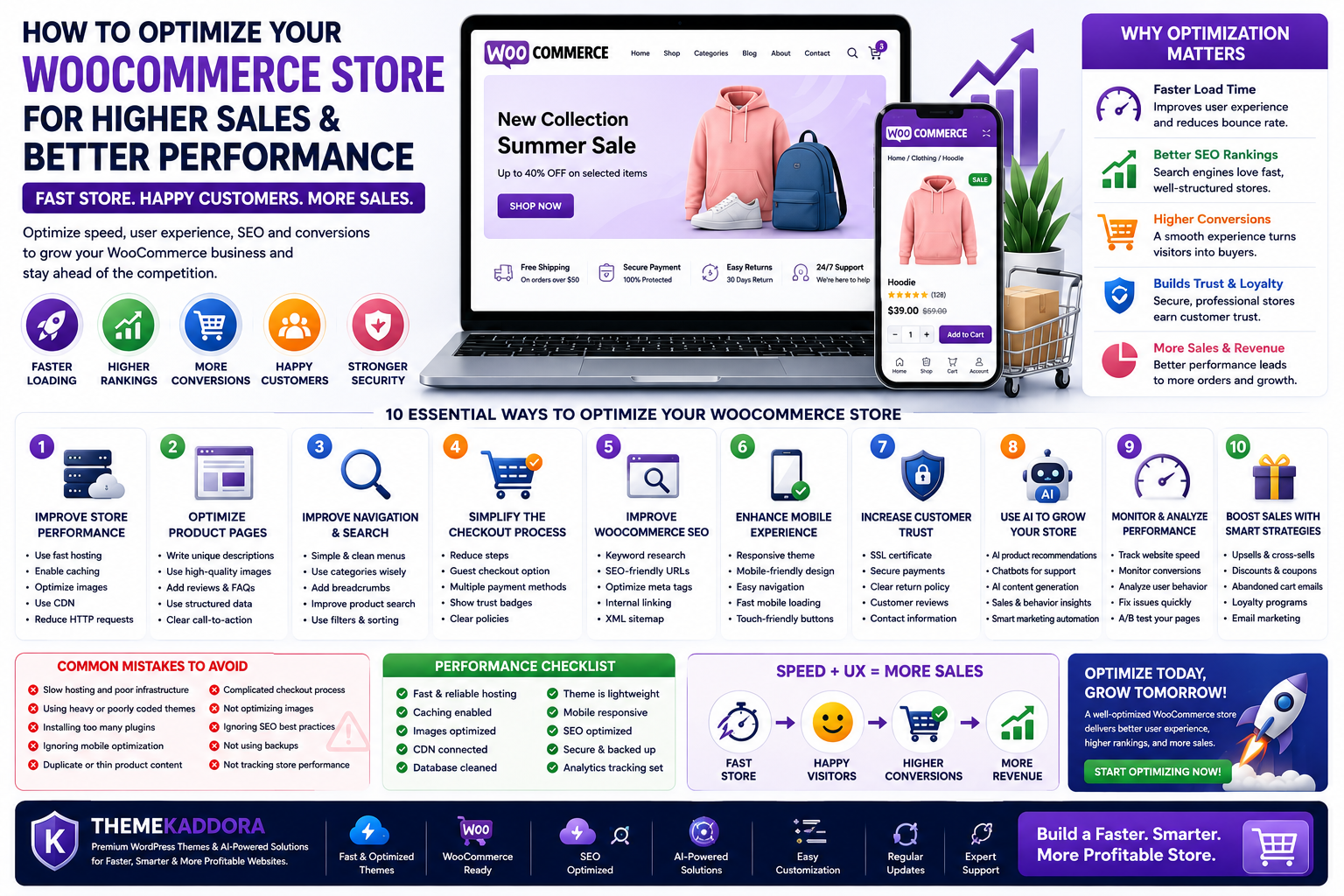
How to Optimize Your WooCommerce Store for Higher Sales and Better Performance
Introduction
Launching a WooCommerce store is an exciting step toward building an online business, but creating a successful store requires much more than simply adding products and waiting for customers to arrive. In today's competitive eCommerce market, customers expect websites to load quickly, provide a smooth shopping experience, and make the purchasing process simple and secure.
A slow or poorly optimized WooCommerce store can negatively affect customer trust, increase cart abandonment, and reduce sales. Even if you have excellent products, visitors may leave your website if pages take too long to load or if the checkout process feels complicated.
Optimization involves improving every aspect of your online store—from performance and SEO to user experience and conversions. By making strategic improvements, you can attract more visitors, keep them engaged, and encourage them to complete purchases.
In this guide, you'll learn how to optimize your WooCommerce store for better performance, improved search rankings, and higher sales while creating a shopping experience your customers will appreciate.
What Is WooCommerce Optimization?
WooCommerce optimization is the process of improving your online store to provide a faster, smoother, and more enjoyable shopping experience. It involves enhancing website speed, usability, SEO, security, and overall performance so customers can browse products easily and complete purchases without frustration.
Optimization focuses on areas such as:
- Website speed
- Product page quality
- Mobile responsiveness
- Search engine optimization
- Navigation
- Checkout experience
- Website security
- Customer engagement
A well-optimized WooCommerce store benefits both your customers and your business.
Why WooCommerce Optimization Matters
Online shoppers have countless options. If your website is slow or difficult to use, visitors may leave before making a purchase.
Optimizing your WooCommerce store helps you:
- Improve customer satisfaction
- Increase conversion rates
- Reduce bounce rates
- Lower cart abandonment
- Improve search engine rankings
- Build customer trust
- Encourage repeat purchases
- Increase revenue
A faster and more user-friendly store creates a positive shopping experience that keeps customers coming back.
Improve Store Performance
Website performance forms the foundation of every successful WooCommerce store.
Choose Reliable Hosting
Your hosting provider directly affects website speed and reliability.
Look for hosting that provides:
- High uptime
- Fast SSD or NVMe storage
- WooCommerce optimization
- Automatic backups
- Strong security
- Scalable resources
Reliable hosting ensures your store performs well even during high-traffic periods.
Use a Lightweight WooCommerce Theme
Your theme should be optimized for speed as well as appearance.
A quality WooCommerce theme should offer:
- Clean coding standards
- Responsive layouts
- SEO-friendly structure
- Fast loading times
- Easy customization
- WooCommerce compatibility
Avoid themes with excessive animations or unnecessary features that slow down performance.
Optimize Images
Product images are essential for online shopping, but oversized files can significantly slow your website.
Best practices include:
- Compress images before uploading
- Resize images to appropriate dimensions
- Use descriptive filenames
- Add meaningful alt text
- Enable lazy loading
- Use modern formats such as WebP when possible
Optimized images improve both website speed and accessibility.
Enable Caching
Caching stores frequently accessed website content, reducing server processing and speeding up page loading for returning visitors.
Benefits include:
- Faster browsing
- Reduced server load
- Better user experience
- Improved scalability
Use a Content Delivery Network (CDN)
A CDN distributes copies of your website across multiple global servers.
Advantages include:
- Faster loading worldwide
- Reduced latency
- Better reliability
- Improved user experience
This is especially beneficial for stores serving customers from multiple countries.
Optimize Product Pages
Product pages play a major role in influencing purchase decisions.
Write Unique Product Descriptions
Avoid copying manufacturer descriptions. Instead, create original content that explains:
- Features
- Benefits
- Specifications
- Usage
- Unique selling points
Original content improves SEO while helping customers make informed decisions.
Use High-Quality Images
Customers cannot physically inspect products online, making quality images essential.
Include:
- Multiple product angles
- Zoom functionality
- Lifestyle photos
- Consistent image quality
Good visuals increase buyer confidence.
Add Customer Reviews
Reviews provide valuable social proof and help potential customers trust your products.
Encourage verified buyers to leave honest reviews after purchasing.
Include Product FAQs
Frequently Asked Questions answer common customer concerns before they become objections.
Examples include:
- Shipping information
- Product dimensions
- Compatibility
- Warranty
- Return policy
FAQs improve customer confidence while reducing support requests.
Use Structured Data
Schema markup helps search engines better understand your product information.
Structured data may enhance search listings with:
- Ratings
- Prices
- Availability
- Product details
This can improve visibility in search results.
Improve Navigation and Product Search
Visitors should be able to find products quickly without frustration.
Improve navigation by:
- Creating logical product categories
- Using descriptive category names
- Adding breadcrumb navigation
- Including product filters
- Providing powerful search functionality
- Linking related products
Simple navigation keeps customers engaged and reduces the time needed to locate products.
Simplify the Checkout Process
A complicated checkout is one of the biggest reasons for abandoned carts.
Reduce Form Fields
Request only the information necessary to complete the order.
Offer Guest Checkout
Not every customer wants to create an account before purchasing.
Support Multiple Payment Methods
Providing various secure payment options increases convenience and customer confidence.
Display Shipping Information Clearly
Unexpected shipping costs are a common reason customers abandon their carts. Be transparent about pricing and delivery estimates early in the process.
Optimize for Mobile Checkout
Many customers shop using smartphones. Ensure the checkout process is fast, responsive, and easy to complete on smaller screens.
Improve WooCommerce SEO
Search engine optimization (SEO) is one of the most effective ways to attract consistent, high-quality traffic to your WooCommerce store. While paid advertising can generate immediate visitors, SEO helps build long-term visibility by making your products easier to discover in search engines.
Optimize Product Titles
Your product titles should be clear, descriptive, and include relevant keywords naturally.
For example:
- Good: Men's Running Shoes – Lightweight Sports Sneakers
- Avoid: Product #1254
Clear titles improve both user experience and search engine understanding.
Write Compelling Meta Titles and Descriptions
Each product and category page should have a unique SEO title and meta description.
A strong meta description should:
- Summarize the product
- Include the focus keyword naturally
- Encourage users to click
- Stay within the recommended character limit
Well-crafted metadata can improve click-through rates from search results.
Create SEO-Friendly URLs
Keep URLs short, readable, and descriptive.
Good Example:
yourstore.com/running-shoes
Avoid:
yourstore.com/product?id=25874
Simple URLs improve usability and search engine indexing.
Optimize Product Images for SEO
Every product image should include:
- Descriptive filenames
- Meaningful alt text
- Optimized file size
- Appropriate dimensions
Image optimization helps improve website speed while increasing visibility in image search results.
Build Strong Internal Links
Link related products, categories, buying guides, and blog posts naturally throughout your store.
Examples include:
- Related Products
- Customers Also Bought
- Featured Collections
- Buying Guides
- Product Comparison Articles
Internal linking improves navigation and distributes SEO value across your website.
Increase Customer Trust
Trust is one of the most important factors influencing purchasing decisions. Even if your products are excellent, visitors may hesitate to buy if your store appears unreliable.
Use HTTPS
An SSL certificate encrypts customer data and displays the secure padlock icon in the browser.
Customers are far more likely to purchase from secure websites.
Display Customer Reviews
Positive reviews build credibility and help new visitors make confident purchasing decisions.
Encourage verified customers to leave honest feedback after completing their orders.
Provide Clear Return Policies
Transparent return and refund policies reduce uncertainty and reassure customers that they can shop with confidence.
Make your policies easy to find and understand.
Display Contact Information
Include multiple contact options such as:
- Email address
- Contact form
- Phone number (if applicable)
- Business address
- Live chat
Easy access to support builds trust and improves customer satisfaction.
Use Secure Payment Gateways
Offer trusted payment methods that customers recognize.
A secure checkout process helps reduce abandoned carts and protects sensitive information.
Use AI to Grow Your WooCommerce Store
Artificial Intelligence is transforming eCommerce by helping store owners provide personalized shopping experiences and automate routine tasks.
Personalized Product Recommendations
AI can analyze browsing behavior and purchase history to recommend products that match each customer's interests.
Benefits include:
- Higher average order value
- Increased cross-selling opportunities
- Improved customer satisfaction
AI Chatbots
AI-powered chatbots can answer common customer questions instantly, even outside business hours.
Typical tasks include:
- Order tracking
- Product recommendations
- Shipping information
- Frequently asked questions
This improves customer support while reducing workload.
Smart Product Search
AI-enhanced search understands user intent better than traditional keyword searches.
Customers can find products faster, improving the shopping experience.
Inventory Forecasting
AI tools can analyze sales trends and help predict future inventory requirements.
This reduces stock shortages and minimizes overstocking.
Sales Analytics
AI-powered analytics identify:
- Best-selling products
- Customer purchasing patterns
- High-converting pages
- Revenue trends
- Marketing opportunities
These insights help store owners make data-driven business decisions.
Common WooCommerce Mistakes to Avoid
Avoiding common mistakes can significantly improve both user experience and sales performance.
Slow Website Speed
Large images, poor hosting, and excessive plugins often slow WooCommerce stores.
Regular performance optimization is essential.
Poor Mobile Experience
A significant portion of online shoppers browse and purchase using smartphones.
Ensure your store is fully responsive and mobile-friendly.
Complicated Checkout
Lengthy forms and unnecessary steps increase cart abandonment.
Keep the checkout process as simple as possible.
Low-Quality Product Images
Blurry or inconsistent images reduce customer confidence.
Use professional, high-resolution product photography.
Missing Product Information
Incomplete descriptions force customers to search elsewhere.
Include detailed specifications, FAQs, shipping details, and product benefits.
Weak Calls-to-Action
Buttons such as "Add to Cart" or "Buy Now" should be clearly visible and encourage immediate action.
Ignoring Customer Reviews
Reviews influence purchasing decisions.
Actively encourage customers to leave feedback after completing their orders.
Why Choose ThemeKaddora?
At ThemeKaddora, we believe successful WooCommerce stores should combine speed, performance, security, and exceptional user experience. Our WordPress themes and plugins are designed using modern development practices to help businesses create online stores that are visually appealing, easy to manage, and optimized for growth.
ThemeKaddora solutions provide:
- WooCommerce-ready themes
- Fast-loading and lightweight code
- Responsive, mobile-first layouts
- SEO-friendly architecture
- Easy customization without coding
- Clean and secure development standards
- AI-powered plugins for automation and business intelligence
- Regular updates and ongoing improvements
Whether you're launching your first online store or scaling an established business, ThemeKaddora provides the tools you need to create a professional, high-performing WooCommerce website.
Conclusion
Optimizing your WooCommerce store is an ongoing process that combines performance improvements, user experience enhancements, SEO, and customer trust. Every optimization—whether it's improving page speed, simplifying checkout, optimizing product pages, or implementing AI-powered features—contributes to a better shopping experience and increased sales.
Success in eCommerce isn't just about attracting visitors; it's about giving them a seamless journey from product discovery to purchase. By continuously monitoring your store, refining its performance, and adopting best practices, you can build a WooCommerce website that not only ranks well in search engines but also converts visitors into loyal customers.
With performance-focused themes, AI-powered plugins, and business-oriented solutions, ThemeKaddora helps you build WooCommerce stores that are fast, secure, scalable, and ready for long-term growth.
Frequently Asked Questions
1. What is WooCommerce optimization?
WooCommerce optimization involves improving your online store's speed, SEO, usability, security, and overall performance to provide a better shopping experience and increase conversions.
2. How can I improve my WooCommerce store's speed?
Choose quality hosting, optimize images, enable caching, use a Content Delivery Network (CDN), and minimize unnecessary plugins and scripts.
3. Why is checkout optimization important?
A streamlined checkout process reduces cart abandonment and makes it easier for customers to complete their purchases.
4. Does WooCommerce SEO help increase sales?
Yes. Better SEO improves your store's visibility in search engines, bringing more targeted traffic and increasing sales opportunities.
5. How do product images affect conversions?
High-quality, optimized images help customers understand products better, build trust, and encourage purchasing decisions.
6. Why are customer reviews important?
Reviews provide social proof, improve credibility, and help new customers make informed purchasing decisions.
7. Can AI improve WooCommerce stores?
Yes. AI can enhance product recommendations, customer support, search functionality, inventory management, and sales analytics.
8. How often should I optimize my WooCommerce store?
Regularly review your store's performance, especially after updates, new product launches, or changes in customer behavior.
9. What are the most common WooCommerce mistakes?
Common issues include slow loading speeds, poor mobile optimization, complicated checkout processes, weak product descriptions, and ignoring customer reviews.
10. Why choose ThemeKaddora for WooCommerce?
ThemeKaddora offers performance-optimized WooCommerce themes and AI-powered WordPress plugins built for speed, SEO, security, customization, and long-term business growth.
Comments (0)