
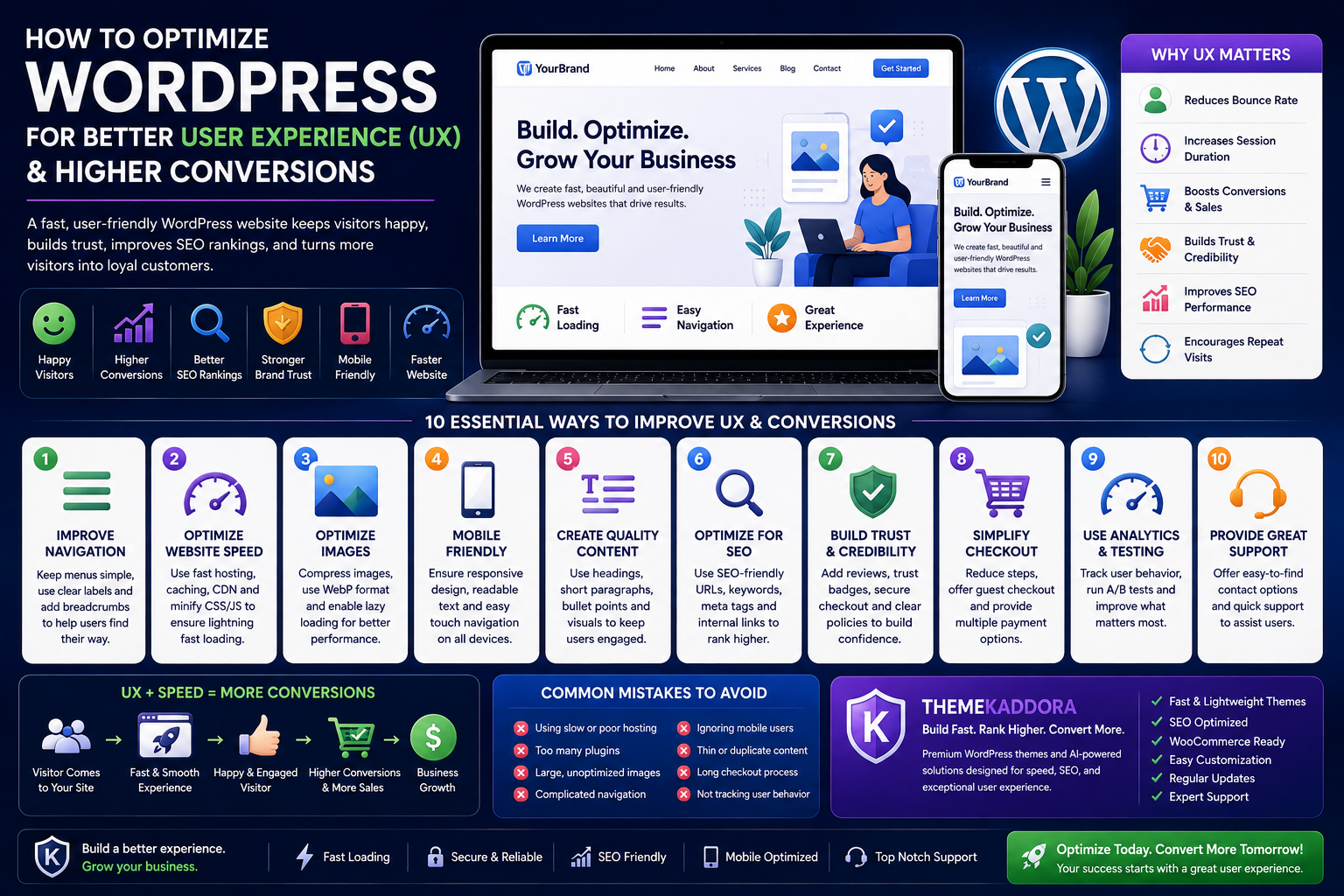
How to Optimize WordPress for Better User Experience (UX) and Higher Conversions
Introduction
Building a beautiful WordPress website is only half the journey. The real success comes when visitors enjoy using your website, easily find the information they need, trust your brand, and ultimately become customers. This entire journey is known as User Experience (UX).
A great user experience doesn't happen by accident. It requires thoughtful planning, fast website performance, intuitive navigation, mobile-friendly design, accessible content, and continuous optimization. When all these elements work together, visitors stay longer, engage more with your content, and are far more likely to complete valuable actions such as filling out a contact form, subscribing to a newsletter, or making a purchase.
Google also rewards websites that deliver excellent user experiences. Factors like Core Web Vitals, page speed, mobile usability, and overall site structure play a significant role in search engine rankings. In other words, improving UX doesn't just make visitors happy—it also supports better SEO performance and long-term organic growth.
Whether you're running a personal blog, a business website, or a WooCommerce store, optimizing user experience should be one of your highest priorities. In this guide, you'll learn practical strategies to create a WordPress website that is fast, intuitive, engaging, and conversion-focused.
What Is User Experience (UX)?
User Experience (UX) refers to the overall experience visitors have while interacting with your website. Every click, page transition, menu, image, button, and form contributes to how users perceive your website.
A website with excellent UX allows visitors to:
- Find information quickly
- Navigate effortlessly
- Read content comfortably
- Complete actions without confusion
- Enjoy a consistent experience across all devices
Good UX combines design, functionality, performance, and usability into one seamless experience.
Why UX Matters for WordPress Websites
Many website owners focus heavily on driving traffic but overlook what happens after visitors arrive. If users encounter slow loading pages, confusing navigation, or cluttered layouts, they often leave without taking any meaningful action.
A positive user experience can help you:
- Reduce bounce rates
- Increase average session duration
- Improve customer trust
- Boost lead generation
- Increase online sales
- Strengthen brand credibility
- Improve search engine rankings
- Encourage repeat visits
Ultimately, UX bridges the gap between attracting visitors and converting them into loyal customers.
Improve Website Navigation
Navigation is the backbone of your website. Visitors should always know where they are and how to find what they need.
Keep Menus Clean and Simple
Avoid overwhelming users with too many menu items. Organize pages into logical categories and limit your primary navigation to the most important sections.
For example, a business website might include:
- Home
- About
- Services
- Blog
- Contact
Simple navigation reduces confusion and improves the overall browsing experience.
Use Descriptive Menu Labels
Avoid creative labels that visitors may not understand. Instead, use clear names that accurately describe each page.
Good examples include:
- Pricing
- Portfolio
- Resources
- Support
- Shop
Visitors shouldn't have to guess where a menu item will take them.
Add Breadcrumb Navigation
Breadcrumbs help users understand their location within your website while making it easier to navigate back to previous pages.
For example:
Home → Blog → WordPress → Website Speed
Breadcrumbs also help search engines better understand your website structure.
Improve Internal Linking
Internal links guide visitors toward related content while strengthening your website's SEO.
For example, an article about website speed can naturally link to:
- Image optimization
- WordPress hosting
- Core Web Vitals
- Website security
This encourages visitors to explore more pages and spend more time on your website.
Optimize Website Speed
Website speed is one of the most important aspects of user experience. Even a one-second delay can increase bounce rates and reduce conversions.
Choose Quality Hosting
Reliable hosting provides:
- Faster server response times
- Better uptime
- Improved scalability
- Enhanced security
Cheap hosting often becomes a bottleneck as your website grows.
Compress Images
Large image files are among the biggest causes of slow websites.
Always:
- Resize images before uploading
- Compress files without sacrificing quality
- Use modern formats such as WebP where appropriate
- Enable lazy loading
Optimized images significantly improve page loading times.
Enable Browser Caching
Caching allows returning visitors to load your website more quickly by storing frequently used resources locally.
This reduces server load while improving overall performance.
Minify CSS and JavaScript
Removing unnecessary spaces and characters from CSS and JavaScript files reduces their size and improves loading speed.
Many performance optimization plugins can automate this process.
Use a Content Delivery Network (CDN)
A CDN stores copies of your website across multiple servers worldwide.
Benefits include:
- Faster global loading times
- Reduced server load
- Better website reliability
- Improved visitor experience
Create a Mobile-Friendly Experience
Today, the majority of WordPress traffic comes from smartphones and tablets. A website that works perfectly on desktop but poorly on mobile devices will lose visitors quickly.
To create a mobile-friendly experience:
- Use a responsive WordPress theme.
- Ensure text is readable without zooming.
- Make buttons large enough to tap comfortably.
- Leave enough spacing between clickable elements.
- Keep navigation simple and intuitive.
- Test your website on different screen sizes regularly.
A smooth mobile experience not only improves usability but also supports better search engine rankings, as Google primarily indexes the mobile version of websites.
Improve Content Readability
Even valuable information can be ignored if it's difficult to read. Well-structured content keeps visitors engaged and encourages them to continue exploring your website.
Follow these readability best practices:
- Write short paragraphs.
- Use descriptive headings and subheadings.
- Break up information with bullet points and numbered lists.
- Highlight important ideas naturally.
- Leave sufficient white space between sections.
- Use a clean, legible font with appropriate line spacing.
Readable content creates a more enjoyable experience and helps users find information quickly.
Design High-Converting Calls-to-Action (CTAs)
A great user experience doesn't just keep visitors engaged—it guides them toward taking meaningful actions. This is where Calls-to-Action (CTAs) become essential. Every page on your website should have a clear purpose, whether it's encouraging users to contact you, subscribe to a newsletter, download a resource, or make a purchase.
Write Clear and Action-Oriented CTA Text
Avoid generic phrases like "Click Here." Instead, use action-focused language that tells visitors exactly what they will gain.
Examples include:
- Get Started Today
- Request a Free Quote
- Download the Free Guide
- Explore Our Themes
- Shop Now
- Contact Our Team
Clear CTAs reduce hesitation and improve conversion rates.
Place CTAs Strategically
Position CTAs where users naturally make decisions, such as:
- At the end of blog posts
- After explaining a product or service
- Within landing pages
- In the website header
- Near pricing sections
Avoid overwhelming visitors with too many competing buttons. A focused CTA is usually more effective than multiple options.
Make CTAs Visually Distinct
Your CTA buttons should stand out without disrupting the overall design. Use contrasting colors, sufficient spacing, and readable text so visitors can easily identify the next step.
Simplify Contact Forms
Forms are often the final step before a visitor becomes a lead or customer. Complicated forms can discourage users from completing the process.
Ask Only for Essential Information
Request only the details you truly need. For many inquiries, asking for a name, email address, and message is enough.
Use Clear Labels
Every form field should have a straightforward label. Avoid confusing terminology or unnecessary instructions.
Display Helpful Validation Messages
If users make an error, explain how to fix it clearly. Helpful feedback reduces frustration and increases successful submissions.
Optimize for Mobile Devices
Ensure forms are easy to complete on smaller screens with appropriately sized input fields and buttons.
Improve Website Accessibility
Accessibility ensures that your website can be used by as many people as possible, including individuals with disabilities. It also contributes to a better overall user experience.
Add Descriptive Alt Text
Every meaningful image should include descriptive alternative text. This helps screen readers interpret images and also provides additional SEO benefits.
Use Proper Heading Structure
Organize content with logical headings (H1, H2, H3, and so on). A clear structure makes pages easier to navigate for both users and search engines.
Ensure Good Color Contrast
Text should be easy to read against its background. Sufficient contrast improves readability for everyone.
Support Keyboard Navigation
Some users rely on keyboards instead of a mouse. Ensure menus, forms, and interactive elements can all be accessed using keyboard controls.
Write Meaningful Link Text
Instead of using "Read More" repeatedly, describe the destination.
For example:
- Learn More About WordPress SEO
- View Our WooCommerce Themes
- Read the Website Speed Guide
Descriptive links improve usability and accessibility.
Use AI to Enhance User Experience
Artificial Intelligence is changing how businesses interact with website visitors. When used thoughtfully, AI can improve efficiency while delivering a more personalized experience.
AI-Powered Chatbots
Chatbots can answer frequently asked questions, provide instant support, and assist visitors outside normal business hours.
Personalized Recommendations
AI can recommend products, articles, or services based on user behavior, helping visitors discover relevant content more quickly.
Smart Search
AI-enhanced search functions understand user intent better than traditional keyword searches, making it easier to find relevant information.
Content Suggestions
Artificial Intelligence can help generate related article recommendations, increasing page views and keeping visitors engaged.
Customer Behavior Analysis
AI tools can analyze visitor behavior to identify areas where users drop off, allowing you to optimize pages for better performance.
Measure UX Performance
Improving user experience is an ongoing process. Regularly monitoring performance helps you understand what is working and where improvements are needed.
Key metrics to monitor include:
- Bounce Rate
- Average Session Duration
- Pages Per Session
- Conversion Rate
- Mobile Performance
- Core Web Vitals
- Form Completion Rate
You can use analytics platforms and heatmap tools to observe how visitors interact with your website and make informed improvements.
Common UX Mistakes to Avoid
Even experienced website owners can unintentionally create frustrating user experiences. Avoid these common mistakes:
Slow Loading Pages
Large images, poor hosting, and excessive plugins can slow down your website.
Cluttered Layouts
Too much information on a single page overwhelms visitors. Keep layouts clean and organized.
Poor Mobile Optimization
A website that performs poorly on smartphones risks losing a significant portion of its audience.
Confusing Navigation
Complex menus and inconsistent page structures make it difficult for users to find information.
Excessive Pop-ups
While pop-ups can be effective, too many interruptions can frustrate visitors and increase bounce rates.
Weak Calls-to-Action
If users don't know what to do next, they are more likely to leave your website without taking action.
Ignoring Accessibility
An inaccessible website excludes potential users and creates unnecessary barriers.
Regular website audits can help identify and resolve these issues before they affect your business.
Why Choose ThemeKaddora?
At ThemeKaddora, we believe great websites combine attractive design with outstanding performance and usability. Our WordPress themes and plugins are developed with modern best practices, making it easier for businesses, bloggers, agencies, and online stores to create professional websites that deliver excellent user experiences.
ThemeKaddora products are designed to offer:
- Clean and optimized code
- Fast-loading performance
- Responsive, mobile-first layouts
- SEO-friendly architecture
- WooCommerce compatibility
- Easy customization options
- Regular updates and ongoing improvements
- AI-powered tools for automation, analytics, and business growth
Whether you're launching a new website or improving an existing one, ThemeKaddora provides the tools and flexibility needed to build a fast, user-friendly, and conversion-focused online presence.
Conclusion
User experience is one of the most valuable investments you can make in your WordPress website. A website that is easy to navigate, loads quickly, works seamlessly on mobile devices, and provides clear guidance encourages visitors to stay longer and engage more deeply with your content.
Improving UX also strengthens SEO, increases customer satisfaction, and supports higher conversion rates. By focusing on navigation, speed, readability, accessibility, and smart optimization, you create an online experience that benefits both your visitors and your business.
Remember that UX is not a one-time task. Regular testing, user feedback, and continuous improvements will help your website remain competitive as user expectations and technology evolve.
If you're looking for performance-focused WordPress themes and AI-powered solutions, ThemeKaddora provides a strong foundation for creating websites that are fast, reliable, and built for long-term success.
Frequently Asked Questions
1. What is User Experience (UX) in WordPress?
User Experience (UX) refers to how visitors interact with and perceive your WordPress website, including navigation, speed, design, accessibility, and usability.
2. Why is UX important for SEO?
Search engines prioritize websites that provide a positive user experience through fast loading times, mobile responsiveness, and easy navigation.
3. How can I improve my WordPress website's user experience?
Improve navigation, optimize website speed, create mobile-friendly layouts, simplify forms, enhance readability, and regularly monitor user behavior.
4. Does website speed affect conversions?
Yes. Faster websites typically reduce bounce rates, improve user satisfaction, and increase the likelihood of visitors completing desired actions.
5. What makes a website mobile-friendly?
Responsive design, readable text, touch-friendly buttons, optimized images, and intuitive navigation all contribute to a mobile-friendly experience.
6. How do Calls-to-Action improve conversions?
Well-designed CTAs clearly guide visitors toward actions such as contacting your business, purchasing products, or subscribing to newsletters.
7. Why is accessibility important?
Accessibility ensures that all users, including those with disabilities, can effectively use your website while also improving usability for everyone.
8. Can AI improve user experience?
Yes. AI can provide personalized recommendations, smart search, chatbots, customer insights, and automation that enhance user engagement.
9. How often should I review my website's UX?
Regular reviews are recommended, especially after redesigns, major content updates, plugin installations, or changes in visitor behavior.
10. Why choose ThemeKaddora?
ThemeKaddora offers premium WordPress themes and AI-powered plugins designed for speed, SEO, usability, WooCommerce compatibility, and long-term business growth.
Comments (0)