
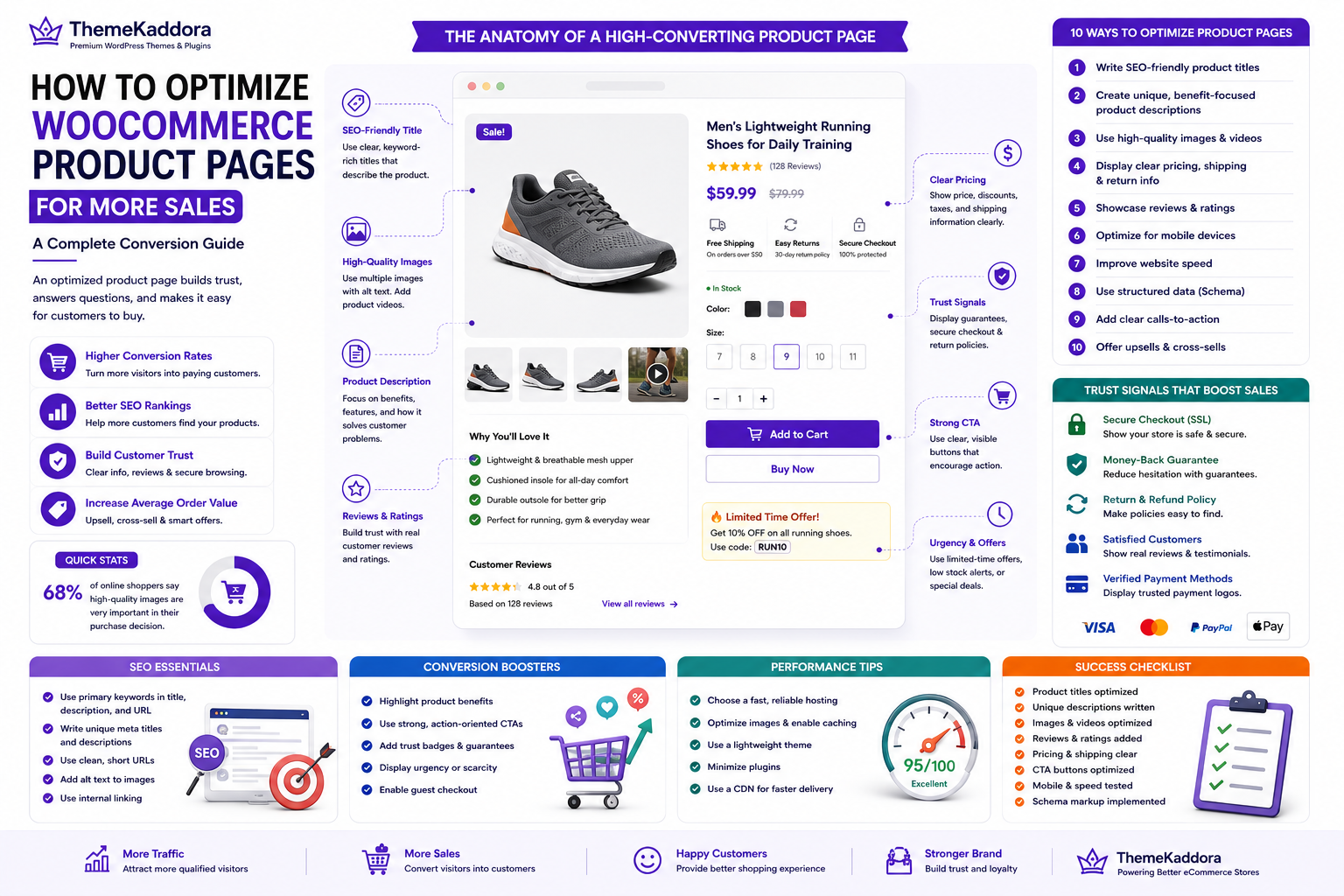
How to Optimize WooCommerce Product Pages for More Sales: A Complete Conversion Guide
Introduction
Your WooCommerce product page is where buying decisions are made. No matter how much traffic your online store receives, visitors won't become customers unless your product pages inspire confidence and make purchasing easy. Every element—from the product title and images to the description, pricing, reviews, and call-to-action button—plays a role in influencing conversions.
Many WooCommerce store owners invest heavily in SEO, paid advertising, and social media marketing but overlook product page optimization. As a result, they attract visitors but struggle to convert them into paying customers. Even small improvements to your product pages can lead to significant increases in conversion rates, average order value, and customer satisfaction.
An optimized product page not only helps visitors understand your product but also builds trust, answers questions, and removes hesitation during the buying process. It also improves search engine visibility, helping more potential customers discover your products through organic search.
In this guide, you'll learn proven strategies to optimize WooCommerce product pages for both search engines and customers, helping you generate more sales and grow your online business.
Why Product Page Optimization Matters
A product page is much more than a place to display product information. It serves as your digital salesperson, guiding visitors toward making a purchase.
Optimizing product pages provides several benefits:
- Higher conversion rates
- Improved customer trust
- Better search engine rankings
- Reduced cart abandonment
- Increased average order value
- Enhanced shopping experience
- More returning customers
By focusing on both user experience and SEO, you create pages that satisfy customers while attracting more organic traffic.
Write SEO-Friendly Product Titles
Your product title is one of the first things visitors and search engines notice. A well-crafted title should clearly describe the product while including relevant keywords naturally.
Include Primary Keywords
Use keywords that accurately describe the product.
For example, instead of:
Running Shoes
Use:
Men's Lightweight Running Shoes for Daily Training
Descriptive titles improve search visibility and help customers immediately understand what you're offering.
Keep Titles Clear and Readable
Avoid stuffing keywords into titles.
Instead of writing:
Best Cheap Men's Running Shoes Lightweight Comfortable Sports Shoes
Choose:
Men's Lightweight Running Shoes for Daily Training
Natural language improves readability and click-through rates.
Highlight Key Features
Include important product attributes when appropriate, such as:
- Size
- Material
- Color
- Model
- Compatibility
- Capacity
These details help customers quickly identify the right product.
Create High-Converting Product Descriptions
A product description should do more than list specifications. It should explain why the product is valuable and how it solves the customer's problem.
Focus on Benefits
Instead of simply listing features, explain how they improve the customer's experience.
Feature:
Water-resistant fabric
Benefit:
Stay comfortable in changing weather with durable water-resistant protection.
Benefit-focused descriptions help customers imagine using the product in real life.
Structure Content for Readability
Large blocks of text can overwhelm visitors.
Use:
- Short paragraphs
- Bullet points
- Headings
- Feature lists
- Frequently asked questions
A clean layout makes information easier to scan and understand.
Write Original Content
Avoid copying manufacturer descriptions.
Unique product content:
- Improves SEO
- Builds credibility
- Provides better customer information
- Helps differentiate your store from competitors
Use High-Quality Product Images and Videos
Since customers cannot physically examine products online, visuals become one of the most influential factors in purchasing decisions.
Use Multiple Product Images
Show your product from different angles.
Include:
- Front view
- Side view
- Rear view
- Close-up details
- Lifestyle images
- Packaging
Comprehensive visuals reduce uncertainty and improve buyer confidence.
Optimize Image Quality
Use sharp, professional images without making file sizes excessively large.
Best practices include:
- Compress images
- Use appropriate dimensions
- Add descriptive alt text
- Use modern image formats like WebP where supported
Optimized images improve both SEO and website speed.
Add Product Videos
Videos help customers better understand how products look and function.
Consider demonstrating:
- Product features
- Assembly process
- Size comparison
- Usage examples
- Product demonstrations
Video content often increases engagement and conversion rates.
Display Clear Pricing and Shipping Information
Unexpected costs are one of the leading reasons for abandoned carts.
Provide transparent information about:
- Product price
- Discounts
- Taxes
- Shipping charges
- Delivery estimates
- Return policy
When customers know exactly what to expect, they are more likely to complete their purchase.
Highlight Special Offers
If applicable, display promotions such as:
- Limited-time discounts
- Free shipping
- Bundle offers
- Buy One Get One deals
- Seasonal sales
Clear promotional messaging creates urgency and encourages faster purchasing decisions.
Build Trust with Reviews and Social Proof
Trust is essential in eCommerce.
Customers are more comfortable purchasing products that have been positively reviewed by others.
Display Customer Reviews
Encourage verified customers to leave detailed reviews.
Authentic feedback helps future buyers make informed decisions.
Show Ratings
Star ratings provide instant visual proof of customer satisfaction.
Products with positive ratings often receive higher click-through and conversion rates.
Include Testimonials
Customer testimonials highlighting real experiences build additional credibility and reinforce trust in your brand.
Showcase Trust Signals
Display elements such as:
- Secure checkout badges
- Money-back guarantees
- Easy returns
- SSL security
- Fast shipping icons
These trust signals reduce hesitation and reassure visitors that their purchase is safe.
Optimize Call-to-Action Buttons
Your Call-to-Action (CTA) button is one of the most important elements on a WooCommerce product page. A well-designed CTA encourages visitors to move from browsing to buying.
Use Clear and Action-Oriented Text
Instead of generic button labels, use text that clearly communicates the next step.
Examples include:
- Add to Cart
- Buy Now
- Purchase Today
- Order Now
- Get Yours Today
Action-oriented wording creates a sense of urgency and encourages interaction.
Make the CTA Stand Out
Your CTA button should be immediately visible without distracting visitors from other important information.
Best practices include:
- High-contrast colors
- Large clickable area
- Consistent placement
- Adequate spacing around the button
- Easy visibility on both desktop and mobile devices
Avoid cluttering the area around the CTA with unnecessary elements.
Display Stock Availability
Customers appreciate knowing whether a product is available.
Examples include:
- In Stock
- Limited Stock Available
- Only 5 Left
- Pre-Order Available
Accurate stock information creates urgency while building trust.
Improve Mobile Shopping Experience
A growing percentage of WooCommerce purchases happen on smartphones and tablets. Optimizing product pages for mobile users is essential for maximizing conversions.
Use Responsive Design
Your product pages should automatically adapt to different screen sizes while maintaining usability.
Responsive design should include:
- Readable typography
- Responsive images
- Easy navigation
- Touch-friendly buttons
- Proper spacing between elements
Optimize Mobile Navigation
Customers should be able to browse products without frustration.
Simplify navigation by providing:
- Sticky navigation menus
- Easy search functionality
- Clearly visible shopping cart
- Simple product categories
- Quick access to customer support
Reduce Page Loading Time
Mobile users often browse on slower connections.
Improve loading speed by:
- Compressing images
- Enabling browser caching
- Using a Content Delivery Network (CDN)
- Minimizing unnecessary scripts
- Optimizing CSS and JavaScript files
A faster mobile experience reduces bounce rates and encourages purchases.
Use Product Schema Markup
Structured data helps search engines better understand your products and display rich results in search listings.
Product schema can include:
- Product name
- Price
- Availability
- Brand
- SKU
- Reviews
- Ratings
Rich snippets improve visibility and increase click-through rates.
Add Review Schema
Review schema allows search engines to display star ratings directly in search results.
Products with visible ratings often attract more clicks and inspire greater customer confidence before visitors even reach your website.
Cross-Sell and Upsell Products
Increasing sales isn't only about attracting more visitors—it's also about maximizing the value of each order.
Cross-Sell Related Products
Recommend complementary items that enhance the customer's purchase.
Examples include:
- Phone cases for smartphones
- Memory cards for cameras
- Laptop bags for laptops
- Replacement filters for air purifiers
Cross-selling encourages customers to purchase additional items they may genuinely need.
Upsell Premium Products
Offer higher-value alternatives that provide additional features or benefits.
For example:
Instead of recommending only a basic product, also display:
- Premium version
- Professional edition
- Extended warranty
- Complete bundle
Upselling can significantly increase average order value when presented naturally.
Display Recently Viewed Products
Allow customers to quickly return to products they've previously explored.
This feature improves navigation and encourages continued shopping.
Monitor Product Page Performance
Optimizing product pages is an ongoing process.
Regularly analyze performance to identify opportunities for improvement.
Monitor Key Metrics
Review important indicators such as:
- Conversion rate
- Bounce rate
- Average session duration
- Click-through rate
- Add-to-cart rate
- Average order value
- Revenue per visitor
Tracking these metrics helps you understand how customers interact with your product pages.
Perform A/B Testing
Experiment with different product page elements to discover what works best.
Test variations of:
- Product titles
- CTA button colors
- Product images
- Pricing displays
- Page layouts
- Product descriptions
Small improvements can lead to significant increases in conversions over time.
Common Product Page Mistakes
Avoiding common mistakes helps create a better shopping experience.
Low-Quality Images
Poor visuals reduce trust and make products less appealing.
Always use professional, high-resolution images.
Weak Product Descriptions
Short or generic descriptions fail to answer customer questions.
Provide detailed, original content that highlights both features and benefits.
Hidden Shipping Costs
Unexpected fees are one of the leading causes of cart abandonment.
Display pricing, taxes, and shipping information as early as possible.
Slow Page Speed
Slow product pages frustrate visitors and reduce conversions.
Regularly optimize website performance and monitor loading times.
Missing Reviews
Products without reviews may appear less trustworthy.
Encourage verified customers to share their experiences.
Poor Mobile Experience
A difficult mobile shopping experience can significantly reduce sales.
Test product pages across different devices and browsers regularly.
Why Choose ThemeKaddora?
At ThemeKaddora, we understand that successful WooCommerce stores require more than attractive designs. They need performance, usability, SEO optimization, and conversion-focused features that help businesses grow.
Our WordPress themes and WooCommerce solutions are built with modern development practices and optimized for both search engines and customers.
ThemeKaddora products offer:
- Lightweight, performance-focused code
- Responsive, mobile-first design
- WooCommerce compatibility
- SEO-friendly architecture
- Fast-loading performance
- Easy customization
- Clean and secure coding standards
- AI-powered plugins for automation and business growth
Whether you're launching a new online store or improving an existing one, ThemeKaddora provides the tools to create professional, high-converting WooCommerce websites.
Conclusion
Optimizing your WooCommerce product pages is one of the most effective ways to increase conversions and grow your online business. By improving product titles, descriptions, images, pricing transparency, trust signals, mobile usability, and internal linking, you create a shopping experience that encourages visitors to become customers.
Remember that optimization is a continuous process. Regularly monitor customer behavior, test improvements, and refine your product pages based on real data. Even small changes can have a significant impact on sales and customer satisfaction.
With fast, SEO-friendly themes and AI-powered WooCommerce plugins from ThemeKaddora, you can build product pages that rank well in search engines, deliver exceptional user experiences, and consistently convert visitors into loyal customers.
Frequently Asked Questions
1. What makes a good WooCommerce product page?
A good product page includes clear titles, detailed descriptions, high-quality images, transparent pricing, customer reviews, and a prominent call-to-action button.
2. Why are product descriptions important?
Well-written descriptions help customers understand the product, improve SEO, and increase confidence before purchasing.
3. How do product images affect conversions?
Professional images reduce uncertainty, improve trust, and help customers make informed buying decisions.
4. Does product page SEO improve rankings?
Yes. Optimized titles, descriptions, images, URLs, and structured data help search engines understand and rank your product pages.
5. Should I include product videos?
Yes. Videos demonstrate product features, increase engagement, and often improve conversion rates.
6. Why are customer reviews valuable?
Reviews provide social proof, build trust, and help potential buyers evaluate products based on real customer experiences.
7. What is product schema markup?
Product schema is structured data that enables search engines to display rich information such as prices, availability, and ratings directly in search results.
8. How can cross-selling increase sales?
Cross-selling recommends complementary products, encouraging customers to purchase additional items and increasing average order value.
9. How often should I optimize product pages?
Review and optimize product pages regularly, especially after adding new products, updating pricing, or analyzing customer behavior.
10. Why choose ThemeKaddora?
ThemeKaddora provides fast, SEO-friendly WordPress themes and AI-powered WooCommerce plugins built with clean code, responsive design, and conversion-focused features to help businesses create high-performing online stores.
Comments (0)