
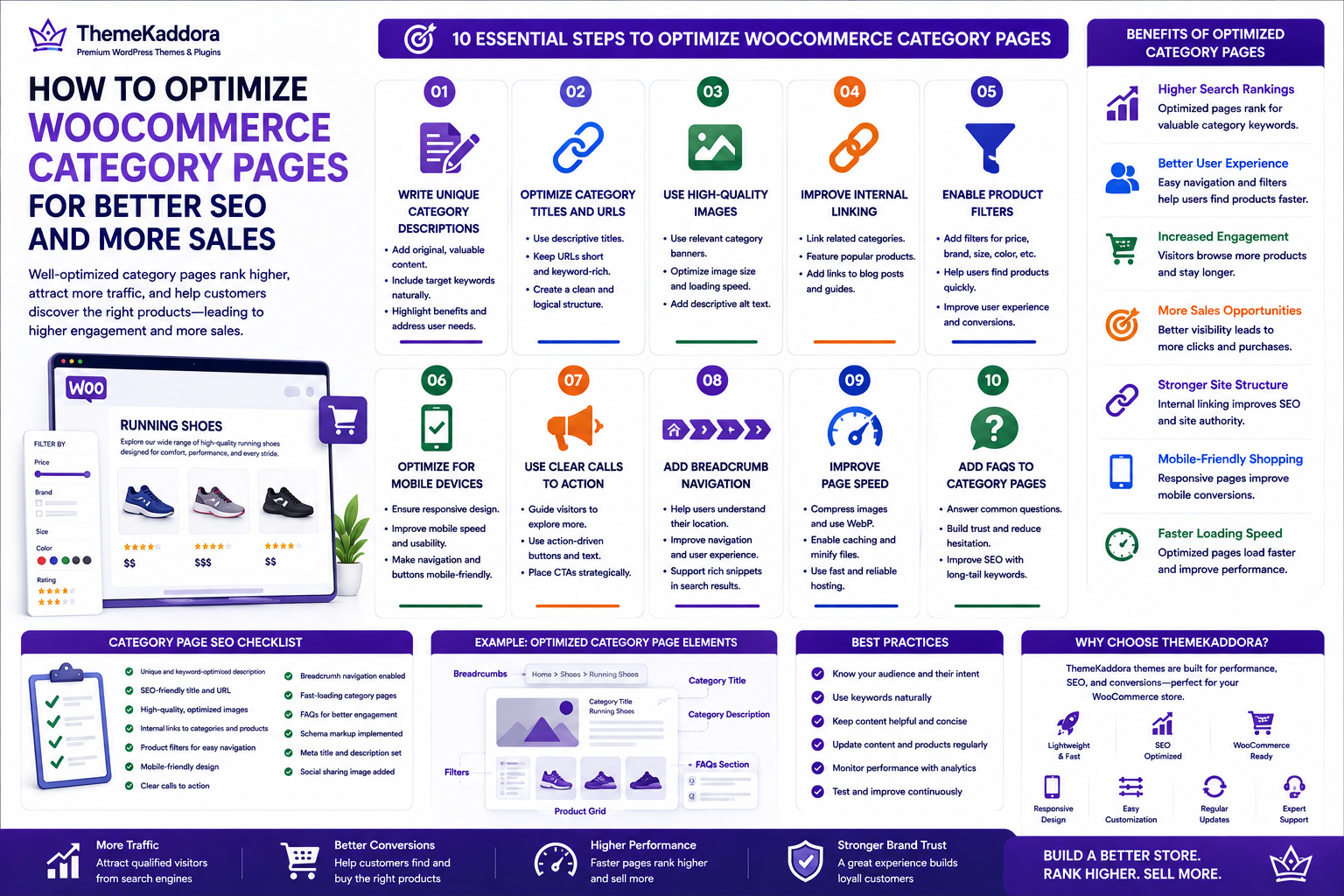
How to Optimize WooCommerce Category Pages for Better SEO and More Sales
Introduction
When optimizing a WooCommerce store, many businesses focus almost entirely on product pages. While product optimization is important, category pages often represent a much larger opportunity to attract qualified traffic from search engines. A well-optimized category page can rank for broad, high-intent keywords such as "Running Shoes," "Office Chairs," or "Wireless Headphones," helping potential customers discover multiple products from a single search.
Category pages also improve your store's navigation and make it easier for shoppers to browse related products. Instead of landing on one item, visitors can compare options within a category, increasing engagement and the likelihood of making a purchase.
By combining strong SEO practices with an excellent user experience, your category pages can become valuable landing pages that drive consistent organic traffic and higher conversions.
In this guide, you'll learn practical techniques to optimize WooCommerce category pages for both search engines and customers.
Why Category Pages Matter
Category pages serve as hubs that organize related products into logical groups. They help search engines understand your website structure while giving customers a better browsing experience.
Benefits of optimized category pages include:
Higher search visibility
Better internal linking
Improved user navigation
Longer session duration
Increased product discovery
Higher conversion opportunities
Rather than relying solely on individual product pages, optimized categories can attract visitors who are still comparing products before making a purchase.
1. Write Unique Category Descriptions
Many WooCommerce stores leave category descriptions blank or copy text from manufacturers. This is a missed SEO opportunity.
A high-quality category description should:
Explain what the category offers.
Naturally include your primary keyword.
Highlight key product features.
Address customer needs.
Encourage users to explore products.
Aim for a description that provides genuine value instead of simply listing keywords.
2. Optimize Category Titles and URLs
Your category title and URL help search engines understand the page topic.
Best Practices
Use descriptive titles.
Include your target keyword naturally.
Keep URLs short and readable.
Avoid unnecessary numbers or special characters.
Maintain a logical site structure.
For example:
Good URL
yourstore.com/running-shoes
Poor URL
yourstore.com/category123?id=567
Clean URLs improve both SEO and user experience.
3. Use High-Quality Images
Images are often the first thing visitors notice on a category page.
Use category banners or featured images that:
Represent the products accurately.
Are optimized for fast loading.
Include descriptive alt text.
Match your brand identity.
Avoid oversized image files, as they can slow down your website and negatively affect both user experience and search rankings.
4. Improve Internal Linking
Internal links help search engines discover content while guiding visitors through your store.
Effective internal linking includes:
Linking related categories.
Featuring popular products.
Connecting buying guides.
Linking to relevant blog articles.
Displaying featured collections.
A strong internal linking strategy distributes page authority throughout your website and helps customers find more products.
5. Enable Product Filters
As your catalog grows, filters become essential for helping customers narrow down their choices.
Useful filter options include:
Price
Brand
Size
Color
Rating
Availability
Material
Custom product attributes
Easy-to-use filters reduce frustration and make shopping more efficient, especially for stores with large inventories.
6. Optimize for Mobile Devices
A significant percentage of WooCommerce traffic comes from smartphones and tablets.
Ensure your category pages are:
Fully responsive
Easy to navigate with touch controls
Fast-loading on mobile networks
Designed with readable text and clear buttons
Optimized for smaller screens
A mobile-friendly category page improves user satisfaction and supports better rankings in mobile search results.
7. Use Clear Calls to Action
Category pages should encourage visitors to continue browsing and purchasing.
Examples of effective calls to action include:
Shop Now
Explore the Collection
View Best Sellers
Discover New Arrivals
Browse All Products
Strategically placed calls to action help guide users toward the next step in their shopping journey without disrupting the browsing experience.
8. Add Breadcrumb Navigation
Breadcrumb navigation helps both users and search engines understand your website's structure. It shows visitors exactly where they are within your store and allows them to navigate back to broader categories with a single click.
For example:
Home → Electronics → Laptops → Gaming Laptops
Benefits of Breadcrumbs
Improves user navigation
Reduces bounce rate
Helps search engines understand site hierarchy
Enhances internal linking
Can appear in Google search results as rich snippets
WooCommerce supports breadcrumbs through many SEO plugins and themes, making them easy to implement.
9. Improve Page Speed
Page speed is one of the most important ranking factors for both SEO and user experience. Even a one-second delay can reduce conversions and increase bounce rates.
Ways to Improve Category Page Speed
Compress category banner images.
Use modern image formats such as WebP.
Enable browser caching.
Minify CSS and JavaScript files.
Remove unused plugins and scripts.
Choose fast WooCommerce hosting.
Use a Content Delivery Network (CDN).
Fast-loading category pages encourage visitors to browse more products and complete purchases.
10. Add FAQs to Category Pages
Frequently Asked Questions provide additional value for shoppers while helping your category pages rank for long-tail search queries.
For example, on a "Running Shoes" category page, you could answer questions such as:
Which running shoes are best for beginners?
How do I choose the correct shoe size?
Are these shoes suitable for trail running?
What materials are used?
Adding FAQs also increases topical relevance and can improve your chances of appearing in featured snippets.
11. Monitor SEO Performance
SEO is an ongoing process, not a one-time task. Regularly reviewing your category page performance helps you identify opportunities for improvement.
Track important metrics such as:
Organic traffic
Keyword rankings
Click-through rate (CTR)
Bounce rate
Average session duration
Conversion rate
Revenue generated from category pages
Use these insights to update content, improve navigation, and refine your optimization strategy.
12. Common Category SEO Mistakes
Many WooCommerce stores unknowingly make mistakes that limit the visibility of their category pages.
Avoid these common issues:
Thin or missing category descriptions
Duplicate titles and meta descriptions
Poor internal linking
Slow-loading pages
Large, unoptimized images
Keyword stuffing
Broken links
Ignoring mobile optimization
Regular SEO audits help identify and resolve these problems before they affect your rankings.
Why Choose ThemeKaddora?
At ThemeKaddora, we create high-performance WordPress themes and WooCommerce solutions designed to help businesses grow online.
Our products are built with a focus on:
Lightweight, optimized code
Fast loading performance
Mobile-first responsive design
SEO-friendly architecture
WooCommerce compatibility
Easy customization
Secure development practices
AI-powered plugins for business automation
Whether you're launching a new store or optimizing an existing one, ThemeKaddora provides the tools you need to improve search visibility, user experience, and sales.
Conclusion
WooCommerce category pages are far more than simple product listings—they are valuable landing pages that can attract qualified traffic, improve navigation, and increase conversions. By optimizing titles, URLs, descriptions, images, internal links, page speed, and mobile usability, you create category pages that serve both search engines and customers effectively.
Remember that SEO is a continuous process. Review your category pages regularly, update content as your product catalog evolves, and monitor performance using analytics tools. Small improvements made consistently can produce significant long-term results.
With a well-optimized WooCommerce store and performance-focused solutions from ThemeKaddora, you can build an eCommerce website that ranks higher, delivers a better shopping experience, and converts more visitors into loyal customers.
Frequently Asked Questions
1. What is a WooCommerce category page?
A WooCommerce category page groups similar products together, making it easier for customers to browse and helping search engines understand your store structure.
2. Should category pages have descriptions?
Yes. Unique, informative category descriptions improve SEO, provide context for shoppers, and increase keyword relevance.
3. How long should a category description be?
Aim for approximately 150–300 words of helpful, original content that naturally includes your target keyword.
4. Are category pages important for SEO?
Absolutely. Category pages often rank for broader commercial keywords and can generate significant organic traffic.
5. Should category pages be indexed?
In most cases, yes. Well-optimized category pages should be indexed so they can appear in search results.
6. What is breadcrumb navigation?
Breadcrumbs display the user's location within your website hierarchy, improving navigation and strengthening internal linking.
7. Do product filters improve SEO?
Filters mainly improve user experience. Configure them carefully to avoid creating duplicate or low-value URLs that could impact SEO.
8. How often should category pages be updated?
Review them every few months or whenever you add new products, change inventory, or target new keywords.
9. Which metrics should I track?
Monitor organic traffic, keyword rankings, click-through rate, bounce rate, conversions, and revenue generated from category pages.
10. Why choose ThemeKaddora?
ThemeKaddora develops fast, secure, SEO-friendly WordPress themes and WooCommerce plugins designed to improve website performance, user experience, and business growth.
Comments (0)