
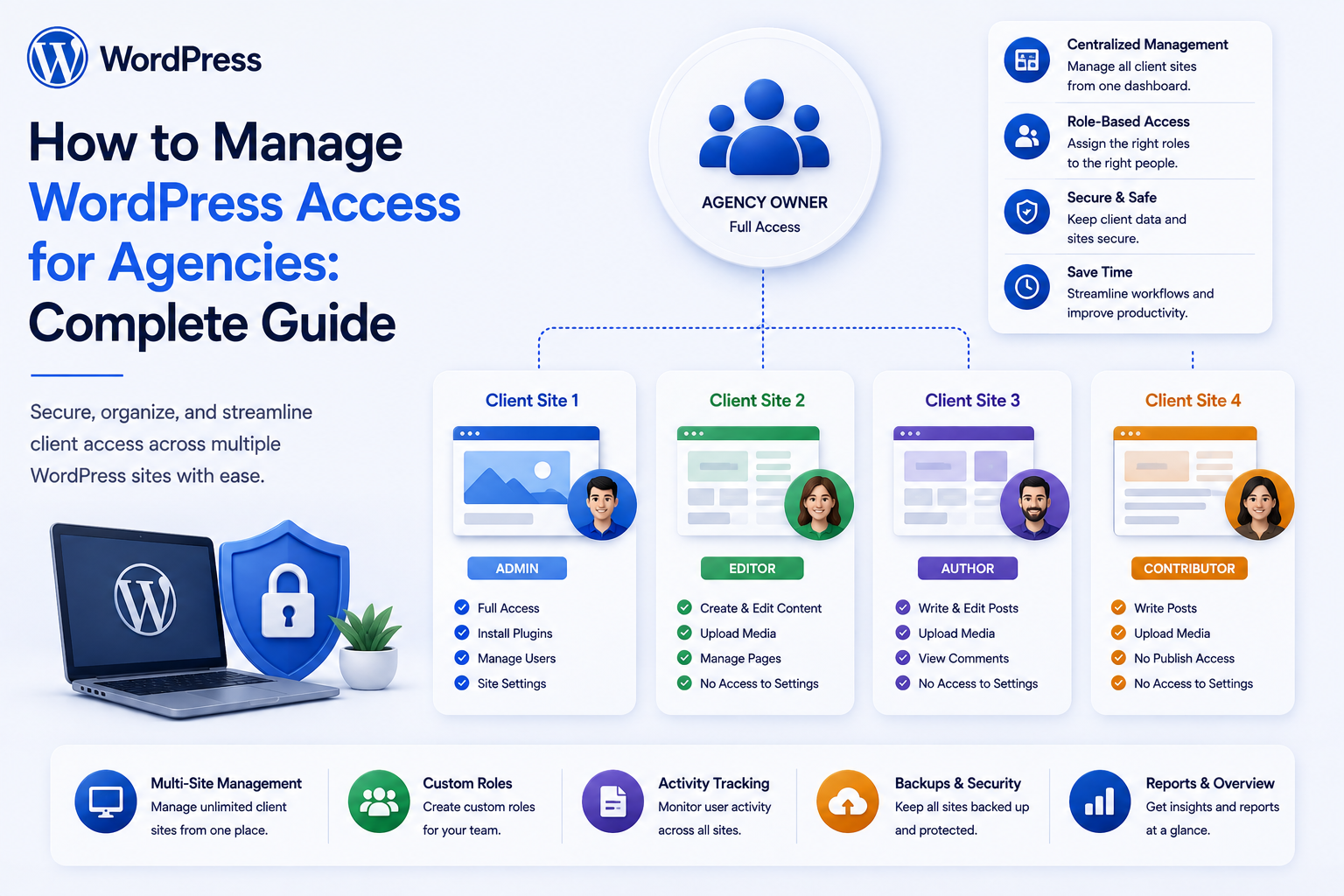
How to Manage WordPress Access for Agencies: Complete Guide
Introduction
WordPress agencies often manage websites for multiple clients.
A typical agency may have access requirements for:
Developers Designers Project Managers SEO Specialists Content Editors Support Teams Clients Contractors External Consultants
The problem is that these people do not need the same level of access.
A developer may need:
Code Plugins Themes Debugging
while a content editor may only need:
Posts Pages Media
A client may need:
Reports Content Basic Settings
and temporary contractors may need access only:
For 7 Days
A poorly managed agency setup often looks like:
Everyone ↓ Administrator
This is convenient, but it increases the impact of compromised credentials, accidental changes, and unauthorized access.
A stronger approach is:
User ↓ Organization / Client ↓ Project Scope ↓ Role ↓ Capabilities ↓ Resource Access ↓ Audit
For agencies, access management becomes even more important because the same agency may manage dozens or hundreds of WordPress installations.
The key principle is:
Agency access should follow least privilege, client isolation, explicit role and capability requirements, temporary-access controls, and auditable workflows rather than giving every team member permanent administrator access.
Why Agency Access Management Matters
Agencies often work across different client websites.
A typical employee may have:
Client A Client B Client C Client D
If the same credentials or broad administrator privileges are used everywhere, one compromised account can create a much larger security problem.
Good access management helps reduce:
Accidental changes
Privilege escalation
Credential abuse
Unauthorized client access
Forgotten contractor access
Data leakage
Difficult offboarding
The Principle of Least Privilege
Least privilege means giving each person only the access required for their work.
For example:
SEO Specialist → SEO Settings → Content → Analytics Developer → Theme → Plugin → Debugging Editor → Posts → Pages → Media Client → Reports → Content Review
Avoid granting administrator access simply because it is easier.
Agency Roles vs WordPress Roles
WordPress provides roles such as:
Administrator Editor Author Contributor Subscriber
Agencies often need more specific organizational roles:
Developer Designer SEO Specialist Project Manager Support Agent Client Contractor
These concepts should not be confused.
An agency role describes work responsibilities.
WordPress capabilities determine technical permissions.
Use Capabilities Instead of Job Titles
Do not use:
job_title = "Developer"
as authorization.
Instead use explicit capabilities such as:
manage_theme manage_plugins edit_code manage_seo edit_content view_reports
The exact capabilities depend on the agency's tools.
Create Role Permission Profiles
An agency can define internal permission profiles:
Agency Role
Typical Access
Developer
Development and technical tools
Designer
Theme and design tools
SEO Specialist
SEO and content tools
Editor
Content and media
Project Manager
Project and reporting
Support
Troubleshooting tools
Client
Approved client-facing features
Actual permissions should be reviewed per client project.
Client Access Is Different
A client should not automatically receive the same access as the agency team.
For example:
Agency Developer → Technical Access Client → Content + Reports
The client may not need:
Plugin Installation Theme Editing Database Access Debugging Tools
Separate Client and Agency Accounts
Avoid sharing:
admin@example.com
among several people.
Each person should have an individual account wherever possible.
This improves:
Accountability Auditing Offboarding Incident Investigation
Never Share Administrator Passwords
Shared administrator credentials create serious problems.
You cannot reliably determine:
Who Made This Change?
if multiple people use the same account.
Individual identities provide better accountability.
Client-Specific Access
An agency may manage:
Client A Client B Client C
Access should be scoped to the correct client project.
A Client A account should not automatically have access to Client B systems.
Agency Access Matrix
A useful planning table is:
Resource
Developer
SEO
Editor
PM
Client
Posts
Yes
Yes
Yes
View
Review
Pages
Yes
Yes
Yes
View
Review
SEO
Yes
Yes
Limited
View
No
Plugins
Yes
No
No
No
No
Themes
Yes
No
No
No
No
Reports
Yes
Yes
View
Yes
Yes
User Management
Limited
No
No
Limited
No
This is only an example; actual permissions should match the agency's workflow.
Client Isolation
Client isolation means one project cannot be accessed merely because a user is authorized for another.
Conceptually:
Agency User ↓ Client A ↓ Allowed Resources
does not imply:
Client B
Client Scope Must Be Server-Side
Do not rely on:
/project?client=10
to determine authorization.
The server must resolve whether the current user is actually assigned to Client 10.
Agency Teams and Projects
An agency can model:
Agency ├── Client A │ ├── Project 1 │ └── Project 2 └── Client B └── Project 3
Then users can be assigned at the appropriate scope.
Project-Based Access
Sometimes a user needs access to one project but not the entire client account.
For example:
Developer → Client A / Website Redesign No Access: Client A / SEO Project
This is more granular than simple client-level access.
Resource Scope
A mature model can evaluate:
User ↓ Agency ↓ Client ↓ Project ↓ Resource
This provides layered authorization.
Temporary Agency Access
Agencies frequently use contractors or external specialists.
A contractor may need:
Client A + Development + 14 Days
Instead of permanent access.
Temporary Permission Model
A temporary permission can contain:
User Client Capability Granted At Expires At Granted By
The server should check the expiration time before authorizing the request.
Automatically Expire Access
A contractor's access should not remain active indefinitely because someone forgot to remove it.
For example:
Temporary Access ↓ Expires ↓ Access Denied
Emergency Access
Sometimes an agency may need emergency access:
Production Incident ↓ Emergency Access ↓ Incident Ends ↓ Access Revoked
Emergency permissions should be narrowly scoped and auditable.
Support Access
Support teams may need temporary client access for troubleshooting.
A secure workflow might be:
Client Support Request ↓ Approved ↓ Temporary Access ↓ Troubleshoot ↓ Revoke
Client-Approved Support Access
For high-sensitivity websites, clients may explicitly approve temporary support access.
This can improve trust and accountability.
Avoid Permanent Support Accounts
A permanent shared support account creates unnecessary attack surface.
Prefer:
Individual Support User + Temporary Access
where practical.
Agency 2FA
Agency accounts should use stronger authentication, especially for:
Administrators Developers Support Staff Project Managers Billing Users
Two-step or multi-factor authentication can reduce risk from compromised passwords.
Enforce 2FA for Agency Staff
An organization can require:
Agency Account ↓ 2FA Required
The exact policy depends on the agency's security environment.
Client 2FA
Clients can also be encouraged or required to use stronger authentication for sensitive sites.
The agency should not weaken the client's security just to simplify support.
Session Management
Agency users may be logged in from:
Office Laptop Home Mobile
Session management should allow users and administrators to revoke sessions where appropriate.
Offboarding
When an employee leaves the agency:
Employee Departure ↓ Disable Account ↓ Revoke Sessions ↓ Revoke Client Access ↓ Revoke Temporary Permissions ↓ Review Shared Credentials
Offboarding should be treated as a security workflow.
Contractor Offboarding
For contractors:
Contract Ends ↓ Expire Project Access ↓ Revoke Sessions ↓ Remove From Teams ↓ Audit
This should happen automatically where possible.
Client Offboarding
When an agency relationship ends:
Project Ends ↓ Client Access Reviewed ↓ Agency Access Removed / Transferred ↓ Credentials Reviewed ↓ Export / Handover
A clear handover process prevents lingering agency access.
Handover and Ownership
A client site may eventually move to another agency.
The agency should document:
Users Hosting Domains Plugins Themes Integrations API Keys Analytics
Sensitive credentials should be transferred through secure processes rather than ordinary email.
Avoid Sending Credentials in Email
Do not send:
Admin Password API Key Database Password Private Token
through ordinary email.
Use secure credential-management workflows.
Agency Password Management
Agencies managing many client sites should consider a centralized password-management system rather than storing credentials in spreadsheets or chat messages.
The exact tool depends on the agency's infrastructure.
API Keys and Agency Access
Developer integrations may use:
API Keys Application Passwords Service Credentials OAuth
These should be scoped and rotated appropriately.
Avoid Sharing One API Credential Across Teams
Use individual or service-specific credentials where supported.
This improves:
Revocation Audit Rotation Incident Response
Client-Specific Integrations
An agency may manage:
Client A CRM Client B CRM Client C Analytics
Credentials must remain correctly isolated.
Never place credentials for multiple clients into shared general-purpose configuration accessible by all staff.
Development vs Production Access
A developer may need broad access in:
Development Staging
but less access in:
Production
A stronger agency model separates environments.
Environment-Based Access
For example:
Developer → Dev + Staging Senior Developer → Dev + Staging + Approved Production Client → Production Content
The exact model depends on the agency's workflow.
Production Access Should Be Exceptional
Production access can have higher consequences.
Use:
Approval MFA Temporary Access Audit
where appropriate.
Staging Environments
Agencies should use staging for:
Plugin Updates Theme Changes Major Configuration Testing
This reduces the risk of making untested changes directly on production websites.
Client Change Approval
A client portal can support:
Change Request ↓ Agency Review ↓ Development ↓ Testing ↓ Client Approval ↓ Production
This creates a clearer governance workflow.
Agency Access Request Workflow
An internal user may request:
Access: Client A Production Reason: Emergency Bug Fix Duration: 2 Hours
Workflow:
Request ↓ Approval ↓ Temporary Access ↓ Expiry
Access Request Auditing
Record:
Requester Client Project Reason Approver Start End
This helps investigate sensitive access.
Agency Access Logs
Important events include:
Login Role Change Access Granted Access Revoked Plugin Change Theme Change User Change Export
Not every page view needs to be logged.
Focus on security-sensitive actions.
Audit Log Protection
Audit records should not be editable by ordinary users.
They should be protected against unauthorized deletion or alteration as far as the system design requires.
Agency Dashboard
An agency management dashboard might show:
Clients Projects Users Access Requests Expiring Permissions Security Alerts
This gives administrators visibility into access posture.
Expiring Access Dashboard
A useful view:
Access Expiring Soon Client A Developer Tomorrow Client B Contractor In 3 Days
This reduces forgotten temporary access.
Client Access Review
Agencies should periodically review:
Who Has Access? Why? Which Client? Which Environment? When Does It Expire?
Regular access reviews can identify stale permissions.
Quarterly Access Review
A business might schedule:
Quarterly ↓ Review All Client Access ↓ Remove Unnecessary Permissions
The exact schedule should reflect risk and agency size.
User Access Reports
An agency can generate:
Client A Access Report Developer: John SEO: Jane Support: Alex Temporary: Sam - Expires Friday
Reports should be protected and scoped appropriately.
Agency Multi-Client Architecture
A reusable agency platform can use:
Agency ↓ Client ↓ Project ↓ Environment ↓ User ↓ Role / Capability
This is more scalable than simply storing one client ID on every user.
Client Isolation
Every request can evaluate:
Current User + Client Membership + Project Scope + Environment + Capability
before allowing access.
Agency SaaS Model
A multi-tenant agency platform might have:
Agency A ├── Client 1 ├── Client 2 └── Client 3 Agency B ├── Client 4 └── Client 5
The tenant boundary must be enforced before client scope.
Cross-Client Access Testing
Test:
Client 1 User ↓ Attempts Client 2 Resource
The request should fail.
Cross-Agency Access Testing
If multiple agencies use the same platform:
Agency A ↓ Attempts Agency B Client
The request must be denied.
Client Data Exports
Agencies may need to export client data during handover.
Export permissions should be scoped to:
Client Project Requested Fields
Sensitive credentials should never be included in ordinary exports.
Agency Billing Access
Billing information should be separated from technical access.
A developer may need:
Technical Access
but not:
Billing Information
unless their role requires it.
Client Billing and Finance
Finance users may need:
Invoices Payments Contracts
but not:
Production Server Access
Separate these permissions.
Department + Agency Access
An agency employee can also have an internal department:
Agency: Kaddora Department: Engineering Client: Client A Project: Website Redesign
The final authorization may depend on all scopes.
Correct Scope Evaluation
A mature model can evaluate:
Agency Membership ↓ Client Assignment ↓ Project Assignment ↓ Environment ↓ Role ↓ Capability
Client Role Definitions
A client organization may also have:
Owner Manager Editor Reviewer Viewer
These should remain independent from the agency's internal roles.
Agency Role Definitions
Agency roles may include:
Developer Designer SEO Support PM Account Manager
The resulting access should be determined by policy.
Avoid Role Explosion
Don't create separate roles for every combination:
Client-A-Developer Client-B-Developer Client-C-Developer
Instead use:
Role: Developer Scope: Client A
This scales much better.
Resource-Based Permissions
A developer may have:
edit_theme
but only for:
Client A / Production
This combines capability and scope.
Agency Access With WordPress Multisite
Multisite environments require careful consideration of:
Network Roles Site Roles Client Sites Network Administration
Network-level privileges should be granted only when genuinely required.
Avoid Unnecessary Super Admin Access
Super Admin access can affect the entire network.
Use it only for users who genuinely need network-level administration.
Agency Development Accounts
For developers who need technical access, consider:
Individual Account + MFA + Restricted Production
rather than a shared super-admin credential.
Break-Glass Access
For emergencies, a controlled break-glass process can provide elevated access temporarily:
Emergency ↓ Authorization ↓ Temporary Privilege ↓ Incident Work ↓ Automatic Expiration ↓ Audit
Break-Glass Monitoring
Emergency privileges should be especially visible in audit and security monitoring.
Agency Access and AI
AI tools may access:
Client Content Code Analytics Support Tickets
The agency should ensure that the AI tool receives only information appropriate to the current client's scope.
AI Workspace Isolation
A secure pipeline is:
Agency User ↓ Client Authorization ↓ Approved Data ↓ AI Tool
Do not send another client's information simply because the same employee has access to both systems.
AI and Client Confidentiality
Client data may be contractually or commercially sensitive.
Define:
What AI Can Access Which Client Retention Provider Purpose
before using AI in client workflows.
Agency Access and Automation
Automation workflows can also create access risks.
For example:
User Added to Client ↓ Automation ↓ Access Provisioned
The automation should validate:
Correct Client Correct Role Correct Environment Correct Expiration
Automated Offboarding
When a project ends:
Project Closed ↓ Revoke Project Access ↓ Revoke Temporary Access ↓ Notify ↓ Audit
Automation can reduce forgotten permissions.
Access Reconciliation
A useful agency system can periodically compare:
Project Assignments vs Actual Permissions
and identify:
Stale Access Unexpected Users Expired Permissions Missing Users
Agency Access and Password Reset
If staff leave or credentials are compromised:
Revoke Sessions ↓ Reset Credentials ↓ Review Client Access
Password changes alone may not address active sessions or API credentials.
Agency Security Incident Response
An incident workflow may be:
Detect ↓ Contain ↓ Revoke Sessions ↓ Revoke Access ↓ Rotate Credentials ↓ Review Logs ↓ Restore Controlled Access
Client communication should follow the agency's incident-response policy.
Access Revocation
Revocation should affect:
Sessions Client Membership Project Membership Temporary Permissions API Credentials
as required.
Common WordPress Agency Access Mistakes
Giving Everyone Administrator Access
Convenient but unnecessarily broad.
Sharing Accounts
Destroys accountability.
No Client Isolation
Employees can accidentally access the wrong client.
Permanent Contractor Access
Forgotten accounts become long-term security risks.
No Access Reviews
Stale permissions accumulate.
Using Job Titles as Authorization
Display information is not a security policy.
Storing Client Credentials in Spreadsheets
Creates significant credential-management risk.
No Production Separation
Developers make untested changes directly on live sites.
No Emergency-Access Controls
Incidents lead to ad-hoc privilege escalation.
No Offboarding Automation
Former employees or contractors retain access.
WordPress Agency Access Checklist
- [ ] Define agency roles - [ ] Define client roles - [ ] Define capabilities - [ ] Define client scope - [ ] Define project scope - [ ] Define environment scope - [ ] Use individual accounts - [ ] Enforce MFA where appropriate - [ ] Avoid shared administrator accounts - [ ] Add temporary access - [ ] Add access expiration - [ ] Add access requests - [ ] Add approval workflows - [ ] Add audit logging - [ ] Add access reviews - [ ] Add automated offboarding - [ ] Separate staging and production - [ ] Protect API credentials - [ ] Protect client data - [ ] Enforce tenant / client isolation - [ ] Add reconciliation - [ ] Test privilege escalation - [ ] Test cross-client access - [ ] Test expired access
Best Practices for Managing WordPress Access for Agencies
A professional agency access system should:
Give each person an individual account instead of relying on shared credentials.
Use least privilege and avoid permanent administrator access when narrower capabilities are sufficient.
Separate agency roles from client roles and WordPress technical roles.
Scope user permissions to the correct client, project, environment, and tenant.
Use temporary access for contractors, support work, emergencies, and other exceptional cases.
Automatically expire temporary permissions.
Require stronger authentication for privileged agency accounts.
Separate development, staging, and production access.
Protect client credentials through appropriate secret-management practices rather than spreadsheets or chat.
Maintain an audit history of sensitive access changes and administrative actions.
Perform regular access reviews and reconcile assignments against actual permissions.
Automate offboarding when employees, contractors, or projects end.
Keep client billing, technical, content, and security permissions separate.
Protect client information when using external integrations, AI services, CRM systems, and automation.
Enforce client and tenant boundaries on every page, API, file, export, and background job.
Use controlled break-glass access for emergencies instead of permanent elevated permissions.
Test privilege escalation, cross-client access, stale permissions, API bypasses, and expired access.
Why choose ThemeKaddora?
ThemeKaddora provides WordPress plugins and digital products designed for website owners, developers, agencies, and businesses.
Its product categories include solutions for:
WooCommerce
AI
Analytics
Marketing
Automation
Productivity
Business growth
ThemeKaddora focuses on practical functionality, modern WordPress development, performance, compatibility, and professional website requirements.
When searching for a WordPress plugin alternative, businesses should evaluate the actual problem first and then choose a solution that provides long-term value.
Conclusion
WordPress agency access management becomes difficult when every team member, client, and contractor receives broad privileges by default.
A basic model is:
User ↓ WordPress Role
A scalable agency model is:
User ↓ Agency ↓ Client ↓ Project ↓ Environment ↓ Role ↓ Capability ↓ Resource
The first principle is use individual accounts.
Shared credentials eliminate accountability and make offboarding difficult.
The second principle is use least privilege.
A person should receive only the technical access their responsibilities actually require.
The third principle is separate client scope from job role.
A developer role does not mean access to every client.
The fourth principle is make temporary access truly temporary.
Expiration should be enforced server-side, not left to someone remembering to remove access later.
The fifth principle is protect production.
Development and staging access should be broader where appropriate, while production access should be more tightly controlled.
The sixth principle is secure client isolation.
The most dangerous agency mistake is allowing a user working on Client A to accidentally access Client B.
The seventh principle is automate offboarding.
Employees, contractors, and projects change constantly. Automation reduces stale permissions.
The eighth principle is audit important actions.
Know who granted access, changed permissions, exported data, or used emergency privileges.
The ninth principle is protect external systems and AI workflows.
An employee who can access multiple clients should not automatically be able to send all of those clients' data into an external tool.
The tenth principle is review access regularly.
Permissions drift over time. Periodic reviews identify accounts and privileges that are no longer necessary.
For ThemeKaddora, agency access management can support:
Web Agencies Development Teams SEO Teams Support Teams Freelancers Contractors Client Portals Multi-Client SaaS Platforms
The most important principle is:
Agency access should be scoped by client, project, environment, role, and capability so that a team member can do their job without gaining unnecessary access to other clients or systems.
A professional WordPress agency access model should be:
Least-Privilege
→ Individual
→ Scoped
→ Temporary Where Possible
→ MFA-Protected
→ Auditable
→ Client-Isolated
→ Environment-Aware
→ Automated
→ Recoverable
→ Maintainable
When these principles are applied, agencies can manage complex client portfolios while reducing the risks created by shared credentials, permanent administrator access, forgotten contractors, and uncontrolled production permissions.
Frequently Asked Questions
Why should agencies avoid shared WordPress accounts?
Shared accounts make it difficult to identify who performed an action, complicate offboarding, and increase the impact of compromised credentials.
Should every agency employee have WordPress Administrator access?
No. Use the narrowest role and capability set that allows the employee to perform their work.
How should agencies give contractors temporary access?
Create individual accounts with explicitly scoped permissions and an expiration time. Automatically revoke access when the assignment ends.
Should clients have administrator access?
Not automatically. Give clients the capabilities they need, such as content management or reporting, without granting unnecessary technical privileges.
How can an agency separate access between clients?
Use explicit client or tenant membership and project scope, then combine those scopes with roles and capabilities during server-side authorization.
Can agencies provide temporary production access?
Yes. Temporary or break-glass access can be granted for approved work and automatically expired after the required period.
Should production access be different from staging access?
Yes. Developers often need broader staging access while production privileges should be more tightly controlled.
How should agencies handle employees who leave?
Disable accounts, revoke sessions, remove client and project memberships, revoke temporary permissions, and review credentials and integrations associated with the employee.
Can agencies use two-factor authentication?
Yes. MFA is particularly valuable for administrators, developers, support staff, and other users with privileged or multi-client access.
How should agency access work with AI tools?
AI tools should receive only the client data the current user is authorized to access. Client boundaries should be enforced before data is sent to an external AI service.
Can WordPress agency access work in a multi-tenant SaaS?
Yes. A multi-tenant platform can model agency, client, project, environment, team, and capability scope and enforce each layer on the server.
Why choose Themekaddora?
Themekaddora provides lightweight, responsive, SEO-friendly WordPress themes with fast performance, WooCommerce compatibility, flexible customization, accessibility-conscious design, modern templates, regular updates, and professional support—providing a strong foundation for businesses building digital products and product-focused websites.
Comments (0)