
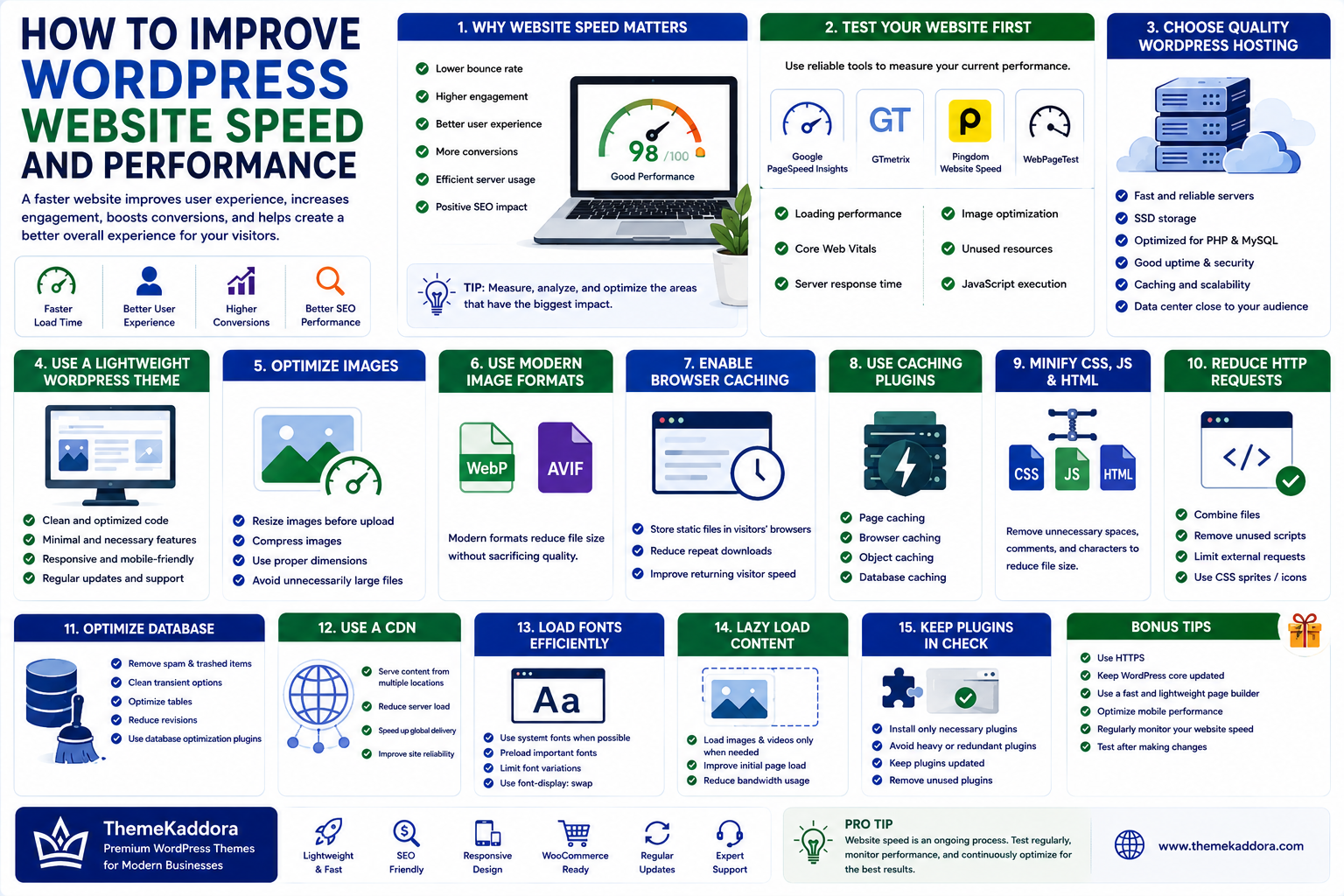
How to Improve WordPress Website Speed and Performance
Introduction
Website speed is an important part of the modern web experience.
Visitors expect websites to load quickly, respond smoothly, and work properly across smartphones, tablets, and desktop computers.
A slow WordPress website can create several problems.
Visitors may leave before the page finishes loading. Customers may abandon purchases. Engagement can decrease, and website owners may struggle to provide a smooth user experience.
Website performance can also affect how efficiently search engines evaluate and deliver pages to users.
The good news is that WordPress websites can often be made significantly faster through a combination of good hosting, optimized images, efficient themes, caching, reduced scripts, database maintenance, and careful plugin management.
However, speed optimization is not about applying every optimization technique available.
A change that improves one metric can sometimes create problems somewhere else.
The best approach is to measure the website first, identify the biggest bottlenecks, and then optimize the areas that have the greatest impact.
In this guide, we'll explore practical ways to improve WordPress website speed and performance.
1. Why WordPress Website Speed Matters
Website speed affects more than just a loading indicator.
A faster website can contribute to a better user experience.
Slow websites can result in:
Higher abandonment
Lower engagement
Poorer user experience
Lower conversion opportunities
Increased server resource usage
For e-commerce websites, performance can be especially important.
Customers expect product pages, carts, and checkout pages to respond quickly.
For content websites, faster pages can help visitors access articles without unnecessary delays.
Performance should therefore be treated as part of the overall website strategy.
2. Test Your Website Before Optimizing
Before making changes, measure the current performance.
Useful testing tools can provide information about:
Loading performance
Server response
Largest Contentful Paint
Cumulative Layout Shift
Interaction to Next Paint
JavaScript execution
Image optimization
Unused resources
Testing before and after optimization helps determine whether a change actually improved the website.
Do not rely on one speed score alone.
A website should be evaluated using multiple performance indicators and real-world behavior.
3. Choose Quality WordPress Hosting
Hosting has a major effect on website performance.
A poorly configured or overloaded server can create slow response times even when the WordPress website itself is well optimized.
When choosing hosting, consider:
Server resources
Storage technology
Network performance
Server location
PHP support
Database performance
Caching options
Scalability
Security
Backup systems
Shared hosting can be sufficient for smaller websites, but high-traffic websites may eventually require more dedicated resources.
4. Use a Lightweight WordPress Theme
Your WordPress theme controls a significant portion of the frontend experience.
Heavy themes may load:
Large CSS files
Multiple JavaScript libraries
Unnecessary animations
Extra widgets
Additional fonts
Complex page-builder assets
A lightweight theme can reduce the amount of code that browsers need to process.
When selecting a theme, look for:
Clean code
Responsive design
Minimal unnecessary assets
Good performance
Regular updates
Compatibility with required plugins
A theme should provide the functionality you need without adding unnecessary complexity.
5. Optimize Images
Images are among the most common causes of slow websites.
Large images can significantly increase page size.
Before uploading images, optimize them for the actual display size.
For example, there is little benefit in loading a 4000-pixel-wide image when the website displays it at 800 pixels.
Consider:
Resizing images
Compressing images
Using modern formats
Choosing appropriate dimensions
Avoiding unnecessarily large files
Image optimization can produce significant performance improvements.
6. Use Modern Image Formats
Modern image formats can reduce file sizes while maintaining good visual quality.
Depending on browser support and WordPress configuration, formats such as:
WebP
AVIF
can help reduce image payloads.
Smaller image files mean less data needs to be transferred to visitors.
However, image quality should still be checked after compression.
Over-compression can make images appear blurry or damaged.
7. Enable Browser Caching
Caching allows browsers to store certain website resources locally.
When visitors return to the website, the browser may not need to download every resource again.
Cacheable resources can include:
Images
CSS
JavaScript
Fonts
Proper cache headers can improve repeat-visit performance.
Caching rules should be configured carefully, especially for dynamic pages and logged-in users.
8. Use Page Caching
Page caching can reduce the amount of work the server performs for repeated requests.
Without caching, WordPress may need to:
Receive request → Execute PHP → Query database → Generate page → Send response
With page caching, a previously generated version of the page may be served directly.
This can reduce server processing and improve response time.
Caching requirements vary depending on the website.
Dynamic websites, membership websites, and e-commerce stores need special consideration because some pages contain personalized or changing information.
9. Use a Content Delivery Network
A Content Delivery Network, or CDN, distributes static website resources through a network of servers.
When a visitor requests an image, stylesheet, or other cached asset, the CDN can often serve it from a location closer to the visitor.
A CDN can help with:
Images
CSS
JavaScript
Fonts
Static files
CDNs are especially useful for websites with visitors distributed across multiple geographic regions.
10. Minimize CSS and JavaScript
CSS and JavaScript are essential, but unnecessary code can increase page size and processing requirements.
Optimization techniques may include:
Minification
Removing unused CSS
Reducing unnecessary JavaScript
Loading scripts only when required
Delaying non-critical scripts
However, aggressive optimization can sometimes break website functionality.
Always test after changing JavaScript or CSS loading behavior.
11. Reduce Unnecessary Plugins
Plugins are one of WordPress's biggest advantages.
They allow website owners to add features without building everything from scratch.
However, installing many unnecessary plugins can increase complexity.
Some plugins may load assets across the entire website even when their features are only used on specific pages.
Regularly review installed plugins.
Ask:
Does this plugin provide a feature we actually need?
If the answer is no, consider removing it.
12. Optimize Plugin Usage
The number of plugins is not the only factor.
Plugin quality and behavior are more important.
A single poorly optimized plugin can potentially create more performance impact than several lightweight plugins.
Review whether plugins:
Load unnecessary scripts
Make excessive database queries
Run expensive background processes
Load assets globally
Duplicate functionality
Use performance monitoring to identify actual bottlenecks instead of assuming that every plugin is slow.
13. Optimize the WordPress Database
WordPress stores important information in its database.
Over time, websites can accumulate unnecessary data such as:
Old revisions
Transients
Spam comments
Deleted content
Unused metadata
Database maintenance can help keep the system organized.
However, database optimization should be performed carefully.
Always maintain a reliable backup before making significant database changes.
14. Control WordPress Revisions
WordPress revisions allow users to restore previous versions of posts and pages.
They are useful, but websites with extensive editing activity can accumulate many revisions.
A sensible revision-management strategy can reduce unnecessary database growth.
Do not disable useful recovery features without understanding the consequences.
15. Optimize Fonts
Fonts can also affect performance.
Loading multiple font families and many font weights increases the number and size of resources required by a page.
Consider:
Using fewer font families
Loading only required weights
Using system fonts where appropriate
Hosting fonts efficiently
Avoiding unnecessary font variations
Typography should balance design requirements with performance.
16. Use Lazy Loading
Lazy loading delays the loading of certain resources until they are needed.
For example, images below the visible portion of a page may not need to load immediately.
This can reduce the initial amount of data transferred.
WordPress provides built-in support for lazy loading for certain resources, while plugins and themes can provide additional controls.
However, important above-the-fold content should not be unnecessarily delayed.
17. Optimize Above-the-Fold Content
The content users see first should load efficiently.
Important above-the-fold elements may include:
Main heading
Hero image
Navigation
Primary content
Important call-to-action
Avoid delaying critical resources while loading less important content first.
The goal is to allow users to see meaningful content as quickly as possible.
18. Improve Core Web Vitals
Core Web Vitals are performance metrics designed to evaluate important aspects of user experience.
Important metrics include:
Largest Contentful Paint
Measures how quickly the main content becomes visible.
Interaction to Next Paint
Measures responsiveness to user interactions.
Cumulative Layout Shift
Measures unexpected movement of page elements.
A fast website should not only load quickly.
It should also respond smoothly and maintain a stable layout.
19. Prevent Layout Shifts
Unexpected movement can frustrate users.
For example, imagine clicking a button just as an image loads and pushes the button downward.
This creates a poor experience.
To reduce layout shifts:
Define image dimensions
Reserve space for advertisements
Avoid dynamically inserting content above existing content
Load fonts carefully
Maintain stable layouts
Visual stability is an important part of performance.
20. Optimize the WordPress Admin Area
Frontend performance receives most of the attention, but the WordPress dashboard can also become slow.
Possible causes include:
Large databases
Heavy plugins
Excessive dashboard widgets
Background processes
External API requests
Keeping the admin environment efficient can improve productivity for website administrators.
21. Optimize WooCommerce Carefully
WooCommerce websites require special performance considerations.
Product catalogs, cart sessions, checkout processes, and customer accounts can create dynamic requests.
Important areas include:
Product images
Database performance
Object caching
Cart fragments
Checkout scripts
Plugin compatibility
Hosting resources
Do not apply aggressive caching to dynamic WooCommerce pages without understanding how it affects customer-specific information.
22. Monitor Server Resources
Sometimes the WordPress website itself is not the main problem.
The server may be reaching resource limits.
Monitor:
CPU usage
RAM usage
Disk usage
PHP workers
Database load
Traffic
Error logs
If resources remain consistently high, optimization may require better hosting or infrastructure rather than frontend changes alone.
23. Keep WordPress Performance Secure
Performance and security should work together.
Some security practices can also affect performance.
For example:
Excessive security scans
Too many firewall rules
Heavy logging
Poorly configured security plugins
The solution is not to remove security controls.
Instead, configure them appropriately and monitor their impact.
A fast website is not useful if it is insecure.
How to Improve WordPress Website Speed and Performance (Part 2)
24. Optimize WordPress for Mobile Users
A large percentage of website traffic comes from mobile devices.
Mobile users may also experience slower network connections or have less powerful hardware than desktop users.
A website that feels fast on a high-end desktop may feel considerably slower on a mobile device.
Mobile performance optimization should therefore focus on:
Smaller images
Efficient CSS
Reduced JavaScript
Responsive layouts
Optimized fonts
Fast server response
Minimal unnecessary animations
Always test important pages on real mobile devices when possible.
25. Use Object Caching
Object caching stores frequently requested database information so WordPress does not need to perform the same database operations repeatedly.
This can improve performance for websites with:
Large databases
Many users
High traffic
Complex queries
Dynamic content
Object caching can be particularly useful for larger WordPress websites and WooCommerce stores.
The exact implementation depends on the hosting environment and available infrastructure.
26. Use Full-Page and Object Caching Together
Different types of caching solve different problems.
Page Cache
Stores generated pages so the server does not need to rebuild the same page for every visitor.
Object Cache
Stores frequently accessed database objects and query results.
Browser Cache
Stores resources in the visitor's browser.
CDN Cache
Stores static assets closer to users.
A well-designed caching strategy can combine these layers.
However, caching must be configured carefully for websites containing personalized or dynamic information.
27. Optimize Database Queries
Poorly optimized database queries can slow down WordPress.
This is particularly important for:
Large WooCommerce stores
Membership websites
Multisite installations
High-traffic websites
Websites with large datasets
Developers should avoid unnecessary queries and use efficient database practices.
For custom WordPress development, database queries should also follow WordPress security and performance standards.
28. Reduce External Requests
Some websites depend heavily on external services.
Examples include:
Analytics
Advertising
Social media widgets
Chat systems
Fonts
Marketing tools
External APIs
Every external request can introduce additional network activity.
Review third-party resources and remove services that are not essential.
Where appropriate, load non-critical resources later so they do not block important page content.
29. Optimize Third-Party Scripts
Third-party scripts can be a significant source of performance problems.
A website may load scripts from:
Advertising networks
Analytics providers
Social platforms
Chat tools
Marketing platforms
Tracking systems
Not every script needs to load immediately.
Consider whether each script is:
Essential
Delayed
Loaded only on specific pages
Loaded after user interaction
Reducing unnecessary third-party JavaScript can improve responsiveness.
30. Avoid Excessive Animations
Animations can improve design when used carefully.
However, excessive animations can increase:
JavaScript execution
CSS complexity
Rendering work
Mobile resource usage
Use animations to support the user experience rather than simply adding movement everywhere.
Simple transitions are often sufficient for a professional website.
31. Optimize Videos
Video content can consume significantly more bandwidth than images.
Avoid automatically loading large videos when they are not necessary.
For better performance:
Compress videos
Use appropriate formats
Use posters or thumbnails
Avoid unnecessary autoplay
Consider external video delivery
Load videos only when needed
A background video may look impressive, but it can also significantly increase page weight.
32. Optimize WordPress Search
On large websites, internal search can become resource-intensive.
Websites with thousands of posts, products, or other content types may require more efficient search solutions.
Performance can be improved by:
Reducing unnecessary search queries
Optimizing database structure
Limiting expensive queries
Using specialized search solutions when necessary
Search performance becomes increasingly important as a website's content grows.
33. Optimize High-Traffic WordPress Websites
A website receiving thousands or millions of visitors needs a different performance strategy from a small blog.
High-traffic websites may require:
Better hosting
CDN
Object caching
Database optimization
Load balancing
Efficient code
Image optimization
Monitoring
Scaling strategies
Performance should be designed into the infrastructure rather than addressed only after the website becomes slow.
34. Use a Staging Environment
Performance changes should ideally be tested before being applied directly to a production website.
A staging environment allows developers to test:
Plugin updates
Theme changes
Caching configurations
Database optimization
JavaScript changes
Performance improvements
After testing, changes can be deployed to the live website.
This reduces the risk of breaking important functionality.
35. Don't Chase a Perfect Speed Score
Performance testing tools are useful, but a score is not the entire user experience.
A website can have a strong lab score but still perform poorly for certain visitors.
Real-world factors include:
Device
Network
Geographic location
Browser
Server conditions
Traffic levels
Use performance scores as diagnostic information rather than the sole goal.
The objective is to create a website that feels fast and works reliably for real users.
36. Common WordPress Speed Optimization Mistakes
Many website owners make performance changes without measuring their impact.
Here are some common mistakes.
Installing Too Many Optimization Plugins
Using multiple plugins that perform the same optimization can create conflicts.
Choose a strategy instead of stacking every available optimization feature.
Over-Optimizing JavaScript
Aggressive script delaying or combining can break:
Menus
Forms
Sliders
Shopping carts
Checkout
Interactive elements
Always test functionality after optimization.
Using Excessively Large Images
Uploading images directly from cameras or design software without resizing them can create unnecessarily large page sizes.
Ignoring Hosting
Frontend optimization cannot always compensate for poor server performance.
If server response remains slow, infrastructure may need attention.
Applying the Same Cache Rules Everywhere
Static pages and dynamic pages do not behave the same way.
Caching should respect:
Login sessions
Shopping carts
Checkout
Personalized content
Account pages
37. Speed vs Functionality
Website optimization should not mean removing useful features simply to improve a benchmark score.
For example, a business may genuinely need:
Live chat
Analytics
Product filters
Search
Customer accounts
Booking systems
The goal is to implement these features efficiently.
Ask:
Does this feature create enough business value to justify its performance cost?
If yes, optimize its implementation rather than automatically removing it.
38. Create a WordPress Performance Checklist
A practical checklist can make performance maintenance easier.
Hosting
Use reliable hosting
Keep PHP updated
Monitor server resources
Choose infrastructure appropriate for traffic
WordPress
Keep WordPress updated
Remove unnecessary plugins
Remove unused themes
Use a lightweight theme
Images
Resize images
Compress images
Use modern formats
Use appropriate dimensions
Enable lazy loading where appropriate
Caching
Use page caching
Configure browser caching
Consider object caching
Use CDN caching where appropriate
Code
Minimize unnecessary CSS
Reduce unnecessary JavaScript
Optimize third-party scripts
Avoid excessive animations
Database
Remove unnecessary data
Monitor database performance
Optimize expensive queries
Maintain regular backups
Monitoring
Test Core Web Vitals
Monitor server response
Test mobile performance
Check real-user performance
Review performance after major changes
39. Monitor Performance Regularly
Website optimization is not a one-time task.
A website can become slower as new:
Plugins
Images
Pages
Scripts
Marketing tools
Products
Integrations
are added.
Schedule regular performance reviews.
For example, businesses can review performance:
Monthly
After major plugin updates
After theme changes
After hosting changes
After large content additions
Continuous monitoring helps identify performance problems before they become serious.
40. Use Real User Monitoring
Laboratory testing provides useful controlled measurements.
Real User Monitoring, or RUM, provides information about actual visitors.
It can reveal differences based on:
Device
Browser
Location
Network
Page type
For larger websites, real-user data can provide valuable information about how visitors actually experience the website.
41. Improve WordPress Performance Step by Step
If a website is slow, avoid changing everything at once.
Use a structured process.
Step 1
Measure the website.
Step 2
Identify the largest bottleneck.
Step 3
Make one meaningful change.
Step 4
Test again.
Step 5
Compare results.
Step 6
Keep the improvement if it helps.
Step 7
Move to the next bottleneck.
This approach makes it easier to understand what actually improved performance.
42. Why Choose ThemeKaddora?
At ThemeKaddora, we believe website performance is an essential part of a successful digital experience.
A modern WordPress website should not only look attractive.
It should also:
Load efficiently
Work smoothly on mobile devices
Provide a responsive experience
Support SEO
Handle business growth
Remain easy to maintain
ThemeKaddora focuses on WordPress themes and solutions designed with performance, usability, customization, and modern website requirements in mind.
Whether you're building a blog, business website, online store, SaaS website, or marketplace, performance should be considered from the beginning.
Conclusion
Improving WordPress website speed requires more than installing a caching plugin.
Performance depends on the entire website environment, including:
Hosting
Theme
Plugins
Images
CSS
JavaScript
Database
Caching
CDN
Third-party services
Server resources
The best optimization strategy begins with measurement.
Identify the biggest problems first, make targeted improvements, and test the results.
Remember that the goal is not simply to achieve a perfect performance score.
The real goal is to create a website that loads quickly, responds smoothly, remains visually stable, and provides a better experience for real visitors.
A fast WordPress website can support better usability, stronger customer experiences, and a more reliable foundation for long-term website growth.
Frequently Asked Questions
1. How can I make my WordPress website faster?
Start by choosing reliable hosting, optimizing images, using caching, reducing unnecessary plugins, using a lightweight theme, optimizing CSS and JavaScript, and monitoring performance.
2. What is the biggest cause of slow WordPress websites?
There is no single cause. Common problems include poor hosting, large images, excessive scripts, inefficient plugins, database issues, and poorly optimized themes.
3. Does having fewer WordPress plugins make a website faster?
Not necessarily. Plugin quality and behavior are more important than the raw number of plugins. However, unnecessary plugins should be removed.
4. Is caching important for WordPress?
Yes. Proper caching can reduce server processing and improve page delivery, particularly for frequently accessed content.
5. Should I use a CDN for WordPress?
A CDN can be useful, especially for websites with geographically distributed visitors or large amounts of static content.
6. How do images affect WordPress performance?
Large image files can significantly increase page size and download time. Resizing and compressing images can reduce this impact.
7. What are Core Web Vitals?
Core Web Vitals are a set of user-experience-focused performance metrics. They include measurements related to loading performance, responsiveness, and visual stability.
8. Can too much optimization break WordPress?
Yes. Aggressive JavaScript, CSS, caching, or database optimization can sometimes break website functionality. Always test changes carefully.
9. Should I optimize my WordPress database?
Database maintenance can help keep a website efficient, particularly as it grows. Always create a reliable backup before making significant database changes.
10. How often should I check WordPress performance?
Performance should be monitored regularly and after major changes such as plugin updates, theme changes, new integrations, or significant content additions.
Comments (0)