
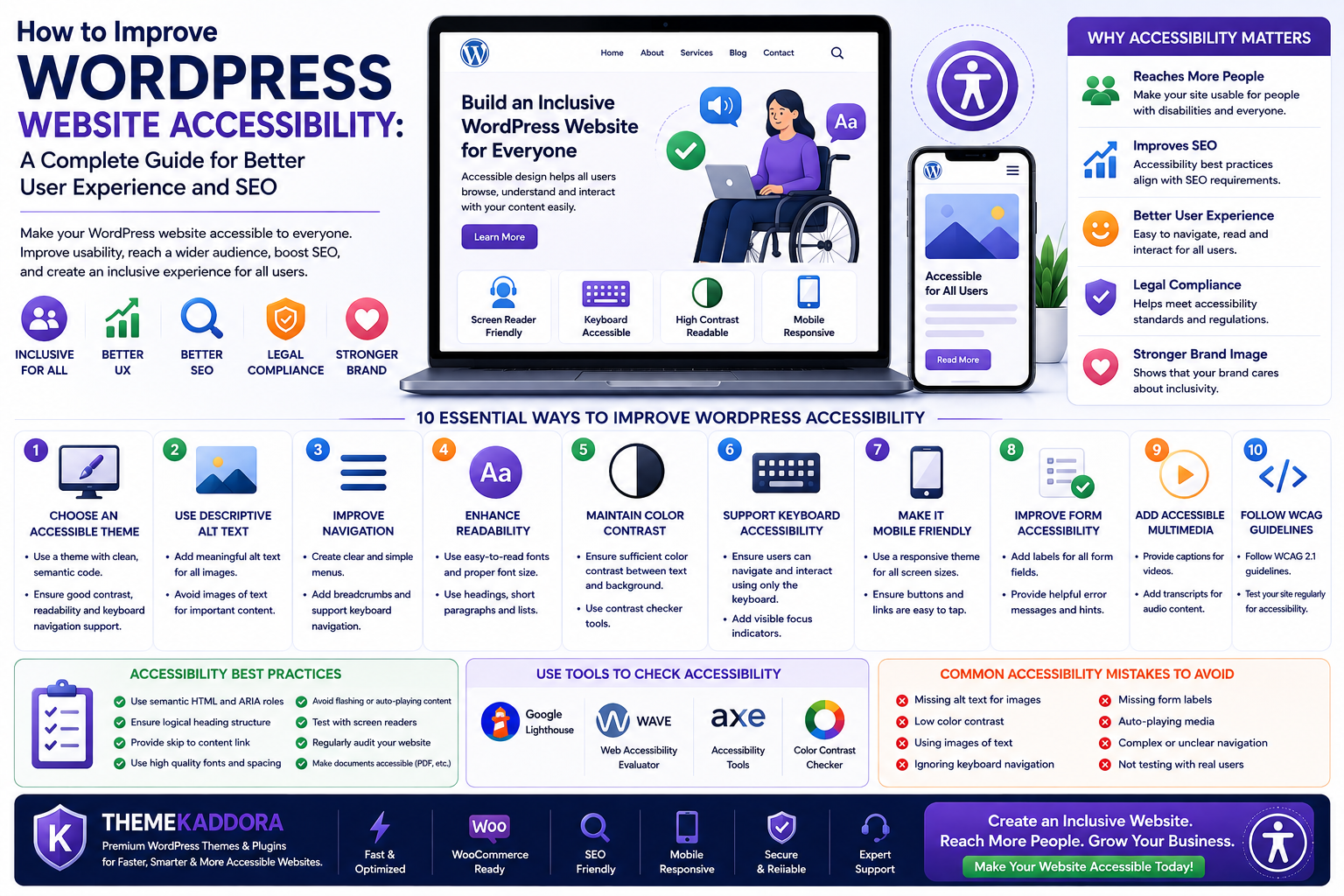
How to Improve WordPress Website Accessibility: A Complete Guide for Better User Experience and SEO
Introduction
A successful WordPress website should be accessible to everyone, regardless of their abilities or the devices they use. Website accessibility ensures that people with visual, hearing, motor, or cognitive impairments can navigate, understand, and interact with your content effectively. It is not only an ethical responsibility but also an important factor for improving user experience, search engine optimization (SEO), and overall website quality.
Today, millions of people rely on assistive technologies such as screen readers, keyboard navigation, voice commands, and screen magnifiers to browse the internet. If your website isn't designed with accessibility in mind, these users may struggle to access your content, resulting in lost visitors and missed opportunities.
Search engines also favor websites that provide a well-structured, user-friendly experience. Clean code, proper heading structures, descriptive alternative text for images, and responsive layouts all contribute to both accessibility and better SEO performance.
Whether you run a blog, business website, portfolio, or WooCommerce store, making your website accessible helps you reach a wider audience, improve customer satisfaction, and create a more inclusive online experience.
In this guide, we'll explore practical techniques to improve your WordPress website's accessibility while strengthening usability and search visibility.
What Is WordPress Accessibility?
WordPress accessibility refers to designing and developing websites so that everyone can use them, including people with disabilities. An accessible website removes barriers and ensures visitors can navigate pages, read content, complete forms, and interact with features without unnecessary difficulty.
Accessibility includes:
- Clear navigation
- Readable typography
- Keyboard-friendly controls
- Alternative text for images
- Proper heading structure
- High color contrast
- Accessible forms
- Responsive layouts
By following accessibility best practices, you create a website that is easier for all visitors to use—not just those with disabilities.
Why Accessibility Matters
Many website owners think accessibility is only necessary for government or large corporate websites. In reality, every website benefits from being more accessible.
Better User Experience
Accessible websites are easier to navigate, understand, and interact with. Visitors can find information more quickly, leading to greater satisfaction and longer browsing sessions.
Improved SEO
Many accessibility practices align with SEO best practices. Proper headings, descriptive image alt text, semantic HTML, and logical navigation help search engines understand your content more effectively.
Larger Audience
An accessible website reaches more users, including people who rely on assistive technologies. By removing barriers, you make your content available to a broader audience.
Better Mobile Experience
Many accessibility improvements—such as responsive layouts, readable text, and touch-friendly navigation—also enhance the mobile browsing experience.
Stronger Brand Reputation
Businesses that prioritize accessibility demonstrate inclusivity and professionalism, building trust with customers and creating a positive brand image.
Choose an Accessibility-Friendly Theme
Your WordPress theme plays a significant role in accessibility. A well-designed theme provides a strong foundation for creating an inclusive website.
Look for themes that offer:
- Responsive design
- Clean, semantic HTML
- Keyboard navigation support
- Fast loading performance
- Proper heading hierarchy
- Good color contrast
- Easy customization
- Compatibility with accessibility plugins
A lightweight and well-coded theme also improves website speed, SEO, and overall usability.
Optimize Images for Accessibility
Images add visual appeal, but they should never prevent visitors from understanding your content.
Use Descriptive Alt Text
Alternative text (alt text) describes images for users who rely on screen readers.
Instead of writing:
image1.jpg
Use:
"Woman shopping online using a WooCommerce store on a laptop."
Good alt text is concise, descriptive, and relevant to the page content.
Avoid Using Images for Important Text
Important information should be written as actual text rather than embedded inside images. This makes content accessible to screen readers and easier for search engines to index.
Use Captions When Helpful
Captions provide additional context and improve understanding, especially for instructional or informational images.
Optimize Image Size
Compressed and properly sized images improve loading speed, which benefits both accessibility and SEO.
Improve Website Navigation
Visitors should be able to move through your website without confusion.
Create Simple Menus
Keep navigation clear and organized with logical categories and descriptive menu labels.
Add Breadcrumb Navigation
Breadcrumbs help users understand where they are within your website and allow them to navigate back easily.
Example:
Home → Blog → WordPress → Accessibility
Support Keyboard Navigation
Many users cannot operate a mouse and rely entirely on a keyboard.
Ensure visitors can:
- Open menus
- Navigate links
- Complete forms
- Access buttons
- Move between sections
using only keyboard controls.
Include a Search Feature
A well-designed search function helps users quickly locate the information they need, especially on websites with extensive content.
Enhance Readability
Readable content benefits everyone, including users with cognitive disabilities and visitors reading on smaller screens.
Improve readability by:
- Using short paragraphs
- Writing clear, simple sentences
- Organizing content with descriptive headings
- Including bullet points where appropriate
- Leaving sufficient white space
- Choosing readable fonts
- Maintaining good contrast between text and background
Readable content keeps visitors engaged and makes information easier to understand.
Create Accessible Forms
Forms are one of the most important interactive elements on a WordPress website. Whether you're collecting inquiries, newsletter subscriptions, or online orders, forms should be easy for everyone to complete.
Poorly designed forms can frustrate users and reduce conversion rates, while accessible forms create a smoother experience for all visitors.
Use Clear Field Labels
Every form field should have a descriptive label placed directly beside or above the input field.
Instead of relying only on placeholder text, use permanent labels such as:
- Full Name
- Email Address
- Phone Number
- Company Name
- Message
This helps users understand exactly what information is required and improves compatibility with screen readers.
Provide Helpful Error Messages
If users make mistakes while completing a form, explain the problem clearly.
For example:
- "Please enter a valid email address."
- "Password must contain at least eight characters."
- "This field cannot be left blank."
Avoid generic error messages that don't explain what needs to be corrected.
Identify Required Fields Clearly
Mark required fields using text such as Required instead of relying only on color.
For example:
Email Address (Required)
This approach is more accessible for users with color vision deficiencies.
Support Keyboard Navigation
Users should be able to move through every form field using the Tab key and submit the form without using a mouse.
Keyboard accessibility is essential for many visitors who use assistive technologies.
Keep Forms Simple
Long forms can discourage users from completing them.
Ask only for information that is necessary. Shorter forms are generally easier to complete and result in higher conversion rates.
Accessibility and SEO
Accessibility and SEO often work together because both aim to improve the overall quality and usability of a website.
Many accessibility improvements also help search engines understand your content more effectively.
Use Proper Heading Structure
Organize pages using logical heading levels.
Example:
- H1 for the page title
- H2 for main sections
- H3 for subsections
A clear heading hierarchy improves readability while helping search engines understand your content.
Use Semantic HTML
Semantic HTML elements such as:
- Header
- Navigation
- Main
- Article
- Section
- Footer
provide meaningful structure for both assistive technologies and search engines.
Optimize Images
Adding descriptive alternative text allows screen readers to describe images while also giving search engines more context.
Image optimization also contributes to faster loading speeds.
Improve Internal Linking
Descriptive internal links help visitors navigate your website more efficiently.
Instead of:
Click Here
Use:
Learn How to Improve WordPress SEO
Meaningful links improve accessibility and provide better SEO signals.
Improve Mobile Usability
Responsive websites with readable fonts, touch-friendly buttons, and adaptable layouts provide a better experience across all devices.
Google also prioritizes mobile-friendly websites in search results.
Common Accessibility Mistakes
Even experienced website owners sometimes overlook accessibility.
Avoid these common mistakes:
Missing Alternative Text
Images without alt text cannot be interpreted by screen readers.
Poor Color Contrast
Low-contrast text is difficult to read for many users.
Choose color combinations that provide sufficient contrast between text and background.
Tiny Font Sizes
Very small text reduces readability.
Use comfortable font sizes that remain readable on all devices.
Skipping Heading Levels
Jumping from H1 directly to H4 creates confusion for screen readers and reduces content structure.
Maintain a logical heading hierarchy throughout every page.
Generic Link Text
Links such as:
- Click Here
- Read More
- Learn More
provide little context.
Instead, use descriptive anchor text that clearly explains the destination.
Keyboard Traps
Ensure users can move freely throughout the website using only a keyboard.
Every interactive element should be reachable without requiring a mouse.
Missing Form Labels
Placeholder text alone is not sufficient.
Always provide visible labels for every input field.
Accessibility Testing Tools
Improving accessibility should be an ongoing process rather than a one-time task.
Regular testing helps identify issues before they affect visitors.
When reviewing your website, check for:
- Missing alternative text
- Heading structure
- Keyboard navigation
- Color contrast
- Broken links
- Form usability
- Mobile responsiveness
- Screen reader compatibility
Conducting periodic accessibility audits helps ensure your website remains usable as content and features evolve.
Why Choose ThemeKaddora?
At ThemeKaddora, we believe that modern WordPress websites should be fast, secure, accessible, and easy to use. Accessibility isn't just about meeting technical standards—it's about creating websites that welcome every visitor and deliver a seamless experience across all devices.
Our WordPress themes and plugins are developed with best practices that support performance, usability, and long-term maintainability.
ThemeKaddora products offer:
- Responsive, mobile-first designs
- Lightweight and optimized code
- SEO-friendly architecture
- WooCommerce compatibility
- Easy customization options
- Clean navigation and layouts
- Fast-loading performance
- Regular updates and ongoing improvements
- AI-powered tools to help businesses grow
Whether you're building a business website, portfolio, blog, or online store, ThemeKaddora provides a solid foundation for creating accessible, professional, and high-performing WordPress websites.
Conclusion
Website accessibility is an essential part of building a successful WordPress website. By creating an inclusive experience, you ensure that more people can access your content, interact with your services, and engage with your business.
Accessibility improvements also strengthen SEO, enhance usability, improve mobile experiences, and increase customer satisfaction. From choosing an accessibility-friendly theme to optimizing forms, navigation, images, and content structure, every improvement contributes to a better website.
Remember that accessibility is an ongoing commitment rather than a one-time task. Regular reviews, updates, and testing will help keep your website welcoming, compliant, and effective as technology and user expectations continue to evolve.
With performance-focused themes, AI-powered plugins, and user-centered design principles, ThemeKaddora helps you create WordPress websites that are accessible, optimized, and built for long-term success.
Frequently Asked Questions
1. What is WordPress accessibility?
WordPress accessibility is the practice of designing and developing websites so they can be used by everyone, including people with disabilities.
2. Why is website accessibility important?
Accessibility improves usability, expands your audience, enhances SEO, and creates a better experience for all visitors.
3. Does accessibility improve SEO?
Yes. Many accessibility best practices—such as semantic HTML, descriptive alt text, and proper heading structure—also support search engine optimization.
4. What are WCAG guidelines?
The Web Content Accessibility Guidelines (WCAG) are internationally recognized recommendations for making websites more accessible to people with disabilities.
5. How do I make images accessible?
Use descriptive alt text, meaningful filenames, optimized image sizes, and captions where appropriate.
6. Why is keyboard navigation important?
Some users rely entirely on keyboards or assistive technologies to browse websites, making keyboard accessibility essential.
7. How can I improve website readability?
Use clear headings, readable fonts, short paragraphs, sufficient white space, and strong color contrast.
8. Why are accessible forms important?
Accessible forms are easier to complete, reduce user frustration, and improve conversion rates for all visitors.
9. How often should I review website accessibility?
It's recommended to perform accessibility checks regularly, especially after redesigns, content updates, or adding new functionality.
10. Why choose ThemeKaddora?
ThemeKaddora provides performance-focused WordPress themes and AI-powered plugins built with clean code, responsive design, SEO-friendly architecture, and usability best practices to help businesses create accessible, high-quality websites.
Comments (0)