
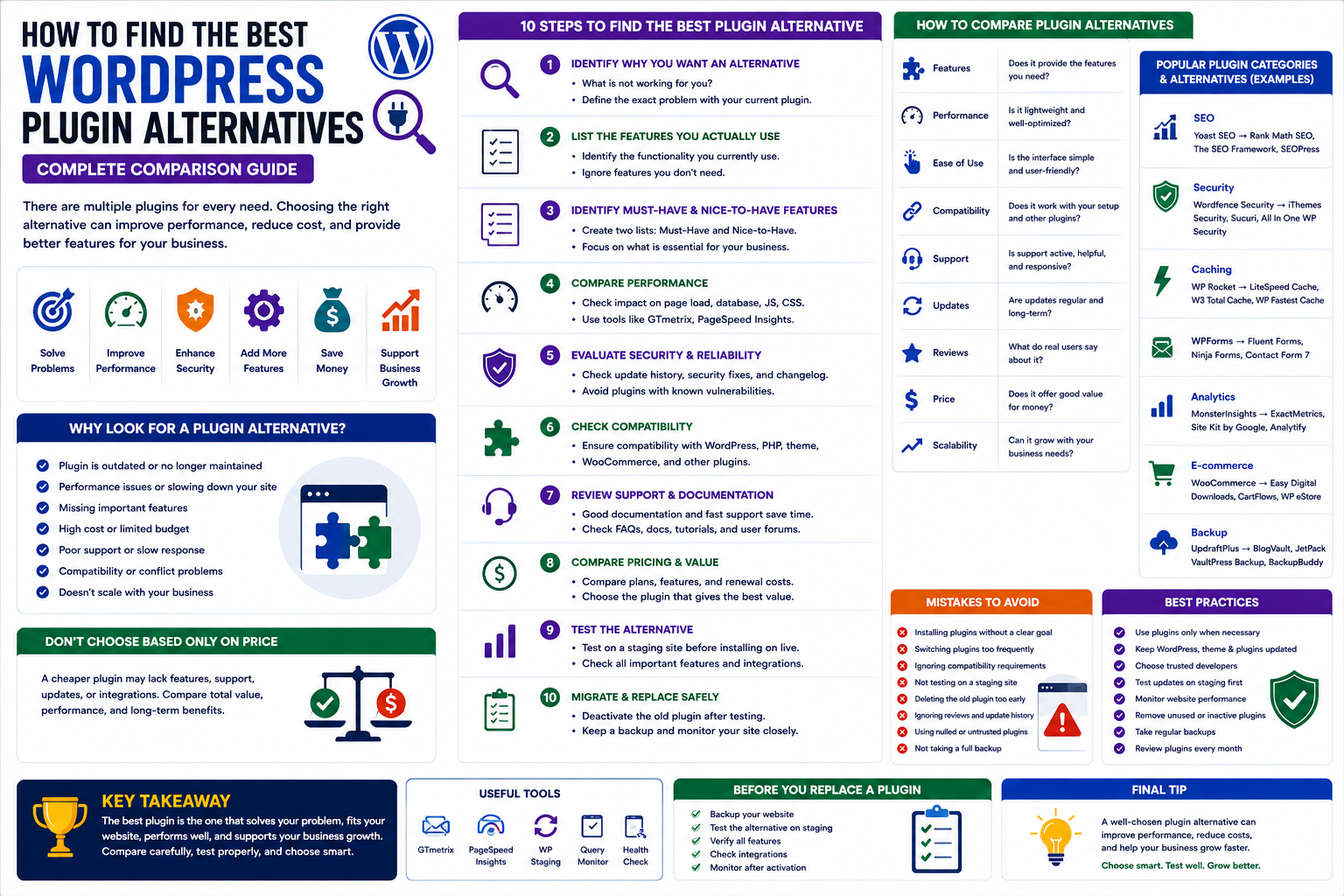
How to Find the Best WordPress Plugin Alternatives: Complete Comparison Guide
Introduction
WordPress gives website owners access to thousands of plugins for almost every type of functionality. From SEO and security to WooCommerce, analytics, Artificial intelligent , automation, marketing, and performance optimization, there is usually more than one plugin capable of solving the same problem.
This flexibility is one of WordPress's biggest advantages.
But it also creates an important challenge.
How do you know which plugin is the right choice?
You may already be using a plugin that has become outdated, too expensive, difficult to configure, slow, incompatible with another tool, or simply unable to meet your growing requirements.
In these situations, finding a reliable WordPress plugin alternative can be a better solution than continuing with software that no longer fits your website.
However, replacing a plugin should not be based only on price or popularity.
You need to compare functionality, performance, security, compatibility, support, scalability, and long-term value.
In this guide, you'll learn how to find and evaluate WordPress plugin alternatives and how to replace an existing plugin without creating unnecessary problems.
What Is a WordPress Plugin Alternative?
A WordPress plugin alternative is another plugin that provides similar or overlapping functionality to an existing plugin.
For example, you may want an alternative because your current plugin:
Is too expensive
Has become outdated
Is slowing down your website
Lacks important features
Has poor support
Creates compatibility problems
Does not scale with your business
Has become difficult to manage
An alternative does not always need to provide exactly the same features.
Sometimes, a better alternative provides fewer unnecessary features while doing the core job more effectively.
Why Look for a WordPress Plugin Alternative?
There are several reasons website owners replace plugins.
1. The Plugin Is No Longer Maintained
An abandoned plugin can become a long-term maintenance problem.
As WordPress and PHP evolve, outdated plugins may eventually become incompatible.
2. Performance Problems
A plugin may provide useful functionality but still negatively affect website performance.
If it creates excessive database queries, loads unnecessary assets, or performs resource-intensive operations, another solution may be more appropriate.
3. Missing Features
Your business may have grown beyond what the current plugin provides.
For example, a basic analytics plugin may no longer provide the reporting or segmentation your business requires.
4. High Cost
Pricing can become a concern when:
Subscription costs increase
Multiple licenses are required
Advanced features are locked behind expensive plans
A suitable alternative may provide better value.
5. Compatibility Problems
Your plugin may conflict with:
WordPress
WooCommerce
Your theme
Page builders
Other plugins
Custom integrations
A replacement can sometimes resolve these issues.
Don't Choose an Alternative Based Only on Price
Price is important, but it should not be the first or only comparison factor.
A cheaper plugin may have:
Fewer features
Less support
Poor documentation
Limited updates
Weak integrations
A slightly more expensive plugin may save development and maintenance costs over time.
Compare total value, not simply the purchase price.
Step 1: Identify Why You Want an Alternative
Before searching, define the exact problem with your current plugin.
Ask:
What isn't working for me?
Possible answers:
Too slow
Too expensive
Missing features
Difficult to use
Poor support
Compatibility issues
Security concerns
Not scalable
This gives you clear criteria for evaluating alternatives.
Step 2: List the Features You Actually Use
Do not compare every feature of the old plugin with every feature of a new plugin.
First identify the functionality your website actually uses.
For example, if you are replacing an analytics plugin, you may only need:
Sales reports
Revenue tracking
Product analytics
Customer insights
Export functionality
You may not need every advanced feature offered by the existing solution.
Step 3: Identify Must-Have Features
Create two lists:
Must-Have
Features that are essential.
Nice-to-Have
Features that would be useful but are not required.
This makes plugin comparisons much easier.
Step 4: Compare Performance
Performance should be a major consideration.
Compare alternatives based on:
Page loading impact
Database usage
JavaScript
CSS
Server processing
External API requests
Do not assume that a plugin with fewer features is automatically faster.
Test it on your actual website whenever possible.
Step 5: Compare Security
Security should never be sacrificed to save money.
Check:
Developer reputation
Update history
Security record
Plugin source
Documentation
Maintenance activity
Avoid plugins from questionable or unauthorized sources.
Step 6: Compare Compatibility
Your replacement plugin should work with your existing technology stack.
Check compatibility with:
WordPress
PHP
Theme
WooCommerce
Page builder
Other important plugins
Hosting environment
A plugin that looks excellent in isolation may not be appropriate for your particular website.
Step 7: Compare Support
Support becomes especially important for business websites.
Check:
Documentation
Support channels
Response process
Support availability
Developer activity
A reliable support system can reduce downtime and troubleshooting costs.
Step 8: Compare Pricing
When comparing plugin pricing, look beyond the advertised starting price.
Consider:
Number of websites
Renewal costs
Premium features
Add-ons
Support period
Update access
Usage limits
Calculate the expected cost over several years rather than only looking at the first purchase.
Step 9: Check Integration Options
A replacement plugin should fit into your existing workflow.
Check whether it supports integrations such as:
WooCommerce
Email marketing
CRM
Payment systems
Analytics
AI services
Automation platforms
The more important the integration, the more carefully it should be tested.
Step 10: Test the Alternative Before Removing the Existing Plugin
Do not immediately delete your existing plugin.
Instead:
Create a backup.
Set up a staging website.
Install the alternative.
Configure it.
Test important features.
Compare performance.
Verify data.
Check compatibility.
Only after successful testing should you plan the production migration.
How to Replace a WordPress Plugin Safely
Replacing a plugin can be more complicated than installing one.
Some plugins store information in the WordPress database.
Examples include:
Settings
Customer data
Analytics
Orders
Custom records
Logs
Before removing the old plugin, determine whether its data can be exported or migrated.
Never assume that deleting a plugin automatically transfers its data to another plugin.
Plugin Replacement Checklist
Before switching:
Create a full backup.
Identify current plugin functionality.
Export important data.
Check replacement compatibility.
Test on staging.
Configure the new plugin.
Verify important features.
Compare performance.
Check integrations.
Plan the production switch.
This reduces the risk of unexpected problems.
Popular WordPress Plugin Categories With Alternatives
Almost every major plugin category has multiple solutions.
SEO Plugins
Alternative solutions may provide:
Meta optimization
XML sitemaps
Schema
Content analysis
Redirect management
Security Plugins
Different security solutions may focus on:
Firewall protection
Malware scanning
Login protection
Activity monitoring
Performance Plugins
Alternatives can include solutions for:
Caching
Asset optimization
Image compression
Database optimization
WooCommerce Plugins
Businesses can compare plugins for:
Upselling
Cross-selling
Analytics
Returns
Customer management
Product recommendations
AI Plugins
AI plugin alternatives may provide:
Chatbots
Content generation
Product recommendations
Customer support
Automation
How to Compare WordPress Plugins
A simple comparison framework can help.
Factor
What to Check
Features
Does it solve your problem?
Security
Is it actively maintained?
Performance
Does it add unnecessary overhead?
Compatibility
Does it work with your stack?
Support
Is assistance available?
Pricing
What is the long-term cost?
Integrations
Does it connect with your tools?
Scalability
Can it support future growth?
Documentation
Is setup clearly explained?
User Experience
Is it easy to manage?
Use the same criteria for every plugin you compare.
This makes the decision more objective.
When Should You Keep Your Existing Plugin?
Replacing a plugin is not always the right decision.
Keep your current plugin if:
It meets your requirements.
It is actively maintained.
It performs well.
It is secure.
It integrates correctly.
Its cost is reasonable.
Your team already understands it.
Migration itself creates work and potential risk.
If there is no meaningful benefit, switching may not be worthwhile.
When Should You Replace a Plugin?
Consider replacing a plugin when:
Development has stopped.
Security concerns remain unresolved.
Performance is consistently poor.
Important features are missing.
Support is inadequate.
It conflicts with critical software.
The total cost has become unreasonable.
Your business has outgrown it.
A plugin replacement should solve a real problem.
Common Mistakes When Choosing Plugin Alternatives
Choosing the Cheapest Option
Low cost does not always mean better value.
Ignoring Data Migration
Important plugin data may not automatically transfer.
Switching Directly on Production
Testing on staging is safer.
Comparing Only Features
Performance, security, support, and compatibility are equally important.
Installing Multiple Alternatives Permanently
Running competing plugins simultaneously can create conflicts.
Use testing environments when comparing solutions.
WordPress Plugin Alternatives for Growing Businesses
As businesses grow, plugin requirements often change.
A small business may initially need basic:
Contact forms
SEO
Analytics
Security
Later, it may need:
CRM
Automation
Advanced analytics
WooCommerce optimization
AI
Customer segmentation
Plugin selection should therefore be reviewed periodically.
Your technology stack should evolve with your business.
Why ThemeKaddora Is Worth Exploring
ThemeKaddora provides WordPress plugins and digital products designed for website owners, developers, agencies, and businesses.
Its product categories include solutions for:
WooCommerce
AI
Analytics
Marketing
Automation
Productivity
Business growth
ThemeKaddora focuses on practical functionality, modern WordPress development, performance, compatibility, and professional website requirements.
When searching for a WordPress plugin alternative, businesses should evaluate the actual problem first and then choose a solution that provides long-term value.
A Better Plugin Selection Strategy
Instead of asking:
"Which plugin is the most popular?"
Ask:
What problem am I solving?
Which features are essential?
Is the plugin actively maintained?
Is it secure?
Will it perform well?
Does it integrate with my existing systems?
Can it scale?
What will it cost over time?
Is support available?
Can I test it safely?
This approach produces better decisions than relying on popularity alone.
Conclusion
Finding the right WordPress plugin alternative requires more than searching for another plugin with similar features.
Start by understanding why you want to replace the existing solution. Define your essential requirements, compare performance and security, evaluate compatibility, investigate support and pricing, and test the alternative before making the switch.
For important websites, always create backups and test migrations in a staging environment.
The best alternative is not necessarily the newest, cheapest, or most popular plugin.
It is the solution that reliably solves your problem, fits your technology stack, supports your business goals, and provides long-term value.
A thoughtful plugin replacement strategy can improve website performance, reduce maintenance problems, control costs, and create a stronger foundation for future WordPress growth.
Frequently Asked Questions
What is a WordPress plugin alternative?
A WordPress plugin alternative is another plugin that provides similar or overlapping functionality to an existing plugin.
Why should I replace a WordPress plugin?
You may replace a plugin because it is outdated, slow, expensive, unsupported, incompatible, missing important features, or no longer suitable for your business.
Is it safe to replace a WordPress plugin?
It can be safe when you create backups, test the replacement on staging, migrate important data, and verify functionality before removing the original plugin.
Can I install two plugins with similar functionality?
You can for testing in a controlled environment, but running multiple plugins that perform the same function on production can create conflicts and unnecessary complexity.
Will plugin data automatically transfer to an alternative?
Not necessarily. Different plugins may use different database structures and storage methods. Check migration and export options before switching.
How do I compare two WordPress plugins?
Compare features, security, performance, compatibility, support, pricing, integrations, documentation, usability, and scalability.
Is a cheaper WordPress plugin always better?
No. Consider the total value, including features, support, updates, maintenance, integrations, and long-term costs.
Should I switch plugins if my current one works?
Not necessarily. If your current plugin is secure, maintained, compatible, performant, and meets your requirements, there may be little reason to replace it.
Why choose ThemeKaddora?
ThemeKaddora focuses on professional digital products designed around modern WordPress development, clean implementation, performance, compatibility, usability, and business-focused functionality.
Comments (0)