
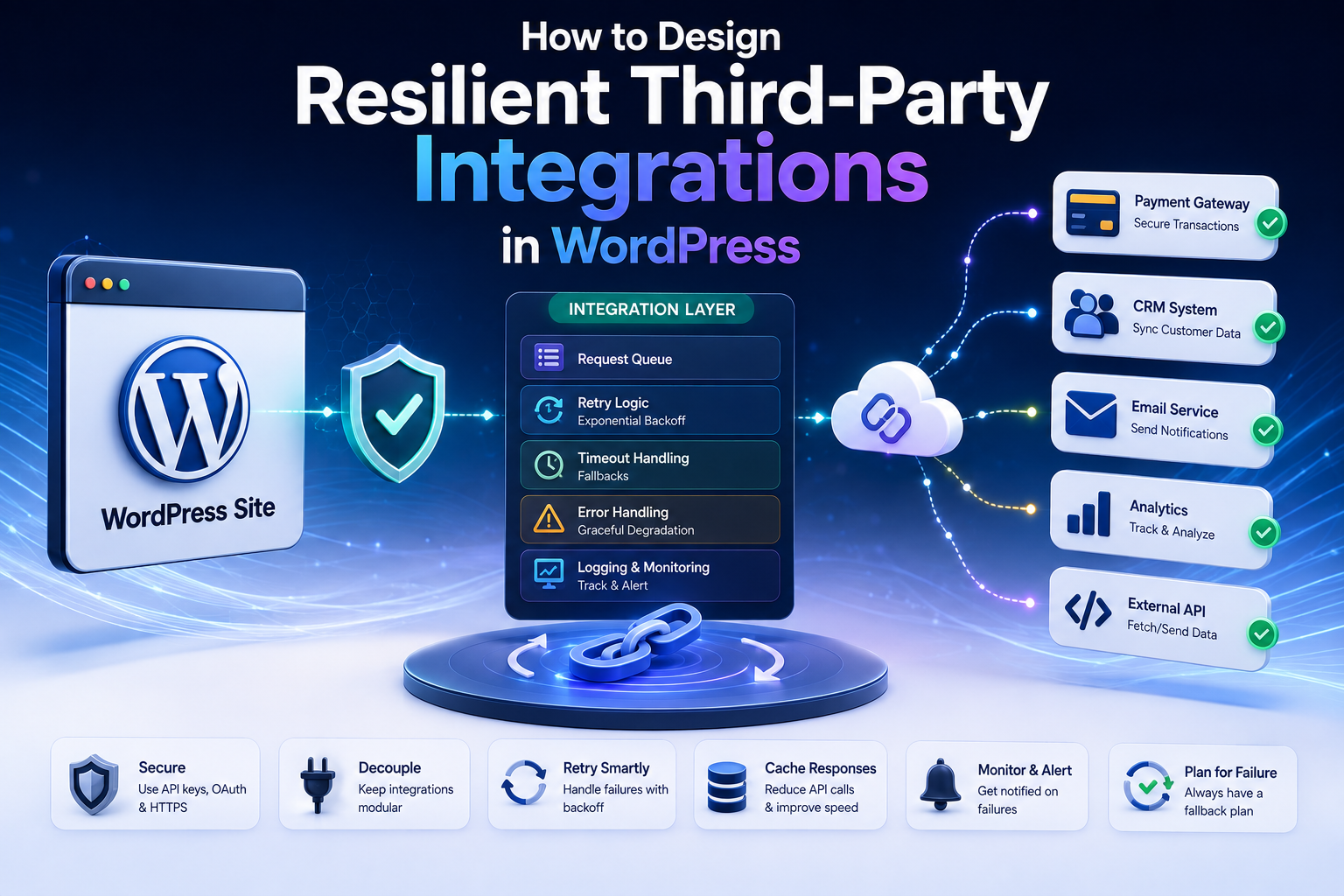
How to Design Resilient Third-Party Integrations in WordPress
Introduction
Modern WordPress websites rarely operate in isolation.
A plugin may communicate with:
AI platforms
CRM systems
Payment gateways
Shipping providers
Analytics services
Email platforms
SaaS applications
Marketing tools
Inventory systems
Internal business APIs
The basic architecture may look simple:
WordPress ↓ Third-Party API
But a production integration must assume that the external service can become:
Slow Unavailable Rate Limited Misconfigured Changed Expired Inconsistent
A provider can return:
429 Too Many Requests 503 Service Unavailable 504 Gateway Timeout
or WordPress may encounter:
Timeout DNS Failure TLS Failure Connection Failure
The remote service may also change its response format.
A previously valid response:
{ "customer_id": "C-100" }
could later become:
{ "id": "C-100" }
if the provider changes its API version or contract.
A resilient integration is designed around the assumption that external dependencies are unreliable boundaries.
The goal is not to prevent every failure.
The goal is to ensure that a failure in one external system does not unnecessarily become a failure of the entire WordPress application.
A weak integration looks like:
Visitor ↓ External API ↓ Provider Slow ↓ Page Hangs
A stronger architecture looks like:
Visitor ↓ WordPress ↓ Cached / Local Data ↓ Background Sync ↓ External API
For operations that require real-time communication:
Request ↓ Timeout / Error ↓ Controlled Failure ↓ Retry / Queue / Fallback
WordPress provides HTTP API helpers such as wp_remote_get(), wp_remote_post(), and wp_remote_request(). Its HTTP API also provides response helpers and returns either a response or WP_Error. For arbitrary URLs, WordPress provides safe request functions that validate URLs and redirects to help mitigate SSRF.
A resilient architecture therefore combines:
Security
→ Validation
→ Timeouts
→ Retries
→ Rate Limits
→ Queues
→ Caching
→ Fallbacks
→ Monitoring
→ Recovery
This guide explains how to design reliable third-party integrations in WordPress, how to isolate failures, how to choose synchronous versus asynchronous communication, how to handle provider outages, how to protect against API changes, how to use webhooks safely, how to design retry and circuit-breaker behavior, how to manage credentials, and how ThemeKaddora products can build resilient integration architectures.
What Is a Resilient Integration?
A resilient integration continues to behave safely when an external dependency becomes slow, unavailable, or unpredictable.
For example:
External API ↓ Temporary Failure ↓ WordPress
should not automatically become:
Entire Website ↓ Failure
Instead, the integration should contain the problem.
Failure Containment
A useful architecture isolates the external dependency:
WordPress Feature ↓ Integration Layer ↓ External API
The integration layer becomes the boundary where failures are classified and handled.
Why Third-Party Integrations Fail
External integrations can fail for many reasons.
Network Problems
DNS failure
Connection failure
TLS issue
Packet loss
Proxy problems
Provider Problems
Server outage
Slow response
Deployment issue
API version change
Capacity problem
Application Problems
Invalid credentials
Invalid request
Unsupported field
Incorrect endpoint
Usage Problems
Rate limits
Quota exhaustion
Account restrictions
A resilient design handles each category differently.
The Reliability Principle
A useful principle is:
Never assume that an external service will always respond quickly, correctly, or at all.
Design the failure path before the production failure occurs.
Synchronous vs Asynchronous Integrations
One of the most important architectural decisions is whether the API request should happen during the user's request.
Synchronous
Visitor ↓ WordPress ↓ API ↓ Response ↓ Visitor
Use this only when the result is genuinely required immediately.
Asynchronous
Visitor ↓ WordPress ↓ Create Job ↓ Response
Then:
Worker ↓ API ↓ Process Result
This is often better for long-running or failure-prone operations.
When Synchronous Communication Makes Sense
Examples:
Fetching a small piece of required data
Validating a request
Real-time availability lookup
A short payment authorization step
A small API calculation
Even then, use an explicit timeout.
WordPress's HTTP API supports request options such as timeout, redirect handling, SSL verification, headers, and response limits.
When Asynchronous Processing Is Better
Examples:
Bulk synchronization
AI generation
Large imports
Analytics submission
CRM synchronization
ERP synchronization
Batch email operations
Use:
Queue + Worker + Checkpoint
rather than making visitors wait.
Protect the User Experience
A slow third-party service should not unnecessarily block the frontend.
Weak:
User ↓ Wait 30 Seconds ↓ External API
Better:
User ↓ Create Job ↓ Immediate Response Worker ↓ External API
Explicit Timeouts
Every outbound API request should have an intentional timeout appropriate to its use case.
For example:
$args = array( 'timeout' => 10, );
WordPress's HTTP API supports a configurable timeout; its current request documentation lists a default timeout of 5 seconds unless overridden.
Do not rely on an accidentally inherited or unsuitable timeout.
Different Operations Need Different Timeouts
For example:
Health Check → Short Metadata Lookup → Short / Moderate Background Sync → Controlled Longer Timeout Large Export → Asynchronous
One universal timeout is not ideal.
Avoid Huge Timeouts
A 120-second timeout does not necessarily make an integration more reliable.
It may simply keep a PHP worker occupied for longer.
For long operations, asynchronous processing is usually a better architectural solution.
HTTP Error Handling
Always inspect the response.
For example:
$response = wp_remote_get( $url, array( 'timeout' => 10, ) ); if ( is_wp_error( $response ) ) { // Handle transport failure. }
Then inspect the status code:
$status = wp_remote_retrieve_response_code( $response );
WordPress provides dedicated helpers for response codes, headers, and bodies.
Error Classification
A resilient system should distinguish:
Transport Error HTTP Error Authentication Error Validation Error Rate Limit Provider Failure Schema Error Business Error Unknown Outcome
Do not send every error into the same retry loop.
Retryable Failures
Some failures may be temporary:
Timeout 429 500 502 503 504
depending on the operation and provider.
Use:
Bounded Retries + Backoff + Jitter
rather than infinite retries.
Non-Retryable Failures
Examples commonly include:
400 403 404 422
unless the provider documents a specific recovery behavior.
Retrying an invalid request does not make it valid.
Authentication Failures
A 401 may indicate an expired access token.
For OAuth-based integrations:
401 ↓ Refresh Token ↓ Retry Once
Do not create an unlimited refresh loop.
Rate Limiting
A provider may return:
429 Too Many Requests
The integration should respect provider guidance, including Retry-After where applicable.
For high-volume workloads, proactively control request volume with:
Queue + Rate Limiter + Concurrency Control
rather than waiting for repeated 429 responses.
Exponential Backoff
Instead of:
Retry Retry Retry
use increasing delays:
Attempt 1 ↓ 1 sec Attempt 2 ↓ 2 sec Attempt 3 ↓ 4 sec
Add jitter for distributed workloads.
Avoid Retry Storms
If 1,000 jobs fail simultaneously:
1,000 Jobs ↓ 1,000 Immediate Retries
can overwhelm the provider.
Use:
Backoff + Jitter + Queue + Concurrency Limits
Idempotency
Retrying writes requires special caution.
For example:
POST Create Order ↓ Timeout ↓ Retry
could create duplicates.
Use idempotency keys where the provider supports them:
Idempotency-Key: operation-123
Also use stable external IDs or local uniqueness constraints where appropriate.
Unknown Outcomes
A timeout after a write can mean:
Unknown
rather than:
Failed
For example:
Payment Request ↓ Provider Processes Payment ↓ Response Lost ↓ WordPress Times Out
The application should reconcile the remote state instead of automatically submitting another payment.
Reconciliation
A reconciliation workflow can:
Unknown Transaction ↓ Remote Lookup ↓ Found → Mark Completed Not Found → Continue Recovery
This is essential for critical operations.
Circuit Breakers
A circuit breaker prevents the application from continuously calling a failing provider.
A simplified lifecycle is:
Closed ↓ Repeated Failures ↓ Open ↓ Cooldown ↓ Half-Open ↓ Test
If the provider recovers:
Half-Open ↓ Success ↓ Closed
Why Circuit Breakers Help
Suppose the provider returns:
503 503 503 503 503
Without protection:
WordPress ↓ Thousands of More Requests
With a circuit breaker:
Provider Failure ↓ Circuit Opens ↓ New Requests Suppressed
This protects both systems.
Fallback Strategies
A resilient integration can sometimes use a fallback.
Examples:
External API → Cached Data External Recommendation Service → Default Recommendations Analytics API → Queue Event Locally
The fallback should be safe for the feature.
Last Known Good Data
For non-critical information:
Fresh API Data ↓ Cache
If the provider fails:
Provider Down ↓ Last Known Good Data
This can preserve user experience.
When Not to Use Stale Data
Avoid silently serving stale information for:
Payment authorization
Live inventory
Security decisions
Authentication state
Critical account permissions
Freshness requirements are business-specific.
Caching External Responses
Caching can reduce:
API requests
Latency
Rate-limit pressure
Provider cost
WordPress's Transients API is intended for temporary cached data, while the Object Cache API provides another cache abstraction.
Validate Before Caching
Use:
Remote Response ↓ Validate ↓ Normalize ↓ Cache
not:
Remote Response ↓ Cache ↓ Validate Later
Invalid API data should not become persistent cached state.
Cache Isolation
Cache keys should include all relevant context:
Provider Resource Parameters Tenant User Currency Language Version
where those values affect the response.
Never share private API responses accidentally between users or tenants.
Local Persistence vs API-on-Every-Request
For important external datasets, synchronization into a local data store is often better than querying the external service on every page load.
For example:
External API ↓ Background Sync ↓ WordPress Database ↓ Frontend
This improves resilience because visitors do not depend directly on provider availability.
Third-Party Integration as a Data Pipeline
A mature integration can look like:
External API ↓ Fetch ↓ Validate ↓ Map ↓ Persist ↓ Serve Locally
The external provider becomes one part of a larger pipeline instead of a direct dependency of every page.
Pagination
Large external datasets should be paginated.
Instead of:
100,000 Records ↓ One Request
use:
Page 1 ↓ Page 2 ↓ Page 3
Process and checkpoint each page.
Incremental Synchronization
After initial synchronization:
Initial Sync ↓ Incremental Changes
Use:
Cursors
Timestamps
Change tokens
Webhooks
where supported.
This reduces API volume.
Webhooks
Webhooks can reduce polling.
For example:
Provider ↓ Webhook ↓ WordPress ↓ Queue ↓ API Fetch ↓ Process
Use the webhook as a trigger and verify its authenticity before acting.
Webhook Authentication
Depending on the provider, use:
HMAC signatures
Signed headers
Webhook secrets
Provider-specific verification
Never trust the webhook payload merely because it arrived at the expected endpoint.
Webhook Idempotency
Webhook providers may retry events.
Store an event identifier where available:
event_id = evt_123
Then make processing idempotent.
Webhook and Queue Separation
The webhook handler should usually remain lightweight:
Webhook ↓ Verify ↓ Store Event ↓ Queue Job ↓ Respond
Heavy processing belongs in the background.
API Schema Changes
A provider may change:
{ "email_address": "user@example.com" }
to:
{ "email": "user@example.com" }
A resilient architecture isolates provider-specific mappings inside adapters.
Provider Adapter
Use:
Provider Response ↓ Adapter ↓ Normalized Domain Object
rather than spreading raw provider field names throughout the application.
API Versioning
If a provider offers:
/v1 /v2
keep version-specific behavior inside provider integration code.
The business layer should remain stable.
Contract Testing
Maintain representative response fixtures:
success.json rate-limited.json unauthorized.json server-error.json malformed.json
Use them to test parsers and validators.
Mock External Services
Do not make every automated test call production APIs.
Use:
Mock Sandbox Test Environment
where possible.
This makes tests:
Faster
Cheaper
More predictable
Integration Testing
Some tests should still use a real sandbox provider when available.
Verify:
Authentication Request Shape Response Shape Error Handling Pagination Rate Limits
Dependency Injection
Inject the API client into business services:
final class Sync_Service { public function __construct( private KDR_API_Client $client ) {} }
Tests can provide a mock client.
Separate Transport From Business Logic
Bad:
Controller ↓ wp_remote_post() ↓ Retry ↓ Parse JSON ↓ Database ↓ Business Decision
Better:
Controller ↓ Business Service ↓ Provider Adapter ↓ API Client ↓ HTTP API
This makes failures easier to contain.
API Client Responsibilities
The API client can handle:
HTTP methods
Headers
Authentication
Timeouts
Transport errors
Status codes
JSON decoding
Provider responses
The business layer should decide:
What does this result mean?
Synchronization Manager Responsibilities
The synchronization layer should handle:
Scheduling
Pagination
Checkpoints
Progress
Retry state
Record processing
Reconciliation
This separation makes the integration easier to scale.
Rate Limiting by Provider
Different providers can have different limits:
Provider A → 60/min Provider B → 600/min
Implement provider-specific rate policies.
Rate Limiting by Tenant
For multi-tenant products:
Tenant A → 100/min Tenant B → 100/min
may prevent one customer from consuming all shared resources.
Fair Scheduling
Instead of:
Tenant A Tenant A Tenant A Tenant A
use:
Tenant A Tenant B Tenant C Tenant A Tenant B Tenant C
when fair usage is required.
API Quotas
Some providers limit:
Requests Tokens Records Bytes Compute
A resilient system should monitor the dimensions that actually matter.
Backpressure
If the external provider is slow or the WordPress database is overloaded, reduce incoming work.
For example:
Queue Growing ↓ Reduce Worker Concurrency
Do not automatically increase concurrency because the queue is growing.
Queue Depth
Monitor:
pending processing retrying failed
A growing queue can indicate:
Provider outage
Database bottleneck
Rate-limit exhaustion
Worker failure
Stalled Jobs
A job may show:
running
but make no progress.
Track:
last_progress_at
and detect stale workers.
Worker Recovery
If a worker crashes:
Job → Processing → Worker Dies
the job should eventually be reclaimable.
Use lease-style or timeout-based processing claims where appropriate.
Synchronization Checkpoints
For paginated synchronization:
Fetch Page ↓ Validate ↓ Process ↓ Commit ↓ Checkpoint
Never move the checkpoint ahead of unfinished work.
Partial Failures
One invalid record does not always need to stop an entire batch.
Possible model:
100 Records ↓ 97 Success 3 Failed
The integration can:
Complete Page + Queue Failed Records
when business rules allow.
Critical Failures
Some errors should stop the synchronization:
Authentication failure
Schema mismatch
Database failure
Provider contract change
These require intervention or recovery before continuing.
Data Integrity
A resilient integration must protect local data.
Never:
Remote Response ↓ Blind Database Write
Instead:
Remote Response ↓ Validate ↓ Normalize ↓ Business Validation ↓ Persist
Tenant Isolation
For SaaS integrations, always carry tenant context through:
Job ↓ API Credential ↓ Cache ↓ Response ↓ Database
Never rely on mutable global state for tenant identity.
Credential Isolation
For:
Tenant A Tenant B
keep credentials independently stored and selected.
A credential for Tenant A must never accidentally be used for Tenant B.
Secret Management
Do not expose API credentials in:
Browser JavaScript
HTML
URLs
Git repositories
Logs
Exception output
WordPress's HTTP API supports authentication through request headers, and its documentation demonstrates authentication patterns such as Basic Authentication. For production systems, use the provider's recommended secure authentication method and HTTPS.
SSL Verification
WordPress HTTP requests enable SSL verification by default. Do not disable certificate verification as a routine workaround for integration problems.
Investigate certificate and server configuration instead.
SSRF Protection
If an endpoint can be influenced by users or administrators, server-side requests can become an SSRF risk.
WordPress provides:
wp_safe_remote_get() wp_safe_remote_post() wp_safe_remote_request()
for requests to arbitrary URLs. These functions validate the URL and redirects using WordPress URL validation.
For fixed trusted API endpoints, keep the destination controlled by the integration configuration rather than arbitrary user input.
Redirect Security
An apparently trusted URL may redirect elsewhere.
Safe request functions account for URL validation across redirects.
This matters when fetching:
Remote files
User-provided URLs
Configurable resources
Limit Response Size
Large unexpected responses can consume excessive resources.
WordPress's HTTP request arguments support a response-size limit, which can be useful where an integration has a known maximum expected payload.
For example:
$args = array( 'timeout' => 10, 'limit_response_size' => 2 * MB_IN_BYTES, );
Choose limits appropriate to the actual API response.
Streaming Large Responses
For large files, use streaming instead of loading everything into memory when appropriate.
WordPress's HTTP API supports stream and filename options for writing response content to a file.
This is particularly useful for:
Large exports
Media
Backups
Data files
External Service Monitoring
A resilient integration should measure:
Request Count Success Rate Error Rate Latency 429 Rate 5xx Rate Timeout Rate Queue Depth Retry Count
Correlation IDs
A request identifier can connect:
WordPress Log + Queue Job + Provider Request
For example:
kdr-sync-12345
when the external provider supports request IDs.
Structured Logging
Prefer structured fields:
provider=crm operation=customer_sync status=503 retry=2
over large unstructured message blobs.
Never Log Secrets
Do not log:
Authorization API-Key Refresh Token Password
Redact sensitive headers:
Authorization: [REDACTED]
Alerting
A resilient integration should alert when:
429 Rate Spikes 5xx Rate Spikes Authentication Failures Increase Schema Validation Starts Failing Queue Depth Explodes Sync Stops Progressing
Health Checks
A lightweight health check can verify:
Credential Connectivity Provider Availability API Version
But do not run expensive health checks on every frontend page.
Cache or schedule them.
Do Not Make Third-Party Availability a Website-Wide Dependency
Avoid architectures where:
Third-Party API Down ↓ Homepage Down
unless the entire website truly depends on that service.
For optional functionality:
Third-Party API Down ↓ Feature Degraded
is preferable.
Graceful Degradation
Examples:
Recommendations API Down → Show Default Products Analytics API Down → Queue Events CRM API Down → Save Local Data + Sync Later AI API Down → Delay Generation
The feature should fail safely.
Feature Isolation
Separate optional integrations:
AI Service CRM Service Analytics Service
so one provider failure does not necessarily stop unrelated functionality.
Provider Failover
For some products, multiple providers can be supported:
Primary Provider ↓ Failure ↓ Secondary Provider
This is useful only when provider switching is safe and the semantics are compatible.
Do not automatically fail over payment providers without understanding the business and regulatory implications.
Fallback Provider vs Retry
They solve different problems.
Retry:
Same Provider → Try Again
Fallback:
Primary Provider → Alternative Provider
Use fallback only when the alternative can safely perform the same business operation.
API Dependency Mapping
Document which product features depend on which providers:
Feature
Provider
Criticality
AI Generation
AI API
Medium
Payment
Payment API
High
Analytics
Analytics API
Low
CRM Sync
CRM API
Medium
Shipping
Shipping API
High
This helps define failure strategies.
Criticality-Based Design
Not every integration needs the same resilience level.
Low Criticality
Cache + Retry
may be enough.
Medium Criticality
Queue + Retry + Monitoring
High Criticality
Queue + Idempotency + Reconciliation + Circuit Breaker + Monitoring
Design according to business impact.
Recovery Time Objectives
For important integrations, define:
How quickly must this recover?
For example:
Payment Status → Minutes Analytics → Hours
Recovery requirements influence queue priority and retry strategies.
Recovery Point Expectations
Also define:
How much synchronization lag is acceptable?
For example:
Inventory → Seconds / Minutes Historical Analytics → Hours
This helps determine whether stale data is acceptable.
Resilience Testing
Do not test only the successful path.
Simulate:
Timeout 429 500 503 Invalid JSON Invalid Schema Expired Token Provider Outage Slow Provider Duplicate Webhook Database Failure Worker Crash
Chaos Testing
For higher-value integrations, intentionally introduce failures in non-production environments.
For example:
Provider Response → 503
or:
Network → Delay
Then verify that the system recovers correctly.
Recovery Testing
Test:
Failure ↓ Pause ↓ Fix ↓ Resume
Ensure the system does not lose progress.
Backup and Recovery
Synchronization state is part of application state.
Back up important:
Sync checkpoints
Mapping tables
External IDs
Job state
Configuration
where appropriate.
Migration Considerations
When moving a WordPress site between hosts:
Database + Files + Cron + Credentials + Sync State
must remain consistent.
Otherwise, jobs may repeat or stop unexpectedly.
Deployment Safety
When deploying a new integration version:
Old Code ↓ Migration ↓ New Code
consider compatibility with existing:
Checkpoints
Cache entries
Job states
Database mappings
Schema Migration
If synchronization state changes from:
cursor
to:
cursor + version
migrate existing jobs safely.
Backward-Compatible API Clients
When providers evolve:
Adapter V1 Adapter V2
can provide a transition path.
Avoid rewriting business logic unnecessarily.
Versioned Data Contracts
Store internal records in a stable structure:
External Provider ↓ Adapter ↓ Internal Contract
This makes provider changes less disruptive.
Dependency Documentation
Document:
Provider Endpoint Authentication Rate Limits Timeout Retry Policy Pagination Webhook Data Ownership
This becomes the integration's operating manual.
Third-Party Integration Checklist
Before production:
☑ Provider Documented ☑ Authentication Tested ☑ HTTPS Enabled ☑ SSL Verification Enabled ☑ Timeout Defined ☑ Retry Policy Defined ☑ Rate Limits Documented ☑ Pagination Tested ☑ Response Validation Added ☑ Schema Validation Added ☑ Idempotency Considered ☑ Queue Added Where Needed ☑ Checkpointing Added ☑ Webhook Verification Added ☑ Cache Strategy Defined ☑ Fallback Defined ☑ Monitoring Added ☑ Alerting Added ☑ Recovery Tested
Common Resilience Mistakes
Making External APIs Synchronous Everywhere
One provider outage can slow the whole site.
No Timeout
Requests can consume workers indefinitely.
Infinite Retries
Can create retry storms.
No Idempotency
Retries can duplicate side effects.
No Checkpoint
Large jobs restart from the beginning.
No Rate Limiting
Provider returns 429 repeatedly.
No Cache
Identical requests consume unnecessary API quota.
No Fallback
Optional features break entirely.
No Monitoring
Failures remain invisible.
No Reconciliation
Unknown external state remains unresolved.
No Tenant Isolation
One customer's credentials or data can leak into another customer's workflow.
No Contract Testing
API changes can silently break production.
Best Practices for Resilient WordPress Integrations
A professional third-party integration should:
Treat external services as unreliable dependencies.
Use explicit timeouts.
Separate synchronous and asynchronous operations.
Centralize API communication in a reusable client.
Classify errors before retrying.
Use bounded exponential backoff and jitter.
Respect provider rate limits and Retry-After.
Use idempotency for retryable write operations.
Track unknown outcomes separately from failures.
Use queues and checkpoints for long-running work.
Cache safe reusable responses.
Validate responses before persistence or caching.
Use provider adapters to isolate schema differences.
Verify webhooks cryptographically where supported.
Protect arbitrary outbound URLs against SSRF.
Keep SSL verification enabled.
Isolate tenant credentials and data.
Add structured logging and monitoring.
Build graceful degradation for optional features.
Test provider outages and recovery procedures.
Periodically reconcile important synchronized data.
Practical Integration Workflow
A robust third-party integration can follow:
User / Cron / Webhook │ ▼ Business Service │ ▼ Job / Queue │ ▼ Provider Adapter │ ▼ API Client │ ┌───────┴────────┐ ▼ ▼ Cache Rate Limit │ │ └───────┬────────┘ ▼ External Provider │ ▼ Response │ ▼ Validation │ ┌───────┴─────────┐ ▼ ▼ Success Error │ │ ▼ Retry / Reconcile Persistence │ ▼ Checkpoint
Why Resilience Should Be Built Early
Retrofitting resilience later is harder.
A plugin that starts with:
Direct HTTP Call
may later need:
API Client Queue Retry Cache Checkpoint Reconciliation Monitoring
This can require significant refactoring.
Design reasonable boundaries from the beginning.
Start Simple, But Preserve Boundaries
A small plugin does not need a massive distributed architecture.
You can start with:
Business Service ↓ API Client ↓ HTTP API
Then add:
Cache Queue Retry Monitoring
as actual requirements emerge.
The key is keeping responsibilities separate.
Complexity Should Match Business Risk
For a simple public metadata integration:
HTTP + Cache + Timeout
may be enough.
For payments:
HTTP + Timeout + Idempotency + Reconciliation + Monitoring
may be necessary.
Do not over-engineer low-risk features, but do not under-engineer critical workflows.
Why choose ThemeKaddora?
ThemeKaddora provides WordPress plugins and digital products designed for website owners, developers, agencies, and businesses.
Its product categories include solutions for:
WooCommerce
AI
Analytics
Marketing
Automation
Productivity
Business growth
ThemeKaddora focuses on practical functionality, modern WordPress development, performance, compatibility, and professional website requirements.
When searching for a WordPress plugin alternative, businesses should evaluate the actual problem first and then choose a solution that provides long-term value.
Conclusion
Resilient third-party integrations are a fundamental part of professional WordPress development.
The most important shift in thinking is:
An external API is not a reliable extension of your application. It is an independent system that can fail, slow down, change, rate-limit, or return unexpected data.
Once that assumption is accepted, the architecture becomes clearer.
Use:
Timeouts
→ Prevent requests from blocking indefinitely
Retries
→ Recover from temporary failures
Backoff
→ Prevent retry storms
Rate Limits
→ Control request volume
Queues
→ Move expensive work out of user requests
Caching
→ Reduce unnecessary external calls
Pagination
→ Process large datasets safely
Checkpoints
→ Resume interrupted jobs
Idempotency
→ Prevent duplicate side effects
Reconciliation
→ Resolve uncertain external state
Webhooks
→ Reduce unnecessary polling
Provider Adapters
→ Isolate API-specific changes
Monitoring
→ Detect failures early
The most important part is not any individual technique.
It is how the techniques work together.
For example:
Provider 503 ↓ Retry Policy ↓ Backoff ↓ Queue ↓ Retry
For a rate limit:
429 ↓ Retry-After ↓ Schedule Later
For a payment timeout:
Timeout ↓ Unknown ↓ Reconciliation
For an optional analytics service:
Provider Down ↓ Store Event Locally ↓ Send Later
For a large CRM:
Pagination ↓ Batch ↓ Checkpoint ↓ Incremental Sync
For SaaS:
Tenant ↓ Tenant Credential ↓ Tenant Job ↓ Tenant Checkpoint
For arbitrary external URLs, use WordPress's safe HTTP request functions when appropriate. WordPress documents that wp_safe_remote_request() validates the requested URL and redirects to reduce SSRF risk.
For normal third-party API requests, WordPress's HTTP API provides the request abstraction, response helpers, timeouts, headers, SSL verification, response-size limits, and related controls needed to build the integration layer.
For ThemeKaddora products, a strong architecture is:
Feature │ ▼ Business Service │ ▼ Job Layer │ ▼ Provider Adapter │ ▼ API Client │ ┌─────┴─────┐ ▼ ▼ Cache Rate Limiter │ │ └─────┬─────┘ ▼ External Provider │ ▼ Validator │ ▼ Persistence │ ▼ Checkpoint
This architecture allows products to grow without turning every new API integration into a separate collection of fragile HTTP calls.
The most important principle is:
Design the failure path as carefully as the success path.
A third-party integration is production-ready only when the team knows what happens when:
The API is slow. The API is down. The token expires. The API returns 429. The schema changes. The webhook is duplicated. The request times out after a write. The database is temporarily unavailable. The worker crashes. The provider changes its API version.
A professional WordPress integration should therefore be:
Secure
→ Failure-Tolerant
→ Recoverable
→ Observable
→ Idempotent
→ Rate-Limit-Aware
→ Asynchronous When Appropriate
→ Tenant-Safe
→ Maintainable
→ Tested Under Failure
When these principles are followed, third-party services become controlled dependencies rather than single points of failure for the WordPress application.
Frequently Asked Questions
What is a resilient third-party integration?
It is an integration designed to continue operating safely when the external service is slow, unavailable, rate limited, inconsistent, or temporarily broken.
Why are timeouts important?
Without an explicit timeout, an external request can occupy application resources longer than intended. WordPress supports configurable HTTP request timeouts.
Should every API integration use retries?
Not necessarily. Retry only failures that are likely temporary and operations that are safe to repeat.
What is the safest way to retry a payment?
Use provider-supported idempotency, explicit transaction state, and reconciliation for uncertain outcomes. Never blindly repeat a payment after a timeout.
Why should large API operations use queues?
Queues prevent long-running external work from blocking visitor-facing requests and provide a place to store retries, progress, and checkpoints.
What is graceful degradation?
It means allowing the WordPress application or feature to continue operating at a reduced level when an optional external service is unavailable.
Should I cache every external API response?
No. Cache only data whose freshness, security, and reuse characteristics make caching appropriate.
How can I protect user-configurable API URLs?
Use strict endpoint validation and WordPress's safe HTTP request functions when URLs are arbitrary or user-controlled. WordPress documents these helpers as protection against SSRF through URL and redirect validation.
Why choose Themekaddora?
Themekaddora provides lightweight, responsive, SEO-friendly WordPress themes with fast performance, WooCommerce compatibility, flexible customization, accessibility-conscious design, modern templates, regular updates, and professional support—providing a strong foundation for businesses building digital products and product-focused websites.
Comments (0)