
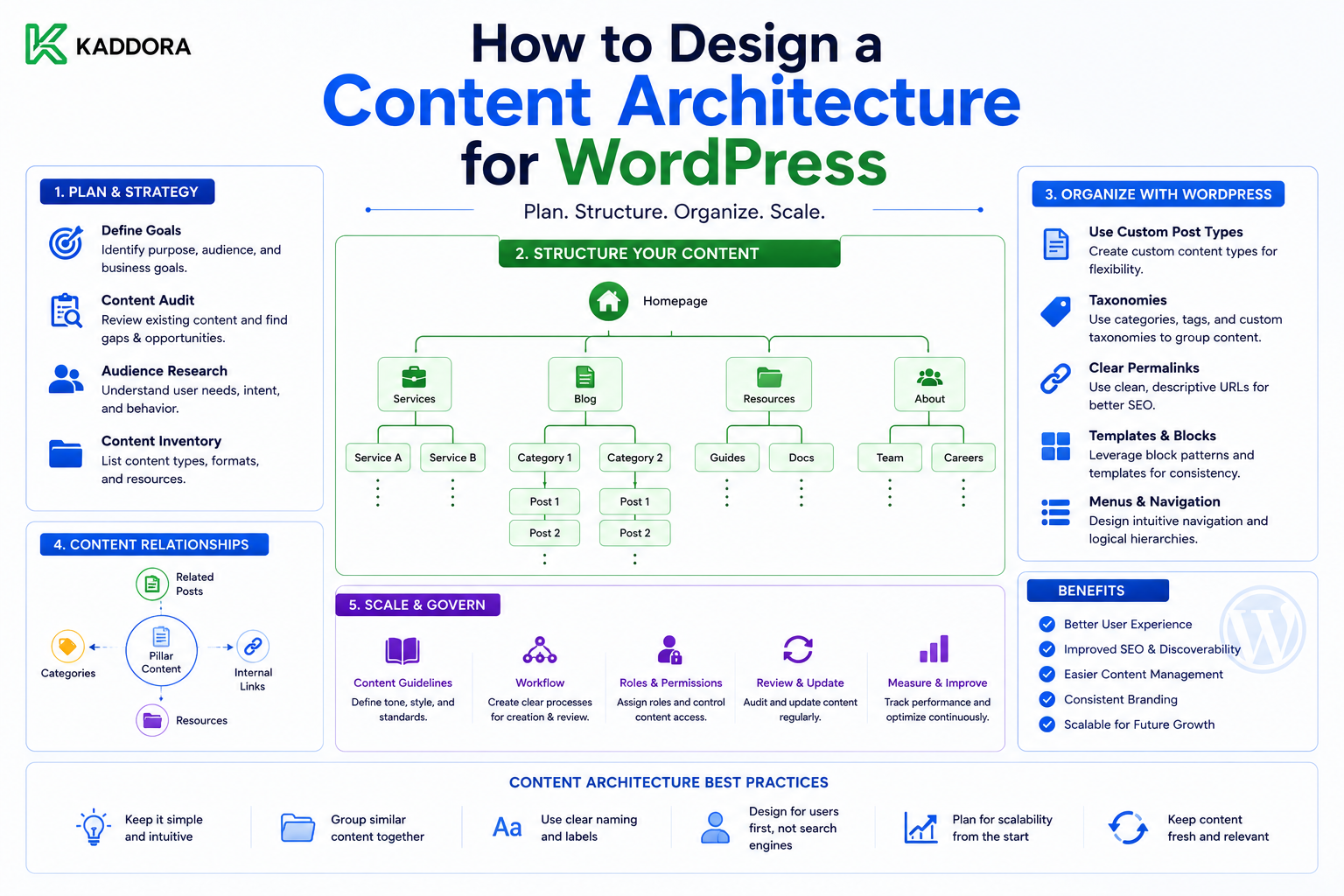
How to Design a Content Architecture for WordPress
Introduction
A WordPress website can contain hundreds, thousands, or even millions of content records.
At a small scale, content organization may appear simple:
Pages Posts Categories Tags
As the website grows, however, content becomes more complex.
A large website may contain:
Articles
Products
Authors
Documentation
Case studies
Reviews
Events
Courses
Locations
Topics
Industries
FAQs
Without a clear architecture, the site can develop problems such as:
Duplicate content
Confusing navigation
Inconsistent categories
Poor internal linking
Difficult editorial workflows
Slow or complicated queries
Hard-to-maintain URLs
Repeated information
Difficult migrations
This is why content architecture matters.
Content architecture defines how information is organized, related, managed, discovered, and presented across the website.
A useful model is:
Business Requirements ↓ Content Entities ↓ Fields + Taxonomies ↓ Relationships ↓ Navigation ↓ Templates ↓ Search + APIs
The architecture should support both current needs and reasonable future growth.
The key principle is:
Design the information structure before designing thousands of individual pages.
What Is WordPress Content Architecture?
WordPress content architecture is the system used to organize and connect the information stored on a WordPress website.
It answers questions such as:
What content types exist? How are they categorized? How are they related? How are they navigated? Who manages them? How are they searched? How are they displayed?
It is broader than simply choosing between posts and pages.
Content Architecture vs Information Architecture
These concepts overlap.
Information architecture focuses heavily on how information is organized and discovered by users.
Content architecture also considers the underlying content model, relationships, fields, workflows, and technical implementation.
A practical WordPress architecture should consider both.
Why Content Architecture Matters
A strong structure helps:
Users find information faster
Editors manage content consistently
Developers build reusable templates
Search systems retrieve relevant information
Related-content systems work reliably
APIs expose structured information
Teams scale content production
Poor architecture creates friction throughout the entire website.
Start With Business Goals
Do not begin with:
"Which WordPress post types should I create?"
Start with:
"What does this website need to represent and accomplish?"
For example, an online marketplace may need:
Products Categories Authors Articles Documentation Reviews FAQs
A university may need:
Courses Departments Faculty Programs Events Research News
The business model should drive the architecture.
Identify Core Content Entities
List the major entities before designing the WordPress implementation.
For example:
Product Article Author Documentation Category Review
Then determine how each entity behaves.
Ask:
Does it have its own URL?
Does it need custom fields?
Does it have its own lifecycle?
Does it have relationships?
Does it require unique permissions?
Does it need independent search?
These answers help determine whether it deserves to be modeled separately.
Define Content Types
WordPress provides several ways to structure information.
Common options include:
Posts
Pages
Custom Post Types
Taxonomies
Metadata
Custom database tables
Do not automatically create a Custom Post Type for every concept.
Choose the structure that best represents the underlying information.
Posts for Editorial Content
Posts are often appropriate for:
Articles
News
Announcements
Blog updates
They already support common editorial concepts such as:
Author
Date
Categories
Tags
Revisions
Pages for Stable Website Content
Pages often work well for:
About
Contact
Legal information
Company information
General landing pages
Avoid using pages as a substitute for structured entities when those entities need specialized relationships or fields.
Custom Post Types for Distinct Entities
A custom post type can represent a specialized entity such as:
Product Course Event Case Study Documentation
The important question is:
Does this content behave differently enough from ordinary posts or pages to justify its own model?
Define Fields Before Building Templates
For each content type, document its important fields.
For example:
Product Required: Name Description Status Category Optional: Version Demo URL Documentation Video
This becomes the content specification.
Distinguish Required and Optional Data
Required fields improve consistency.
For example:
Article: Title → Required Author → Required Topic → Required Summary → Optional Video → Optional
Without this distinction, editors may create incomplete content.
Use Structured Data for Structured Information
If information must be:
Filtered
Sorted
Queried
Exported
Reused
store it in structured fields.
For example:
Product Version → Field Product Price → Field Product Status → Field
rather than putting all of it into a paragraph.
Design Taxonomies Carefully
Taxonomies provide shared classification.
For an article library:
Topic Industry Difficulty
For products:
Category Technology License
Each taxonomy should have a clear purpose.
Avoid Taxonomy Overload
A website can become difficult to manage when editors see:
Category Topic Type Group Area Section Class Theme Subject
with overlapping meanings.
Every taxonomy should answer a different classification question.
Define Taxonomy Ownership
For each taxonomy, decide:
Who creates terms? Who approves them? Who can edit them?
Without governance, taxonomy values often become inconsistent.
For example:
AI Artificial Intelligence Artificial-Intelligence AI Technology
may all describe the same concept.
Use Hierarchies Only When Meaningful
A hierarchical structure may be:
Technology ├── AI ├── APIs └── Cloud
This works when parent-child relationships are meaningful.
Do not create deep hierarchies just to make the taxonomy appear sophisticated.
Design Content Relationships
Complex websites depend heavily on relationships.
For example:
Article ↓ Product ↓ Documentation
or:
Course ↓ Instructor ↓ Department
Relationships should be deliberately modeled.
Common Relationship Types
Consider:
One-to-One One-to-Many Many-to-Many Parent-Child Related Prerequisite Featured
The meaning of the relationship matters.
Example Many-to-Many Model
An article can cover multiple products:
Article A ├── Product 1 └── Product 2 Article B ├── Product 2 └── Product 3
The same product can therefore appear across multiple articles.
Relationship Direction
Sometimes relationships have direction.
For example:
Product → Documentation
The product is the primary entity.
Other relationships may be symmetrical:
Related Product A ↔ Related Product B
Define the semantics clearly.
Relationship Metadata
Sometimes a relationship has its own information.
For example:
Product ↓ Article Relationship: Featured Priority: 1
This should be modeled as relationship data rather than hidden in unrelated content fields.
Create a Navigation Hierarchy
Content architecture must connect to navigation.
For example:
Home ├── Products │ ├── WordPress │ ├── WooCommerce │ └── AI ├── Blog ├── Documentation └── Resources
Navigation should reflect how users actually look for information.
Navigation Is Not the Same as Content Structure
A content item can belong to one conceptual location while appearing in multiple navigation contexts.
For example:
Product
may appear under:
Products
and also:
Featured Solutions
Do not force the content model to exactly match one navigation menu.
Design URLs Carefully
URL structures should be:
Predictable
Stable
Understandable
Consistent
For example:
/products/product-name/
may work better than deeply nested URLs that reflect every taxonomy relationship.
Avoid creating URL structures that are impossible to preserve when the taxonomy changes.
Separate URL Structure From Taxonomy Structure
A product may belong to:
AI WordPress Business
but that does not mean the URL must contain all three classifications.
Keeping them separate can make URLs more stable.
Design Templates Around Content Models
Templates should consume structured content.
For example:
Product Template ├── Product Name ├── Description ├── Features ├── Related Articles └── Documentation
This is better than manually building every page from unrelated blocks.
Reusable Components
A content architecture should support reusable presentation components such as:
Product cards
Author profiles
Related articles
FAQ blocks
Comparison tables
Documentation sections
The data model should make these components easy to populate.
Content Architecture and Search
Search requirements should influence the model.
Users may search by:
Topic Product Author Industry Location Keyword
If an attribute is important for search, it should be modeled in a queryable way.
Search vs Navigation
Navigation helps users browse.
Search helps users retrieve specific information.
A good architecture supports both.
Content Architecture and Internal Linking
Relationships can automatically support relevant internal links.
For example:
Article ↓ Related Product ↓ Documentation
This can create a connected information ecosystem.
Content Architecture for Topic Clusters
A content system can support:
Topic ├── Pillar Article ├── Supporting Articles ├── FAQs └── Related Products
The structure allows the website to organize content around meaningful subjects.
Avoid Artificial Relationships
Do not connect content merely to create more internal links.
Relationships should have a real informational purpose.
Content Lifecycle
Define how each content type moves through its lifecycle.
For example:
Draft ↓ Review ↓ Approved ↓ Published ↓ Updated ↓ Archived
Different content types can have different lifecycle requirements.
Content Ownership
Assign responsibility:
Product Team → Products Marketing → Articles Support → Documentation
This becomes increasingly important as teams grow.
Editorial Permissions
Not every user should necessarily be able to:
Create taxonomies
Change content types
Edit relationships
Publish content
Archive content
Permissions should align with responsibilities.
Content Governance
Define rules for:
Naming
Taxonomies
Required fields
Relationships
URLs
Ownership
Archiving
Governance prevents architecture drift.
Avoid Duplicate Sources of Truth
Suppose the product description exists in:
Product Article Landing Page Documentation
Which one is authoritative?
Choose one.
For example:
Product Entity → Authoritative Product Data
Other pages reuse it.
Build Reusable Content
A strong architecture allows one piece of data to power multiple experiences:
Product ├── Website ├── Search ├── API ├── Comparison └── Email
This reduces duplication.
Content Architecture and APIs
Structured content makes API development easier.
For example:
GET /wp-json/kdr/v1/products/123
can expose a stable product representation.
The content model should not be designed only around a single frontend.
Headless WordPress Considerations
If WordPress content may later power:
React
Mobile applications
External websites
SaaS dashboards
design content so that meaningful information is stored independently from presentation.
Content Architecture and Performance
A theoretically clean model can still perform poorly.
Test actual queries such as:
Find all articles for product X Find all products in category Y Find content updated after date Z Find all related documentation
Measure how these queries behave at realistic content volumes.
Avoid N+1 Queries
A page that loads:
100 Articles ↓ Each Article ↓ Related Product Query
may create unnecessary database work.
Use efficient loading strategies and appropriate relationships.
Custom Tables for Specialized Data
For very large or specialized datasets, custom database tables may be appropriate.
Examples include:
High-volume events
Queue jobs
Analytics
Complex relationship indexes
Do not move standard WordPress content to custom tables without a clear reason.
Content Architecture and Caching
Well-defined content objects can be cached more predictably.
For example:
Product 123 ↓ Cached Representation
Invalidate or refresh the cache when the source content changes.
Content Architecture and APIs
If external systems consume content, define stable identifiers.
Useful identifiers can include:
WordPress ID External ID Slug UUID
Choose based on integration requirements.
Avoid Using Slugs as Universal IDs
Slugs can change.
For integration-heavy systems, a stable internal identifier should generally be preferred over assuming the slug never changes.
Content Model Versioning
As architecture evolves:
Version 1 ↓ Version 2 ↓ Version 3
document structural changes and migrations.
Migration Planning
A content architecture change should follow:
Backup ↓ Migration ↓ Validation ↓ Testing ↓ Deployment ↓ Monitoring
Large changes should be tested on staging first.
Content Architecture Documentation
Create a model document for each major entity:
Entity: Product Fields: Name Description Version Status Taxonomies: Category Technology Relationships: Author Article Documentation Lifecycle: Draft Published Archived
This provides a shared reference for developers and editors.
Content Architecture and Search Experience
Structured data can power:
Filters
Facets
Related content
Recommendations
Search suggestions
Category pages
This is more robust than extracting attributes from article text.
Content Architecture and Recommendations
A recommendation system can use relationships such as:
Same Topic Same Category Related Product Related Industry Frequently Viewed Together
The architecture provides the data foundation.
Content Architecture and AI
AI-powered features can benefit from structured metadata.
For example:
Article ├── Topic ├── Audience ├── Difficulty ├── Products └── Summary
This provides additional context for retrieval and recommendation systems.
Design for Human Editors
Architecture should not only make developers happy.
Editors should understand:
What is this field? Why is it required? Which category should I choose? Which content should be related?
Good architecture reduces editorial confusion.
Avoid Excessive Complexity
A content architecture with:
25 Taxonomies 17 Relationships 40 Required Fields
may technically be structured but operationally difficult.
Use only the structure that delivers meaningful value.
A Practical Content Architecture Process
Use this sequence:
1. Define Business Goals ↓ 2. Identify Content Entities ↓ 3. Define Fields ↓ 4. Define Taxonomies ↓ 5. Define Relationships ↓ 6. Define Navigation ↓ 7. Define Lifecycle ↓ 8. Define Ownership ↓ 9. Test Search & Queries ↓ 10. Implement
This prevents technical implementation from coming before information design.
Common WordPress Content Architecture Mistakes
Treating Every Item as a Page
Makes structured content difficult to query.
Creating Too Many Post Types
Fragments similar concepts.
Too Many Taxonomies
Creates classification confusion.
No Relationship Model
Forces manual content connections.
Duplicate Information
Creates conflicting sources of truth.
URLs Tied Too Closely to Taxonomies
Taxonomy changes can break URL strategies.
No Governance
Content structure becomes inconsistent over time.
Ignoring Query Performance
Architecture may work with 100 records but fail with 100,000.
Content Architecture Checklist
- [ ] Define business goals - [ ] Identify major entities - [ ] Define content types - [ ] Define required fields - [ ] Define taxonomies - [ ] Define relationships - [ ] Define navigation - [ ] Define URL strategy - [ ] Define lifecycle states - [ ] Define ownership - [ ] Establish sources of truth - [ ] Define search requirements - [ ] Test important queries - [ ] Consider APIs - [ ] Consider caching - [ ] Consider performance - [ ] Document the architecture - [ ] Define governance - [ ] Test migrations
Best Practices for WordPress Content Architecture
A scalable content architecture should:
Start from business information rather than WordPress implementation details.
Define clear content entities.
Use the simplest appropriate WordPress structures.
Use structured fields for structured data.
Give each taxonomy a distinct purpose.
Model important relationships explicitly.
Separate navigation from the underlying content model.
Maintain a single source of truth.
Define content ownership and lifecycle.
Consider search and API requirements early.
Test queries at realistic scale.
Avoid unnecessary custom tables.
Document structural decisions.
Establish governance for future changes.
Keep the editor experience understandable.
Why choose ThemeKaddora?
ThemeKaddora provides WordPress plugins and digital products designed for website owners, developers, agencies, and businesses.
Its product categories include solutions for:
WooCommerce
AI
Analytics
Marketing
Automation
Productivity
Business growth
ThemeKaddora focuses on practical functionality, modern WordPress development, performance, compatibility, and professional website requirements.
When searching for a WordPress plugin alternative, businesses should evaluate the actual problem first and then choose a solution that provides long-term value.
Conclusion
Content architecture is one of the most important foundations of a large WordPress website.
A website can have excellent design and fast hosting while still becoming difficult to manage because the underlying content structure is inconsistent.
The first principle is start with business entities.
Ask what the organization actually needs to represent:
Products Articles Services Authors Documentation Events
The second principle is choose appropriate WordPress structures.
Posts, pages, custom post types, taxonomies, metadata, and custom tables should each have a clear purpose.
The third principle is structure important information.
If data needs to be filtered, sorted, searched, exported, or reused, model it as data rather than burying it in unstructured text.
The fourth principle is model relationships.
A modern content ecosystem is rarely a collection of isolated pages.
For example:
Product ↓ Documentation ↓ Article ↓ FAQ
These relationships can power navigation, search, recommendations, and reusable experiences.
The fifth principle is maintain a single source of truth.
Do not manually copy the same product information into multiple pages unless there is a specific reason.
The sixth principle is design navigation independently from the data model.
The same product may appear in multiple navigation and discovery contexts without changing its underlying identity.
The seventh principle is consider performance early.
Test important queries with realistic data volumes.
A model that performs well for 100 records may behave very differently with 100,000.
The eighth principle is include lifecycle and ownership.
Large websites need clear answers to:
Who owns this? Is it approved? Is it current? Should it be archived?
The ninth principle is design for reuse.
Structured content can power:
Website Search API Recommendations Mobile Email
without duplicating the underlying information.
The tenth principle is govern the architecture.
A content model can slowly become inconsistent when every editor or developer introduces new structures independently.
For ThemeKaddora, a connected ecosystem might look like:
Product ├── Documentation ├── Articles ├── Reviews ├── FAQs └── Related Products
while articles can connect back to:
Topics Products Industries Related Articles
This creates a reusable information system rather than a collection of disconnected pages.
The recommended architecture process is:
Business Goals ↓ Entities ↓ Fields ↓ Taxonomies ↓ Relationships ↓ Navigation ↓ Lifecycle ↓ Ownership ↓ Search ↓ Implementation
The most important principle is:
Design the information architecture around how the business and users understand the content, then use WordPress structures to implement that model cleanly.
A professional WordPress content architecture should be:
Structured
→ Discoverable
→ Relationship-Aware
→ Reusable
→ Governed
→ Searchable
→ API-Friendly
→ Performance-Aware
→ Maintainable
→ Scalable
When these principles are applied, WordPress can support complex content ecosystems without becoming a collection of disconnected posts, pages, categories, and manually maintained links.
Frequently Asked Questions
What is WordPress content architecture?
WordPress content architecture is the system used to organize content types, fields, taxonomies, relationships, navigation, ownership, and lifecycle rules across a WordPress website.
What is the difference between content architecture and content modeling?
Content modeling defines the structure of individual content entities. Content architecture is broader and also considers relationships, navigation, workflows, search, governance, and implementation.
Should every type of content use a custom post type?
No. Use custom post types when the content represents a genuinely distinct entity with its own fields, relationships, workflows, or queries.
How many taxonomies should a WordPress website have?
There is no universal number. Each taxonomy should represent a distinct and useful classification rather than duplicating the purpose of another taxonomy.
Why are content relationships important?
Relationships allow the website to connect products, articles, documentation, authors, topics, and other entities for navigation, search, recommendations, and reusable experiences.
Should URL structures follow taxonomy structures?
Not necessarily. Keeping URLs relatively independent from taxonomies can make them more stable when classifications change.
Can content architecture improve SEO?
A clear architecture can support better navigation, internal linking, topic organization, structured content, and discoverability. It should primarily be designed around users and business requirements.
How does content architecture support headless WordPress?
A structured content model makes it easier to expose consistent entities and relationships through APIs to mobile applications, JavaScript frontends, and other systems.
Why choose Themekaddora?
Themekaddora provides lightweight, responsive, SEO-friendly WordPress themes with fast performance, WooCommerce compatibility, flexible customization, accessibility-conscious design, modern templates, regular updates, and professional support—providing a strong foundation for businesses building digital products and product-focused websites.
Comments (0)