
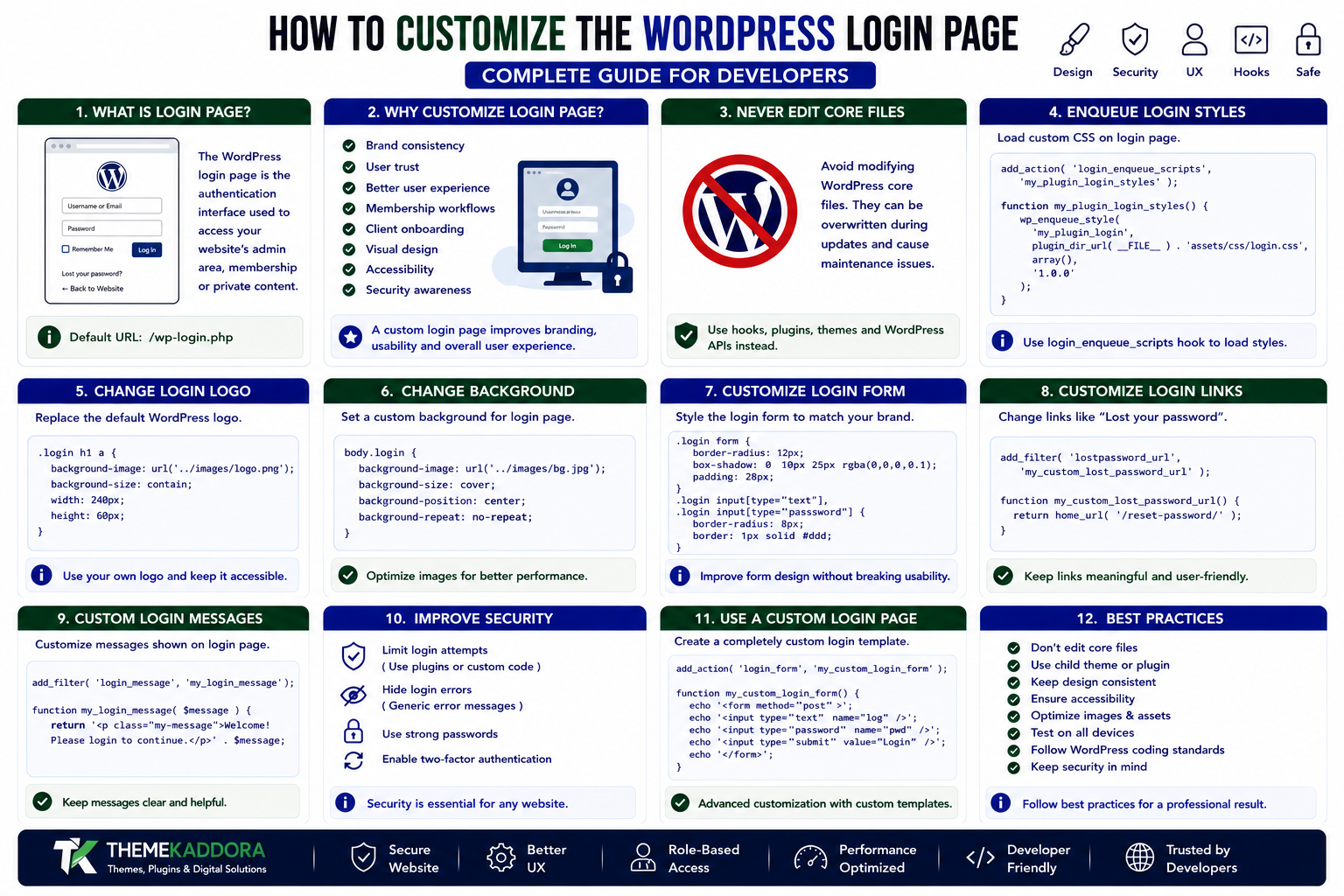
How to Customize the WordPress Login Page: Complete Guide for Developers
Introduction
The WordPress login page is one of the first screens users encounter when accessing a website's administration area, membership system, customer portal, or private content.
The default WordPress login screen is functional, but businesses, agencies, membership websites, SaaS platforms, and custom WordPress applications often need a more personalized experience.
You may want to:
Add your brand logo
Change the background
Customize colors
Add custom CSS
Modify login messages
Change links
Improve accessibility
Create a branded customer experience
Integrate the login screen with a custom workflow
Fortunately, WordPress provides hooks and APIs that allow developers to customize the login page without modifying WordPress core files.
In this guide, you'll learn how to customize the WordPress website login page safely, change its appearance, modify login behavior, add branding, customize messages, improve security, and create a professional login experience.
What Is the WordPress Login Page?
The WordPress login page is the authentication interface used to access WordPress accounts.
The standard login URL is commonly:
/wp-login.php
The page provides fields for:
Username or email
Password
Remember Me
Log In
Lost Password
Registration, when enabled
A simplified flow looks like:
User ↓ Login Page ↓ Authentication ↓ Permission Check ↓ WordPress Dashboard
The login page is therefore both a user-interface component and an important security boundary.
Why Customize the WordPress Login Page?
A custom login experience can improve:
Brand consistency
User trust
Usability
Customer experience
Membership workflows
Client onboarding
Accessibility
Visual design
For example, an agency managing client websites may replace the default WordPress branding with its own visual identity.
A SaaS-style WordPress application might create a login experience that matches the rest of its application.
Never Edit WordPress Core Files
Avoid directly modifying:
wp-login.php wp-admin/ wp-includes/
Core files can be replaced during WordPress updates.
Instead, use:
Actions
Filters
Plugins
Themes
Child themes
WordPress APIs
This keeps your customization maintainable and update-friendly.
Change the WordPress Login Logo
WordPress provides the login_enqueue_scripts hook for loading custom login styles.
For example:
add_action( 'login_enqueue_scripts', 'my_plugin_login_styles' ); function my_plugin_login_styles() { wp_enqueue_style( 'my-plugin-login', plugin_dir_url( __FILE__ ) . 'assets/css/login.css', array(), '1.0.0' ); }
Your stylesheet can customize the login logo.
For example:
.login h1 a { background-image: url('../images/logo.png'); background-size: contain; width: 240px; }
Use your own plugin-specific asset paths and make sure the logo remains accessible.
Change the Login Background
You can customize the login page background using CSS.
For example:
body.login { background-image: url('../images/login-background.jpg'); background-size: cover; background-position: center; }
For a simpler design:
body.login { background: #f5f5f5; }
Keep background images optimized so they don't unnecessarily increase login-page loading time.
Customize the Login Form
The login form can be styled to match your brand.
For example:
.login form { border-radius: 12px; padding: 28px; }
You can customize:
Form spacing
Border radius
Shadows
Input fields
Buttons
Typography
Background colors
However, avoid making the form difficult to recognize or use.
Customize the Login Button
The login button can be styled through CSS.
For example:
.wp-core-ui .button-primary { border-radius: 6px; min-height: 42px; }
A branded button can make the login page feel more consistent with your website.
Avoid using overly aggressive styles that could reduce readability or accessibility.
Change Login Logo URL
By default, the login logo points toward WordPress-related information.
Developers can use the appropriate filter to change the destination.
For example:
add_filter( 'login_headerurl', 'my_plugin_login_header_url' ); function my_plugin_login_header_url() { return home_url( '/' ); }
This can send users to your website homepage.
Change Login Logo Title
You can also customize the logo's accessible title.
For example:
add_filter( 'login_headertext', 'my_plugin_login_header_text' ); function my_plugin_login_header_text() { return __( 'Visit our website', 'my-plugin' ); }
Use meaningful text rather than decorative or empty labels.
Add Custom Login Styles
For more advanced designs, create a dedicated stylesheet:
my-plugin/ │ ├── assets/ │ └── css/ │ └── login.css │ └── my-plugin.php
Then enqueue it only on the login screen.
This is better than inserting large amounts of inline CSS into the page.
Add Custom Login Messages
WordPress provides filters that allow developers to customize parts of the login interface.
For example:
add_filter( 'login_message', 'my_plugin_login_message' ); function my_plugin_login_message( $message ) { $message .= '<p class="message">'; $message .= esc_html__( 'Welcome back. Please sign in to continue.', 'my-plugin' ); $message .= '</p>'; return $message; }
Keep messages short and useful.
Customize Error Messages Carefully
Login errors can be customized, but developers should avoid revealing sensitive information.
For example, avoid messages that clearly disclose whether a particular username exists.
A generic authentication message can reduce unnecessary information disclosure.
Security-related messages should balance usability and privacy.
Customize the Lost Password Experience
The WordPress login system includes a password recovery workflow.
When customizing it, ensure that users can still:
Request password recovery
Receive the recovery email
Follow the reset link
Set a new password
Return to login
Don't remove password recovery functionality simply to create a cleaner interface.
Customize the Login Footer
The login footer can be customized using appropriate hooks.
For example:
add_filter( 'login_footer', 'my_plugin_login_footer' );
Depending on the customization, developers can add helpful information or branding.
Avoid unnecessary promotional content that distracts users from authentication.
Add a Custom Privacy Notice
If your application collects additional information during authentication, provide appropriate privacy information.
For example:
By signing in, you agree to our Terms and Privacy Policy.
The exact wording should reflect the site's actual policies.
Do not claim compliance or legal requirements without verifying the site's specific situation.
Customize Login Fields
Some WordPress applications require additional information during registration or authentication workflows.
For example:
Company name
Employee ID
Customer number
Invitation code
However, the standard WordPress login form should not be modified unnecessarily.
For additional registration fields, use appropriate registration hooks and validate all submitted data server-side.
Add Custom Registration Fields
If registration is enabled, developers can extend the registration workflow.
A custom field should be:
Displayed clearly.
Validated.
Sanitized.
Stored safely.
Retrieved when required.
Protected from unauthorized modification.
For example:
add_action( 'register_form', 'my_plugin_registration_field' ); function my_plugin_registration_field() { ?> <p> <label for="company_name"> <?php esc_html_e( 'Company Name', 'my-plugin' ); ?> </label> <input type="text" name="company_name" id="company_name" class="input" > </p> <?php }
The field must also have corresponding validation and persistence logic.
Validate Registration Data
Never trust submitted registration data.
For example:
$company_name = isset( $_POST['company_name'] ) ? sanitize_text_field( wp_unslash( $_POST['company_name'] ) ) : '';
Then validate according to your application's requirements.
Sanitization and validation are different:
Sanitization cleans data.
Validation determines whether the data is acceptable.
Both may be required.
Add Nonces Where Appropriate
For custom forms or custom actions, use WordPress nonce mechanisms where appropriate.
A nonce helps verify that a request originated from an expected context.
However, a nonce is not a replacement for authentication or authorization.
For sensitive operations, use the appropriate combination of:
Authentication
Authorization
Nonce verification
Validation
Sanitization
Improve Login Page Accessibility
A custom login page should remain accessible.
Consider:
Clear labels
Sufficient color contrast
Keyboard navigation
Visible focus states
Readable text
Accessible error messages
Meaningful link text
Responsive layouts
Don't sacrifice accessibility simply to achieve a more visually impressive design.
Responsive Login Page Design
Users may access login screens from:
Desktop computers
Laptops
Tablets
Mobile phones
Make sure the login form works on smaller screens.
Avoid fixed widths that cause horizontal scrolling.
A simple responsive approach might use:
.login { width: auto; } .login form { max-width: 420px; margin: 0 auto; }
Test the final design across different viewport sizes.
Custom Login Page for Client Websites
Agencies can create branded login pages for clients.
For example:
Client Website ↓ Branded Login ↓ WordPress Authentication ↓ Client Dashboard
Branding may include:
Company logo
Brand colors
Background
Support information
Custom links
The goal should be to create a consistent experience without hiding essential WordPress functionality.
Custom Login Page for Membership Websites
Membership websites may need a more customer-oriented login experience.
Useful elements can include:
Member branding
Registration links
Password recovery
Support links
Account information
Terms and privacy links
The authentication workflow should remain secure and predictable.
Custom Login Page for SaaS Applications
WordPress-powered SaaS applications can create login experiences that resemble modern application interfaces.
For example:
┌─────────────────────────┐ │ │ │ Company Logo │ │ │ │ Email │ │ Password │ │ │ │ [ Sign In ] │ │ │ │ Forgot Password? │ │ │ └─────────────────────────┘
The design can be customized while WordPress continues to handle authentication.
Customize Login With a Plugin
For reusable login customization, a dedicated plugin is often preferable.
Example architecture:
my-login-plugin/ │ ├── assets/ │ ├── css/ │ │ └── login.css │ └── images/ │ └── logo.png │ ├── includes/ │ └── class-login-customizer.php │ └── my-login-plugin.php
This makes the customization portable across themes.
Theme vs Plugin for Login Customization
Use a theme or child theme when the customization is tightly connected to the website's visual identity.
Use a plugin when the customization represents functionality that should remain active even if the theme changes.
For example:
Branding ↓ Theme-related Authentication enhancement ↓ Plugin-related
Separating presentation from functionality makes long-term maintenance easier.
Add Security Features Carefully
A customized login page may be combined with additional security controls such as:
Strong password policies
Two-factor authentication
Login attempt monitoring
Rate limiting
CAPTCHA
Security notifications
Session management
These features should be implemented using established security practices.
Don't build authentication security mechanisms without understanding the risks involved.
Login Security Best Practices
A professional WordPress login system should consider:
HTTPS
Strong passwords
Appropriate authentication controls
Two-factor authentication where suitable
Rate limiting
Secure session handling
Regular WordPress updates
Updated plugins and themes
Least-privilege user roles
Changing the visual design of the login page does not automatically make it more secure.
Don't Hide Security Controls
A common mistake is removing visible security features because they make the login page look less clean.
For example, don't remove:
Password recovery
Error feedback
Authentication requirements
Required notices
unless you have a secure replacement workflow.
Login Page Performance
The login page should remain lightweight.
Avoid loading:
Large background videos
Unnecessary JavaScript libraries
Huge images
Multiple font families
Heavy animation frameworks
A simple, fast login page usually provides a better experience.
Common WordPress Login Customization Mistakes
Editing wp-login.php
Core modifications are difficult to maintain.
Loading Assets Everywhere
Login-specific CSS should be loaded only where needed.
Using Huge Background Images
They can slow down the authentication page.
Removing Password Recovery
This can make account recovery difficult.
Ignoring Accessibility
Visual customization should not make authentication harder to use.
Exposing Sensitive Login Errors
Error messages should not unnecessarily reveal account information.
Trusting User Input
All custom fields must be validated and sanitized.
Using Weak Authentication
Branding does not replace security.
Testing a Custom WordPress Login Page
Before publishing your customization, test:
Desktop
Verify the layout at common desktop sizes.
Mobile
Check small screens and touch interactions.
Login
Verify valid credentials work.
Invalid Credentials
Ensure errors are understandable without revealing unnecessary information.
Password Recovery
Test the complete reset process.
Registration
If enabled, test custom fields and validation.
Keyboard Navigation
Ensure the complete form is usable without a mouse.
Screen Readers
Check labels and status messages.
Browser Compatibility
Test supported browsers.
Plugin Compatibility
Verify security, membership, WooCommerce, and authentication plugins continue working correctly.
Professional Login Customization Architecture
A reusable plugin could use:
custom-login/ │ ├── assets/ │ ├── css/ │ │ └── login.css │ ├── js/ │ │ └── login.js │ └── images/ │ ├── includes/ │ ├── class-login.php │ ├── class-registration.php │ └── class-security.php │ ├── languages/ │ └── custom-login.php
Separating login, registration, and security functionality makes the plugin easier to maintain.
WordPress Login Page Best Practices
Professional developers should:
Never edit WordPress core files.
Use login hooks and filters.
Enqueue assets properly.
Keep login pages lightweight.
Use scoped CSS.
Preserve password recovery.
Maintain accessibility.
Validate and sanitize custom fields.
Use nonces where appropriate.
Protect sensitive operations with authorization checks.
Avoid revealing sensitive authentication information.
Test mobile layouts.
Test registration and password recovery.
Keep branding consistent.
Test compatibility with authentication and membership plugins.
Why choose ThemeKaddora?
ThemeKaddora products may be used for:
Business websites
Membership platforms
SaaS applications
Client portals
WooCommerce stores
CRM systems
Learning platforms
Community websites
These projects often require a login experience that feels like part of the product rather than a disconnected WordPress screen.
A well-designed login interface can improve brand consistency and usability while preserving WordPress's authentication architecture.
The goal is not simply to make the login page look different.
The goal is to make it clearer, faster, more accessible, and appropriate for the users who depend on it.
Conclusion
Customizing the WordPress login page is an effective way to improve branding and user experience without modifying WordPress core.
Developers can customize the logo, background, form, buttons, messages, links, registration fields, and other elements using WordPress hooks, filters, styles, and APIs.
However, visual customization should never compromise security or accessibility.
A professional login page should be:
Branded
Fast
Secure
Accessible
Responsive
Easy to use
Update-safe
By following WordPress development standards and testing the complete authentication workflow, developers can create login experiences that feel custom while remaining compatible with the WordPress ecosystem.
Frequently Asked Questions
Can I customize the WordPress login page?
Yes. WordPress provides hooks, filters, and asset-loading mechanisms that allow developers to customize the login page without editing core files.
How can I change the WordPress login logo?
You can customize the login logo through login-specific CSS loaded with login_enqueue_scripts.
Can I change the WordPress login background?
Yes. Custom CSS can change the background color, image, positioning, and other visual properties.
Should I edit wp-login.php?
No. Direct core modifications can be overwritten by WordPress updates and create maintenance problems.
Can I add custom fields to registration?
Yes. Developers can extend the registration form, but custom fields must be validated, sanitized, stored securely, and tested.
Does a custom login page improve security?
Not by itself. Visual customization improves branding and UX. Security requires appropriate authentication controls, HTTPS, authorization, secure coding, and other protections.
Can I create a custom login page for clients?
Yes. Agencies can create branded login experiences for client websites while continuing to use WordPress authentication.
Can WordPress login pages be customized for membership websites?
Yes. Membership websites can customize branding, registration, password recovery, support links, and other user-facing elements.
Should login customization be placed in a theme or plugin?
If it is purely visual and tied to the site's design, a theme or child theme may be appropriate. If it represents reusable functionality, a plugin is usually better.
Why is login accessibility important?
Authentication is a critical entry point. Users should be able to log in, recover passwords, and understand errors regardless of device or accessibility needs.
Why choose ThemeKaddora?
ThemeKaddora develops WordPress themes, plugins, templates, and digital solutions with a focus on clean architecture, responsive design, accessibility, security, performance, and professional user experiences.
Comments (0)