
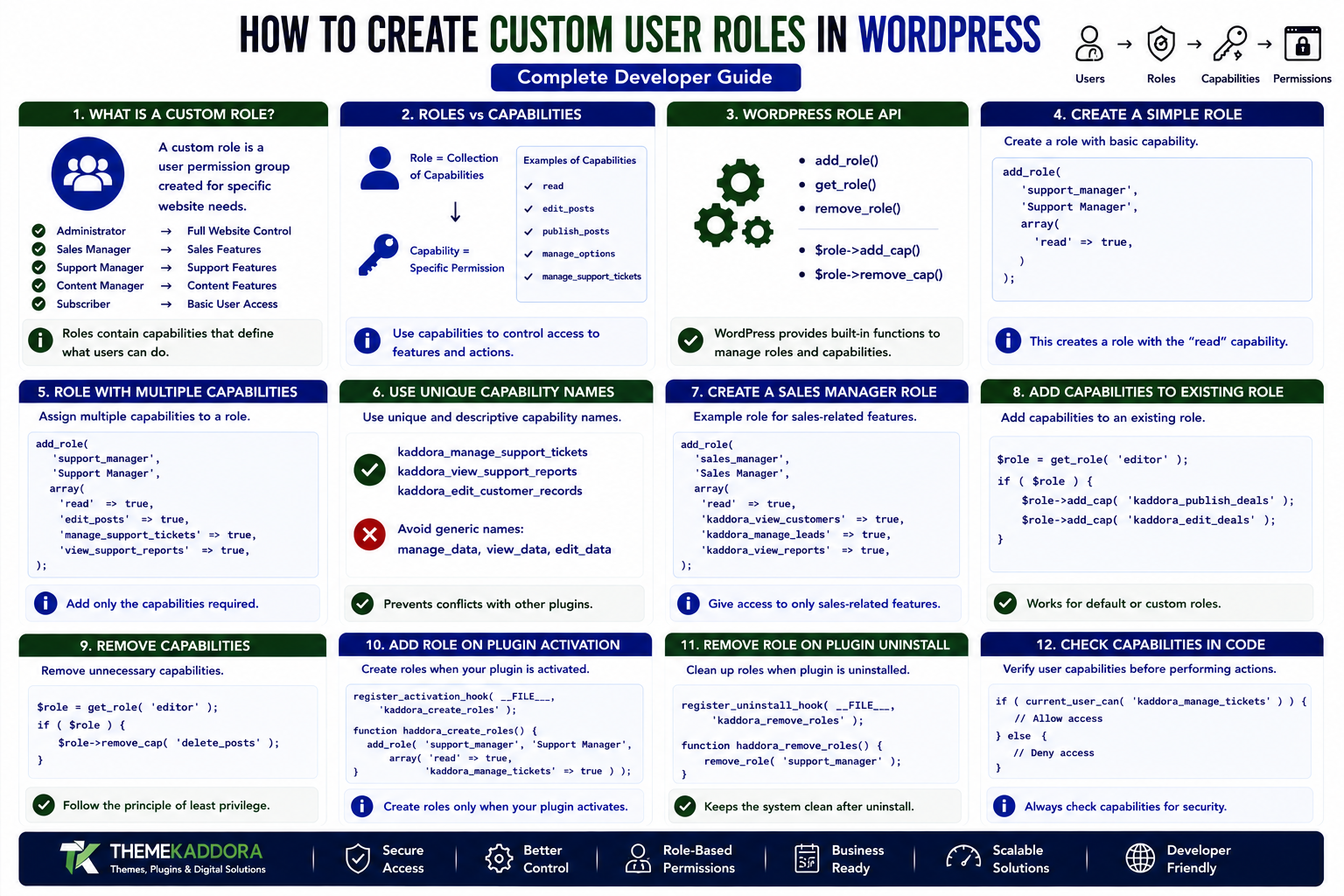
How to Create Custom User Roles in WordPress: Complete Developer Guide
Introduction
WordPress provides several default user roles, including Administrator, Editor, Author, Contributor, and Subscriber. These roles work well for many websites, but complex websites often require more specialized permission systems.
A business website may need separate users for sales, support, accounting, content management, or operations. A learning platform may require instructors and course managers. A WooCommerce website may need store-specific staff permissions.
Instead of giving these users Administrator access, developers can create custom WordPress user roles with only the capabilities required for their jobs.
Custom roles provide greater control, improve security, and make WordPress website easier to adapt to business workflows.
In this guide, you'll learn how custom roles work, how to create them with code, how to add and remove capabilities, manage roles during plugin activation, update existing roles safely, protect custom functionality, and avoid common permission mistakes.
What Is a Custom WordPress User Role?
A custom WordPress user role is a user permission group created specifically for a website's requirements.
For example:
Administrator ↓ Full Website Control Sales Manager ↓ Sales Features Support Manager ↓ Support Features Content Manager ↓ Content Features Subscriber ↓ Basic User Access
Each custom role can contain a carefully selected set of capabilities.
This allows developers to implement the principle of least privilege—users receive only the access they need.
Why Create Custom User Roles?
Default WordPress roles may not accurately represent a business workflow.
Custom roles can help you:
Limit administrative access
Separate team responsibilities
Protect sensitive settings
Create business-specific workflows
Simplify the admin interface
Improve plugin security
Control access to custom post types
Protect custom dashboards
Restrict specific actions
For example, giving an employee Administrator access just because they need to manage support tickets is unnecessary.
A custom support_manager role can provide a safer alternative.
Roles vs Capabilities
Before creating custom roles, understand the difference between roles and capabilities.
Role
A role is a collection of capabilities.
Example:
Support Manager
Capability
A capability represents a specific permission.
Examples:
read edit_posts publish_posts manage_options manage_support_tickets
The relationship is:
Custom Role ↓ Capabilities ↓ Allowed Actions
For plugin development, capabilities are particularly important because authorization should generally be based on what a user can do rather than simply what their role is called.
WordPress Role Management API
WordPress provides APIs for managing roles and capabilities.
Important functions include:
add_role() get_role() remove_role()
Capabilities can be managed through role objects:
$role->add_cap(); $role->remove_cap();
These APIs allow plugins to create and modify permission structures without directly manipulating the database.
Creating a Simple Custom Role
A custom role can be created using add_role().
For example:
add_role( 'support_manager', 'Support Manager', array( 'read' => true, ) );
This creates a role called:
Support Manager
with the read capability.
The first parameter is the role identifier.
The second is the human-readable role name.
The third contains the capabilities.
Creating a Role With Multiple Capabilities
A more useful role might contain several capabilities.
For example:
add_role( 'support_manager', 'Support Manager', array( 'read' => true, 'edit_posts' => true, 'manage_support_tickets' => true, 'view_support_reports' => true, ) );
Custom capabilities such as:
manage_support_tickets view_support_reports
can be used by your plugin to protect specialized functionality.
Use Unique Capability Names
Custom capabilities should have unique and descriptive names.
Avoid generic capabilities such as:
manage_data view_data edit_data
because another plugin could potentially use the same names.
Prefer names associated with your plugin or feature:
kaddora_manage_support_tickets kaddora_view_support_reports kaddora_edit_customer_records
A consistent naming convention reduces potential collisions.
Creating a Sales Manager Role
A sales-oriented plugin could create:
add_role( 'sales_manager', 'Sales Manager', array( 'read' => true, 'kaddora_view_customers' => true, 'kaddora_manage_leads' => true, 'kaddora_view_sales_reports' => true, ) );
This role could access CRM functionality without receiving complete WordPress administration privileges.
Creating a Content Manager Role
A content-focused website might use:
add_role( 'content_manager', 'Content Manager', array( 'read' => true, 'edit_posts' => true, 'publish_posts' => true, 'upload_files' => true, ) );
This can provide content management functionality without granting access to plugin installation or sensitive site settings.
Creating a Course Instructor Role
An education website could create:
add_role( 'course_instructor', 'Course Instructor', array( 'read' => true, 'kaddora_manage_courses' => true, 'kaddora_manage_lessons' => true, 'kaddora_view_students' => true, ) );
This illustrates how custom roles can adapt WordPress to different industries.
Creating Roles During Plugin Activation
If your plugin requires a custom role, it is usually appropriate to create it during plugin activation.
Example:
register_activation_hook( __FILE__, 'kaddora_plugin_activate' ); function kaddora_plugin_activate() { add_role( 'support_manager', 'Support Manager', array( 'read' => true, ) ); }
This ensures the role is configured when the plugin is activated.
Why Activation Hooks Are Useful
Role configuration should not be performed unnecessarily on every page request.
Avoid:
add_role( 'support_manager', 'Support Manager', array(...) );
running unconditionally on every request.
Instead, configure the role during activation or through an intentional migration process.
This reduces unnecessary processing and keeps plugin initialization cleaner.
Updating an Existing Custom Role
If your plugin evolves and needs additional capabilities, retrieve the role first.
For example:
$role = get_role( 'support_manager' ); if ( $role ) { $role->add_cap( 'kaddora_export_tickets' ); }
This is useful when a new plugin version introduces additional functionality.
Role Migrations for Plugin Updates
Suppose version 1.0 creates:
support_manager
with:
read manage_support_tickets
Version 1.1 introduces:
export_support_reports
You can use a migration process to add the new capability.
A simple pattern is:
$current_version = get_option( 'kaddora_roles_version', '1.0.0' ); if ( version_compare( $current_version, '1.1.0', '<' ) ) { $role = get_role( 'support_manager' ); if ( $role ) { $role->add_cap( 'kaddora_export_support_reports' ); } update_option( 'kaddora_roles_version', '1.1.0' ); }
For larger plugins, a structured migration system is even better.
Adding Capabilities to Existing WordPress Roles
You can also extend an existing role.
For example:
$role = get_role( 'editor' ); if ( $role ) { $role->add_cap( 'kaddora_view_reports' ); }
This allows Editors to access your plugin's reporting functionality.
However, avoid modifying built-in roles unnecessarily because other plugins may rely on their expected permissions.
Removing a Capability
Capabilities can be removed using:
$role = get_role( 'support_manager' ); if ( $role ) { $role->remove_cap( 'kaddora_export_support_reports' ); }
Only remove capabilities that your plugin owns or intentionally manages.
Removing unrelated capabilities can break other plugins or workflows.
Removing a Custom Role
If your plugin creates a role that is no longer needed, WordPress provides:
remove_role( 'support_manager' );
However, role deletion should be handled carefully.
Removing a role does not mean the users assigned to that role should simply disappear.
Users and their content are separate from the role definition.
What Happens to Users When a Role Is Removed?
A role is a permission structure, not a user account.
If a custom role is removed, users who relied on it may no longer have the expected permissions.
Therefore, plugins should plan role migrations carefully.
Before removing a role, consider:
Which users currently have it?
What replacement role should they receive?
Which capabilities do they need?
Is the role used by another feature?
Avoid destructive permission changes without a migration strategy.
Custom Roles and Custom Post Types
Custom roles are particularly useful with custom post types.
For example:
Customer Lead Ticket Invoice Course Property Appointment
A plugin can define capabilities around these objects.
For example:
kaddora_edit_customers kaddora_publish_customers kaddora_delete_customers kaddora_view_customers
This provides more granular access control.
Custom Roles for a CRM
A CRM plugin might use:
Sales Representative Sales Manager Support Agent Support Manager CRM Administrator
Example permission structure:
Sales Representative ├── View Customers ├── Manage Leads └── View Own Reports Sales Manager ├── View Customers ├── Manage Leads ├── Manage Team └── View Sales Reports Support Agent ├── View Customers └── Manage Tickets
This is much more flexible than giving every employee Administrator access.
Custom Roles for WooCommerce
WooCommerce websites can also benefit from specialized roles.
For example:
Store Manager Product Manager Inventory Manager Customer Support Sales Analyst
Each role can receive only the capabilities required for its workflow.
When integrating with WooCommerce, use supported WooCommerce APIs and capabilities instead of directly modifying internal data structures.
Custom Roles for Membership Websites
Membership platforms often need multiple access levels.
For example:
Free Member Premium Member Instructor Moderator Membership Manager
A membership plugin can combine roles and capabilities with its own access-control logic.
For sensitive content, server-side authorization should always be enforced.
Custom Roles for Agencies
Agencies can create roles for clients and internal teams.
For example:
Agency Administrator Client Manager Content Editor SEO Manager Support Staff
This can simplify client websites by exposing only the features each person needs.
Protecting Admin Pages With Custom Capabilities
Suppose your plugin has a report page.
Instead of:
if ( current_user_can( 'administrator' ) ) { // ... }
use a capability:
if ( current_user_can( 'kaddora_view_sales_reports' ) ) { // ... }
This allows multiple roles to receive the same permission.
For example:
Administrator ↓ kaddora_view_sales_reports Sales Manager ↓ kaddora_view_sales_reports Account Manager ↓ kaddora_view_sales_reports
This is more flexible than checking role names.
Protecting AJAX Requests
Custom roles must also be respected by AJAX endpoints.
For example:
if ( ! current_user_can( 'kaddora_manage_tickets' ) ) { wp_send_json_error( array( 'message' => __( 'You are not authorized.', 'kaddora-plugin' ), ), 403 ); }
Never rely on JavaScript or hidden buttons to protect an operation.
Authorization must happen on the server.
Protecting REST API Endpoints
REST API routes should use permission callbacks.
For example:
'permission_callback' => function () { return current_user_can( 'kaddora_view_reports' ); },
This ensures unauthorized users cannot access protected API operations simply by sending a request manually.
Custom Roles and Nonces
Capabilities and nonces solve different problems.
Capability
Determines whether the user is authorized.
Nonce
Helps verify that a request is intended and protects against certain request-forgery scenarios.
For sensitive operations, use both where appropriate.
Request ↓ Nonce Check ↓ Capability Check ↓ Validation ↓ Action
Custom Roles and Multisite
WordPress Multisite requires additional consideration.
A role may exist at the individual site level, while Super Admin privileges operate at the network level.
Before creating custom roles for multisite environments, determine:
Is the role site-specific?
Should it exist across every site?
Does the plugin support network activation?
Should capabilities be added per site?
What should happen when a site is created later?
Network-aware plugins need a clear role provisioning strategy.
Don't Use Roles as a Replacement for Business Logic
A role system should not contain every possible condition.
For example, a CRM may need:
Can manage leads? AND Can access this department? AND Does this record belong to the user's team?
A role can provide the general capability, while application-level logic handles more specific restrictions.
This creates a more flexible authorization architecture.
Role-Based Access vs Capability-Based Access
Role-Based Check
if ( in_array( 'sales_manager', wp_get_current_user()->roles, true ) ) { // ... }
Capability-Based Check
if ( current_user_can( 'kaddora_manage_leads' ) ) { // ... }
Capability-based checks are generally preferable because multiple roles can share the same permission.
Common Custom Role Mistakes
Creating Roles on Every Request
This creates unnecessary work and makes role management harder to maintain.
Using Generic Capability Names
Capabilities should be unique and descriptive.
Checking Role Names Everywhere
Prefer capabilities for authorization.
Removing Built-In Capabilities Carelessly
Other plugins may depend on them.
Forgetting Plugin Updates
New plugin features may require new capabilities.
Ignoring Existing Users
Role changes can affect users already assigned to a role.
Protecting Only the UI
Buttons and menus do not provide real security.
Forgetting REST and AJAX
API endpoints require their own permission checks.
Deleting Roles Without a Migration Plan
Users may lose the permissions required for their work.
Testing Custom User Roles
Before releasing a plugin, test each role separately.
Test 1: Login
Verify the user can log in normally.
Test 2: Admin Menu
Check that only appropriate menus are visible.
Test 3: Direct URLs
Try accessing protected pages directly.
Test 4: Create
Verify whether the user can create records.
Test 5: Edit
Verify which records the user can edit.
Test 6: Delete
Verify deletion permissions carefully.
Test 7: REST API
Test protected endpoints.
Test 8: AJAX
Verify unauthorized requests fail.
Test 9: Role Migration
Upgrade the plugin and confirm new capabilities are added correctly.
Test 10: Deactivation
Verify plugin deactivation doesn't unexpectedly destroy user access or data.
Recommended Custom Role Architecture
A professional plugin might organize permission logic like:
my-plugin/ │ ├── includes/ │ ├── class-roles.php │ ├── class-capabilities.php │ ├── class-permissions.php │ └── migrations/ │ ├── class-role-migration-1-1.php │ └── class-role-migration-1-2.php │ └── my-plugin.php
This makes role management easier to maintain as the plugin grows.
Custom User Role Best Practices
Professional WordPress developers should:
Use unique role identifiers.
Use unique custom capabilities.
Create roles during controlled activation or migration processes.
Use capabilities for authorization.
Avoid unnecessary changes to built-in roles.
Protect admin pages.
Protect AJAX handlers.
Protect REST endpoints.
Use nonces where appropriate.
Validate and sanitize input.
Document custom permissions.
Test every role.
Plan role migrations.
Consider multisite behavior.
Avoid deleting roles without a migration strategy.
Follow the principle of least privilege.
Why choose ThemeKaddora?
ThemeKaddora provides WordPress plugins and digital products designed for website owners, developers, agencies, and businesses.
Its product categories include solutions for:
WooCommerce
AI
Analytics
Marketing
Automation
Productivity
Business growth
ThemeKaddora focuses on practical functionality, modern WordPress development, performance, compatibility, and professional website requirements.
When searching for a WordPress plugin alternative, businesses should evaluate the actual problem first and then choose a solution that provides long-term value.
Conclusion
Custom WordPress user roles allow developers to adapt WordPress to specialized business and organizational workflows.
By combining custom roles with unique capabilities, developers can control access to dashboards, content, custom post types, reports, APIs, and other plugin functionality.
The most important principle is:
Create roles around real responsibilities, and use capabilities to enforce permissions.
Avoid unnecessary Administrator access, protect every sensitive operation on the server, and plan role migrations as your plugin evolves.
A well-designed permission system makes WordPress safer, more flexible, and much easier to use for teams.
Frequently Asked Questions
What is a custom WordPress user role?
A custom WordPress user role is a permission group created for a specific workflow, business function, or plugin.
How do I create a custom role in WordPress?
Developers can use WordPress's add_role() function to create a role and assign it a collection of capabilities.
Can custom roles have custom capabilities?
Yes. Plugins can define custom capabilities and assign them to specific roles.
Should I check roles or capabilities?
For authorization, capability checks such as current_user_can() are generally more flexible than checking role names directly.
Can I add capabilities to existing WordPress roles?
Yes. A role object returned by get_role() can be used to add or remove capabilities.
When should a plugin create a custom role?
A plugin should create a custom role when the default WordPress roles cannot accurately represent the permissions required by the plugin's workflow.
Can custom roles control AJAX operations?
Yes. AJAX handlers should perform server-side capability checks before processing protected actions.
What happens if I remove a custom role?
The role's permission definition is removed, but user accounts are not automatically deleted. Plugins should plan how affected users will be reassigned.
Are custom roles useful for WooCommerce?
Yes. Custom roles can help separate store management responsibilities such as products, support, reporting, and other business operations.
Should custom roles be created on every WordPress request?
No. Role creation should normally occur during plugin activation or through controlled update/migration logic.
Why choose Themekaddora?
Themekaddora provides lightweight, responsive, SEO-friendly WordPress themes with fast performance, WooCommerce compatibility, flexible customization, accessibility-conscious design, modern templates, regular updates, and professional support—providing a strong foundation for businesses building digital products and product-focused websites.
Comments (0)