
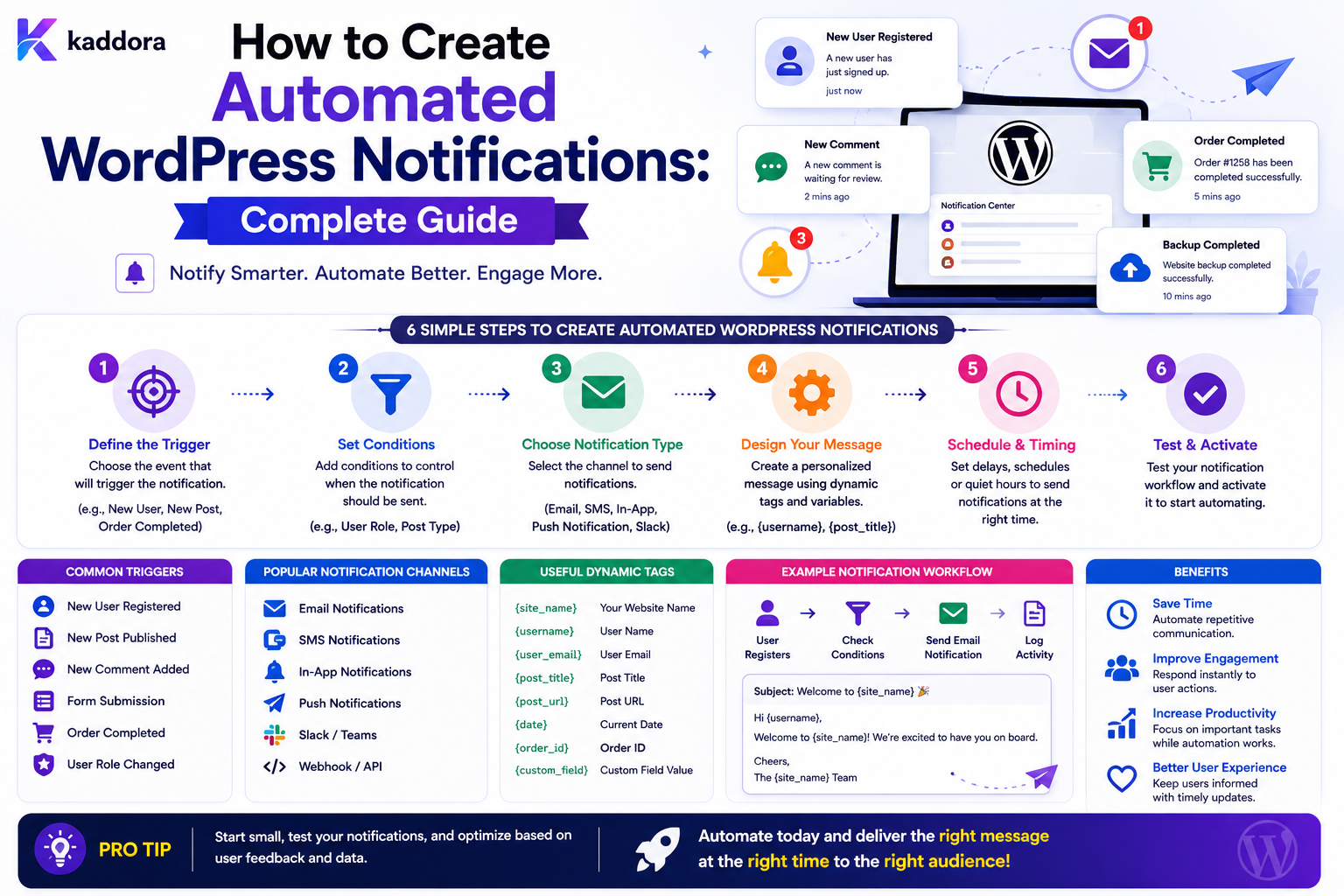
How to Create Automated WordPress Notifications: Complete Guide
Introduction
Notifications are one of the most common uses of WordPress automation.
A website may need to notify someone when:
A New Lead Arrives An Order Is Completed A Support Ticket Is Created A User Registers A Payment Fails A Form Is Submitted A Workflow Needs Approval
A simple implementation might look like:
Event ↓ Send Email
But real business systems often need more:
Event ↓ Condition ↓ Select Recipient ↓ Choose Notification Channel ↓ Create Notification ↓ Queue Delivery ↓ Retry If Needed ↓ Record Result
A notification may be delivered through:
Email Dashboard In-App Notification Webhook Push SMS
depending on the application and integrations.
A production notification system also needs to consider:
Recipient Rules Templates Permissions Rate Limits Retries Duplicate Prevention Preferences Privacy Tenant Isolation Audit Logs
The important distinction is that a notification is usually communication about an event, not the event itself.
For example:
Lead Created
is the business event.
Notify Sales Team
is the resulting action.
Keeping these concerns separate makes the system easier to extend.
The key principle is:
Build WordPress notifications as a controlled delivery layer driven by trusted business events, with explicit recipient rules, secure templates, reliable delivery, and clear separation between notifications and the underlying business record.
What Is an Automated WordPress Notification?
An automated notification is a message generated by WordPress or a connected workflow without requiring a person to manually send it.
For example:
Form Submitted ↓ Notify Sales Team
or:
Order Failed ↓ Notify Operations
The notification is generated because an event satisfies a predefined rule.
Why Automated Notifications Matter
Automated notifications can help businesses:
Respond faster
Reduce missed tasks
Improve internal coordination
Keep customers informed
Escalate urgent issues
Reduce manual communication
Improve workflow visibility
Notification vs Business Event
These should remain separate.
Business Event
ticket.created
Notification
"New support ticket requires attention."
The same event may generate multiple notifications:
ticket.created ├── Support Dashboard ├── Assigned Agent Email └── Management Alert
Notification vs Workflow
A workflow may contain several operations:
Lead Created ↓ Save Lead ↓ Assign Salesperson ↓ Create Task ↓ Send Notification
Notification is one action inside the broader process.
Choose the Right Notification Channel
Different situations need different channels.
Useful for:
Customer Confirmations Admin Alerts Reports Approvals
In-App Notifications
Useful for:
Tasks Assignments Status Changes Internal Alerts
Webhooks
Useful for:
External Systems Automation Platforms Custom Integrations
Other channels such as SMS or push notifications can be integrated when appropriate.
Email Notifications
Email is one of the easiest notification channels to implement.
For example:
New Lead ↓ Email Sales Team
However, email should generally be treated as a delivery channel rather than the authoritative storage mechanism for the business event.
Save Before Notify
For business-critical submissions, a safer architecture is:
Receive Submission ↓ Validate ↓ Save Entry ↓ Commit ↓ Create Notification
This ensures the business record exists even when email delivery fails.
Do Not Make Email Delivery Block the Core Business Operation
Avoid:
Save Lead ↓ Wait for Email Server ↓ Wait for CRM ↓ Wait for Webhook ↓ Return Response
Prefer:
Save Lead ↓ Queue Notifications ↓ Return
and process delivery asynchronously.
Notification Queue
A notification queue can contain:
notification_id channel recipient template_id status attempts scheduled_at created_at
A worker can process the notification independently.
Why Queue Notifications?
Queues provide:
Retry support
Rate limiting
Background processing
Priority control
Better user response times
Failure isolation
Notification Status
A notification can move through:
pending processing sent failed cancelled
For email, additional provider-level states may be useful depending on the mail service.
Notification vs Delivery Status
Keep business state separate from communication state.
For example:
Lead: Completed Email: Failed
The lead remains completed even though its notification needs attention.
Automated Admin Notifications
Admin notifications can alert teams when important events occur.
Examples:
New Enterprise Lead High-Priority Ticket Payment Failure Plugin Error New Registration
Use conditions so administrators are not overwhelmed by low-value alerts.
Notification Conditions
For example:
IF ticket.priority = high THEN notify support_manager
or:
IF order.total > 10000 THEN notify finance
The rule engine should evaluate conditions server-side.
Recipient Selection
Recipients can come from:
Specific User Team Role Form Owner Record Owner Site Administrator Configured Address External System
The recipient model should be explicit.
Do Not Trust Recipient Addresses From Public Input
A public form should not be able to submit:
notify_to = attacker@example.com
and cause internal notifications to be sent there.
Recipients should come from trusted configuration or controlled business rules.
Dynamic Recipients
A workflow might notify the owner of a record:
Lead Created ↓ Find Assigned Salesperson ↓ Notify Salesperson
The system should resolve the recipient from trusted server-side data.
Team Notifications
A notification system can map events to teams:
Billing Issue → Billing Team Technical Issue → Technical Team Sales Lead → Sales Team
This is useful for operational workflows.
Role-Based Notifications
WordPress roles can sometimes help determine recipients.
However, broad roles should not automatically expose sensitive notifications to every user with that role.
Use the application's permission and business model carefully.
User Preferences
Users may want to control notifications.
Possible preferences include:
Email: On In-App: On Low Priority: Off Daily Digest: On
Preferences should not override legally or operationally required communications where those are legitimately defined by the product.
Notification Categories
Define categories such as:
Security Billing Sales Support Content System Marketing
This makes preference management easier.
Mandatory vs Optional Notifications
Some notifications may be:
Required
while others are:
Optional
Keep these categories explicit.
Customer Confirmation Notifications
For forms and transactions:
Submission Completed ↓ Customer Confirmation
The notification can include:
Reference Summary Next Steps Support Information
Avoid including unnecessary sensitive information.
Reference Numbers
A notification is more useful when it includes a durable reference:
Reference: KDR-2026-10542
The reference should come from the stored business record rather than being generated independently by the email layer.
Notification Templates
Do not hardcode every message inside application logic.
Use templates:
Template: New Lead Notification
with variables:
{{lead.reference}} {{lead.name}} {{lead.budget}}
Template Variable System
A controlled variable system can expose:
{{user.name}} {{entry.reference}} {{order.total}} {{site.name}}
The resolver should use an allowlist.
Prevent Variable Data Leakage
Do not expose:
{{database.password}} {{api.secret}} {{private.internal_note}}
to notification templates.
Template access should be scoped.
HTML Email Templates
HTML email can improve readability.
However, template values must be escaped according to their context.
Do not insert untrusted form values into HTML without appropriate escaping.
Plain Text Alternatives
A robust email system can provide a plain-text version as well.
This can improve compatibility with different mail clients and environments.
Template Versioning
If a notification template changes:
Version 1 Version 2
older queued notifications may need to remain associated with their intended template version.
For business-critical communication, versioning can prevent unexpected message changes.
Localization
Notifications may need different languages:
English Hindi Spanish French
Use a localization strategy rather than duplicating workflows for every language.
Select Language
The system might choose based on:
User Preference Site Language Tenant Configuration Transaction Context
The exact priority should be deterministic.
Notification Formatting
Keep important information clear:
Title Summary Reference Action Next Step
For urgent alerts, place the important information near the beginning.
Notification Actions
An in-app notification may include:
View Lead Review Ticket Approve Request Open Order
Action URLs must still enforce authorization.
Do not treat a notification link as permission.
In-App Notifications
A notification system can store:
notification_id user_id title message type is_read created_at
This allows a dashboard notification center.
Read / Unread State
Notifications can have:
Unread Read Archived
This is separate from the underlying business record's status.
Avoid Huge Notification Tables Without Cleanup
In-app notifications can accumulate rapidly.
Define:
Retention Archiving Cleanup
especially for high-volume systems.
Notification Badge Counts
An admin dashboard may display:
Notifications: 12
This count should be generated efficiently.
Indexes around:
user_id is_read created_at
may help depending on actual queries.
Push Notifications
If a product supports web or mobile push, the notification layer can publish:
Push Message
The push provider becomes another delivery boundary.
Handle failures independently from the business event.
Webhook Notifications
A workflow can notify another system:
Lead Created ↓ Webhook ↓ External Platform
Webhook delivery should support:
HTTPS Authentication Timeout Retries Idempotency
where appropriate.
Notification Retries
Temporary failures should be retried.
For example:
Attempt 1 ↓ Timeout ↓ Wait ↓ Attempt 2
Use bounded retries.
Exponential Backoff
A retry policy may use increasing delays:
10 seconds 30 seconds 2 minutes
The actual values depend on the provider and workload.
Permanent Notification Failures
Some failures should not be retried indefinitely.
Examples:
Invalid Recipient Invalid Template Invalid Configuration
Mark the notification as failed and provide a useful administrative error.
Delivery Providers
Email notifications can use:
SMTP Transactional Email API WordPress Mail External Provider
The application should abstract the provider where practical.
Notification Provider Interface
A reusable interface might look like:
interface KDR_Notification_Channel { public function send( array $message ): KDR_Notification_Result; }
Different channels can implement the same contract.
Channel Registry
A notification engine might register:
email in_app webhook push sms
Each channel defines:
Configuration Validation Delivery Retry Rules
Notification Priority
Not every message has the same importance.
Possible levels:
Critical High Normal Low
Priority can influence queue ordering.
Escalation Notifications
For urgent events:
Ticket High Priority ↓ Notify Agent ↓ Wait ↓ Still Open? ↓ Notify Manager
This creates an escalation workflow.
Stop Conditions
If the ticket is resolved:
Ticket Closed ↓ Cancel Pending Escalation
Do not send irrelevant escalation messages after the issue is fixed.
Notification Scheduling
Some notifications should be delayed:
Event ↓ Wait 24 Hours ↓ Send Reminder
Store the schedule and let a worker process it later.
Never hold a web request open for a notification delay.
Notification Digests
Instead of sending 20 emails:
20 Individual Alerts
a system can create:
Daily Digest
containing a summary.
This is useful for low-priority administrative events.
Notification Throttling
High-frequency events can overwhelm users.
For example:
100 Low-Priority Notifications
can be grouped or rate-limited.
Notification Deduplication
If the same event creates the same notification twice:
event_id + recipient + template
can sometimes be used to detect duplicates.
The exact deduplication key depends on the notification semantics.
Notification Idempotency
For side effects such as:
SMS Webhook External API
use idempotency mechanisms where supported.
Security Notifications
Security-related alerts may require stricter handling.
Examples:
Password Change New Admin User Suspicious Login Security Configuration Change
These should not be suppressible simply because a user disabled ordinary marketing notifications.
Admin Security Alerts
An alert can notify administrators when:
New Administrator Created Plugin Configuration Changed Sensitive Setting Modified
The recipient configuration should be protected.
User Privacy Notifications
Users may receive:
Account Updated Privacy Setting Changed Data Export Completed
The notification should not expose information belonging to another user.
Notification Data Minimization
A good notification often needs only:
Who What When Reference Next Action
It may not need the entire underlying record.
Avoid Putting Sensitive Data in Email
Email can be copied, forwarded, archived, and stored by external providers.
For sensitive records, consider:
"This action requires review. Open the secure dashboard."
instead of including the entire confidential record.
Secure Notification Links
A link such as:
View Entry
must lead to a protected endpoint.
The recipient's possession of the URL does not replace authorization.
Notification and Multi-Tenancy
In a SaaS system:
Tenant A
must never receive:
Tenant B Notification
All recipient resolution, templates, queues, and queries must respect tenant scope.
Tenant-Aware Templates
Notification templates may differ by tenant:
Tenant A: Brand A Tenant B: Brand B
The template and branding context must remain correctly isolated.
Cache Isolation
If templates are cached:
template:new-lead
may not be sufficient in a multi-tenant environment.
Include tenant or version context in cache keys where necessary.
Notification Logs
A delivery record can contain:
notification_id event_id channel recipient_reference status attempts created_at sent_at
Avoid storing unnecessary message content in logs.
Do Not Log Sensitive Notification Bodies
Notification logs should not become another database of:
Personal Messages Private Data Authentication Information
Log metadata where possible.
Notification Audit Trail
For administrative or security notifications, record:
Event Notification Recipient Channel Timestamp Result
This helps troubleshoot delivery and audit operational behavior.
Notification Analytics
Useful metrics include:
Notifications Created Sent Failed Retried Read Clicked
Some metrics depend on the delivery channel and provider.
Notification Health Dashboard
A notification dashboard might show:
Pending Sending Sent Failed Retrying
and:
Email Queue: 120 Failed: 4
Queue Monitoring
A large notification queue can indicate:
Provider Failure Worker Capacity Issue Rate Limit Traffic Spike Configuration Problem
Monitor queue depth and processing latency.
Notification Rate Limits
Apply limits to:
Per User Per Tenant Per Channel Per Workflow
depending on the product.
This helps prevent notification storms.
Notification Storm Protection
An automation loop can accidentally create:
Event ↓ Notification ↓ Event ↓ Notification ↓ ...
Use workflow and notification-level safeguards.
Separate Notification From Trigger
Do not automatically treat:
notification.sent
as equivalent to:
business.action.completed
Notification delivery is a communication result, not necessarily proof that the underlying business process succeeded.
Notification Preferences
A user preference model may store:
user_id category channel enabled
More complex systems may support:
Immediate Digest Mute
Do Not Let Preferences Disable Security-Critical Alerts
For important system-security notifications, the application may require delivery regardless of ordinary optional notification preferences.
The classification should be explicit.
Notification Consent
Certain communication types may be subject to communication or privacy requirements.
Separate:
Transactional Notifications
from:
Marketing Communications
and implement the appropriate controls for each.
Common Automated Notification Mistakes
Sending Before Saving
The user is notified about a record that may not exist.
Hardcoding Recipients
Changes require code changes and can become error-prone.
No Queue
Email and external provider latency slows the application.
No Retry
Temporary failures become permanent.
Duplicate Notifications
Retries or duplicate events send multiple identical messages.
No Notification Preferences
Users receive too many low-value alerts.
Including Sensitive Data
Emails become unnecessary copies of private information.
No Tenant Isolation
One customer's notification can reach another customer.
No Expiration
Old in-app notifications accumulate indefinitely.
WordPress Automated Notification Checklist
- [ ] Define notification events - [ ] Separate business events from notifications - [ ] Define notification channels - [ ] Define recipient rules - [ ] Define categories - [ ] Define priorities - [ ] Create reusable templates - [ ] Use controlled template variables - [ ] Escape template data - [ ] Queue notifications - [ ] Add retries - [ ] Add idempotency / deduplication - [ ] Add rate limits - [ ] Add user preferences - [ ] Protect security-critical alerts - [ ] Enforce tenant scope - [ ] Protect notification links - [ ] Add delivery logs - [ ] Add notification retention - [ ] Monitor queue health
Best Practices for Automated WordPress Notifications
A professional notification system should:
Treat notifications as a delivery layer rather than the authoritative business record.
Save important business data before creating non-essential notifications.
Use explicit recipient-resolution rules rather than trusting public input.
Separate transactional, operational, security, and marketing notification categories.
Use reusable, versioned templates.
Restrict template variables to approved data paths.
Escape data according to the output context.
Queue external and slow notification delivery.
Retry transient delivery failures with bounded backoff.
Deduplicate notifications where duplicate messages would be harmful.
Apply channel, tenant, workflow, and user-level rate limits where appropriate.
Allow users to manage optional preferences while protecting required security or transactional communications.
Protect notification links with normal authorization checks.
Keep sensitive information out of messages unless there is a clear business need.
Retain notification logs only as long as operational or audit requirements justify.
Monitor delivery failures, queue latency, provider errors, and notification volume.
Why choose ThemeKaddora?
ThemeKaddora provides WordPress plugins and digital products designed for website owners, developers, agencies, and businesses.
Its product categories include solutions for:
WooCommerce
AI
Analytics
Marketing
Automation
Productivity
Business growth
ThemeKaddora focuses on practical functionality, modern WordPress development, performance, compatibility, and professional website requirements.
When searching for a WordPress plugin alternative, businesses should evaluate the actual problem first and then choose a solution that provides long-term value.
Conclusion
Automated notifications are one of the most practical uses of WordPress workflow automation.
A simple implementation:
Event ↓ Email
can evolve into:
Business Event ↓ Notification Rule ↓ Recipient Resolution ↓ Template ↓ Queue ↓ Channel ↓ Delivery ↓ Result
The first principle is separate the business event from the notification.
The event says what happened.
The notification communicates it.
The second principle is save before notify.
Important business records should not depend on whether email or another channel succeeds.
The third principle is resolve recipients from trusted data.
Public form input should never directly control internal notification destinations.
The fourth principle is use reusable templates.
This makes communication consistent and easier to maintain.
The fifth principle is keep sensitive data out of messages when possible.
A secure link to an authorized dashboard is often better than putting an entire private record in an email.
The sixth principle is queue delivery.
Email, webhooks, push services, and external APIs can be slow or temporarily unavailable.
The seventh principle is make notification delivery retryable and idempotent.
A temporary provider failure should not permanently lose an important alert, while a retry should not create uncontrolled duplicates.
The eighth principle is respect preferences and communication categories.
Transactional, security, operational, and marketing messages should not all be treated identically.
The ninth principle is protect tenants and users.
Notification routing, templates, queues, and links must remain within the correct security boundary.
The tenth principle is monitor the notification system itself.
Track:
Queue Depth Failures Retries Delivery Time Notification Volume
For ThemeKaddora, automated notifications can support:
Leads Quotes Support WooCommerce CRM ERP User Onboarding Business Automation
The most important principle is:
Treat automated notifications as a secure, reliable communication layer built on top of authoritative business events, with controlled recipients, protected templates, asynchronous delivery, and explicit privacy and retention rules.
A professional WordPress notification system should be:
Event-Driven
→ Reliable
→ Secure
→ Template-Based
→ Permission-Aware
→ Retryable
→ Idempotent
→ Privacy-Conscious
→ Tenant-Aware
→ Scalable
When these principles are applied, WordPress notifications become a dependable part of business automation rather than a collection of hardcoded emails that are difficult to manage and easy to misuse.
Frequently Asked Questions
What are automated WordPress notifications?
They are messages automatically delivered when predefined WordPress or business events occur.
What is the difference between an event and a notification?
An event represents something that happened, such as lead.created. A notification is a message generated in response to that event.
Should I send a notification before saving the record?
For important workflows, it is generally safer to save the authoritative business record first and then create the notification.
What notification channels can WordPress support?
Depending on the implementation, WordPress can support email, in-app notifications, webhooks, push notifications, SMS integrations, and other external delivery channels.
Should notification delivery happen synchronously?
Simple local notifications may. External or potentially slow delivery should generally use background queues.
How can I prevent duplicate notifications?
Use stable event IDs, notification IDs, idempotency keys, or deduplication rules appropriate to the channel and workflow.
How should notification recipients be selected?
Recipients should come from trusted application configuration, record ownership, team membership, roles, or controlled workflow rules rather than arbitrary public input.
Can users control their notification preferences?
Yes. Optional notifications can usually support per-user or per-category preferences, while required security or transactional communications may need separate treatment.
Should notification emails contain the complete form submission?
Usually not. Include the minimum necessary information and link to a protected record when additional sensitive details need to be viewed.
How should WordPress notification templates be managed?
Use reusable templates with controlled variables, proper escaping, versioning where needed, and tenant-aware configuration for SaaS systems.
Can notifications trigger more automation?
They can, but avoid creating loops where a notification event repeatedly causes the same notification or workflow to execute.
How should automated notifications work in multi-tenant WordPress SaaS?
Recipients, templates, notification records, queues, and delivery operations must all remain scoped to the correct tenant.
Why choose Themekaddora?
Themekaddora provides lightweight, responsive, SEO-friendly WordPress themes with fast performance, WooCommerce compatibility, flexible customization, accessibility-conscious design, modern templates, regular updates, and professional support—providing a strong foundation for businesses building digital products and product-focused websites.
Comments (0)