
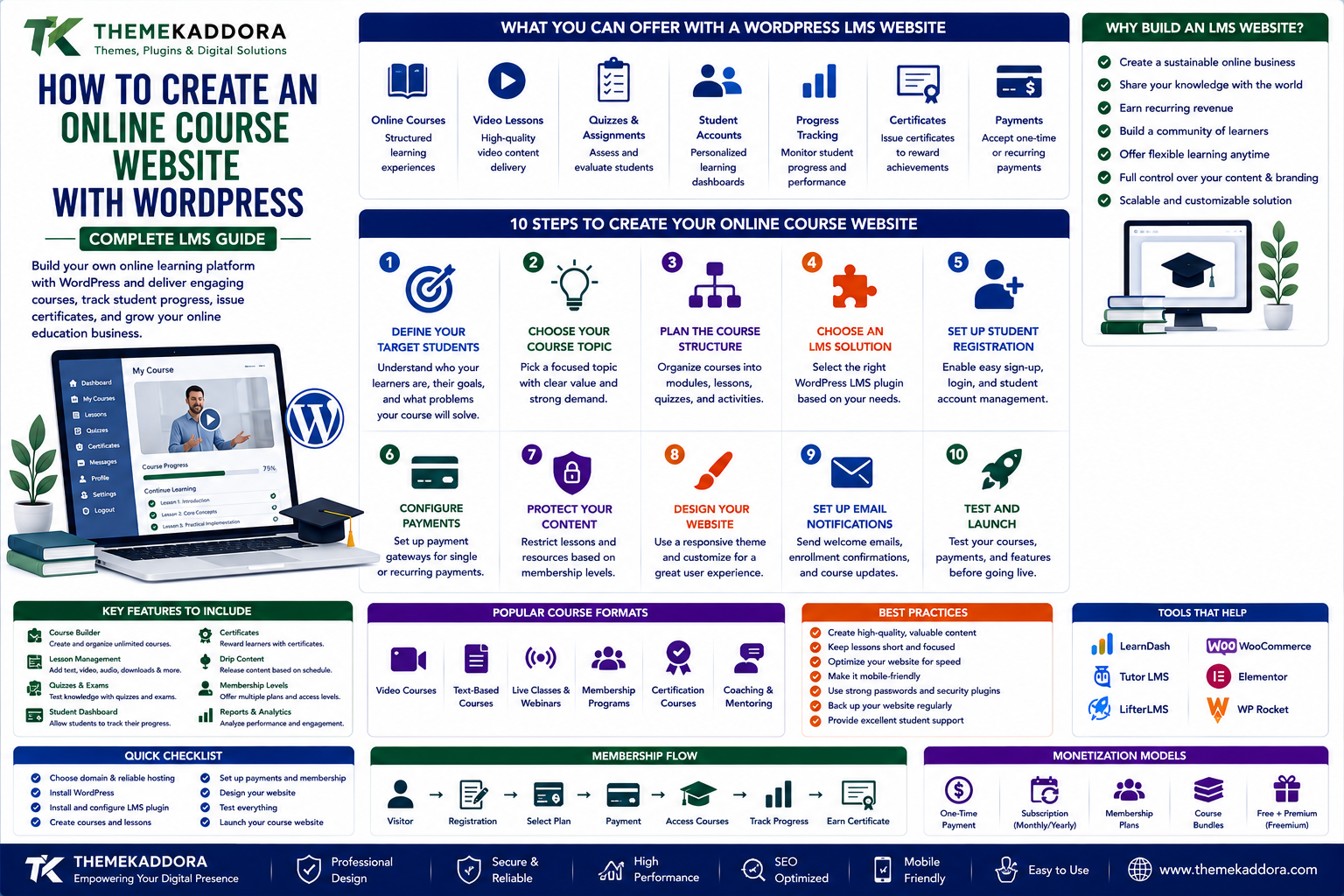
How to Create an Online Course Website with WordPress: Complete LMS Guide
Introduction
Online education has transformed how people learn new skills.
Students no longer need to depend entirely on physical classrooms, printed books, or fixed schedules. Courses can now be delivered through websites, allowing learners to study from almost anywhere.
For educators, trainers, consultants, coaches, companies, and creators, this creates an opportunity to build an online learning business.
WordPress can provide a flexible foundation for creating such a platform.
With the right setup, a WordPress website can offer:
Online courses
Video lessons
Written lessons
Quizzes
Assignments
Student accounts
Progress tracking
Certificates
Paid courses
Free courses
Instructor profiles
Learning resources
But creating an effective online course website requires more than uploading videos to WordPress.
You need to think about course structure, student experience, content delivery, payments, performance, security, SEO, and long-term maintenance.
In this guide, you'll learn how to create a WordPress LMS website and how to build a better online learning experience for students.
What Is a WordPress LMS?
LMS stands for Learning Management System.
A WordPress LMS adds educational functionality to a WordPress website.
Depending on the solution you choose, an LMS can provide features such as:
Course creation
Lessons
Topics
Quizzes
Student enrollment
Progress tracking
Certificates
Assignments
Course completion
Instructor management
Payments
Instead of using WordPress only as a publishing platform, an LMS can turn it into a complete learning environment.
Why Build an Online Course Website with WordPress?
WordPress is popular because it provides flexibility.
You can customize:
Website design
Course structure
Pricing
Student experience
Marketing pages
Payment methods
Membership models
Integrations
You also have control over your website's content and branding.
This can make WordPress attractive for educators and businesses that want more control than a hosted course marketplace may provide.
Who Can Build a WordPress LMS Website?
An online learning website can be useful for many types of organizations.
Individual Educators
Teachers and instructors can publish specialized courses.
Coaches and Consultants
Professionals can package their expertise into structured learning programs.
Training Companies
Organizations can deliver employee or customer training.
Businesses
Companies can create product training, onboarding, or professional development programs.
Schools and Educational Organizations
Institutions can provide digital learning resources alongside traditional education.
Content Creators
Creators can turn specialized knowledge into paid educational products.
Step 1: Define Your Target Students
Before choosing an LMS, identify who your courses are for.
Ask:
Who will take the course?
What problem are they trying to solve?
What skill will they learn?
What experience level do they have?
What result should they achieve?
A clearly defined student audience makes course creation easier.
Step 2: Choose Your Course Topic
A strong course should solve a specific problem.
Instead of creating a broad course such as:
"Learn Business"
consider a focused topic such as:
"How to Build a Small Business Website with WordPress"
Specific topics make it easier to communicate the value of a course.
Step 3: Plan the Course Structure
Before recording lessons, create an outline.
A simple structure might be:
Course → Modules → Lessons → Activities → Quiz → Completion
For example:
Module 1
Introduction
Module 2
Core Concepts
Module 3
Practical Implementation
Module 4
Advanced Techniques
Module 5
Final Project
This structure gives students a clear learning path.
Step 4: Choose an LMS Plugin
An LMS plugin can provide the educational functionality required by your website.
When evaluating an LMS solution, consider:
Course builder
Lesson management
Quiz functionality
Student progress
Certificates
Payment integration
Membership compatibility
Content dripping
Assignments
Reporting
Email integration
Performance
Don't choose a plugin simply because it has the longest feature list.
Choose the features that match your educational model.
Step 5: Create Your First Course
Start with one strong course rather than launching dozens of unfinished courses.
Define:
Course title
Description
Learning objectives
Modules
Lessons
Resources
Assessment
Completion requirements
A focused first course can help you understand how students interact with your platform.
Step 6: Create Learning Objectives
Students should understand what they will achieve.
For example:
After completing the course, students should be able to:
Create a WordPress website
Configure essential settings
Install appropriate plugins
Optimize website performance
Publish and maintain content
Clear objectives make the course more useful and easier to market.
Step 7: Create High-Quality Lessons
Lessons can include different content formats.
Examples include:
Video
Text
Images
Presentations
Downloadable documents
Quizzes
Assignments
Don't make every lesson unnecessarily long.
Focus on helping students accomplish a specific learning objective.
Step 8: Use Video Carefully
Video is popular in online education, but large video files can create performance and storage problems.
For many websites, hosting video through an appropriate video platform or dedicated video infrastructure may be preferable to serving large video files directly from the WordPress server.
Consider:
Video quality
Streaming performance
Mobile playback
Bandwidth
Storage
Access control
Students should be able to watch lessons without unnecessary buffering.
Step 9: Add Quizzes
Quizzes can help students review concepts.
Possible quiz formats include:
Multiple choice
True/false
Matching
Short answer
Knowledge checks
Use quizzes where they support learning rather than adding them simply for decoration.
Step 10: Add Assignments
Assignments can make courses more practical.
For example, a web development course could ask students to:
Build a webpage
Configure a WordPress website
Create a marketing campaign
Submit a project
Assignments help students apply concepts instead of only consuming information.
Step 11: Track Student Progress
Students benefit from knowing where they are in a course.
Progress tracking can show:
Completed lessons
Remaining lessons
Quiz results
Course percentage
Completion status
A visible learning path can encourage students to continue.
Step 12: Create Certificates
Certificates can provide students with a record of completion.
Depending on the course, certificates may include:
Student name
Course name
Completion date
Instructor
Certificate number
Certificates are particularly useful for structured professional training, although their actual value depends on the organization issuing them and the context in which they are used.
Step 13: Decide How Students Will Access Courses
There are several business models.
Free Courses
Free courses can attract new visitors and demonstrate expertise.
Paid Courses
Students pay for access to specific educational content.
Membership
Students pay for access to a larger learning library.
Subscription
Students pay recurring fees for ongoing educational content.
Course Bundles
Multiple courses can be packaged together.
Choose a model based on your audience and content strategy.
Step 14: Set Your Course Pricing
Pricing should reflect the value and depth of the course.
Consider:
Course length
Instructor expertise
Student outcomes
Support included
Resources
Assessments
Certificates
Market competition
Avoid choosing a price based solely on the number of video hours.
A shorter course that solves an expensive problem may provide more value than a longer course with little practical application.
Step 15: Add Secure Payments
If you sell courses, you'll need an appropriate payment solution.
Depending on your market, payment options may include:
Cards
Digital wallets
Bank-based payment methods
Regional payment methods
Use established payment providers and follow their requirements.
Avoid storing sensitive payment credentials directly on your WordPress server when a trusted payment provider can handle payment processing.
Step 16: Create Student Accounts
Students should have an account area where they can access their learning information.
A student dashboard may display:
Enrolled courses
Course progress
Completed courses
Certificates
Account information
Orders
Available resources
Keep the dashboard simple.
Students should quickly understand where to continue learning.
Step 17: Make the LMS Mobile-Friendly
Many students will use mobile devices.
Test:
Course pages
Videos
Quizzes
Navigation
Downloads
Account pages
Checkout
Buttons should be easy to tap, text should be readable, and videos should work properly on smaller screens.
WordPress LMS SEO Strategy
An LMS website can attract students through organic search.
Create public pages around topics such as:
Course subjects
Learning guides
Tutorials
Beginner resources
Educational blog posts
Frequently asked questions
Your course sales pages should clearly explain:
Who the course is for
What students will learn
Course requirements
Expected outcomes
Instructor information
Free Content and Course Marketing
Free educational content can become an important acquisition channel.
For example:
Blog Article → Free Tutorial → Email Subscriber → Free Course → Paid Course
This creates a natural learning and marketing funnel.
Don't make every piece of content a sales pitch.
Teach first.
Build trust.
Then introduce the paid course where it genuinely fits the user's needs.
Course Landing Pages
A course landing page should answer important questions quickly.
Include:
Course title
Main benefit
Target audience
Learning outcomes
Course curriculum
Instructor information
Course duration
Pricing
FAQs
Call to action
Students should understand the course before they purchase it.
Instructor Profiles
Instructor credibility can influence enrollment.
An instructor profile can include:
Professional experience
Areas of expertise
Qualifications
Relevant achievements
Teaching experience
Avoid exaggerated claims.
Use specific information that helps students understand why the instructor is qualified to teach the subject.
Email Marketing for Online Courses
Email can help with:
Course announcements
Enrollment confirmations
Lesson reminders
New content
Course completion
Promotions
Student engagement
For self-paced courses, reminder emails can encourage students who registered but stopped progressing.
Student Engagement
Online learning can become passive if students simply watch videos.
Encourage active participation through:
Quizzes
Projects
Assignments
Discussion areas
Progress tracking
Practical exercises
The goal is not to maximize content consumption.
The goal is to maximize learning outcomes.
WordPress LMS Performance
LMS websites can become resource-intensive.
Potential performance factors include:
Large videos
Course databases
Student accounts
Progress tracking
Quizzes
Third-party integrations
Payment systems
Use suitable hosting and optimize media.
Monitor performance as the number of students increases.
WordPress LMS Security
An LMS may contain:
Student accounts
Personal information
Course content
Payment-related information
Instructor accounts
Security should therefore be taken seriously.
Use:
HTTPS
Strong passwords
Appropriate user permissions
Multi-factor authentication where suitable
Regular updates
Security monitoring
Reliable backups
Keep student information protected and only collect data that is necessary for your service.
LMS Backups
Backups should include important course and student data.
Depending on your system, this may include:
Courses
Lessons
Student accounts
Progress information
Quiz results
Orders
Certificates
Website files
Database
Test your restoration process regularly.
For active learning platforms, determine how much recent student data you can afford to lose.
Analytics for Online Course Websites
Track meaningful educational and business metrics.
Examples include:
Course enrollments
Course completion
Lesson completion
Quiz performance
Conversion rate
Refunds
Student engagement
Revenue
Subscription retention
Analytics can reveal where students are struggling.
For example, if many students stop at the same lesson, that lesson may need improvement.
Common WordPress LMS Mistakes
Creating Too Much Content
More lessons don't automatically mean a better course.
Ignoring Learning Objectives
Students should understand what they are expected to achieve.
Using Poor Video Quality
Bad audio or difficult-to-watch video can damage the learning experience.
Making Courses Too Long
Long courses can overwhelm students.
Ignoring Mobile Users
Students need flexible access.
Poor Course Navigation
Students should always know what to do next.
No Student Support
Some learners will need assistance during the course.
Selling Without Demonstrating Value
Explain outcomes rather than simply listing features.
WordPress LMS Checklist
Planning
Define students
Choose topic
Create learning objectives
Plan curriculum
Technology
LMS solution
Hosting
Payment system
Email integration
Video delivery
Course
Modules
Lessons
Resources
Quizzes
Assignments
Student Experience
Registration
Dashboard
Progress tracking
Mobile support
Certificates
Marketing
Course landing page
SEO content
Free resources
Email marketing
Testimonials where appropriate
Security
HTTPS
Strong passwords
Access controls
Updates
Backups
Monitoring
Why choose ThemeKaddora?
ThemeKaddora provides digital products for WordPress users, developers, agencies, educators, and businesses.
Its ecosystem includes:
WordPress plugins
WordPress themes
WooCommerce solutions
AI tools
Analytics products
Marketing solutions
Automation tools
HTML templates
UI kits
A modern online education website needs more than course content.
It needs a reliable combination of design, functionality, performance, security, and user experience.
ThemeKaddora focuses on practical digital products that can support modern WordPress websites and evolving business workflows.
A Simple WordPress LMS Formula
Think about an online course business as:
Teach → Engage → Support → Measure → Improve
The first version of your course doesn't need to be perfect.
Launch with a clear learning outcome, listen to student feedback, analyze engagement, and improve the course over time.
Final Thoughts
WordPress can provide a flexible foundation for creating an online course website.
With the right LMS solution, you can create structured courses, manage students, deliver lessons, create quizzes, track progress, issue certificates, and sell educational content.
But technology is only one part of successful online education.
The real value comes from the learning experience.
Define a clear audience.
Solve a specific problem.
Create useful learning objectives.
Structure lessons logically.
Use practical exercises.
Make the platform easy to navigate.
Support your students.
Measure course performance.
Then improve based on real learner behavior.
Whether you're an independent instructor, consultant, training company, educator, or business, an LMS can turn your knowledge into a scalable digital learning experience.
The best online course websites aren't necessarily the ones with the most lessons.
They're the ones that help students achieve meaningful results.
Frequently Asked Questions
What is a WordPress LMS?
A WordPress LMS is a learning management system built into or connected to WordPress that provides features for creating and delivering online courses.
Can I sell online courses with WordPress?
Yes. WordPress can be combined with an LMS and appropriate payment solutions to sell online courses.
Do I need an LMS plugin?
An LMS plugin can simplify course creation, student management, quizzes, progress tracking, certificates, and other educational functionality.
Can WordPress handle online courses?
Yes. WordPress can support online learning websites ranging from simple educational resources to more advanced course platforms.
Can I create free and paid courses?
Yes. Your LMS and payment setup can support different course access models depending on the tools you choose.
Can I offer subscriptions for online courses?
Yes. A suitable membership or subscription system can allow students to pay recurring fees for access to courses or learning libraries.
How can I protect paid course content?
Use appropriate access-control functionality to restrict lessons, downloads, videos, and other premium resources to enrolled students.
Can WooCommerce be used for online courses?
Yes. WooCommerce can be integrated with appropriate LMS or membership solutions for selling courses and managing payments.
Should online courses be mobile-friendly?
Yes. Students may learn from phones and tablets, so course pages, videos, quizzes, navigation, and account areas should be tested on mobile devices.
How do I market an online course?
Use educational content, SEO, email marketing, social media, free resources, webinars, partnerships, and other channels relevant to your target students.
What makes a good online course?
A good course has a clearly defined audience, useful learning objectives, logical structure, high-quality lessons, practical activities, and a clear path toward a meaningful outcome.
How can I improve course completion rates?
Improve onboarding, simplify navigation, divide content into manageable lessons, use progress tracking, add practical activities, and communicate with students throughout the learning journey.
What should an LMS website include?
Common features include courses, lessons, student accounts, progress tracking, quizzes, assignments, certificates, payments, dashboards, and content protection.
Why choose ThemeKaddora?
ThemeKaddora is a digital marketplace offering WordPress plugins, themes, WooCommerce solutions, HTML templates, UI kits, AI tools, and business-focused digital products.
Comments (0)