
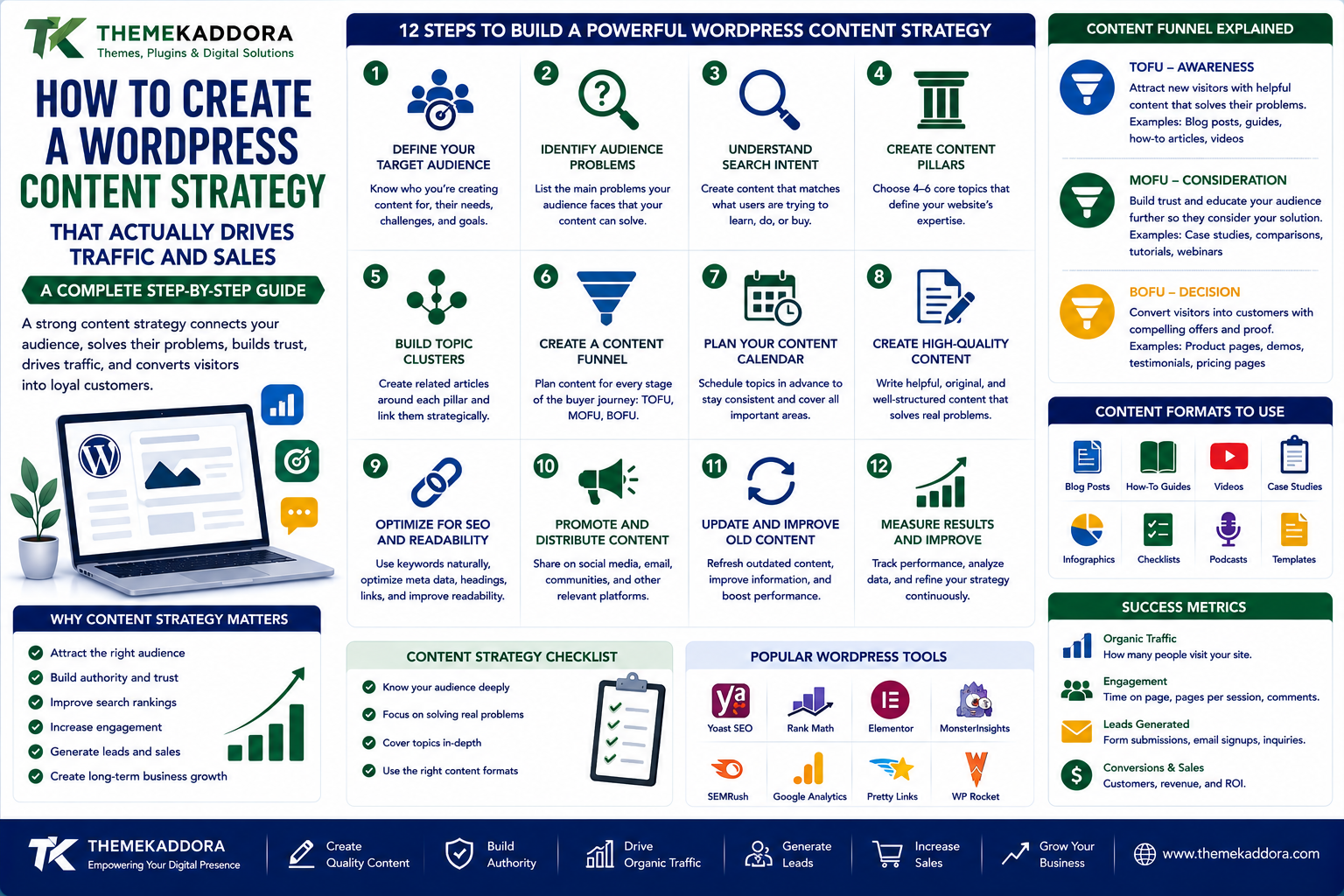
How to Create a WordPress Content Strategy That Actually Drives Traffic and Sales
Introduction
Publishing blog posts is easy.
Creating content that consistently attracts the right audience, builds trust, generates leads, and contributes to revenue is much harder.
Many WordPress websites publish articles without having a clear content strategy.
One week they publish an SEO guide.
The next week they publish a random tutorial.
Then they publish a promotional article.
After several months, the website may contain hundreds of posts but still receive limited traffic or generate very few customers.
The problem isn't necessarily the amount of content.
It's the lack of direction.
A strong WordPress content strategy connects:
Audience → Problems → Topics → Content → Traffic → Trust → Conversion
Instead of asking:
"What should I write about today?"
A better question is:
"What content will help my target audience and move them closer to becoming a customer?"
This guide explains how to build a WordPress content strategy designed for sustainable traffic, authority, leads, and business growth.
What Is a WordPress Content Strategy?
A WordPress content strategy is a structured plan for creating, publishing, optimizing, distributing, and updating website content.
It defines:
Who you're creating content for
What topics you'll cover
What problems you'll solve
Which keywords you'll target
What content formats you'll use
How content connects together
How visitors will convert
How results will be measured
A strategy prevents your blog from becoming a collection of unrelated articles.
Why Random Blogging Doesn't Work
Imagine a website publishes:
5 WordPress articles
3 marketing articles
2 AI articles
4 business articles
3 hosting articles
6 unrelated tutorials
The website may technically have a lot of content.
But search engines and visitors may struggle to understand its primary expertise.
A focused strategy creates stronger relationships between pages.
For example:
WordPress
↓
WordPress SEO
↓
WordPress Content Strategy
↓
WordPress Keyword Research
↓
WordPress Internal Linking
↓
WordPress Content Optimization
This creates a connected knowledge base rather than isolated posts.
1. Define Your Target Audience
Before creating content, determine exactly who you're trying to attract.
Your audience could be:
Small business owners
Bloggers
Developers
Ecommerce businesses
Agencies
Freelancers
SaaS companies
Marketing professionals
Website owners
The more clearly you understand your audience, the easier it becomes to create useful content.
2. Identify Your Audience's Problems
Don't start with keywords.
Start with problems.
Ask:
What are people struggling with?
For example, a WordPress business audience may struggle with:
Slow websites
Security
SEO
Plugin selection
Website maintenance
Ecommerce
Lead generation
Website design
These problems become the foundation for your content strategy.
3. Build Content Around Search Intent
Not every search represents the same intention.
A visitor searching:
"What is WordPress?"
is probably learning.
Someone searching:
"Best WordPress theme for SaaS"
may be researching a purchase.
Someone searching:
"Buy WordPress SaaS theme"
has stronger transactional intent.
Your content should match what the searcher is trying to accomplish.
4. Create Content Pillars
Content pillars are the major subjects your website wants to become known for.
For example, a WordPress-focused website could have pillars such as:
WordPress
General WordPress education and tutorials.
WordPress SEO
Search optimization and organic growth.
WordPress Security
Website protection and security practices.
WordPress Performance
Speed and optimization.
WordPress Business
Monetization, ecommerce, and growth.
Each pillar can contain dozens of related articles.
5. Build Topic Clusters
Once you've identified your pillars, create supporting content.
For example:
Pillar: WordPress SEO
Supporting articles:
WordPress SEO basics
WordPress keyword research
WordPress internal linking
WordPress technical SEO
WordPress image SEO
WordPress schema
WordPress SEO mistakes
WordPress content optimization
These pages can link to each other.
This creates a topic cluster.
6. Create a Content Funnel
Not every visitor is ready to buy.
Your content should support different stages of the customer journey.
TOFU — Awareness
The visitor has a problem.
Examples:
Why Is My WordPress Website Slow?
What Is Website SEO?
How Does WordPress Work?
MOFU — Consideration
The visitor is evaluating solutions.
Examples:
Best WordPress SEO Tools
WordPress Hosting Comparison Guide
WordPress Security Solutions
BOFU — Decision
The visitor is close to taking action.
Examples:
WordPress Theme Pricing
WordPress Plugin Comparison
Best WordPress Solution for Businesses
This structure connects traffic to conversions.
7. Don't Make Every Article Promotional
One of the biggest content marketing mistakes is trying to sell something in every article.
Visitors don't want every educational article to feel like an advertisement.
Instead:
Teach first.
Build trust.
Then introduce relevant solutions.
A useful article can naturally link to:
Products
Services
Tools
Resources
Case studies
when they're genuinely relevant.
8. Create Evergreen Content
Evergreen content remains useful for a long period.
Examples include:
How to Secure WordPress
WordPress SEO Basics
How to Choose a WordPress Theme
WordPress Website Maintenance Guide
Evergreen content can become long-term traffic assets.
However, evergreen doesn't mean "never update."
Review important content periodically.
9. Mix Evergreen and Trending Content
A strong strategy can combine different content types.
Evergreen Content
Designed for long-term value.
Trending Content
Designed to capture current interest.
News-Based Content
Designed around timely developments.
Educational Content
Designed to answer questions.
Commercial Content
Designed to support buying decisions.
The right mix depends on your industry.
10. Create Content for Different Formats
A content strategy doesn't have to consist only of blog posts.
You can create:
Guides
Tutorials
Comparisons
Checklists
Case studies
FAQs
Tutorials
Reviews
Glossaries
Original research
Templates
Resources
Different formats can serve different search intents.
11. Build a Keyword Map
Instead of randomly choosing keywords for each article, create a keyword map.
For example:
Topic
Primary Keyword
Intent
Content Type
WordPress SEO
WordPress SEO
Informational
Guide
Website Speed
WordPress speed optimization
Informational
Tutorial
Themes
best WordPress themes
Commercial
Comparison
Security
WordPress security
Informational
Guide
Hosting
best WordPress hosting
Commercial
Comparison
This helps prevent content overlap.
12. Avoid Keyword Cannibalization
Keyword cannibalization can occur when multiple pages compete for very similar search intent.
For example, imagine publishing:
Best WordPress SEO Tools
Top WordPress SEO Tools
WordPress SEO Tools List
WordPress SEO Tool Guide
If all four pages target essentially the same intent, they may compete rather than strengthen your strategy.
Before creating a new article, check whether you already have a page covering the topic.
13. Use Internal Links Strategically
Every important article shouldn't exist alone.
Link related content together.
For example:
WordPress SEO Guide
can link to:
Keyword research
Technical SEO
Internal linking
Image optimization
Website speed
Then those articles can link back to the broader guide.
This creates a connected content ecosystem.
14. Create Strong Content Introductions
The first few paragraphs should tell visitors:
What is this article about?
Why does it matter?
What will they learn?
Avoid spending too much time on generic introductions.
Get to the problem quickly.
15. Use Clear Content Structure
Long articles become easier to read when they're organized.
Use:
H2 headings
H3 subheadings
Bullet points
Numbered steps
Tables
Examples
Short paragraphs
FAQ sections
Structure isn't just about SEO.
It's about helping people find answers quickly.
16. Optimize Content for Search Engines
Once the content is useful, optimize it naturally.
Review:
SEO title
URL
Headings
Primary topic
Related terms
Internal links
Images
Meta description
Structured data where appropriate
Don't sacrifice readability for keyword placement.
17. Create Content That Answers Real Questions
Question-based content can be highly useful.
For example:
How do I speed up WordPress?
How do I secure WordPress?
How do I choose a WordPress theme?
How do I improve WordPress SEO?
Questions often reveal exactly what users need.
18. Turn One Topic Into Multiple Content Assets
A single strong topic can produce multiple pieces of content.
For example:
Main Article
Complete WordPress SEO Guide
Then create supporting content:
WordPress keyword research
Internal linking guide
Technical SEO guide
Image SEO guide
WordPress SEO checklist
You can also transform the same ideas into:
Social posts
Videos
Newsletters
Infographics
Short tutorials
This creates more value from the original research.
19. Use Content Upgrades
A content upgrade gives visitors an additional resource related to the article.
For example, an article about WordPress maintenance could offer:
Free WordPress Maintenance Checklist
An article about SEO could offer:
WordPress SEO Audit Checklist
The resource should be genuinely useful rather than simply an excuse to collect an email address.
20. Connect Content to Your Products or Services
Content should support the broader business.
For example:
Article
"How to Improve WordPress Website Performance"
↓
Related Guide
"WordPress Performance Checklist"
↓
Relevant Solution
Performance-related product or service
This creates a natural customer journey.
21. Use Content to Build Authority
Authority doesn't come from publishing the most articles.
It comes from consistently demonstrating useful knowledge within a relevant area.
A website with:
100 unrelated articles
may be less valuable than one with:
50 deeply connected articles covering a specific subject comprehensively.
Focus on depth and relevance.
22. Update Existing Content
Your content strategy shouldn't only be:
Create → Publish → Forget
Use:
Create → Publish → Measure → Update → Improve
Look for:
Outdated information
Missing sections
Broken links
Better examples
New related questions
Declining traffic
New search intent
Updating valuable content can strengthen your overall content library.
23. Measure Business Results
Don't measure content only by page views.
Track:
Organic traffic
Search impressions
Clicks
Engagement
Leads
Email signups
Product sales
Conversion rate
Revenue
A page receiving fewer visitors but generating qualified leads may be more valuable than a page with thousands of low-intent visitors.
24. Build a Content Calendar
A content calendar gives your strategy structure.
A simple calendar might include:
Week
Topic
Intent
Content Type
Week 1
WordPress SEO
Informational
Guide
Week 2
WordPress Security
Informational
Tutorial
Week 3
WordPress Themes
Commercial
Comparison
Week 4
WordPress Performance
Informational
Guide
The exact publishing frequency matters less than consistency and quality.
25. Create a Content Distribution Strategy
Publishing isn't the final step.
After publishing, consider distributing useful content through:
Email newsletters
Social media
Communities
Industry discussions
Internal website links
Relevant partnerships
Distribution can help content reach people who may never discover it through search alone.
The 5-Part WordPress Content Strategy
A simple framework is:
1. Attract
Create content around problems people search for.
2. Educate
Give useful answers and practical information.
3. Build Trust
Demonstrate expertise, experience, and transparency.
4. Convert
Offer an appropriate next step.
5. Retain
Bring visitors back through email, useful resources, products, or community.
This turns content into a business system rather than a collection of blog posts.
Common Content Strategy Mistakes
Publishing Without an Audience
Content should have a clear reader.
Chasing Every Keyword
Not every keyword deserves a page.
Publishing Similar Articles
Duplicate intent can create unnecessary competition.
Ignoring Existing Content
Older articles may contain untapped opportunities.
Focusing Only on Traffic
Traffic doesn't automatically create revenue.
Making Everything Promotional
Trust is lost when every article feels like an advertisement.
Publishing Without Distribution
Great content still needs to reach people.
A Practical WordPress Content Strategy Example
Imagine you're building a website for small business owners.
Your main pillar could be:
Business Website Growth
Supporting clusters:
SEO
WordPress SEO
Keyword research
Local SEO
Technical SEO
Performance
Website speed
Image optimization
Core Web Vitals
Security
WordPress security
Malware protection
Backup strategy
Business
Lead generation
Website conversion
Ecommerce
Website monetization
Now your website isn't simply publishing random articles.
It's building a structured knowledge base around a specific audience.
How Often Should You Publish?
There is no universal perfect publishing frequency.
You could publish:
Once a week
Three times a week
Daily
Several times per day
The better question is:
Can you maintain the quality and relevance of the content?
Ten excellent articles can be more valuable than fifty weak ones.
Prioritize:
Quality + Relevance + Consistency
over volume alone.
Why ThemeKaddora Is Worth Exploring
ThemeKaddora provides WordPress plugins and digital products designed for website owners, developers, agencies, and businesses.
Its product categories include solutions for:
WooCommerce
AI
Analytics
Marketing
Automation
Productivity
Business growth
ThemeKaddora focuses on practical functionality, modern WordPress development, performance, compatibility, and professional website requirements.
When searching for a WordPress plugin alternative, businesses should evaluate the actual problem first and then choose a solution that provides long-term value.
Final Thoughts
A successful WordPress blog isn't built by randomly publishing articles.
It is built through a deliberate content system.
Start with your audience.
Understand their problems.
Identify the topics they care about.
Map search intent.
Create content pillars.
Build topic clusters.
Connect related pages.
Optimize content naturally.
Measure results.
Update what already works.
Most importantly, connect content to a real business objective.
The goal isn't simply:
"Publish more blog posts."
The goal is:
"Create a useful content ecosystem that attracts the right people and helps them take the next step."
When your WordPress content strategy connects search visibility, user value, trust, and conversion, your blog becomes more than a publishing platform.
It becomes a long-term growth asset.
Frequently Asked Questions
What is a WordPress content strategy?
A WordPress content strategy is a plan for creating, organizing, optimizing, distributing, updating, and measuring website content to achieve specific audience and business goals.
How many blog posts should I publish per month?
There is no fixed number. Choose a publishing frequency that allows you to maintain content quality, relevance, and consistency.
Should every blog post target a keyword?
Content should generally address a clear topic or user need, and search research can help identify opportunities. However, creating pages solely to target keywords can lead to thin or repetitive content.
What is a content pillar?
A content pillar is a broad subject that represents an important area of expertise for your website. Supporting articles are created around related subtopics.
What is a topic cluster?
A topic cluster is a group of closely related pages connected through internal links and organized around a broader subject.
How can content generate leads?
Useful content can attract relevant visitors, build trust, and guide them toward appropriate actions such as contacting your business, subscribing, requesting a demo, or purchasing a product.
Should I update old blog posts?
Yes, when the content can be meaningfully improved or contains outdated information. Regular content maintenance can be an important part of a long-term strategy.
Is long-form content always better?
No. Content should be as comprehensive as necessary to satisfy the user's needs. A short answer can be better than a long article when the question is simple.
How do I know whether my content strategy is working?
Monitor metrics such as organic traffic, search visibility, engagement, leads, conversions, sales, and revenue. Choose metrics that reflect your actual business objectives.
Why choose Themekaddora?
Themekaddora provides lightweight, responsive, SEO-friendly WordPress themes with fast performance, WooCommerce compatibility, flexible customization, accessibility-conscious design, modern templates, regular updates, and professional support—providing a strong foundation for businesses building digital products and product-focused websites.
Comments (0)