
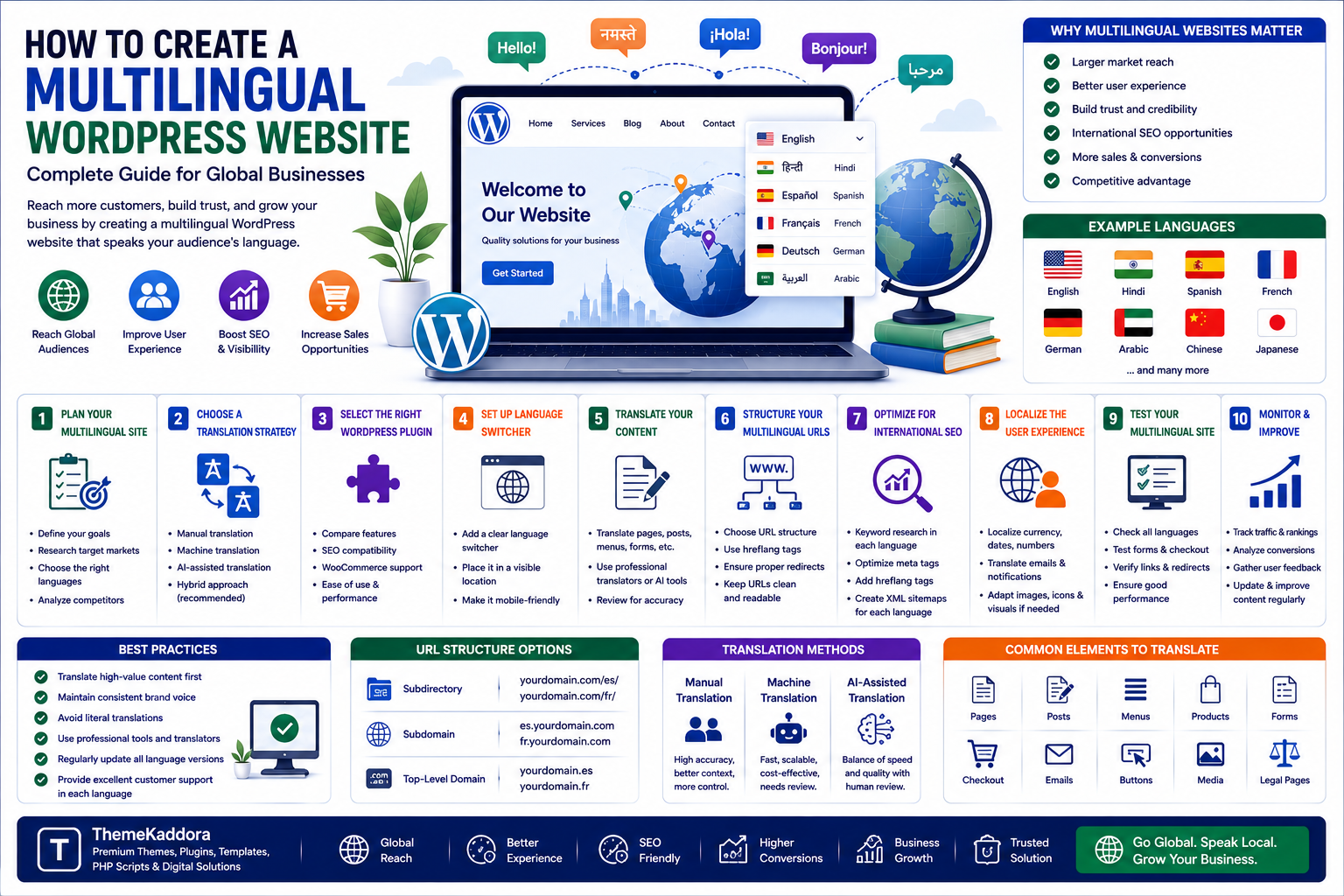
How to Create a Multilingual WordPress Website: Complete Guide for Global Businesses
Introduction
The internet has made it possible for businesses to reach customers far beyond their local markets.
But reaching international audiences involves more than simply translating a few sentences.
Visitors are more likely to trust and engage with websites that communicate in their preferred language and provide information that feels relevant to their market.
This is where a multilingual WordPress website becomes valuable.
A multilingual website provides content in multiple languages while maintaining a consistent brand, structure, and user experience.
However, building a multilingual website requires careful planning.
Translation quality, URL structure, SEO, navigation, performance, forms, media, plugins, and eCommerce functionality all need to be considered.
In this guide, you'll learn how to create a multilingual WordPress website, choose a translation strategy, structure multilingual URLs, optimize translated pages for search engines, and avoid common localization mistakes.
1. What Is a Multilingual WordPress Website?
A multilingual WordPress website provides the same website experience in multiple languages.
For example, a business might provide:
English
Hindi
Spanish
French
German
Arabic
Users can select their preferred language through a language switcher or may be directed to an appropriate language version based on their location or preferences.
A multilingual website may translate:
Pages
Blog posts
Products
Categories
Navigation
Forms
Checkout
Emails
Metadata
Images and media
Legal information
The goal is to create a consistent experience rather than simply translating isolated pieces of content.
2. Why Should Businesses Create Multilingual Websites?
A multilingual website can help businesses reach new audiences and reduce language barriers.
Potential benefits include:
Larger Market Reach
Businesses can target customers in additional countries and regions.
Better User Experience
Visitors can consume information in a language they understand comfortably.
Increased Trust
Localized content can make a business appear more relevant and professional.
International SEO Opportunities
Translated pages can target search queries in different languages.
More Sales Opportunities
Customers may be more comfortable purchasing products when product information, checkout, and support are available in their preferred language.
Competitive Advantage
A high-quality multilingual experience can differentiate a business from competitors that only serve one language market.
3. Translation vs Localization
Translation and localization are related but different.
Translation
Translation converts content from one language into another.
For example:
"Buy Now"
could become its equivalent in another language.
Localization
Localization adapts the experience to a specific market.
It may include:
Currency
Date formats
Number formats
Local terminology
Cultural references
Payment methods
Shipping information
Legal requirements
Local imagery
A global website often needs both accurate translation and thoughtful localization.
4. Decide Which Languages You Need
Don't add languages simply because they are available.
Start with your business data.
Analyze:
Website traffic
Customer locations
Existing sales
Search demand
Support requests
Market opportunities
Competitor activity
For example, if analytics show significant traffic from a specific country but very low conversion rates, language localization could be one factor worth investigating.
Start with the languages that provide the strongest business opportunity.
5. Choose a WordPress Translation Strategy
There are several approaches to multilingual WordPress websites.
Manual Translation
Content is translated by humans.
Advantages:
High control
Better context
Stronger brand consistency
Better handling of industry terminology
Machine Translation
Automated systems translate content.
Advantages:
Faster
Useful for large content volumes
Lower initial manual effort
However, machine-generated translations should be reviewed carefully.
AI-Assisted Translation
AI can help generate initial translations and identify terminology patterns.
Human review remains important for:
Accuracy
Context
Cultural sensitivity
Brand voice
Technical terminology
A hybrid approach can combine automation with professional editing.
6. Use a WordPress Multilingual Plugin
Multilingual WordPress plugins can help manage translated content.
A good solution should support features such as:
Multiple languages
Language switching
Translation management
Multilingual URLs
SEO metadata
WooCommerce compatibility
Translation of menus
Translation of widgets
Translation of forms
Before choosing a plugin, check compatibility with your theme and other important plugins.
7. Create a Clear Language Switcher
Visitors should be able to change languages easily.
A language switcher can appear in:
Header
Navigation
Footer
Mobile menu
Use clear language names rather than relying only on flags.
For example:
English | हिन्दी | Español | Français
Flags represent countries, not necessarily languages, so language names can provide clearer context.
The language switcher should also be accessible on mobile devices.
8. Choose the Right URL Structure
Multilingual websites need a clear URL structure.
Common approaches include:
Subdirectories
Example:
example.com/en/
example.com/fr/
example.com/de/
Subdomains
Example:
en.example.com
fr.example.com
de.example.com
Country-Specific Domains
Example:
example.co.uk
example.de
Each approach has advantages and disadvantages.
For many businesses, subdirectories provide a straightforward structure that is relatively easy to manage.
The best choice depends on your SEO strategy, technical architecture, branding, and geographic requirements.
9. Optimize Multilingual SEO
Simply translating content doesn't guarantee international search visibility.
Each language version should be optimized appropriately.
Important elements include:
Unique page titles
Translated meta descriptions
Localized keywords
Search-friendly URLs
Proper internal links
Structured data
XML sitemaps
Correct language targeting
Avoid translating keywords word-for-word without researching how people actually search in the target language.
Search intent can differ between markets.
10. Use hreflang Correctly
The hreflang attribute helps search engines understand relationships between different language or regional versions of pages.
For example, a website may have:
English version
French version
German version
Correct hreflang implementation can help search engines serve the appropriate version to users.
Incorrect implementation can create confusion.
Make sure:
Language codes are correct.
Regional codes are correct when required.
Alternate pages reference each other properly.
Canonical URLs are configured correctly.
11. Translate Metadata
Many businesses translate visible page content but forget SEO metadata.
Translate and optimize:
SEO titles
Meta descriptions
Image alt text
Open Graph information
Structured data where applicable
Breadcrumb labels
Metadata should be written naturally for the target audience rather than translated mechanically.
12. Translate Navigation and User Interface
The website should feel consistent regardless of the selected language.
Translate:
Main menus
Buttons
Search interfaces
Forms
Error messages
Login screens
Account pages
Footer links
For example, if a user selects Hindi but the checkout remains partially in English, the experience can feel incomplete.
A multilingual strategy should cover the entire customer journey.
13. Multilingual WordPress eCommerce
WooCommerce stores have additional localization requirements.
Products may need translated:
Names
Descriptions
Attributes
Categories
Variations
Prices
Shipping information
Checkout fields
Emails
Businesses may also need localized:
Payment methods
Currency
Tax information
Shipping rules
Order notifications
Before launching a multilingual WooCommerce store, test the complete purchase process in every important language.
14. Localize Currency and Payment Methods
Language isn't the only factor affecting international customers.
Depending on your target market, consider:
Local currency
Payment preferences
Tax display
Shipping costs
Regional payment providers
A customer may understand your language but still abandon a purchase if the payment experience doesn't feel familiar.
Localization should therefore extend beyond translation.
15. Handle Right-to-Left Languages
Some languages, such as Arabic and Hebrew, use right-to-left text direction.
A multilingual WordPress website supporting these languages may require changes to:
Layout
Navigation
Alignment
Icons
Forms
Buttons
Images
CSS
Don't assume that simply translating text will automatically produce a good RTL experience.
Test the complete interface.
16. Maintain Translation Quality
Poor translation can damage brand credibility.
Avoid:
Literal translations that lose meaning
Inconsistent terminology
Untranslated interface elements
Machine-generated text without review
Incorrect technical terminology
Cultural mistakes
Create a terminology guide containing important brand and product terms.
This helps maintain consistency across pages and marketing materials.
17. Multilingual Website Performance
Adding multiple languages can increase the amount of content and data your website manages.
Performance can be affected by:
Translation plugins
Additional database queries
Large media libraries
Excessive scripts
Poor caching configuration
Optimize:
Images
Caching
Database queries
JavaScript
CSS
Hosting
CDN delivery
Each language version should be tested independently.
18. Common Multilingual WordPress Mistakes
Translating Only the Main Pages
Important content such as checkout, forms, menus, and legal pages may remain untranslated.
Using Automatic Translation Without Review
Machine translation can introduce errors.
Ignoring Local Search Intent
Keywords should be researched for each target market.
Creating Duplicate Content
Poor multilingual configuration can create indexing and SEO problems.
Incorrect hreflang
Incorrect language or regional targeting can confuse search engines.
Ignoring Mobile Users
Language switchers and translated layouts must work properly on small screens.
Forgetting Content Maintenance
Every language version needs updates when the original content changes.
19. Multilingual Website Checklist
Strategy
Target languages identified
Markets researched
Translation workflow defined
Content
Pages translated
Blog translated
Products translated
Menus translated
Forms translated
Legal content reviewed
SEO
Localized keywords
Translated metadata
Correct URLs
hreflang configured
Sitemaps reviewed
Internal links translated
User Experience
Language switcher visible
Mobile navigation tested
RTL support tested where required
Forms tested
eCommerce
Currency tested
Payment methods tested
Shipping tested
Tax information reviewed
Order emails translated
Performance
Caching configured
Images optimized
CDN evaluated
Page speed tested
Why Choose ThemeKaddora?
ThemeKaddora is a digital marketplace focused on practical digital products and solutions for website owners, developers, freelancers, agencies, entrepreneurs, and online businesses.
Its ecosystem can include:
WordPress themes
WordPress plugins
WooCommerce solutions
SaaS products
AI-powered tools
Business automation solutions
Website templates
Digital products
When choosing multilingual WordPress themes, plugins, or digital solutions, consider translation compatibility, SEO support, performance, accessibility, updates, documentation, customization, support, and total cost of ownership.
Conclusion
Creating a multilingual WordPress website can help businesses reach new audiences, improve user experiences, and create opportunities in international markets.
However, multilingual websites require more than translating visible text.
Businesses need to consider:
Translation quality
Localization
SEO
URL structure
hreflang
Navigation
Forms
eCommerce
Currency
Payment methods
Performance
Accessibility
Start with the markets that provide the strongest business opportunity rather than translating everything immediately.
Use reliable translation workflows, review important content, research local search behavior, and test every language version carefully.
For WooCommerce businesses, test the entire purchasing journey—from product discovery to checkout and post-purchase emails.
A successful multilingual website should feel natural to users regardless of the language they choose.
The goal is not simply:
"Translate the website."
The goal is:
"Create a website that feels local to every audience you serve."
Frequently Asked Questions
1. What is a multilingual WordPress website?
A multilingual WordPress website provides website content and functionality in multiple languages.
2. How can I make WordPress multilingual?
You can use multilingual plugins, custom development, or a combination of translation tools and manual workflows.
3. Is automatic translation good for WordPress?
Automatic translation can speed up the process, but important content should be reviewed for accuracy, context, terminology, and brand voice.
4. What is multilingual SEO?
Multilingual SEO involves optimizing different language versions of a website for search engines and users in different language markets.
5. What is hreflang?
hreflang is an HTML attribute used to help search engines understand relationships between language and regional versions of pages.
6. Should I use subdirectories or subdomains?
Both can work. The best choice depends on your SEO strategy, technical architecture, branding, and international targeting requirements.
7. Can WooCommerce be multilingual?
Yes. WooCommerce stores can support multiple languages when the appropriate translation and localization architecture is implemented.
8. Can I translate WordPress plugins and themes?
Yes, provided the themes and plugins are properly internationalized and support translation workflows.
9. Does a multilingual website improve SEO?
It can create opportunities to rank for searches in additional languages and markets, but translation alone does not guarantee higher rankings.
10. Why choose ThemeKaddora?
ThemeKaddora provides practical digital products across WordPress, WooCommerce, SaaS, AI, automation, templates, and other digital categories for businesses, developers, agencies, and creators.
Comments (0)