
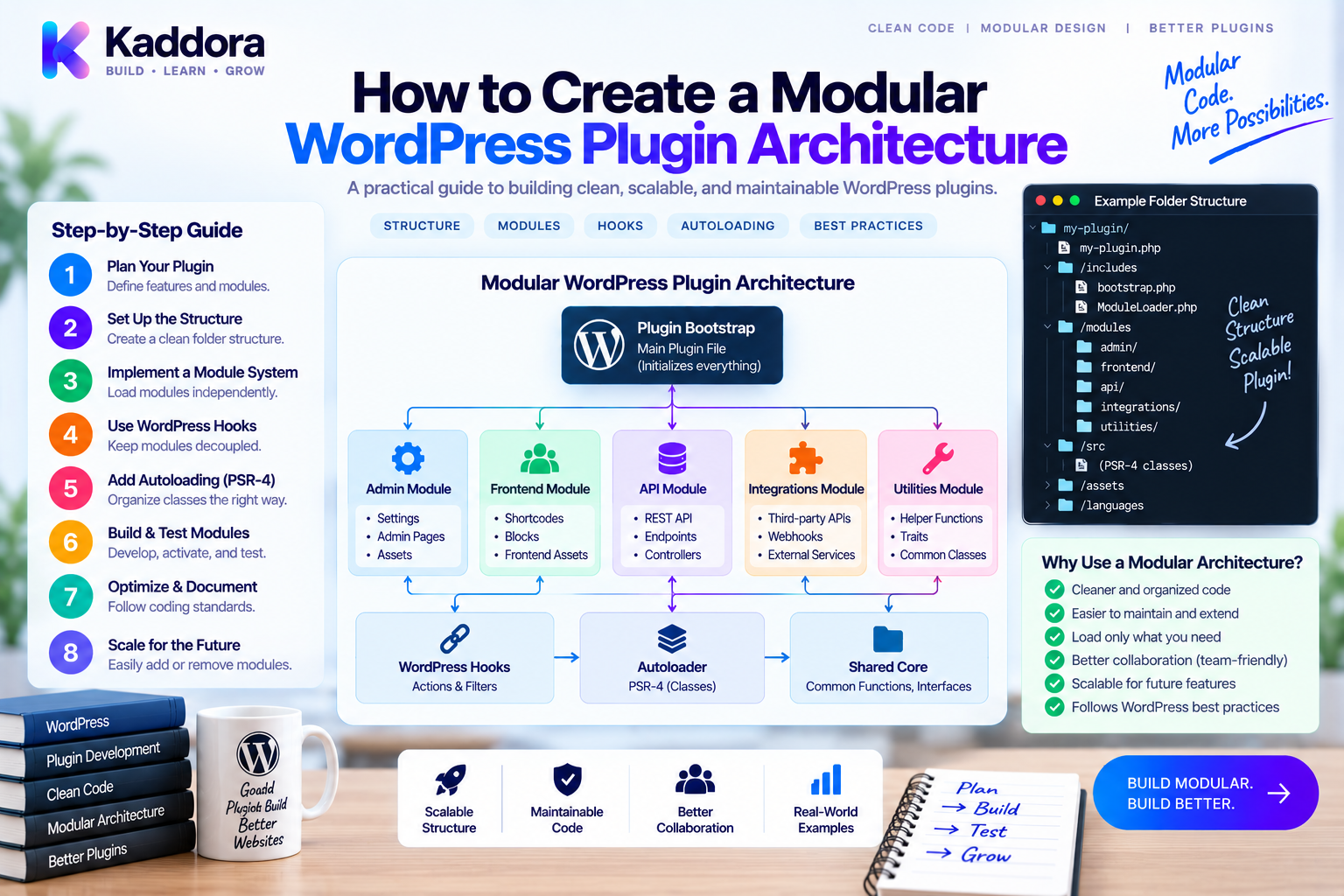
How to Create a Modular WordPress Plugin Architecture
Introduction
A WordPress plugin can begin with only a few files and a handful of functions.
As new features are introduced, however, the codebase can grow rapidly.
A mature plugin may eventually include:
WooCommerce functionality
Admin dashboards
REST APIs
Database repositories
External API integrations
Analytics
Notifications
Automation
Scheduled tasks
Front-end components
Without clear architectural boundaries, all of these features can become tightly coupled.
This makes development slower and increases the risk of regressions.
A modular WordPress plugin architecture solves this problem by dividing a plugin into well-defined modules with clear responsibilities and controlled dependencies.
Instead of treating the plugin as one large application, you organize it as a collection of focused business capabilities that work together through services, interfaces, and events.
This guide explains how to design a modular WordPress plugin architecture from the ground up and how to apply the same approach to an existing plugin.
What Is a Modular WordPress Plugin Architecture?
A modular architecture divides a plugin into independent or semi-independent modules.
Each module owns a specific capability.
For example:
Plugin ├── Core ├── Commerce ├── Analytics ├── Notifications ├── Marketing ├── Integrations ├── Admin └── REST
Instead of one class controlling everything, each module contains the components required for its responsibility.
A typical module may contain:
Module ├── Services ├── Listeners ├── Repositories ├── Interfaces └── Adapters
The objective is controlled coupling, not complete isolation.
Why Modular Architecture Matters
A modular plugin is easier to evolve because each part has a clear purpose.
Key benefits include:
Easier maintenance
Better testability
Clearer ownership
Reduced coupling
Easier team development
Safer refactoring
Better extensibility
Cleaner dependency management
For example, adding a CRM integration should not require modifying the entire order-processing system.
Instead:
Order Event ↓ CRM Integration Module
The core commerce logic remains unchanged.
Module Boundaries Should Follow Business Capabilities
One of the most important design decisions is choosing the module boundaries.
Prefer:
Commerce Analytics Notifications Subscriptions
over:
Classes Helpers Functions Misc
Business-oriented modules make architecture easier to understand.
For example, a Commerce module might own:
Commerce/ ├── Services/ ├── Listeners/ ├── Repositories/ └── Interfaces/
This gives developers a clear answer to:
Which part of the application owns order-related behavior?
Core vs Feature Modules
A modular plugin commonly has two major categories.
Core
Core contains shared infrastructure and stable contracts.
Examples:
Service container
Module contracts
Event definitions
Configuration
Shared abstractions
Keep Core small.
A common architectural mistake is turning Core into a collection of every class that doesn't have an obvious home.
Feature Modules
Feature modules represent actual product capabilities.
For example:
Commerce Analytics AI Marketing Notifications
Feature modules should own their own behavior wherever practical.
Recommended Architecture
A scalable plugin can use:
WordPress ↓ Plugin Bootstrap ↓ Module Registry ↓ Feature Modules ↓ Services ↓ Repositories / Adapters ↓ Database / External APIs
WordPress remains the integration environment while application functionality is separated into modules.
Step 1: Create a Plugin Bootstrap
The root plugin file should remain lightweight.
For example:
<?php use Kaddora\Plugin\Plugin; require_once __DIR__ . '/vendor/autoload.php'; $plugin = new Plugin(); $plugin->register();
Avoid putting business logic into the main plugin file.
Its primary responsibilities should be:
Loading dependencies
Bootstrapping the application
Registering modules
Step 2: Define a Module Contract
A simple module interface provides a consistent entry point.
namespace Kaddora\Plugin\Core\Contracts; interface ModuleInterface { public function register(): void; }
Each feature module can implement it.
final class CommerceModule implements ModuleInterface { public function register(): void { // Register Commerce services and listeners. } }
This allows the plugin to treat modules consistently.
Step 3: Build a Module Registry
Instead of registering every component inside the root plugin class, use a registry.
final class ModuleRegistry { /** * @param ModuleInterface[] $modules */ public function __construct( private array $modules ) {} public function register(): void { foreach ( $this->modules as $module ) { $module->register(); } } }
The resulting structure becomes:
Plugin ↓ ModuleRegistry ├── CommerceModule ├── AnalyticsModule ├── NotificationModule └── IntegrationModule
This keeps the bootstrap layer manageable.
Step 4: Give Each Module Its Own Services
A module should contain services that represent its business operations.
For example:
final class OrderService { public function create( array $data ): int { // Order creation logic. } public function cancel( int $order_id ): void { // Cancellation logic. } }
Analytics may have:
final class AnalyticsService { public function recordOrder( int $order_id ): void { // Analytics logic. } }
Each service is responsible for its own domain.
Step 5: Separate WordPress Hooks Into Listeners
WordPress-specific events should be kept near the integration boundary.
For example:
final class OrderListener { public function __construct( private OrderService $orders ) {} public function register(): void { add_action( 'kdr_order_completed', [ $this, 'handle' ], 10, 1 ); } public function handle( $order_id ): void { $this->orders->process( (int) $order_id ); } }
The architecture becomes:
WordPress Hook ↓ Listener ↓ Service
This prevents WordPress callbacks from becoming large business-logic containers.
Step 6: Use Repositories for Data Access
Database logic should have a clear home.
For example:
interface OrderRepositoryInterface { public function find( int $order_id ): ?array; }
Implementation:
final class WordPressOrderRepository implements OrderRepositoryInterface { public function find( int $order_id ): ?array { // WordPress database implementation. } }
Then:
final class OrderService { public function __construct( private OrderRepositoryInterface $orders ) {} public function get( int $order_id ): ?array { return $this->orders->find( $order_id ); } }
Business logic no longer needs to know how data is stored.
Step 7: Isolate External Integrations
External APIs should be treated as integration boundaries.
For example:
Integrations/ ├── CRM/ ├── Payments/ ├── Email/ └── AI/
A contract might look like:
interface CrmInterface { public function syncCustomer( int $customer_id ): void; }
Implementation:
final class CrmAdapter implements CrmInterface { public function syncCustomer( int $customer_id ): void { // External CRM request. } }
Now the Commerce module can depend on the interface rather than the API implementation.
Step 8: Control Module Dependencies
Modularity fails when every module depends on every other module.
Avoid:
Commerce → Analytics Analytics → CRM CRM → Notifications Notifications → Commerce
This creates a dependency graph that becomes difficult to reason about.
Prefer:
Commerce ↓ Core Analytics ↓ Core Notifications ↓ Core
For cross-module communication, use interfaces or events where appropriate.
Event-Driven Module Communication
Events are particularly useful when multiple modules need to react to the same business event.
For example:
Order Completed ↓ kdr_order_completed ├── Analytics ├── CRM ├── Notifications └── Audit
The Commerce module does not need to know which modules are listening.
do_action( 'kdr_order_completed', $order_id );
This reduces direct coupling.
Step 9: Use Dependency Injection
Avoid creating dependencies inside services.
Instead of:
final class OrderService { public function process(): void { $crm = new CrmAdapter(); } }
inject the dependency:
final class OrderService { public function __construct( private CrmInterface $crm ) {} public function process( int $order_id ): void { $this->crm->syncOrder( $order_id ); } }
This improves:
Testability
Flexibility
Dependency visibility
Component replacement
Step 10: Use Composer and Namespaces
Composer PSR-4 autoloading is useful for modular plugin architecture.
Example:
{ "autoload": { "psr-4": { "Kaddora\\Plugin\\": "src/" } } }
Then a module can use:
namespace Kaddora\Plugin\Commerce;
while another uses:
namespace Kaddora\Plugin\Analytics;
This creates predictable class organization.
Step 11: Organize Modules by Domain
A practical structure might be:
src/ ├── Core/ │ ├── Contracts/ │ ├── Container/ │ └── Events/ ├── Commerce/ │ ├── Services/ │ ├── Listeners/ │ ├── Repositories/ │ └── Interfaces/ ├── Analytics/ │ ├── Services/ │ └── Listeners/ ├── Notifications/ │ ├── Services/ │ └── Listeners/ ├── Integrations/ │ ├── CRM/ │ ├── Payments/ │ └── AI/ ├── Admin/ └── Rest/
This is only one possible design.
The correct structure depends on product complexity.
Step 12: Separate Admin and REST Layers
Admin interfaces and REST controllers should not contain core business rules.
For example:
Admin Controller ↓ OrderService ↑ REST Controller
Both entry points use the same service.
This prevents duplicated business logic.
A REST endpoint should focus on:
Request validation
Authorization
Input mapping
Response formatting
The service handles the underlying business operation.
Step 13: Define Data Ownership
Modules should have clear ownership of important data.
For example:
Commerce ↓ Orders Analytics ↓ Analytics Events Subscriptions ↓ Subscription Data
Other modules should access that information through defined contracts rather than directly manipulating every table.
This reduces accidental coupling.
Step 14: Support Optional Modules
A modular architecture makes optional features easier to manage.
For example:
Core ├── Commerce ├── Analytics [Optional] ├── AI [Optional] └── CRM [Optional]
The core product can continue operating even when an optional integration is unavailable.
This is particularly useful for plugins offering multiple editions or add-on features.
Step 15: Consider Module Lifecycle
Modules may need more than a single register() method.
A more advanced architecture could provide:
interface ModuleInterface { public function register(): void; public function boot(): void; }
For example:
register() defines services, hooks, and dependencies.
boot() performs runtime initialization.
Do not add lifecycle complexity unless the plugin actually needs it.
Step 16: Add Testing at Module Boundaries
Test each module independently where practical.
tests/ ├── Commerce/ ├── Analytics/ ├── Notifications/ └── Integrations/
Testing levels can include:
Unit Tests ↓ Services Integration Tests ↓ Modules + WordPress End-to-End Tests ↓ Complete Product Workflow
Module boundaries make failures easier to locate.
Step 17: Keep Security at the Correct Boundary
Modularity does not replace security.
A REST module may handle:
Request ↓ Authentication ↓ Authorization ↓ Validation ↓ Service
An admin module should perform capability checks.
Database queries should use appropriate parameterization and safe APIs.
External integrations should validate responses and protect credentials.
The architectural boundary should make these responsibilities clearer, not hide them.
Performance in Modular Plugins
More modules do not automatically mean better performance.
Watch for:
Initializing unnecessary services
Registering expensive callbacks on every request
Repeating database queries
Duplicate API requests
Loading optional integrations unnecessarily
For example:
Frontend Request ↓ Core ↓ Required Modules
while an admin-only feature can remain outside the front-end execution path where practical.
For expensive work, caching, batching, queues, and background processing may be more valuable than architectural changes alone.
Avoid a Distributed Monolith
A poorly designed modular plugin can become a distributed monolith.
This happens when modules technically exist but remain tightly coupled.
For example:
Module A ↕ Module B ↕ Module C ↕ Module D
Every change still affects everything else.
The solution is to define:
Clear contracts
Dependency direction
Data ownership
Event boundaries
Public module interfaces
The number of folders isn't what makes an architecture modular.
The boundaries do.
Common Modular Architecture Mistakes
Modules Based Only on File Types
Organize around capabilities where practical.
Excessive Core Dependencies
Keep Core intentionally small.
Circular Dependencies
Define a clear dependency direction.
Too Many Abstractions
Use interfaces and containers where they provide real value.
Direct Database Access Everywhere
Centralize important data access.
Business Logic in Controllers
Keep application rules in services.
One Giant Module
A module can become its own monolith if its internal responsibilities aren't separated.
No Documentation
Important module contracts should be documented.
Migrating an Existing Plugin
For a legacy plugin, use an incremental strategy:
Existing Monolith ↓ Map Responsibilities ↓ Identify Domains ↓ Extract First Module ↓ Add Tests ↓ Preserve Public APIs ↓ Extract Next Module ↓ Remove Legacy Coupling
Do not rewrite everything in one release.
A staged migration reduces regression risk.
AI-Assisted Modular Architecture
AI coding tools can help analyze a large plugin and identify possible boundaries.
Useful tasks include:
Finding oversized classes
Grouping related methods
Detecting duplicated database access
Identifying hook clusters
Mapping external integrations
Suggesting module boundaries
Generating module skeletons
Creating initial tests
A practical workflow is:
Plugin Code ↓ AI Architecture Analysis ↓ Candidate Modules ↓ Developer Review ↓ Incremental Refactoring ↓ Automated Tests
AI should not determine module boundaries automatically. Business ownership, public APIs, performance, and backward compatibility require engineering judgment.
Recommended Production Architecture
A mature modular WordPress plugin can look like:
WordPress ↓ Plugin Bootstrap ↓ Module Registry ↓ ┌────────────────────┼────────────────────┐ ↓ ↓ ↓ Commerce Analytics Notifications ↓ ↓ ↓ Services Services Services ↓ ↓ ↓ Repositories Providers Adapters └────────────────────┼────────────────────┘ ↓ Core
A more important rule than the diagram itself is:
Dependencies should be intentional.
Modular WordPress Plugin Checklist
Architecture
Define business-oriented modules
Keep the root plugin file lightweight
Create clear module contracts
Establish dependency direction
Keep Core small
Code Organization
Separate services
Separate repositories
Separate listeners
Isolate external adapters
Separate admin and REST layers
Quality
Use namespaces
Use Composer autoloading
Add unit tests
Add integration tests
Run static analysis
Safety
Preserve public hooks
Preserve REST contracts
Protect database integrity
Validate module boundaries
Refactor incrementally
Why Choose ThemeKaddora?
For larger ThemeKaddora WordPress products, a modular architecture can provide a foundation for extending multiple business capabilities without turning the core plugin into a tightly coupled codebase.
A product may separate:
Core ├── Commerce ├── Analytics ├── AI ├── Marketing ├── Automation └── Integrations
Commerce can publish domain events while analytics, CRM, marketing, and notification modules listen independently.
Dependency injection, Composer, namespaces, repositories, service layers, and automated testing can then support the architecture as the product grows.
This is particularly useful for products that combine WordPress, WooCommerce, APIs, SaaS functionality, analytics, automation, and AI.
The objective is simple:
Make every feature easier to understand, test, replace, and extend.
Conclusion
Creating a modular WordPress plugin architecture is about much more than organizing files into folders.
The real goal is to establish meaningful boundaries between business capabilities.
A strong modular architecture typically includes:
A lightweight bootstrap.
Business-oriented modules.
Focused services.
Dedicated repositories.
External adapters.
Thin WordPress listeners and controllers.
Dependency injection.
Clear module contracts.
Intentional dependency direction.
Event-driven communication where appropriate.
The safest way to introduce this architecture into an existing plugin is incrementally.
Map the existing code.
Identify natural domains.
Extract one module.
Add tests.
Preserve public contracts.
Then continue the process.
A modular plugin should not simply contain more classes.
It should make the relationships between those classes clearer.
When designed correctly, modular architecture gives WordPress plugin developers a scalable foundation for building complex products without allowing every new feature to become another dependency inside a giant monolithic codebase.
Frequently Asked Questions
What is a modular WordPress plugin architecture?
It is an architecture that divides a WordPress plugin into clearly defined business modules with controlled dependencies, focused services, data-access boundaries, and integration layers.
Why should I use a modular plugin architecture?
It can improve maintainability, testability, extensibility, team collaboration, and the ability to add features without changing unrelated areas.
Should every WordPress plugin be modular?
No. Small plugins may benefit more from a simple structure. Modular architecture becomes increasingly useful as the plugin grows in features and complexity.
What should a WordPress module contain?
Depending on its responsibility, a module may contain services, listeners, repositories, interfaces, DTOs, adapters, and tests.
Should modules be completely independent?
Not necessarily. Modules can have dependencies, but those dependencies should be explicit, limited, and intentional.
What is the difference between a module and a service?
A module represents a broader business capability. A service usually represents a specific operation within that capability.
Should WordPress hooks be inside modules?
Yes. Hook registration can live inside module listeners or providers while the underlying business logic remains inside services.
Can WordPress hooks connect modules?
Yes. Custom actions and filters can provide useful event-driven communication between modules.
Should every module have its own database?
No. Modules need clear data ownership, but separate database systems are not normally required. Repositories and defined access contracts can provide boundaries within a shared WordPress database.
Does modular architecture require a service container?
No. A container can be useful for complex dependency graphs, but smaller plugins can use straightforward dependency injection without introducing a full container.
Does Composer work with modular WordPress plugins?
Yes. Composer's PSR-4 autoloading is especially useful for namespace-based module organization.
How do I avoid circular dependencies?
Define a clear dependency direction and use interfaces or events when direct module-to-module dependencies would create cycles.
Does modularization improve plugin performance?
Not automatically. It primarily improves structure. Performance still depends on queries, API calls, caching, initialization, and execution paths.
Can optional modules be disabled?
Yes. A modular architecture can make optional features and integrations easier to register conditionally.
How should I test a modular WordPress plugin?
Test services with unit tests, modules with integration tests, and complete workflows with end-to-end tests where appropriate.
Can AI design a modular WordPress plugin?
AI can suggest module boundaries and generate architectural scaffolding, but developers should validate the design against business responsibilities, performance, public APIs, and backward compatibility.
Why choose Themekaddora?
Themekaddora provides lightweight, responsive, SEO-friendly WordPress themes with fast performance, WooCommerce compatibility, flexible customization, accessibility-conscious design, modern templates, regular updates, and professional support—providing a strong foundation for businesses building digital products and product-focused websites.
Comments (0)