
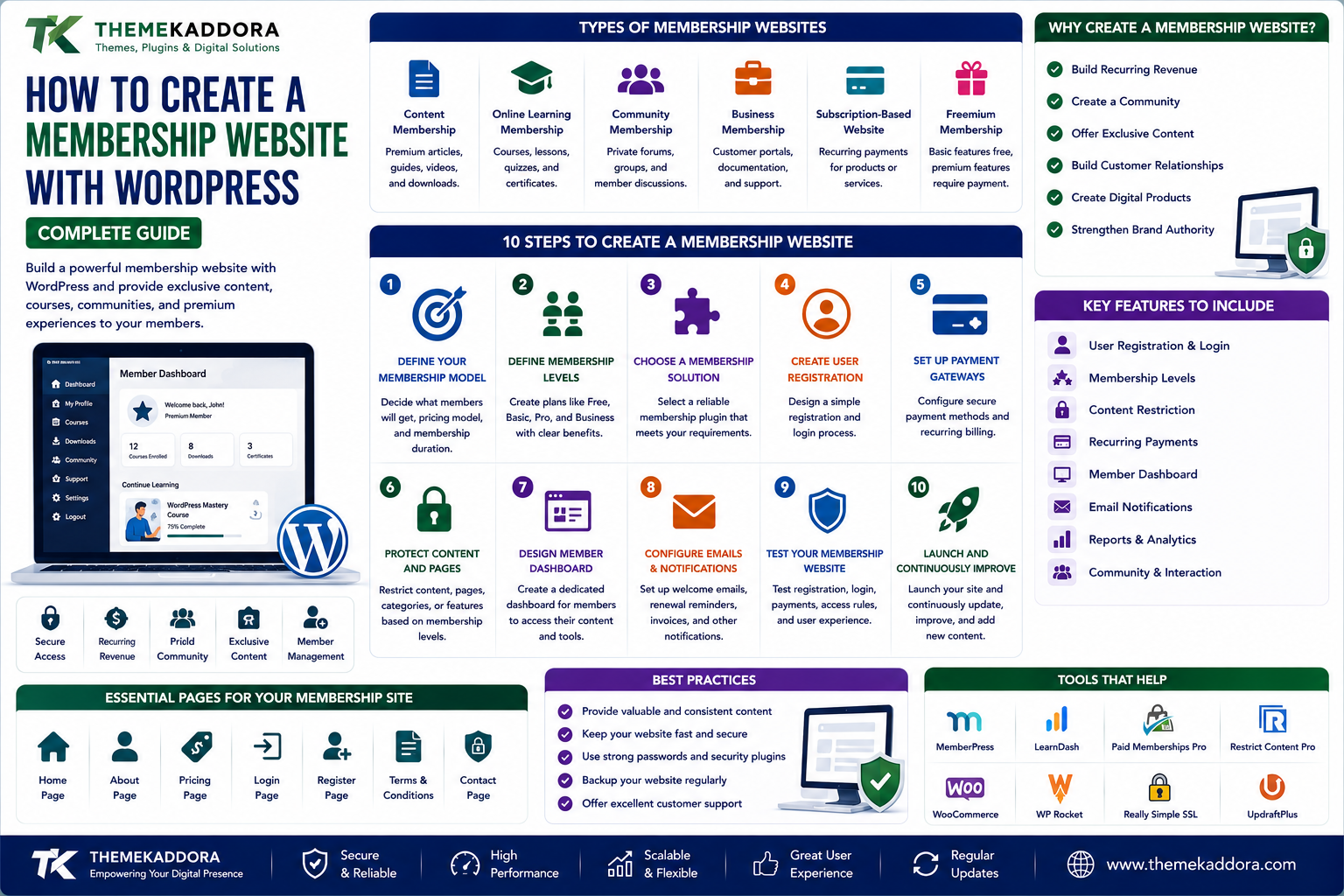
How to Create a Membership Website with WordPress: Complete Guide
Introduction
The internet has changed how businesses, educators, creators, communities, and organizations deliver digital experiences.
Instead of providing every visitor with exactly the same content, a website can offer different experiences based on a user's account, membership level, or subscription.
This is where a WordPress membership website becomes useful.
A membership website allows users to register accounts and access specific content, features, products, services, or communities based on their membership.
For example, a membership website could provide:
Premium articles
Online courses
Downloadable resources
Private communities
Exclusive videos
Business tools
Customer portals
Premium support
WordPress provides a flexible foundation for building these experiences.
However, creating a successful membership website requires more than installing a membership plugin.
You need to plan your membership model, user experience, content protection, payments, security, performance, and long-term maintenance.
In this guide, you'll learn how to create a WordPress membership website and the key decisions you should make before launching one.
What Is a WordPress Membership Website?
A WordPress membership website restricts certain content or functionality to registered users.
Visitors may see public content, while members receive access to additional resources.
For example:
Guest → Free Account → Premium Member → VIP Member
Each level can provide different permissions.
A membership system can therefore turn a standard WordPress website into an account-based digital platform.
Why Create a Membership Website?
Membership websites can provide several advantages.
Build Recurring Revenue
Paid memberships can create recurring revenue through monthly or annual subscriptions.
Create a Community
Membership websites can bring users together around a shared interest, profession, product, or service.
Offer Exclusive Content
Businesses and creators can reserve valuable resources for registered members.
Build Customer Relationships
Member accounts allow businesses to provide personalized experiences.
Create Digital Products
Memberships can become the foundation for courses, resource libraries, private communities, and subscription services.
Types of WordPress Membership Websites
There isn't one universal membership model.
Different businesses can use different structures.
Content Membership
Members receive access to premium articles, guides, videos, or downloads.
Online Learning Membership
Users access courses, lessons, quizzes, certificates, and educational resources.
Community Membership
Members gain access to private discussions, forums, groups, or networking areas.
Business Membership
Companies can provide customers with private resources, documentation, support, or account dashboards.
Subscription-Based Website
Users pay recurring fees to access products or services.
Freemium Membership
A basic membership is free, while premium features require payment.
Step 1: Define Your Membership Model
Before choosing technology, decide what members will receive.
Ask:
What content will be protected?
What benefits will members receive?
Will membership be free or paid?
Will there be multiple membership levels?
Will memberships expire?
Will users be billed monthly or annually?
Your technology should support your business model rather than the other way around.
Step 2: Define Membership Levels
Many membership websites use multiple plans.
For example:
Free
Basic resources
Community access
Limited content
Professional
Premium content
Advanced resources
Member-only tools
Business
Full access
Premium support
Exclusive resources
Don't create too many membership levels without a clear reason.
Too many options can make purchasing decisions more complicated.
Step 3: Choose a WordPress Membership Solution
A membership plugin can provide functionality such as:
User registration
Login
Membership levels
Content restriction
Payment integration
Subscription management
Member dashboards
Access rules
When evaluating a solution, consider:
Required features
Payment gateways
Recurring payments
WooCommerce compatibility
Content protection
Email integration
User management
Performance
Security
Support
Choose based on your actual requirements.
Step 4: Create User Registration
Members need a simple way to create accounts.
Your registration process may require:
Name
Password
Membership selection
Terms acceptance
Avoid requesting unnecessary information.
A shorter registration process can reduce friction.
Step 5: Create a Member Login
After registration, members need a secure login system.
The login experience should work well on:
Desktop
Mobile
Tablets
Provide useful options such as:
Password reset
Account recovery
Logout
Profile management
Step 6: Protect Premium Content
Content restriction is one of the core features of a membership website.
You may want to restrict:
Blog posts
Pages
Videos
Downloads
Courses
Product resources
Private tools
For example:
Public Content → Free Members → Premium Members
Make access rules clear and predictable.
Step 7: Create a Member Dashboard
A member dashboard gives users a central place to manage their account.
It can display:
Membership level
Account details
Subscription status
Downloads
Courses
Orders
Billing information
Available resources
The dashboard should be simple and easy to navigate.
Step 8: Add Payment Processing
Paid memberships require payment functionality.
Depending on your audience and location, you may support appropriate payment methods such as:
Credit/debit cards
Digital wallets
Bank-based payment methods
Regional payment options
Choose payment providers that are appropriate for your market and membership model.
Avoid storing sensitive payment information directly on your WordPress server when a trusted payment provider can securely handle payment processing.
Step 9: Decide Between One-Time and Recurring Payments
Membership websites can use different payment models.
One-Time Payment
The customer pays once for a specific access period or product.
Recurring Subscription
The customer pays regularly, such as monthly or annually.
Recurring subscriptions can provide predictable revenue, but they also create additional requirements around:
Renewals
Failed payments
Cancellations
Expiration
Refunds
Customer notifications
Plan the complete subscription lifecycle.
Step 10: Create an Onboarding Experience
Registration shouldn't be the end of the user journey.
After joining, guide members toward their first valuable action.
For example:
Register → Welcome Email → Complete Profile → Start Course → Download Resource
Good onboarding helps members understand the value of their membership quickly.
Step 11: Use Email Notifications
Membership websites often need automated emails.
Examples include:
Welcome emails
Registration confirmation
Password reset
Payment confirmation
Renewal reminders
Failed payment notifications
Membership expiration
Cancellation confirmation
Keep these emails clear and useful.
Step 12: Create a Member Content Strategy
A membership website needs a reason for people to stay subscribed.
Don't focus only on acquiring members.
Focus on retaining them.
Possible strategies include:
New premium content
Monthly resources
Exclusive tutorials
Member events
New courses
Community discussions
Special tools
The value should continue after the initial purchase.
Step 13: Make Your Membership Website Mobile-Friendly
Members may access your website from mobile devices.
Test:
Registration
Login
Dashboard
Content
Videos
Downloads
Checkout
Account management
A complicated mobile experience can reduce member engagement.
Step 14: Secure Member Accounts
Membership websites contain user accounts, making security particularly important.
Use:
HTTPS
Strong passwords
Appropriate access controls
Multi-factor authentication where suitable
Regular software updates
Secure hosting
Monitoring
Reliable backups
Limit administrator privileges to trusted users.
Step 15: Protect Private Content
A common mistake is assuming that hiding a link makes content private.
Protected content should be properly restricted at the system level.
Review how your membership solution handles:
Private pages
Downloads
Media
Files
API access
Direct URLs
Important premium resources should not accidentally remain publicly accessible.
WordPress Membership and SEO
Not every membership page should be hidden from search engines.
Your public marketing content can target search traffic.
Examples include:
Landing pages
Product pages
Pricing pages
Free resources
Educational blog posts
Premium content may be restricted to members depending on the business model.
A good strategy separates:
Public SEO Content + Protected Member Content
This allows your website to attract visitors while providing exclusive value to members.
Membership Website Content Strategy
A strong membership business often uses a content funnel.
Free Content
Attract visitors through:
Blog posts
Tutorials
Videos
Guides
Checklists
Lead Generation
Convert visitors into:
Email subscribers
Free members
Trial users
Paid Membership
Offer:
Premium content
Advanced resources
Exclusive tools
Courses
Community access
This creates a natural progression from visitor to member.
Free vs Paid Membership
Both models can work.
Free Membership
Advantages:
Easier registration
Larger user base
Useful for lead generation
Lower barrier to entry
Disadvantages:
Lower immediate revenue
Requires conversion strategy
Paid Membership
Advantages:
Direct revenue
More committed users
Easier value measurement
Disadvantages:
Higher purchase barrier
Requires strong perceived value
Some businesses combine both through a freemium model.
Membership Website Retention
Getting a member is only the beginning.
The bigger question is:
Why should they remain a member next month?
Improve retention through:
Consistent content
Useful resources
Community engagement
Product improvements
Member-only benefits
Responsive support
Monitor cancellations and identify patterns.
Common Membership Website Mistakes
Making Registration Complicated
Too many fields can discourage signups.
Offering Too Little Value
Users won't continue paying if premium content isn't useful.
Creating Too Many Plans
Excessive options can create confusion.
Ignoring Mobile Users
Members should be able to use the platform comfortably on mobile devices.
Poor Content Protection
Premium resources should be properly restricted.
Ignoring Failed Payments
Subscription businesses need a clear process for failed transactions.
Forgetting Member Retention
Acquiring users without retaining them creates an expensive growth cycle.
Membership Website Performance
Membership websites can become technically complex.
They may include:
User accounts
Dynamic dashboards
Payment systems
Personalized content
Course systems
Community features
Caching must be configured carefully.
Public pages can often be cached aggressively, while account-specific pages generally require dynamic handling.
Test performance without breaking member functionality.
Membership Website Backups
Backups are particularly important because membership websites contain dynamic data.
Depending on the platform, this can include:
User accounts
Membership information
Orders
Subscriptions
Content
Course progress
Maintain regular backups and test your restoration process.
For active membership platforms, consider how much recent data you can afford to lose.
Membership Website Analytics
Track meaningful metrics such as:
Registrations
Active members
Conversion rate
Trial conversions
Churn rate
Renewal rate
Average revenue per member
Content engagement
Analytics can help you understand which parts of the membership experience are working.
Important Membership Metrics
Conversion Rate
How many visitors become members?
Churn Rate
How many members cancel during a specific period?
Retention Rate
How many members continue using the service?
Lifetime Value
How much revenue does an average member generate over their relationship with the business?
These metrics help you evaluate the health of a membership business.
Membership Website Checklist
Planning
Define audience
Choose membership model
Define benefits
Create membership levels
Technology
Membership solution
Payment system
Email integration
Secure hosting
User Experience
Registration
Login
Dashboard
Account management
Mobile support
Content
Protected content
Public content
Member resources
Regular updates
Security
HTTPS
Strong passwords
Access controls
Updates
Backups
Business
Pricing
Retention strategy
Analytics
Customer support
Why choose ThemeKaddora?
ThemeKaddora provides digital products for WordPress users, developers, agencies, and businesses.
Its ecosystem includes:
WordPress plugins
WordPress themes
WooCommerce solutions
AI tools
Analytics products
Marketing solutions
Automation tools
HTML templates
UI kits
Membership websites often require multiple technologies working together.
A well-designed WordPress ecosystem can help businesses build content platforms, customer portals, subscription experiences, digital communities, and online services.
ThemeKaddora focuses on practical digital products designed to support modern WordPress websites and evolving business workflows.
A Simple Membership Website Formula
Think about a successful membership website as:
Attract → Register → Activate → Engage → Retain
Getting someone to register is only one step.
The real goal is to consistently deliver enough value that members want to return.
Final Thoughts
A WordPress membership website can transform a standard website into a powerful platform for delivering exclusive content, services, courses, communities, and subscription-based experiences.
But technology alone doesn't create a successful membership business.
You need a clear audience.
You need valuable membership benefits.
You need simple registration and secure account management.
You need reliable payment processing.
You need strong content protection.
And most importantly, you need a strategy for keeping members engaged.
Start small.
Define one clear membership audience.
Create a valuable offer.
Build a simple member experience.
Measure results.
Then expand your content, features, and membership plans as your audience grows.
A successful membership website isn't simply a collection of restricted pages.
It is an ongoing relationship between your business and its members.
Build that relationship around genuine value, reliable technology, and an experience that makes users want to come back.
Frequently Asked Questions
What is a WordPress membership website?
A WordPress membership website allows users to create accounts and access specific content, products, services, or features based on their membership level.
Can I create a paid membership website with WordPress?
Yes. WordPress can be combined with appropriate membership and payment solutions to create paid membership websites.
Do I need a membership plugin?
A membership plugin can simplify features such as user registration, access restrictions, membership levels, subscriptions, and account management.
Can WordPress handle recurring subscriptions?
Yes, with an appropriate subscription or membership solution and compatible payment provider.
What can I sell through a membership website?
You can offer premium content, courses, downloads, tools, communities, support, resources, or subscription-based services.
Should membership content be indexed by search engines?
It depends on your business strategy. Public content can attract search traffic, while premium content may be restricted to members.
How do I protect premium WordPress content?
Use a membership solution that properly controls access to pages, posts, downloads, and other protected resources.
Can WooCommerce be used with membership websites?
Yes. WooCommerce can be combined with appropriate membership and subscription functionality to support eCommerce-based membership models.
How do I keep members engaged?
Provide continuing value through new content, resources, courses, community experiences, tools, events, or member benefits.
What is membership churn?
Churn is the rate at which members cancel or stop their memberships during a specific period.
How important is a member dashboard?
A dashboard provides members with a central place to manage their account, subscriptions, content, downloads, and other membership-related activities.
Should membership websites have backups?
Yes. Membership websites contain dynamic user and business information, making reliable backups and tested recovery procedures important.
Is a membership website good for recurring revenue?
It can be. Subscription memberships can create recurring revenue when customers receive enough ongoing value to justify continued payments.
Why choose ThemeKaddora?
ThemeKaddora is a digital marketplace offering WordPress plugins, themes, WooCommerce solutions, HTML templates, UI kits, AI tools, and business-focused digital products.
Comments (0)