
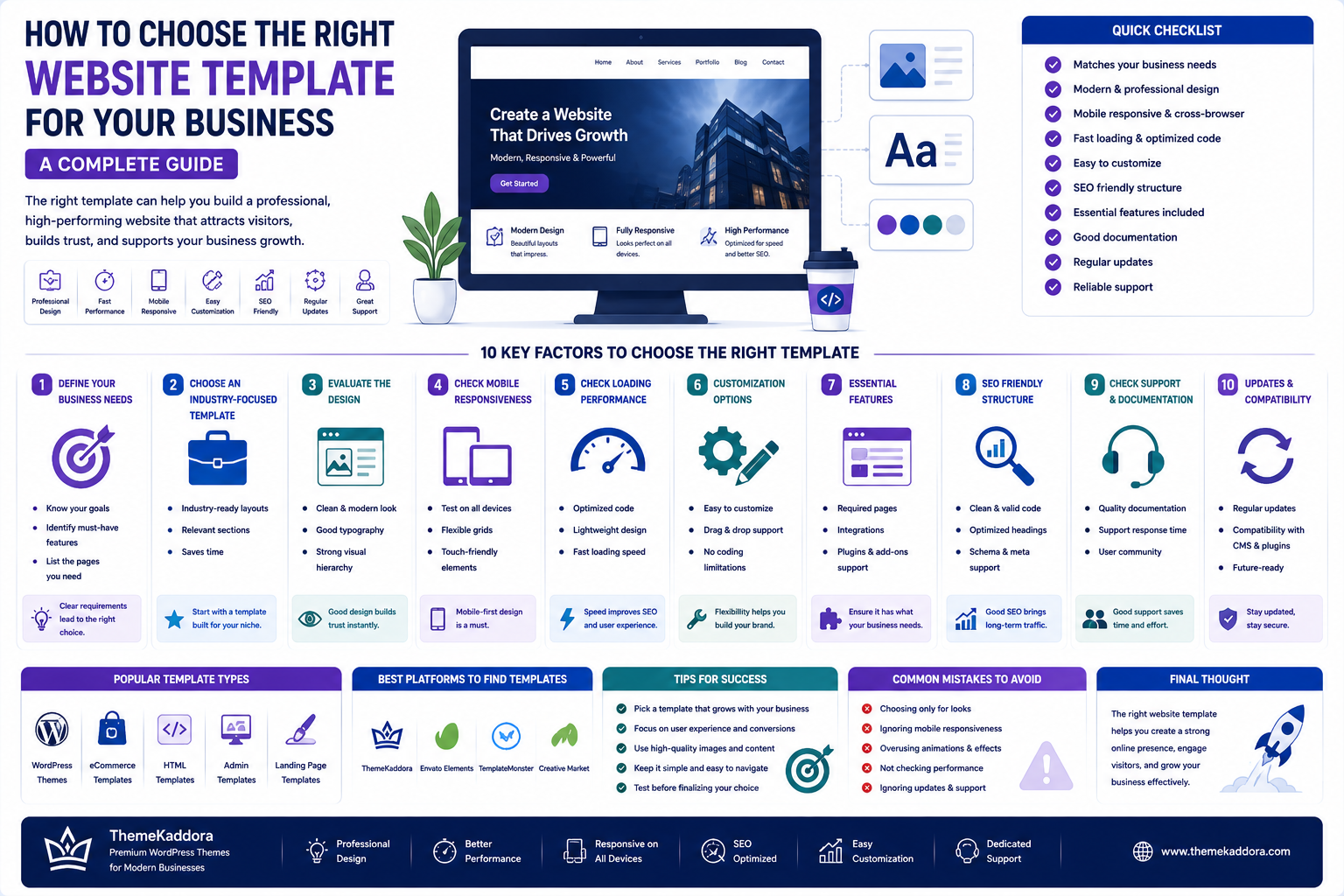
How to Choose the Right Website Template for Your Business: A Complete Guide
Introduction
Your website is often the first place potential customers interact with your business.
Before contacting you, purchasing a product, booking a service, or requesting a quote, visitors may evaluate your website to determine whether your business looks professional, trustworthy, and relevant to their needs.
Creating a website from scratch can be expensive and time-consuming. This is why website templates have become a popular solution for businesses, freelancers, agencies, startups, and entrepreneurs.
A professionally designed template provides a foundation that can be customized according to your brand and business requirements.
However, choosing the right template is not simply about selecting the most attractive design.
A template should also provide:
Good performance
Responsive design
Easy customization
Relevant features
SEO-friendly structure
Browser compatibility
Good user experience
Reliable documentation
Long-term flexibility
In this guide, you'll learn how to evaluate website templates and choose an option that supports your business goals.
What Is a Website Template?
A website template is a pre-designed website layout that provides the structure and visual foundation for a website.
Depending on the type of template, it may include:
Homepage designs
About pages
Service pages
Contact pages
Blog layouts
Portfolio sections
Pricing pages
Product pages
Landing pages
Dashboard interfaces
Templates allow businesses to start with an existing design rather than building every page from scratch.
Why Businesses Use Website Templates
Building a website from zero can require significant time, design work, development, testing, and maintenance.
Templates can reduce the initial workload.
Benefits include:
Faster development
Lower design costs
Professional appearance
Pre-built layouts
Faster launch
Customization options
Consistent visual design
For startups and small businesses, templates can provide a practical way to establish a professional online presence.
1. Start With Your Business Requirements
Before browsing templates, define what your website actually needs.
Ask:
What does the business do?
Who is the target audience?
What action should visitors take?
How many pages are required?
Will the website sell products?
Will customers book appointments?
Will users create accounts?
Will you publish articles?
Will you need integrations?
For example, a restaurant website may need:
Menu
Reservations
Location
Opening hours
Gallery
Contact information
A SaaS company may instead need:
Product features
Pricing
Documentation
Integrations
Testimonials
Signup pages
The right template depends on the business model.
2. Choose a Template Designed for Your Industry
Industry-specific templates can reduce customization requirements.
Common categories include:
Business
Agency
SaaS
Finance
Healthcare
Education
Real estate
Restaurant
Portfolio
Consulting
eCommerce
Technology
An industry-focused template may already include layouts that match the expectations of your target customers.
However, industry relevance should not be the only deciding factor.
A template with excellent functionality and performance may be more valuable than one that simply looks closely related to your industry.
3. Evaluate the Design
Visual design creates the first impression.
Look for:
Clear typography
Consistent spacing
Strong visual hierarchy
Professional color usage
Easy navigation
Appropriate imagery
Clear calls to action
Avoid templates that rely excessively on animations, decorative elements, or visual effects that do not contribute to the user experience.
A professional website should make information easy to understand.
4. Check Mobile Responsiveness
A website must work well across different screen sizes.
Test the template on:
Smartphones
Tablets
Laptops
Desktop monitors
Check whether:
Navigation works correctly
Text remains readable
Images resize properly
Buttons are easy to tap
Forms work correctly
Content does not overflow horizontally
Responsive design is essential for modern websites.
5. Prioritize Website Performance
A visually impressive template can still be a poor choice if it loads slowly.
Look for templates built with:
Optimized assets
Efficient CSS
Minimal unnecessary scripts
Proper image handling
Clean code
Performance-conscious layouts
Avoid choosing a template solely because it contains dozens of animations and visual effects.
Performance should be considered part of the design.
6. Check Customization Options
A template should provide enough flexibility to adapt to your brand.
Consider whether you can change:
Colors
Fonts
Logo
Header
Footer
Page layouts
Buttons
Sections
Images
Navigation
If significant changes require rewriting large portions of the code, the template may not be suitable for your project.
7. Review Available Features
Different businesses need different functionality.
Depending on the project, look for features such as:
Contact forms
Blog layouts
Pricing tables
Testimonials
Team sections
Portfolio galleries
Product layouts
Appointment forms
Search
User dashboards
Only prioritize features that your business actually needs.
More features do not automatically mean a better template.
8. Check Compatibility
Before purchasing or downloading a template, check compatibility with your technology stack.
Consider:
CMS compatibility
WordPress compatibility
WooCommerce compatibility
PHP version requirements
Browser support
JavaScript dependencies
Page builder compatibility
Required plugins
Compatibility problems can create unnecessary development work.
9. Look for Clean and Maintainable Code
For developers, code quality is an important consideration.
A quality template should ideally have:
Logical file structure
Meaningful naming
Organized CSS
Reusable components
Clear JavaScript
Minimal duplication
Appropriate comments
Maintainable architecture
Clean code makes future customization easier.
10. Evaluate SEO Friendliness
A template cannot guarantee search rankings, but its technical structure can influence how easily a website can be optimized.
Look for:
Semantic HTML
Proper heading structure
Fast loading performance
Mobile responsiveness
Clean URLs
Image optimization support
Crawlable content
Good accessibility practices
SEO should be considered from the beginning rather than added as an afterthought.
11. Check Documentation
Good documentation can save significant development time.
Documentation should explain:
Installation
Configuration
Customization
Required dependencies
Importing demo content
Common problems
Updates
Developers and non-technical users both benefit from clear instructions.
12. Consider Support
Support can become important when something does not work as expected.
Before choosing a template, understand what type of support is available.
Check:
Support channels
Response process
Documentation
Troubleshooting resources
Update policy
Clear support information helps users make informed purchasing decisions.
13. Review Updates and Maintenance
Web technologies change continuously.
A template should ideally be maintained over time.
Look for information about:
Release history
Bug fixes
Compatibility updates
Security improvements
Feature updates
A template that is abandoned shortly after release may create problems later.
14. Check Browser Compatibility
Your website visitors may use different browsers and operating systems.
Test important pages across commonly used browsers.
Pay attention to:
Layout
Forms
Navigation
Animations
JavaScript functionality
Responsive behavior
Cross-browser compatibility helps create a consistent experience.
15. Consider Accessibility
Website accessibility should be part of the selection process.
Look for:
Readable text
Sufficient contrast
Keyboard-friendly navigation
Proper labels
Semantic HTML
Accessible forms
Meaningful image alternatives
An accessible website can provide a better experience for a broader audience.
16. Don't Choose a Template Based Only on the Demo
A demo can look impressive while hiding important technical details.
Before making a decision, investigate:
Performance
Code quality
Features
Documentation
Compatibility
Update history
Customization options
The demo represents the appearance.
The underlying structure determines how practical the template will be.
17. Compare Templates Before Choosing
Create a simple comparison checklist.
Factor
Template A
Template B
Template C
Design
✓
✓
✓
Responsive
✓
✓
✓
Performance
✓
—
✓
Customization
✓
✓
—
Documentation
✓
—
✓
Compatibility
✓
✓
✓
Updates
✓
—
✓
This makes it easier to compare templates objectively.
18. Think About Long-Term Requirements
Do not choose a template only for what you need today.
Ask:
Will this template still work if my business grows?
You may eventually need:
More pages
More products
Additional integrations
Multilingual support
Membership features
Advanced forms
Analytics
Marketing tools
A flexible template can reduce the need for a complete redesign later.
19. Consider Total Cost
The template price is only one part of the total website cost.
Consider:
Template price
Hosting
Plugins
Extensions
Development
Maintenance
Premium services
Customization
A cheap template that requires extensive development may ultimately cost more than a higher-quality template that requires minimal modification.
20. Choose Templates From a Reliable Marketplace
A marketplace can make it easier to discover templates across different industries and technologies.
When evaluating a marketplace, consider whether it provides:
Clear product information
Screenshots and live previews
Documentation
Developer information
Compatibility details
Update information
Licensing information
Support information
These details help buyers make more informed decisions.
How ThemeKaddora Helps Businesses Find Digital Solutions
ThemeKaddora is designed as a marketplace for digital products that can help businesses, developers, freelancers, agencies, and entrepreneurs build and improve their online projects.
A digital marketplace can bring different types of solutions together, including:
WordPress themes
Website templates
WooCommerce solutions
Plugins
Business tools
SaaS products
UI resources
Digital assets
The goal is to make it easier for users to discover practical digital products without having to build everything from scratch.
What Makes a Good Digital Marketplace Product?
A high-quality digital product should provide more than attractive visuals.
Important qualities include:
Good Design
The product should provide a professional and usable experience.
Reliable Performance
It should be built with performance in mind.
Clear Documentation
Users should understand installation and configuration.
Compatibility
The product should clearly communicate supported technologies and requirements.
Maintainability
Products should be structured so users can continue working with them over time.
Useful Features
Features should solve real problems rather than simply increase the feature list.
Common Website Template Selection Mistakes
Choosing Based Only on Appearance
A beautiful design does not guarantee good performance.
Ignoring Mobile Design
A desktop-only experience can create serious usability problems.
Installing Too Many Features
Unnecessary functionality can increase complexity.
Ignoring Compatibility
Technology mismatches can create development problems.
Not Checking Documentation
Poor documentation can increase setup time.
Forgetting Future Growth
A template should support realistic future requirements.
Website Template Selection Checklist
Before choosing a template, verify:
Design
Professional appearance
Clear navigation
Consistent typography
Strong visual hierarchy
Technical
Responsive design
Good performance
Browser compatibility
Clean structure
SEO-friendly foundation
Business
Suitable for target audience
Appropriate page layouts
Required features
Customization options
Future scalability
Product Quality
Documentation
Updates
Support
Compatibility information
Clear licensing
Conclusion
Choosing the right website template is an important business decision.
The best template is not necessarily the one with the most impressive demo or the largest feature list.
Instead, choose a template that matches your business requirements, provides a strong user experience, performs well, works across devices, supports customization, and can evolve as your business grows.
Start by defining your requirements.
Then compare design, performance, responsiveness, compatibility, features, documentation, support, and long-term flexibility.
A carefully selected template can save development time, reduce costs, and provide a strong foundation for your online presence.
For businesses and developers exploring digital products, marketplaces such as ThemeKaddora can provide a convenient place to discover themes, templates, plugins, and other solutions designed for modern online projects.
The goal should always be the same:
Choose technology that solves a real problem and creates long-term value.
Frequently Asked Questions
1. What is a website template?
A website template is a pre-designed structure that provides layouts, styling, and components that can be customized for a website.
2. Why should businesses use website templates?
Templates can reduce development time, lower initial design costs, and provide a professional starting point.
3. How do I choose the right website template?
Evaluate the template based on your business requirements, design, performance, responsiveness, features, compatibility, customization, documentation, and future needs.
4. Are premium templates better than free templates?
Not necessarily. Quality depends on design, code, support, maintenance, features, and suitability for your project rather than price alone.
5. Should I prioritize design or performance?
Both matter. A professional website needs attractive design while also providing fast and reliable performance.
6. Why is responsive design important?
Responsive design allows websites to adapt to smartphones, tablets, laptops, and desktop screens.
7. What should I check before buying a template?
Check compatibility, features, documentation, updates, support, customization options, licensing, and performance.
8. Can website templates be customized?
Yes. The level of customization depends on how the template is built and which technology it uses.
9. What is a website template marketplace?
It is a platform where users can discover and acquire pre-designed websites, templates, themes, plugins, and other digital products.
10. What is ThemeKaddora?
ThemeKaddora is a digital marketplace focused on themes, templates, plugins, WooCommerce solutions, and other digital products for businesses, developers, freelancers, and entrepreneurs.
Comments (0)