
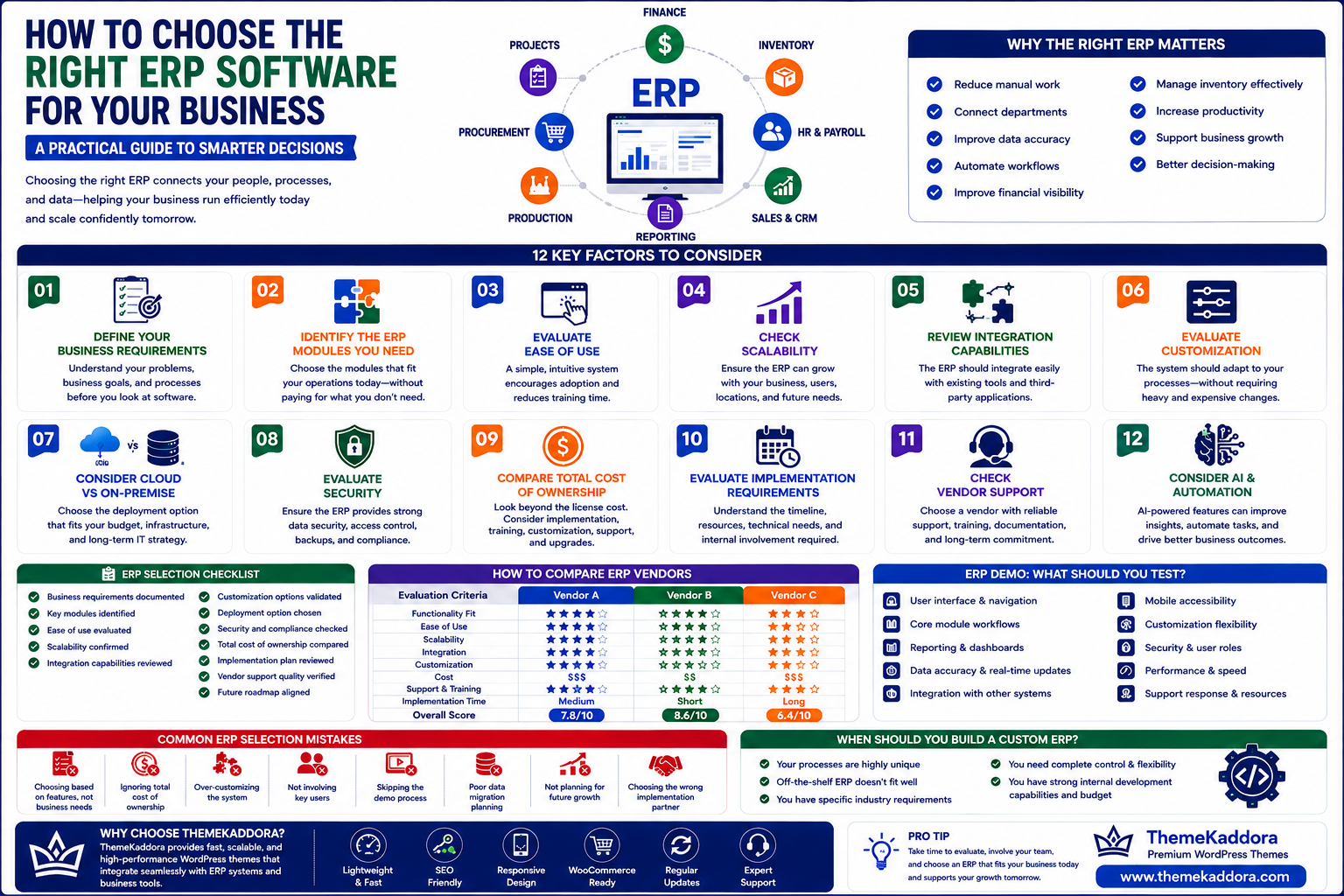
How to Choose the Right ERP Software for Your Business
Introduction
Choosing an Enterprise Resource Planning (ERP) system is one of the most important technology decisions a growing business can make.
An ERP system can influence how a company manages its finances, inventory, employees, procurement, sales, customers, projects, reporting, and day-to-day operations. The right platform can connect departments, automate repetitive processes, improve visibility, and provide management with better information for decision-making.
However, choosing the wrong ERP can create the opposite result.
A system that doesn't match your business processes may lead to expensive customization, poor employee adoption, complicated workflows, unnecessary features, and higher long-term costs.
The challenge is that there is no single ERP system that is perfect for every business.
A manufacturing company may need production planning and supply chain management. A retail business may prioritize inventory and point-of-sale integration. A professional services company may need project management, billing, and resource planning.
Therefore, ERP selection should begin with your business requirements, not with a software vendor's feature list.
In this guide, we'll explain the most important factors to consider when choosing ERP software and provide a practical framework for evaluating different solutions.
Table of Contents
Why Choosing the Right ERP Matters
Define Your Business Requirements
Identify the ERP Modules You Need
Evaluate Ease of Use
Check Scalability
Review Integration Capabilities
Evaluate Customization
Consider Cloud vs On-Premise ERP
Evaluate Security
Compare Total Cost of Ownership
Evaluate Implementation Requirements
Check Vendor Support
Consider AI and Automation
Build an ERP Requirements Checklist
How to Compare ERP Vendors
ERP Demo: What Should You Test?
Common ERP Selection Mistakes
When Should You Build a Custom ERP?
Why Choose ThemeKaddora
Conclusion
Frequently Asked Questions
1. Why Choosing the Right ERP Matters
ERP software becomes deeply connected to business operations.
Once implemented, employees may use the system every day to manage customers, inventory, invoices, purchases, employees, projects, and reports.
Because of this, choosing an ERP should not be treated like purchasing an ordinary software application.
The right ERP can help your business:
Reduce manual work
Connect departments
Improve data accuracy
Automate workflows
Improve financial visibility
Manage inventory more effectively
Increase employee productivity
Support business growth
Improve decision-making
A poorly selected system, however, may create:
Difficult workflows
Low employee adoption
Expensive customization
Integration problems
Data migration challenges
Unexpected costs
The objective should therefore be to select a system that fits your current requirements while providing enough flexibility for future growth.
2. Define Your Business Requirements
Before comparing ERP vendors, document your business requirements.
Start by asking:
What problems are we trying to solve?
For example, your organization may struggle with:
Multiple disconnected systems
Spreadsheet dependency
Inventory inaccuracies
Slow financial reporting
Manual approvals
Repetitive data entry
Poor customer visibility
Difficult employee management
Lack of real-time dashboards
Document these problems before looking at software.
Next, identify the processes that should be improved.
For example:
Current process:
Customer order → Manual inventory check → Email warehouse → Create invoice manually → Update spreadsheet
Desired process:
Customer order → Automatic inventory check → Warehouse notification → Automated invoice → Real-time reporting
This process-based approach makes ERP selection much more practical.
3. Identify the ERP Modules You Need
Not every business needs every ERP module.
Common ERP modules include:
Finance and Accounting
Used for:
Invoicing
Expenses
Accounts payable
Accounts receivable
Budgets
Financial reporting
Inventory Management
Used for:
Stock tracking
Warehouse management
Product movement
Reordering
Inventory reporting
Human Resources
Used for:
Employee records
Attendance
Leave management
Payroll
Performance management
Procurement
Used for:
Supplier management
Purchase requests
Purchase orders
Approvals
Vendor tracking
Sales and CRM
Used for:
Leads
Customers
Sales opportunities
Quotations
Sales orders
Customer interactions
Manufacturing
Manufacturing organizations may require:
Production planning
Bill of materials
Work orders
Production tracking
Quality management
Project Management
Professional services businesses may need:
Projects
Tasks
Timesheets
Resource allocation
Project billing
Create two lists:
Must-have modules
and
Nice-to-have modules
This prevents you from paying for functionality your business doesn't actually need.
4. Evaluate Ease of Use
An ERP system can have hundreds of features, but those features are only valuable if employees can use them effectively.
During evaluation, consider:
Is the interface intuitive?
Can new employees learn the system quickly?
Are common tasks easy to complete?
Can employees access information without unnecessary steps?
Are dashboards understandable?
Does the system work well on different devices?
Employee adoption is one of the most important factors in ERP success.
A technically powerful system that employees avoid using will not deliver its expected value.
5. Check Scalability
Your ERP should support your future business—not only your current business.
Consider how your organization might change over the next three to five years.
You may add:
Employees
Customers
Products
Warehouses
Locations
Departments
Business units
Transactions
Ask potential ERP providers:
Can the system support more users?
Can new modules be added later?
Can additional locations be managed?
Can the system support increased transaction volumes?
Can new integrations be introduced?
A scalable ERP can reduce the need for another major software replacement as your business expands.
6. Review Integration Capabilities
Modern businesses rarely operate with only one software platform.
Your ERP may need to communicate with:
CRM platforms
E-commerce platforms
Payment gateways
Banking systems
Payroll software
Marketing tools
Communication platforms
Shipping systems
Analytics tools
Before selecting an ERP, review its integration capabilities.
Look for:
APIs
Webhooks
Standard integrations
Data import/export
Third-party connectors
Real-time synchronization
Good integration capabilities can prevent employees from manually transferring information between systems.
7. Evaluate Customization
Every business has unique processes.
Some organizations can adapt their workflows to standard ERP functionality. Others require specific features or custom processes.
Determine whether the ERP supports:
Custom fields
Custom reports
Workflow configuration
User roles
Approval rules
Business-specific dashboards
API access
Custom modules
However, customization should be approached carefully.
Excessive customization can make an ERP more expensive to maintain and upgrade.
The ideal approach is generally to use standard functionality where possible and customize only when there is a clear business requirement.
8. Consider Cloud ERP vs On-Premise ERP
One of the most important ERP decisions is choosing how the software will be deployed.
Cloud ERP
Cloud ERP is hosted by the software provider and accessed through the internet.
Common advantages include:
Remote accessibility
Easier scalability
Automatic updates
Reduced infrastructure requirements
Faster deployment
Lower upfront hardware costs
Cloud ERP can be particularly useful for businesses with distributed teams, multiple locations, or a preference for subscription-based software.
On-Premise ERP
On-premise ERP is installed and managed on the organization's own infrastructure.
It can provide greater control over:
Infrastructure
Data storage
System configuration
Internal security policies
However, businesses may also need to manage servers, maintenance, updates, backups, and infrastructure costs.
Neither option is automatically better for every organization. The right choice depends on security requirements, budget, IT capabilities, accessibility needs, compliance requirements, and long-term strategy.
9. Evaluate Security
ERP systems contain highly sensitive business information, including financial records, employee information, customer data, supplier information, and operational data.
Security should therefore be a major part of your ERP evaluation.
Consider whether the platform provides:
Role-based access control
User permissions
Multi-factor authentication
Data encryption
Secure backups
Audit logs
Session management
Security monitoring
Regular updates
Also determine where data is stored and how the provider handles backups, security incidents, and data recovery.
Security should not be considered only after implementation. It should be evaluated during the ERP selection process.
10. Compare Total Cost of Ownership
The price displayed on an ERP website is not necessarily the total cost of implementing and operating the system.
Consider all potential costs, including:
Software licensing
User subscriptions
Implementation
Customization
Data migration
Integrations
Training
Support
Infrastructure
Maintenance
Future upgrades
A useful approach is to calculate the Total Cost of Ownership (TCO) over several years instead of comparing only the initial purchase price.
For example, a solution with a lower upfront price may become more expensive if it requires extensive customization or costly integrations.
Likewise, a more expensive platform may provide better long-term value if it significantly reduces manual work and operational costs.
11. Evaluate Implementation Requirements
ERP implementation can involve much more than installing software.
It may include:
Business process analysis
System configuration
Data cleaning
Data migration
Integration development
User setup
Workflow configuration
Testing
Employee training
Launch and ongoing support
Before selecting an ERP, ask the vendor how implementation works.
Find out:
Who manages the implementation?
How long could implementation take?
What information must your business provide?
How is data migrated?
What training is included?
What happens if implementation takes longer than expected?
Understanding these requirements early can help prevent unexpected delays.
12. Check Vendor Support
ERP software becomes an important part of daily operations, so reliable support is essential.
Evaluate:
Support availability
Response times
Documentation
Training resources
Technical assistance
Upgrade support
Community resources
Implementation assistance
Also check whether support is included in the software subscription or charged separately.
A strong support system can make a significant difference when your organization encounters technical or operational problems.
13. Consider AI and Automation
Modern ERP systems are increasingly incorporating Artificial Intelligence and automation.
AI-powered ERP capabilities can include:
Demand forecasting
Inventory predictions
Intelligent reporting
Automated document processing
Financial anomaly detection
Predictive maintenance
AI-assisted decision-making
Automated workflows
For example, an AI-enabled ERP system could analyze historical sales data and help predict future inventory requirements.
However, AI should not be treated as a feature that automatically makes one ERP better than another.
Evaluate whether the AI capabilities actually solve relevant business problems.
Ask:
Will this feature save time, reduce costs, improve accuracy, or support better decisions?
14. Build an ERP Requirements Checklist
Before contacting ERP vendors, create a structured requirements checklist.
Divide your requirements into three categories:
Must Have
Features that are essential for business operations.
Examples:
Accounting
Inventory
Payroll
Procurement
Sales management
Should Have
Important features that would improve efficiency but are not essential.
Examples:
Advanced dashboards
Workflow automation
Additional integrations
Mobile applications
Nice to Have
Features that could provide additional value in the future.
Examples:
Advanced AI
Predictive analytics
Specialized reporting
Advanced customization
This approach helps prevent vendors from overwhelming you with long feature lists.
15. How to Compare ERP Vendors
Create a comparison framework before evaluating vendors.
You can score each ERP according to criteria such as:
Evaluation Area
Importance
Required modules
High
Ease of use
High
Scalability
High
Security
High
Integrations
High
Customization
Medium
AI and automation
Medium
Implementation
High
Support
High
Total cost
High
Instead of choosing the ERP with the most features, choose the solution that provides the best overall fit for your business.
16. ERP Demo: What Should You Test?
Never rely solely on a presentation or marketing website.
Ask vendors to demonstrate real business scenarios.
For example:
Sales Scenario
Create a customer → Create quotation → Convert to order → Check inventory → Generate invoice.
Procurement Scenario
Create purchase request → Approval → Purchase order → Receive goods → Update inventory.
Employee Scenario
Add employee → Record attendance → Apply leave → Process payroll.
Reporting Scenario
Create transaction → Update business data → Generate management report.
The goal is to determine whether the software works naturally with your actual business processes.
17. Common ERP Selection Mistakes
Choosing Too Many Features
More features do not necessarily mean better software.
Choose functionality that provides measurable business value.
Ignoring Employee Feedback
Employees who will use the system should be involved in the evaluation.
Focusing Only on the Initial Price
Always consider implementation, customization, support, integrations, and long-term operating costs.
Not Testing Integrations
A system may look excellent independently but become difficult to use when connected with your existing technology.
Ignoring Future Growth
Choose an ERP that can accommodate your expected growth.
Underestimating Data Migration
Poorly prepared data can create serious problems during implementation.
Skipping Real-World Testing
A polished demo may not represent your actual workflows. Test realistic scenarios before making a final decision.
18. When Should You Build a Custom ERP?
Not every organization needs a completely custom ERP.
For many businesses, a configurable or established ERP platform may provide everything they need.
However, custom ERP development can make sense when:
Your business has highly specialized workflows
Standard ERP systems cannot support important processes
Industry-specific requirements are significant
You require complete control over the platform
Multiple systems need to be unified
Your business model is highly unique
A hybrid approach can also work.
Businesses can use a standard ERP foundation and customize selected modules or workflows where necessary.
The key is to compare the long-term benefits and costs before choosing between an off-the-shelf ERP and a custom solution.
19. Why Choose ThemeKaddora?
At ThemeKaddora, we understand that ERP selection is ultimately about solving business problems.
Businesses may require different combinations of:
ERP
CRM
HRMS
Inventory management
Business automation
Workflow automation
AI-powered solutions
SaaS applications
Custom software
Instead of treating every business the same, the right technology strategy should consider the organization's workflows, industry, team structure, operational complexity, integration requirements, and growth plans.
ThemeKaddora focuses on creating digital solutions that help businesses connect processes, reduce repetitive work, improve visibility, and build scalable operations.
Conclusion
Choosing the right ERP software is not simply a matter of comparing feature lists or selecting the platform with the lowest price.
A successful ERP decision begins with understanding your business.
Start by identifying operational problems, documenting important workflows, defining required modules, and involving employees who will actually use the system.
Then evaluate important factors such as usability, scalability, integration capabilities, customization, deployment options, security, total cost of ownership, implementation requirements, support, and AI capabilities.
Most importantly, test the ERP using realistic business scenarios before making a final decision.
The right ERP should fit your organization rather than forcing your organization to completely change the way it works.
A well-selected ERP can become the foundation for better automation, improved visibility, stronger collaboration, and sustainable business growth.
The objective is not to find the ERP with the longest feature list.
The objective is to find the ERP that solves your most important business problems today while supporting where your business is going tomorrow.
Frequently Asked Questions
1. How do I choose the right ERP software?
Start by identifying your business problems and required processes. Then evaluate ERP modules, usability, scalability, integrations, security, customization, implementation, support, and total cost.
2. What should I look for in an ERP system?
Look for functionality that matches your business requirements, ease of use, scalability, security, integrations, reporting, automation, reliable support, and reasonable total cost of ownership.
3. How much does ERP software cost?
ERP costs vary significantly depending on the number of users, modules, deployment model, customization, integrations, implementation, and support requirements.
4. Should I choose Cloud ERP or On-Premise ERP?
Cloud ERP can provide easier accessibility, scalability, and reduced infrastructure management. On-premise ERP can provide greater control over infrastructure and data management. The right choice depends on your organization's requirements.
5. How important are ERP integrations?
Integrations are extremely important when your business relies on other platforms such as CRM, e-commerce, payment, banking, payroll, shipping, or marketing systems.
6. Should ERP software be customizable?
Some customization can be valuable for unique business requirements. However, excessive customization can increase costs and make future maintenance more difficult.
7. How long does ERP implementation take?
Implementation time depends on the organization's size, number of modules, data migration, integrations, customization, testing, and training requirements.
8. Should small businesses use ERP?
Small businesses can benefit from ERP when their operations become complex enough that spreadsheets and disconnected tools are limiting efficiency or growth.
9. When should a company choose custom ERP development?
Custom ERP can be appropriate when a business has highly specialized workflows or requirements that existing ERP platforms cannot adequately support.
10. Can AI improve ERP software?
Yes. AI can support forecasting, intelligent reporting, document processing, anomaly detection, workflow automation, recommendations, and other business processes.
Comments (0)