
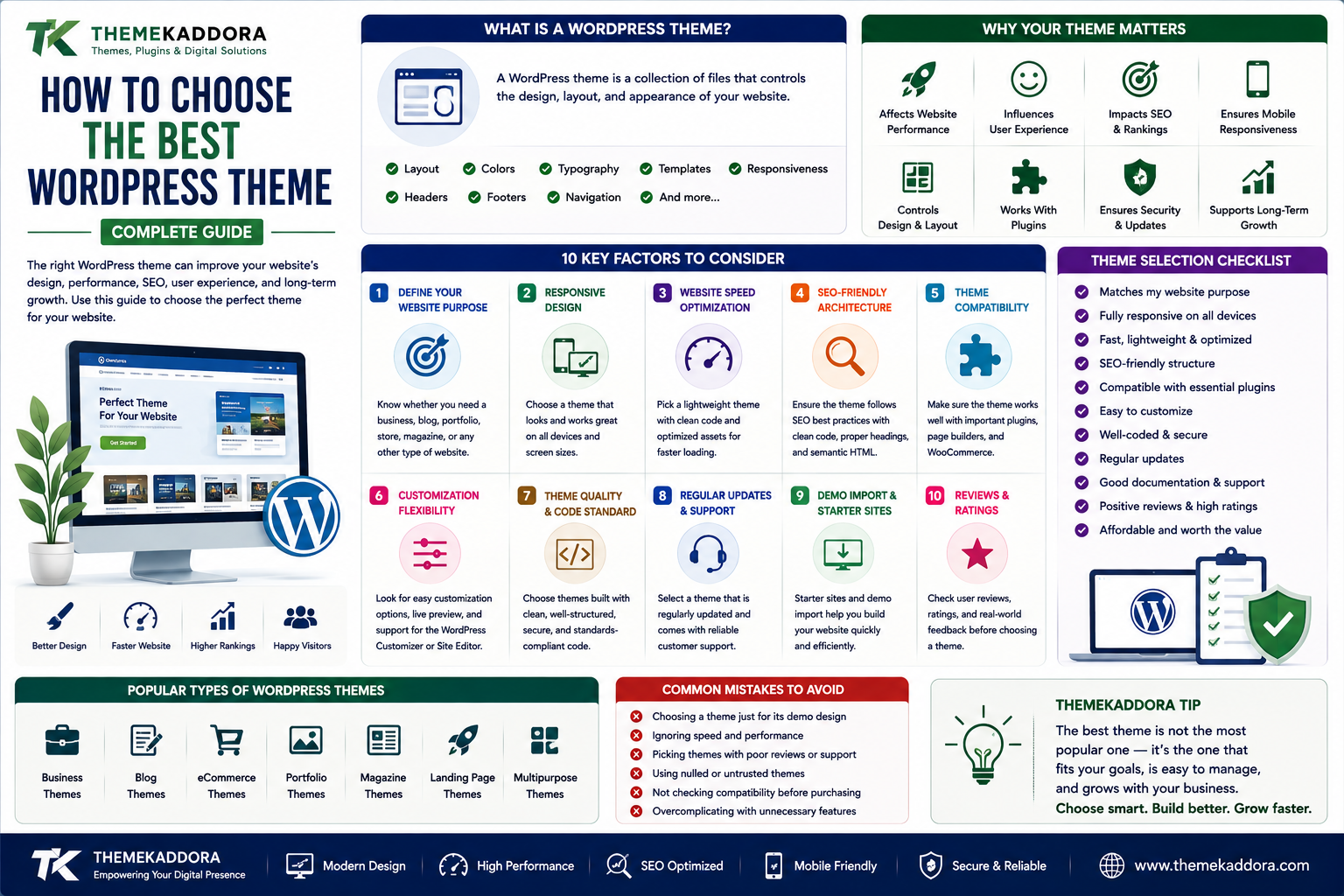
How to Choose the Best WordPress Theme for Your Website
Introduction
Choosing a WordPress theme is one of the first major decisions you make when building a website.
The theme controls much more than the colors and appearance of your website.
It can influence:
Website structure
User experience
Loading performance
Mobile responsiveness
Customization
SEO
Accessibility
Compatibility
Long-term maintenance
With thousands of WordPress themes available, choosing the right one can feel overwhelming.
A theme may look impressive in a demo but fail to meet your actual business requirements.
Another theme may have fewer visual effects but provide cleaner code, better performance, easier customization, and stronger long-term value.
This is why choosing the best WordPress theme isn't about selecting the most beautiful demo.
It's about selecting a theme that fits your website's purpose, audience, functionality, and growth plans.
In this guide, you'll learn what to look for when choosing a WordPress theme and how to avoid common mistakes.
What Is a WordPress Theme?
A WordPress theme is a collection of files that controls the presentation and layout of a WordPress website.
A theme can influence:
Typography
Colors
Page layouts
Headers
Footers
Navigation
Blog layouts
Product layouts
Templates
Responsive behavior
Modern themes can also include customization systems, block patterns, templates, and integrations with popular WordPress tools.
Why Your WordPress Theme Matters
Your theme is part of the foundation of your website.
A poor theme choice can create problems later.
You may encounter:
Slow loading
Difficult customization
Plugin conflicts
Poor mobile layouts
Limited design flexibility
Security concerns
Outdated code
Difficult migrations
Choosing carefully at the beginning can reduce these problems.
1. Start With Your Website's Purpose
Before searching for a theme, define what your website needs to accomplish.
Is it a:
Business website?
Blog?
Portfolio?
Online store?
Magazine?
Agency website?
Educational platform?
Membership website?
Restaurant website?
Different website types require different layouts and functionality.
A theme designed for a photography portfolio may not be appropriate for a large WooCommerce store.
Start with the business requirement rather than the visual demo.
2. Look for a Responsive WordPress Theme
A responsive theme automatically adapts its layout to different screen sizes.
Your website should work well on:
Desktop computers
Laptops
Tablets
Smartphones
Mobile responsiveness is essential because visitors can access your website from many different devices.
Before selecting a theme, test its demo on multiple screen sizes.
3. Prioritize Website Speed
A visually impressive theme can still be a poor choice if it loads unnecessary resources.
Look for themes with:
Efficient code
Reasonable asset loading
Optimized layouts
Minimal unnecessary scripts
Lightweight components
Avoid selecting a theme solely because its demo contains dozens of animations and visual effects.
A website should look good without sacrificing usability.
4. Check SEO-Friendly Architecture
A theme should provide a strong foundation for search optimization.
Look for:
Proper heading structure
Semantic HTML
Mobile responsiveness
Clean markup
Fast loading
Good accessibility
Compatibility with SEO plugins
Remember that a theme alone does not make a website SEO-friendly.
Your content, site architecture, technical SEO, and overall strategy also matter.
5. Check Theme Compatibility
Your theme needs to work with the tools your website depends on.
Common integrations include:
WooCommerce
Page builders
Block editor
SEO plugins
Contact forms
Membership systems
LMS plugins
Translation tools
If your website requires WooCommerce, make sure the theme properly supports important store pages and workflows.
6. Evaluate Customization Options
A good theme should allow you to create a website that reflects your brand.
Customization may include:
Colors
Typography
Layouts
Headers
Footers
Sidebars
Buttons
Templates
Blog layouts
Choose a theme that provides the right level of customization for your technical skill and project requirements.
7. Don't Choose a Theme Based Only on the Demo
Theme demos are designed to showcase possibilities.
They may include:
Professional images
Custom illustrations
Premium fonts
Carefully written content
Optimized layouts
Your actual website may look different after replacing those assets.
Ask:
Can I create the structure I need with this theme?
That is more important than asking whether the demo looks impressive.
8. Check Theme Documentation
Good documentation can save hours of work.
Look for documentation covering:
Installation
Configuration
Customization
Importing demos
WooCommerce setup
Plugin compatibility
Troubleshooting
Updates
A well-documented theme is easier to maintain.
9. Look for Regular Updates
WordPress itself evolves.
Plugins change.
Browsers change.
PHP versions change.
A theme should be maintained to remain compatible with the modern WordPress ecosystem.
Review the theme's update history before purchasing or installing it.
10. Evaluate Developer Reputation
Research the developer or marketplace offering the theme.
Look for:
Documentation
Support
Update history
Product portfolio
Customer feedback
Clear licensing
Avoid choosing a theme solely because it has a high number of downloads.
Quality and maintenance matter.
11. Check Accessibility
Accessibility helps make websites usable by people with different abilities.
A good theme should consider:
Keyboard navigation
Color contrast
Focus states
Semantic markup
Readable typography
Accessible navigation
Accessibility is beneficial for users and contributes to better overall website quality.
12. Consider Page Builder Compatibility
Some themes are designed around specific page builders.
Others rely heavily on the WordPress block editor.
Before selecting a theme, determine which editing experience your team prefers.
Avoid choosing a theme that forces you into a workflow you don't want.
13. Think About WooCommerce Support
If you're building an online store, WooCommerce support is important.
Check whether the theme properly handles:
Shop pages
Product pages
Product categories
Cart
Checkout
Customer accounts
Product variations
Also consider how the theme handles mobile shopping experiences.
14. Check Translation and Multilingual Support
If your website targets multiple languages or regions, consider translation compatibility.
Look for themes that work with your preferred multilingual or translation workflow.
This is especially important for businesses targeting international audiences.
15. Review Typography
Typography affects readability and brand perception.
Look for:
Readable body text
Appropriate font sizes
Good line spacing
Clear headings
Consistent hierarchy
Avoid themes that use decorative fonts everywhere.
Good typography should make content easier to consume.
16. Check Header and Navigation Options
Navigation affects how users explore your website.
Depending on your requirements, you may need:
Simple navigation
Dropdown menus
Mega menus
Sticky headers
Mobile navigation
Search
Call-to-action buttons
Don't overlook navigation while evaluating the theme.
17. Consider Long-Term Scalability
A theme should work not only for today's website but also for future growth.
Think about what your website might need later.
You may eventually add:
Products
Services
Blog content
Memberships
Courses
New landing pages
Additional languages
Marketing integrations
Choose a theme that won't become a limitation as your project grows.
18. Free vs Premium WordPress Themes
Free themes can be excellent for many websites.
Premium themes may provide:
More layouts
Advanced customization
Premium templates
Additional integrations
Dedicated support
More frequent feature development
The right choice depends on your requirements.
A free theme isn't automatically inferior, and a premium theme isn't automatically better.
Evaluate the actual product.
19. Avoid Bloated Themes
A theme may advertise hundreds of features.
That sounds attractive.
But you may only use ten of them.
Unnecessary features can increase complexity.
Instead, prioritize:
Useful functionality + clean architecture + performance + maintainability
A focused theme can be more valuable than an overloaded one.
20. Check Licensing
Understand what your theme license allows.
Review:
Number of websites
Updates
Support period
Commercial usage
Redistribution restrictions
Renewal requirements
Clear licensing helps avoid problems later.
How to Compare WordPress Themes
Create a simple comparison table.
Feature
Theme A
Theme B
Theme C
Responsive
Yes
Yes
Yes
WooCommerce
Yes
No
Yes
Performance
Good
Excellent
Good
Customization
High
Medium
High
Documentation
Yes
Yes
Yes
Updates
Regular
Regular
Limited
Support
Yes
Yes
No
Don't compare themes based on appearance alone.
Evaluate the factors that actually affect your website.
Common WordPress Theme Mistakes
Choosing Based Only on Appearance
A beautiful demo doesn't guarantee a good website foundation.
Ignoring Mobile Design
Always evaluate the mobile experience.
Installing Too Many Features
More features can mean more complexity.
Ignoring Updates
An outdated theme can become a maintenance problem.
Forgetting Compatibility
Check compatibility with important plugins before committing.
Choosing an Abandoned Theme
Long-term maintenance matters.
Ignoring Licensing
Understand what you are purchasing.
WordPress Theme and Website Performance
Theme selection can influence website performance, but it is only one part of the equation.
Other factors include:
Hosting
Images
Plugins
Caching
CDN
JavaScript
CSS
Third-party services
A lightweight theme gives you a better starting point, but your entire website needs to be optimized.
WordPress Theme and SEO
A theme should provide a technically sound foundation.
However, SEO success also depends on:
Content quality
Search intent
Internal linking
Site architecture
Technical SEO
Backlinks
User experience
Don't expect a theme to solve your entire SEO strategy.
WordPress Theme for Business Websites
Business websites often need:
Professional layouts
Service pages
Contact forms
Testimonials
Case studies
Blog functionality
Calls to action
Mobile responsiveness
Prioritize clarity and conversion rather than unnecessary visual effects.
WordPress Theme for Online Stores
An eCommerce theme should make shopping easy.
Important considerations include:
Product discovery
Search
Filters
Product galleries
Cart
Checkout
Customer accounts
Mobile usability
The theme should support the complete customer journey.
WordPress Theme for Blogs
For blogs, prioritize:
Readability
Typography
Navigation
Categories
Search
Related content
Internal linking
Mobile experience
Content should remain the central focus.
WordPress Theme for Agencies
Agency websites often need strong visual presentation.
Useful features can include:
Portfolio layouts
Case studies
Services
Team sections
Testimonials
Contact forms
Landing pages
However, performance should remain a priority even when the design is highly visual.
A Practical WordPress Theme Selection Process
Use this process:
Define → Shortlist → Test → Compare → Verify → Choose
Define
Identify website requirements.
Shortlist
Select several suitable themes.
Test
Check demos on desktop and mobile.
Compare
Review performance, features, compatibility, and customization.
Verify
Check documentation, updates, support, and licensing.
Choose
Select the theme that best fits the project.
Why choose ThemeKaddora?
ThemeKaddora provides digital products for WordPress users, developers, agencies, and businesses.
Its ecosystem includes:
WordPress themes
WordPress plugins
WooCommerce solutions
AI tools
Analytics products
Marketing solutions
Automation tools
HTML templates
UI kits
Choosing a theme should be based on the needs of your website rather than simply selecting the most popular design.
ThemeKaddora focuses on practical digital products that can help website owners create professional, responsive, customizable, and business-ready websites.
A Simple WordPress Theme Formula
Think about theme selection as:
Purpose + Performance + Compatibility + Customization + Support
A theme that satisfies these five areas can provide a stronger foundation for long-term website growth.
Final Thoughts
Choosing the best WordPress theme requires more than finding a design you like.
Your theme should support your website's purpose, users, content, functionality, performance requirements, and future growth.
Before choosing a theme, define what your website needs.
Then evaluate responsiveness, speed, SEO architecture, customization, compatibility, accessibility, documentation, updates, support, and licensing.
Don't let an impressive demo make the decision for you.
Instead, ask whether the theme can help you build the website your business actually needs.
A good WordPress theme should become a foundation—not a limitation.
Choose carefully, keep it updated, optimize your website continuously, and select a theme that can grow alongside your project.
Frequently Asked Questions
What is a WordPress theme?
A WordPress theme controls the visual design, layouts, templates, typography, navigation, and presentation of a WordPress website.
How do I choose the best WordPress theme?
Start by identifying your website's purpose and then evaluate responsiveness, performance, customization, compatibility, SEO-friendly architecture, updates, documentation, support, and licensing.
Are premium WordPress themes better than free themes?
Not necessarily. Free and premium themes can both be excellent. The best choice depends on your requirements, features, support needs, maintenance, and budget.
Does a WordPress theme affect website speed?
Yes. Themes can load CSS, JavaScript, images, fonts, and other assets. Efficient themes can provide a better foundation for website performance.
Does a WordPress theme affect SEO?
A theme can influence technical elements such as markup, headings, mobile responsiveness, and performance. However, overall SEO depends on many additional factors.
What is a responsive WordPress theme?
A responsive theme automatically adapts its layout to different screen sizes, including desktops, tablets, and smartphones.
What should I check before buying a WordPress theme?
Check features, compatibility, performance, responsive design, update history, documentation, support, licensing, customization options, and developer reputation.
Can I change my WordPress theme later?
Yes. WordPress allows you to change themes, but changing themes can affect layouts, widgets, templates, styling, and functionality. Always create a backup and test the change before applying it to a live website.
Is WooCommerce compatibility important?
If you're running an online store, yes. A WooCommerce-compatible theme should properly support important shopping pages and customer workflows.
How often should I update my WordPress theme?
Update the theme whenever reliable updates are released, particularly when they include security fixes or compatibility improvements. Test important changes before production when practical.
Why choose ThemeKaddora?
ThemeKaddora provides practical digital products for WordPress users, developers, agencies, and businesses, helping them build websites and digital platforms with themes, plugins, templates, automation, AI, analytics, and other solutions.
Comments (0)