
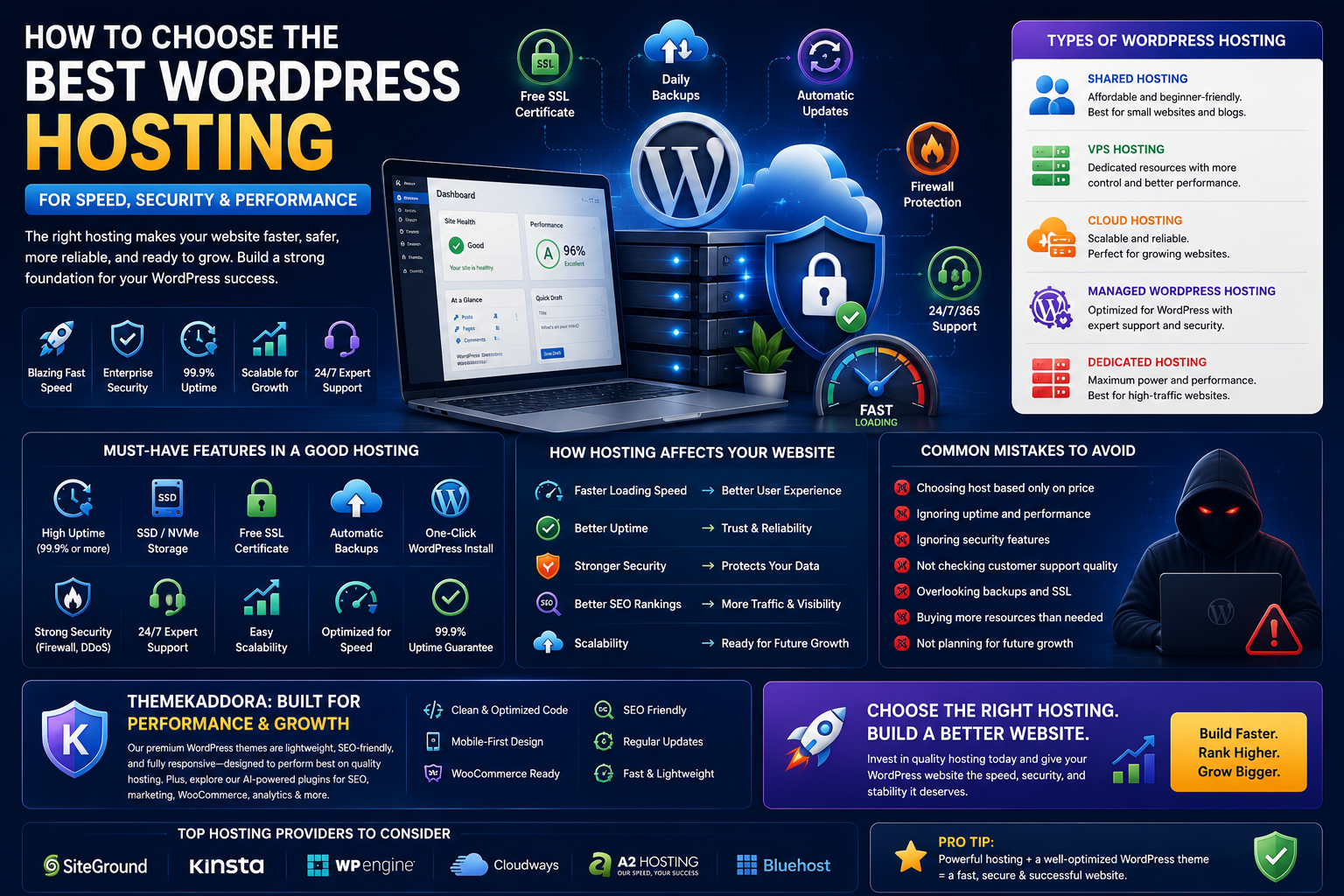
How to Choose the Best WordPress Hosting for Speed, Security, and Performance
Introduction
Choosing the right WordPress hosting is one of the most important decisions you'll make when building a website. Whether you're creating a personal blog, a business website, a portfolio, or a WooCommerce store, your hosting provider directly impacts your website's speed, security, uptime, SEO performance, and overall user experience.
Many website owners spend weeks selecting the perfect WordPress theme, creating content, and optimizing SEO but overlook the importance of reliable hosting. Even the fastest WordPress theme cannot compensate for slow servers, poor uptime, or inadequate security.
A high-quality hosting provider ensures your website loads quickly, stays online during traffic spikes, protects your data, and provides the resources needed for long-term growth. On the other hand, poor hosting can lead to slow page loading, security vulnerabilities, frustrated visitors, and lost business opportunities.
In this guide, you'll learn how WordPress hosting works, the different hosting types available, the features you should look for, and how to choose the best hosting solution for your website.
Why WordPress Hosting Matters
Your hosting provider stores your website's files, databases, and content while making them accessible to visitors around the world.
Good hosting helps:
- Improve loading speed
- Reduce downtime
- Increase website reliability
- Strengthen security
- Improve user experience
- Support SEO performance
- Handle traffic spikes
- Simplify website management
Hosting is the foundation of every successful WordPress website.
Types of WordPress Hosting
Not every website has the same hosting requirements. Understanding the different hosting options helps you choose the right solution based on your budget and business goals.
Shared Hosting
Shared hosting is the most affordable option because multiple websites share the same server resources.
Best For
- Personal blogs
- Beginners
- Small business websites
- Low-traffic websites
Advantages
- Low cost
- Easy setup
- Beginner-friendly
- One-click WordPress installation
Limitations
- Limited performance
- Shared resources
- Slower during traffic spikes
- Less control
VPS Hosting
Virtual Private Server (VPS) hosting provides dedicated resources within a shared server environment.
Best For
- Growing businesses
- Medium-sized websites
- Agencies
Advantages
- Better performance
- Greater flexibility
- More server control
- Improved scalability
Cloud Hosting
Cloud hosting distributes your website across multiple servers rather than relying on a single machine.
Benefits
- Excellent uptime
- Flexible scaling
- Faster performance
- Better reliability
Cloud hosting is ideal for websites expecting fluctuating traffic.
Managed WordPress Hosting
Managed WordPress hosting is specifically optimized for WordPress websites.
Most providers include:
- Automatic updates
- Daily backups
- Security monitoring
- Performance optimization
- Expert WordPress support
- Built-in caching
Although more expensive, managed hosting saves time and simplifies website management.
Dedicated Hosting
Dedicated hosting provides an entire server exclusively for your website.
Best For
- Enterprise websites
- High-traffic platforms
- Large WooCommerce stores
Advantages include:
- Maximum performance
- Full server control
- Advanced security
- Excellent scalability
Features to Look for in a Hosting Provider
Choosing the cheapest hosting plan isn't always the best decision.
Instead, evaluate hosting providers based on these important features.
High Uptime
Look for providers offering at least 99.9% uptime to minimize website downtime.
Fast SSD or NVMe Storage
Modern storage technologies significantly improve loading speeds compared to traditional hard drives.
Automatic Backups
Daily backups ensure your website can be restored quickly if something goes wrong.
Free SSL Certificate
SSL protects visitor data and enables HTTPS, which improves trust and supports SEO.
One-Click WordPress Installation
This feature simplifies website setup, especially for beginners.
Customer Support
Reliable technical support is invaluable when facing website issues.
Look for providers offering:
- 24/7 support
- Live chat
- Knowledge base
- Ticket system
How Hosting Affects Website Speed
Website speed is influenced by several factors, but hosting plays a major role.
Quality hosting improves performance by providing:
- Faster servers
- Better caching
- Optimized databases
- Content delivery options
- Modern server software
- Lower server response times
Fast websites improve user experience and encourage visitors to stay longer.
Hosting and Website Security
A secure hosting provider helps protect your website from cyber threats.
Important security features include:
- Malware scanning
- Firewall protection
- DDoS mitigation
- Automatic security updates
- Secure server configurations
- Account isolation
Hosting security works alongside WordPress security practices to create a stronger defense.
Hosting and SEO
Many people don't realize hosting can influence search engine optimization.
Good hosting contributes to SEO by providing:
- Faster page loading
- Better uptime
- HTTPS support
- Stable performance
- Improved Core Web Vitals
Search engines reward websites that offer fast and reliable experiences.
Scalability for Growing Websites
Your hosting needs today may not be the same in a year.
Choose a provider that allows easy upgrades as your website grows.
Look for hosting plans that support:
- Increased traffic
- Additional storage
- More bandwidth
- Better server resources
- Easy plan upgrades
Scalable hosting prevents the need for complicated migrations later.
Common Hosting Mistakes to Avoid
Avoid these common mistakes when selecting WordPress hosting:
- Choosing solely based on price
- Ignoring uptime guarantees
- Overlooking security features
- Purchasing more resources than needed
- Ignoring customer support quality
- Forgetting backup availability
- Selecting hosting without SSL
- Not planning for future growth
A little research before purchasing can save significant time and money.
Tips for Choosing the Right Hosting Plan
Before making your decision, ask yourself:
- How much traffic do I expect?
- Will I sell products online?
- Do I need email hosting?
- Is technical support important?
- Do I require automatic backups?
- How important is website speed?
- Will my website grow significantly?
Answering these questions helps narrow down the best hosting option.
Why ThemeKaddora Themes Perform Better on Quality Hosting
ThemeKaddora develops WordPress themes with clean code, responsive layouts, and SEO-friendly architecture. When combined with reliable hosting, these themes can deliver faster loading times, smoother user experiences, and improved website stability.
ThemeKaddora's growing ecosystem of AI-powered plugins—including SEO tools, WooCommerce enhancements, business intelligence, analytics, and automation solutions—also benefits from a hosting environment that provides adequate resources and consistent performance.
Pairing optimized themes with quality hosting creates a strong foundation for business growth.
Conclusion
Your hosting provider is much more than a place to store website files—it forms the backbone of your WordPress website. Choosing the right hosting solution improves speed, strengthens security, enhances SEO, and ensures visitors enjoy a smooth browsing experience.
Whether you're launching a personal blog or building a large eCommerce store, investing in reliable WordPress hosting pays off through better performance, fewer technical issues, and greater long-term stability. Combined with well-coded themes and regular website maintenance, quality hosting helps your website succeed in an increasingly competitive online environment.
Frequently Asked Questions
1. What is WordPress hosting?
WordPress hosting is a hosting environment specifically designed to run WordPress websites efficiently.
2. Which type of hosting is best for beginners?
Shared hosting is usually the most affordable and beginner-friendly option for new websites.
3. Is managed WordPress hosting worth it?
Yes. Managed hosting simplifies updates, backups, security, and performance optimization.
4. Does hosting affect SEO?
Yes. Faster loading speeds, better uptime, and HTTPS support all contribute to improved SEO performance.
5. How important is website uptime?
High uptime ensures visitors can access your website consistently, reducing lost traffic and improving user trust.
6. Can I upgrade my hosting later?
Most hosting providers allow you to upgrade your plan as your website grows.
7. Does hosting improve website speed?
Quality hosting provides faster servers, optimized resources, and better caching, all of which improve loading times.
8. Should every website use SSL?
Yes. SSL encrypts visitor data, enables HTTPS, and improves both security and credibility.
9. Is cloud hosting better than shared hosting?
Cloud hosting generally offers better scalability, reliability, and performance than shared hosting.
10. Why do ThemeKaddora themes perform well on quality hosting?
Because they are developed with clean code, responsive design, SEO-friendly architecture, and performance optimization, allowing reliable hosting to maximize their speed and stability.
Comments (0)