
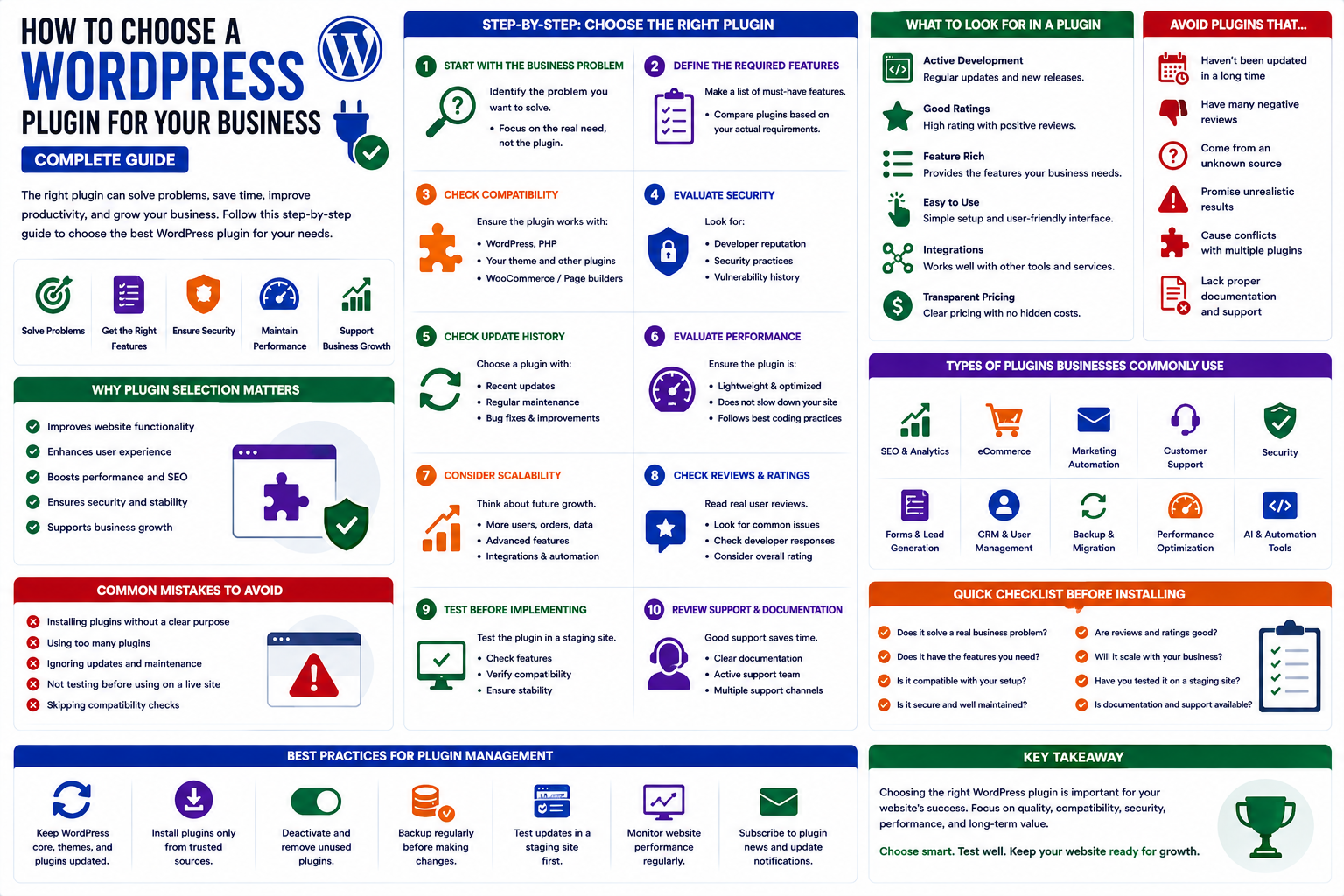
How to Choose a WordPress Plugin for Your Business: Complete Guide
Introduction
A business website needs more than attractive design.
It needs reliable functionality that helps attract visitors, generate leads, communicate with customers, manage information, improve productivity, and increase revenue.
WordPress plugins make it possible to add these capabilities without developing every feature from scratch.
There are plugins for almost every business requirement, including SEO, security, contact forms, analytics, CRM, WooCommerce, automation, artificial intelligence, marketing, customer support, and performance optimization.
But having thousands of options creates another problem:
How do you choose the right WordPress plugin for your business?
The most popular plugin is not necessarily the best choice for every business. A plugin should solve a specific problem, fit your technology stack, provide reliable support, and remain useful as your business grows.
In this guide, you'll learn how to evaluate WordPress plugins for business websites, which factors matter most, common mistakes to avoid, and how to build a reliable plugin ecosystem for long-term growth.
Why Businesses Need WordPress Plugins
WordPress provides a strong foundation, but plugins allow businesses to customize their websites according to their specific requirements.
Business plugins can help with:
Lead generation
Customer management
Online sales
Marketing automation
Analytics
Security
SEO
Customer support
Workflow automation
AI-powered services
The right plugin can save development time and reduce manual work.
Start With the Business Problem
The first step is not searching for a plugin.
It is identifying the problem.
Ask:
What business problem am I trying to solve?
For example:
Problem: Too Many Customer Inquiries
Possible solution:
Contact form
Helpdesk
CRM integration
Customer support automation
Problem: Low Online Sales
Possible solutions:
Product recommendations
Upselling
Cross-selling
Conversion optimization
Problem: Too Much Manual Work
Possible solutions:
Workflow automation
AI tools
Marketing automation
Data synchronization
Starting with the problem prevents unnecessary plugin installation.
Define the Required Features
Once the business problem is clear, create a feature list.
For example, a business looking for a customer management plugin might require:
Customer profiles
Lead management
Communication history
Notes
Reporting
Automation
User permissions
This makes plugin comparison much easier.
Instead of asking:
Which plugin is best?
Ask:
Which plugin provides the functionality my business actually needs?
Check Plugin Compatibility
Compatibility is critical for business websites.
Before installing a plugin, check compatibility with:
WordPress
PHP
Your theme
WooCommerce
Page builders
Other plugins
Hosting environment
A plugin may work perfectly on one website and cause problems on another because the technology stack is different.
Evaluate Plugin Security
Security should be a major consideration for any business website.
A business website may process:
Customer information
User accounts
Orders
Payment information
Contact details
Business data
Before installing a plugin, evaluate:
Developer reputation
Update history
Security practices
Known vulnerabilities
Plugin source
Documentation
Avoid downloading modified or unauthorized plugin packages.
Check the Update History
An actively maintained plugin is generally easier to manage over time.
Look at:
Recent releases
Update frequency
Compatibility updates
Security fixes
Bug fixes
An abandoned plugin may eventually become incompatible with your WordPress environment.
For a business website, long-term maintenance matters.
Evaluate Plugin Performance
Business websites need to remain fast and responsive.
A plugin should provide useful functionality without unnecessarily increasing:
Page size
Database queries
Server processing
JavaScript execution
External requests
When evaluating a plugin, consider whether its functionality justifies its resource usage.
Consider Scalability
A plugin that works for a small business may not necessarily be suitable when the business grows.
Think about future requirements.
Ask:
Can the plugin handle more customers?
Can it process more orders?
Does it support automation?
Can it integrate with other systems?
Does it provide export options?
Does it support advanced reporting?
Can multiple administrators use it?
Choosing scalable software can prevent expensive migrations later.
Check Plugin Integrations
Modern businesses rarely use one system.
Your WordPress website may need to connect with:
CRM platforms
Email marketing tools
Payment gateways
Accounting software
Analytics systems
Shipping services
AI platforms
Customer support tools
Before choosing a plugin, check whether it supports the integrations your business needs.
Evaluate Documentation
Good documentation can significantly reduce maintenance costs.
Look for documentation covering:
Installation
Configuration
Features
Integrations
Troubleshooting
Updates
Frequently asked questions
A plugin with clear documentation is easier for administrators and developers to manage.
Consider Customer Support
Business websites cannot always afford long periods of downtime.
Reliable support can be valuable when:
A feature stops working
An integration fails
An update creates a conflict
Configuration is complicated
Before purchasing a premium plugin, understand what support is included.
Check:
Support channels
Response process
Documentation
Support duration
Technical assistance
Free vs Premium Plugins for Businesses
Both free and premium plugins can be useful.
Free Plugins
They can be suitable when:
Requirements are simple
Budget is limited
Basic functionality is sufficient
Premium Plugins
They may be more appropriate when you need:
Advanced functionality
Professional support
Regular feature development
Business integrations
Advanced reporting
Automation
For a business, the important question is not simply the purchase price.
Consider the total value the plugin provides.
Calculate the Value of a Plugin
A plugin may cost money but still save significantly more through automation or improved conversions.
For example:
A plugin costs $100 per year.
If it saves several hours of manual work every month or helps increase sales, its business value may be much higher than its subscription price.
Consider:
Cost → Time Saved → Revenue Impact → Operational Value
This provides a better way to evaluate business software.
Essential Plugin Categories for Businesses
Different businesses need different plugins, but several categories are commonly valuable.
SEO Plugins
Help improve search visibility and content optimization.
Security Plugins
Help protect websites against common threats.
Performance Plugins
Help improve loading speed and website performance.
Analytics Plugins
Help businesses understand traffic, visitors, conversions, and sales.
Lead Generation Plugins
Help collect customer inquiries and leads.
CRM Plugins
Help manage customer relationships and sales processes.
WooCommerce Plugins
Help online stores improve:
Sales
Customer experience
Analytics
Product management
Marketing
AI Plugins
AI plugins can help businesses automate:
Customer support
Content creation
Product recommendations
Data analysis
Business workflows
Marketing Automation Plugins
These plugins can reduce repetitive marketing tasks.
Examples include:
Email automation
Lead nurturing
Customer segmentation
Campaign management
Avoid Installing Too Many Plugins
A business website does not need a plugin for every possible feature.
Too many plugins can increase:
Maintenance complexity
Compatibility risks
Security exposure
Performance challenges
Instead, create a clear plugin strategy.
Choose plugins based on business value.
Avoid Duplicate Functionality
Before installing a plugin, check your existing plugin collection.
You may already have functionality for:
SEO
Caching
Analytics
Security
Forms
Marketing
Adding another plugin for the same purpose may create unnecessary complexity.
Test Plugins Before Production
For business websites, staging environments are highly recommended.
Test:
Core website pages
Forms
User registration
Login
Checkout
Payments
Emails
Integrations
Mobile experience
Only move the plugin to production after verifying the important functionality.
Create a WordPress Plugin Management Strategy
Businesses should treat plugins as part of their technology infrastructure.
Create a simple management process:
Step 1
Maintain a list of installed plugins.
Step 2
Document why each plugin is being used.
Step 3
Monitor updates.
Step 4
Create regular backups.
Step 5
Test major updates.
Step 6
Remove unnecessary plugins.
This makes the website easier to manage as the business grows.
WordPress Plugins and Business Growth
The best plugins do more than add features.
They can help improve business outcomes.
For example:
SEO
More visibility → More traffic
Lead Generation
More leads → More opportunities
Automation
Less manual work → More productivity
Analytics
Better data → Better decisions
WooCommerce Optimization
Better customer experience → More sales
AI Automation
Faster processes → Greater operational efficiency
The goal should always be to connect plugin functionality with measurable business outcomes.
Why Choose ThemeKaddora?
ThemeKaddora provides professional digital products designed for website owners, developers, agencies, and businesses.
Its WordPress product ecosystem covers areas such as:
WordPress plugins
WordPress themes
WooCommerce solutions
AI tools
Analytics
Business automation
Marketing
Productivity
HTML templates
UI kits
ThemeKaddora focuses on practical functionality, modern design, performance, compatibility, and business-oriented solutions.
Whether you are launching a new business website or improving an existing WordPress platform, selecting the right digital tools can make your website easier to manage and more effective.
A Simple WordPress Plugin Selection Checklist
Before installing a plugin, ask:
Business Need
What problem does this plugin solve?
Features
Does it provide the features I actually need?
Security
Is the developer trustworthy?
Is the plugin actively maintained?
Compatibility
Does it work with my WordPress environment?
Performance
Could it negatively affect website speed?
Integrations
Does it connect with my existing tools?
Support
Is reliable technical support available?
Scalability
Can it support future business growth?
Cost
Does the value justify the price?
If a plugin performs well across these areas, it may be a strong candidate.
Common Mistakes Businesses Make
Choosing Only the Cheapest Plugin
Low price does not always mean better value.
Choosing Only by Number of Installs
Popularity does not guarantee compatibility with your specific website.
Ignoring Support
Businesses often underestimate the value of technical support until something breaks.
Installing Too Many Plugins
More functionality can create more maintenance.
Ignoring Scalability
A plugin that works today may not meet your requirements tomorrow.
Conclusion
Choosing the right WordPress plugin for your business requires more than looking at ratings or prices.
Start with the business problem, define the required features, evaluate security and performance, check compatibility, investigate integrations, and consider long-term scalability.
The best plugin is not necessarily the one with the most features.
It is the one that solves the right problem reliably and provides measurable value to your business.
A carefully selected WordPress plugin ecosystem can improve productivity, customer experience, marketing, sales, automation, and long-term website growth.
Frequently Asked Questions
What are the best WordPress plugins for businesses?
The best plugins depend on your business requirements. Common categories include SEO, security, performance, analytics, lead generation, CRM, WooCommerce, AI, and marketing automation.
How many plugins should a business website have?
There is no fixed number. Businesses should install only the plugins that provide genuine value and are properly maintained.
Are premium plugins worth it for businesses?
Premium plugins can be worthwhile when they provide advanced features, reliable support, regular updates, integrations, or automation that delivers measurable business value.
How do I know if a business plugin is secure?
Check its source, developer reputation, update history, security record, compatibility, documentation, and maintenance activity.
Can WordPress plugins help automate business processes?
Yes. Plugins can automate marketing, customer communication, reporting, product recommendations, workflows, analytics, and other repetitive tasks.
Should I test a plugin before installing it on my business website?
Yes. Testing on a staging environment can help identify compatibility and functionality problems before they affect customers.
Can WordPress plugins improve sales?
Some plugins can contribute to higher sales by improving product discovery, upselling, customer engagement, lead generation, analytics, and conversion optimization.
Why choose ThemeKaddora?
ThemeKaddora focuses on professional digital products with modern design, clean development practices, performance optimization, WordPress compatibility, and business-oriented functionality.
Comments (0)