
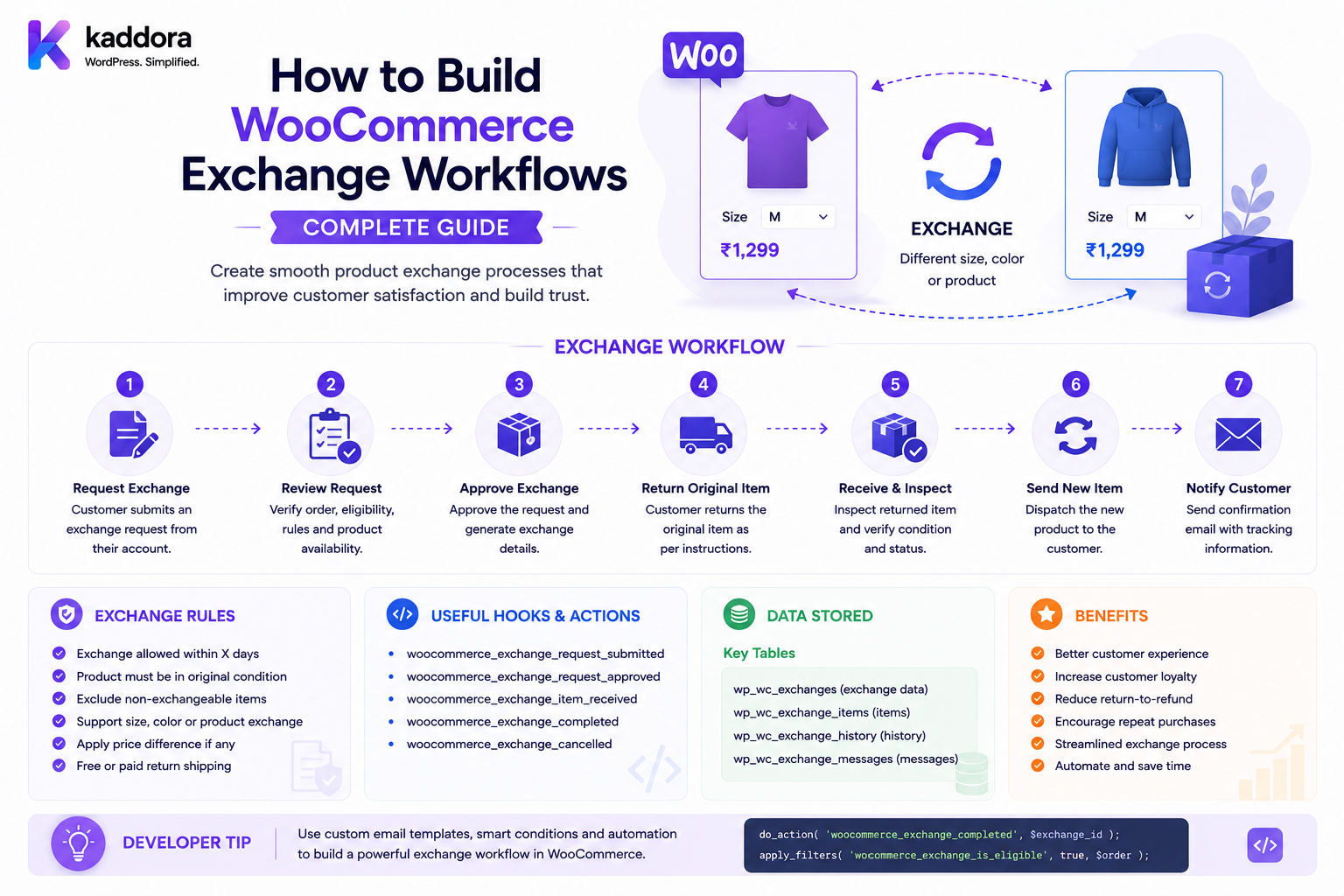
How to Build WooCommerce Exchange Workflows: Complete Guide
Introduction
An exchange is different from a standard refund.
Instead of returning a product and receiving money back, the customer wants to replace the original product with another item.
A simple example is:
Customer Bought: T-Shirt — Medium Customer Wants: T-Shirt — Large
The workflow becomes:
Exchange Request ↓ Eligibility Check ↓ Approval ↓ Return Original Item ↓ Validate Replacement ↓ Reserve Replacement Stock ↓ Receive / Inspect Original ↓ Fulfill Replacement ↓ Price Difference ↓ Close Exchange
WooCommerce's return tooling supports exchange-specific settings such as exchange windows, partial exchanges, automatic approval, exchange methods, and exchange reasons.
For developers, however, an exchange is not simply "replace one product ID with another."
It can involve:
Original Order Return Item Replacement Product Replacement Variation Inventory Shipping Taxes Price Difference Payment Refund Store Credit Approval Warehouse ERP Notifications
A production exchange system therefore needs to treat the original purchase and replacement transaction as related but distinct records.
The key principle is:
A WooCommerce exchange should preserve the original transaction, validate the replacement independently, and coordinate return, inventory, fulfillment, and any financial difference through explicit states.
What Is a WooCommerce Exchange?
A WooCommerce exchange allows a customer to return an original product and receive another product or variation in its place.
Examples include:
Medium → Large Black → White Old Model → New Model Product A → Product B Damaged Unit → Replacement Unit
Exchange vs Refund
A refund returns money:
Return ↓ Refund
An exchange primarily returns and replaces merchandise:
Return ↓ Replacement
An exchange can still create a refund or additional payment when the replacement value differs.
Exchange vs Replacement
The terms may overlap, but a useful distinction is:
Exchange
Customer chooses another eligible product or variation.
Replacement
Business sends a replacement, often for a defective or incorrect item.
For example:
Wrong Item → Merchant Sends Correct Item
may be a replacement workflow rather than a customer-selected exchange.
Why Build Exchange Workflows?
Exchange functionality can:
Reduce refund losses
Improve customer retention
Simplify size/color changes
Support defective-product replacement
Recover sales
Reduce support workload
Standardize return decisions
Improve inventory control
WooCommerce's return guidance explicitly lists replacement/exchange as a return-resolution option.
Exchange Workflow Architecture
A scalable architecture can use:
Customer ↓ Exchange Request ↓ Eligibility Engine ↓ Approval ↓ Replacement Selection ↓ Inventory Validation ↓ Price Difference Calculation ↓ Return Shipment ↓ Replacement Fulfillment ↓ Financial Settlement ↓ Exchange Completed
Exchange Request
A request can contain:
Order ID Order Item ID Original Quantity Replacement Product Replacement Variation Reason Preferred Resolution
Example:
Original: T-Shirt / Medium / Black Requested: T-Shirt / Large / Black
Exchange Request Is Not Approval
The customer may submit:
"I want size Large."
The server must still check:
Return Window Product Eligibility Replacement Availability Customer Ownership Exchange Policy
Exchange State Machine
A useful lifecycle is:
Requested ↓ Under Review ↓ Approved ↓ Replacement Selected ↓ Return In Transit ↓ Return Received ↓ Inspection ↓ Replacement Reserved ↓ Replacement Fulfillment ↓ Financial Settlement ↓ Completed
Alternative states can include:
Rejected Cancelled Expired Failed
Why Multiple States Matter
A status such as:
Exchanged
does not tell you whether:
The original item was returned.
The replacement was reserved.
The replacement shipped.
The price difference was collected.
The exchange was completed.
Separate states make the workflow observable.
Exchange Eligibility
Before approving, validate:
Order Exists ↓ Customer Owns Order ↓ Item Exists in Order ↓ Item Has Not Already Been Fully Returned ↓ Return Window Valid ↓ Product Is Exchangeable
Exchange Window
A store may define:
Exchange Window: 30 Days
WooCommerce's return tooling allows merchants to configure the allowed return/exchange window and eligible order statuses.
The system should use the appropriate business date, such as delivery completion, when calculating eligibility.
Product-Specific Exchange Policies
Some products may allow:
Size Exchange
but not:
Product-to-Product Exchange
Others may be:
Non-Exchangeable
Custom or personalized products are common examples of products that may have restricted exchange policies, subject to the applicable business and consumer rules.
Variation Exchange
One of the most common use cases is exchanging a variation.
Example:
Original: Size M Color Black Replacement: Size L Color Black
The exchange record should preserve both product and variation identity.
Variation Validation
If the replacement contains:
variation_id=500
the server must confirm:
Variation 500 belongs to Product 100
and that the variation is currently eligible for purchase.
Exchange Product-to-Product
Some businesses allow:
Product A → Product B
This is more complex because the products can have different:
Price Tax Shipping Inventory Warranty Return Policy
Same-Product Exchange
The simplest model is:
Same Product + Different Variation
Examples:
Size Color Storage Capacity Configuration
This generally produces a cleaner exchange experience.
Cross-Product Exchange
A cross-product exchange can be:
Headphones A → Headphones B
The exchange engine must calculate any price difference and validate the replacement independently.
Replacement Inventory
Before approving an exchange, check:
Replacement Exists Purchasable In Stock Variation Available Customer Eligible
Do not promise a replacement that cannot be fulfilled.
Replacement Reservation
For high-demand products, approving an exchange may need to reserve the replacement.
Example:
Replacement: 1 Available Exchange Approved ↓ Reserve 1
This prevents another customer from consuming the last unit before the exchange is fulfilled.
Exchange vs Stock Reservation
An exchange reservation is temporary inventory allocation.
It should have:
Reservation ID Quantity Expiration Exchange ID Status
and should be released if the exchange is cancelled or expires.
Exchange Replacement Stock Failure
Suppose:
Requested Replacement: Large Available: 0
The system could offer:
Waitlist Alternative Variation Store Credit Refund Backorder
according to policy.
Exchange Approval Before Replacement Availability
Some stores allow approval before replacement stock is available.
In that model:
Exchange Approved ↓ Replacement Backordered ↓ Fulfill When Available
This must be clearly communicated to the customer.
Price Difference
An exchange can result in:
Original: ₹2,000 Replacement: ₹2,500
Difference:
₹500
The business must determine who pays the difference.
Customer Pays Difference
A common workflow is:
Replacement Price - Eligible Original Value = Amount Due
The customer pays the difference before fulfillment.
Customer Receives Difference
If:
Original: ₹2,500 Replacement: ₹2,000
the business may:
Refund ₹500
or issue:
₹500 Store Credit
depending on policy.
WooCommerce's return-policy guidance includes store credit alongside replacement/exchange and payment-method refunds as possible return resolutions.
Same-Value Exchange
If:
Original Value: ₹2,000 Replacement Value: ₹2,000
there is no financial difference.
Original Transaction Value
The exchange calculation should usually use the original transaction state rather than today's catalog price.
For example:
Purchased: ₹1,800 Current Catalog Price: ₹2,200
The business needs an explicit policy for determining the exchange credit value.
Exchange Credit Value
Possible policies include:
Original Paid Amount Original Item Value Current Catalog Price Approved Return Value
Choose one explicitly.
For most commerce systems, using the historical eligible value provides the clearest transaction history.
Discounted Orders
Suppose:
Product: ₹2,000 Coupon: ₹500 Paid: ₹1,500
An exchange must define whether the replacement receives:
₹1,500 Exchange Credit
or some other configured value.
Do not simply use the product's current ₹2,000 price as the credit.
Bundle Exchange
A bundle might contain:
Camera Lens Bag
An exchange can be complicated because the customer may want to replace only one component.
WooCommerce's own exchange-policy guidance recommends clearly defining whether products sold as sets or bundles can be exchanged individually or whether the entire set must be returned.
Bundle Exchange Policies
Possible policies:
Entire Bundle Only
or:
Component Exchange Allowed
or:
Same Component Only
Product Kit Exchange
For configurable kits:
Gaming PC CPU GPU RAM SSD
the system should preserve the original configuration.
If the customer wants a different GPU:
Original GPU → Replacement GPU
compatibility must be revalidated.
Product Add-On Exchange
A customer may want:
Laptop + Installation Add-On
to be changed.
The business should define whether the add-on is:
Exchangeable Refundable Non-Refundable
Exchange and Customized Products
Personalized products can be difficult to exchange because the replacement may need to be specially produced.
Possible policy:
Custom Product → No Standard Exchange Defect: → Replacement Review
The policy should be communicated clearly.
Exchange and Warranty
A defective product outside the normal exchange window may still qualify under warranty.
A workflow can route:
Return Request ↓ Outside Exchange Window ↓ Warranty Check ↓ Warranty Exchange
This prevents standard return logic from incorrectly denying legitimate warranty cases.
Exchange Reason Codes
Use stable codes:
wrong_size wrong_color wrong_item defective damaged configuration_change
Reason-specific policies can then be implemented reliably.
Size Exchange Workflow
A common fashion workflow is:
Customer: Medium Requests: Large Check: Large Available Approve ↓ Return Medium ↓ Receive ↓ Send Large
Color Exchange
Example:
Black → Blue
The system must validate the requested color/variation.
Configuration Exchange
For electronics:
512GB → 1TB
The replacement may have a price difference.
Exchange and Shipping
The exchange can require:
Return Shipping + Replacement Shipping
The policy should specify who pays each.
Return Shipping Responsibility
Examples:
Wrong Item: Merchant Pays Changed Mind: Customer Pays Defective: Merchant Pays
Replacement Shipping
The store may:
Free Replacement Shipping
or:
Charge Shipping Difference
according to policy.
Exchange Shipping Labels
A workflow may generate:
Return Label
for the original item and later:
Outbound Shipment
for the replacement.
Exchange Tracking
The exchange record can link:
Return Tracking + Replacement Tracking
This gives the customer a complete view of the process.
Exchange Warehouse Routing
The returned product may go to:
Regional Warehouse
while the replacement ships from:
Warehouse B
The system should support separate inbound and outbound fulfillment locations.
Exchange Fulfillment
The replacement should usually be fulfilled through a clearly identifiable transaction.
Possible models include:
Replacement Order
or:
Exchange Fulfillment Record
A dedicated replacement transaction often makes inventory, shipping, and accounting easier to audit.
Do Not Rewrite the Original Order
The original order should preserve what the customer originally purchased.
Do not change:
Original: Size M
to:
Size L
simply because an exchange occurred.
Keep historical transaction data intact.
Replacement Order
A replacement transaction can reference:
Original Order ID Exchange ID Original Item Replacement Item Price Difference
This creates an explicit relationship between the two transactions.
Exchange Accounting
An exchange may involve:
Return Credit + Replacement Sale + Additional Payment
The accounting system should understand these relationships.
Exchange Financial Outcomes
Possible outcomes:
No Difference Customer Pays Customer Receives Refund Store Credit
Additional Payment
If the replacement costs more:
Amount Due: ₹500
Do not ship the replacement before payment is successfully completed if the policy requires payment first.
Payment Failure During Exchange
If the customer cannot pay the difference:
Exchange: Pending Payment
The replacement reservation may eventually expire.
Exchange Refund Difference
If the replacement costs less:
Credit: ₹500
the system can create a refund or store credit according to the selected resolution.
Exchange and Coupons
The original coupon may not be reusable.
The exchange engine should define whether:
Original Discount
is:
Preserved Recalculated Transferred Expired
Exchange and Dynamic Pricing
If the replacement has customer-specific pricing:
Retail: ₹2,500 VIP: ₹2,200
the system must calculate the replacement price in the correct customer context.
Do not use a public cached price.
Exchange Price Cache Safety
Customer-specific exchange values must not leak between customers.
For example:
Customer A: VIP Price ₹2,200 Customer B: Retail Price ₹2,500
The exchange calculation must remain customer-scoped.
Exchange and Tax
The replacement transaction may have different tax treatment from the original item.
Use the applicable product/address/tax configuration for the replacement and preserve the historical tax information on the original transaction.
Exchange and Payment Gateways
If additional payment is required:
Exchange ↓ Difference: ₹500 ↓ Payment Gateway
The additional payment should be processed as a new payment transaction or through the architecture appropriate to the chosen payment system.
Exchange and Refund Gateway
If the customer is owed money:
Exchange Difference: -₹500
the refund should go through the established refund workflow.
Exchange and Store Credit
A business may choose:
₹500 Store Credit
instead of a payment refund.
This can help preserve the sale while giving the customer flexibility.
Exchange Approval
A business can automatically approve simple exchanges:
Same Product + Size Change + Within Policy + Low Risk
while requiring manual review for:
Cross-Product + High Value
Exchange Approval Matrix
Condition
Action
Same product, different size
Auto approve
Same product, different color
Auto approve
Price increase
Payment required
Price decrease
Refund/credit
High-value replacement
Manual review
Custom product
Policy review
Warranty case
Warranty workflow
The actual policy should be determined by the business.
Exchange Risk Signals
Review:
Return Frequency Exchange Frequency Product Value Order Age Customer History Reason Serial Number
Risk should be used to prioritize review rather than automatically reject customers.
Exchange Request API
A custom API may support:
Create Exchange Request Get Exchange Select Replacement Approve Reject Reserve Replacement Release Reservation Create Replacement Order Complete
Exchange API Security
Protect every operation with:
Authentication Authorization Order Ownership Exchange Ownership Tenant Scope Validation
Exchange IDOR
Never allow a customer to modify another exchange by changing:
exchange_id
The exchange must be linked to the authenticated customer or authorized staff member.
Exchange Product Validation
Before accepting a replacement:
Product Exists Variation Valid Purchasable Exchangeable Visible Eligible
Exchange Quantity Validation
If the customer returns:
Quantity: 2
the replacement quantity must follow the business exchange policy.
Do not allow:
Return 1 → Receive 10
unless an explicit conversion or upgrade model permits it.
Exchange Ratio
Most simple exchanges use:
1 Returned → 1 Replacement
But B2B processes may have different rules.
Make the relationship explicit.
Exchange and Bundled Quantities
For bundles, quantity relationships can become:
Bundle × 1 → Component Exchange
The replacement quantity must follow the configured bundle policy.
Exchange and Multi-Item Orders
An order may contain:
Product A × 1 Product B × 2 Product C × 1
The customer might exchange only:
Product B × 1
The return record should track exactly that quantity.
Exchange and Partial Exchanges
WooCommerce return tooling can support partial exchange workflows, allowing individual order items to be handled separately.
A custom implementation should model partial exchange quantities explicitly rather than treating the entire order as one exchange.
Exchange and Product Availability
A replacement can become unavailable between:
Exchange Approval
and:
Replacement Fulfillment
This is why a reservation or final stock revalidation is important.
Exchange Reservation Expiration
If a replacement is temporarily held:
Reserved: 1 Expires: Tomorrow
and the customer does not complete the required return/payment step:
Release Reservation
Exchange and Return Receipt
Some businesses require:
Original Item Received
before shipping the replacement.
Others ship the replacement first for customer convenience.
Both models are possible.
Simultaneous Exchange
A simultaneous exchange can be:
Courier Delivers Replacement + Collects Original Product
This can reduce customer downtime but requires carrier support.
Advance Replacement
Another model is:
Replacement Ships First ↓ Customer Returns Original
This increases inventory and fraud risk and should therefore use appropriate controls.
Advance Replacement Risk Controls
Possible requirements:
Deposit Account History Payment Authorization Return Deadline Reservation
Exchange and B2B
B2B customers may require:
Company Purchase Order Contract Approval Bulk Quantity
before an exchange can be authorized.
B2B Exchange Approval
Workflow:
Customer Request ↓ Account Manager ↓ Approval ↓ Warehouse ↓ Replacement
Exchange and Quotes
A quote can include:
Replacement Product Price Difference Expiration
The replacement price should be revalidated if the quote expires.
Exchange and ERP
An ERP may need:
Original SKU Replacement SKU Returned Quantity Replacement Quantity Reason Warehouse
ERP Exchange Workflow
WooCommerce ↓ Exchange Approved ↓ ERP ↓ Return Transaction + Replacement Transaction
Exchange and WMS
A WMS can process:
Inbound Return + Outbound Replacement
as two related fulfillment workflows.
Exchange and Supplier
Defective products may be returned to suppliers:
Customer ↓ Store ↓ Supplier
while a replacement is sent to the customer.
Exchange and Analytics
Track:
Exchange Rate Exchange Reason Original Product Replacement Product Price Difference Processing Time
Exchange Rate
For example:
Orders: 10,000 Exchanges: 500 Exchange Rate: 5%
Product Exchange Analytics
Compare:
Size M → Size L
If one variation is frequently exchanged for another, the business may have:
Sizing Issues
Exchange Reason Analytics
Common patterns can reveal:
Wrong Size Wrong Color Wrong Product Quality Problem Configuration Issue
These insights can improve product descriptions and fulfillment accuracy.
Exchange Cost
An exchange can generate:
Return Shipping Handling Replacement Shipping Payment Fees Warehouse Labor Inventory Cost
Track total exchange cost rather than only refund value.
Exchange Conversion
A useful metric:
Exchange Requests → Completed Exchanges
A high exchange-completion rate may indicate successful retention.
Exchange vs Refund Retention
Compare:
Exchange Resolution
with:
Refund Resolution
to understand how often exchanges preserve revenue.
Exchange SLA
Measure:
Request → Approval → Replacement → Delivery
A long exchange cycle can frustrate customers even when the final resolution is successful.
Exchange Dashboard
An internal dashboard can show:
Requested: 30 Approved: 22 Awaiting Return: 10 Awaiting Replacement: 6 Completed: 120 Failed: 3
Exchange Notifications
Customer messages can reflect:
Request Received Exchange Approved Replacement Reserved Return Shipped Return Received Replacement Shipped Exchange Completed
The wording should always match the actual state.
Exchange Notification Queue
Send notifications asynchronously:
Exchange State Changed ↓ Event ↓ Queue ↓ Email / SMS
A notification failure should not corrupt the exchange state.
Exchange Event Architecture
Useful events include:
exchange.requested exchange.approved exchange.replacement_reserved exchange.return_received exchange.inspection_completed exchange.replacement_shipped exchange.completed exchange.cancelled
Event Idempotency
External services may send the same event twice.
Track:
event_id
and process each event once.
Exchange Webhooks
Carrier or ERP systems can report:
Return Delivered Replacement Shipped Replacement Delivered
Verify and process those events securely.
Exchange Failure States
The exchange may fail because:
Replacement Out of Stock Payment Difference Failed Return Not Received Inspection Failed ERP Unavailable Shipping Failure
Each failure should have an appropriate recovery path.
Exchange Recovery
Possible actions:
Retry Change Replacement Refund Store Credit Manual Review Cancel
Exchange and Refund Fallback
If the requested replacement becomes unavailable:
Exchange ↓ Replacement Unavailable ↓ Offer Refund / Credit
This should be a deliberate business policy.
Exchange and Replacement Cancellation
If the customer cancels after the replacement has been reserved:
Release Replacement Reservation
and update the exchange state.
Exchange and Original Return Cancellation
If a return is cancelled:
Exchange ↓ Return Cancelled
the system may need to release:
Replacement Reservation
unless the business has another resolution.
Exchange Security Testing
Test manipulation of:
Exchange ID Order ID Order Item ID Product ID Variation ID Quantity Price Customer ID Tenant ID
All must be validated server-side.
Exchange Concurrency Testing
Test:
Last Replacement Unit: 1 Exchange A: Requests 1 Exchange B: Requests 1
Only one should receive the reservation when inventory is limited.
Exchange Payment Testing
Test:
No Difference Customer Pays Difference Customer Receives Refund Payment Fails Payment Times Out Payment Webhook
Exchange Shipping Testing
Test:
Return Label Return Tracking Return Delivered Replacement Label Replacement Tracking
and verify state transitions are idempotent.
Exchange Inspection Testing
Test:
Passed Failed Damaged Missing Components Wrong Item Manual Review
Exchange Upgrade Testing
After plugin upgrades verify:
Pending Exchanges Reservations Return Shipments Replacement Orders Payments Events
remain consistent.
Exchange Uninstall Strategy
Do not delete active exchanges without a controlled migration/release process.
Document handling for:
Active Exchanges Reservations Replacement Orders Historical Exchanges Events Audit Logs
Common WooCommerce Exchange Workflow Mistakes
Replacing the Original Order Item
Do not rewrite history to make the original order appear as the replacement.
Ignoring Replacement Inventory
Approval does not guarantee stock.
No Price-Difference Handling
Cross-product exchanges can change the amount owed.
Trusting Frontend Replacement IDs
Validate every selected product and variation.
No Reservation
Another customer may buy the replacement before fulfillment.
Ignoring Partial Exchanges
One item in a multi-item order may be exchanged independently.
Treating Exchange as Refund
An exchange can create additional payment, refund, store credit, or no financial difference.
Automatically Restocking Returns
Inspection may be required.
Ignoring Bundles and Kits
Component relationships matter.
No Idempotency
Repeated carrier/payment events can create duplicate operations.
No Approval Controls
High-value exchanges need stronger authorization.
No Tenant Isolation
B2B exchange data can leak between organizations.
WooCommerce Exchange Workflow Checklist
- [ ] Define exchange policy - [ ] Define exchange window - [ ] Define eligible products - [ ] Define non-exchangeable products - [ ] Define exchange reasons - [ ] Define same-product exchanges - [ ] Define cross-product exchanges - [ ] Define variation exchanges - [ ] Define partial exchanges - [ ] Define bundle exchanges - [ ] Define kit exchanges - [ ] Define add-on behavior - [ ] Define warranty exchanges - [ ] Define replacement inventory - [ ] Define reservation duration - [ ] Define return shipping - [ ] Define replacement shipping - [ ] Define price difference - [ ] Define customer payment - [ ] Define customer refund - [ ] Define store credit - [ ] Define approval rules - [ ] Define inspection - [ ] Define ERP/WMS integration - [ ] Define exchange states - [ ] Add idempotency - [ ] Add audit logs - [ ] Protect APIs - [ ] Protect ownership - [ ] Protect tenant scope - [ ] Test concurrency - [ ] Test payment - [ ] Test shipping - [ ] Test inspection
Best Practices for Building WooCommerce Exchange Workflows
A professional exchange system should:
Keep the original order unchanged as the historical record of the original transaction.
Create a separate exchange/replacement relationship that references the original order and order item.
Define whether exchanges are limited to the same product, variation, category, or any eligible product.
Validate the replacement product and variation independently from the original item.
Revalidate replacement inventory immediately before reservation and fulfillment.
Reserve scarce replacement inventory when the business promises the replacement to the customer.
Use short, explicit reservation windows and release unused replacement stock automatically.
Calculate price differences from historical transaction values and explicit exchange policy rather than current catalog prices alone.
Handle customer payment, refunds, and store credit as separate financial outcomes.
Preserve original discounts, taxes, and historical values when calculating exchange credit.
Support partial item and quantity exchanges where the business requires them. WooCommerce's return tooling includes partial exchange support.
Define whether bundles and sets must be exchanged as complete units or whether component-level exchanges are allowed.
Keep return receipt and inspection separate from replacement fulfillment.
Support both return-first and advance-replacement workflows explicitly rather than mixing the two.
Use separate return and replacement shipment records for tracking.
Keep gateway-specific payment/refund logic behind adapters or dedicated payment services.
Make payment, carrier, ERP, and webhook processing idempotent.
Preserve audit history for approval, replacement selection, price differences, inventory reservations, and final resolution.
Protect exchange APIs using customer ownership, staff capabilities, tenant isolation, validation, and rate limiting.
Use queues for notifications, ERP synchronization, shipping events, and high-volume exchange operations.
Provide calculation traces that explain replacement price, exchange credit, payment difference, and inventory decisions.
Test last-unit replacement races, payment failures, variation changes, partial exchanges, bundles, kits, subscriptions, returns, inspections, and duplicate events.
Why choose ThemeKaddora?
ThemeKaddora provides WordPress plugins and digital products designed for website owners, developers, agencies, and businesses.
Its product categories include solutions for:
WooCommerce
AI
Analytics
Marketing
Automation
Productivity
Business growth
ThemeKaddora focuses on practical functionality, modern WordPress development, performance, compatibility, and professional website requirements.
When searching for a WordPress plugin alternative, businesses should evaluate the actual problem first and then choose a solution that provides long-term value.
Conclusion
WooCommerce exchange workflows are fundamentally a replacement-transaction orchestration problem.
A scalable architecture is:
Original Order ↓ Exchange Request ↓ Eligibility ↓ Replacement Selection ↓ Inventory Validation ↓ Replacement Reservation ↓ Original Return ↓ Inspection ↓ Financial Settlement ↓ Replacement Fulfillment ↓ Completion
The first principle is preserve the original transaction.
The original order should continue to represent what the customer initially purchased.
The second principle is model the exchange separately.
An exchange record connects the original item with the requested replacement and tracks its own lifecycle.
The third principle is validate replacement inventory.
An approved exchange is not useful if the desired replacement cannot actually be fulfilled.
The fourth principle is reserve scarce replacement stock.
Without a reservation, another shopper can purchase the final unit while the exchange is waiting for processing.
The fifth principle is calculate financial differences explicitly.
A replacement can be more expensive, less expensive, or equal in value.
The sixth principle is separate returns from replacements.
The original item may still be in transit while the replacement is being prepared.
The seventh principle is handle bundles and configurable kits carefully.
The business must define whether exchanges operate at the full-bundle level or component level.
The eighth principle is make event processing idempotent.
Carrier, payment, ERP, and warehouse events may be delivered more than once.
The ninth principle is keep human approval where risk is high.
Simple size exchanges can be automated, while expensive cross-product exchanges may require review.
The tenth principle is make the entire exchange traceable.
Support teams should be able to answer:
What was returned? What was requested? Why was it approved? What was reserved? What was paid? What was refunded? Where is the replacement?
For ThemeKaddora, a complete exchange platform can support:
Size Exchanges Color Exchanges Variation Exchanges Cross-Product Exchanges Defective Replacements Bundle Exchanges Kit Exchanges B2B Exchanges Advance Replacements Store Credit Price Differences ERP/WMS Integration Exchange Analytics AI-Assisted Exchange Classification
The most important principle is:
Treat an exchange as a new fulfillment and financial relationship linked to the original transaction, while preserving the original order and independently validating the replacement.
A professional WooCommerce exchange system should be:
Order-Preserving
→ Replacement-Aware
→ Inventory-Safe
→ Price-Aware
→ Return-Aware
→ Payment-Aware
→ Event-Driven
→ Idempotent
→ Secure
→ Auditable
When these principles are followed, WooCommerce can support simple size exchanges as well as complex cross-product, B2B, bundle, configurable-kit, and warranty replacement workflows without losing transaction history or creating inventory and payment inconsistencies.
Frequently Asked Questions
What is a WooCommerce exchange workflow?
It is the process of replacing an originally purchased product or variation with another eligible product or variation while managing the return, inventory, fulfillment, and any financial difference.
What is the difference between an exchange and a refund?
A refund returns money to the customer. An exchange primarily replaces the merchandise, although an exchange can also require an additional payment or generate a refund.
Can WooCommerce support size exchanges?
Yes. A custom exchange workflow can allow customers to return one variation and request another variation of the same product.
Can customers exchange one product for another?
Yes, if the store's policy permits cross-product exchanges. The replacement must be independently validated for eligibility, inventory, tax, shipping, and price.
Can an exchange have a price difference?
Yes. The customer may need to pay the difference when the replacement costs more, or receive a refund/store credit when it costs less.
Should the original WooCommerce order be changed to the replacement product?
No. The original order should remain the historical record of the original transaction. The exchange should be represented through a separate relationship or replacement transaction.
Can a replacement product be reserved?
Yes. Reservation is useful when the replacement is scarce and the business wants to guarantee availability while the exchange is being completed.
Can customers exchange part of an order?
Yes. Partial exchange workflows can handle individual products or quantities. WooCommerce return tooling supports partial exchanges when configured.
Can bundles be exchanged partially?
They can be, but the business needs an explicit policy. Some stores require the entire bundle to be returned, while others permit component-level exchanges.
Can product kits be exchanged?
Yes. The system should preserve the original configuration and revalidate compatibility and inventory for any replacement components.
Can customized products be exchanged?
A business may restrict exchanges for personalized products because the replacement cannot easily be resold. The exact policy should be clearly defined and comply with applicable requirements.
Can an exchange require additional payment?
Yes. If the replacement is more valuable, the customer can be required to pay the difference before the replacement is fulfilled.
Can an exchange result in a refund?
Yes. If the replacement is less valuable, the difference can be refunded or issued as store credit according to policy.
Can exchanges use store credit?
Yes. Store credit can be used as an alternative resolution where the business supports it.
Should the exchange use today's product price?
Not automatically. The system should use an explicit exchange-credit policy based on the historical transaction and current replacement pricing rules.
Can exchanges work with payment gateways?
Yes. Additional payment can use a supported gateway, while any refund difference should use the established refund workflow.
Can exchanges work with ERP and WMS systems?
Yes. Return receipt, replacement fulfillment, inventory reservation, and exchange transactions can be synchronized with ERP/WMS platforms.
Can exchange events be processed asynchronously?
Yes. Shipping updates, ERP synchronization, notifications, and other secondary operations are good candidates for queue-based processing.
How do I prevent two customers from receiving the same replacement item?
Use concurrency-safe inventory allocation and, for scarce products, an explicit replacement-stock reservation.
Can AI help with exchange workflows?
Yes. AI can classify exchange reasons, summarize customer requests, recommend routing, or identify unusual patterns, while eligibility, inventory, pricing, and payment remain governed by deterministic server-side rules.
Why choose Themekaddora?
Themekaddora provides lightweight, responsive, SEO-friendly WordPress themes with fast performance, WooCommerce compatibility, flexible customization, accessibility-conscious design, modern templates, regular updates, and professional support—providing a strong foundation for businesses building digital products and product-focused websites.
Comments (0)