
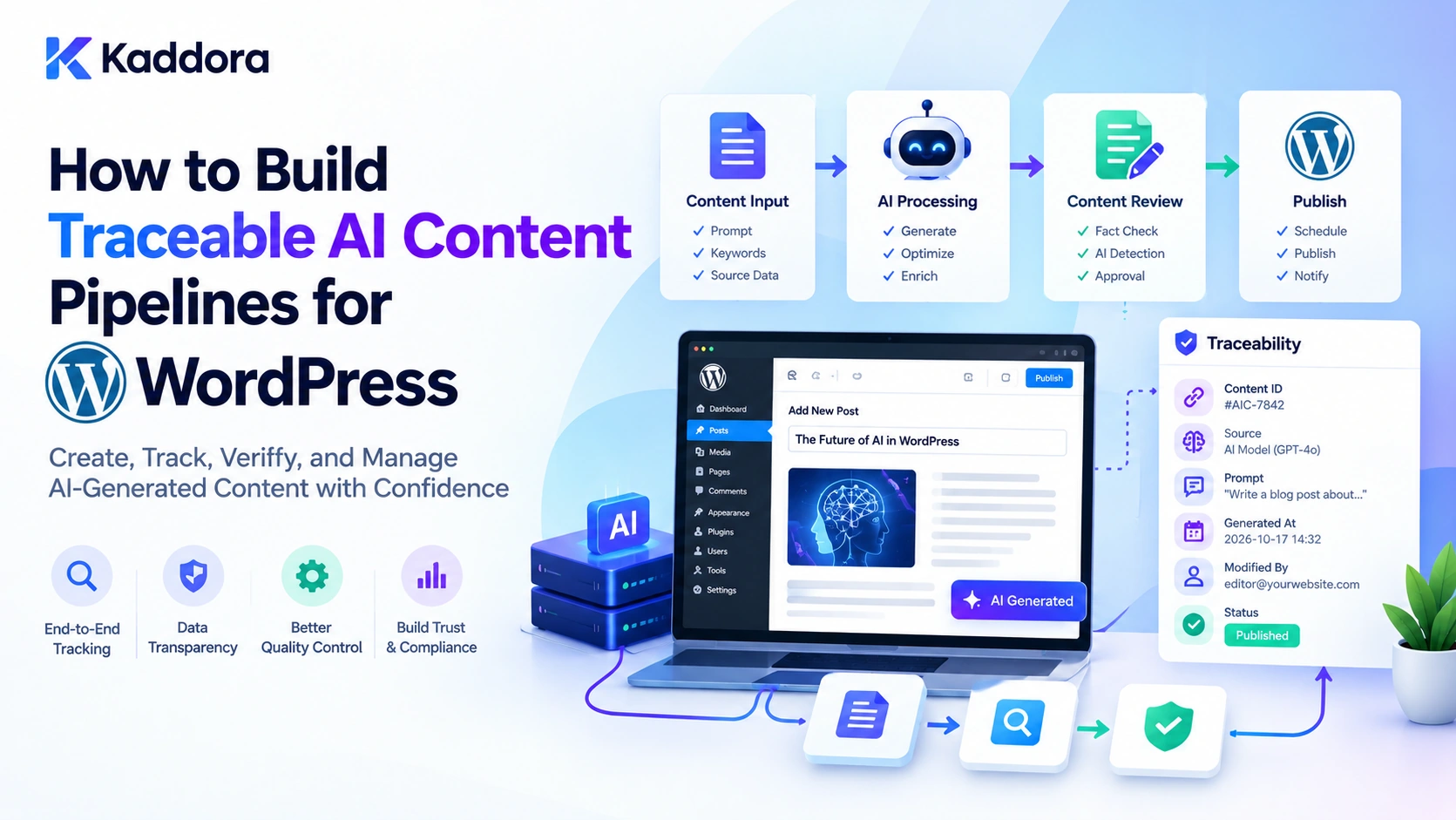
Introduction
AI-powered WordPress plugins can create articles, product descriptions, SEO metadata, landing pages, summaries, and other website content. However, generating content is only one part of a reliable publishing workflow.
Before an AI-generated article reaches a WordPress website, information may pass through several operations. A plugin retrieves source content, selects relevant information, prepares a prompt, sends a request to an AI provider, validates the response, aplies formatting, and saves the result as a draft. An editor may then review and approve the content before publication.
When these operations are managed independently, it becomes difficult to understand how a particular result was produced.
For example, an AI content generator might publish an incorrect product specification. Was the original product information outdated? Did the retrieval process select the wrong record? Did the AI misunderstand the source? Did a transformation modify the information? Or did an editor introduce the error?
A traceable AI content pipeline connects the important stages of content generation so developers can follow the information, processing decisions, and output from its original sources to the final WordPress content.
It combines controlled data retrieval, versioned transformations, generation records, output validation, review workflows, and publishing controls.
This guide explains how to build a traceable AI content pipeline using WordPress and PHP, with practical implementation examples and a focus on maintainable plugin architecture.
What Is a Traceable AI Content Pipeline?
A traceable AI content pipeline is a structured workflow that records how content is generated, processed, checked, reviewed, and delivered.
Unlike a basic AI integration that sends a prompt and receives text, a traceable pipeline maintains relationships between the input data, processing stages, generated output, and resulting WordPress content.
For example, an AI blog-writing plugin might use the following process:
Receive a content-generation request.
Retrieve approved WordPress articles and reference material.
Record the source identifiers and relevant versions.
Extract and normalize the required information.
Prepare a versioned prompt.
Request content from the AI provider.
Validate the response and check important claims.
Save the content as a WordPress draft.
Record editorial review and approval.
Publish the approved version.
Each operation contributes to the final result and should be identifiable in the workflow history.
Traceability versus ordinary AI content generation
Basic AI generation
Traceable AI pipeline
Sends a prompt directly to a provider
Uses a defined sequence of processing stages
Stores the generated text
Stores the output with its generation context
May discard source information
Records relevant source identifiers
Treats the response as ready-to-use content
Applies validation and review rules
Provides limited debugging information
Connects processing events to a generation run
Often publishes automatically
Uses controlled draft and approval stages
Traceability does not automatically guarantee that generated content is accurate. It makes the workflow easier to inspect and investigate while supporting separate verification and quality-control processes.
Why WordPress Plugins Need Traceable AI Pipelines
A traceable pipeline becomes particularly valuable when AI content generation involves multiple data sources, users, automated operations, or publishing decisions.
Reliable content workflows: Developers can define exactly which stages must complete before content becomes publishable.
Better debugging: When a generation result is incorrect, the team can inspect the relevant source records, prompt version, and processing events.
Source transparency: Editors can identify the information that contributed to a generated article or product description.
Consistent validation: Every generated response can pass through the same required checks before being saved.
Editorial accountability: The pipeline can distinguish AI generation, automated validation, human review, and final publication.
Controlled automation: Sensitive publishing operations can require explicit approval instead of allowing the model to decide when content should go live.
For example, an AI SEO plugin might generate page titles and meta descriptions from existing WordPress content. A traceable pipeline can record the source page, extraction rules, prompt version, validation result, and saved metadata.
A WooCommerce content assistant can use a similar approach for product descriptions, ensuring that product attributes are retrieved from appropriate records before generation.
1. Define the Stages of Your AI Content Pipeline
Before writing PHP code, define the stages your plugin needs.
A practical pipeline can use the following stages.
Stage
Responsibility
Request
Accept the content-generation task
Retrieval
Collect approved source information
Preparation
Extract and normalize relevant data
Prompt construction
Build a versioned instruction and input
Generation
Request output from the AI provider
Validation
Check structure, content requirements, and factual support
Draft creation
Save the generated result in WordPress
Editorial review
Record review and approval
Publication
Publish only when all required conditions are satisfied
Not every plugin needs all these stages. A simple metadata generator may not require a separate editorial workflow, while a large content automation system might need multiple review and verification steps.
The important principle is to define the pipeline before implementing it.
Each stage should have a clear responsibility, an input, an output, and an identifiable result.
Design a traceable workflow
A typical architecture looks like this:
Content Generation Request | v Create Generation Run | v Retrieve Approved Sources | v Record Source References | v Normalize and Prepare Data | v Build Versioned Prompt | v Call AI Provider | v Validate Generated Output | v Save WordPress Draft | v Editorial Review | v Approve and Publish | v Complete Pipeline Record
If a stage fails, the pipeline should record the failure and stop or retry according to a predefined policy. It should not silently continue using incomplete information.
2. Create a Generation Run and Shared Pipeline Context
Every content-generation workflow should have a unique run identifier.
A generation run connects the events belonging to one attempt. For example, source retrieval, prompt preparation, AI generation, and draft creation can all reference the same run ID.
A shared context also helps different functions exchange information without relying on loosely related global variables.
The following PHP example creates a pipeline context:
<?php /** * Create a traceable AI content-generation context. * * @param int $kaddora_ai_actor_id User initiating the task. * @param string $kaddora_ai_task Generation task. * @return array|WP_Error */ function kaddora_ai_create_pipeline_context( $kaddora_ai_actor_id, $kaddora_ai_task ) { $kaddora_ai_actor_id = absint( $kaddora_ai_actor_id ); $kaddora_ai_task = sanitize_key( $kaddora_ai_task ); if ( ! $kaddora_ai_actor_id ) { return new WP_Error( 'kaddora_ai_missing_actor', 'A valid user is required.' ); } if ( ! current_user_can( 'edit_posts' ) ) { return new WP_Error( 'kaddora_ai_pipeline_permission', 'You cannot start this generation workflow.' ); } if ( ! in_array( $kaddora_ai_task, array( 'blog_article', 'product_description', 'seo_metadata', 'page_summary', ), true ) ) { return new WP_Error( 'kaddora_ai_invalid_task', 'The requested generation task is not supported.' ); } return array( 'run_id' => wp_generate_uuid4(), 'actor_id' => $kaddora_ai_actor_id, 'task' => $kaddora_ai_task, 'status' => 'started', 'created_at_gmt' => current_time( 'mysql', true ), 'prompt_version' => '', 'source_records' => array(), 'events' => array(), ); }
The example checks whether the current user can edit posts. A production plugin should also verify that the supplied actor ID matches the authenticated user, or use an explicit trusted execution context for automated jobs.
The context is an in-memory representation of the generation run. It must also be persisted through an event or run-record storage mechanism so the workflow can be inspected after execution.
For workflows that process many records, avoid placing the entire source content or full AI response inside a large shared context. Store appropriate references and keep payloads within the component that needs them.
3. Retrieve and Register Approved Source Data
A traceable pipeline should collect information from defined sources before generating content.
Depending on the feature, these sources may include:
Published WordPress posts and pages.
Approved knowledge-base articles.
Custom post types.
WooCommerce product attributes.
Existing website content.
Structured records maintained by the plugin.
Do not pass every available record to the AI provider. Retrieve only content that is relevant and authorized for the task.
The following function retrieves published WordPress posts and creates a simple source registry.
<?php /** * Retrieve approved public content for an AI pipeline. * * @param array $kaddora_ai_post_ids Source post IDs. * @return array|WP_Error */ function kaddora_ai_retrieve_pipeline_sources( $kaddora_ai_post_ids ) { if ( ! is_array( $kaddora_ai_post_ids ) ) { return new WP_Error( 'kaddora_ai_invalid_source_list', 'Source identifiers must be an array.' ); } $kaddora_ai_post_ids = array_slice( array_unique( array_filter( array_map( 'absint', $kaddora_ai_post_ids ) ) ), 0, 20 ); $kaddora_ai_sources = array(); foreach ( $kaddora_ai_post_ids as $kaddora_ai_post_id ) { $kaddora_ai_post = get_post( $kaddora_ai_post_id ); if ( ! $kaddora_ai_post || 'publish' !== $kaddora_ai_post->post_status || post_password_required( $kaddora_ai_post ) ) { continue; } if ( ! in_array( $kaddora_ai_post->post_type, array( 'post', 'page' ), true ) ) { continue; } $kaddora_ai_content = strip_shortcodes( $kaddora_ai_post->post_content ); $kaddora_ai_content = wp_strip_all_tags( $kaddora_ai_content ); $kaddora_ai_content = trim( $kaddora_ai_content ); if ( '' === $kaddora_ai_content ) { continue; } $kaddora_ai_sources[] = array( 'source_id' => 'post_' . $kaddora_ai_post_id, 'post_id' => $kaddora_ai_post_id, 'title' => get_the_title( $kaddora_ai_post_id ), 'content' => $kaddora_ai_content, 'modified_gmt' => get_post_modified_time( 'c', true, $kaddora_ai_post ), ); } return $kaddora_ai_sources; }
This is a basic retrieval example for public WordPress posts and pages. It does not implement semantic ranking or guarantee that the returned sources are relevant.
A production implementation should apply an appropriate retrieval strategy and additional content-type, publication, access, and business rules.
For private records, customer-specific information, or internal documents, implement authorization checks before including the data in the pipeline.
Record the source selection
Once sources are retrieved, record their identifiers and useful metadata against the generation run.
For example:
$kaddora_ai_source_manifest = array( array( 'source_id' => 'post_184', 'post_id' => 184, 'source_version' => '2026-10-28T10:30:00', ), );
This is an illustrative manifest. Build it from the actual retrieval results rather than manually supplying identifiers.
The source manifest provides a record of what entered the workflow. It does not prove that every source was used correctly or that the final content is supported by that source.
4. Version Data Transformations and Prompt Preparation
Source data usually needs processing before it can be sent to an AI model.
For example, an AI blog generator might extract headings, summaries, product information, and approved keywords from several WordPress records.
A transformation step can:
Remove irrelevant fields.
Normalize inconsistent data.
Limit the length of source passages.
Separate factual attributes from editorial instructions.
Prepare structured input for the AI provider.
Record the transformation version so that developers can understand which preparation logic was used during a particular generation run.
Prompt templates should also have stable identifiers.
For example:
$kaddora_ai_pipeline_config = array( 'transformation_version' => 'source-normalizer-v2', 'prompt_version' => 'blog-article-v4', 'output_schema_version' => 'article-response-v1', );
The identifiers are examples. A production plugin should manage these versions consistently as part of its release and configuration process.
Why versioning matters
Suppose the same product information is used in two generation runs, but the resulting descriptions are different.
The difference might be explained by a new prompt version, a changed transformation rule, or a different model.
Without these identifiers, investigating the change becomes difficult.
Store the configuration versions with the generation event. If the full prompt or transformed data must be retained for historical analysis, apply suitable privacy, access, and retention controls.
5. Record Pipeline Events at Every Important Stage
A traceable pipeline should maintain a record of significant operations.
Examples include:
source_retrieved
data_normalized
prompt_prepared
generation_started
generation_completed
output_validated
draft_saved
review_approved
content_published
pipeline_failed
A dedicated database table is often suitable for these records because it supports multiple events within a generation run.
An event record could contain:
Field
Purpose
Event ID
Identifies the individual operation
Run ID
Connects the operation to a generation workflow
Parent event ID
Identifies the preceding operation
Stage
Describes the operation
Status
Records success, failure, or pending state
Input hash
Identifies the processed input fingerprint
Output hash
Identifies the resulting output fingerprint
Timestamp
Records when the operation occurred
Error code
Helps identify a failed operation
Use a unique event ID for each event rather than updating a previous record when an operation is repeated.
For example, if the AI provider returns invalid output and the plugin performs a retry, the retry should produce a new event that references the previous failed attempt.
This preserves the history of what actually happened.
6. Create Reusable Functions for Pipeline Stage Execution
Instead of embedding logging and error handling inside every generation function, create a shared event-recording layer.
A simple approach is to define a reusable function that records stage results in the pipeline context.
<?php /** * Add a processing event to a pipeline context. * * @param array $kaddora_ai_context Pipeline context. * @param string $kaddora_ai_stage Stage identifier. * @param string $kaddora_ai_status Stage status. * @param array $kaddora_ai_details Event details. * @return array|WP_Error */ function kaddora_ai_add_pipeline_event( $kaddora_ai_context, $kaddora_ai_stage, $kaddora_ai_status, $kaddora_ai_details = array() ) { if ( ! is_array( $kaddora_ai_context ) || empty( $kaddora_ai_context['run_id'] ) ) { return new WP_Error( 'kaddora_ai_invalid_context', 'The pipeline context is invalid.' ); } $kaddora_ai_allowed_stages = array( 'source_retrieval', 'data_preparation', 'prompt_preparation', 'ai_generation', 'output_validation', 'draft_creation', 'editorial_review', 'publication', ); $kaddora_ai_allowed_statuses = array( 'started', 'completed', 'failed', 'skipped', ); if ( ! in_array( $kaddora_ai_stage, $kaddora_ai_allowed_stages, true ) || ! in_array( $kaddora_ai_status, $kaddora_ai_allowed_statuses, true ) ) { return new WP_Error( 'kaddora_ai_invalid_pipeline_event', 'The pipeline event is not supported.' ); } $kaddora_ai_event = array( 'event_id' => wp_generate_uuid4(), 'run_id' => $kaddora_ai_context['run_id'], 'stage' => $kaddora_ai_stage, 'status' => $kaddora_ai_status, 'details' => $kaddora_ai_details, 'created_at_gmt' => current_time( 'mysql', true ), ); $kaddora_ai_context['events'][] = $kaddora_ai_event; return $kaddora_ai_context; }
This function demonstrates the event structure within the current request. It is not persistent audit storage by itself.
In production, connect it to your database event recorder and save each event immediately. Keeping all events only in memory means they could be lost if PHP execution stops unexpectedly.
For large workflows, save events as they occur and update the overall run status separately.
7. Connect the AI Provider Through a Controlled Generation Stage
The AI generation stage should be separate from source retrieval, prompt preparation, and publishing.
This separation makes it easier to change providers without rewriting the entire pipeline.
A provider integration should return a predictable result containing the generated content and relevant response metadata.
For example, your provider adapter could return:
$kaddora_ai_generation_result = array( 'content' => 'Generated article content.', 'provider' => 'example-provider', 'model' => 'example-model-version', 'request_status' => 'completed', );
These values are illustrative. Your adapter should populate them from the actual provider response and configuration.
A provider-independent pipeline can accept a generation callback:
<?php /** * Execute the AI generation callback. * * @param string $kaddora_ai_prompt Generated prompt. * @param callable $kaddora_ai_callback Provider adapter. * @return array|WP_Error */ function kaddora_ai_execute_generation( $kaddora_ai_prompt, $kaddora_ai_callback ) { if ( ! is_string( $kaddora_ai_prompt ) || '' === trim( $kaddora_ai_prompt ) || ! is_callable( $kaddora_ai_callback ) ) { return new WP_Error( 'kaddora_ai_invalid_generation_request', 'The generation request is invalid.' ); } $kaddora_ai_result = call_user_func( $kaddora_ai_callback, $kaddora_ai_prompt ); if ( is_wp_error( $kaddora_ai_result ) ) { return $kaddora_ai_result; } if ( ! is_array( $kaddora_ai_result ) || empty( $kaddora_ai_result['content'] ) || ! is_string( $kaddora_ai_result['content'] ) ) { return new WP_Error( 'kaddora_ai_invalid_provider_response', 'The AI provider returned an invalid response.' ); } return $kaddora_ai_result; }
The callback is responsible for communicating with your selected provider, handling authentication, applying timeouts, and converting the provider response into the expected structure.
Keep provider credentials on the server. Do not store API keys in event records, generated prompts, or public JavaScript.
A provider error should be recorded as a failed generation event, not disguised as an empty or successful response.
8. Validate the Generated Content Before Saving It
Receiving generated text does not mean it is ready for WordPress.
The pipeline should validate the response according to the content type and the requirements of the feature.
For an AI article generator, checks might include:
Non-empty output.
Required title and content fields.
Valid response structure.
Appropriate HTML elements.
Required sections.
Acceptable content length.
Supported factual claims.
No prohibited or unexpected fields.
The following example validates and sanitizes HTML intended for a WordPress draft.
<?php /** * Validate generated article HTML. * * @param string $kaddora_ai_content AI-generated content. * @return string|WP_Error */ function kaddora_ai_validate_generated_content( $kaddora_ai_content ) { if ( ! is_string( $kaddora_ai_content ) || '' === trim( $kaddora_ai_content ) ) { return new WP_Error( 'kaddora_ai_empty_content', 'Generated content is empty.' ); } $kaddora_ai_content = trim( $kaddora_ai_content ); if ( strlen( $kaddora_ai_content ) > 200000 ) { return new WP_Error( 'kaddora_ai_content_too_large', 'Generated content exceeds the allowed size.' ); } $kaddora_ai_safe_content = wp_kses_post( $kaddora_ai_content ); if ( '' === trim( $kaddora_ai_safe_content ) ) { return new WP_Error( 'kaddora_ai_invalid_html', 'Generated content did not pass HTML validation.' ); } return $kaddora_ai_safe_content; }
This example checks basic content validity and applies WordPress post-content HTML filtering. It does not verify factual accuracy, article quality, or the correctness of citations.
Those checks require additional feature-specific logic.
For example, an AI product-description generator should compare important product claims with canonical WooCommerce attributes. An AI support assistant should validate its answers against relevant approved documentation.
Keep factual verification separate from HTML sanitation.
9. Save Generated Content as a WordPress Draft
A traceable pipeline should not automatically publish every successful AI response.
For many content-generation features, creating a draft is a safer default. This gives editors an opportunity to inspect the content, correct mistakes, and approve the final result.
The following function creates a draft using WordPress's post API.
<?php /** * Save validated AI content as a draft. * * @param string $kaddora_ai_title Draft title. * @param string $kaddora_ai_content Validated content. * @return int|WP_Error */ function kaddora_ai_save_generated_draft( $kaddora_ai_title, $kaddora_ai_content ) { if ( ! current_user_can( 'edit_posts' ) ) { return new WP_Error( 'kaddora_ai_draft_permission', 'You cannot create this draft.' ); } $kaddora_ai_title = sanitize_text_field( $kaddora_ai_title ); if ( '' === $kaddora_ai_title || '' === trim( $kaddora_ai_content ) ) { return new WP_Error( 'kaddora_ai_invalid_draft', 'A valid title and content are required.' ); } $kaddora_ai_post_id = wp_insert_post( array( 'post_type' => 'post', 'post_status' => 'draft', 'post_title' => $kaddora_ai_title, 'post_content' => $kaddora_ai_content, ), true ); if ( is_wp_error( $kaddora_ai_post_id ) ) { return $kaddora_ai_post_id; } return (int) $kaddora_ai_post_id; }
This function creates a new post. For an existing post, use a controlled update workflow and verify the user's permission to edit that specific post.
After the draft is created, record the post ID against the generation run. This connects the generated result to the rest of its pipeline history.
A production plugin should also consider whether the draft creation operation and its corresponding audit event can fail independently. Define how incomplete records will be detected and reconciled.
10. Implement Editorial Approval and Controlled Publication
Human review is an important part of many AI content workflows.
A generated draft might pass structural validation but still contain inaccurate claims, unsuitable language, or incomplete information.
A traceable pipeline should distinguish between:
AI-generated content.
Automatically validated content.
Content awaiting review.
Content approved by an authorized user.
Published content.
Before publication, verify that the current user has the appropriate capability to publish the specific post.
For example:
<?php /** * Publish an approved AI-generated draft. * * @param int $kaddora_ai_post_id WordPress post ID. * @return int|WP_Error */ function kaddora_ai_publish_approved_content( $kaddora_ai_post_id ) { $kaddora_ai_post_id = absint( $kaddora_ai_post_id ); $kaddora_ai_post = get_post( $kaddora_ai_post_id ); if ( ! $kaddora_ai_post ) { return new WP_Error( 'kaddora_ai_post_missing', 'The content record was not found.' ); } if ( ! current_user_can( 'publish_post', $kaddora_ai_post_id ) ) { return new WP_Error( 'kaddora_ai_publish_permission', 'You cannot publish this content.' ); } if ( 'draft' !== $kaddora_ai_post->post_status ) { return new WP_Error( 'kaddora_ai_invalid_publish_status', 'Only approved drafts can be published.' ); } $kaddora_ai_result = wp_update_post( array( 'ID' => $kaddora_ai_post_id, 'post_status' => 'publish', ), true ); if ( is_wp_error( $kaddora_ai_result ) ) { return $kaddora_ai_result; } return (int) $kaddora_ai_result; }
This is a basic publishing operation. It assumes that an independent approval process has already established that the draft is approved.
A production system must enforce that approval state before calling this function. It should not treat the fact that a post is a draft as proof that editorial review has taken place.
For automated publishing, define explicit approval rules and enforce them server-side. A model-generated statement that content is approved must never replace an authorized human or application-level approval decision.
11. Build an Administrative Pipeline History
Once events are stored, an administrative interface can display the entire generation process.
A useful history screen should show:
Generation run ID.
Related WordPress post.
Event timeline.
Source records.
Prompt and transformation versions.
AI provider and model.
Input and output fingerprints.
Validation results.
Review and publication status.
Failed operations and diagnostic codes.
For example:
Pipeline stage
Recorded result
Source retrieval
5 approved records selected
Data preparation
Required fields extracted
Prompt preparation
Blog template version 4
AI generation
Response received
Output validation
Structural checks passed
Draft creation
Draft saved
Editorial review
Awaiting approval
Publication
Not yet published
These are illustrative results.
Use pagination and filters when loading historical events. Restrict administrative access with appropriate WordPress capabilities and escape displayed values.
Avoid exposing private source content or sensitive prompt information in the history view unless the current user is authorized to see it.
The pipeline history should also distinguish between an operation that was never attempted, one that failed, and one that completed successfully. This prevents incomplete runs from being mistaken for successful content generation.
12. Test, Monitor, and Improve the Pipeline
A traceable pipeline needs tests for both successful operations and failures.
Test scenarios should include:
No eligible source records are found.
A source changes during the generation workflow.
Data preparation returns empty information.
The prompt cannot be constructed.
The AI provider times out.
The provider returns malformed output.
Content validation fails.
Draft creation returns an error.
Editorial approval is missing.
A user lacks publishing permission.
Event storage fails.
A generation run is retried.
A WordPress post is edited after publication.
Check whether the pipeline records the correct stage, status, and related run ID for each case.
Monitor useful operational indicators such as:
Pipeline completion rate: The percentage of generation runs that reach their intended final stage.
Stage failure rate: The frequency of errors in retrieval, preparation, generation, validation, and publishing.
Source traceability: The percentage of generated outputs with complete source references.
Validation failure rate: How frequently generated content fails required checks.
Review rate: The proportion of drafts that require human correction or additional evidence.
Audit completeness: The percentage of required processing events that are successfully recorded.
These metrics help identify workflow problems, but a high completion rate does not prove that the content is accurate. Evaluate factual support and editorial quality independently.
Common Mistakes to Avoid
Connecting directly to an AI provider without defining pipeline stages.
Storing the final content without recording its generation context.
Failing to identify the source records used by the workflow.
Overwriting failed generation attempts during retries.
Using unversioned transformation and prompt logic.
Treating HTML sanitation as factual verification.
Publishing generated content without enforcing approval requirements.
Keeping pipeline history only in PHP memory.
Ignoring failures in audit-event storage.
Exposing private source data in administrative reports.
Treating traceability as proof that every pipeline operation was correct.
Best Practices Checklist
Define the stages of the AI content workflow.
Create a unique identifier for each generation run.
Retrieve only eligible and authorized source information.
Record source identifiers and relevant versions.
Version prompt templates and data transformations.
Separate provider integration from pipeline orchestration.
Record processing events as they occur.
Validate generated content before saving it.
Save drafts separately from publication operations.
Enforce editorial approval and WordPress publishing capabilities.
Track retries and incomplete pipeline runs.
Protect audit records and administrative reports.
Test failure handling and monitor pipeline completeness.
Why Choose Kaddora?
Kaddora focuses on WordPress-oriented digital products and development solutions for website functionality, AI integration, and business automation.
Developing reliable AI content workflows requires more than connecting a model to a WordPress website. It requires organized processing stages, practical validation, controlled publishing, and visibility into how generated content moves through the system.
Kaddora's focus on WordPress development and digital solutions aligns with creating maintainable tools that support website management and automation.
For developers working on AI writing assistants, SEO tools, WooCommerce content generators, or automated publishing systems, traceable pipelines provide a foundation for improving workflow transparency, investigating errors, and maintaining better content control.
Conclusion
Traceable AI content pipelines help WordPress developers manage the entire journey from original source information to the final published result.
The process involves clearly defined stages for source retrieval, data preparation, prompt construction, AI generation, output validation, draft creation, editorial approval, and publication.
By connecting these operations through generation identifiers, event records, source references, and version information, developers can investigate how content was produced instead of relying only on the final generated text.
A traceable workflow does not automatically guarantee factual accuracy or tamper-proof audit history. Those requirements need independent verification, security controls, and suitable record-management practices.
Start by defining the pipeline stages and creating a unique generation run for every content request. Add persistent event recording, source tracking, validation, and controlled publishing as the workflow develops.
With a well-structured implementation, WordPress plugins can make AI content generation more transparent, maintainable, and manageable.
Frequently Asked Questions
What is a traceable AI content pipeline in WordPress?
It is a structured content-generation workflow that records how information is retrieved, transformed, sent to an AI model, validated, reviewed, and saved or published in WordPress.
What are the main stages of a traceable AI content pipeline?
The main stages typically include source retrieval, data preparation, prompt construction, AI generation, output validation, draft creation, editorial review, and publication.
Why does an AI content pipeline need a generation run ID?
A unique run ID connects all events belonging to one content-generation attempt. It helps developers inspect the workflow and distinguish separate generations, retries, and outputs.
How can I track the sources used by an AI content generator?
Create a server-controlled source registry containing stable source IDs, related WordPress record IDs, and relevant version information. Record those references against the generation run and validate citations before presenting them.
Should AI-generated WordPress content be published automatically?
Not necessarily. Draft creation followed by validation and authorized editorial approval is a sensible approach for many workflows. Automated publishing should only occur under explicit, properly enforced rules.
What should happen when an AI pipeline stage fails?
The plugin should record the failed stage, preserve the relevant event history, and stop or retry according to a defined recovery policy. It should not report the run as successful when required stages remain incomplete.
How can I test a traceable AI content pipeline?
Test source retrieval, data preparation, prompt changes, provider failures, invalid output, draft creation, approval, publishing permissions, audit-storage errors, and retries. Verify that every important event is connected to the correct generation run.
Why choose ThemeKaddora?
ThemeKaddora supports WordPress website development by offering a range of digital products, including plugins, themes, and templates. It gives developers and website owners resources to explore when building, extending, or improving their websites.
Comments (0)