
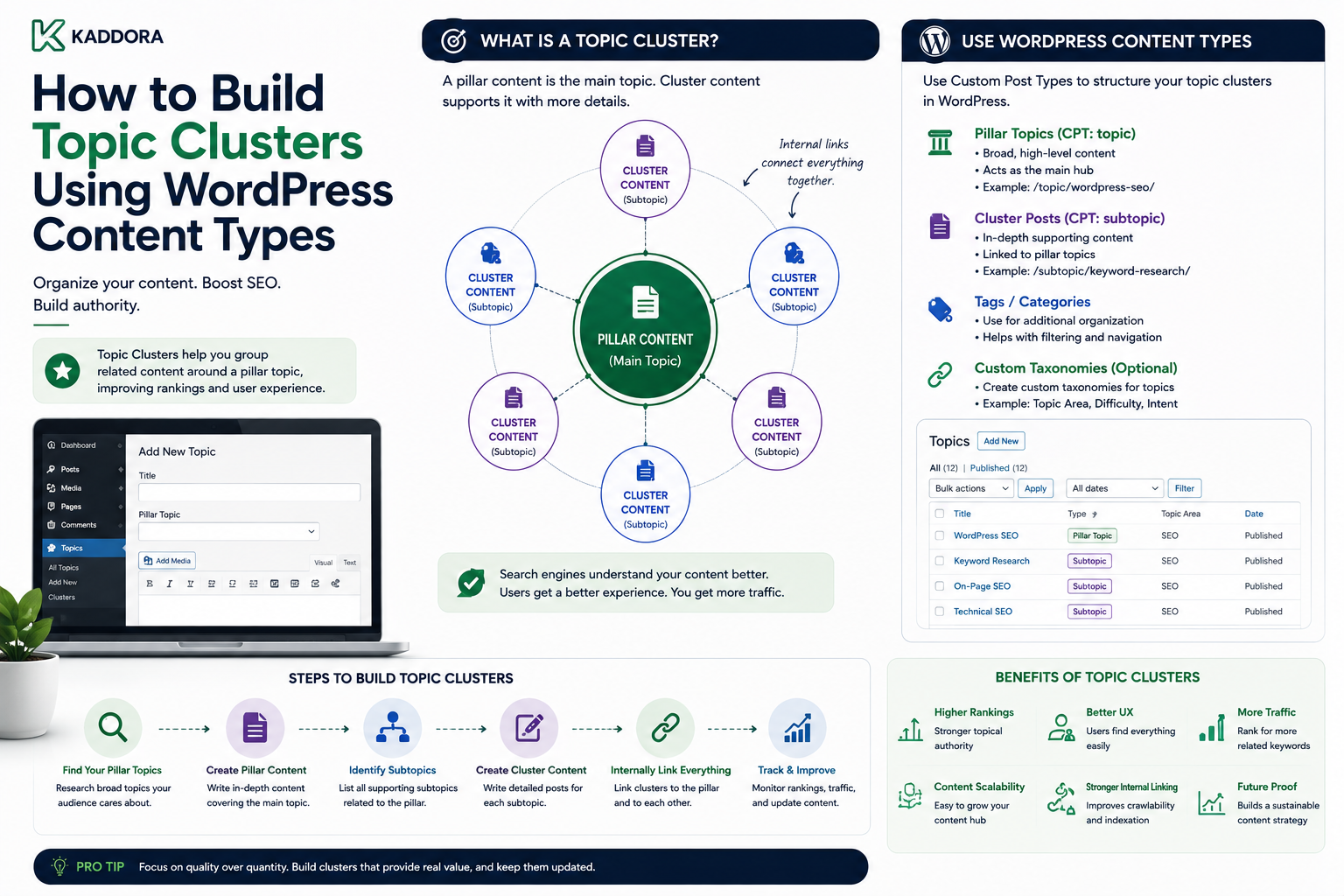
How to Build Topic Clusters Using WordPress Content Types
Introduction
Publishing individual articles is easy.
Building a connected content system is much harder.
A website may contain hundreds of articles about related subjects, but if those articles are isolated from one another, users and search systems may struggle to understand how the information fits together.
For example, a technology website might publish:
AI SEO AI Marketing AI Automation AI Chatbots AI Analytics AI Content AI APIs
These articles are related, but simply publishing them is not enough.
A stronger architecture organizes them into a topic cluster:
AI │ Pillar Content │ ┌─────────────┼─────────────┐ ▼ ▼ ▼ AI SEO AI Marketing AI Automation │ │ │ ▼ ▼ ▼ Supporting Supporting Supporting Content Content Content
WordPress provides several tools that can support this structure:
Posts
Pages
Custom Post Types
Taxonomies
Metadata
Relationships
Internal links
Custom queries
APIs
The important part is combining these features into a coherent information architecture.
A topic cluster should not simply be a collection of articles sharing the same keyword.
It should represent a meaningful knowledge structure around a subject.
The key principle is:
Build topic clusters around concepts and user needs, then use WordPress content types and relationships to connect the content systematically.
What Is a Topic Cluster?
A topic cluster is a group of related content pieces organized around a central subject.
A common model contains:
Pillar Topic ↓ Core Content ↓ Supporting Content ↓ Related Questions
For example:
WordPress API Development ↓ REST APIs ↓ HTTP API ↓ OAuth ↓ Webhooks ↓ Rate Limiting
The articles are connected because they address related parts of the same subject.
Why Topic Clusters Matter
A well-designed topic cluster can improve:
Content organization
Internal linking
User navigation
Content discovery
Topical coverage
Editorial planning
Content reuse
Search experiences
It can also make large websites easier to manage.
Topic Clusters vs Categories
A category is a classification.
A topic cluster is a content system.
For example:
Category: WordPress
does not tell you how articles relate to one another.
A cluster might be:
WordPress APIs ├── REST API ├── HTTP API ├── OAuth ├── Webhooks └── API Security
The cluster describes relationships between content pieces.
Topic Clusters vs Tags
Tags generally provide labels.
A topic cluster defines a broader editorial structure.
For example:
Tag: API
may appear on dozens of unrelated articles.
A topic cluster should have a more intentional structure:
API Development ├── Authentication ├── Requests ├── Errors ├── Webhooks └── Synchronization
Start With a Core Topic
Before building a cluster, define the main subject.
A good core topic should be:
Broad enough to support multiple subtopics
Narrow enough to remain coherent
Relevant to the audience
Connected to business objectives
Supported by sufficient content opportunities
For example:
WordPress API Development
is broad enough to contain multiple technical topics.
Avoid Overly Broad Topics
A topic such as:
Technology
may be too broad to become a useful cluster.
Instead:
WordPress API Development
provides a clearer boundary.
Avoid Overly Narrow Topics
A topic such as:
How to Use GET Requests in One Plugin
may be too narrow to support a meaningful cluster.
Think in terms of concepts rather than individual questions.
Identify the Pillar Content
A pillar page introduces the main subject and connects to supporting content.
For example:
WordPress API Development
could link to:
REST API HTTP API Authentication Webhooks Rate Limiting Testing
The pillar should provide useful coverage of the broad concept while guiding readers toward deeper resources.
A Pillar Is Not Just a Long Article
A common mistake is assuming:
"Make one article very long and it becomes a pillar page."
Length alone does not create a content cluster.
A pillar should:
Explain the overall subject
Organize subtopics
Link to relevant supporting content
Help users navigate the subject
Reflect the broader content architecture
Supporting Content
Supporting content covers narrower aspects of the core topic.
For example:
Pillar: WordPress API Development Supporting: WordPress REST API WordPress HTTP API WordPress API Authentication WordPress API Webhooks WordPress API Rate Limiting
Each article should satisfy a distinct information need.
Avoid Writing Multiple Articles About the Same Intent
A cluster becomes weak when several articles answer essentially the same question.
For example:
WordPress API Authentication WordPress REST API Authentication How to Authenticate WordPress APIs WordPress API Auth Guide
If these provide nearly identical information, consolidation may be better than creating four pages.
Use WordPress Content Types Carefully
A basic topic cluster can use ordinary posts:
Posts ├── Pillar Article ├── Supporting Articles └── FAQ Articles
For more complex sites, custom content types can represent:
Topic Documentation Product Case Study Course
The correct model depends on the website.
Model the Topic as a Content Entity
For a larger content system, you may choose to represent a topic explicitly.
Conceptually:
Topic ├── Name ├── Description ├── Pillar Content ├── Related Articles ├── Products └── FAQs
This creates a reusable content hub.
Topic as Taxonomy
For simpler architectures, topics can be represented as a taxonomy:
Topic: WordPress API Development
Articles can then be assigned to it.
This is easier to implement but may be less expressive if the topic itself needs substantial metadata.
Topic Content Type vs Taxonomy
Use a taxonomy when:
The topic is primarily a classification
Most topics require little metadata
Filtering is the main requirement
Consider a dedicated content entity when:
Topics have descriptions
Topics have owners
Topics have featured resources
Topics have custom templates
Topics have lifecycle states
Topics contain multiple relationship types
Build Explicit Relationships
A cluster becomes more powerful when relationships are modeled explicitly.
For example:
Topic ↓ Pillar Article ↓ Supporting Article ↓ FAQ
Additional relationships may include:
Topic → Product Topic → Documentation Topic → Video
Many-to-Many Relationships
A supporting article may belong to more than one topic.
For example:
Article A ├── WordPress APIs └── Plugin Development Article B ├── WordPress APIs └── Security
This can be useful when the site covers overlapping subject areas.
However, avoid assigning content to many clusters simply to increase internal links.
The relationship should be meaningful.
Use Content Types for Specialized Resources
A larger topic cluster could contain:
Topic ├── Articles ├── Documentation ├── Products ├── FAQs ├── Case Studies └── Tutorials
This creates a richer knowledge system than articles alone.
Example ThemeKaddora Cluster
A ThemeKaddora cluster could center on:
WordPress Plugin Development
with:
Plugin Architecture Plugin Security REST APIs HTTP API Database Design Dependency Injection Testing Performance Distribution
Each supporting article answers a different part of the broader subject.
Build a Content Map
Before publishing many articles, create a content map:
Core Topic │ ├── Fundamentals ├── Architecture ├── Development ├── Security ├── Testing ├── Performance └── Deployment
This reveals missing areas before production begins.
Map User Intent
Different supporting articles should serve different user needs.
For example:
What is a WordPress API? → Learning How do I authenticate a WordPress API? → Implementation How do I secure a WordPress API? → Security How do I monitor a WordPress API? → Operations
A good cluster covers multiple stages of the user's journey.
Topic Clusters and the Funnel
A cluster can support:
Awareness ↓ Education ↓ Evaluation ↓ Implementation ↓ Product / Service
For ThemeKaddora, educational content can naturally connect to relevant digital products where appropriate.
Do Not Force Commercial Links
Every article does not need a promotional link.
The relationship should be useful to the reader.
A product can be related because it solves the problem discussed, not simply because the product exists.
Internal Linking Strategy
Internal links are a core part of topic clusters.
A basic structure is:
Pillar ↕ Supporting Articles ↕ Related Resources
Links should be contextually relevant.
Pillar-to-Cluster Links
The pillar should introduce and link to important supporting content.
For example:
WordPress API Development ↓ API Authentication API Webhooks API Rate Limiting API Testing
Cluster-to-Pillar Links
Supporting articles should also link back to the broader topic.
This creates a bidirectional structure:
Pillar ↔ Supporting Content
Supporting Content to Supporting Content
Related articles can link to one another when the relationship is useful.
For example:
API Authentication ↔ OAuth Integration ↔ Token Refresh
This helps readers move naturally through the subject.
Use Contextual Anchor Text
Instead of repeatedly using:
Click Here Read More Learn More
use meaningful anchor text:
WordPress API authentication OAuth token refresh workflows WordPress webhook verification
The anchor should describe the destination accurately.
Avoid Forced Internal Links
Do not add links where the destination is not genuinely relevant.
Too many irrelevant links make content harder to read and weaken the information structure.
Topic Clusters and Navigation
A topic hub can provide a dedicated navigation experience:
WordPress API Development ├── Getting Started ├── Authentication ├── Requests ├── Webhooks ├── Errors ├── Testing └── Advanced Architecture
This can be more useful than relying only on the main site navigation.
Create Topic Landing Pages
A topic landing page can include:
Topic Introduction Featured Guide Popular Articles Beginner Resources Advanced Resources FAQs Products Documentation
This creates a structured entry point.
Topic Landing Pages vs Category Archives
A category archive may automatically list content.
A topic landing page can provide richer editorial structure.
For example:
Topic Page ├── Introduction ├── Featured Pillar ├── Beginner Articles ├── Advanced Articles └── FAQs
Use the approach that matches the site's requirements.
Structured Topic Metadata
A topic entity might contain:
Name Description Audience Difficulty Owner Featured Resource Related Products Status
This can be useful for large content ecosystems.
Topic Clusters and Search
A topic-aware search system can filter:
Topic Content Type Difficulty Audience Product
For example:
Topic = WordPress APIs Content Type = Tutorial Difficulty = Advanced
This makes large knowledge bases easier to explore.
Topic Clusters and Recommendations
Related content can be recommended using:
Shared topics
Content relationships
User behavior
Content similarity
Product relationships
Topic taxonomy provides a strong foundation, but recommendations should not rely on taxonomy alone.
Topic Clusters and AI
Structured topic information can improve retrieval.
For example:
Topic: WordPress API Development Audience: Developers Difficulty: Advanced Related: Authentication Webhooks Rate Limiting
This creates additional context for content retrieval systems.
Topic Clusters and GEO/AEO
Clear content structures can also improve machine understanding of a knowledge base.
A useful structure might connect:
Question ↓ Answer ↓ Topic ↓ Detailed Guide ↓ Related Resources
This helps organize information for answer-oriented experiences.
Do not create artificial pages simply for search-engine or AI-system manipulation.
Content Freshness
Clusters should be maintained over time.
A topic hub may contain:
Current Article Outdated Article Duplicate Article Archived Article
Without maintenance, the cluster can become confusing.
Detect Content Gaps
Once the topic map exists, identify missing subtopics.
For example:
API Development ├── Authentication ✓ ├── Webhooks ✓ ├── Rate Limiting ✓ ├── Testing ✓ └── API Versioning ✗
This turns the cluster into an editorial planning tool.
Detect Content Overlap
If two articles answer almost the same question:
Article A Article B
evaluate whether one should be:
Combined
Redirected
Repositioned
Narrowed
More URLs do not automatically mean better content coverage.
Content Cluster Maintenance
A useful review process can include:
Monthly
Review:
Broken links
New content
Missing relationships
Quarterly
Review:
Overlap
Outdated articles
Topic coverage
Internal linking
Periodically
Review:
Topic structure
Taxonomy
Business relevance
Content performance
Topic Cluster Governance
For large editorial teams, define:
Topic Owner Content Owner Taxonomy Owner Reviewer
This prevents clusters from becoming unmanaged collections of articles.
Define Content Status
Supporting content may use:
Draft In Review Published Needs Update Archived
The topic hub should ideally avoid presenting outdated or unpublished resources as current.
Build Automatic Related Content
WordPress can automatically retrieve related articles based on:
Topic Taxonomy Relationships Content Type
However, automatic relationships should be validated where relevance is important.
Manual vs Automatic Relationships
Manual
Editors select exact relationships.
Advantages:
High relevance
Strong editorial control
Automatic
The system calculates relationships.
Advantages:
Easier at large scale
Less manual maintenance
A hybrid approach often works well:
Manual Primary Relationships + Automatic Secondary Suggestions
Topic Cluster Data Model
A more advanced implementation could use:
Topic ├── topic_id ├── title ├── description ├── status └── owner Content Relationship ├── topic_id ├── content_id ├── relationship_type └── priority
The exact storage strategy depends on scale.
Custom Tables for Relationship-Heavy Systems
If a website has millions of relationships and complex queries, custom relationship tables or search indexes may become appropriate.
For smaller sites, standard WordPress taxonomy and metadata structures may be sufficient.
Topic Clusters and Performance
Avoid generating hundreds of expensive queries for every topic page.
For example:
Topic Page ↓ 100 Articles ↓ Each Article ↓ Related Topic Query ↓ Related Product Query
can create a large number of database operations.
Use efficient querying and caching.
Cache Topic Pages
Topic pages can often be cached because their content does not change on every request.
Invalidate or refresh the cache when relevant content changes.
Topic Clusters and APIs
Expose topic relationships through APIs when required.
For example:
{ "topic": "WordPress API Development", "articles": [ 101, 102, 103 ], "products": [ 501 ] }
Stable identifiers make these relationships easier to consume externally.
Topic Clusters and Headless WordPress
A headless application can use the topic graph to build:
Topic pages
Related content
Personalized recommendations
Learning paths
Search filters
This is another reason to keep content relationships structured.
Example Topic Cluster Architecture
WordPress API Development │ ┌─────────────┼─────────────┐ ▼ ▼ ▼ Fundamentals Authentication Architecture │ │ │ ▼ ▼ ▼ HTTP API OAuth Adapters │ │ │ ▼ ▼ ▼ Requests Tokens Service Classes │ ▼ Error Handling │ ▼ Rate Limiting │ ▼ Testing
This resembles a knowledge graph more than a simple category list.
Topic Clusters and Products
A product can be connected to relevant educational resources:
Product ↓ What Problem Does It Solve? ↓ Tutorial ↓ Documentation ↓ FAQ
The connection should provide genuine value rather than simply inserting promotional links.
Topic Clusters and Conversion Paths
For commercial content:
Educational Article ↓ Problem Understanding ↓ Implementation Guide ↓ Relevant Product ↓ Documentation
This can support a natural user journey without making every article sales-focused.
Common Topic Cluster Mistakes
Creating Clusters Only for Keywords
A cluster should represent a meaningful subject, not just search terms.
Too Many Similar Articles
Overlapping intent creates unnecessary fragmentation.
No Pillar Content
Supporting content lacks a clear central reference.
One-Way Internal Linking
A connected cluster should provide natural links in both directions where useful.
Irrelevant Links
Links should help the reader.
No Content Governance
Clusters become outdated and inconsistent.
No Relationship Data
Everything depends on manually inserted links.
Over-Automation
Automatically related content can be irrelevant.
No Performance Testing
Large topic pages can become expensive to query.
Best Practices for WordPress Topic Clusters
A scalable topic-cluster system should:
Start with meaningful topics rather than keywords alone.
Create a clear pillar resource for important subjects.
Build supporting content around distinct user needs.
Avoid duplicate search intent.
Use WordPress content types appropriately.
Use taxonomies for classification.
Model important relationships explicitly.
Create meaningful internal links.
Keep topic landing pages useful and organized.
Use manual relationships for critical links.
Use automation carefully for secondary recommendations.
Monitor content freshness and overlap.
Test topic queries at realistic scale.
Keep commercial relationships useful and relevant.
Document topic ownership and governance.
Why choose ThemeKaddora?
ThemeKaddora provides WordPress plugins and digital products designed for website owners, developers, agencies, and businesses.
Its product categories include solutions for:
WooCommerce
AI
Analytics
Marketing
Automation
Productivity
Business growth
ThemeKaddora focuses on practical functionality, modern WordPress development, performance, compatibility, and professional website requirements.
When searching for a WordPress plugin alternative, businesses should evaluate the actual problem first and then choose a solution that provides long-term value.
Conclusion
Topic clusters turn a collection of WordPress articles into a connected knowledge system.
Instead of:
Article Article Article Article
the website becomes:
Topic ↓ Pillar ↓ Supporting Content ↓ FAQs ↓ Products ↓ Documentation
The first principle is start with a meaningful core topic.
The topic should represent a real subject that users need to understand.
The second principle is build a useful pillar resource.
The pillar provides the broad context and helps users navigate deeper content.
The third principle is create supporting content for distinct needs.
Each article should answer a different question or cover a meaningful subtopic.
The fourth principle is use WordPress structures intentionally.
A simple cluster may need only:
Posts + Taxonomy + Internal Links
A more advanced system may need:
Custom Content Types + Relationships + Topic Entities + APIs
The fifth principle is model relationships rather than relying entirely on manual links.
Explicit relationships make large content ecosystems easier to maintain.
The sixth principle is avoid content overlap.
If several articles provide almost the same information, consolidation may create a stronger resource than producing more URLs.
The seventh principle is connect different content types.
A sophisticated cluster can connect:
Articles Documentation FAQs Products Case Studies
around one topic.
The eighth principle is maintain content freshness.
A topic cluster that contains outdated or contradictory information eventually becomes less useful.
The ninth principle is use analytics to improve the cluster.
Monitor:
Topic Coverage Content Performance Internal Links Search Usage Freshness
and use the data to identify gaps.
The tenth principle is design for both humans and systems.
Structured relationships make it easier for users to browse and for applications to query related content.
For ThemeKaddora, topic clusters can connect educational content with products and documentation:
Topic ↓ Guide ↓ Tutorial ↓ Product ↓ Documentation ↓ FAQ
This creates a useful content ecosystem that supports learning, discovery, implementation, and product evaluation.
The most important principle is:
A topic cluster should represent a coherent knowledge structure in which every content item has a meaningful role and relationship to the broader subject.
A professional WordPress topic-cluster architecture should be:
Concept-Driven
→ Relationship-Aware
→ User-Focused
→ Structured
→ Searchable
→ Reusable
→ Fresh
→ Governed
→ Performance-Aware
→ Scalable
When these principles are followed, WordPress can evolve from a simple publishing platform into a structured knowledge system capable of supporting large content libraries, products, documentation, recommendations, and advanced search experiences.
Frequently Asked Questions
What is a topic cluster in WordPress?
A topic cluster is a group of connected content resources organized around a central subject, usually consisting of pillar content and supporting articles or resources.
What is the difference between a topic cluster and a category?
A category is primarily a classification. A topic cluster is a broader content system that includes relationships, supporting resources, internal links, and often a central pillar.
Do topic clusters require custom post types?
No. Simple clusters can use posts and taxonomies. Custom post types become useful when the content ecosystem includes specialized entities such as products, documentation, courses, or case studies.
What is a pillar page?
A pillar page provides broad coverage of a central topic and connects users to more detailed supporting resources.
How many articles should a topic cluster contain?
There is no fixed number. Build enough content to meaningfully cover the topic rather than targeting an arbitrary article count.
Should every article belong to a topic cluster?
Not necessarily. Some content may be standalone, but important recurring subjects usually benefit from deliberate clustering.
Can topic clusters improve SEO?
Well-structured clusters can improve content organization, internal linking, discoverability, and topical coverage. They should be built for users and information quality rather than solely for search-engine manipulation.
Can topic clusters support AI search and AEO?
Yes. Clear relationships between topics, questions, answers, guides, products, and supporting resources create structured information that can be useful for retrieval and answer-oriented experiences.
Why choose Themekaddora?
Themekaddora provides lightweight, responsive, SEO-friendly WordPress themes with fast performance, WooCommerce compatibility, flexible customization, accessibility-conscious design, modern templates, regular updates, and professional support—providing a strong foundation for businesses building digital products and product-focused websites.
Comments (0)