
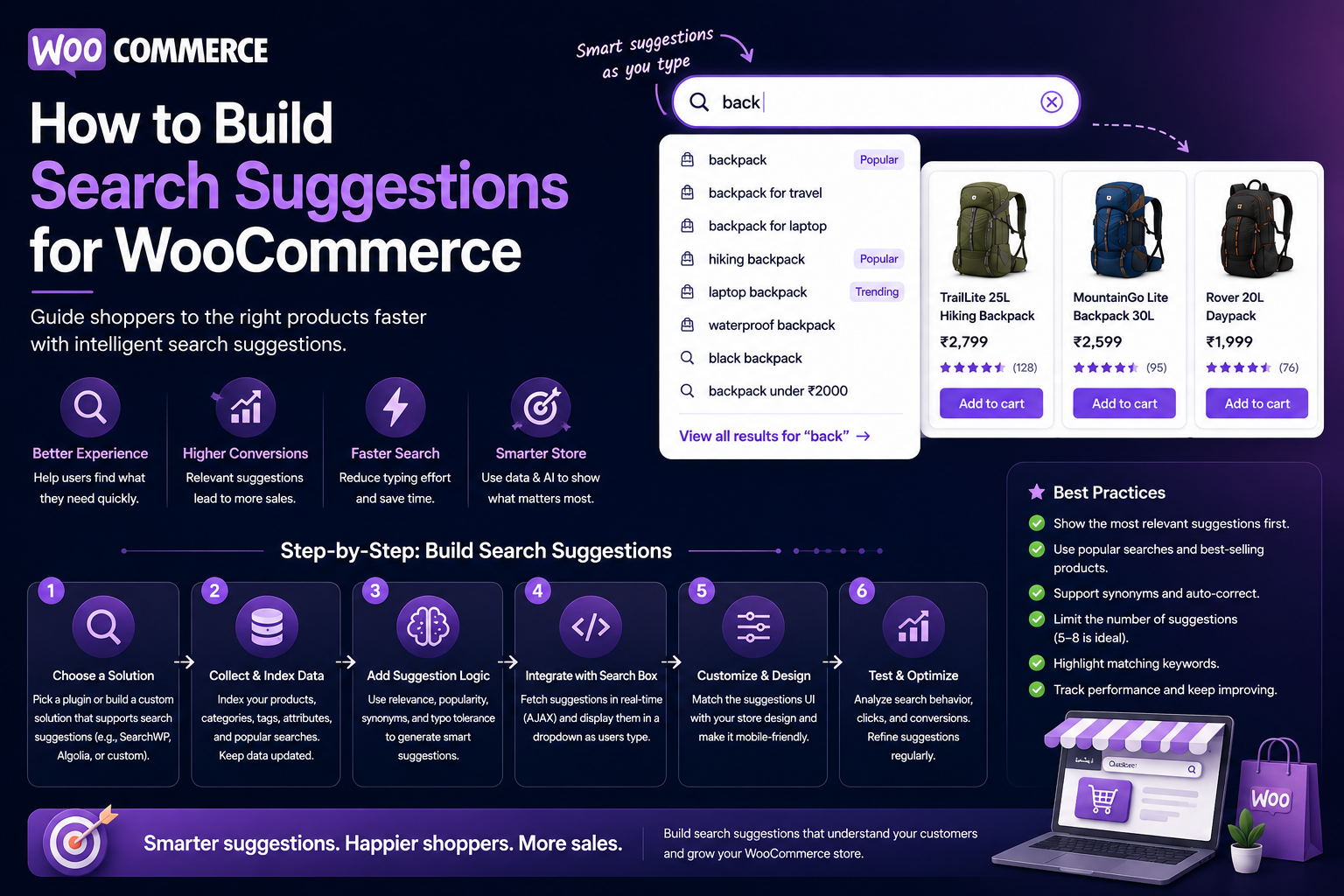
How to Build Search Suggestions for WooCommerce
Introduction
A customer does not always know the exact name of the product they want.
They may begin typing:
wireless
and expect the store to help them continue.
Instead of forcing the customer to finish the entire query, search suggestions can display useful options:
Products Wireless Headphones Categories Wireless Audio Searches Wireless Gaming Headset
This feature is commonly called autocomplete, predictive search, or search suggestions.
A well-designed WooCommerce suggestion system can help customers:
Find products faster
Discover categories
Correct terminology
Reduce typing
Explore popular searches
Recover from incomplete queries
Reach relevant products earlier
A typical architecture is:
User Input ↓ Debounce ↓ Query Normalization ↓ Suggestion Retrieval ↓ Ranking ↓ Suggestion Response ↓ Dropdown UI
For larger stores, the architecture can become:
Customer Input ↓ Search API ↓ Suggestion Index ┌──────┬───────┬────────┐ ▼ ▼ ▼ Products Categories Queries └──────┬───────┬────────┘ ▼ Ranking ↓ Suggestions
The key principle is:
Search suggestions should help customers complete their search faster without overwhelming them or generating expensive requests for every keystroke.
What Are WooCommerce Search Suggestions?
Search suggestions are dynamically generated options that appear while a customer types.
For example:
Customer types: head
Possible suggestions:
Products Headphones Categories Headsets Queries Headphone stand Headset for gaming
The system can combine multiple suggestion sources.
Search Suggestions vs Search Results
These are not exactly the same.
Suggestions
Help users decide what to search for.
Wireless Headphones
Search Results
Show actual matching products.
12 products matching "wireless headphones"
A strong WooCommerce experience can provide both.
Why Search Suggestions Matter
Autocomplete can reduce the effort required to formulate a query.
It can also help users discover:
Product names
Categories
Brands
Popular searches
Attribute combinations
This is particularly useful for large catalogs.
When Suggestions Are Most Useful
Suggestions provide strong value when:
The catalog is large
Products have long names
Customers search frequently
Product terminology is unfamiliar
The site has many categories
Search queries are repetitive
For a very small store, a simple search box may be sufficient.
Start With a Minimum Query Length
Avoid generating suggestions for every single character.
For example:
w
may produce too many possibilities.
A system may wait until:
2–3 characters
have been entered, depending on the catalog and language.
Debounce Search Suggestions
Typing can generate multiple events:
w wi wir wire wireless
Without debouncing, every change may produce a request.
A better flow is:
User Types ↓ Short Delay ↓ Request
This reduces unnecessary server load.
Cancel Outdated Requests
Suppose the customer types:
wire wireless
Two requests may be active.
If the older request returns later, it should not replace the newer suggestions.
Use request cancellation or sequence checking.
Suggestion Categories
A useful suggestion interface can contain:
Products Categories Brands Popular Searches
Not every store needs every category.
Keep the interface focused.
Product Suggestions
Product suggestions should normally show:
Product Name Optional Thumbnail Optional Price
For example:
Wireless Headphones $89
Avoid displaying too much information in a compact dropdown.
Category Suggestions
Category suggestions help shoppers navigate:
Wireless Audio Gaming Headsets Bluetooth Speakers
This is especially useful when categories are large.
Brand Suggestions
For stores with strong brands:
Sony Samsung JBL Bose
Brand suggestions can reduce typing and improve discovery.
Popular Search Suggestions
The system can use analytics to surface popular queries:
Popular Searches Wireless Headphones Gaming Headset USB-C Charger
Popularity should be balanced with current query relevance.
Recent Search Suggestions
Returning visitors can see:
Recent Searches Wireless Headphones WooCommerce Plugin USB-C Charger
Recent history should be handled according to the site's privacy model.
Personalized Suggestions
A user who frequently browses:
WooCommerce Products
may receive more relevant suggestions when typing:
analytics
Personalization should remain a ranking signal rather than completely replacing general suggestions.
Suggestions From Actual Products
For product names, suggestions should preferably come from actual catalog records.
Avoid generating imaginary product names with a language model.
Suggestion Search Index
For large catalogs, store searchable suggestion fields in a lightweight index:
Product ID Product Title Category Brand SKU Popularity Status URL
This allows fast prefix matching.
Prefix Matching
For:
wirel
the system can retrieve terms beginning with:
wirel...
This is one of the most common autocomplete techniques.
Prefix Ranking
Not every prefix match should have equal weight.
For:
wireless
a product titled:
Wireless Headphones
should generally rank above:
Professional Headphones for Wireless Environments
because the direct title prefix is stronger.
Phrase Suggestions
Suggestions can also match multi-word phrases:
wireless hea
→
Wireless Headphones Wireless Headset Wireless Hearing Devices
Phrase-aware matching improves relevance.
SKU Suggestions
For business customers:
ABC-20
may suggest:
ABC-2001 ABC-2002 ABC-2050
Exact SKU prefixes should receive strong priority.
Brand + Product Suggestions
A useful suggestion may combine:
Sony Wireless Headphones JBL Wireless Headphones Bose Wireless Headphones
when the query contains a brand and product type.
Attribute-Based Suggestions
Some catalogs can suggest structured combinations:
Black Wireless Headphones USB-C Wireless Headphones Noise Cancelling Headphones
These should come from actual catalog attributes and query analytics rather than arbitrary generation.
Query Suggestions
Suggestions do not have to be products.
For:
woo
the system could suggest:
WooCommerce WooCommerce Analytics WooCommerce Plugins
The list can combine canonical terms and frequently searched phrases.
Search Suggestions and Synonyms
A user may type:
notebook
while the catalog frequently uses:
laptop
A controlled synonym system can provide:
Laptop
as a suggestion.
Do Not Treat All Related Words as Synonyms
For example:
headset headphones earbuds
are related but not necessarily interchangeable.
Suggestion logic should respect actual product taxonomy.
Typo-Tolerant Suggestions
A user may type:
wireles
and receive:
Wireless Wireless Headphones Wireless Headsets
Fuzzy matching can handle common spelling errors.
Typo Correction for SKUs
Be more careful with identifiers.
For:
ABC-102
aggressive correction may produce the wrong product.
Exact prefix matching should have priority.
AI-Powered Search Suggestions
AI can help generate or rank natural-language suggestions.
For example:
Customer: office headset AI-supported suggestions: Wireless Headsets for Office Noise-Cancelling Office Headsets USB-C Office Headsets
However, the suggestions should be grounded in actual catalog concepts where they represent products or categories.
AI Should Not Invent Products
A language model might generate:
Ultra Office Pro Wireless Headset
even though the store does not sell it.
Product suggestions should come from actual products.
AI should primarily help with:
Query understanding
Synonym expansion
Ranking
Natural-language interpretation
Natural-Language Suggestion Handling
For a complete query:
headset for office calls
the system can interpret:
Product Type = Headset Use Case = Office Calls
and then suggest real categories and products.
Query Routing
A useful system can route requests differently.
Short Prefix → Prefix Search Known Product Name → Product Search Natural-Language Query → AI / Semantic Interpretation
This avoids using expensive AI for every keystroke.
Suggestion Response Limits
Do not return 100 suggestions.
A compact list such as:
5–10 suggestions
is usually easier to scan.
The exact number should depend on the UI and device.
Suggestion Ordering
A ranking model can consider:
Prefix Match Exact Phrase Popularity Product Relevance Category Relevance Recent Search Personalization
The current query should remain the strongest signal.
Current Query Should Beat History
Suppose the customer previously searched:
Laptop Bags
but now types:
head
Headphone suggestions should dominate.
Old history should not overwhelm the current query.
Suggestion Diversity
Avoid returning ten nearly identical products.
Instead:
Products 2–3 results Categories 1–2 Queries 2–3
This creates a more useful discovery interface.
Do Not Force Diversity
If the user clearly searches for:
Sony WH-1000
product suggestions should dominate.
Diversity should support discovery, not dilute exact intent.
Search Suggestions and Mobile UX
Mobile autocomplete should have:
Large touch targets
Compact rows
Clear content types
Smooth scrolling
Easy dismissal
Stable layout
Avoid tiny clickable rows.
Keyboard Navigation
Desktop users should be able to use:
Arrow Down → Next Suggestion Arrow Up → Previous Suggestion Enter → Select Escape → Close
Keyboard behavior should be predictable.
Accessibility
Search suggestions should support:
Keyboard navigation
Screen readers
Focus management
Clear selected state
Appropriate ARIA semantics
Accessible result labels
Dynamic dropdowns need careful accessibility handling.
Suggestion Loading State
When suggestions are being fetched:
Searching...
or a subtle loading indicator can appear.
Avoid excessive animation.
Empty Suggestion State
If no suggestion exists:
No suggestions found.
The user should still be able to submit their query normally.
Suggestion Errors
An autocomplete failure should not break the main search.
For example:
Suggestions unavailable
while allowing:
Press Enter to search normally.
This provides graceful degradation.
Search Suggestions and AJAX
A common architecture is:
Input ↓ Debounce ↓ AJAX / REST ↓ Suggestion Service ↓ JSON ↓ Dropdown
Keep the response lightweight.
REST API Suggestion Endpoint
A custom endpoint might be:
GET /wp-json/kdr/v1/suggestions?q=wire
The endpoint should validate:
Query length
Maximum query length
Requested content types
Result limits
Example Response
{ "suggestions": [ { "type": "product", "id": 501, "label": "Wireless Headphones", "url": "/product/wireless-headphones/" }, { "type": "category", "label": "Wireless Audio", "url": "/product-category/wireless-audio/" } ] }
Returning normalized structured data makes the frontend easier to maintain.
Secure the Suggestion API
Public autocomplete endpoints can receive a large number of requests.
Consider:
Rate Limiting Query Limits Result Limits Caching Abuse Monitoring
Do not expose internal or private product data.
Cache Suggestions
Popular prefixes can be cached:
suggest:wire suggest:wireless suggest:woo
Normalize the query before generating cache keys.
Prefix Cache Strategy
Suggestion caching works particularly well because prefixes repeat.
For example:
woo
may be searched by thousands of visitors.
Cache results for commonly requested prefixes.
Avoid Unlimited Prefix Cache Growth
Not every possible character sequence needs permanent storage.
Use:
TTL
Maximum cache size
Popular prefix caching
Eviction
Search Suggestions From Analytics
Analytics can identify high-performing suggestions.
For example:
Query: woo Most selected: WooCommerce Analytics
The suggestion can receive an additional ranking signal.
Suggestion CTR
Track:
Suggestion CTR = Suggestion Clicks ÷ Suggestion Impressions
This helps determine whether suggestions are actually useful.
Suggestion-to-Search Rate
Track whether users select suggestions or submit their own query.
For example:
Suggestions Shown → Suggestion Selected → Search / Product View
This provides a useful interaction funnel.
Search Suggestion Analytics
Track:
Query Suggestion Position Suggestion Type Clicks Result Outcome
This can reveal which suggestions perform best.
Zero-Result Search Reduction
A good suggestion system may reduce failed searches.
Track:
Before Suggestions: Zero-Result Rate = X After Suggestions: Zero-Result Rate = Y
Use actual production data to evaluate impact.
Suggestion Quality by Content Type
Compare:
Product Suggestions Category Suggestions Query Suggestions Brand Suggestions
Different suggestion types may have different CTRs.
Search Suggestions and AI
AI can classify:
office headset
into:
Headsets Office Audio Video Conferencing
and use those concepts to find real suggestions.
AI should not create fictional catalog entities.
Suggestion Personalization
Returning users may receive:
Recent Searches Saved Categories Frequently Viewed Products
alongside general suggestions.
Keep personalized suggestions clearly subordinate to the current query.
Cold Start Suggestions
New visitors have no history.
Use:
Popular Searches Popular Products Trending Categories
as fallback suggestions.
Trending Suggestions
Trending search topics can be useful:
Trending: AI Plugins WooCommerce Analytics WordPress SaaS Themes
Make sure trends are based on actual data.
Avoid Manipulative Suggestions
Do not use suggestions merely to force products users did not request.
Suggestions should improve discovery, not become an advertising mechanism disguised as search.
Search Suggestions and Merchandising
Merchandising priorities can influence suggestions where appropriate.
For example:
Featured Product
can receive a modest boost.
However, exact query relevance should remain stronger.
Suggestion Ranking and Sponsored Content
If commercial promotion is ever included, clearly distinguish it from organic search suggestions.
Do not make promotional content appear to be an organic relevance result.
Search Suggestion Performance
Monitor:
P50 Latency P95 Latency P99 Latency Cache Hit Rate Error Rate Suggestion CTR
Autocomplete should feel fast because it is part of the typing interaction.
Load Testing Suggestions
Simulate realistic typing:
w wi wir wire wireless
with realistic timing.
This tests the actual request volume created by autocomplete.
Race Condition Testing
Verify that:
Older Request
cannot overwrite:
Newer Request
This is especially important in search-as-you-type interfaces.
Suggestion Relevance Testing
Create test queries:
woo wire head sony usb api
Define expected top suggestions.
Run these tests after changes to the ranking system.
Common WooCommerce Suggestion Mistakes
Showing Too Many Suggestions
Large lists overwhelm users.
Ignoring Query Context
Old popular terms can overwhelm the current query.
No Debouncing
Every keystroke becomes a server request.
No Request Cancellation
Stale responses overwrite newer results.
Inventing Products With AI
Suggestions must represent real catalog entities.
No Mobile Optimization
Desktop autocomplete patterns may not work on phones.
No Accessibility
Keyboard and screen-reader users can be excluded.
No Analytics
You cannot determine whether suggestions help.
Global Caching of Personalized Results
Can expose user-specific or tenant-specific data.
WooCommerce Search Suggestions Checklist
- [ ] Define suggestion types - [ ] Set minimum query length - [ ] Normalize input - [ ] Add debounce - [ ] Cancel stale requests - [ ] Define searchable suggestion fields - [ ] Add product suggestions - [ ] Add category suggestions - [ ] Add brand suggestions where useful - [ ] Add popular queries - [ ] Add synonym handling - [ ] Add typo tolerance - [ ] Limit suggestion count - [ ] Rank by current query - [ ] Add caching - [ ] Add rate limits - [ ] Support keyboard navigation - [ ] Support mobile UX - [ ] Track suggestion clicks - [ ] Measure search improvement
Best Practices for WooCommerce Search Suggestions
A professional suggestion system should:
Start suggesting only after a meaningful minimum query length.
Debounce requests to reduce unnecessary traffic.
Cancel or ignore stale responses.
Prioritize exact and prefix matches.
Use actual product, category, and brand records.
Normalize common terminology and controlled synonyms.
Handle common spelling errors without damaging exact SKU searches.
Keep suggestion lists short.
Group different suggestion types clearly.
Maintain strong relevance to the current query.
Use popularity and personalization as secondary signals.
Cache common prefixes.
Apply rate limiting and result limits to public endpoints.
Support keyboard, mobile, and screen-reader interactions.
Track suggestion impressions and clicks.
Measure whether autocomplete reduces zero-result searches and improves product discovery.
Why choose ThemeKaddora?
ThemeKaddora provides WordPress plugins and digital products designed for website owners, developers, agencies, and businesses.
Its product categories include solutions for:
WooCommerce
AI
Analytics
Marketing
Automation
Productivity
Business growth
ThemeKaddora focuses on practical functionality, modern WordPress development, performance, compatibility, and professional website requirements.
When searching for a WordPress plugin alternative, businesses should evaluate the actual problem first and then choose a solution that provides long-term value.
Conclusion
WooCommerce search suggestions can make product discovery significantly easier.
Instead of requiring a shopper to type:
wireless usb-c noise cancelling headphones
the interface can help after a few characters:
wireless
and provide:
Wireless Headphones Wireless Headsets Wireless Audio
The first principle is help users complete the query quickly.
Suggestions should reduce effort rather than add complexity.
The second principle is prioritize the current query.
Recent history and popularity should never overpower what the shopper is currently typing.
The third principle is use real catalog data.
Products, brands, and categories should come from the actual WooCommerce catalog.
The fourth principle is keep autocomplete lightweight.
Use prefix search and cached suggestions for simple inputs rather than invoking expensive AI processing for every keystroke.
The fifth principle is use AI selectively.
AI can help interpret natural-language queries, synonyms, or intent, while actual suggestions remain grounded in searchable catalog data.
The sixth principle is make suggestions accessible.
Keyboard navigation, focus management, screen-reader support, and mobile-friendly controls are essential.
The seventh principle is control request volume.
Debouncing and request cancellation are critical for search-as-you-type interfaces.
The eighth principle is measure suggestion quality.
Track:
Impressions Clicks CTR Zero Results Product Views Conversions Latency
The ninth principle is use analytics to improve ranking.
Frequently selected suggestions can become useful ranking signals, provided they remain relevant to the current query.
The tenth principle is scale the suggestion architecture with the catalog.
A practical roadmap is:
Basic Prefix Search ↓ Cached Suggestions ↓ Product + Category Suggestions ↓ Autocomplete Analytics ↓ Typo + Synonym Support ↓ Semantic Suggestions ↓ AI-Assisted Natural-Language Suggestions
For ThemeKaddora, search suggestions can create a unified discovery experience across:
Plugins Themes Templates UI Kits SaaS Products Articles Documentation
A visitor typing:
api
could immediately discover:
Products API Integration Plugin Articles WordPress API Guide Documentation REST API Authentication Templates API Dashboard Template
The most important principle is:
Make suggestions fast, relevant, grounded in real content, and easy to understand—while keeping request volume, privacy, accessibility, and scalability under control.
A professional WooCommerce search-suggestion system should be:
Fast
→ Relevant
→ Predictive
→ Catalog-Grounded
→ Accessible
→ Mobile-Friendly
→ Cache-Friendly
→ Analytics-Driven
→ Secure
→ Scalable
When these principles are applied, autocomplete becomes more than a dropdown—it becomes an important part of the product-discovery architecture.
Frequently Asked Questions
What are WooCommerce search suggestions?
They are dynamically generated product, category, brand, or query suggestions displayed while a customer types into the store's search field.
How can I add autocomplete to WooCommerce?
A frontend search field can send debounced AJAX or REST requests to a suggestion service that returns relevant products, categories, brands, or queries.
How many suggestions should I show?
Keep the list compact. A small set of highly relevant suggestions is generally easier to scan than a long list.
Should WooCommerce suggestions include product images?
They can. Small thumbnails can improve product recognition, but the suggestion layout should remain compact and fast.
Can search suggestions use SKUs?
Yes. SKU prefix and exact matching can be particularly useful for business customers.
Can AI generate WooCommerce search suggestions?
Yes, but product suggestions should come from real catalog data. AI is better used for query interpretation, synonym expansion, or ranking than for inventing products.
How can I reduce autocomplete server requests?
Use a minimum query length, debounce typing, cancel stale requests, cache common prefixes, and limit the response size.
Can suggestions be personalized?
Yes. Recent searches, saved items, or recent product views can influence suggestions, but the current query should remain the strongest signal.
How can I measure whether search suggestions are useful?
Track suggestion impressions, clicks, click-through rate, completed searches, zero-result searches, product views, and conversions.
Should suggestions work on mobile?
Yes. Mobile search should support touch-friendly rows, clear controls, stable layout, and efficient loading.
How should WooCommerce suggestions work in a multi-store platform?
Every suggestion request, cache entry, and returned product must be scoped to the correct store or tenant.
Why choose Themekaddora?
Themekaddora provides lightweight, responsive, SEO-friendly WordPress themes with fast performance, WooCommerce compatibility, flexible customization, accessibility-conscious design, modern templates, regular updates, and professional support—providing a strong foundation for businesses building digital products and product-focused websites.
Comments (0)