
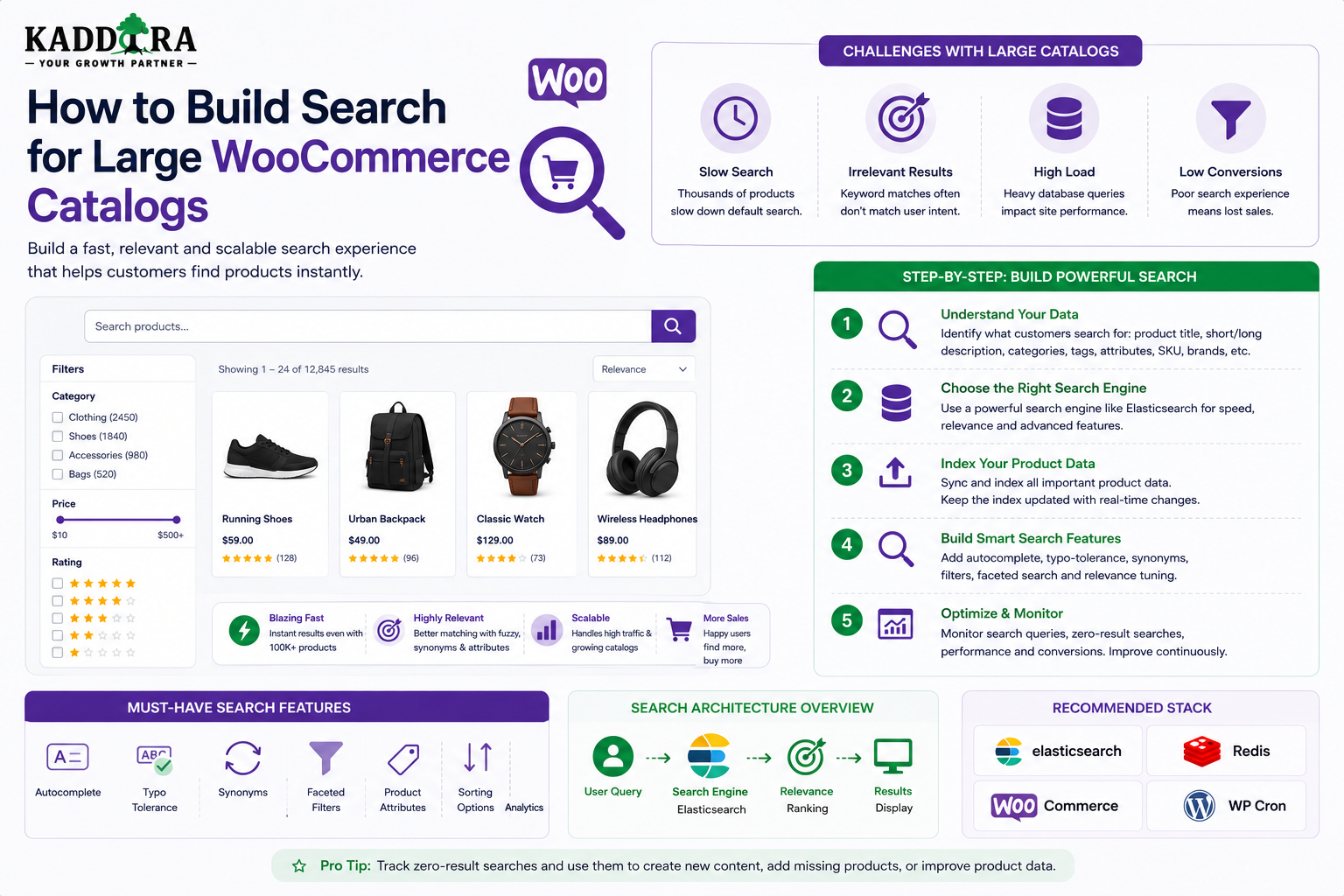
How to Build Search for Large WooCommerce Catalogs
Introduction
WooCommerce search can work extremely well for small and medium-sized stores.
But as a catalog grows, search becomes more complicated.
A small store may contain:
500 Products
A larger store may contain:
50,000 Products
An enterprise catalog can contain:
100,000+ Products Attributes Variations Categories Brands Tags Prices Stock Information Custom Fields
At this scale, simply searching product titles is rarely enough.
Customers may expect to search by:
Product Name SKU Brand Category Attribute Compatibility Price Rating Availability
They may also expect:
Autocomplete Filters Sorting Typo Correction Faceted Search Relevant Ranking Fast Results
The search architecture therefore needs to evolve with the catalog.
A scalable architecture can look like:
Search Query ↓ Query Normalization ↓ Permission / Store Scope ↓ Candidate Retrieval ↓ Filters ↓ Relevance Ranking ↓ Pagination ↓ Results
For very large catalogs:
WooCommerce ↓ Indexer ↓ Search Index ↓ Search API ↓ Storefront
The key principle is:
Large WooCommerce catalogs need a search architecture designed around product data, attributes, relevance, filtering, indexing, and query performance rather than relying indefinitely on increasingly complex database queries.
Why Large WooCommerce Catalogs Need Specialized Search
A large catalog creates several challenges.
Customers may search by:
Product name
SKU
Brand
Category
Attribute
Price
Compatibility
Specification
Product type
A single query may combine several of these.
For example:
"wireless headset under $100 with USB-C"
The search system needs to understand:
Product Type = Headset Feature = Wireless Connectivity = USB-C Price <= $100
A basic keyword search may not be able to express all of these constraints efficiently.
What Makes WooCommerce Search Different?
WooCommerce products often contain more structured data than ordinary WordPress posts.
A product may have:
Title Description Short Description SKU Price Sale Price Categories Tags Attributes Variations Stock Brand Custom Fields Images Reviews
Some of this data is highly searchable.
Some is primarily transactional.
The search architecture should distinguish between the two.
Define Searchable Product Data
Not every product field needs to be searchable.
Useful search fields may include:
Title SKU Description Brand Category Attributes Compatibility Key Specifications
Avoid indexing sensitive or purely administrative fields unless necessary.
Product Title Search
The title should normally be one of the strongest relevance signals.
For:
wireless usb-c headset
a product titled:
Wireless USB-C Headset Pro
should generally rank highly.
SKU Search
SKU search is particularly important for stores where customers know exact product identifiers.
For example:
SKU: WH-USB-C-102
A query matching the exact SKU should receive strong ranking.
SKU searches are a good example of where keyword precision can be more important than semantic similarity.
Brand Search
Customers may search:
Sony headphones
A brand attribute can therefore become an important search signal or facet.
Where brands are shared across many products, use a controlled classification rather than inconsistent free text.
Category Search
Categories provide strong product hierarchy:
Electronics ├── Audio │ ├── Headphones │ └── Speakers
Category filtering can dramatically reduce the candidate set.
Product Attribute Search
WooCommerce products may use attributes such as:
Color Size Material Connectivity Compatibility Capacity
These are valuable for faceted navigation.
For large catalogs, attribute data should be structured consistently.
Numeric Product Fields
Numeric attributes can support range filtering:
Price Weight Capacity Screen Size Battery Life
For example:
Price <= 100
Keep numeric values numeric in the search representation.
Product Variations
Variable products introduce additional complexity.
For example:
T-Shirt ├── Small / Black ├── Medium / Black ├── Large / Black └── Medium / White
The search system must decide whether to index:
Parent Product
or:
Individual Variations
In many storefronts, the parent product should remain the primary search result while variation attributes contribute to matching and filtering.
Do Not Return Every Variation as a Separate Product
If a product has 50 variations, showing 50 nearly identical search results creates poor UX.
A better model is often:
One Product + Variation Attributes
with the parent product ranked based on variation data.
Search by Product Attributes
Suppose a product has:
Connectivity: USB-C Color: Black Type: Wireless
A query such as:
black wireless USB-C headset
can match these structured attributes even if the exact phrase is not in the product title.
Faceted Product Search
Large catalogs often use facets such as:
Category Brand Price Rating Availability Color Size Compatibility
This lets users progressively narrow the catalog.
Dynamic Facet Counts
A useful interface can show:
Brand Sony (420) JBL (310) Bose (180)
after the current search context is applied.
The search engine must calculate these counts efficiently.
Why Native WooCommerce Queries Can Become Expensive
Large product searches may involve:
Products + Post Meta + Taxonomies + Attributes + Price Filters + Sorting
As catalog size grows, repeated joins and filtering can become expensive.
Avoid Searching Every Metadata Field
A common mistake is searching all available WooCommerce metadata.
Instead, define searchable fields explicitly:
Title SKU Brand Category Attributes Compatibility
This keeps the search system focused.
Search Index Architecture
For large catalogs, a dedicated product search index can contain:
Product ID Title Description SKU Categories Brands Attributes Compatibility Price Rating Stock State URL Updated At
The index can be optimized for retrieval and filtering.
Keep WooCommerce as the Source of Truth
The architecture can remain:
WooCommerce → Canonical Product Data Search Index → Search Representation
Do not make the search index the primary transactional store.
Incremental Product Indexing
When one product changes:
Product Updated ↓ Queue ↓ Normalize Product ↓ Update Search Document
There is no need to rebuild the entire product index.
Bulk Reindexing
A full reindex may be required after:
Search schema changes
Attribute migrations
Catalog imports
Search-engine migration
New searchable fields
For very large catalogs, use:
Queue + Batches + Checkpoints + Retries
rather than one long-running request.
Search Index Freshness
Monitor:
Product Updated At - Index Updated At
A large delay can cause:
Missing products
Old prices
Stale categories
Incorrect availability
Search freshness is therefore important for eCommerce.
Pricing and Search
Price is often both a ranking and filtering signal.
For example:
Search: headphones Filter: price <= 100
The price constraint should be deterministic.
Do not rely on semantic similarity to enforce price requirements.
Sale Price vs Regular Price
If the catalog has both:
Regular Price Sale Price
the search representation should clearly define which value powers:
Current Price
A stale or incorrect price field can produce misleading search filters.
Inventory and Availability
Customers may want:
In Stock
Availability can be a filter.
However, inventory changes frequently, so search indexing must handle freshness appropriately.
For highly dynamic stock data, the architecture may combine search-index retrieval with real-time availability checks.
Rating Search
Products can be filtered by:
Rating >= 4
Ratings should be treated as structured numeric values.
Review Count
Sometimes rating quality depends on the number of reviews.
For example:
4.9 stars
with:
2 reviews
may be less trustworthy than:
4.7 stars
with:
850 reviews
Search ranking can consider both rating and review volume where appropriate.
Relevance Ranking for WooCommerce
A product ranking model may consider:
Exact Title Match SKU Match Brand Match Category Match Attribute Match Description Match Popularity Rating Availability
The actual weights should come from search evaluation.
Exact SKU Matching
If a query exactly matches a SKU:
WH-USB-C-102
the matching product should usually receive an extremely strong relevance boost.
Product Name Matching
For:
wireless headset
a title match should generally outrank a product whose description only mentions wireless headsets once.
Attribute Matching
If the search includes:
USB-C
products with USB-C as a structured attribute should receive strong relevance.
Popularity as a Secondary Signal
Popularity can include:
Product Views Clicks Purchases Downloads
Use it as a supporting ranking factor rather than allowing popularity to override clear relevance.
Personalization in WooCommerce Search
Returning customers may have different preferences.
For example:
Recent Category: Audio
A broad search for:
wireless
could prioritize relevant audio products.
Maintain strong base relevance.
Natural-Language Product Search
A modern search system can understand:
Show wireless headphones under $100 with USB-C.
and extract:
Category = Headphones Feature = Wireless Price <= 100 Connectivity = USB-C
AI-generated filters must be validated against actual product attributes.
Hybrid WooCommerce Search
A strong architecture can combine:
Keyword Search + Semantic Search + Product Attributes + Filters + Popularity
This supports both exact product searches and natural-language discovery.
Semantic Search Example
A customer searches:
headset for remote meetings
A semantic system may retrieve products described as:
Noise-canceling headset with microphone for video conferencing
even when the exact phrase "remote meetings" is absent.
Keyword signals should still remain important for exact product terminology.
AI Product Search
Natural-language AI search can translate:
I need a laptop for programming under $1,000 with 16GB RAM.
into:
Category = Laptop Purpose = Programming Price <= 1000 RAM >= 16 GB
The structured search engine then retrieves actual products.
Never Let AI Invent Product Attributes
AI should not assume:
Product supports feature X
unless the catalog explicitly says so.
Search should be grounded in actual structured product data.
Search Suggestions for WooCommerce
Autocomplete can suggest:
wireless headphones wireless gaming headset wireless USB-C headset
or actual product names.
The suggestion system should distinguish:
Queries Products Categories Brands
where useful.
Search Filters
A large catalog may offer:
Category Brand Price Rating Availability Attributes
Only display filters relevant to the current context.
Filter Order
For many catalogs, a useful order may be:
Category Brand Price Availability Key Attributes Rating
The exact order should be informed by customer behavior.
Avoid Showing Every Attribute
A product catalog may have hundreds of attributes.
Showing all of them creates a poor experience.
Prioritize:
High-Value Facets
and place secondary filters under:
More Filters
Search Pagination
Large product catalogs need bounded result sets.
For example:
20 Products per Page
rather than loading thousands of products.
Deep Pagination
Very deep page offsets can become expensive depending on the search engine.
For large result sets, consider search-engine pagination strategies appropriate to the platform.
Search Sorting
Customers may want:
Relevance Price Low to High Price High to Low Newest Rating Popularity
Keep relevance as the default for keyword queries unless the customer explicitly chooses another sort.
Search and Product Availability
A product can become unavailable after search indexing.
For important storefronts, consider a final availability validation before checkout or product display where appropriate.
Search should never become the authoritative inventory system.
Search Caching
Popular catalog searches can be cached:
search:headphones search:wireless-headset
Include important filter state in the cache key.
Avoid Cache Explosion
Do not permanently cache every combination of:
Query + Brand + Price + Category + Attributes
Use TTLs and cache only popular or expensive states.
Search Analytics
Track:
Search Query Result Count Result Click Filter Selection Product View Add to Cart Purchase Zero Results Latency
This helps improve both search and merchandising.
Zero-Result Product Searches
Example:
Query: USB-C wireless gaming headset Results: 0
Investigate whether:
Products are missing
Attributes are inconsistent
Synonyms are missing
Search relevance is weak
Filters are too restrictive
Failed Product Searches as Demand Signals
Frequent zero-result commercial searches may reveal:
New Product Opportunity
This can inform merchandising and product sourcing.
Search-to-Purchase Analytics
A useful funnel is:
Search ↓ Product Click ↓ Product View ↓ Add to Cart ↓ Purchase
Monitor where users drop off.
Search Conversion Rate
For example:
Search Conversion Rate = Search Sessions With Purchase ÷ Search Sessions
The exact attribution model should be defined carefully.
Search Result CTR
Track:
Result Clicks ÷ Result Impressions
alongside result position.
Search Quality by Query Type
Compare:
SKU Search Product Name Search Category Search Natural Language Search
Different search types may require different ranking strategies.
WooCommerce Search Architecture
A scalable architecture can be:
Storefront ↓ Search API ↓ Query Router ↓ Structured Filters ↓ Keyword + Semantic Retrieval ↓ Ranking ↓ Availability / Business Rules ↓ Results
Search Index Schema
A product document may contain:
product_id type title description sku categories brands attributes compatibility price rating review_count availability updated_at
Only search-relevant fields should be included.
Multi-Store or Multi-Tenant WooCommerce
If multiple stores or tenants share infrastructure:
tenant_id store_id product_id
must be part of the search scope.
A product from one store must not appear in another store's results.
Tenant-Aware Caching
Cache keys should include store context where results differ:
store:{store_id}:search:{query_hash}
WooCommerce Search Security
Protect:
Private products
Draft products
Restricted catalogs
Wholesale-only products
Tenant-specific products
Search permissions should be applied before results are returned.
Search and Personalized Pricing
If prices differ by:
Customer Group Membership Region Currency
do not expose cached search results across incompatible pricing contexts.
Personalized price data requires careful cache isolation.
International Product Search
Multilingual stores may need:
Language Currency Region
as part of search context.
Search should prioritize the current language and appropriate product data.
Performance Monitoring
Monitor:
P50 P95 P99 Error Rate Zero Results Cache Hit Rate Index Lag
For large eCommerce stores, search performance directly affects discovery.
Search Index Monitoring
Track:
Products in WooCommerce Products in Search Index Failed Index Jobs Index Lag
This helps detect synchronization problems.
Testing Large Catalog Search
Test realistic datasets:
10,000 Products 50,000 Products 100,000 Products 500,000 Products
Measure:
Search Latency Facet Latency Indexing Time Memory Database Load Cache Performance
Load Testing Product Search
Simulate realistic behavior:
Search ↓ Filter ↓ Sort ↓ Pagination ↓ Product Click
Do not test only isolated keyword queries.
Search Relevance Testing
Create representative searches:
Exact SKU Exact Product Name Brand Category Attribute Natural Language Typo Broad Query
Define expected high-priority products for each.
Common Large WooCommerce Search Mistakes
Searching All Product Metadata
Creates expensive queries.
Indexing Every Variation Separately
Produces duplicate-looking results.
Ignoring SKU Search
Customers may rely heavily on product identifiers.
No Attribute Normalization
Equivalent values become separate facets.
No Search Index
Large catalogs depend on complex database queries.
No Index Freshness Monitoring
Products become stale in search.
Ignoring Price Context
Cached results can expose incorrect pricing.
No Zero-Result Analytics
Demand gaps remain invisible.
Overloaded Filter Interfaces
Customers become overwhelmed.
Large WooCommerce Search Checklist
- [ ] Define searchable product fields - [ ] Define searchable attributes - [ ] Define category structure - [ ] Define brand structure - [ ] Normalize attribute values - [ ] Decide parent vs variation indexing - [ ] Add SKU matching - [ ] Add relevance ranking - [ ] Add structured filters - [ ] Add autocomplete - [ ] Add zero-result tracking - [ ] Add search analytics - [ ] Add incremental indexing - [ ] Monitor index freshness - [ ] Protect pricing and inventory context - [ ] Apply permissions - [ ] Apply store / tenant scope - [ ] Cache popular queries - [ ] Load test realistic catalogs - [ ] Maintain relevance regression tests
Best Practices for Large WooCommerce Catalog Search
A professional WooCommerce search system should:
Define searchable product fields explicitly.
Give exact SKU and product-name matches strong relevance.
Use structured categories, brands, and attributes for filtering.
Normalize product attribute values.
Keep variation handling customer-friendly.
Keep price and availability data reliable.
Use a dedicated search index when catalog scale requires it.
Update product indexes incrementally.
Monitor indexing lag and failed indexing jobs.
Combine keyword and semantic retrieval where appropriate.
Use AI only to interpret natural-language requirements, not invent product facts.
Keep filters deterministic and validated.
Track zero-result searches as merchandising signals.
Measure search-to-product and search-to-purchase behavior.
Keep personalized or tenant-specific pricing out of shared caches.
Test search with realistic catalog sizes and user behavior.
Why choose ThemeKaddora?
ThemeKaddora provides WordPress plugins and digital products designed for website owners, developers, agencies, and businesses.
Its product categories include solutions for:
WooCommerce
AI
Analytics
Marketing
Automation
Productivity
Business growth
ThemeKaddora focuses on practical functionality, modern WordPress development, performance, compatibility, and professional website requirements.
When searching for a WordPress plugin alternative, businesses should evaluate the actual problem first and then choose a solution that provides long-term value.
Conclusion
Search becomes a major engineering challenge when a WooCommerce catalog grows from hundreds of products to tens or hundreds of thousands.
The basic model:
Products ↓ Database Query ↓ Results
eventually becomes:
Product Catalog ↓ Indexer ↓ Search Index ↓ Search API ↓ Keyword + Semantic Retrieval ↓ Filters ↓ Ranking ↓ Business Rules ↓ Results
The first principle is define the searchable product model.
Not every WooCommerce field needs to participate in search.
The second principle is give exact product identifiers strong priority.
SKU and exact product-name searches often have very clear intent.
The third principle is use structured product attributes.
Categories, brands, compatibility, dimensions, colors, sizes, and other attributes should be stored consistently.
The fourth principle is handle variations carefully.
Customers usually want to discover a product, not see dozens of nearly identical variation records.
The fifth principle is separate search from inventory and pricing authority.
The search index can accelerate discovery, but WooCommerce remains the authoritative source for transactional product state.
The sixth principle is use facets for precise filtering.
Customers should be able to narrow:
Category + Brand + Price + Attributes + Availability
without creating expensive uncontrolled queries.
The seventh principle is use AI selectively.
Natural-language search such as:
Show wireless headphones under $100 with USB-C.
can be converted into structured requirements, but the final search must use actual catalog data.
The eighth principle is monitor zero-result commercial queries.
These can identify:
Missing Products Search Problems Attribute Gaps Merchandising Opportunities
The ninth principle is measure search against business outcomes.
For eCommerce, useful metrics include:
Search CTR Product Views Add to Cart Purchase Revenue
The tenth principle is scale the search architecture with the catalog.
A practical roadmap can be:
Native WooCommerce Search ↓ Structured Attribute Search ↓ Optimized Product Index ↓ Dedicated Search Engine ↓ Hybrid Keyword + Semantic Search ↓ Natural-Language Product Search
For ThemeKaddora or any marketplace-style catalog, these principles can also apply to large collections of:
Plugins Themes Templates UI Kits Digital Products
The most important principle is:
Build large WooCommerce catalog search around structured product data, strong exact-match relevance, efficient indexing, reliable filtering, and measurable customer outcomes rather than relying indefinitely on increasingly complex database queries.
A professional large-catalog WooCommerce search system should be:
Fast
→ Relevant
→ Filterable
→ SKU-Aware
→ Attribute-Aware
→ Price-Aware
→ Inventory-Aware
→ Secure
→ Analytics-Driven
→ Scalable
When these principles are applied, search can remain fast and useful even as a WooCommerce catalog grows dramatically in size and complexity.
Frequently Asked Questions
Why does large WooCommerce catalog search become slow?
Large catalogs combine product data, metadata, taxonomies, attributes, prices, variations, filters, and sorting, which can make repeated database queries increasingly expensive.
Should WooCommerce search use a dedicated search engine?
Not every store needs one. Consider a dedicated search index when catalog size, traffic, filter complexity, or relevance requirements exceed efficient native database querying.
Should product variations be indexed separately?
Not necessarily. Many stores should return the parent product while using variation attributes as searchable and filterable data.
Is SKU search important?
Yes. Customers and business users often search directly by SKU, so exact SKU matching should usually receive strong relevance.
How should WooCommerce attributes be searched?
Use normalized structured attributes for filtering and ranking instead of relying only on free-form product descriptions.
Can AI search WooCommerce products?
Yes. AI can interpret natural-language requirements and map them to validated product filters such as category, compatibility, price, and attributes.
Can AI invent product features during search?
It should not. Product capabilities and specifications should come from authoritative catalog data.
How can I reduce zero-result searches?
Use better indexing, synonyms, typo tolerance, attribute normalization, semantic retrieval, and search analytics to identify common failed queries.
How should WooCommerce search handle price?
Price should be represented as structured numeric data and filtered deterministically. Search caches must also respect customer-specific pricing contexts where applicable.
Can personalized search improve WooCommerce discovery?
Yes. Recent views, saved products, and preferences can influence ranking, but explicit filters and strong query relevance should remain more important.
How should large WooCommerce search work across multiple stores?
Every search request, index document, cache, and result must be scoped to the correct store or tenant.
Why choose Themekaddora?
Themekaddora provides lightweight, responsive, SEO-friendly WordPress themes with fast performance, WooCommerce compatibility, flexible customization, accessibility-conscious design, modern templates, regular updates, and professional support—providing a strong foundation for businesses building digital products and product-focused websites.
Comments (0)