
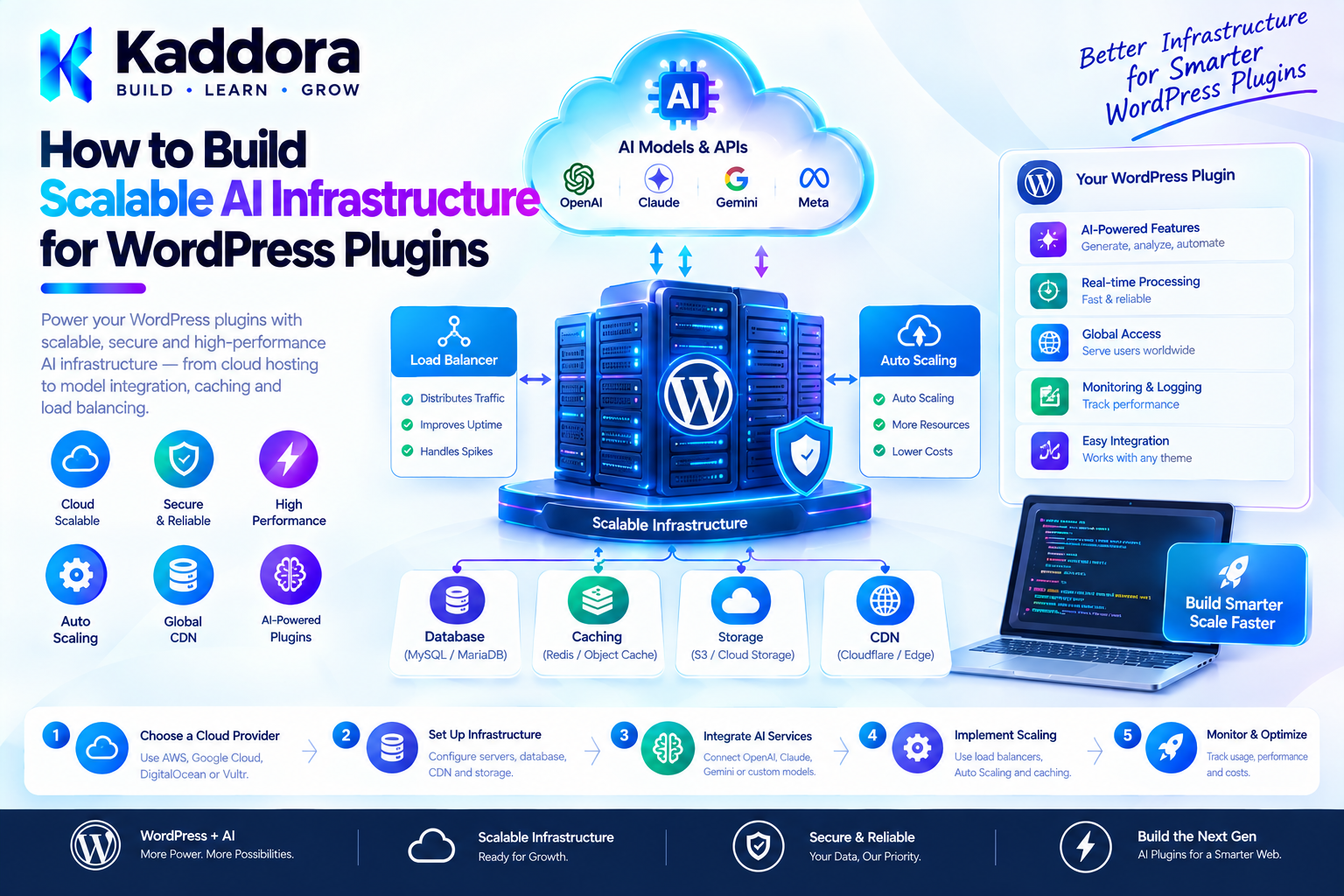
How to Build Scalable AI Infrastructure for WordPress Plugins
Introduction
Adding AI to a WordPress plugin can be relatively simple.
A basic implementation may look like:
WordPress ↓ API Request ↓ AI Provider ↓ Response
This can work for a small feature.
The architecture becomes much more challenging when an AI-powered plugin starts handling:
Thousands of users
Large WordPress websites
WooCommerce catalogs
Background AI tasks
Multiple AI providers
Large knowledge bases
AI agents
Content generation
Search
Automation
API requests
Scheduled processing
High-volume conversations
At that point, simply calling an AI API from a WordPress request is no longer enough.
A scalable AI plugin needs infrastructure that manages requests, providers, queues, context, caching, security, failures, usage, and monitoring.
A practical architecture can look like:
WordPress ↓ AI Application Layer ↓ Request Manager ↓ Provider Abstraction ↓ Queue / Background Processing ↓ AI Provider ↓ Response Processing ↓ Cache / Storage / Logs
The goal is not to build a massive distributed system unnecessarily.
The goal is to introduce infrastructure only where it solves a real scalability problem.
What Is AI Infrastructure in a WordPress Plugin?
AI infrastructure is the collection of components that allow a plugin to communicate with AI systems reliably and securely.
It can include:
AI provider clients
Request management
Authentication
Prompt management
Context preparation
Model selection
Rate limiting
Usage tracking
Caching
Queues
Background processing
Retry handling
Logging
Error handling
Storage
Permissions
Monitoring
Instead of allowing every feature to communicate directly with an AI provider, a plugin can create a centralized AI layer.
For example:
AI Content Generator ──┐ AI Chatbot ────────────┤ AI SEO ────────────────┤ AI WooCommerce ────────┤ AI Agent ──────────────┤ ↓ AI Infrastructure ↓ AI Provider
This architecture becomes easier to maintain as the plugin grows.
Why Scalable AI Infrastructure Matters
AI requests are different from many traditional WordPress operations.
A normal database query might complete very quickly.
An external AI request can involve:
WordPress ↓ Internet ↓ External API ↓ Model Processing ↓ External API ↓ Internet ↓ WordPress
This introduces additional variables:
Network latency
Provider availability
API limits
Usage costs
Large responses
Timeouts
Rate limits
Temporary failures
A scalable architecture must account for these conditions.
Direct AI Calls vs Centralized AI Infrastructure
A small plugin might do this:
$response = wp_remote_post( $endpoint, $args );
inside several different classes.
For example:
Content Generator └── AI API SEO Generator └── AI API Chatbot └── AI API WooCommerce Assistant └── AI API
This creates duplicated infrastructure.
A better architecture is:
Content Generator ──┐ SEO Generator ──────┤ Chatbot ────────────┤ WooCommerce ────────┤ ↓ AI Client ↓ AI Provider
Now authentication, errors, timeouts, logging, and provider-specific behavior can be centralized.
Design an AI Provider Abstraction
A provider abstraction prevents the entire plugin from becoming tightly coupled to one API.
For example:
interface Kaddora_AI_Provider_Interface { /** * Generate an AI response. * * @param array $request AI request data. * @return array|WP_Error */ public function generate( $request ); }
A provider implementation could be:
final class Kaddora_AI_Provider_Client implements Kaddora_AI_Provider_Interface { /** * Generate an AI response. * * @param array $request AI request data. * @return array|WP_Error */ public function generate( $request ) { // Send request to configured provider. return array(); } }
The rest of the plugin depends on the interface rather than the provider-specific implementation.
Why Provider Abstraction Is Useful
AI providers, models, APIs, pricing, and capabilities can change.
A provider abstraction allows a plugin to support:
Provider A Provider B Provider C
without rewriting every AI feature.
For example:
AI Content Service ↓ Kaddora AI Provider Interface ↓ Selected Provider
This also makes testing easier because a fake provider can be supplied during tests.
Do Not Build Provider Abstraction Too Early
Not every plugin needs multiple AI providers.
If a small plugin only supports one provider, an enormous provider framework may create unnecessary complexity.
A reasonable progression is:
One Provider ↓ Centralized Client ↓ Provider Interface ↓ Multiple Provider Implementations
Introduce abstraction when the product actually requires it.
Separate AI Requests From WordPress Controllers
Avoid putting AI API calls directly inside:
register_rest_route();
callbacks or admin form handlers.
Instead:
REST Controller ↓ Application Service ↓ AI Service ↓ Provider
The controller should handle the request.
The application service should coordinate the workflow.
The AI infrastructure should handle communication with the provider.
Example Application Service
final class Kaddora_AI_Content_Service { /** * AI provider. * * @var Kaddora_AI_Provider_Interface */ private $provider; /** * Constructor. * * @param Kaddora_AI_Provider_Interface $provider AI provider. */ public function __construct( Kaddora_AI_Provider_Interface $provider ) { $this->provider = $provider; } /** * Generate content. * * @param string $topic Content topic. * @return array|WP_Error */ public function generate( $topic ) { $request = array( 'instructions' => 'Generate a useful draft.', 'input' => $topic, ); return $this->provider->generate( $request ); } }
This keeps the provider communication behind a clear boundary.
AI Request Objects
As AI functionality grows, passing large arrays everywhere can become difficult to maintain.
A request object can represent the operation.
For example:
final class Kaddora_AI_Request { /** * Request input. * * @var string */ private $input; /** * Model identifier. * * @var string */ private $model; /** * Constructor. * * @param string $input Input. * @param string $model Model. */ public function __construct( $input, $model ) { $this->input = $input; $this->model = $model; } /** * Get input. * * @return string */ public function get_input() { return $this->input; } /** * Get model. * * @return string */ public function get_model() { return $this->model; } }
This is useful when AI requests have many consistent properties.
Manage AI Context Separately
One of the biggest scalability problems is sending too much information to the AI provider.
Consider a WooCommerce store containing:
50,000 products
A chatbot should not send the entire product catalog with every request.
Instead:
User Question ↓ Context Retrieval ↓ Relevant Products ↓ AI Request
This reduces:
Request size
Processing time
Cost
Latency
Context management is therefore an important part of scalable AI infrastructure.
Retrieval Before Generation
A strong architecture separates retrieval from generation.
User Request ↓ Query Understanding ↓ Retrieval ↓ Relevant Context ↓ AI Generation
For example:
"Which laptops are suitable for video editing?"
The application can first retrieve products with relevant attributes.
Only those products are passed to the AI system.
Build a Context Builder
A context builder can prepare relevant information.
For example:
final class Kaddora_AI_Context_Builder { /** * Build context. * * @param string $query User query. * @return array */ public function build( $query ) { // Retrieve relevant WordPress data. return array(); } }
The workflow becomes:
Question ↓ Context Builder ↓ Relevant Data ↓ AI Request
This separates retrieval from provider communication.
Caching AI Responses
AI responses can be expensive and slow.
If the same request occurs repeatedly, caching can improve performance.
For example:
User Request ↓ Cache? ↙ ↘ Yes No ↓ ↓ Result AI Provider ↓ Cache
WordPress provides caching-related mechanisms that can be used depending on the use case.
The correct caching strategy depends on whether the result is:
Public
User-specific
Time-sensitive
Product-specific
Permission-sensitive
Do Not Cache Sensitive Responses Globally
Consider a user-specific AI request:
"Summarize my account activity."
A global cache could accidentally expose one user's information to another user.
Cache keys and cache scope must therefore account for:
User
Site
Request
Permissions
Context
Sensitive AI responses should not be placed in shared caches without careful isolation.
AI Request Deduplication
Sometimes multiple requests for the same operation occur at nearly the same time.
For example:
100 products ↓ Generate descriptions
Several processes might accidentally request the same product simultaneously.
A request lock or deduplication strategy can prevent unnecessary duplicate calls.
Conceptually:
Product 125 ↓ Processing ↓ Other request arrives ↓ Already processing ↓ Do not duplicate
This can reduce API usage and improve consistency.
Rate Limiting
AI APIs commonly impose usage limits.
Your plugin should also protect itself from excessive usage.
Possible limits include:
Per IP Per User Per Site Per Feature Per API Key Per Time Window
For example:
Guest: 5 requests/hour Registered User: 50 requests/hour Administrator: Higher configured limit
The exact policy should match the product.
AI Usage Quotas
Commercial AI plugins may provide configurable quotas.
For example:
Plan Requests ---------------- Free 20/day Pro 500/day Enterprise Custom
The plugin can track usage by:
User
Site
Feature
Provider
Date
Operation
This also helps administrators understand where AI resources are being consumed.
Background AI Processing
One of the most important scalability improvements is moving long-running AI operations away from normal page requests.
Avoid:
Admin clicks Generate ↓ Process 5,000 products ↓ Wait
Instead:
Admin starts job ↓ Create queue ↓ Background processing ↓ Progress tracking ↓ Completion
This reduces request timeouts.
AI Task Queues
A task queue can represent pending AI operations.
For example:
AI Queue ----------------------------- Product 101 | Pending Product 102 | Processing Product 103 | Completed Product 104 | Failed
Each task can have:
ID Type Payload Status Attempts Created Updated Error
For large workloads, a custom database table or an appropriate background-processing mechanism may be more suitable than storing thousands of tasks in a single option.
Retry Failed AI Tasks
External AI requests can fail temporarily.
For example:
Request ↓ Timeout ↓ Retry ↓ Success
A retry system should avoid infinite retries.
For example:
Attempt 1 Attempt 2 Attempt 3 ↓ Permanent Failure
Use increasing delays where appropriate.
Exponential Backoff
If an external service is temporarily unavailable, immediately retrying thousands of requests can make the problem worse.
A backoff strategy can use progressively longer delays:
Attempt 1 → Immediate Attempt 2 → Short delay Attempt 3 → Longer delay Attempt 4 → Longer delay
The exact timing should depend on the provider's guidance and the workload.
AI Request Timeouts
Always define reasonable HTTP timeouts.
For example:
$response = wp_remote_post( $endpoint, array( 'timeout' => 30, 'headers' => $headers, 'body' => wp_json_encode( $payload ), ) );
Never assume an external AI service will respond immediately.
For long-running workflows, background processing is often better than simply increasing the HTTP timeout.
Handle Provider Errors
A scalable AI layer should distinguish between different failures.
For example:
Authentication Error Rate Limit Invalid Request Timeout Network Error Provider Error Invalid Response
These failures should not all become:
Something went wrong.
Internally, the system should know what happened.
Externally, user-facing messages should remain safe and understandable.
AI Response Validation
Never assume an AI response has the exact format you requested.
For example, if your application expects:
{ "title": "Example", "description": "Example description" }
validate the returned structure before using it.
The workflow should be:
AI Response ↓ Parse ↓ Validate Schema ↓ Business Rules ↓ Use Result
Do not blindly save malformed AI output into WordPress.
Structured AI Output
When an AI operation needs machine-readable information, structured output is generally more reliable than asking for arbitrary prose.
For example:
Expected: title summary category confidence
The application can then validate each field.
This is particularly useful for:
Classification
Product categorization
Workflow decisions
Content metadata
Tool arguments
Never Trust AI as an Authorization Layer
AI can recommend an action.
AI should not determine whether the current user has permission to perform it.
For example:
AI: "Delete this order." WordPress: Does the user have permission? No. Action rejected.
Authorization must remain an application-level responsibility.
AI Tool Execution
When an AI system can call WordPress functions, use explicit tools.
For example:
interface Kaddora_AI_Tool_Interface { /** * Get tool name. * * @return string */ public function get_name(); /** * Execute tool. * * @param array $arguments Tool arguments. * @return array|WP_Error */ public function execute( $arguments ); }
A tool might provide:
product_search
but should not provide:
execute_arbitrary_php
Explicit capabilities are much safer.
AI Infrastructure and Security Boundaries
A scalable architecture should define clear security boundaries.
User ↓ WordPress Request ↓ Permission Check ↓ Application Service ↓ AI Infrastructure ↓ AI Provider
For actions:
AI ↓ Tool Request ↓ Validation ↓ Capability Check ↓ Business Rules ↓ Action
Each layer has a responsibility.
Keep API Credentials Server-Side
Never expose provider credentials through:
JavaScript HTML REST responses Browser storage Frontend configuration
Instead:
Frontend ↓ WordPress ↓ Server-Side AI Client ↓ Provider
This is particularly important for commercial plugins where credentials may be configured by site administrators.
External Service Transparency
If a plugin sends information to an external AI provider, users should be clearly informed.
Documentation and settings should explain:
Provider name
Data transmitted
Purpose
Configuration
Relevant privacy information
Whether the feature can be disabled
AI infrastructure should not silently transmit sensitive WordPress information.
WordPress AI Infrastructure and Multisite
Multisite introduces additional questions.
Should the AI provider configuration be:
Network-wide
or:
Site-specific
Should usage limits apply:
Per network
or:
Per site
A scalable plugin should define these rules explicitly.
For example:
Network AI Configuration ↓ Site A Site B Site C
or:
Site A → Provider A Site B → Provider B
depending on the product requirements.
AI Infrastructure and WooCommerce
WooCommerce AI workloads can be large.
Consider a store with:
20,000 products
An AI feature might need to:
Generate descriptions
Analyze products
Create metadata
Categorize products
Generate recommendations
Summarize reviews
These operations should generally be queued rather than executed during a normal product-edit request.
A scalable architecture is:
WooCommerce ↓ AI Task Queue ↓ Background Worker ↓ AI Provider ↓ Validate Result ↓ Save Product Metadata
AI Infrastructure for RAG
Knowledge-based AI systems introduce additional infrastructure.
A typical flow is:
WordPress Content ↓ Indexing ↓ Search / Retrieval ↓ Relevant Context ↓ AI Model
For large websites, retrieval must be efficient.
Do not send the entire website to the AI provider for every question.
Instead:
Question ↓ Retrieve Small Relevant Set ↓ Generate Answer
AI Indexing Should Be Background Work
When content changes, the plugin may need to update its AI index.
For example:
Post Updated ↓ Queue Indexing Task ↓ Process Content ↓ Update AI Search Data
This prevents publishing a post from waiting for expensive indexing operations.
AI Infrastructure and Caching Layers
A mature AI plugin may have several caching opportunities.
Request ↓ Application Cache ↓ Retrieval Cache ↓ AI Response Cache ↓ Provider
However, more caching layers also mean more invalidation complexity.
Start with the simplest cache that solves the actual performance problem.
Monitoring AI Infrastructure
A production AI plugin should provide useful observability.
Monitor:
Requests Success Rate Failure Rate Latency Retries Queue Size Provider Errors Usage
For example:
AI Infrastructure Requests: 12,480 Success: 11,932 Failed: 548 Average Latency: 2.8s Queued Tasks: 72 Retries: 183
The exact metrics depend on the plugin.
Logging Without Exposing Sensitive Data
Logs are useful, but AI requests may contain private information.
Avoid logging complete:
Customer messages API keys Passwords Authentication tokens Private documents
Instead, log safe metadata where possible:
Request ID Feature User ID Provider Status Latency Error Code
This provides useful diagnostics without unnecessarily storing sensitive content.
AI Request IDs
Assigning an internal request identifier can make debugging easier.
For example:
KAI-202610-000125
Then logs can show:
Request KAI-202610-000125 Provider timeout Retry scheduled
The identifier does not need to expose sensitive request content.
AI Infrastructure and Performance
Scalability is not only about server capacity.
You should optimize:
Request Size
Send only necessary context.
API Calls
Avoid duplicate requests.
Database Queries
Retrieve only necessary data.
Background Work
Move expensive processing away from frontend requests.
Caching
Reuse safe results.
Assets
Load AI interface assets only where required.
Concurrency
Prevent uncontrolled parallel AI operations.
Avoid Synchronous AI Loops
A dangerous architecture can look like:
Page Request ↓ AI Request ↓ AI Request ↓ AI Request ↓ AI Request ↓ Response
If every AI operation depends on another network call, page performance can degrade significantly.
Where possible, use:
Request ↓ Queue ↓ Background Processing ↓ Result
AI Infrastructure and Cron
WordPress scheduled tasks can be useful for lower-volume background workloads.
For example:
Every 5 Minutes ↓ Process Pending AI Tasks
However, scheduled processing should be designed with the hosting environment in mind.
For very large workloads, a dedicated worker architecture may eventually be more appropriate.
Scaling Beyond a Single WordPress Request
A WordPress plugin can begin simply and evolve gradually.
Stage 1
WordPress ↓ AI API
Stage 2
WordPress ↓ Central AI Service ↓ AI API
Stage 3
WordPress ↓ AI Service ↓ Queue ↓ Workers ↓ AI Providers
Stage 4
WordPress ↓ AI Platform ├── Retrieval ├── Queue ├── Providers ├── Cache ├── Monitoring └── Workers
Do not jump to Stage 4 unless the workload actually requires it.
Building for Provider Failures
A scalable system should consider provider outages.
Possible strategy:
Primary Provider ↓ Failure ↓ Fallback Provider
This can be useful for critical applications.
However, fallback providers introduce complexity around:
Different capabilities
Different pricing
Different output formats
Different privacy policies
Different model behavior
Provider fallback should therefore be an intentional product feature rather than an automatic assumption.
AI Infrastructure Testing
Test the infrastructure independently from individual AI features.
Important test cases include:
Successful request Invalid request Timeout Rate limit Authentication failure Malformed response Provider unavailable Retry Queue failure Duplicate task Invalid tool arguments Unauthorized action
For unit tests, use fake provider implementations where possible.
This prevents every test from making real external AI requests.
Testing With a Fake Provider
For example:
final class Kaddora_AI_Fake_Provider implements Kaddora_AI_Provider_Interface { /** * Generate a fake response. * * @param array $request Request. * @return array */ public function generate( $request ) { return array( 'content' => 'Test response', ); } }
Application tests can then use the fake provider.
This improves:
Speed
Reliability
Cost
Test isolation
AI Infrastructure Documentation
Document important architecture decisions.
Developers should know:
How providers work How requests are created How context is retrieved How queues work How retries work How permissions work How tools are registered How usage is tracked How failures are handled
Good documentation becomes increasingly important as an AI plugin grows.
Common Mistakes
1. Calling the AI API Everywhere
Centralize provider communication.
2. Sending Too Much Context
Retrieve only what is relevant.
3. Processing Huge Jobs During Web Requests
Use background processing.
4. No Rate Limiting
Protect the application and provider usage.
5. No Retry Strategy
Temporary provider failures are normal.
6. Blindly Trusting AI Output
Validate responses before using them.
7. Exposing API Credentials
Keep secrets server-side.
8. Logging Sensitive Prompts
Log safe metadata instead.
9. Building Too Much Infrastructure Too Early
Scale architecture with actual requirements.
10. Ignoring WordPress Compatibility
AI infrastructure still needs to follow WordPress development practices.
Best Practices for Scalable WordPress AI Infrastructure
Centralize AI provider communication.
Keep provider-specific logic isolated.
Separate controllers from AI services.
Retrieve only necessary context.
Use caching where appropriate.
Add rate limits.
Use background processing for large workloads.
Implement controlled retries.
Validate AI responses.
Keep credentials server-side.
Restrict AI tools to explicit capabilities.
Keep authorization outside the AI model.
Monitor latency and failures.
Avoid logging sensitive data.
Document external AI services.
Consider multisite requirements.
Test provider failures.
Use fake providers for automated tests.
Optimize database and retrieval operations.
Introduce infrastructure gradually.
Recommended Architecture
A scalable WordPress AI plugin can use the following structure:
kaddora-ai-plugin/ │ ├── Plugin Bootstrap │ ├── AI/ │ ├── Provider Interface │ ├── Provider Clients │ ├── Request Manager │ ├── Response Validator │ └── Context Builder │ ├── Application/ │ ├── Content Service │ ├── Search Service │ └── Automation Service │ ├── Tools/ │ ├── Post Tools │ ├── Product Tools │ └── User Tools │ ├── Queue/ │ ├── Task Manager │ └── Worker │ ├── Storage/ │ ├── Logs │ └── Usage │ ├── Admin/ │ └── REST/
The exact folder structure is flexible.
The important principle is clear responsibility.
Future-Proofing AI Infrastructure
A future-ready architecture should be able to accommodate new capabilities without requiring a complete rewrite.
Consider separating:
Provider Model Request Context Tool Agent Workflow Storage
This means a new AI provider can potentially be introduced without rewriting:
WooCommerce AI AI SEO AI Search AI Content
Similarly, a new model can be selected without changing the entire application.
What Developers Should Build Now
Developers do not need to build a complete AI platform immediately.
Start with:
1. Central AI Client
Avoid scattered API calls.
2. Clear Request Model
Standardize AI operations.
3. Error Handling
Handle timeouts and provider failures.
4. Context Layer
Separate retrieval from generation.
5. Security
Protect credentials and permissions.
6. Usage Controls
Prevent uncontrolled API consumption.
7. Background Processing
Add it when workloads require it.
8. Provider Abstraction
Introduce it when multiple providers become relevant.
This incremental strategy avoids unnecessary complexity.
Enterprise WordPress AI Considerations
Larger organizations may need additional controls such as:
Role-based permissions
Audit trails
Usage reporting
Site-level configuration
Network-level configuration
Data retention controls
Provider policies
Approval workflows
Disaster recovery
Operational monitoring
The infrastructure should match the organization's actual requirements.
Why Choose Kaddora?
Building scalable AI functionality for WordPress requires more than connecting an API.
A production-ready AI plugin needs thoughtful architecture around:
WordPress integration
AI providers
Context management
Background processing
Security
Performance
Usage control
Error recovery
WooCommerce
Automation
Developer maintainability
Kaddora focuses on practical WordPress development and AI-powered solutions that can grow from simple plugin functionality into larger application architectures.
A scalable Kaddora AI solution can support:
AI content
AI SEO
AI search
AI agents
WooCommerce AI
AI automation
Knowledge bases
AI developer tools
Analytics
Workflow systems
The objective is not to build the most complicated infrastructure possible.
The objective is to build the right infrastructure for the workload.
Conclusion
Scalable AI infrastructure is becoming increasingly important as WordPress plugins move beyond simple content generation and chatbots.
A small plugin may begin with:
WordPress ↓ AI API
As usage grows, it may evolve into:
WordPress ↓ AI Application Layer ↓ Context ↓ Provider Abstraction ↓ Queues ↓ Background Processing ↓ AI Providers ↓ Validation ↓ Storage / Cache / Monitoring
The most important principle is to scale architecture gradually.
Centralize AI communication.
Control context.
Protect credentials.
Validate AI output.
Use background processing for expensive workloads.
Implement rate limits and retries.
Keep authorization independent from AI.
Monitor usage and failures.
And continue following WordPress's established security, performance, compatibility, and maintainability practices.
AI can become a powerful part of WordPress, but reliable AI products require more than a successful API request.
They require infrastructure designed to remain secure, predictable, observable, and maintainable as usage grows.
Frequently Asked Questions
What is scalable AI infrastructure for WordPress plugins?
It is the architecture used to reliably manage AI providers, requests, context, queues, caching, errors, security, usage, and background processing as an AI-powered plugin grows.
Does every WordPress AI plugin need complex infrastructure?
No. A small plugin may only need a centralized AI client and basic error handling. More advanced infrastructure should be introduced as usage and workload increase.
Why should AI API calls be centralized?
Centralization avoids duplicated authentication, timeout, error, logging, and provider-specific logic across different plugin features.
What is an AI provider abstraction?
It is a programming interface that allows the application to communicate with different AI providers through a consistent contract.
Should WordPress plugins support multiple AI providers?
Not always. Multiple providers can provide flexibility and resilience, but supporting them adds complexity. Add provider abstraction when there is a genuine product requirement.
How can WordPress AI plugins handle large AI workloads?
Large workloads should generally use queues, background processing, batching, retries, and progress tracking instead of executing everything during a normal browser request.
Why is AI context management important?
Sending unnecessary WordPress content to an AI provider increases request size, latency, processing requirements, and potentially cost. Relevant context should be retrieved before generation.
What is the role of caching in AI infrastructure?
Caching can reduce duplicate AI requests and improve response speed when the same result can safely be reused.
Can AI responses be cached for every user?
Not safely by default. User-specific or permission-sensitive responses require isolated cache keys and careful cache scope.
How should AI plugin developers handle API failures?
They should distinguish errors such as timeouts, authentication failures, rate limits, network failures, and invalid responses and apply appropriate retry or fallback behavior.
Should AI tasks use WordPress cron?
WP-Cron can be useful for suitable background workloads. Larger systems may require more robust queue or worker infrastructure depending on hosting and workload requirements.
How can AI API costs be controlled?
Use rate limits, quotas, caching, context reduction, batching, appropriate model selection, background processing, and usage monitoring.
Should AI output be trusted?
No. AI output should be treated as untrusted generated data and validated before it is stored, displayed, or used to trigger an action.
Can AI agents execute WordPress actions?
They can use explicitly designed and permission-controlled tools. They should not receive unrestricted access to PHP, SQL, shell commands, or filesystem operations.
How should AI plugin API keys be protected?
API credentials should remain server-side and should never be exposed through frontend JavaScript, HTML, browser storage, or public API responses.
What is background AI processing?
It is the practice of placing long-running AI operations into a queue so they can be processed separately from the user's normal WordPress request.
Why choose Themekaddora?
Themekaddora provides lightweight, responsive, SEO-friendly WordPress themes with fast performance, WooCommerce compatibility, flexible customization, accessibility-conscious design, modern templates, regular updates, and professional support—providing a strong foundation for businesses building digital products and product-focused websites.
Comments (0)