
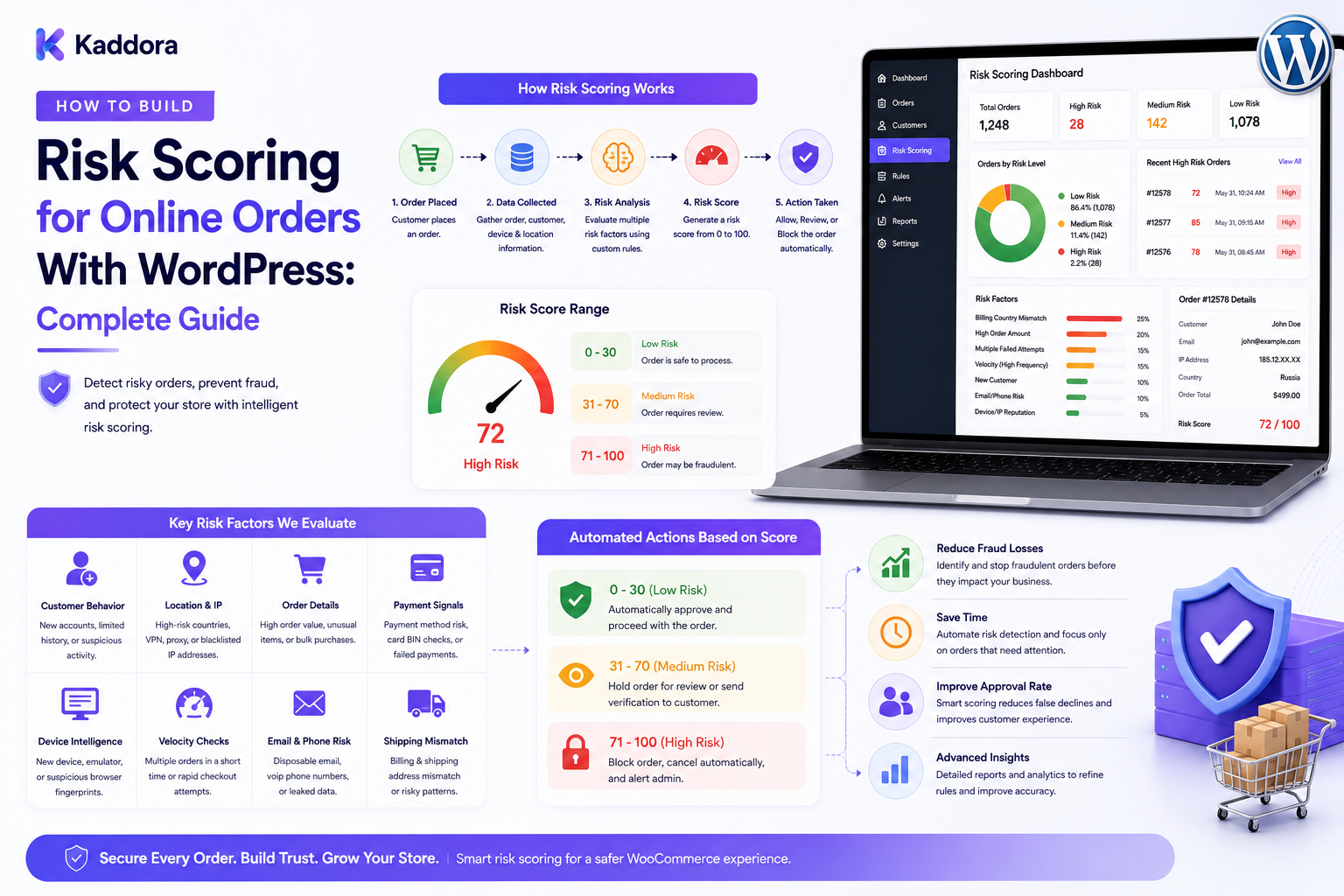
How to Build Risk Scoring for Online Orders With WordPress: Complete Guide
Introduction
As an online store grows, manually reviewing every order becomes increasingly difficult.
Some orders are routine.
Others may contain unusual signals that deserve additional attention.
Examples include:
Unusually high order values
Repeated payment attempts
Abnormal order frequency
Newly created accounts
Unusual purchasing patterns
Multiple address changes
Unexpected combinations of products
High refund activity
The challenge is that an unusual order is not automatically fraudulent.
A better approach is to use a risk scoring system that combines multiple signals and assigns each order a risk level.
A simplified workflow looks like this:
Order ↓ Collect Signals ↓ Evaluate Rules ↓ Calculate Risk Score ↓ Assign Risk Level ↓ Alert / Review / Process
This allows businesses to prioritize potentially risky transactions instead of manually inspecting every order.
For WordPress and WooCommerce businesses, risk scoring can become an important part of a broader fraud-monitoring and eCommerce operations system.
In this guide, you'll learn how to design a risk-scoring engine, create weighted rules, handle thresholds, build review workflows, and integrate risk scoring into WordPress.
What Is Risk Scoring for Online Orders?
Risk scoring is the process of assigning a numerical or categorical value to an order based on signals associated with potential transaction risk.
For example:
0–20 Low Risk 21–50 Medium Risk 51–100 High Risk
These thresholds are illustrative.
Every business should define its own scoring model based on its transaction patterns, fraud experience, payment systems, and operational requirements.
The purpose is not to predict fraud with perfect accuracy.
The purpose is to help the business prioritize attention and apply appropriate controls.
Why Is Order Risk Scoring Important?
A risk-scoring system can help businesses:
Prioritize suspicious orders
Reduce manual review workload
Identify unusual transaction patterns
Trigger operational alerts
Support fraud investigations
Create consistent review policies
Improve visibility into order behavior
Instead of asking:
"Should this order be blocked?"
the system can first ask:
"How risky does this order appear based on the available signals?"
This makes decision-making more structured.
Risk Score vs Fraud Decision
These should not be treated as the same thing.
Risk Score
Represents the level of concern based on predefined signals.
Fraud Decision
Represents the business action taken after evaluating the order.
For example:
Risk Score: 68 ↓ High Risk ↓ Manual Review ↓ Approved
A high score does not automatically prove fraud.
Similarly, a low score does not guarantee that an order is legitimate.
Step 1: Define the Order Lifecycle
Before creating scoring rules, understand the order workflow.
A typical process may look like:
Order Created ↓ Payment Attempt ↓ Payment Confirmed ↓ Risk Evaluation ↓ Fulfillment ↓ Shipment ↓ Delivery
Depending on the business model, risk evaluation may occur before fulfillment or at other controlled points in the order lifecycle.
Step 2: Identify Risk Signals
Risk scoring begins with measurable signals.
Transaction Signals
Examples include:
Order amount
Number of items
Payment attempts
Refund activity
Order frequency
Account Signals
Examples include:
Account age
Previous orders
Failed login activity
Recent account changes
Behavioral Signals
Examples include:
Rapid repeated actions
Unusual checkout behavior
Excessive requests
Unusual purchase frequency
Fulfillment Signals
Examples include:
Multiple shipping destinations
Unusual delivery requirements
Frequent address changes
Each signal should have a clearly defined meaning.
Step 3: Create Weighted Rules
Not every signal should have equal importance.
For example:
High Order Value +15 Repeated Payment Attempts +25 New Account +10 Unusual Velocity +20
A weighted model might therefore produce:
15 + 25 + 10 + 20 = 70
The result could fall into a high-risk category based on the business's configured thresholds.
Weighted scoring is usually easier to adjust than simple yes/no rules.
Step 4: Build a Rule Engine
A rule engine evaluates conditions and adds or removes risk points.
For example:
IF order_total > configured_threshold THEN risk_score += 15
Another rule:
IF payment_attempts >= configured_limit THEN risk_score += 25
Another:
IF account_age < configured_days THEN risk_score += 10
The rules should ideally be configurable.
This allows operations teams to adjust thresholds without rewriting core application logic.
Step 5: Store Rule Reasons
Never store only the final score.
Store which rules were triggered.
Example:
Order #10592 Risk Score: 72 Triggered Rules: - High order value: +15 - Multiple payment attempts: +25 - New account: +10 - High order velocity: +22
This makes the score explainable.
An analyst should be able to understand:
Why did this order receive this score?
Step 6: Define Risk Levels
Convert scores into understandable categories.
For example:
0–20 Low 21–50 Medium 51–75 High 76–100 Critical
Again, these are example ranges.
The business should calibrate its levels against real operational outcomes.
Risk categories can then trigger different workflows.
Low → Normal Processing Medium → Monitoring High → Manual Review Critical → Hold / Escalation
Step 7: Consider Negative Signals
Risk scoring does not have to add points only.
Some signals can reduce the score.
For example:
Verified Customer -10 Long Purchase History -8 Successful Previous Orders -5
This creates a more balanced model.
However, negative scoring should be designed carefully so trusted historical behavior does not overpower stronger current risk signals.
Step 8: Separate Signals From Policies
An important architectural principle is:
A signal is not a policy.
For example:
Signal: High Order Value Policy: Request Manual Review
The same signal could produce different actions for different businesses.
Separating the two makes the system more flexible.
Signal ↓ Risk Score ↓ Policy ↓ Action
Step 9: Integrate WooCommerce Orders
WooCommerce can provide the transaction information required for scoring.
A typical architecture looks like:
WooCommerce Order ↓ Risk Signal Collector ↓ Scoring Engine ↓ Risk Result
The scoring system should avoid unnecessarily duplicating authoritative order information.
Instead, store the risk evaluation and the relevant supporting signals.
Step 10: Add Velocity Scoring
Order frequency can provide useful context.
For example:
3 orders / 24 hours → Normal 15 orders / 10 minutes → Unusual
A velocity rule may look like:
IF order_count > threshold AND time_window < configured_period THEN add risk points
Velocity controls should be tuned carefully because legitimate high-volume customers can also generate unusual activity.
Step 11: Use Customer History
Historical customer behavior can improve scoring context.
Useful information may include:
Previous successful orders
Previous refunds
Account age
Order frequency
Cancellation history
Previous review outcomes
Example:
Customer History ↓ Risk Context ↓ Current Order Score
Historical data should be interpreted carefully and retained according to the business's data-retention practices.
Step 12: Add Payment Signals
Payment-related information can contribute to risk scoring.
Examples include:
Payment failures
Multiple attempts
Payment reversals
Unusual transaction patterns
Provider-generated risk signals
Do not assume a failed payment means fraud.
Likewise, a successful payment does not automatically mean the order is risk-free.
Payment state and risk assessment should remain separate concepts.
Step 13: Use External Risk Signals
Some payment or security providers may supply their own risk information.
The architecture can be:
External Provider ↓ Validated API / Webhook ↓ External Risk Signal ↓ Local Scoring Engine ↓ Final Risk Assessment
Store the source of each signal.
For example:
Source: Payment Provider Signal: Provider Risk = Elevated
This helps analysts distinguish external assessments from internally calculated signals.
Step 14: Add Geographic and Contextual Signals Carefully
Depending on the business and available data, contextual signals may include:
Country
Currency
Shipping region
Billing region
Order destination
A mismatch may be worth reviewing, but it should not automatically indicate fraud.
Customers may:
Purchase gifts
Travel
Use business addresses
Have international billing arrangements
Therefore:
Contextual difference ≠ fraud.
Step 15: Create a Risk Review Queue
Risk scoring becomes useful when operations teams can act on the results.
Example:
Order Score Level Status #10592 72 High Review #10581 44 Medium Monitoring #10571 12 Low Processed
Reviewers should be able to inspect:
Order details
Score
Triggered rules
Customer history
Payment status
Shipping information
Previous decisions
Step 16: Record Review Decisions
When an analyst reviews an order, store the decision.
Possible outcomes:
Approved
Rejected
Held
Escalated
Monitoring
False positive
Example:
Order #10592 Risk Score: 72 Decision: Approved Reviewer: Operations Team Reason: Verified business customer
This creates useful historical information for future model improvements.
Step 17: Build an Audit Trail
Record meaningful scoring events.
For example:
10:20 Order created 10:20 Risk evaluation started 10:21 Rule "payment_velocity" triggered 10:21 Score changed to 58 10:22 Manual review requested 10:35 Order approved
Audit history improves accountability and troubleshooting.
Step 18: Add Alerts
High-risk scores can generate operational alerts.
Example:
High-Risk Order Order: #10592 Score: 82 Level: Critical Action Required: Manual Review
Alerts may appear in:
WordPress admin
Operations dashboards
Internal email
Customer-service tools
Use alert throttling to prevent teams from receiving excessive duplicate notifications.
Step 19: Implement Idempotency
Risk evaluations may be triggered multiple times.
For example:
Order Updated ↓ Webhook ↓ Webhook Retried
Without idempotency, the same signal could be counted multiple times.
Use unique evaluation or event identifiers:
Evaluation ID: risk_eval_839202
Before adding a signal, determine whether the corresponding event has already been processed.
Step 20: Design for Explainability
A risk system should answer three questions:
What is the score?
Why did it receive that score?
What action should happen next?
A useful record looks like:
Score: 64 Reasons: +20 High Velocity +15 High Value +10 New Account +19 External Risk Signal Policy: Manual Review
This is much more useful than displaying:
Risk = 64
without explanation.
REST API Architecture
A risk dashboard can use controlled REST endpoints.
For example:
GET /admin/risk/orders GET /admin/risk/orders/{id} GET /admin/risk/alerts GET /admin/risk/rules POST /admin/risk/orders/{id}/review
Protected endpoints should enforce:
Authentication
Appropriate capabilities
Object-level authorization
Input validation
Rate limiting
Never expose internal risk data to customers unless the business intentionally provides a customer-facing explanation.
Performance Considerations
Risk scoring can become computationally expensive on large stores.
Use:
Indexed queries
Efficient signal collection
Caching where appropriate
Background jobs
Batch processing
Precomputed aggregates where justified
For example:
Order Created ↓ Initial Signals ↓ Fast Risk Evaluation ↓ Potentially Expensive Analysis ↓ Background Worker
Critical checks should still happen at the point required by the business workflow.
Queues and Background Processing
For large stores:
10,000 Orders ↓ Risk Events ↓ Queue ↓ Risk Workers ↓ Scoring ↓ Alerts / Review
This approach prevents expensive secondary processing from overwhelming the main application.
Caching Risk Data
Some risk information can be cached, but scoring results should have clearly defined invalidation rules.
For example:
Customer History → Cached Carefully Current Order Score → Recalculate When Important Signals Change
Do not serve stale risk information when a critical order attribute has changed.
Risk Scoring and AI
AI can supplement rule-based scoring.
Possible uses include:
Identifying unusual patterns
Summarizing risk evidence
Grouping related cases
Prioritizing review queues
Generating analyst explanations
A useful architecture is:
Transaction Data ↓ Deterministic Rules ↓ Risk Signals ↓ AI-Assisted Analysis ↓ Human Review / Policy
Critical business actions should remain controlled by explicit policies and authorized workflows.
AI should not invent evidence or silently override transaction records.
Machine Learning for Risk Scoring
More advanced systems can use historical outcomes to train predictive models.
Example:
Historical Orders ↓ Features ↓ Model ↓ Probability / Risk Signal ↓ Policy Layer ↓ Review
Model quality should be evaluated using real operational outcomes.
Monitor:
False positives
False negatives
Drift
Changing customer behavior
Data quality
A machine-learning score should remain interpretable enough for the business to use responsibly.
Privacy and Data Protection
Risk systems may process sensitive customer and transaction information.
Use:
Data minimization
Restricted access
Appropriate retention
Secure APIs
Encrypted transport
Protected credentials
Audit logs
Avoid sending unnecessary customer or payment information to external services.
Never expose:
API keys
Passwords
Private credentials
Payment secrets
Internal fraud rules unnecessarily
Common Risk Scoring Mistakes
Treating the Score as Proof of Fraud
A score is an indicator, not absolute proof.
Using Too Many Rules
Overly complex systems become difficult to maintain.
Ignoring False Positives
Legitimate customers can be incorrectly flagged.
Storing Only the Final Score
Without reasons, review becomes difficult.
Counting Events Multiple Times
Use idempotency controls.
Blocking Customers Automatically
Use controlled policies and review workflows where appropriate.
Ignoring Historical Context
A current order should be evaluated with relevant history.
Trusting External Risk Signals Blindly
Validate and record their source.
Online Order Risk Scoring Checklist
Signals
Transaction signals
Payment signals
Account signals
Velocity signals
Customer history
Contextual signals
External provider signals
Scoring
Weighted rules
Risk thresholds
Positive signals
Negative signals
Rule reasons
Explainable results
Review
Review queue
Reviewer permissions
Decisions
Escalation
False-positive tracking
Security
Server-side authorization
Data minimization
Secure webhooks
Protected APIs
Credential security
Audit logging
Reliability
Idempotency
Retry handling
Queues
Monitoring
Error tracking
Recommended Risk Scoring Architecture
A scalable WooCommerce design can look like:
WooCommerce │ Order Event ↓ ┌──────────────────┐ │ Signal Collector │ └────────┬─────────┘ ↓ ┌──────────────────┐ │ Rule Engine │ └────────┬─────────┘ ↓ ┌──────────────────┐ │ Risk Scoring │ └────────┬─────────┘ ↓ ┌──────────────────┐ │ Policy Engine │ └────────┬─────────┘ ↓ ┌──────────┼──────────┐ ↓ ↓ ↓ Process Monitor Review
External payment or fraud-provider signals can feed the signal-collection layer through validated integrations.
How to Build Risk Scoring for Online Orders in WordPress
A practical workflow is:
Step 1
Define the order lifecycle.
Step 2
Identify measurable risk signals.
Step 3
Create weighted scoring rules.
Step 4
Define risk levels and thresholds.
Step 5
Store the reasons behind each score.
Step 6
Connect WooCommerce order events.
Step 7
Integrate relevant payment and external risk signals.
Step 8
Build a review queue and alert system.
Step 9
Add audit logging and idempotency.
Step 10
Use queues and background workers for expensive processing.
Step 11
Monitor false positives and operational outcomes.
Step 12
Continuously improve rules and policies based on evidence.
Why Choose ThemeKaddora?
ThemeKaddora develops WordPress themes, plugins, WooCommerce solutions, HTML templates, UI kits, SaaS products, and business-focused digital solutions.
Modern commerce products can support workflows involving:
WooCommerce
Order management
Customer portals
Risk monitoring
Analytics
APIs
Webhooks
CRM
ERP
Automation
Notifications
Risk scoring can become part of a larger eCommerce operations platform that connects order intelligence with customer management, fraud monitoring, fulfillment, and business automation.
Conclusion
Risk scoring gives eCommerce businesses a structured way to evaluate unusual orders without treating every anomaly as fraud.
A strong system connects:
Order Data
↓
Risk Signals
↓
Weighted Rules
↓
Risk Score
↓
Policy
↓
Process / Monitor / Review
The most important principle is that a risk score should support decision-making rather than pretend to provide absolute certainty.
A reliable system explains why an order received its score, records the evidence behind the decision, protects sensitive customer information, prevents duplicate processing, and provides authorized teams with clear review workflows.
For smaller WooCommerce stores, a few carefully designed rules may provide useful risk visibility.
For larger businesses, the architecture can expand into external provider signals, customer-history analysis, velocity monitoring, machine learning, AI-assisted investigations, background queues, audit trails, and advanced operational dashboards.
The goal is not to build a complicated scoring system.
The goal is to make order-risk decisions more consistent, explainable, and manageable while minimizing unnecessary friction for legitimate customers.
Frequently Asked Questions
What is risk scoring for online orders?
Risk scoring is a method of assigning a numerical or categorical risk value to an order based on signals such as transaction behavior, account activity, payment events, order velocity, and other relevant indicators.
Is a high risk score proof of fraud?
No. A high score indicates that an order deserves additional attention based on the configured signals. It does not automatically prove fraudulent behavior.
Can WooCommerce orders be risk scored?
Yes. WooCommerce order events can feed a custom risk-scoring system that evaluates relevant transaction and customer signals.
What signals can be used for order risk scoring?
Possible signals include order value, payment attempts, order frequency, account age, previous purchase history, refund activity, shipping context, and validated external risk information.
Should all risk signals have the same weight?
Not necessarily. Weighted scoring allows businesses to assign greater importance to signals that have stronger relevance to their risk model.
Should a risk score only add points?
Not always. Positive and negative signals can be used, provided the scoring model is carefully calibrated and stronger current risk signals cannot be incorrectly neutralized by historical trust.
What is an explainable risk score?
An explainable risk score includes the reasons and signals that contributed to the final result instead of showing only a single number.
Can risk scores be used to automatically block orders?
They can be used as inputs to business policies, but automatic blocking should be designed carefully because legitimate customers can also produce unusual signals. Many businesses benefit from manual review for uncertain cases.
Can order history improve risk scoring?
Yes. Previous orders, successful transactions, refunds, and review outcomes can provide useful context for evaluating current activity.
Can payment-provider risk signals be integrated?
Yes. External payment or fraud-provider signals can be consumed through validated APIs or webhooks and combined with internal scoring rules.
How can I prevent duplicate risk evaluations?
Use unique event or evaluation identifiers and idempotency checks so repeated events do not cause the same signal to be counted multiple times.
Should risk scoring happen during checkout?
Some important risk controls may need to occur before fulfillment, while more expensive analysis can often be processed asynchronously depending on business requirements.
Can AI improve order risk scoring?
AI can help identify patterns, summarize evidence, prioritize cases, and assist analysts. It should operate within controlled workflows and should not invent transaction evidence or bypass authorization.
Can machine learning be used for order risk scoring?
Yes. Machine-learning models can generate additional risk signals from historical data, but they should be evaluated for false positives, false negatives, data quality, and changing behavior.
How do I protect risk-scoring data?
Use restricted permissions, server-side authorization, secure integrations, data minimization, protected credentials, appropriate retention, and audit logging.
What is the difference between risk scoring and fraud monitoring?
Risk scoring assigns a risk value to an order, while fraud monitoring is the broader process of collecting signals, observing patterns, generating alerts, investigating cases, and supporting business decisions.
Why are false positives important?
False positives can incorrectly flag legitimate customers, creating checkout friction, lost sales, and additional operational work. Measuring them is essential for improving the scoring model.
Why choose ThemeKaddora?
ThemeKaddora develops WordPress themes, plugins, WooCommerce solutions, templates, UI kits, SaaS products, and digital solutions that can support eCommerce automation, analytics, customer portals, risk monitoring, APIs, integrations, and business workflows.
Comments (0)