
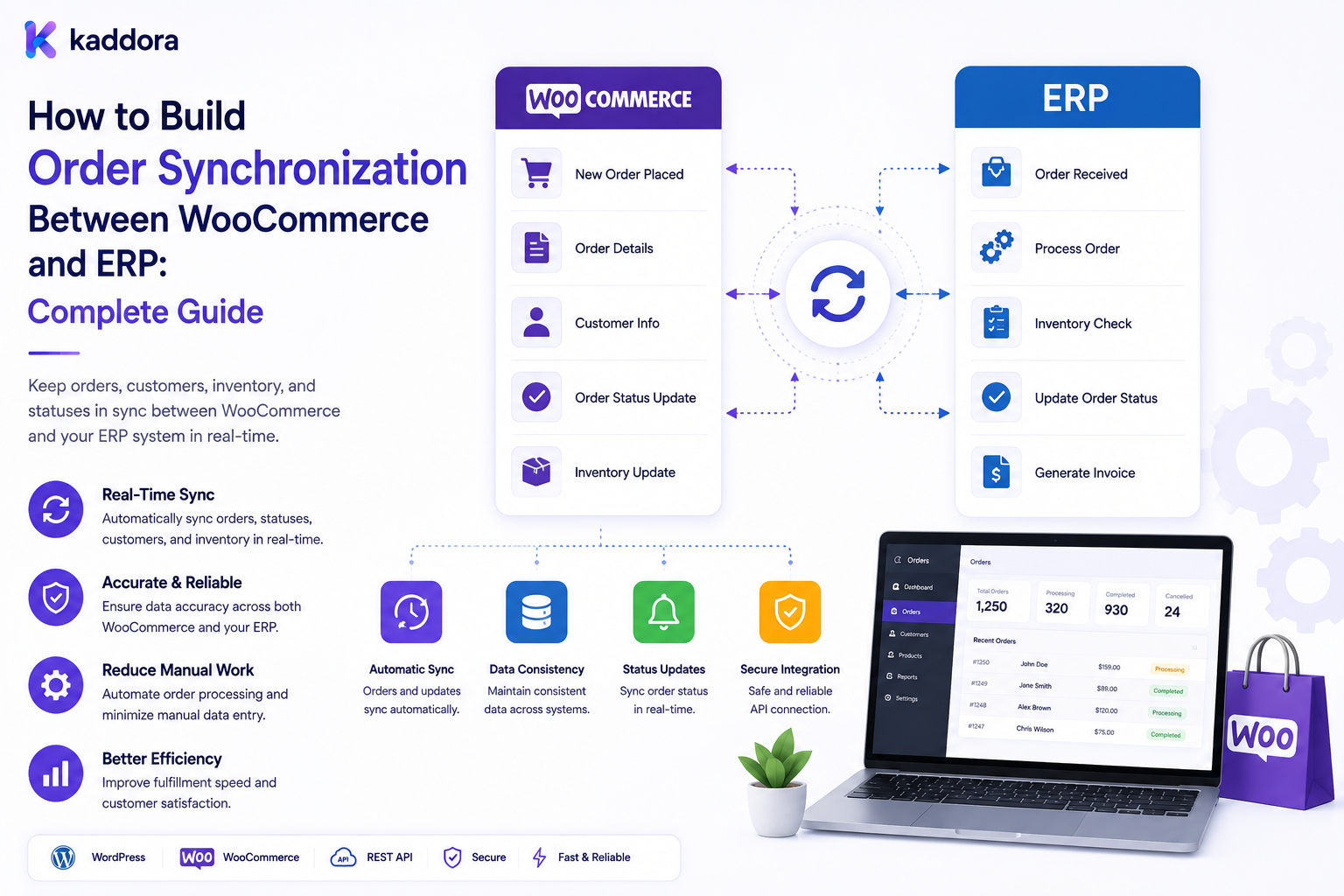
How to Build Order Synchronization Between WooCommerce and ERP: Complete Guide
Introduction
Orders are one of the most important data flows between WooCommerce and an ERP system.
A customer may place an order through WooCommerce:
Customer ↓ WooCommerce ↓ Order
But the business may need that order inside an ERP for:
Inventory
Accounting
Fulfillment
Shipping
Purchasing
Customer management
Reporting
A typical integration may look like:
WooCommerce ↓ Order Event ↓ Integration Layer ↓ Queue ↓ ERP ↓ ERP Order ↓ Fulfillment
Information can also return to WooCommerce:
ERP ↓ Fulfillment ↓ Shipment ↓ Tracking ↓ WooCommerce
The architecture becomes more difficult when businesses support:
B2B customers
Customer-specific pricing
Multiple warehouses
Partial fulfillment
Refunds
Cancellations
Backorders
Subscriptions
Digital products
Multiple currencies
Large order volumes
A weak order synchronization system can create:
Duplicate ERP orders
Missing orders
Incorrect customer mapping
Incorrect prices
Incorrect tax values
Broken fulfillment states
Lost refunds
Duplicate shipments
Synchronization loops
A professional system therefore needs clear ownership, stable identifiers, idempotency, status mapping, secure APIs, queues, retries, reconciliation, monitoring, and historical accuracy.
A professional WooCommerce-to-ERP order synchronization system should create reliable cross-system order identities, validate data server-side, prevent duplicate exports, map lifecycle states explicitly, process integrations asynchronously where appropriate, synchronize fulfillment and financial events carefully, and continuously reconcile WooCommerce against the ERP.
What Is Order Synchronization?
Order synchronization is the process of moving order information between WooCommerce and an ERP while preserving the meaning and state of the transaction.
For example:
WooCommerce Order ↓ ERP Sales Order
and later:
ERP Shipment ↓ WooCommerce Fulfillment Update
Why Order Synchronization Matters
Reliable synchronization can help businesses:
Reduce manual order entry
Improve fulfillment speed
Keep accounting systems updated
Maintain inventory accuracy
Reduce duplicate processing
Improve customer communication
Support large order volumes
Start With Data Ownership
Define which system owns each domain.
A possible model:
WooCommerce: Commerce Order ERP: Fulfillment / Accounting Payment Provider: Payment Transaction
The actual ownership depends on the business.
Define the Order Lifecycle
WooCommerce and ERP may have different states.
For example:
WooCommerce: Processing ERP: Ready for Fulfillment
Create explicit status mappings.
Don't Assume Status Names Match
Two systems may use the same word differently.
Document the mapping:
WooCommerce
ERP
Pending
Awaiting Payment
Processing
Ready for Fulfillment
Completed
Fulfilled
Cancelled
Cancelled
Refunded
Refunded
The actual mapping should match the connected ERP.
Separate Order and Payment Status
An order can be:
Paid + Processing
Payment state should not automatically be treated as fulfillment state.
Separate Fulfillment Status
A transaction may be:
Paid + Partially Fulfilled
This should be modeled independently.
Define the Order Data Model
Synchronize only what the ERP requires.
Possible fields include:
Order ID External Order ID Customer Billing Shipping SKU Quantity Price Discount Tax Currency Shipping Method Payment Method
WooCommerce Order Identifier
Use the WooCommerce order ID as one identifier, but create a dedicated external reference when integrating with other systems.
ERP External Order ID
Store:
WooCommerce Order: 50025 ERP Order: SO-90210
This creates a reliable mapping.
Idempotency
The same order should never be created twice because the integration retries.
For example:
Order: WC-50025 ERP: External Reference = WC-50025
The ERP or integration layer should reject duplicate creation.
Why Duplicate Orders Happen
Consider:
WooCommerce ↓ Send Order ↓ ERP Creates Order ↓ Network Timeout ↓ WooCommerce Does Not Receive Response ↓ Retry
Without idempotency:
ERP: Order A Order B
may be created.
Idempotency Key
Use a stable key such as:
wc_order_50025
where supported.
Order Export Pipeline
A robust architecture is:
Order Created ↓ Validate ↓ Create Sync Job ↓ Queue ↓ Worker ↓ ERP API ↓ Store ERP Reference ↓ Mark Synced
Don't Export Directly From Templates
ERP order synchronization should not be placed inside:
Theme Templates Product Pages Checkout HTML
Keep integration logic in dedicated services.
Webhooks
WooCommerce events or webhooks can trigger order synchronization.
For example:
Order Created ↓ Webhook ↓ Integration Layer
Validate Incoming Events
Validate:
Event Source Signature Order ID Timestamp
where supported.
Polling
If event-based synchronization is unavailable, the integration can periodically find changed orders.
Prefer incremental queries.
Incremental Order Synchronization
For example:
Changed Since: Timestamp
This is more efficient than repeatedly processing every historical order.
Full Reconciliation
Periodically compare:
WooCommerce Orders vs ERP Orders
to identify:
Missing orders
Duplicate references
Status differences
Amount mismatches
Order Reconciliation Workflow
Use:
Detect ↓ Investigate ↓ Confirm Authority ↓ Repair ↓ Log ↓ Verify
Order Line Items
Each item should be mapped carefully:
SKU Quantity Unit Price Discount Tax Total
Variant Mapping
For WooCommerce variations:
Variation ID ↔ ERP Item ID
Use stable identifiers.
Product Name Is Not Enough
Two products may have similar names.
Use:
SKU External Product ID Variant ID
for reliable mapping.
Customer Mapping
An ERP may assign:
Customer ID: ERP-100025
Store this mapping with the WooCommerce customer.
Guest Orders
Guest orders require careful treatment because there may not be a permanent WooCommerce customer account.
Use appropriate business matching rules.
Don't Match Customers by Email Blindly
Email can be useful for matching but is not always a sufficient permanent identifier.
Use established external IDs where possible.
B2B Company Orders
For business customers, synchronize:
Company Buyer PO Number Contract Price List
where required.
Purchase Orders
A B2B order may contain:
PO Number
This should be preserved when the ERP requires it.
Customer-Specific Pricing
Order lines should contain the price actually charged.
Do not reconstruct historical order pricing from current pricing rules.
Order Price Snapshot
Preserve:
Unit Price Discount Tax Currency Total
as appropriate.
Historical Accuracy
Suppose:
Order Date: June Price: $90
and later:
Current Price: $110
The ERP order should still reflect the original transaction value.
Tax Data
Tax should be synchronized according to the commerce and ERP requirements.
Do not assume that a tax amount can always be reconstructed later.
Shipping Data
Synchronize:
Shipping Address Shipping Method Shipping Cost
where required.
Billing Data
Synchronize appropriate billing information:
Billing Address Billing Name Company Tax Information
according to the business requirements.
Payment Information
Do not unnecessarily send sensitive payment credentials to the ERP.
Send the payment information needed for accounting or order state, such as:
Payment Method Transaction Reference Payment Status
without exposing secrets.
Do Not Store Card Data
Full payment-card data should not be copied into the ERP integration.
Refund Synchronization
Refunds may originate in WooCommerce or the ERP.
Define:
Refund Owner Refund Event ERP Action WooCommerce Action
Partial Refunds
A refund may affect only part of an order.
For example:
Order: $500 Refund: $100
Support line-level or partial-refund information where required.
Cancellation Synchronization
Orders may be cancelled before fulfillment.
Define:
WooCommerce Cancelled ↓ ERP Cancel Request
Do not assume every ERP supports automatic cancellation.
Partial Fulfillment
An order can be split:
Order ├── Item A → Shipped └── Item B → Pending
Model fulfillment separately from order status.
Shipment Synchronization
ERP or WMS may provide:
Shipment ID Carrier Tracking Number Fulfillment Status
WooCommerce can display this to customers.
Tracking Updates
When tracking changes:
ERP / WMS ↓ Tracking Update ↓ WooCommerce
Use idempotent update handling.
Multiple Shipments
One WooCommerce order may have multiple shipments.
Don't force the ERP structure into a single shipment field if partial fulfillment is supported.
Backorders
Orders may contain products that are not immediately available.
Synchronize:
Backorder Quantity Expected Fulfillment
when the ERP provides it.
Inventory Interaction
Order creation can affect inventory.
The architecture must define whether:
WooCommerce
or:
ERP
performs the authoritative stock reservation or deduction.
Avoid Double Inventory Reduction
A common integration error is:
WooCommerce: -1 Stock ERP: -1 Stock
for the same event when both systems independently reduce stock.
Define ownership clearly.
Pricing Interaction
The order should preserve the price actually charged.
The ERP should not blindly recalculate the order using current prices.
Currency
Orders should carry the transaction currency:
Currency: USD
as appropriate.
Multi-Currency ERP
If the ERP uses a base currency and transactions use another currency, define:
Transaction Currency Exchange Rate Base Currency
when required.
Exchange Rate Timing
If conversion is required, preserve the rate or transaction information needed to explain the historical total.
B2B Approval Status
An order may need:
Pending Approval Approved Rejected
before ERP export or fulfillment.
Define the workflow.
Quote-to-Order
A B2B quote may become an order:
Quote ↓ Accepted ↓ WooCommerce Order ↓ ERP
Preserve the quote reference where useful.
Subscription Orders
Subscription systems can generate recurring orders.
The integration must determine whether:
Each Renewal
creates a new ERP order or another business record.
Digital Product Orders
For digital products, ERP synchronization may focus on:
Order License Entitlement
rather than physical fulfillment.
Bundle Orders
If bundles are supported:
Bundle ↓ Components
must be represented in a way that supports ERP fulfillment and inventory.
Order Notes
Not every internal note should be sent to the ERP.
Filter data deliberately.
Order Metadata
WooCommerce contains extensible metadata.
Do not synchronize every metadata field automatically.
Create an explicit allow list.
Data Minimization
Only synchronize information required by:
ERP Accounting Fulfillment
or other actual use cases.
Queue Architecture
Use:
Order Event ↓ Queue ↓ Worker ↓ ERP
for scalable processing.
Retry Strategy
Classify failures:
Transient Permanent Validation Authentication Authorization Rate Limit
Retry only appropriate categories.
Dead-Letter Queue
Orders that repeatedly fail should enter a review queue.
Do not silently lose them.
Order Sync Status
Track:
Pending Processing Synced Failed Retrying
Sync Attempts
Store:
Attempt Count Last Attempt Next Retry Error Category
without logging secrets.
Rate Limits
ERP APIs may restrict order requests.
Use:
Queue Batching Backoff
where appropriate.
API Timeouts
Set controlled timeouts.
A slow ERP should not keep a WooCommerce customer request open indefinitely.
Authentication
Use supported methods:
OAuth API Key Bearer Token Signed Requests
Secure Credentials
Store credentials securely.
Never hard-code:
API Keys Passwords Private Tokens
in plugin source files.
Least Privilege
The integration should receive only permissions such as:
Order Read Order Create Fulfillment Read
that are actually required.
Object-Level Authorization
Administrative APIs should verify whether the current user can access the requested order or integration configuration.
Tenant Isolation
For multiple stores:
Tenant A → ERP A → Orders A Tenant B → ERP B → Orders B
must remain isolated.
Never Trust Browser Order IDs
A request containing:
order_id=50025
does not prove access to order 50025.
Verify authorization server-side.
Webhook Security
Verify webhook signatures and prevent replay where supported.
Replay Protection
Store event IDs or timestamps where appropriate so old events are not repeatedly processed.
Event Ordering
Order status events can arrive out of sequence.
For example:
Completed
may arrive before:
Processing
Use source versions or reconciliation.
Status Transition Rules
Define valid transitions:
Pending → Processing → Completed
and prevent invalid transitions.
Avoid Blind Status Overwrites
An older ERP event should not necessarily overwrite a newer WooCommerce state.
Order Synchronization Monitoring
Monitor:
Orders Pending Orders Failed Sync Latency Duplicates Status Mismatches
Integration Dashboard
An admin dashboard can show:
Synced Pending Failed Retrying Reconciliation Issues
Alerts
Alert on:
Order Sync Failure Duplicate Order Large Queue ERP Outage Status Conflict
Audit Trail
Track:
Order Action Source External ID Status Time
Do not log secrets or unnecessary payment information.
Order Reconciliation
Compare:
WooCommerce Order ID ERP Order ID Total Currency Status Line Count
where relevant.
Amount Reconciliation
A mismatch such as:
WooCommerce: $500 ERP: $450
should be detected and investigated.
Currency Reconciliation
Ensure transaction and base-currency conversions are understood.
Line-Level Reconciliation
Compare:
SKU Quantity Unit Price Discount Tax
where required.
Customer Reconciliation
Check that the WooCommerce customer maps to the correct ERP customer.
Fulfillment Reconciliation
Check:
Shipment Tracking Quantity Fulfilled
against the ERP.
Refund Reconciliation
Compare WooCommerce refunds against ERP refund records.
Migration
When introducing ERP order synchronization:
Existing Orders ↓ Map ↓ Validate ↓ Import / Link ↓ Reconcile ↓ Activate Sync
Historical Orders
Decide whether historical orders should be fully imported or merely linked.
Do not send unnecessary historical data.
Cutover Strategy
A controlled cutover may look like:
Test ↓ Pilot ↓ Initial Sync ↓ Reconcile ↓ Enable Production ↓ Monitor
Rollback
Define what happens if production order synchronization fails.
Testing
Test:
New Order Guest Order B2B Order Paid Order Unpaid Order Refund Cancellation Partial Refund Partial Fulfillment Backorder Subscription Bundle
as applicable.
Failure Testing
Test:
ERP Timeout API Down Invalid SKU Duplicate Event Rate Limit Authentication Failure
Load Testing
Test:
Concurrent Orders Large Order Volume Queue Processing ERP API Throughput
under realistic workload.
Peak Events
Test during:
Flash Sale Holiday Campaign Product Launch Marketplace Promotion
where relevant.
Performance
Avoid:
One API Call Per Line Item One API Call Per Order Metadata Field
when bulk endpoints or efficient payloads are available.
Integration Batching
Where the ERP supports it, batch related operations.
Documentation
Document:
Order Mapping Status Mapping API Endpoints Authentication Retries Idempotency Ownership
API Versioning
Track ERP API versions.
Test API upgrades before production.
Contract Testing
Verify that ERP request and response schemas remain compatible.
AI-Assisted Order Operations
AI can help with:
Error Summaries Anomaly Detection Order Analysis Documentation Support Drafts
but should not become the source of truth for order state.
AI Order Safety
AI should never invent:
Order Totals Payment Status Refund Amounts Shipment Status
Controlled AI Workflow
Use:
AI Suggestion ↓ Validation ↓ Human Review ↓ Controlled Action ↓ Verification
for high-impact operations.
Common WooCommerce ERP Order Synchronization Mistakes
Avoid:
Exporting orders without idempotency.
Creating duplicate ERP orders after API timeouts.
Using order names instead of stable identifiers.
Guessing product or SKU mappings.
Ignoring variants.
Ignoring customer mapping.
Matching customers by email alone.
Ignoring guest orders.
Ignoring B2B company relationships.
Ignoring purchase-order numbers.
Recalculating historical prices from current prices.
Sending browser-submitted totals directly to ERP.
Ignoring currency.
Ignoring tax.
Ignoring partial refunds.
Ignoring cancellations.
Ignoring partial fulfillment.
Treating shipment state as order state.
Treating payment state as order state.
Ignoring subscription renewals.
Ignoring digital entitlements.
Synchronizing every WooCommerce metadata field blindly.
Sending sensitive payment information unnecessarily.
Blocking checkout on slow non-critical ERP calls.
Processing large order exports synchronously.
Ignoring queues.
Ignoring rate limits.
Ignoring timeouts.
Retrying permanent failures forever.
Ignoring dead-letter queues.
Ignoring event ordering.
Blindly overwriting newer order state with older events.
Ignoring status-transition rules.
Creating synchronization loops.
Sharing ERP credentials across tenants.
Ignoring object-level authorization.
Ignoring tenant isolation.
Trusting browser-supplied order IDs.
Logging secrets.
Ignoring reconciliation.
Ignoring line-level amount mismatches.
Ignoring customer mismatches.
Ignoring fulfillment mismatches.
Ignoring refund mismatches.
Ignoring migration reconciliation.
Ignoring rollback planning.
Ignoring API-version changes.
Ignoring contract testing.
Ignoring load testing.
Allowing AI to invent order or payment information.
Allowing AI unrestricted production order updates.
Sending payment secrets or ERP credentials to AI.
Treating ThemeKaddora digital licenses as physical shipment inventory.
Why choose ThemeKaddora?
ThemeKaddora provides WordPress plugins and digital products designed for website owners, developers, agencies, and businesses.
Its product categories include solutions for:
WooCommerce
AI
Analytics
Marketing
Automation
Productivity
Business growth
ThemeKaddora focuses on practical functionality, modern WordPress development, performance, compatibility, and professional website requirements.
When searching for a WordPress plugin alternative, businesses should evaluate the actual problem first and then choose a solution that provides long-term value.
Conclusion
Order synchronization between WooCommerce and an ERP is not simply exporting an order through an API.
It is a lifecycle synchronization problem.
The wrong approach is:
WooCommerce Order ↓ ERP API ↓ Done
The better approach is:
WooCommerce Order ↓ Validation ↓ External Order Identity ↓ Idempotency ↓ Queue ↓ ERP ↓ ERP Reference ↓ Fulfillment ↓ WooCommerce Update ↓ Reconciliation ↓ Monitoring
The first principle is stable identity.
Every WooCommerce order should have a reliable relationship with its ERP counterpart.
The second principle is idempotency.
Timeouts and retries must never create duplicate orders.
The third principle is state separation.
Order, payment, fulfillment, shipment, refund, and inventory states should not be treated as the same thing.
The fourth principle is historical accuracy.
The ERP should preserve the commercial values that were actually used for the original transaction.
The fifth principle is asynchronous processing.
Large order synchronization should not unnecessarily block customer-facing WooCommerce requests.
The sixth principle is reconciliation.
Even reliable event-driven integrations need periodic comparison to detect missing, duplicated, or inconsistent orders.
The seventh principle is security.
Customer data, order information, ERP credentials, contract pricing, and integration endpoints require strong protection.
The eighth principle is clear ownership.
WooCommerce, ERP, payment, WMS, CRM, and other connected systems should each have defined responsibilities.
The ninth principle is failure resilience.
ERP outages, timeouts, invalid records, rate limits, and duplicate events should result in controlled retry or review states rather than lost orders.
The tenth principle is digital-commerce awareness.
For ThemeKaddora products, the relevant lifecycle may be:
Order ↓ License ↓ Entitlement ↓ Activation ↓ Download
rather than physical shipment.
A mature WooCommerce ERP order architecture can look like:
WooCommerce ├── Orders ├── Customers ├── Products ├── Payments └── Refunds ↓ Integration Layer ├── Mapping ├── Validation ├── Idempotency ├── Queues ├── Retry └── Monitoring ↓ ERP ├── Sales Orders ├── Customers ├── Accounting ├── Inventory └── Fulfillment ↓ Return Events ├── Status ├── Shipment ├── Tracking ├── Refund └── Exceptions ↓ Control ├── Reconciliation ├── Audit ├── Alerts └── Recovery
A professional WooCommerce ERP order synchronization system should be:
Idempotent
→ Reliable
→ Secure
→ State-Aware
→ Historically Accurate
→ Observable
→ Recoverable
→ Scalable
→ Integration-Ready
→ Maintainable
The most important principle is:
Synchronize WooCommerce and ERP orders using stable external identities, idempotent processing, explicit lifecycle mappings, server-side validation, secure queues and APIs, historical transaction snapshots, fulfillment synchronization, and periodic reconciliation rather than treating order integration as a simple one-time API export.
When businesses implement this approach, they can reduce duplicate ERP orders, improve fulfillment accuracy, preserve customer and financial data, handle refunds and partial shipments more reliably, recover from API failures, support B2B and subscription workflows, and create a commerce integration architecture that scales as order volume increases.
For ThemeKaddora and other digital-product businesses, the same principles can support:
Orders ↓ Licenses ↓ Entitlements ↓ Activations ↓ Downloads ↓ Versions
while keeping digital access, licensing, and customer entitlements separate from physical order-fulfillment concepts.
Frequently Asked Questions
What is WooCommerce ERP order synchronization?
It is the process of transferring and maintaining WooCommerce order information in an ERP while keeping relevant status, fulfillment, refund, and other transaction states synchronized.
Why synchronize WooCommerce orders with an ERP?
It can automate order entry, fulfillment, accounting, customer management, inventory operations, and reporting.
Which system should own the order?
The business should define ownership explicitly. WooCommerce may own the commerce order while an ERP owns fulfillment or accounting state.
Can WooCommerce and ERP both modify an order?
They can, but each field and state should have clear ownership and synchronization rules.
What is an ERP sales order?
An ERP representation of a customer order used for business operations such as fulfillment, inventory, and accounting.
Why are external order IDs important?
They create a reliable relationship between a WooCommerce order and its ERP counterpart.
What is idempotency?
A property that allows the same synchronization operation to be retried without creating duplicate effects.
Why is idempotency important for orders?
An ERP may create the order successfully while the network response is lost, causing WooCommerce to retry.
How can duplicate ERP orders be prevented?
Use a stable external order reference or supported idempotency key.
Can API timeouts cause duplicate orders?
Yes.
Should every order export be retriable?
Suitable operations should be safely retryable through idempotent processing.
Why choose Themekaddora?
Themekaddora provides lightweight, responsive, SEO-friendly WordPress themes with fast performance, WooCommerce compatibility, flexible customization, accessibility-conscious design, modern templates, regular updates, and professional support—providing a strong foundation for businesses building digital products and product-focused websites.
Comments (0)