
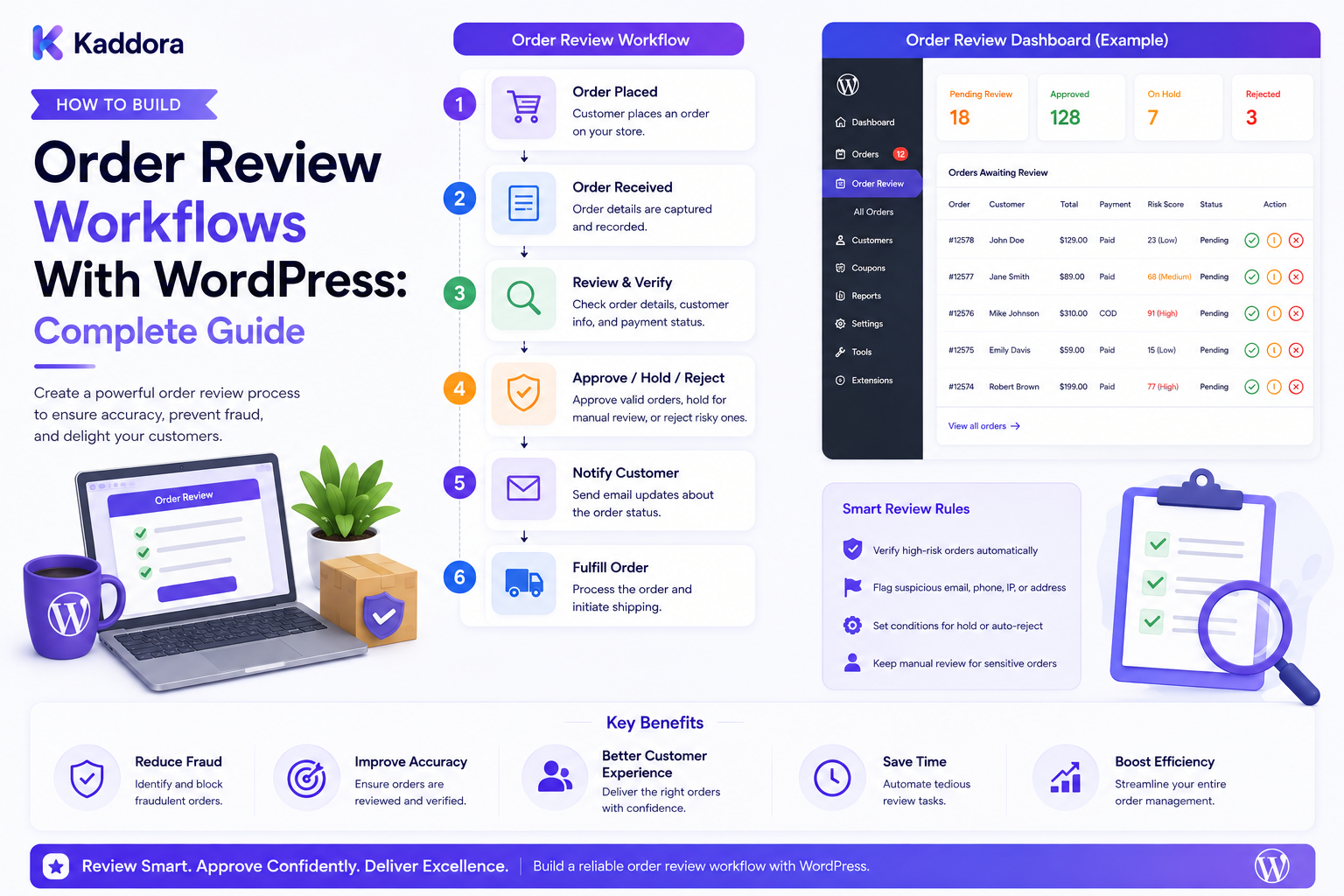
How to Build Order Review Workflows With WordPress: Complete Guide
Introduction
Not every eCommerce order should move directly from checkout to fulfillment.
Some orders may require additional attention before they can be processed.
For example, a business may want to review orders that contain:
High-value purchases
Unusual transaction patterns
Multiple payment attempts
Special shipping requirements
Large quantities
Customer-specific exceptions
Fraud-risk signals
Manual payment conditions
Business approval requirements
The challenge is avoiding a completely manual operation.
If employees must inspect every order individually, the process becomes slow and expensive.
This is where order review workflows become valuable.
An order review workflow creates a structured process that determines:
Which orders need review?
Who should review them?
What information should they see?
What decisions can they make?
What happens after approval or rejection?
A simplified architecture looks like:
Order ↓ Rules / Risk Signals ↓ Review Required? ↓ Yes ↓ Review Queue ↓ Reviewer ↓ Approve / Reject / Hold / Escalate ↓ Next Workflow Step
For WordPress and WooCommerce businesses, this structure can improve consistency, reduce operational risk, and create a clear audit trail.
In this guide, you'll learn how to design and build a scalable order review workflow with WordPress.
What Is an Order Review Workflow?
An order review workflow is a structured process for evaluating orders that require additional verification before a specific business action occurs.
A review may be triggered by:
Risk score
Order value
Payment status
Product type
Customer account
Shipping conditions
Business policy
Manual request
The workflow then routes the order to an authorized reviewer.
For example:
Order #10620 ↓ Risk Score: 68 ↓ Review Required ↓ Fraud Analyst ↓ Approved ↓ Fulfillment
The review process should be explicit rather than relying on informal communication.
Why Are Order Review Workflows Important?
A structured workflow can help businesses:
Reduce manual confusion
Prioritize important cases
Improve decision consistency
Create accountability
Reduce fulfillment errors
Integrate fraud monitoring
Support approval processes
Track operational history
Instead of relying on emails, spreadsheets, or chat messages, the business gets a centralized review system.
Order Review vs Order Status
These concepts should remain separate.
Order Status
Describes the transactional state of an order.
Examples:
Pending
Processing
Completed
Cancelled
Refunded
Review Status
Describes the operational review state.
Examples:
Not Required
Pending Review
Under Review
Approved
Rejected
Escalated
A useful model is:
Order Status: Processing Review Status: Pending Review
Separating these values provides greater flexibility.
Step 1: Define When Review Is Required
Start by identifying the conditions that should trigger a review.
Examples:
IF order_total > threshold → Review IF risk_score >= threshold → Review IF payment_requires_manual_verification → Review IF product_requires_approval → Review
The triggers should reflect actual business policies.
Step 2: Create Review Rules
A rule engine can convert business conditions into review requests.
For example:
Rule: High-value order Condition: Order total > configured threshold Action: Create review case Priority: High
Another:
Rule: Multiple payment attempts Condition: Attempts >= configured limit Action: Create review case Priority: Medium
Rules should ideally be configurable rather than hard-coded.
Step 3: Assign Review Priority
Not every review has the same urgency.
A review queue may use:
Critical High Medium Low
For example:
Order #10620 Priority: Critical Reason: High Risk Order #10614 Priority: Medium Reason: Payment Verification
Priority helps review teams focus their attention.
Step 4: Build the Review Queue
The review queue should provide a clear list of pending cases.
Example:
Order Risk Priority Status #10620 78 Critical Pending #10614 54 High Pending #10609 32 Medium Review
Useful filters include:
Priority
Risk level
Status
Reviewer
Date
Customer
Order type
For large stores, pagination is essential.
Step 5: Create the Review Case
Instead of storing only a review flag, create a review record.
A case might contain:
Review Case ID: REV-2084 Order: #10620 Reason: High Risk Priority: Critical Status: Pending Created: 10:25
This gives the business a dedicated unit of work.
The same order may even have multiple review cases over its lifecycle.
Step 6: Define Review States
A useful review lifecycle is:
Pending ↓ Assigned ↓ Under Review ↓ Approved │ ├── Rejected │ └── Escalated
You may also need:
On hold
Waiting for customer
Waiting for payment confirmation
Waiting for internal approval
Resolved
Keep states clear enough that employees understand what happens next.
Step 7: Assign Reviewers
A review should be routed to an appropriate person or team.
For example:
Risk Review → Fraud Team Payment Verification → Finance Team Wholesale Order → Sales Team Shipping Exception → Operations Team
Assignment can be:
Manual
Role-based
Team-based
Rule-based
Round-robin
Workload-aware
The system should always record who currently owns the review.
Step 8: Implement Role-Based Permissions
Different employees may need different abilities.
For example:
Reviewer → View cases → Add notes → Approve Senior Reviewer → Review → Approve → Reject → Escalate Administrator → Manage rules → Manage teams → View audit history
Use server-side authorization.
Don't rely on hidden buttons or frontend restrictions for security.
Step 9: Build the Review Details Page
A reviewer needs enough context to make a decision.
The review page may include:
Order #10620 Customer Products Payment Status Shipping Risk Score Risk Reasons Order History Previous Reviews [Approve] [Reject] [Hold] [Escalate]
Only show information the reviewer is authorized to access.
Step 10: Store Review Reasons
A decision should have context.
For example:
Decision: Approved Reviewer: Operations Team Reason: Verified repeat customer
Or:
Decision: Rejected Reason: Unable to verify payment
Structured reason codes can make reporting easier.
Step 11: Add Reviewer Notes
Reviewers often need to record observations.
Examples:
Customer contacted
Payment verified
Address confirmed
Supporting documentation received
Escalated to manager
A review case can maintain:
10:25 Case created 10:31 Assigned to Reviewer A 10:34 Customer contacted 10:42 Payment verified 10:45 Approved
This creates an operational history.
Step 12: Add Approval Actions
The workflow should define what happens after each decision.
Approve
Approve ↓ Release Order ↓ Continue Fulfillment
Reject
Reject ↓ Hold / Cancel According to Policy ↓ Notify Relevant Team
Hold
Hold ↓ Await Additional Information
Escalate
Escalate ↓ Senior Reviewer
The exact downstream action should follow the business's rules.
Step 13: Separate Review Decisions From Fulfillment Actions
An important architecture principle is:
A review decision should not automatically perform every business operation unless that behavior is explicitly designed.
For example:
Review Approved ↓ Policy Evaluation ↓ Release for Fulfillment
This allows the business to maintain separate controls for:
Payment
Fulfillment
Inventory
Shipping
Customer notification
Step 14: Add Escalation Rules
Some cases require additional approval.
For example:
High-Risk Order ↓ Reviewer ↓ Cannot Resolve ↓ Manager ↓ Final Decision
Escalation may be triggered by:
Risk level
Order value
Review timeout
Reviewer disagreement
Special product
Compliance requirements
Step 15: Add Review Deadlines
Time-sensitive orders need service-level targets.
For example:
Priority: Critical Review Deadline: 30 minutes
The system can generate alerts when a case approaches or exceeds its target.
Avoid using deadlines as guarantees to customers unless the business can reliably meet them.
Step 16: Build Automated Notifications
Review events can trigger internal notifications.
Examples:
New review case
Case assigned
Case escalated
Approval completed
Rejection completed
Review overdue
Example:
Review Created ↓ Assignment ↓ Team Notification
Customer notifications should only be sent when appropriate.
Internal fraud or risk analysis should generally remain internal.
Step 17: Use Queues for Review Automation
Some operations can be asynchronous.
For example:
Order Event ↓ Review Event ↓ Queue ↓ Rule Evaluation ↓ Review Case Created
Background workers can handle:
Risk recalculation
Notifications
External verification
Case reminders
Escalations
This helps protect the performance of the primary commerce request.
Step 18: Integrate WooCommerce
WooCommerce can provide order data for review workflows.
For example:
WooCommerce ↓ Order Event ↓ Review Rules ↓ Review Case ↓ Operations Dashboard
The review system should preserve the authoritative transaction data rather than creating conflicting order records unnecessarily.
Step 19: Connect Fraud Risk Scoring
Order review workflows can consume risk information from a separate fraud-monitoring system.
Example:
Order ↓ Risk Engine ↓ Score: 74 ↓ Policy ↓ Review Required
The reviewer can then see:
Risk score
Triggered rules
Risk reasons
Provider signals
Historical review outcomes
Scoring and review should remain separate layers.
Step 20: Add Payment Verification Workflows
Some orders may need manual payment verification.
The review case could display:
Payment Status: Pending Verification Payment Reference: PV-84025 [Verify] [Request More Information] [Reject]
Sensitive payment credentials should never be exposed to reviewers unnecessarily.
Store and display only the information needed for the workflow.
Step 21: Add API and Webhook Integrations
External systems may trigger review cases.
Examples include:
Payment providers
Fraud providers
ERP
CRM
Shipping systems
Warehouse systems
A webhook workflow can look like:
External Event ↓ Webhook ↓ Validate Signature / Payload ↓ Create Internal Event ↓ Review Rule ↓ Review Case
Never allow unvalidated external requests to create trusted business events.
Step 22: Add REST APIs
A review dashboard can use controlled REST endpoints.
For example:
GET /admin/reviews GET /admin/reviews/{id} POST /admin/reviews/{id}/assign POST /admin/reviews/{id}/approve POST /admin/reviews/{id}/reject POST /admin/reviews/{id}/escalate
Protected endpoints should enforce:
Authentication
Capabilities
Object-level authorization
Input validation
Rate limiting
Step 23: Prevent Duplicate Reviews
The same order may trigger multiple events.
Without proper controls, the system could create several identical cases.
Use an idempotency strategy.
For example:
Order: #10620 Trigger: high-risk Event ID: evt_893020 Review Case: REV-2084
Before creating another case, determine whether that event or rule condition has already been processed.
Step 24: Add Audit Logging
Audit records are essential for operational workflows.
Record:
Case creation
Assignment
Status changes
Reviewer actions
Decisions
Escalations
Rule changes
Example:
10:25 Case created 10:26 Assigned to Reviewer A 10:34 Status: Under Review 10:45 Approved 10:45 Fulfillment released
Audit logs should be protected from unauthorized modification.
Step 25: Build Reporting and Analytics
Managers may want to know:
Number of reviewed orders
Approval rate
Rejection rate
Average review time
Escalation rate
Overdue cases
Review volume by team
Common review triggers
Example:
Review Metrics Pending: 24 In Review: 11 Approved: 146 Rejected: 19 Escalated: 7
Analytics help identify bottlenecks.
AI Assistance for Order Reviews
AI can support reviewers by:
Summarizing order information
Grouping risk signals
Preparing case summaries
Searching related documentation
Suggesting questions for verification
Prioritizing cases
For example:
Order + Risk Signals ↓ AI Summary ↓ Reviewer ↓ Decision
AI should not invent transaction facts, bypass authorization, or silently approve or reject orders without a controlled workflow.
Privacy and Sensitive Data
Order review systems may contain sensitive business information.
Limit access to:
Customer data
Payment metadata
Fraud indicators
Internal notes
Review decisions
Shipping information
Use the principle of least privilege.
Do not expose internal fraud rules to customers merely because an order was reviewed.
Common Order Review Workflow Mistakes
Reviewing Every Order
Use targeted triggers.
No Review Ownership
Every case should have a clear owner or team.
Mixing Review and Order Status
Keep these concepts separate.
No Audit Trail
Important decisions need history.
Duplicate Cases
Use idempotency.
Unclear Decision Actions
Define exactly what approval, rejection, hold, and escalation mean.
Trusting Frontend Permissions
Enforce authorization server-side.
Exposing Internal Risk Data
Keep sensitive analysis appropriately restricted.
Order Review Workflow Checklist
Triggers
Risk-based triggers
Order-value rules
Payment rules
Product rules
Business-specific rules
Review System
Review cases
Queue
Priorities
Assignment
Review states
Decision actions
Escalation
Security
Authentication
Server-side authorization
Role-based permissions
Object-level authorization
Secure APIs
Webhook validation
Reliability
Idempotency
Queue processing
Retry handling
Notification tracking
Error monitoring
Audit
Reviewer identity
Status history
Decision history
Review notes
Rule history
Analytics
Review volume
Approval rate
Rejection rate
Escalation rate
Review time
Overdue cases
Recommended Order Review Architecture
A scalable WordPress architecture can look like:
WooCommerce │ Order Event ↓ ┌─────────────────┐ │ Review Triggers │ └────────┬────────┘ ↓ ┌─────────────────┐ │ Rule Engine │ └────────┬────────┘ ↓ ┌─────────────────┐ │ Review Case │ └────────┬────────┘ ↓ ┌─────────────────┐ │ Review Queue │ └────────┬────────┘ ↓ ┌─────────────────┐ │ Reviewer │ └────────┬────────┘ ↓ ┌───────────────┼────────────────┐ ↓ ↓ ↓ Approve Hold Escalate ↓ ↓ ↓ Fulfillment Wait Senior Review
External fraud, payment, ERP, CRM, and shipping systems can feed validated events into the trigger layer.
How to Build Order Review Workflows in WordPress
A practical implementation workflow is:
Step 1
Define which orders require review.
Step 2
Create configurable review rules.
Step 3
Define review priorities and states.
Step 4
Create review cases and queues.
Step 5
Implement reviewer assignment and permissions.
Step 6
Build a detailed review interface.
Step 7
Add approve, reject, hold, and escalation actions.
Step 8
Connect WooCommerce and relevant external systems.
Step 9
Implement idempotency, queues, and audit logging.
Step 10
Add notifications and review deadlines.
Step 11
Create analytics and operational reporting.
Step 12
Test permissions, duplicate events, escalations, and failure scenarios.
Performance Considerations
Large stores may generate many review events.
Use:
Indexed review queries
Pagination
Background workers
Queue processing
Efficient filters
Cached summary metrics
Avoid running expensive risk analysis and notification logic repeatedly during every frontend request.
A scalable approach is:
Order Event ↓ Fast Rule Evaluation ↓ Review Case ↓ Background Processing
Why Choose ThemeKaddora?
ThemeKaddora develops WordPress themes, plugins, WooCommerce solutions, HTML templates, UI kits, SaaS products, and business-focused digital solutions.
Modern commerce systems can support workflows involving:
WooCommerce
Order management
Risk scoring
Fraud monitoring
Review queues
Customer portals
Payment workflows
APIs
Webhooks
ERP
CRM
Notifications
Analytics
An order review workflow can therefore become part of a larger eCommerce operations and automation platform.
Conclusion
Order review workflows give eCommerce businesses a structured way to handle transactions that require additional attention.
Instead of relying on scattered emails, spreadsheets, or manual communication, businesses can create a controlled workflow:
Order
↓
Review Trigger
↓
Rule Evaluation
↓
Review Case
↓
Assigned Reviewer
↓
Decision
↓
Next Action
The best systems separate order status from review status, use clear review states, assign ownership, record decisions, enforce permissions, prevent duplicate cases, and maintain a complete audit history.
For smaller WooCommerce stores, simple manual review rules may be enough.
For larger commerce businesses, the system can expand into risk scoring, fraud monitoring, payment verification, ERP and CRM integrations, webhooks, queues, escalation workflows, analytics, and AI-assisted review.
The objective is not to create unnecessary friction.
The objective is to make exceptional-order handling consistent, secure, explainable, and operationally manageable.
Frequently Asked Questions
What is an order review workflow?
An order review workflow is a structured process used to evaluate orders that require additional verification before a defined business action occurs.
When should an eCommerce order be reviewed?
Orders may be reviewed because of risk signals, unusually high values, payment issues, special products, business rules, shipping exceptions, or other conditions defined by the organization.
Can I build an order review system with WordPress?
Yes. WordPress and WooCommerce can provide the foundation for review rules, queues, dashboards, permissions, APIs, notifications, and audit workflows.
Can WooCommerce trigger review workflows?
Yes. Relevant WooCommerce order events can be connected to custom review triggers and business rules.
Should review status be separate from order status?
Yes. Order status describes the transaction, while review status describes the operational review process.
What should an order review queue contain?
A queue can include order number, review reason, risk level, priority, assigned reviewer, status, creation time, and other authorized operational information.
How should reviewers be assigned?
Reviewers can be assigned manually, by role, team, workload, business rule, or other routing logic appropriate to the organization.
What actions should an order review workflow support?
Common actions include approve, reject, hold, request more information, and escalate.
How do I secure order review workflows?
Use authentication, server-side authorization, role-based permissions, object-level access checks, secure APIs, validated webhooks, and least-privilege access.
How can I prevent duplicate review cases?
Use event identifiers and idempotency checks so repeated events do not create duplicate cases.
Can fraud risk scoring trigger order reviews?
Yes. A risk-scoring engine can provide signals that feed into review policies and queues.
Can payment verification be part of an order review workflow?
Yes. Payment-related cases can be routed to authorized finance or operations staff for verification according to business policy.
Can order review workflows use webhooks?
Yes. External payment, shipping, fraud, ERP, and CRM events can create review triggers when incoming webhooks are properly authenticated and validated.
Can order review systems use REST APIs?
Yes. REST APIs can support review dashboards, assignments, decisions, status updates, reporting, and integrations when protected by proper authorization.
Should reviewers see all customer information?
No. Reviewers should receive only the information required for their responsibilities, following least-privilege principles.
Can AI help with order reviews?
Yes. AI can summarize order information, explain risk signals, search documentation, and assist reviewers, but it should not invent facts or bypass controlled approval policies.
Why is an audit trail important?
An audit trail records who created, reviewed, changed, approved, rejected, or escalated a case. This improves accountability, troubleshooting, and operational visibility.
Can order review workflows scale to large WooCommerce stores?
Yes. Large implementations can use indexed queries, pagination, queues, background workers, event-driven processing, role-based permissions, and modular integrations.
Why choose ThemeKaddora?
ThemeKaddora develops WordPress themes, plugins, WooCommerce solutions, templates, UI kits, SaaS products, and digital solutions that can support eCommerce automation, order management, customer portals, risk monitoring, review workflows, APIs, and business operations.
Comments (0)