
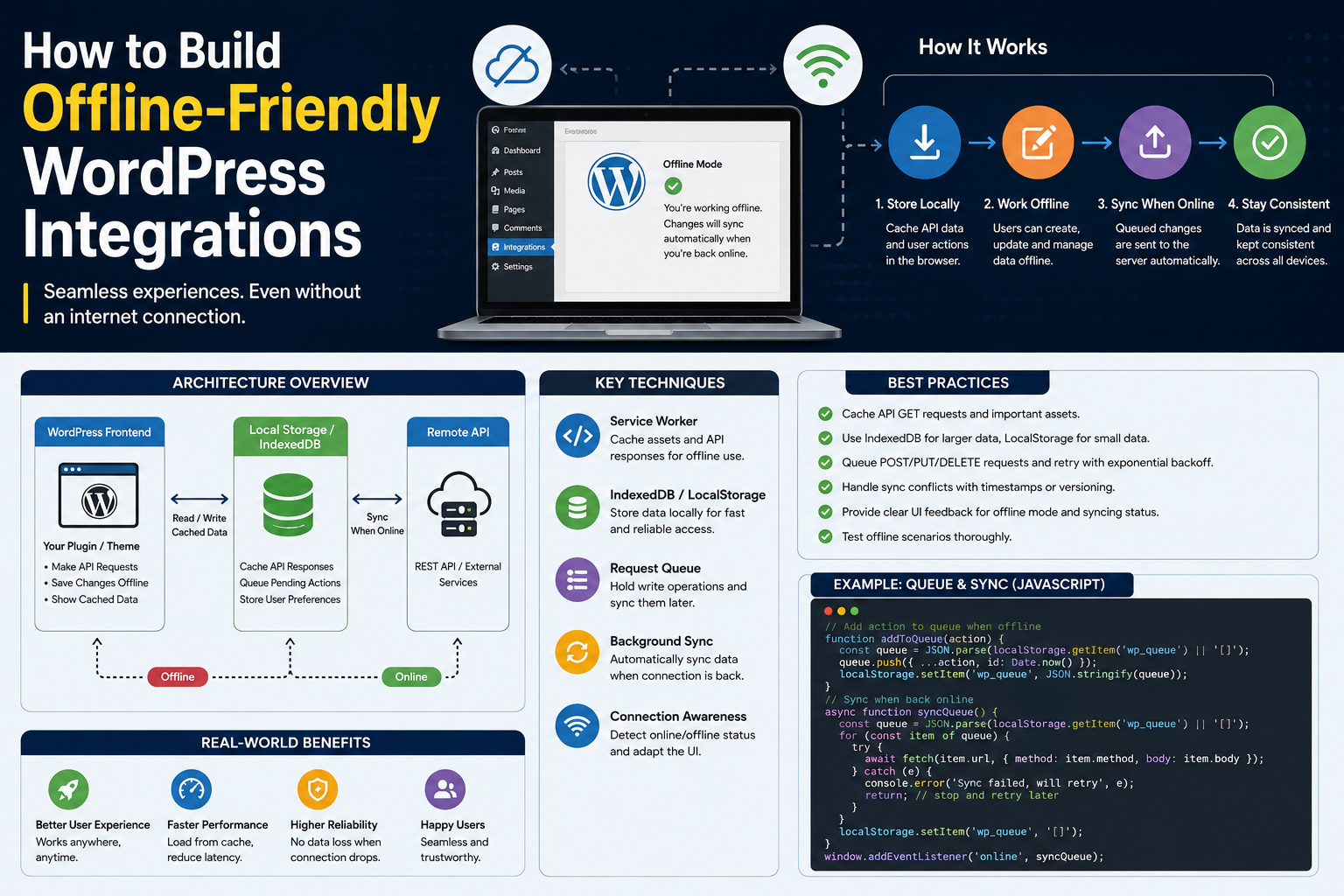
How to Build Offline-Friendly WordPress Integrations
Introduction
WordPress integrations often depend on external APIs.
A plugin may connect to:
CRM systems
Payment services
AI providers
Analytics platforms
Email services
SaaS applications
Shipping systems
Marketing platforms
When the external service is available, the workflow may look simple:
WordPress ↓ External API ↓ Response ↓ Local Processing
But networks fail.
External services experience outages.
DNS can fail.
Servers can become temporarily unreachable.
API credentials can expire.
Rate limits can be reached.
A plugin that assumes the external service is always available can become difficult to use whenever connectivity is interrupted.
An offline-friendly integration is designed to continue operating as safely as possible when the external dependency is temporarily unavailable.
This does not necessarily mean that the entire plugin works completely offline.
Instead, it means:
External API Unavailable ↓ Local Work Continues ↓ Changes Stored Safely ↓ Queue / Sync ↓ External Service Recovers ↓ Changes Synchronize
For example, an administrator might create or update local data even while the external provider is unavailable.
The integration can then synchronize that data later, provided the business operation is safe to defer.
The core principle is:
Do not make every business operation depend on an external service being available at the exact moment the user performs the action.
What Does Offline-Friendly Mean?
Offline-friendly architecture allows the application to tolerate temporary loss of external connectivity.
A simple model is:
Online ↓ Normal API Communication
and:
Offline / Provider Unavailable ↓ Local State ↓ Pending Work ↓ Later Synchronization
The application should know which operations can safely be delayed and which cannot.
Offline-Friendly vs Offline-First
These terms are related but not identical.
Offline-Friendly
The application continues useful local work when the external service is temporarily unavailable.
Offline-First
The application is designed primarily around local state and treats synchronization with external services as a secondary process.
Most WordPress plugins will benefit from an offline-friendly approach rather than a fully offline-first architecture.
Which Operations Can Work Offline?
This depends on the business.
Examples that may be deferrable:
Draft creation
Local content changes
Sync preparation
Analytics event buffering
Non-critical CRM updates
Background exports
Operations that often require immediate provider confirmation include:
Payment authorization
Real-time inventory reservation
Certain security actions
Provider-generated authentication flows
Never assume that every operation can safely be delayed.
Separate Local State From Remote State
A reliable architecture distinguishes:
Local State + Remote State
For example:
Local Order: sync_status = pending
means the local application knows the order exists, but external synchronization has not yet completed.
Use Explicit Synchronization States
Useful states include:
pending syncing synced retry_scheduled failed conflict unknown
For uncertain operations:
unknown
can be safer than assuming either success or failure.
Queue Work Instead of Blocking Users
Instead of:
User Action ↓ Wait for API ↓ API Timeout ↓ Error
consider:
User Action ↓ Save Local State ↓ Queue Sync ↓ Return to User
The queue can attempt synchronization later.
Background Synchronization
A typical architecture is:
Local Change ↓ Pending Record ↓ Queue ↓ Worker ↓ External API ↓ Success ↓ Mark Synced
If the API is unavailable:
API Failure ↓ Backoff ↓ Retry Later
Store Pending Changes Safely
The queue should not contain raw credentials.
Store information such as:
connection_id resource_id operation payload_reference attempt_count next_attempt_at
Resolve credentials securely when the job executes.
Do Not Store Secrets in Queue Jobs
Avoid placing:
access_token refresh_token client_secret
inside job payloads.
Use a connection identifier and a secure credential manager.
Local-First Data Entry
For suitable operations, the local database can become the immediate source of user-visible state:
User ↓ WordPress Database ↓ UI Updated ↓ Sync Pending
This gives users immediate feedback without waiting for the external provider.
Show Synchronization Status
The admin interface can display:
CRM Sync: Pending Last Successful Sync: 10 minutes ago Next Attempt: In 2 minutes
This is much better than hiding the delayed state.
Avoid Pretending Everything Is Synced
If the remote provider has not confirmed an operation, do not show:
Synced
Instead show:
Pending Synchronization
Accurate status is essential.
Offline-Friendly API Caching
For read-heavy integrations, locally cached data can remain available when the provider is temporarily unreachable.
For example:
User Requests Customer ↓ Fresh Local Cache? ├── Yes → Return Data └── No → Try API
Stale-While-Revalidate
A useful strategy is:
Cached Data Available ↓ Show Cached Data ↓ Refresh In Background
This can provide a better experience when slightly stale data is acceptable.
Not Every Data Type Can Be Stale
For example:
Product Description
may tolerate stale information.
But:
Payment Status
may require current provider confirmation.
Caching policy must match business risk.
Cache Freshness
Store information such as:
cached_at expires_at source
This allows the application to distinguish:
Fresh Stale Unavailable
Read-Only Offline Mode
A simple offline-friendly strategy is to continue serving previously synchronized data:
External API Unavailable ↓ Local Snapshot ↓ Read-Only UI
This is often safer than allowing unconfirmed writes.
Offline-Friendly Analytics
Analytics events are often suitable for buffering.
Instead of:
User Action ↓ Analytics API ↓ Failure
use:
User Action ↓ Local Event Queue ↓ Later Upload
Offline-Friendly AI Jobs
AI integrations can use asynchronous jobs:
User Request ↓ Store Job ↓ Queue ↓ AI Provider
If the AI provider is unavailable, the job remains pending rather than failing the entire application request.
Offline-Friendly CRM Sync
For CRM integrations:
WordPress Change ↓ Local State ↓ Pending Sync ↓ CRM API
The local system can continue functioning until the provider becomes available.
Offline-Friendly ERP Sync
ERP systems often manage important records.
Use clear synchronization states:
Pending Synced Conflict Failed Unknown
Never assume a critical remote transaction succeeded merely because the local record was saved.
Offline-Friendly Inventory
Inventory is more difficult.
Suppose:
Local Stock = 10 Remote Stock = 5
If the remote ERP is unavailable, immediately allowing additional sales may create overselling.
For high-risk inventory operations, offline behavior may need to become:
Read Only
or use conservative local policies.
Offline-Friendly Payments
Payment processing generally requires current provider confirmation.
Do not convert:
Payment API Unavailable
into:
Payment Successful
Instead:
Payment Pending / Unknown
and reconcile with the provider.
Handle Unknown Remote Outcomes
An uncertain operation can be represented as:
unknown
For example:
POST Payment ↓ Timeout ↓ Remote State Unknown
A reconciliation process can later determine the actual status.
Reconciliation
Reconciliation compares:
Local State vs Remote State
and repairs discrepancies.
For example:
Local: Payment Pending Remote: Payment Completed Reconciliation: → Mark Completed
Offline-Friendly Synchronization
A synchronization system should use checkpoints:
Fetch ↓ Process ↓ Commit ↓ Checkpoint
If the provider is unavailable:
Keep Existing Checkpoint
Do not advance synchronization state without successful processing.
Retry With Backoff
Offline-friendly integrations should not constantly retry.
Use:
Exponential Backoff + Jitter + Retry Limit
This prevents a recovery storm.
Circuit Breakers
If the provider remains unavailable:
Failures ↓ Circuit Opens ↓ Pause API Requests ↓ Probe Later
Queues can continue storing pending work.
Queue Recovery
When the provider returns:
Provider Recovers ↓ Circuit Half-Open ↓ Successful Probe ↓ Gradual Queue Processing
Do not immediately release thousands of pending jobs.
Preventing Recovery Storms
Suppose:
20,000 jobs
accumulated during an outage.
If all retry immediately:
20,000 Requests ↓ Provider ↓ 429 / 503
Instead use:
Controlled Concurrency + Rate Limiter + Priority Queue
Prioritize Important Work
During recovery, prioritize business-critical operations:
Payments Orders Inventory CRM Analytics
The actual priority order depends on the product.
Tenant-Aware Recovery
For multi-tenant SaaS:
Tenant A → 10,000 jobs Tenant B → 20 jobs
Tenant A should not automatically consume all recovery capacity.
Use fair scheduling when appropriate.
Conflict Handling
Offline-friendly workflows can create conflicts.
Example:
Local: Name = John Remote: Name = Jonathan
The system needs a defined conflict strategy:
Local wins
Remote wins
Last update wins
Manual review
Field-level merge
Do not resolve conflicts implicitly when the business meaning is unclear.
Versioning for Conflict Detection
If the provider supplies:
version updated_at etag
use them where appropriate to detect stale updates.
Optimistic Concurrency
A provider may support:
ETag If-Match
This can prevent one stale update from overwriting a newer remote version.
Offline-Friendly Admin Experience
The admin dashboard should explain:
Provider: CRM Status: Temporarily Unavailable Pending: 128 records Last Success: 10:30 Next Retry: 10:45
This turns an outage into an understandable state rather than an unexplained error.
Do Not Hide Failures
Offline-friendly does not mean silent failure.
The application should provide:
Status
Last successful synchronization
Pending work
Retry state
Conflict state
Recovery action
Offline-Friendly Monitoring
Monitor:
Pending Jobs Oldest Job Age Sync Lag Provider Availability Retry Rate Conflict Count Unknown Operations
This provides visibility into offline periods.
Detecting Extended Offline Periods
A short outage may be normal.
If:
Last Successful Sync: 6 hours ago
the integration should be clearly marked as degraded.
Data Retention During Offline Periods
Pending data should have appropriate retention rules.
Do not silently delete synchronization work because it remained pending for a long time.
Instead define:
Pending Retrying Expired Dead Letter
and provide recovery actions.
Storage Growth
A long provider outage can produce thousands of queued records.
Monitor:
Queue Size Database Size Pending Payloads
Avoid allowing a prolonged outage to exhaust WordPress storage.
Payload Storage
For large payloads, consider storing a reference instead of duplicating the entire data set in every queue record.
For example:
queue_job ↓ local_record_id
Then retrieve the current local data when processing, if the operation semantics allow it.
Be Careful With Mutable Payloads
Using only a record reference can change the intended operation if the local record is edited before the retry.
For important operations, preserve the necessary operation snapshot or version.
Offline-Friendly Webhooks
If the external provider is available but WordPress processing is temporarily unavailable:
Webhook ↓ Store Event ↓ Queue ↓ Process Later
This allows asynchronous recovery.
Idempotent Webhook Processing
Duplicate webhooks can arrive during retries.
Track event IDs:
event_123
so that repeated delivery produces one logical effect.
Offline-Friendly REST APIs
A WordPress REST endpoint can return:
202 Accepted
for a deferred operation rather than blocking until the external service responds.
The response can include a local operation ID:
operation_id = sync_123
The client can later check status.
Asynchronous Operation Model
A useful flow is:
Request ↓ Create Local Operation ↓ Queue ↓ 202 Accepted ↓ Worker ↓ External API ↓ Complete / Retry / Unknown
This pattern works well for long-running integrations.
Operation Status Endpoint
The application can expose:
Pending Processing Completed Failed Conflict Unknown
for the local operation.
This provides transparency without exposing internal credentials.
Offline-Friendly WordPress Admin
An admin screen might show:
Integration Status: Degraded Remote API: Unavailable Pending Jobs: 76 Oldest Job: 24 min Last Successful Sync: 11:42 Next Retry: 12:10 [View Pending Jobs] [Run Diagnostic]
Avoid Manual Retry Storms
If an administrator clicks:
Retry All
for thousands of jobs, the system may overwhelm the provider.
Manual actions should still respect:
Rate limits
Circuit breakers
Concurrency
Queue controls
Testing Offline-Friendly Integrations
Test:
Provider Unavailable Timeout DNS Failure 503 429 Credential Failure Queue Growth Recovery Duplicate Events Conflicts Unknown Writes
The integration should remain internally consistent through each scenario.
Test Local Work During Outage
Simulate:
API Unavailable ↓ Create Local Record
Verify that the record becomes:
Pending Sync
rather than being silently lost.
Test Recovery
Simulate:
Offline ↓ Create Local Changes ↓ Provider Returns ↓ Sync ↓ Local State Updated
Test Duplicate Recovery
Simulate the same job being processed twice.
Expected:
One Logical Business Result
This validates idempotency.
Test Conflicts
Simulate:
Local Change + Different Remote Change
and verify the defined conflict policy.
Test Long Outages
Simulate:
Hours of Provider Unavailability
and verify that:
Queue storage remains safe
Retry delays increase appropriately
Monitoring reports degraded state
No retry storm occurs
Recovery is gradual
Test Tenant Fairness
Create:
Tenant A = Large Backlog Tenant B = Small Backlog
and verify that recovery does not indefinitely starve Tenant B.
Best Practices for Offline-Friendly WordPress Integrations
A professional integration should:
Separate local state from remote state.
Use explicit synchronization statuses.
Queue work that can safely be deferred.
Keep critical real-time operations synchronous when business requirements demand it.
Use cached or stale data only where the business can tolerate it.
Represent uncertain remote outcomes explicitly.
Use idempotency for retryable writes.
Use reconciliation for unknown operations.
Protect synchronization checkpoints.
Apply exponential backoff and jitter.
Use circuit breakers for persistent provider failures.
Prevent retry and recovery storms.
Keep queues tenant-aware where necessary.
Show administrators accurate synchronization status.
Monitor queue age and data freshness.
Protect pending data from accidental deletion.
Test extended outages and recovery scenarios.
Common Mistakes
Assuming the Internet Is Always Available
External dependencies will eventually fail.
Treating Offline as a Fatal Error
Some operations can safely be deferred.
Pretending Pending Data Is Synced
This creates false confidence.
Retrying Immediately
Creates more pressure during outages.
No Local State
Users lose work when the provider is unavailable.
No Idempotency
Retries can create duplicates.
No Reconciliation
Unknown remote outcomes remain unresolved.
No Conflict Policy
Different local and remote changes can overwrite one another unpredictably.
No Queue Limits
A prolonged outage can exhaust storage.
Why choose ThemeKaddora?
ThemeKaddora provides WordPress plugins and digital products designed for website owners, developers, agencies, and businesses.
Its product categories include solutions for:
WooCommerce
AI
Analytics
Marketing
Automation
Productivity
Business growth
ThemeKaddora focuses on practical functionality, modern WordPress development, performance, compatibility, and professional website requirements.
When searching for a WordPress plugin alternative, businesses should evaluate the actual problem first and then choose a solution that provides long-term value.
Conclusion
Offline-friendly integration architecture allows WordPress plugins to remain useful when external APIs are temporarily unavailable.
The goal is not necessarily to make the entire application fully offline.
Instead, the goal is to make dependency failures manageable:
External API Unavailable ↓ Local State Continues ↓ Pending Work Stored ↓ Retry / Queue ↓ Provider Recovers ↓ Synchronize
The first principle is separate local and remote state.
A local record can exist while synchronization remains:
pending
Do not claim that it is synced until the provider confirms the operation.
The second principle is queue deferred work.
Queues allow WordPress to continue accepting safe operations without blocking users on external API availability.
The third principle is use explicit states.
Useful states include:
pending syncing synced retry_scheduled failed conflict unknown
The fourth principle is treat critical operations differently.
Payments, inventory reservations, and other sensitive transactions may require real-time provider confirmation.
Offline mode should never create false success.
The fifth principle is use caching selectively.
Previously synchronized data can remain useful during an outage, but stale information is not acceptable for every workflow.
The sixth principle is use idempotency and reconciliation.
If a write times out, the remote result may be unknown.
Determine the actual provider state before creating another side effect.
The seventh principle is protect synchronization checkpoints.
Only advance a checkpoint after successful processing.
The eighth principle is recover gradually.
After a long outage, a large queue can exist.
Do not immediately release every job.
Use:
Rate Limiter + Concurrency Control + Priority Scheduling
The ninth principle is make offline state visible.
Administrators should see:
Provider Status Pending Jobs Last Sync Next Retry Conflicts
The tenth principle is test long outages.
An integration that survives a five-minute outage may still fail after several hours if queue storage, retry delays, or recovery behavior are not designed properly.
For ThemeKaddora products, a reusable architecture is:
Local WordPress State │ ┌───────────┼───────────┐ ▼ ▼ ▼ UI/Data Queue Cache │ │ │ └───────────┼───────────┘ ▼ Sync Service │ API Client │ Circuit Breaker │ Rate Limiter │ External Provider
This can support CRM, ERP, AI, WooCommerce, analytics, payments, and SaaS integrations.
The most important rule is:
When an external service becomes unavailable, preserve safe local work, make synchronization state explicit, and recover later without creating duplicate or inconsistent business operations.
A professional offline-friendly WordPress integration should be:
Resilient
→ Queue-Based
→ State-Aware
→ Idempotent
→ Reconciliation-Ready
→ Conflict-Aware
→ Tenant-Aware
→ Observable
→ Recovery-Friendly
→ Secure
When these principles are applied, temporary API outages become manageable synchronization delays rather than events that cause lost work, duplicate transactions, or broken WordPress workflows.
Frequently Asked Questions
What is an offline-friendly WordPress integration?
It is an integration designed to continue safe local work when an external API is temporarily unavailable and synchronize pending changes after connectivity returns.
Does offline-friendly mean the plugin works completely without the internet?
Not necessarily. It means selected operations can continue locally or be deferred while external dependencies are unavailable.
Which operations can usually be deferred?
Examples include some CRM updates, analytics events, background imports, exports, and non-critical synchronization tasks. Payment and other real-time operations may require immediate provider confirmation.
Should pending data be shown as synced?
No. Clearly distinguish local changes from confirmed remote synchronization.
How should offline work be stored?
Use durable local records or queue jobs containing safe references such as connection IDs, operation IDs, and local record IDs. Do not store raw credentials in job payloads.
What happens when a remote write times out?
Treat the result as potentially unknown for important operations. Use idempotency and reconciliation to determine the actual remote state before retrying blindly.
Can cached data be used during an outage?
Yes, when the business can tolerate stale information. Clearly distinguish fresh, stale, and unavailable data.
Why choose Themekaddora?
Themekaddora provides lightweight, responsive, SEO-friendly WordPress themes with fast performance, WooCommerce compatibility, flexible customization, accessibility-conscious design, modern templates, regular updates, and professional support—providing a strong foundation for businesses building digital products and product-focused websites.
Comments (0)