
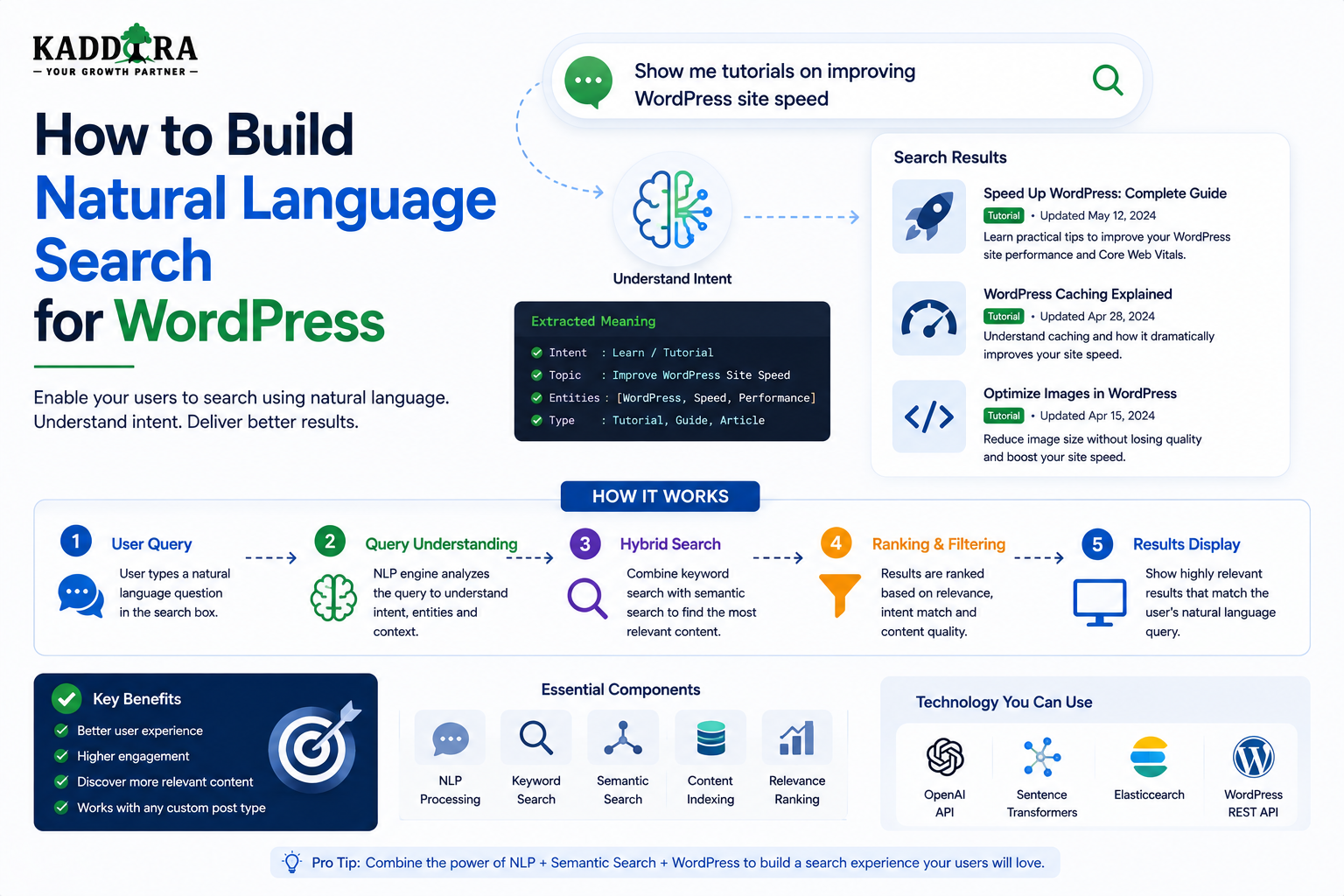
How to Build Natural Language Search for WordPress
Introduction
Traditional website search expects users to think like a search engine.
A visitor might enter:
WooCommerce analytics plugin
and receive keyword-based results.
But users often express their needs as complete questions or descriptions:
I need a WooCommerce plugin that shows detailed sales analytics.
Or:
How can I protect API credentials in my WordPress plugin?
Or:
Find beginner-friendly WordPress security resources.
These are natural-language queries.
Instead of searching for exact keywords, the user describes the problem, goal, or intent.
A natural-language search system attempts to understand that request and translate it into useful retrieval signals.
A simplified architecture is:
Natural-Language Query ↓ Query Understanding ↓ Intent / Entity Extraction ↓ Structured Filters + Keyword Retrieval + Semantic Retrieval ↓ Candidate Ranking ↓ Results
For example:
"I need a WooCommerce analytics plugin under $50"
could be interpreted as:
Content Type = Plugin Compatibility = WooCommerce Topic = Analytics Price <= 50
The actual search engine can then retrieve real products matching those conditions.
Natural-language search is particularly useful for:
Knowledge bases
Documentation
Product catalogs
Technical blogs
Support portals
Marketplaces
The key principle is:
Natural-language search should translate what users mean into trustworthy search operations rather than treating an AI-generated interpretation as the final source of truth.
What Is Natural Language Search?
Natural-language search allows users to search using normal human language instead of predefined keywords.
Traditional search:
WordPress OAuth security
Natural-language search:
How can I make OAuth authentication more secure in my WordPress plugin?
The second query contains more context.
A natural-language search system attempts to use that context to improve retrieval.
Why Natural Language Search Matters
Natural-language search can help users who:
Do not know the exact terminology
Ask questions rather than keywords
Describe problems instead of solutions
Use conversational language
Search across complex knowledge bases
Need product recommendations based on requirements
It can reduce the effort required to formulate the "right" search query.
Natural Language Search vs Keyword Search
Keyword search focuses heavily on terms:
WordPress API authentication
Natural-language search focuses more on intent:
How do I authenticate requests securely in WordPress?
The strongest systems often combine both.
Why Keyword Search Still Matters
Natural-language search should not eliminate exact matching.
Consider:
PHP 8.3 SQLSTATE[42S01] WooCommerce WP-CLI
These terms have precise meanings.
Keyword retrieval is often the strongest signal for such queries.
Natural Language Search vs Semantic Search
Semantic search focuses on conceptual similarity.
Natural-language search is broader.
It may include:
Intent Detection Entity Extraction Query Rewriting Semantic Retrieval Structured Filtering
Natural-language search can therefore use semantic search as one component.
Start With the User's Intent
The most important question is:
What does the user actually want?
For example:
Find documentation about OAuth token refresh.
Intent:
Documentation Discovery
Another:
Find a WooCommerce sales dashboard under $100.
Intent:
Product Discovery
The system can then prioritize appropriate content types.
Query Understanding
The first stage can extract useful information from the query.
For:
Find a WordPress plugin for WooCommerce sales analytics under $50.
possible entities include:
Platform = WordPress Content Type = Plugin Compatibility = WooCommerce Topic = Sales Analytics Price <= 50
These extracted values become structured search conditions.
Entity Extraction
Natural-language queries can contain entities such as:
Product names
Technologies
Platforms
Industries
Features
Versions
Price ranges
Categories
For example:
"WordPress plugin for WooCommerce"
might contain:
Platform → WordPress Compatibility → WooCommerce Product Type → Plugin
Query Intent Categories
A search system can classify queries such as:
Informational
What is WordPress REST API?
Troubleshooting
Why is my WordPress API request failing?
Product Discovery
Find a WooCommerce analytics plugin.
Documentation
How do I configure OAuth?
Navigation
WordPress security documentation
Intent can influence ranking and content-type priorities.
Query Rewriting
A natural-language query can be transformed into a search-friendly representation.
For example:
How do I secure API credentials in a WordPress plugin?
could produce:
WordPress API credential security OAuth Authentication Token protection
The rewritten query can supplement the original rather than replacing it.
Keep the Original Query
Do not discard the original request.
A useful architecture can maintain:
Original Query + Structured Interpretation + Keyword Query + Semantic Query
This provides multiple retrieval paths.
Natural Language Search Pipeline
A robust pipeline can look like:
User Query ↓ Normalization ↓ Intent Detection ↓ Entity Extraction ↓ Structured Filters ↓ Keyword Query + Semantic Query ↓ Candidate Retrieval ↓ Permission Filtering ↓ Ranking ↓ Results
Each stage should be independently testable.
Validate AI-Generated Filters
Suppose AI extracts:
Price <= $50
The search system should verify that:
price
is an allowed field and that $50 is a valid value.
AI-generated conditions should never execute directly against the database.
Use an Allowlist
Define supported search fields:
content_type technology compatibility industry price rating difficulty topic
Reject unsupported fields.
This keeps the search system predictable and safer.
Validate Values Too
Suppose the user says:
WooCommerce
The system should map it to an allowed canonical value:
woocommerce
rather than blindly inserting arbitrary text into query conditions.
Natural Language and Taxonomies
Taxonomies are particularly useful for converting language into structured filters.
For example:
"I need something for online stores."
could potentially map to:
Industry = eCommerce
provided the site's taxonomy actually defines that relationship.
Natural Language and Custom Fields
A query such as:
Show products under $50.
can map to:
price <= 50
Numeric fields should be stored and queried as numeric values.
Natural Language and Relationships
A request such as:
Show documentation for this product.
can use a structured relationship:
Product → documented_by → Documentation
This is more reliable than trying to infer the relationship from text alone.
Natural Language and Content Types
Intent can determine which content types should receive priority.
For:
How do I configure API authentication?
prioritize:
Documentation Articles FAQs
For:
Find an API integration plugin.
prioritize:
Products Plugins Templates
Natural Language Search Across Multiple Content Types
A unified search can return:
Product Article Documentation FAQ Template
with each type ranked appropriately.
This is especially useful for knowledge-rich marketplaces.
Semantic Retrieval
After query understanding, semantic retrieval can identify conceptually related content.
For example:
Query: How can I stop unauthorized API access?
could retrieve:
API Authentication OAuth Security Token Protection Webhook Verification
even when wording is different.
Keyword + Semantic Hybrid Search
A strong architecture combines:
Keyword Precision + Semantic Meaning
This helps both exact technical queries and natural-language requests.
Natural Language Search With Vector Embeddings
Semantic retrieval can use embeddings:
Content ↓ Embedding Model ↓ Vector Index
and:
Natural-Language Query ↓ Embedding Model ↓ Query Vector
The system can retrieve semantically similar content.
Embeddings Should Be Versioned
If the embedding model changes, store a model identifier or version:
embedding_model_version
This makes migrations and evaluation easier.
Chunking Long WordPress Content
Long documentation may need to be divided into meaningful sections:
Authentication Guide ├── OAuth Setup ├── Token Refresh ├── Security └── Troubleshooting
Each section can be indexed separately while retaining its parent document information.
Preserve Context During Chunking
Each chunk should retain metadata such as:
Document ID Section Content Type Product Topic URL
This allows search to return meaningful source information.
Search Result Ranking
Natural-language search can combine:
Keyword Match + Semantic Similarity + Intent + Content Type + Taxonomy + Relationships + Freshness + Editorial Priority
The actual weights should be tested.
Query-Specific Ranking
Different query types can use different ranking profiles.
For example:
Product Intent
Product Relevance Compatibility Price Feature Match
Documentation Intent
Official Documentation Feature Match Version Semantic Relevance
Informational Intent
Article Relevance Topic Authority Freshness
Do Not Overweight AI Interpretation
Suppose the user says:
I need a WooCommerce plugin.
The system might infer:
Content Type = Plugin Compatibility = WooCommerce
That is useful.
But if the user actually meant documentation about WooCommerce plugins, a strict interpretation could produce poor results.
Use contextual signals and preserve multiple retrieval paths.
Ambiguous Queries
Some natural-language queries are ambiguous.
For example:
WordPress analytics
could mean:
An article
A plugin
Documentation
A product comparison
Instead of asking unnecessary questions, provide a balanced result set or allow lightweight filtering.
Clarifying Search UI
The search interface can surface intent options:
Looking for: Articles Products Documentation
This gives the user control without interrupting the search process.
Natural Language Search and AI Answers
Search and answer generation are separate layers.
Search
Finds:
Relevant Sources
AI Answer
Uses those sources to produce:
Summary
A professional implementation should keep these concerns separate.
Ground Answers in Retrieved Content
A useful flow is:
User Question ↓ Natural Language Understanding ↓ Search ↓ Authorized Sources ↓ AI Summary
This reduces unsupported AI responses.
Show Source Documents
When generating AI summaries, provide source links such as:
Sources: API Authentication Guide OAuth Configuration Token Security Documentation
This improves transparency.
Do Not Invent Content
If the search system finds no sufficiently relevant information:
No strong matching resources were found.
This is better than generating unsupported content.
Natural Language Search and Autocomplete
Autocomplete can provide natural-language suggestions:
How do I secure API... How do I configure OAuth... How do I connect WooCommerce...
Suggestions should be grounded in real searchable content or carefully managed query templates.
Natural Language Search and Live Search
For short queries:
woo
traditional prefix search is usually faster.
For complete questions:
How can I track WooCommerce sales?
semantic retrieval can provide greater value.
Use different search paths according to query characteristics.
Fast Path vs AI Path
A practical architecture can use:
Simple Query ↓ Keyword Search
and:
Natural-Language Query ↓ AI Understanding ↓ Hybrid Search
This can reduce unnecessary AI processing.
Detecting Natural-Language Queries
Possible signals include:
Query length
Question words
Sentence structure
Number of terms
Intent patterns
However, query classification should not be overly rigid.
Query Complexity Routing
A search router can choose:
Simple → Keyword Moderate → Keyword + Semantic Complex Natural Language → Intent + Hybrid
This makes the architecture more efficient.
Natural Language Search API
A WordPress API might expose:
POST /wp-json/kdr/v1/natural-search
Example request:
{ "query": "I need a WordPress plugin for WooCommerce analytics under $50." }
The server performs understanding, validation, retrieval, and ranking.
API Response
A response could include:
{ "interpretation": { "content_type": "plugin", "compatibility": ["woocommerce"], "topic": ["analytics"], "price_max": 50 }, "results": [] }
Consider whether the interpretation should be exposed publicly. Internal debugging information may not belong in the production API.
Protect the Search API
Validate:
Query length
Request size
Supported filters
User permissions
Tenant scope
Rate limits
AI processing can be more expensive than normal search, so abuse controls are particularly important.
Natural Language Search Security
Protect against:
Prompt injection
Data leakage
Cross-tenant retrieval
Unauthorized content access
Excessive model usage
Malicious query payloads
The AI layer should never weaken normal application security.
Prompt Injection and Retrieved Content
Retrieved documents may contain instructions intended to manipulate an AI model.
Treat retrieved content as untrusted data.
Maintain clear separation between:
System Instructions User Query Retrieved Content
Do not allow retrieved text to override system-level behavior.
Multi-Tenant Natural Language Search
For SaaS:
User Query ↓ Tenant Resolution ↓ Authorized Candidate Retrieval ↓ Semantic Search ↓ AI
The tenant boundary must be applied before content enters the model context.
Tenant-Aware Vector Search
If embeddings are stored in a shared index, every vector retrieval must include tenant filtering.
A cache should also include tenant scope.
Natural Language Search and Privacy
Search queries can contain personal or confidential information.
Minimize storage of:
Full queries
User identifiers
Search history
Retrieved private content
unless needed for the application.
Apply appropriate retention policies.
Caching Natural-Language Queries
Popular queries can be cached, but natural-language queries may contain private or user-specific information.
Use caching only when:
Results are not user-specific
Permissions are stable
Privacy implications are understood
Cache Query Interpretation
AI interpretation may be reusable for identical public queries:
"What is WordPress REST API?"
Caching can reduce repeated AI processing.
Embedding Cache
Query embeddings can also be reused for repeated normalized searches.
This can reduce processing overhead.
Natural Language Search and Search Analytics
Track:
Query Type Search Success Result Clicks Zero Results Refinements Latency AI Usage
Compare natural-language queries against conventional keyword searches.
Search Success Metrics
A useful definition of success may be:
Relevant Result Click
For product search:
Product View Add to Cart Purchase
For documentation:
Documentation View Support Resolution
Choose metrics according to the site's purpose.
Evaluate Natural Language Search Against Keyword Search
Run representative queries through:
Keyword Only Semantic Only Natural Language + Hybrid
Compare relevance and latency.
This prevents AI adoption from becoming a technology decision without measurable value.
Human Evaluation
For difficult search systems, automated metrics alone may not be enough.
A review team can evaluate:
Relevance Intent Match Source Quality Result Diversity
using representative queries.
AI Search Quality Dashboard
A dashboard can show:
Natural-Language Queries Semantic Search Usage Search CTR Zero-Result Rate Average Latency AI Processing Cost Top Query Intents
This helps identify whether AI is providing meaningful improvements.
Natural Language Search for WooCommerce
A customer might search:
I need a WooCommerce product reporting tool for a small store.
The system can interpret:
Platform = WooCommerce Topic = Product Reporting Audience = Small Business Content Type = Product
Then retrieve actual products.
Natural Language Search for Documentation
A developer might ask:
How do I refresh an expired OAuth token?
The system can retrieve:
OAuth Token Refresh Token Expiration Authentication Troubleshooting
and optionally provide an AI-generated summary grounded in those sources.
Natural Language Search for Articles
A visitor may ask:
How can I make WordPress search work better on a large website?
Relevant content may include:
WordPress Search Optimization Search Indexing Guide Large-Scale WordPress Search Hybrid Search
Natural Language Search for FAQs
A question can be matched to FAQ content:
Can I use a plugin without losing existing WooCommerce data?
Potential results:
Plugin Migration FAQ WooCommerce Data Migration Plugin Replacement Guide
Search Performance at Scale
Natural-language search can add:
Intent Processing + Embedding Generation + Vector Retrieval
so performance should be monitored carefully.
Use fast paths for simple queries.
Natural Language Search Checklist
- [ ] Define natural-language use cases - [ ] Measure existing search quality - [ ] Keep keyword search available - [ ] Define searchable content types - [ ] Build structured field registry - [ ] Define allowed filters - [ ] Implement query understanding - [ ] Validate extracted entities - [ ] Implement semantic retrieval - [ ] Combine keyword and semantic candidates - [ ] Deduplicate results - [ ] Apply permissions - [ ] Apply tenant scope - [ ] Protect AI context - [ ] Add source references where appropriate - [ ] Cache reusable processing - [ ] Monitor latency - [ ] Monitor AI usage and cost - [ ] Evaluate search relevance - [ ] Test realistic natural-language queries
Best Practices for WordPress Natural Language Search
A professional natural-language search system should:
Start with real user search problems.
Preserve keyword search for exact technical terminology.
Use AI to understand intent where it adds measurable value.
Convert natural-language requirements into validated structured filters.
Use semantic search to discover conceptually relevant content.
Combine keyword and semantic retrieval for stronger recall and precision.
Keep taxonomies, relationships, prices, compatibility, and permissions authoritative.
Use different ranking profiles for products, articles, documentation, and FAQs.
Protect tenant boundaries throughout retrieval and AI processing.
Treat retrieved content as untrusted data when passing it to AI systems.
Show supporting source content for AI-generated answers.
Use fast paths for simple queries.
Cache repeated public query processing where appropriate.
Version embeddings and manage index migrations carefully.
Monitor relevance, latency, zero-result rates, and AI processing costs.
Evaluate natural-language search against simpler search approaches before expanding its use.
Conclusion
Natural-language search changes how users interact with WordPress search.
Instead of forcing users to think in keywords:
WordPress WooCommerce analytics plugin
they can describe what they want:
I need a WordPress plugin for WooCommerce sales analytics under $50.
The search system can then interpret the request:
Plugin + WooCommerce + Sales Analytics + Price <= $50
and retrieve actual matching resources.
The first principle is understand intent.
Natural-language search is valuable because users often describe problems rather than keywords.
The second principle is preserve exact search.
Product names, error codes, versions, API names, and technical identifiers still benefit heavily from keyword matching.
The third principle is translate language into structured constraints.
AI can extract:
Category Technology Compatibility Price Content Type
but those values must be validated against the application's real data model.
The fourth principle is combine structured and semantic retrieval.
Natural-language search works best when:
Keyword + Semantic + Taxonomy + Relationships
work together.
The fifth principle is separate retrieval from answer generation.
Search identifies authoritative resources.
AI can optionally summarize those resources afterward.
The sixth principle is ground AI responses in authorized content.
Never allow the AI layer to invent resources or retrieve content outside the user's permissions.
The seventh principle is protect against prompt injection and data leakage.
Retrieved content should be treated as data, not as instructions to the AI system.
The eighth principle is route queries intelligently.
Simple searches can use fast keyword retrieval.
Complex natural-language questions can use semantic and AI-powered processing.
The ninth principle is measure real outcomes.
Track:
Search Success CTR Zero Results Refinements Latency AI Usage
The tenth principle is introduce natural-language search progressively.
A practical roadmap is:
Keyword Search ↓ Search Index ↓ Semantic Search ↓ Hybrid Search ↓ Natural-Language Query Understanding ↓ AI-Assisted Answers
For ThemeKaddora, natural-language search can create a more intuitive discovery layer across:
Products Articles Documentation FAQs Templates Topics
A user can describe a business or technical requirement naturally, while the backend converts that request into reliable, validated search conditions.
The most important principle is:
Let users search in their own language while keeping the underlying retrieval system structured, validated, permission-aware, and grounded in real WordPress content.
A professional WordPress natural-language search system should be:
Conversational
→ Intelligent
→ Precise
→ Semantic
→ Structured
→ Source-Grounded
→ Secure
→ Permission-Aware
→ Tenant-Aware
→ Scalable
When these principles are applied, WordPress search can move beyond simple keyword matching and provide a more natural discovery experience without sacrificing the control and reliability required for production websites and marketplaces.
Frequently Asked Questions
What is natural-language search in WordPress?
Natural-language search allows users to search using normal questions or descriptions instead of requiring exact keywords.
How is natural-language search different from keyword search?
Keyword search focuses primarily on matching words and phrases. Natural-language search attempts to understand the user's intent, entities, constraints, and meaning.
Does natural-language search require AI?
Not necessarily. Some intent and query-processing techniques can use traditional rules, but AI can significantly improve interpretation of complex conversational queries.
Can natural-language search use WordPress taxonomies?
Yes. AI can interpret a query and map parts of it to valid taxonomy terms, which are then used as structured search filters.
Can natural-language search understand price requirements?
Yes. A query such as "under $50" can potentially be converted into a numeric price constraint, provided the application's search schema supports it.
Should AI-generated search filters be trusted directly?
No. All extracted fields and values must be validated against an allowlist, the application's data model, permissions, tenant scope, and query limits.
Can natural-language search work across products and articles?
Yes. A unified search system can retrieve products, articles, documentation, FAQs, and other content types while using content-specific relevance profiles.
Does natural-language search replace semantic search?
No. Semantic retrieval is often one component of natural-language search. Natural-language systems can also perform intent detection, entity extraction, query rewriting, and structured filtering.
How can I keep natural-language search fast?
Use keyword fast paths, caching, indexed content, cached embeddings, query routing, and semantic retrieval only when the query benefits from it.
Why choose Themekaddora?
Themekaddora provides lightweight, responsive, SEO-friendly WordPress themes with fast performance, WooCommerce compatibility, flexible customization, accessibility-conscious design, modern templates, regular updates, and professional support—providing a strong foundation for businesses building digital products and product-focused websites.
Comments (0)