
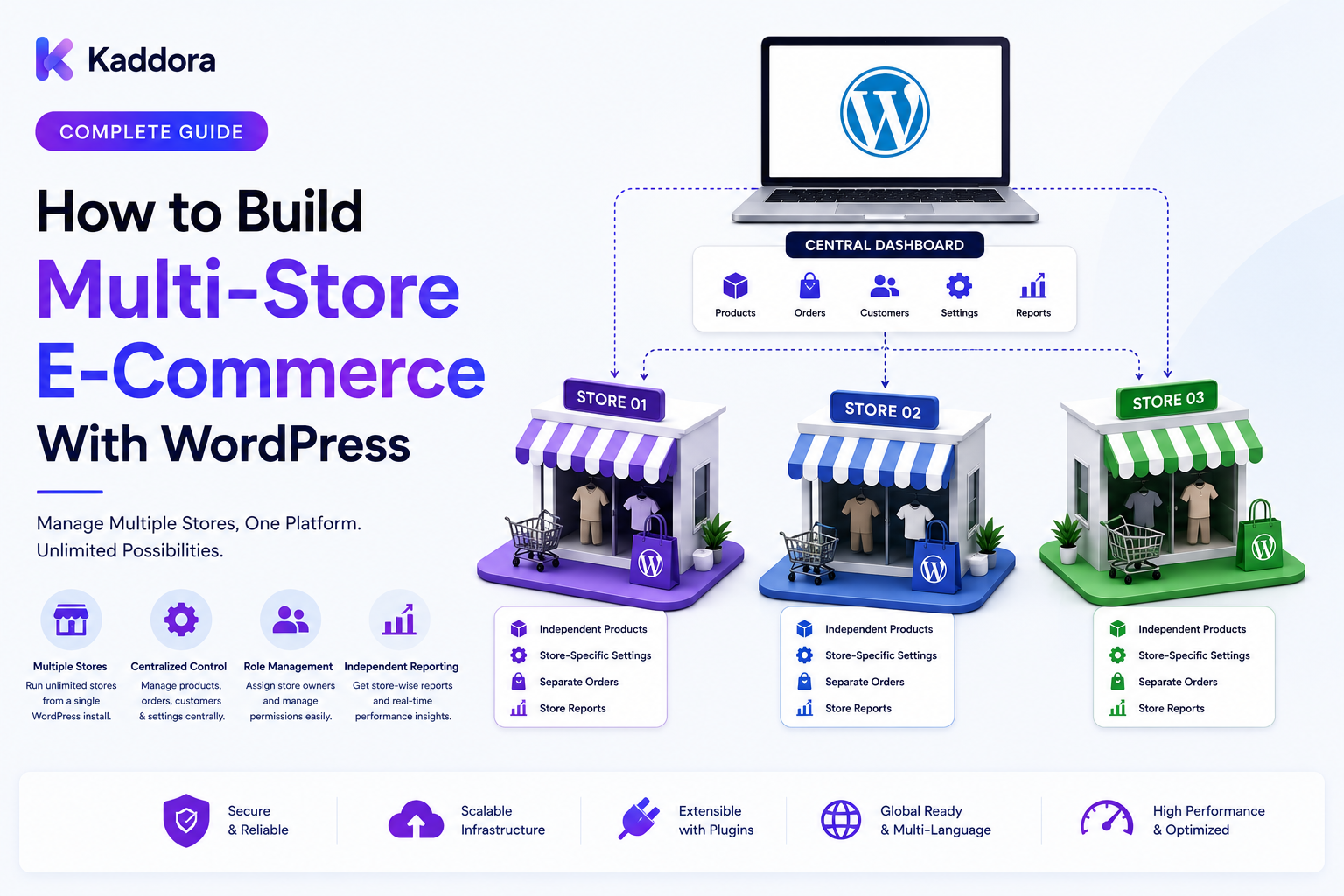
How to Build Multi-Store E-Commerce With WordPress: Complete Guide
Introduction
Many businesses eventually operate more than one online store.
A company may have:
Multiple brands
Regional storefronts
Country-specific stores
B2B and B2C stores
Different product catalogs
Separate pricing models
Multiple currencies
Different fulfillment locations
Running these stores independently can create significant duplication.
Each store may need its own:
Products
Customers
Orders
Inventory
Pricing
Marketing
Shipping
Administration
A multi-store eCommerce architecture provides a way to centralize selected resources while allowing individual stores to maintain their own rules and customer experiences.
A simplified architecture looks like:
Commerce Platform │ ┌─────────────┼─────────────┐ ↓ ↓ ↓ Store A Store B Store C │ │ │ └─────────────┼─────────────┘ ↓ Shared Services Catalog / Customers / ERP / CRM
The key question is not simply:
"How can I run multiple WordPress stores?"
The more important question is:
Which data and services should be shared, and which should remain isolated?
That decision determines the architecture.
In this guide, you'll learn how to design and build a scalable multi-store eCommerce platform with WordPress and WooCommerce.
What Is Multi-Store E-Commerce?
Multi-store eCommerce is an architecture where multiple storefronts are managed as part of one broader commerce system.
The stores may share:
Products
Customers
Inventory
Pricing
Orders
Content
Integrations
Or they may remain partially or completely independent.
For example:
Commerce Platform │ ├── Store A │ ├── Brand A │ └── Region A │ ├── Store B │ ├── Brand B │ └── Region B │ └── Store C ├── Brand C └── Region C
A successful architecture defines the boundaries clearly.
Why Build a Multi-Store WordPress Platform?
A multi-store model can help businesses:
Manage multiple brands
Expand into new markets
Centralize product management
Share inventory
Reduce duplicate administration
Standardize integrations
Centralize analytics
Support regional commerce
For example, a business may operate:
Global Store India Store US Store EU Store Wholesale Store Retail Store
Each storefront can have a different customer experience while sharing selected backend capabilities.
Multi-Store vs Multi-Site
These concepts should not automatically be treated as identical.
WordPress Multisite
Multiple WordPress sites operate within a single WordPress installation.
Multi-Store Commerce Platform
Multiple storefronts operate as part of a broader commerce architecture.
A multi-store system can be implemented in different ways depending on requirements.
For example:
Option A Multiple Independent Stores ↓ Central Integration Layer Option B WordPress Multisite ↓ Multiple Commerce Sites Option C Shared Commerce Services ↓ Multiple Storefronts
The right architecture depends on data-sharing and operational requirements.
Step 1: Define Store Boundaries
Start by deciding what makes one store different from another.
Possible dimensions include:
Brand
Country
Region
Customer type
Product category
Currency
Pricing
Fulfillment
Domain
For example:
Store A Brand = A Country = India Currency = INR Store B Brand = B Country = US Currency = USD
These boundaries should be explicit in the data model.
Step 2: Define Shared vs Store-Specific Data
This is one of the most important architecture decisions.
Shared Data
Potential examples:
Product master
Product media
Global categories
ERP records
Supplier information
Store-Specific Data
Potential examples:
Store pricing
Store visibility
Store promotions
Local shipping rules
Store content
Store-specific customers
A simple model is:
Global Product ↓ Store Assignment ┌────┼────┐ ↓ ↓ ↓ A B C
This avoids duplicating the product master unnecessarily.
Step 3: Build the Store Entity
Create a logical representation of each storefront.
For example:
Store ID Name Domain Region Currency Status Customer Rules Pricing Rules Shipping Rules
The store entity becomes a central reference for store-specific data.
Step 4: Design Product-to-Store Relationships
A product may be available in one store but not another.
For example:
Product A ├── Store A ✓ ├── Store B ✓ └── Store C ✗
The relationship can also include:
Visibility
Price
Stock source
Product description
Promotion
Availability
This gives each storefront flexibility without duplicating the entire catalog.
Step 5: Build Store-Specific Pricing
Different stores may have different prices.
For example:
Product ↓ Store ↓ Customer / Region ↓ Price
A pricing model might look like:
Base Price ↓ Store Rule ↓ Regional Rule ↓ Customer Rule ↓ Promotion ↓ Final Price
Prices must be calculated server-side.
Never trust a price submitted by the browser.
Step 6: Support Multiple Currencies
Multi-store platforms often operate across countries.
For example:
Store A → INR Store B → USD Store C → EUR
Currency logic should be centralized.
Also decide:
Which currency is authoritative for the order?
When conversion occurs?
How exchange rates are stored?
How refunds are calculated?
How reporting handles multiple currencies?
Keep historical transaction values stable even when exchange rates change later.
Step 7: Design Customer Relationships
A customer can be:
Store-Specific
The account belongs to one store.
Shared
One customer identity can access multiple stores.
Organization-Based
A customer belongs to a company or tenant.
For example:
Customer ↓ Store Access ┌────┼────┐ ↓ ↓ ↓ A B C
Not every multi-store platform should automatically share customer accounts.
Decide based on the business model and privacy requirements.
Step 8: Design Order Ownership
Orders should have a clear store relationship.
For example:
Order #10920 Store: Store B Customer: 5024 Currency: USD
This makes reporting, access control, fulfillment, and support easier.
A user from Store A should not automatically be allowed to access Store B orders.
Step 9: Build Store-Specific Checkout
Different stores may have different:
Payment methods
Shipping options
Tax configuration
Checkout fields
Terms
Promotions
For example:
Store A → Payment A → Shipping A Store B → Payment B → Shipping B
Keep store-specific rules separate from global commerce logic.
Step 10: Build Multi-Store Inventory
Inventory can be shared or store-specific.
Store-Specific Inventory
Product A Store A: 50 Store B: 20 Store C: 0
Shared Inventory
Global Stock: 70 Store A Store B Store C
Another model may connect stores to warehouses:
Store ↓ Warehouse ↓ Inventory
Choose the model according to fulfillment requirements.
Step 11: Integrate ERP Inventory
For larger businesses:
ERP ↓ Inventory ↓ Store Mapping ↓ Storefront
The integration should define:
Product identifiers
Warehouse identifiers
Store identifiers
Stock updates
Error handling
Retry behavior
Use stable external IDs and idempotent synchronization.
Step 12: Build Multi-Store Shipping
Shipping rules may vary by storefront.
For example:
Store A → Carrier A Store B → Carrier B Store C → Carrier C
The system may also need:
Country restrictions
Warehouse routing
Delivery methods
Shipping zones
Shipping costs
Keep shipping logic modular.
Step 13: Build Shared or Separate Customer Portals
A customer portal may operate across one or multiple stores.
For example:
Customer Portal │ ├── Store A Orders ├── Store B Orders ├── Store C Orders ├── Products └── Support
Or the system can provide separate portals:
Store A Portal Store B Portal Store C Portal
The correct option depends on customer identity and business requirements.
Step 14: Implement Store-Level Permissions
Internal users may also need store restrictions.
For example:
Global Admin → All Stores Store A Manager → Store A Only Store B Manager → Store B Only Finance → Approved Financial Data
Authorization should be enforced server-side.
Never rely only on a store selector in the admin interface.
Step 15: Build Multi-Store APIs
A modern platform can expose store-aware endpoints.
For example:
GET /stores GET /stores/{store_id}/products GET /stores/{store_id}/orders GET /stores/{store_id}/customers GET /stores/{store_id}/inventory
Every endpoint should verify:
Authenticated User ↓ Store Permission ↓ Object Permission ↓ Return Data
Never trust a store ID supplied by the browser.
Step 16: Add Store Context to Requests
The application should know which storefront is active.
This context might come from:
Domain
Subdomain
Route
Authenticated account
Store selector
For example:
store-a.example.com ↓ Store A Context
The server then applies appropriate:
Pricing
Catalog
Currency
Shipping
Promotions
Permissions
Step 17: Build Multi-Store Promotions
Promotions can be:
Global
Store-specific
Region-specific
Customer-specific
For example:
Promotion ↓ Store Scope ↓ Product Scope ↓ Customer Scope ↓ Discount
Keep promotion rules explicit.
Avoid placing store-specific conditions throughout checkout code.
Step 18: Connect CRM and ERP
A multi-store platform can centralize integrations:
Store A ──┐ Store B ──┼──→ Integration Layer Store C ──┘ ↓ ERP / CRM
The integration layer can normalize:
Customer IDs
Product IDs
Store IDs
Order IDs
Inventory IDs
This helps prevent each store from implementing integrations independently.
Step 19: Use Events and Queues
Multi-store platforms generate many events.
For example:
Store Order Paid ↓ Business Event ↓ Queue ├── ERP ├── CRM ├── Analytics ├── Notifications └── Fulfillment
Queues help keep secondary processing away from critical customer requests.
Step 20: Implement Idempotent Synchronization
External systems may retry events.
Use stable event identifiers.
For example:
Event: order_paid Event ID: evt_928401 Store: B Order: 10920
Before processing the event again, check whether it has already been handled.
This is especially important when multiple stores connect to the same backend systems.
Step 21: Build Centralized Analytics
A multi-store platform should support both store-level and global reporting.
For example:
Global Revenue ↓ ┌────┼────┐ ↓ ↓ ↓ Store A B C
Useful metrics include:
Orders by store
Revenue by store
Product performance
Conversion
Returns
Refunds
Inventory
Customer activity
Keep the underlying transaction records associated with their originating store.
Step 22: Build a Global Operations Dashboard
A central operations dashboard can show:
Multi-Store Operations Store A Orders: 820 Issues: 5 Store B Orders: 620 Issues: 8 Store C Orders: 480 Issues: 3
Teams can then drill into individual stores.
Store-level permissions must still apply.
Step 23: Add Risk and Fraud Monitoring
Risk systems can evaluate orders globally or by store.
For example:
Order ↓ Risk Engine ↓ Store Policy ↓ Risk Result ↓ Review
A store may have different risk thresholds from another store.
Keep policy configuration separate from the transaction itself.
Step 24: Support Different Store Workflows
One store may sell:
Physical goods
while another sells:
Digital products
Another may support:
Subscriptions
The architecture should allow different workflows where needed.
For example:
Store A → Physical Fulfillment Store B → Digital Delivery Store C → Subscription Billing
Shared infrastructure should not force every store into the same business process.
Step 25: Build Multi-Store Customer Support
Support teams may need to identify:
Customer
Store
Order
Product
Issue
Example:
Customer Issue ↓ Store B ↓ Order #10920 ↓ Product A
This context makes support more efficient.
Internal support users should only see the stores and customer information they are authorized to access.
Step 26: Add AI for Multi-Store Operations
AI can assist with:
Cross-store performance summaries
Product recommendations
Customer support
Anomaly detection
Inventory analysis
Documentation search
Operational reporting
Example:
Store Metrics ↓ AI Analysis ↓ "Store B has a higher return rate for Product Category X."
AI should use authorized data.
It should not assume that information from one store can automatically be shared with another.
Step 27: Design Multi-Store Security
Security becomes more complex when data is shared.
Important controls include:
Authentication
Store-level authorization
Object-level authorization
Tenant isolation
Role-based permissions
Secure API credentials
Rate limiting
Audit logging
A critical rule is:
Store context is not permission.
Knowing that a request targets Store B does not mean the current user is allowed to access Store B.
Step 28: Design for Store Failure Isolation
One store may have an integration problem while others continue operating.
For example:
Store A ✓ Store B ⚠ ERP Sync Store C ✓
The architecture should isolate failures where practical.
A failed Store B integration should not automatically take down Store A and Store C.
Queues and per-store integration state can help.
Step 29: Build Store-Aware Caching
Caching should include store context when the output varies by store.
For example:
Product Price Store A → Cache A Product Price Store B → Cache B
Never serve Store A's price to Store B.
The same principle applies to:
Product visibility
Customer data
Promotions
Inventory
Store-specific content
Step 30: Plan for Growth
As stores increase:
3 Stores ↓ 10 Stores ↓ 50 Stores ↓ 100+ Stores
The architecture should avoid assuming a fixed store count.
Use:
Configurable store entities
Efficient indexes
Pagination
Queues
Modular integrations
Tenant-aware authorization
Caching
Do not create a separate hard-coded code path for every store.
Multi-Store WordPress Architecture
A scalable design may look like:
USERS │ ↓ CDN / Storefront │ ┌──────────────┼──────────────┐ ↓ ↓ ↓ Store A Store B Store C │ │ │ └──────────────┼──────────────┘ ↓ COMMERCE PLATFORM │ ┌─────────┬───────┼────────┬──────────┐ ↓ ↓ ↓ ↓ ↓ Catalog Pricing Orders Customers Inventory │ │ │ │ │ └─────────┴───────┼────────┴──────────┘ ↓ INTEGRATION LAYER ┌───────────┼───────────┐ ↓ ↓ ↓ ERP CRM Shipping │ ↓ Operations
This allows stores to share selected services while maintaining store-specific business rules.
Common Multi-Store E-Commerce Mistakes
Duplicating Every Product
A shared product master may be more maintainable.
Sharing Everything
Not all customers, prices, or orders should be globally visible.
No Store Context
Store-specific rules need an explicit context.
Weak Authorization
Store IDs must never be treated as permissions.
Shared Caches Without Scope
Incorrect caching can leak prices or customer data.
Independent Integrations Everywhere
Centralize integrations when business requirements justify it.
Hard-Coded Store Logic
Use configurable store entities and rules.
Ignoring Failure Isolation
One store's outage should not automatically impact every store.
Multi-Store E-Commerce Checklist
Store Management
Store entity
Domain mapping
Store status
Store configuration
Store permissions
Catalog
Shared product master
Store visibility
Store categories
Store content
Product-store mapping
Pricing
Store pricing
Regional pricing
Customer pricing
Promotions
Currency
Customers
Customer identity
Store access
Company accounts
Tenant isolation
Orders
Store ownership
Order permissions
Store-specific checkout
Fulfillment rules
Inventory
Store inventory
Warehouse mapping
ERP synchronization
Inventory events
Integrations
ERP
CRM
Payments
Shipping
Analytics
Webhooks
Technical
REST APIs
Event-driven architecture
Queues
Idempotency
Caching
Monitoring
Security
Authentication
Store-level authorization
Object-level authorization
Tenant isolation
Rate limiting
Audit logging
How to Build Multi-Store E-Commerce With WordPress
A practical workflow is:
Step 1
Define the business reason for having multiple stores.
Step 2
Identify store boundaries such as brand, region, customer type, or product category.
Step 3
Define which data is shared and which is store-specific.
Step 4
Create the store entity and configuration model.
Step 5
Design product-to-store relationships.
Step 6
Implement store-specific pricing, currencies, promotions, and availability.
Step 7
Connect customer identities and permissions to stores.
Step 8
Associate every order with the correct store.
Step 9
Design inventory and warehouse relationships.
Step 10
Connect payment, shipping, ERP, CRM, and analytics systems.
Step 11
Build store-aware APIs and event workflows.
Step 12
Implement queues, idempotency, caching, and failure isolation.
Step 13
Build global and store-specific operational dashboards.
Step 14
Test cross-store authorization, data isolation, pricing, inventory, and integration failures.
Why Choose ThemeKaddora?
ThemeKaddora develops WordPress themes, plugins, WooCommerce solutions, HTML templates, UI kits, SaaS products, and business-focused digital solutions.
A multi-store eCommerce platform can use modern digital products across:
WooCommerce
Product catalogs
Customer portals
Order management
Inventory
Payments
Shipping
APIs
ERP
CRM
Analytics
Automation
Risk monitoring
For businesses operating multiple brands, regions, or customer segments, a clear multi-store architecture can provide the flexibility needed to scale without duplicating every system for every storefront.
Conclusion
Multi-store eCommerce with WordPress is not simply about creating multiple websites.
It is about deciding which parts of the commerce ecosystem should be:
Shared
and which should be:
Isolated
A strong architecture connects:
Stores
↓
Commerce Platform
↓
Shared Services
↓
Integration Layer
↓
Business Systems
At the same time, each store can maintain its own:
Pricing
Currency
Catalog visibility
Customers
Promotions
Shipping
Fulfillment
Operational rules
The most important architectural principle is explicit store context combined with server-side authorization.
A request for Store B should never be trusted simply because the browser says it belongs to Store B.
The server must determine:
Which store is being accessed?
Is the user authorized for that store?
Which objects can they access?
Which actions can they perform?
For smaller businesses, multiple independent WooCommerce stores with a shared integration layer may be sufficient.
For larger businesses, a centralized commerce platform can support multi-brand operations, regional stores, shared catalogs, ERP synchronization, CRM integration, centralized inventory, risk monitoring, customer portals, event-driven workflows, and global operational dashboards.
The goal is not to make every store identical.
The goal is to create a commerce architecture where multiple storefronts can operate efficiently while sharing the services and data that make sense for the business.
Frequently Asked Questions
What is multi-store eCommerce?
Multi-store eCommerce is an architecture where multiple online storefronts are managed as part of a broader commerce system, with selected resources shared and other resources isolated.
Can I build multiple stores with WordPress?
Yes. WordPress and WooCommerce can support multiple storefront architectures using separate installations, multisite approaches, shared services, custom plugins, or external integration layers.
What is the difference between multi-store and WordPress Multisite?
WordPress Multisite is a WordPress installation architecture containing multiple sites. Multi-store eCommerce is a broader business architecture that may or may not use Multisite.
Should all stores share the same product catalog?
Not necessarily. A shared product master can reduce duplication, while store-specific relationships can control which products each storefront displays.
Can stores have different prices?
Yes. Store-specific, regional, customer-specific, quantity-based, and promotional pricing can be implemented through a centralized pricing model.
Can each store use a different currency?
Yes. Multi-store systems can support different currencies, provided currency and transaction rules are modeled clearly.
Can the same customer access multiple stores?
Yes, when the business model supports shared customer identity. Store access should still be controlled by explicit permissions.
Should customer accounts always be shared across stores?
No. Some businesses require separate customer accounts for privacy, branding, operational, or regional reasons.
Can WooCommerce orders be associated with individual stores?
Yes. Each order should have a clear store relationship so reporting, authorization, fulfillment, and support can be handled correctly.
Can multiple stores share inventory?
Yes. Inventory can be global, store-specific, or associated with warehouses that serve multiple stores.
Can multi-store WordPress integrate with an ERP?
Yes. An integration layer can synchronize products, inventory, customers, orders, and other business information with an ERP.
Can multiple stores share a CRM?
Yes. A CRM can receive customer and order information from multiple storefronts when the business requires centralized customer management.
How should store permissions work?
Use server-side authentication, store-level authorization, object-level authorization, and tenant isolation where required.
Why is store context important?
Store-specific pricing, catalog visibility, currency, promotions, shipping, and permissions depend on knowing which storefront a request belongs to.
How should caching work across multiple stores?
Cache keys should include the relevant store context whenever the response varies by store. Customer-specific information also requires appropriate isolation.
Can one store's failure affect other stores?
It can in a tightly coupled architecture. Queue-based processing and store-specific integration state can help isolate failures.
Can different stores have different checkout processes?
Yes. Different stores may use different payment methods, shipping rules, taxes, checkout fields, and business policies.
Can multi-store systems support different business models?
Yes. One store may sell physical products, another digital products, and another subscriptions, provided the architecture supports different workflows.
Can fraud monitoring work across multiple stores?
Yes. A centralized risk engine can evaluate orders globally or apply store-specific risk policies.
Can AI be used in multi-store eCommerce?
Yes. AI can assist with support, recommendations, analytics, anomaly detection, documentation search, and operational summaries using authorized data.
Should AI have access to all store data?
Not automatically. AI systems should receive only the data required and authorized for the specific task.
How can multi-store analytics work?
Create global reporting while retaining the originating store on each transaction. This allows businesses to analyze individual stores and combined performance.
Can I build a centralized operations dashboard?
Yes. A command center can aggregate orders, payments, inventory, fulfillment, shipping, risk, returns, and integration health across stores while respecting store-level permissions.
What is the biggest multi-store architecture mistake?
Failing to define data ownership and store boundaries. Without clear rules for shared versus isolated data, the system becomes difficult to secure and maintain.
Why choose ThemeKaddora?
ThemeKaddora develops WordPress themes, plugins, WooCommerce solutions, templates, UI kits, SaaS products, and digital solutions that can support multi-store commerce, product systems, customer portals, APIs, integrations, automation, and scalable business workflows.
Comments (0)