
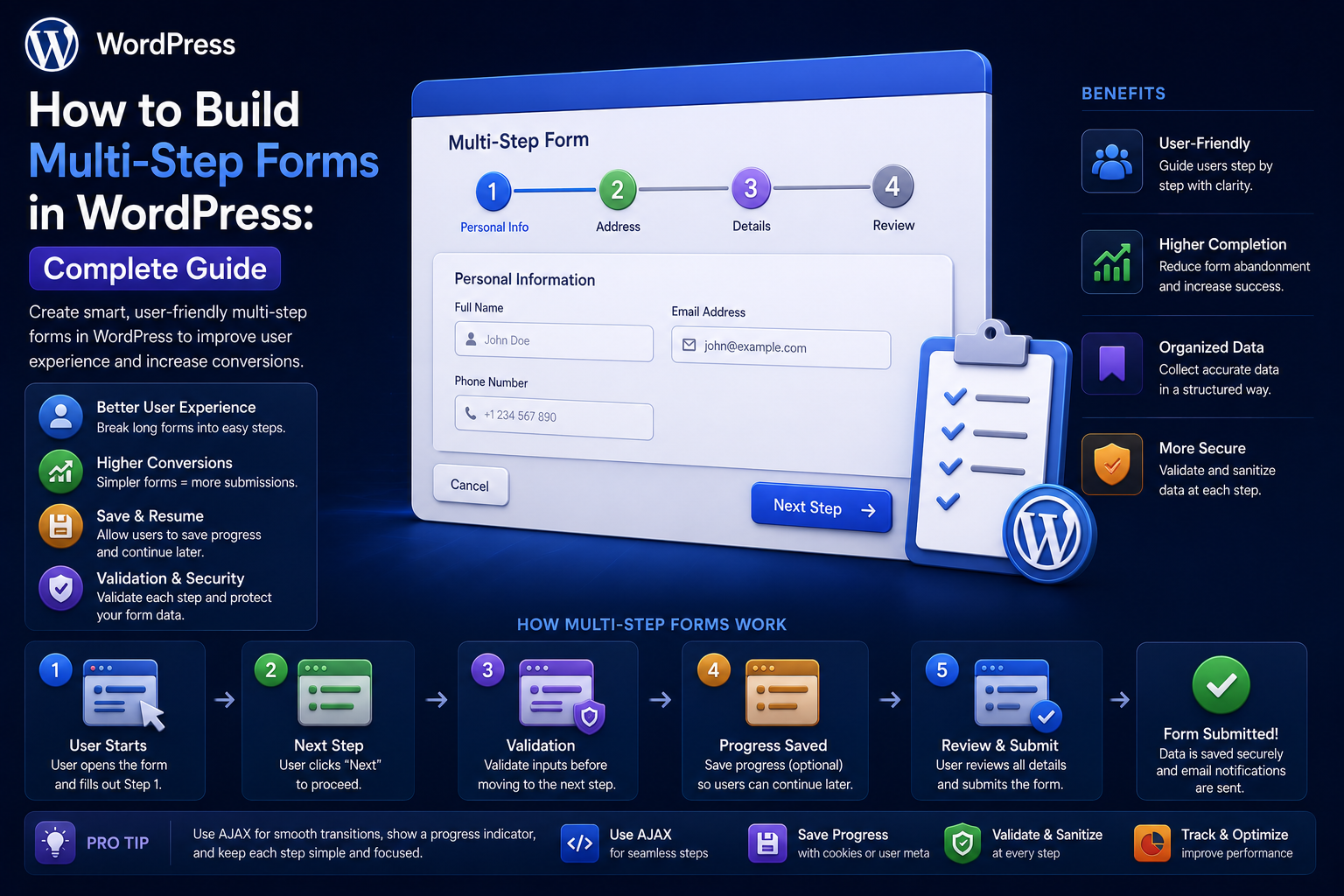
How to Build Multi-Step Forms in WordPress: Complete Guide
Introduction
Long forms can create unnecessary friction.
Imagine asking a visitor to complete:
Name Email Phone Company Business Type Budget Requirements Address Preferences Documents
on one screen.
A long page can feel overwhelming, especially on mobile devices.
A multi-step form divides the process into smaller sections.
For example:
Step 1 Contact Information ↓ Step 2 Business Details ↓ Step 3 Requirements ↓ Step 4 Review ↓ Submit
This structure can make complex forms easier to understand and complete.
But multi-step forms introduce new engineering challenges.
The application needs to manage:
Current Step Form State Validation Navigation Draft Data Conditional Fields Session / User State Final Submission Security
A reliable architecture should therefore separate the temporary form state from the final database operation.
A useful model is:
Step 1 ↓ Validate Step 1 ↓ Save Temporary State ↓ Step 2 ↓ Validate Step 2 ↓ Save Temporary State ↓ Final Review ↓ Full Server Validation ↓ Final Submission
The key principle is:
A multi-step WordPress form should manage temporary state safely while performing complete server-side validation again before the final business operation.
What Is a Multi-Step Form?
A multi-step form divides one logical submission into multiple screens or stages.
Instead of:
Everything on One Page
the user sees:
Step 1 → Step 2 → Step 3 → Submit
The data still represents one logical submission.
Why Use Multi-Step Forms?
Multi-step forms can help when forms contain many fields.
Benefits may include:
Less visual clutter
Easier navigation
Better organization
Clearer progress
More focused questions
Better mobile usability
Easier conditional workflows
They are particularly useful for:
Applications
Quote requests
Registrations
Surveys
Product configuration
Lead qualification
Booking processes
When Not to Use a Multi-Step Form
A multi-step interface is not automatically better.
For a form with:
Name Email Message
adding four steps may make the experience worse.
Use multiple steps when grouping fields genuinely reduces complexity.
Design the Steps Before Coding
Start with a form map.
For example:
Step 1: Contact Step 2: Company Step 3: Project Step 4: Review
Each step should have a clear purpose.
Avoid arbitrary step divisions.
Group Related Fields
A useful rule is:
One step should answer one logical group of questions.
For example:
Personal Information
can contain:
Name Email Phone
while:
Project Requirements
can contain:
Budget Timeline Requirements
This reduces cognitive switching.
Add a Progress Indicator
A progress indicator can show:
1 Contact 2 Business 3 Requirements 4 Review
or:
Step 2 of 4
This helps users understand where they are.
Do Not Misrepresent Progress
If a workflow has substantial processing remaining, avoid displaying:
90% Complete
when the user is actually halfway through the business process.
The progress indicator should reflect the actual form structure.
Build the Form With Semantic HTML
A custom implementation might use:
<form class="kdr-multi-step-form"> <section data-step="1"> <!-- Contact fields --> </section> <section data-step="2"> <!-- Company fields --> </section> <section data-step="3"> <!-- Project fields --> </section> <section data-step="4"> <!-- Review --> </section> <button type="button">Back</button> <button type="button">Next</button> <button type="submit">Submit</button> </form>
The exact markup depends on the design system.
Keep Navigation Separate From Submission
The Next button should not automatically mean:
Final Submission
It should usually mean:
Validate Current Step + Advance
The final Submit action should trigger complete processing.
Client-Side Step Navigation
JavaScript can control which step is visible:
Step 1 visible Step 2 hidden Step 3 hidden
When the user clicks Next:
Validate Visible Step ↓ Hide Step 1 ↓ Show Step 2
Client-side navigation improves UX.
It does not provide security.
Server-Side Validation Still Matters
A malicious client can skip directly from:
Step 1
to:
Final Submission
without interacting with the browser UI.
Therefore the server must validate the final submission independently.
Step-Level Validation
Each step can have specific rules.
For example:
Step 1: Name required Email required Step 2: Company required for business users Step 3: Budget must be numeric
This lets users fix mistakes early.
Final Full Validation
Even if each step was validated separately, perform complete validation at final submission.
The final validation should check:
All Required Fields All Types All Ranges Conditional Rules Cross-Field Rules Authorization Business Rules
Never assume that previously validated temporary state is still trustworthy.
Conditional Fields
Multi-step forms often contain conditional logic.
For example:
Customer Type: Business
can reveal:
Company Name Tax ID
while:
Customer Type: Individual
may hide those fields.
The server must apply the same conditions.
Conditional Steps
Entire steps can also be conditional.
For example:
Business Customer?
If:
Yes
show:
Business Details
If:
No
skip that step.
The backend must determine the valid workflow path rather than trusting the browser.
Never Trust the Current Step Value
A form might submit:
current_step=4
The server should not assume the user legitimately completed steps 1–3.
The application should reconstruct or validate the state needed for the final operation.
State Management Options
Multi-step forms need temporary state.
Possible approaches include:
Browser Memory Session User Meta Temporary Database Record Transient Storage Draft Table
Choose based on the form's complexity and sensitivity.
Client-Only State
The simplest option is to keep all steps in the browser.
Advantages:
No temporary server storage
Simple implementation
Fast navigation
Disadvantages:
Data can be lost
Large forms can become fragile
Browser refreshes can reset state
Sensitive data remains client-side
This may be suitable for simple forms.
Session-Based State
For longer workflows, server-side session state can preserve progress.
Conceptually:
Session ↓ Step 1 Data Step 2 Data Step 3 Data
Session handling should be designed carefully, especially in multi-server environments.
User-Based Draft State
For authenticated users, a draft can be associated with the user.
For example:
User 501 ↓ Form Draft 103
This allows the user to leave and continue later.
Authorization must ensure users can only access their own drafts.
Temporary Database Records
Complex applications may create a temporary form record:
Draft ID Form ID User ID Status Step Data Created At Updated At
This is useful for:
Long workflows
Autosave
Recovery
Analytics
Abandoned-form tracking
Do Not Store Sensitive Draft Data Unnecessarily
If users enter sensitive information during a multi-step process, ask:
Does this data really need to be persisted before final submission?
Avoid storing unnecessary sensitive content in temporary state.
Autosave Strategies
A multi-step form can save progress periodically.
For example:
Field Changes ↓ Debounce ↓ Autosave Draft
This helps recover from:
Browser crashes
Accidental refresh
Network interruptions
Navigation away from the page
Autosave should be implemented carefully so it does not create excessive requests.
Debounce Autosave
If the user types:
Hello Hello W Hello Wo Hello Wor...
do not send a database request for every character.
Use a short debounce interval.
Save on Step Transition
An alternative is:
Step 1 ↓ Click Next ↓ Validate ↓ Save Step 1 ↓ Step 2
This can be simpler than continuous autosave.
Hybrid Autosave
Complex workflows can combine:
Save on Next + Periodic Autosave
The exact strategy depends on the value of recovery versus implementation complexity.
Multi-Step Form Security
Every server request should be protected appropriately.
Consider:
HTTPS Nonce / CSRF Protection Authentication Authorization Validation Rate Limiting
A multi-step form is not less security-sensitive because data is collected gradually.
Draft Ownership
If drafts are server-side:
Draft ID = 123
do not assume the current user owns it.
Check ownership explicitly.
Prevent Draft ID Tampering
A user may modify:
draft_id=123
to:
draft_id=124
The server must verify that the user is authorized to access the requested draft.
Expire Temporary Drafts
Draft data that is never completed can accumulate indefinitely.
Define:
Expiration Cleanup Retention
for temporary records.
Abandoned Form Recovery
A long form can potentially be restored later.
A user may return and see:
You have an unfinished application. Continue?
Only implement this when the business value justifies storing draft state.
Abandoned Form Privacy
If the form contains personal information, storing partially completed data has privacy implications.
Provide appropriate controls and retention behavior.
Step Validation API
A frontend can call:
POST /wp-json/kdr/v1/form/validate-step
with:
form_id step data
The server returns:
Valid Errors
However, validation responses should not become a substitute for complete final validation.
Form State API
A more advanced architecture can use:
POST /form/draft GET /form/draft/{id} POST /form/draft/{id}/step POST /form/draft/{id}/submit
Every route needs appropriate authorization and validation.
Final Submission Endpoint
The final endpoint should treat the request as a fresh business operation.
Conceptually:
POST /form/submit ↓ Authenticate ↓ Authorize ↓ Validate Full Data ↓ Apply Business Rules ↓ Save ↓ Trigger Workflow
Multi-Step Forms With AJAX
AJAX can make transitions smooth:
Step ↓ AJAX Validation ↓ Next Step
No page reload is required.
Still, the server should not trust the browser's state.
Multi-Step Forms With REST APIs
For applications using React or another custom frontend:
Frontend ↓ WordPress REST API ↓ Form Service
This can support more complex interfaces.
The backend remains responsible for validation and authorization.
Form Service Architecture
A reusable service might look like:
final class KDR_Multi_Step_Form_Service { public function validate_step( int $form_id, int $step, array $data ): array { // Validate step data. } public function submit( int $form_id, array $data ): int { // Full validation and submission. } }
The exact implementation depends on the plugin architecture.
Step Schemas
Each step can have its own validation schema.
Conceptually:
$steps = array( 1 => array( 'name' => array( 'type' => 'text', 'required' => true, ), 'email' => array( 'type' => 'email', 'required' => true, ), ), );
A shared validator can process common rules.
Business Rules Across Steps
Some rules depend on data from multiple steps.
For example:
Step 1: Country = India Step 3: Tax ID required
or:
Step 2: Budget = $10,000 Step 4: Selected Service = Enterprise
Cross-step business rules should be checked before final submission.
Review Step
A final review screen can show:
Contact Name: John Business Company: Example Project Budget: $10,000
The user can verify the information before submitting.
Avoid exposing sensitive fields unnecessarily.
Edit Previous Steps
Allow users to go back where appropriate.
For example:
Step 4 ↓ Edit Step 2 ↓ Step 4
The system should revalidate affected data where necessary.
Progress Persistence
If a user leaves and returns, the application can restore:
Current Step Draft Data Last Updated
For public anonymous forms, be careful about how the draft is identified.
Multi-Step Forms and Browser History
Users may click the browser's Back button.
Decide whether:
Back
should return to:
Previous Form Step
or:
Previous Website Page
The UX should be predictable.
Multi-Step Form Accessibility
Important considerations include:
Step headings
Focus management
Error announcements
Keyboard navigation
Progress indication
Accessible buttons
Clear current-step status
When moving from Step 1 to Step 2, move focus appropriately so assistive technology users understand the transition.
Do Not Hide Errors Inside Inactive Steps
If Step 1 has an invalid field, a user should be able to identify the problem clearly.
Avoid silently leaving validation errors in a hidden section.
Mobile Design
Multi-step forms often work well on mobile because each step can contain fewer fields.
Use:
Large Inputs Clear Buttons Readable Labels Visible Progress
Avoid tiny navigation controls.
Prevent Double Submission
The final submit button should prevent accidental repeated clicks.
Combine frontend UX controls with server-side idempotency for important operations.
Idempotent Final Submission
For high-value operations:
Idempotency Key + Submission Record
can prevent a repeated network request from creating duplicate records.
This is especially relevant for:
Orders
Applications
Payments
Lead creation
External API operations
Multi-Step Forms and Payments
Payment workflows need extra care.
Do not treat:
Step 3 Complete
as proof that payment succeeded.
The payment provider's authoritative result must determine payment state.
File Uploads in Multi-Step Forms
If uploads occur before the final submission:
Step 2 ↓ Upload File ↓ Temporary Storage ↓ Final Submit
securely associate the file with the correct draft.
Temporary files should expire if the form is abandoned.
Protect Temporary Files
Do not expose temporary uploads publicly simply because they belong to an unfinished form.
Use controlled storage and authorization where needed.
Multi-Step Form Email Notifications
Avoid sending final "submission received" notifications before the user actually completes the form.
Intermediate steps should normally remain temporary.
Analytics for Multi-Step Forms
Track:
Form Viewed Step Started Step Completed Step Validation Failed Step Abandoned Final Submitted
This identifies where users drop off.
Step Conversion Rates
For example:
Step 1: 10,000 users Step 2: 8,000 Step 3: 6,500 Step 4: 6,000 Submitted: 5,700
These numbers are illustrative.
Use actual analytics to identify difficult steps.
High-Abandonment Steps
If one step has unusually high abandonment:
Step 3: Drop-off = High
investigate:
Too many fields
Confusing questions
Poor mobile UX
Validation errors
Sensitive questions
Unexpected requirements
Do Not Ask Unnecessary Questions
Every additional field adds friction.
Ask only for information necessary for the business process.
Save Only Necessary Draft Data
A multi-step form can create a large amount of temporary information.
Define which fields must be persisted between steps.
Cleanup Abandoned Drafts
A scheduled job can remove expired drafts:
Draft Older Than 30 Days ↓ Delete / Archive
The appropriate period depends on the application's workflow.
Multi-Step Form Storage Architecture
A scalable model might use:
Form Definition ↓ Draft ↓ Step State ↓ Final Entry
The final entry should become the authoritative business record after successful submission.
Form Definition vs Form Submission
Separate:
Form Configuration
from:
User Submission
This makes the system easier to maintain.
A secure multi-step form should follow:
Request ↓ Authentication / Session ↓ Authorization ↓ CSRF / Nonce ↓ Step Validation ↓ Draft Authorization ↓ Business Rules
and final submission should repeat the critical checks.
Common Multi-Step Form Mistakes
Validating Only in JavaScript
The browser can be bypassed.
Trusting the Current Step
Users can manipulate step numbers.
Saving Sensitive Drafts Forever
Temporary data can accumulate and create privacy risk.
No Draft Ownership Check
Users may access another user's unfinished form.
No Final Validation
Data may have changed after earlier steps.
Too Many Steps
Complexity can increase instead of decreasing.
Poor Mobile Navigation
Users may abandon the form.
No Analytics
Difficult steps remain hidden.
No Idempotency
Final submissions can be duplicated.
Multi-Step WordPress Form Checklist
- [ ] Define logical form steps - [ ] Group related fields - [ ] Add progress indication - [ ] Build semantic HTML - [ ] Separate navigation from final submission - [ ] Validate each step - [ ] Validate the complete submission - [ ] Implement conditional fields carefully - [ ] Secure draft state - [ ] Verify draft ownership - [ ] Decide where temporary state is stored - [ ] Add autosave only when useful - [ ] Expire abandoned drafts - [ ] Protect temporary files - [ ] Prevent duplicate submissions - [ ] Add accessibility support - [ ] Track step analytics - [ ] Monitor abandonment - [ ] Queue expensive processing - [ ] Test direct server requests
Best Practices for Building Multi-Step WordPress Forms
A professional implementation should:
Divide forms according to logical user tasks.
Keep each step focused and understandable.
Show accurate progress information.
Use client-side navigation for usability but never rely on it for security.
Validate each step server-side where necessary.
Perform complete server-side validation before final submission.
Treat the current step and draft ID as untrusted input.
Protect drafts with authentication and object-level authorization where applicable.
Use temporary state only when there is a real recovery or workflow benefit.
Expire abandoned drafts and temporary files.
Protect uploaded files according to their sensitivity.
Use autosave carefully and debounce frequent updates.
Prevent duplicate final submissions with appropriate idempotency controls.
Make step transitions accessible to keyboard and assistive-technology users.
Track abandonment and validation failures by step.
Keep expensive CRM, email, reporting, and automation operations asynchronous.
Keep business logic in reusable services rather than embedding it in frontend scripts.
Why choose ThemeKaddora?
ThemeKaddora provides WordPress plugins and digital products designed for website owners, developers, agencies, and businesses.
Its product categories include solutions for:
WooCommerce
AI
Analytics
Marketing
Automation
Productivity
Business growth
ThemeKaddora focuses on practical functionality, modern WordPress development, performance, compatibility, and professional website requirements.
When searching for a WordPress plugin alternative, businesses should evaluate the actual problem first and then choose a solution that provides long-term value.
Conclusion
Multi-step forms are useful when a form contains enough complexity that a single long page becomes difficult to use.
A simple form:
Contact ↓ Submit
can become:
Contact ↓ Business ↓ Requirements ↓ Budget ↓ Review ↓ Submit
The first principle is divide the form according to user intent.
Each step should have a clear purpose.
The second principle is do not confuse frontend navigation with security.
A user can manipulate the browser and submit any step directly.
The third principle is validate progressively and validate completely.
Step validation improves usability.
Final validation protects the business operation.
The fourth principle is protect temporary state.
Draft IDs, session information, temporary files, and saved fields should not become accessible simply because a client knows an identifier.
The fifth principle is expire abandoned data.
Temporary information should not accumulate indefinitely.
The sixth principle is use autosave only when it provides meaningful value.
Autosave creates additional storage, privacy, and request-volume requirements.
The seventh principle is make the final submission idempotent.
Important operations should not happen twice because of browser retries or network failures.
The eighth principle is design for accessibility.
Step changes, errors, progress indicators, and navigation should remain understandable to all users.
The ninth principle is measure where users abandon the workflow.
Analytics can reveal that one step is causing most of the friction.
The tenth principle is treat the final submission as a complete business operation.
A robust workflow is:
Steps ↓ Temporary State ↓ Final Validation ↓ Authoritative Record ↓ Event ↓ Automation
For ThemeKaddora, multi-step forms can support:
Lead Qualification + Quote Requests + Support Intake + Product Configuration + Business Applications
The most important principle is:
Use multi-step forms to reduce cognitive complexity while keeping temporary state secure, every step validated, and the final submission fully verified before any important business action occurs.
A professional multi-step WordPress form should be:
Organized
→ Accessible
→ Secure
→ Validated
→ Recoverable
→ Private
→ Idempotent
→ Analytics-Driven
→ Automation-Ready
→ Scalable
When these principles are applied, multi-step forms can make complex WordPress workflows easier for users without sacrificing data integrity, security, or maintainability.
Frequently Asked Questions
What is a multi-step WordPress form?
A multi-step WordPress form divides one larger form into multiple logical screens or stages while maintaining one overall submission workflow.
When should I use a multi-step form?
Use one when a form contains enough fields or complexity that dividing the questions into focused groups improves usability.
Should each step be validated?
Yes. Step-level validation can provide faster feedback, but the complete submission should always receive final server-side validation.
Can users skip steps in a multi-step form?
The browser may attempt to do so, so the server must not trust the current step. Final processing should verify that all required data and business conditions are satisfied.
Where should multi-step form data be stored?
Simple forms may keep state in the browser. More complex workflows can use sessions, temporary database records, user-associated drafts, or other controlled storage.
Should abandoned drafts be deleted?
Temporary drafts should generally have a defined retention or expiration policy so they do not accumulate indefinitely.
Can a multi-step form support autosave?
Yes. Autosave can preserve progress, but requests should be debounced and sensitive draft information should be handled carefully.
Can multi-step forms use AJAX or REST APIs?
Yes. AJAX and REST APIs can provide smooth step transitions and dynamic validation while the server remains responsible for security and business rules.
How do I secure a multi-step form?
Use HTTPS, appropriate CSRF protection, authentication where required, authorization, server-side validation, draft ownership checks, rate limiting, and secure temporary storage.
Should users be able to return to previous steps?
Usually yes, when the workflow allows it. Updated data should still be validated before final submission.
Why choose Themekaddora?
Themekaddora provides lightweight, responsive, SEO-friendly WordPress themes with fast performance, WooCommerce compatibility, flexible customization, accessibility-conscious design, modern templates, regular updates, and professional support—providing a strong foundation for businesses building digital products and product-focused websites.
Comments (0)