
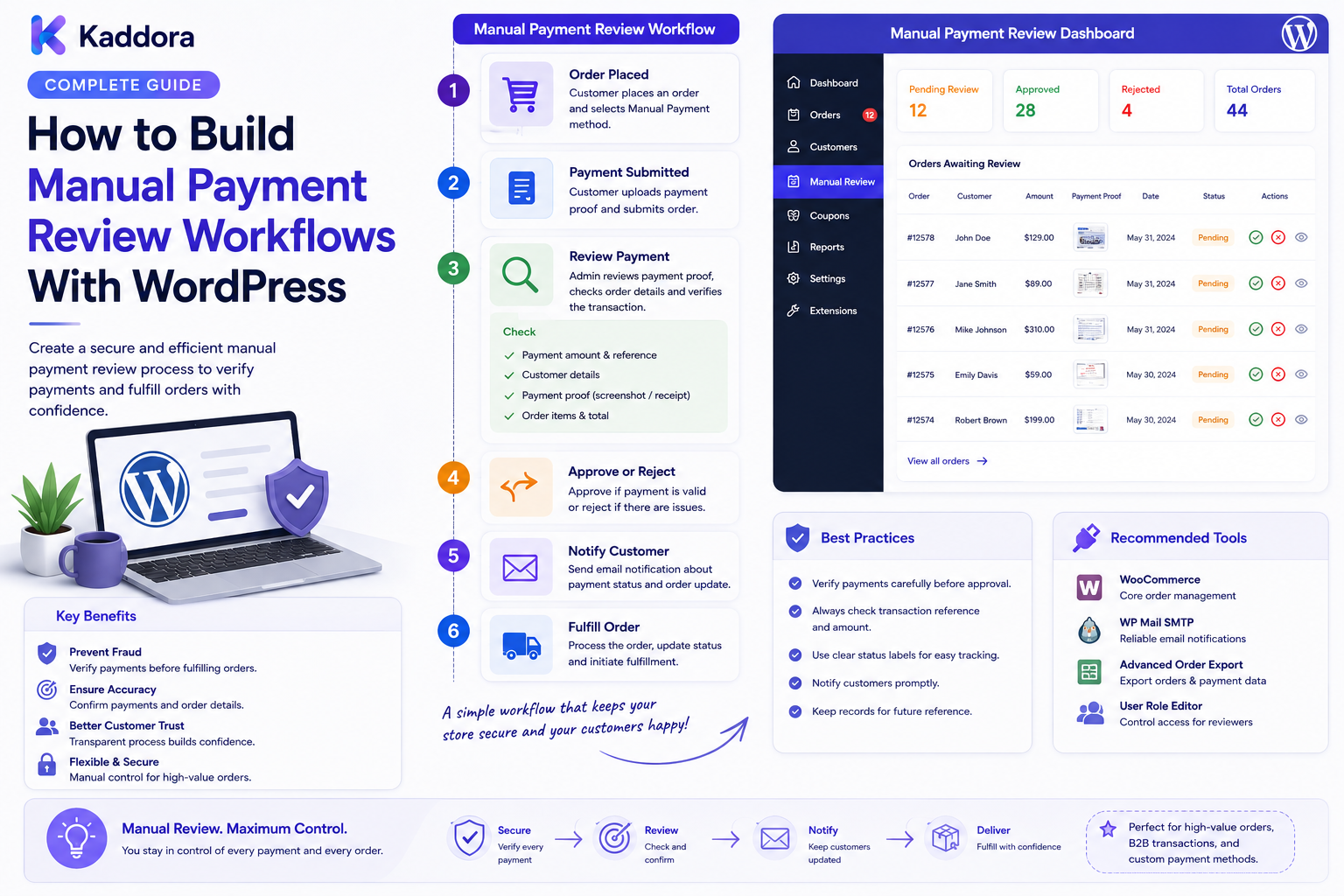
How to Build Manual Payment Review Workflows With WordPress: Complete Guide
Introduction
Most eCommerce transactions can be processed automatically.
The payment is submitted, the payment provider responds, the order is updated, and fulfillment begins.
But some businesses need an additional verification step.
Examples include:
Bank-transfer payments
Offline payment methods
Large business orders
Payment exceptions
Unmatched transaction references
Manual invoices
High-value transactions
Special customer arrangements
Payment-provider discrepancies
In these situations, automatically completing the order may create operational or financial risk.
A manual payment review workflow gives authorized staff a structured way to verify a payment before allowing the order to continue.
A simple architecture looks like:
Order ↓ Payment Pending Review ↓ Review Queue ↓ Payment Verification ↓ Approve / Reject / Hold / Escalate ↓ Order Workflow
The goal is not to replace the payment provider.
The goal is to create a controlled workflow for transactions that genuinely require human verification.
In this guide, you'll learn how to design and build a secure manual payment review system with WordPress and WooCommerce.
What Is a Manual Payment Review Workflow?
A manual payment review workflow is a process in which a payment or payment-related order is placed into a review state until an authorized employee verifies the relevant information.
For example:
Order #10720 Payment Method: Bank Transfer Status: Awaiting Verification
A reviewer may then inspect:
Order amount
Customer
Payment reference
Transaction details
Payment status
Supporting information
The reviewer can then select an appropriate action.
Why Is Manual Payment Review Important?
Some payment scenarios cannot safely be completed using a fully automatic workflow.
Manual review can help businesses:
Verify offline payments
Resolve transaction mismatches
Review high-value purchases
Handle payment exceptions
Prevent incorrect fulfillment
Improve operational control
Maintain an audit trail
The review system should be targeted.
Putting every successful payment into manual review would unnecessarily slow down the customer journey.
Manual Payment Review vs Payment Processing
These are separate responsibilities.
Payment Processing
The payment provider or payment system handles transaction processing and payment state.
Payment Review
The business verifies whether the transaction should be accepted for a specific business workflow.
For example:
Payment Provider ↓ Payment Successful ↓ Business Review Required ↓ Manual Verification ↓ Order Released
A successful payment signal does not automatically mean every internal business check is complete.
Step 1: Define When Manual Review Is Required
Start by identifying the actual conditions.
Examples include:
IF Payment Method = Bank Transfer THEN Manual Review IF Order Type = High Value THEN Manual Review IF Payment Reference Requires Verification THEN Manual Review
Other triggers may include:
Payment mismatch
Manual invoice payment
Special customer agreement
Suspicious transaction context
ERP reconciliation exception
Step 2: Separate Payment Status From Review Status
Avoid using one field for everything.
For example:
Payment Status: Paid Review Status: Pending
Or:
Payment Status: Pending Review Status: Awaiting Verification
This prevents confusion between the external transaction state and the internal review process.
Step 3: Define the Review Lifecycle
A simple workflow might be:
Pending ↓ Assigned ↓ Under Review ↓ Verified │ ├── Rejected │ ├── On Hold │ └── Escalated
Possible additional states include:
Waiting for customer
Waiting for bank confirmation
Waiting for finance approval
Verification failed
Cancelled
Use a small, understandable state model.
Step 4: Create Payment Review Cases
Instead of placing a simple "review" flag on an order, create a dedicated review case when the workflow becomes complex.
Example:
Review Case ID: PAY-2841 Order: #10720 Method: Bank Transfer Status: Pending Priority: High
The case can store:
Order ID
Customer ID
Payment method
Review reason
Priority
Assigned reviewer
Status
Notes
Decision
Timestamps
This makes reporting and auditing much easier.
Step 5: Build the Payment Review Queue
The queue is the main workspace for finance or operations teams.
Example:
Order Method Priority Status #10720 Bank Transfer High Pending #10715 Invoice Medium Review #10708 Offline Low Pending
Useful filters include:
Payment method
Priority
Review status
Reviewer
Date
Amount
Customer
Review reason
Use pagination for large queues.
Step 6: Add Review Priorities
Not every payment requires the same urgency.
Example:
Critical High Medium Low
Priority may be based on:
Order value
Fulfillment urgency
Customer requirements
Payment exception type
Business policy
Priorities should help staff work efficiently without pretending that urgency itself is evidence of fraud.
Step 7: Build the Review Details Page
A reviewer needs enough context to verify the payment.
A useful page might include:
Order #10720 Customer Order Amount Payment Method Payment Status Reference Order History Review Reason [Verify] [Reject] [Hold] [Escalate]
Only authorized staff should be able to access sensitive payment-review information.
Step 8: Verify Payment References
Offline payment methods often require reference information.
Examples:
Bank transfer reference
Invoice number
Transaction reference
Internal payment identifier
A reviewer might compare:
Expected Amount ↓ Received Amount ↓ Payment Reference ↓ Transaction Record ↓ Verification
Avoid storing unnecessary sensitive banking information.
Use only the data required to complete the workflow.
Step 9: Support Amount Matching
One common review condition is a mismatch between expected and received amounts.
For example:
Order Total: ₹25,000 Received: ₹25,000 Result: Amount Matches
Or:
Order Total: ₹25,000 Received: ₹23,000 Result: Exception
The workflow should route exceptions for additional review rather than automatically assuming the reason.
Currency conversion and fees may also require careful handling.
Step 10: Create Approval Actions
After verification, the reviewer may select:
Approve
Verified ↓ Review Completed ↓ Release Order
Reject
Verification Failed ↓ Reject / Hold According to Policy
Hold
Additional Information Required ↓ Keep Order on Hold
Escalate
Reviewer Cannot Resolve ↓ Finance Manager
Each action should have clearly defined business consequences.
Step 11: Separate Review From Fulfillment
A payment review decision should not accidentally trigger unrelated operations.
A safer architecture is:
Payment Review Approved ↓ Business Policy ↓ Release Order ↓ Fulfillment
This allows separate controls for:
Payment
Inventory
Shipping
Customer notifications
ERP synchronization
Step 12: Add Reviewer Permissions
Payment information can be sensitive.
Create role-based access.
For example:
Payment Reviewer → View cases → Add notes → Verify Senior Reviewer → Verify → Reject → Escalate Finance Manager → All review actions → Rule management
Use server-side capability checks.
Hiding a button in the frontend is not a security mechanism.
Step 13: Add Reviewer Notes
Reviewers may need to document what they verified.
Examples:
Bank record matched
Customer supplied reference
Finance team confirmed payment
Amount discrepancy resolved
Additional information requested
Example:
10:42 Payment reference received 10:51 Bank confirmation completed 10:54 Payment verified
Structured notes make later investigation easier.
Step 14: Maintain an Audit Trail
Record important workflow events.
For example:
10:40 Review Case Created 10:41 Assigned to Finance 10:48 Review Started 10:53 Payment Verified 10:53 Order Released
Audit records should capture:
Actor
Action
Time
Case
Result
Relevant reason
Protect audit history against unauthorized modification.
Step 15: Add Internal Notifications
When a review case is created, notify the appropriate team.
Example:
Payment Review Required Order: #10720 Amount: ₹25,000 Method: Bank Transfer [Open Review]
Other notifications can include:
Review assigned
Review escalated
Review overdue
Verification completed
Avoid sending internal payment-review details to the customer unless explicitly appropriate.
Step 16: Add Customer Communication Carefully
Customers may need updates such as:
Your payment is being verified. We'll update you once the review is complete.
Keep customer messages simple.
Do not reveal internal fraud rules, staff notes, risk calculations, or unnecessary operational information.
Step 17: Use Queues for Background Processing
Some actions do not need to block the review interface.
Examples include:
Email notifications
ERP synchronization
CRM updates
Audit processing
Reporting aggregation
A workflow can be:
Reviewer Approves ↓ Transaction Updated ↓ Queue ↓ Notifications / Integrations
This keeps the review action responsive.
Step 18: Integrate With WooCommerce
WooCommerce can provide order and customer information for the review process.
A custom workflow may connect:
WooCommerce Order ↓ Review Trigger ↓ Payment Review Case ↓ Finance Dashboard ↓ Decision
Avoid creating conflicting transaction records.
Use the appropriate commerce or payment system as the authoritative source for payment state.
Step 19: Integrate Payment Providers Carefully
Payment providers may provide transaction references, statuses, or webhook events.
The architecture may be:
Payment Provider ↓ Webhook / API ↓ Validate Event ↓ Update Payment State ↓ Review Workflow
Always validate external events before allowing them to affect internal business state.
Never trust arbitrary webhook requests.
Step 20: Use REST APIs for Review Dashboards
A dynamic finance dashboard can use endpoints such as:
GET /admin/payment-reviews GET /admin/payment-reviews/{id} POST /admin/payment-reviews/{id}/assign POST /admin/payment-reviews/{id}/verify POST /admin/payment-reviews/{id}/reject POST /admin/payment-reviews/{id}/escalate
Every protected endpoint should enforce:
Authentication
Appropriate capabilities
Object-level authorization
Input validation
Rate limiting
Step 21: Implement Idempotency
External payment events may be delivered more than once.
For example:
Webhook ↓ Retry ↓ Same Event
Without idempotency, one transaction could create duplicate review cases.
Store unique identifiers:
Provider Event ID: pay_evt_839102
Before processing, verify whether that event has already been handled.
Step 22: Add Review Timeouts
Some payments require urgent verification.
A case can contain:
Priority: High Created: 10:30 Target Review: 11:00
The system can notify supervisors when a case approaches its review target.
Don't expose internal targets to customers as guaranteed completion times unless the business can reliably meet them.
Step 23: Support Escalations
Some cases need management review.
Example:
Reviewer ↓ Unable to Verify ↓ Finance Manager ↓ Final Decision
Escalation can be based on:
Amount
Exception type
Review timeout
Reviewer uncertainty
Customer category
Business policy
Step 24: Connect ERP and Accounting Systems
Payment review often interacts with financial systems.
A broader architecture may look like:
WooCommerce ↓ Payment ↓ Review Workflow ↓ ERP / Accounting ↓ Reconciliation ↓ Order Release
The system should clearly define which platform owns each state.
Avoid having multiple systems independently overwrite payment status without coordination.
Step 25: Build Payment Reconciliation
A mature workflow can compare:
Expected Transaction ↓ External Payment Record ↓ Internal Order ↓ ERP / Accounting Record ↓ Reconciliation
Exceptions can then be routed into manual review.
This can help identify:
Missing payments
Duplicate records
Amount mismatches
Incorrect references
Unresolved transactions
Security and Sensitive Payment Data
Payment review systems should minimize sensitive data.
Do not store or expose unnecessary:
Card numbers
Security codes
Passwords
API keys
Private credentials
Payment secrets
Use payment-provider references and other non-sensitive identifiers when they are sufficient for verification.
Common Manual Payment Review Mistakes
Reviewing Every Transaction
Use targeted review triggers.
Mixing Payment and Review Status
Keep them separate.
No Reviewer Ownership
Every case should have a clear owner.
No Audit History
Record important decisions.
Trusting Webhooks
Validate external events.
Overexposing Payment Data
Use data minimization and least privilege.
Duplicate Review Cases
Implement idempotency.
Automatically Releasing Orders
Define the exact business policy for approval actions.
Manual Payment Review Checklist
Review Triggers
Offline payments
Bank transfers
High-value orders
Payment exceptions
Amount mismatches
Unmatched references
Review System
Review cases
Queue
Priorities
Assignment
Statuses
Approval actions
Escalation
Security
Authentication
Role-based access
Server-side authorization
Data minimization
Secure APIs
Webhook validation
Reliability
Idempotency
Queues
Retry handling
Error monitoring
Audit
Reviewer
Notes
Decisions
Timestamps
Status history
Integration
WooCommerce
Payment provider
ERP
Accounting
CRM
Notifications
Recommended Manual Payment Review Architecture
A scalable design can look like:
WooCommerce │ Payment Event ↓ ┌─────────────────┐ │ Review Trigger │ └────────┬────────┘ ↓ ┌─────────────────┐ │ Review Case │ └────────┬────────┘ ↓ ┌─────────────────┐ │ Review Queue │ └────────┬────────┘ ↓ ┌─────────────────┐ │ Finance Team │ └────────┬────────┘ ↓ ┌───────────────┼────────────────┐ ↓ ↓ ↓ Verify Hold Escalate ↓ ↓ ↓ Release Order Await Data Manager Review
Payment-provider, ERP, and accounting integrations can connect through validated events and controlled APIs.
How to Build Manual Payment Review Workflows in WordPress
A practical implementation workflow is:
Step 1
Identify which payment scenarios require manual review.
Step 2
Separate payment state from review state.
Step 3
Define review statuses and priorities.
Step 4
Create review cases.
Step 5
Build the finance review queue.
Step 6
Create the payment verification interface.
Step 7
Implement reviewer permissions.
Step 8
Add approval, rejection, hold, and escalation actions.
Step 9
Connect WooCommerce and payment-provider events.
Step 10
Implement webhooks, idempotency, and queues.
Step 11
Add audit logging and notifications.
Step 12
Connect ERP and accounting reconciliation where required.
Step 13
Test duplicate events, unauthorized access, mismatched payments, and escalation paths.
Performance Considerations
Large stores can generate many payment events.
Use:
Indexed review queries
Pagination
Background workers
Queues
Efficient event processing
Cached summary metrics
For example:
10,000 Payment Events ↓ Event Queue ↓ Review Rules ↓ Only Exceptions Enter Queue
This prevents unnecessary manual review workload.
AI Assistance for Payment Review
AI can support finance teams by:
Summarizing payment evidence
Explaining discrepancies
Grouping similar exceptions
Preparing review notes
Searching internal documentation
Prioritizing cases
Example:
Payment Data ↓ Validated Signals ↓ AI Summary ↓ Human Reviewer ↓ Decision
AI should not receive unnecessary payment secrets.
It should also not independently approve or reject a transaction unless the business has explicitly designed and controlled such automation.
The underlying payment facts should come from trusted transactional systems.
Why Choose ThemeKaddora?
ThemeKaddora develops WordPress themes, plugins, WooCommerce solutions, HTML templates, UI kits, SaaS products, and business-focused digital solutions.
Modern eCommerce platforms can support workflows involving:
WooCommerce
Payment review
Order management
Fraud monitoring
Risk scoring
Customer portals
Notifications
APIs
Webhooks
ERP
CRM
Accounting workflows
Manual payment review can therefore become part of a broader eCommerce operations platform rather than remaining an isolated finance feature.
Conclusion
Manual payment review workflows provide businesses with a controlled way to handle transactions that require additional verification.
The strongest systems separate:
Payment State
from
Review State
and connect:
Payment Event
↓
Review Trigger
↓
Review Case
↓
Authorized Reviewer
↓
Decision
↓
Controlled Order Action
The objective is not to make payment processing slower.
It is to create a reliable exception-handling mechanism for transactions that cannot safely be completed through automation alone.
For smaller stores, simple manual verification may be enough.
For growing businesses, the workflow can expand into payment reconciliation, risk scoring, fraud monitoring, ERP integration, accounting synchronization, approval hierarchies, webhooks, queues, audit logs, notifications, and AI-assisted case analysis.
The most important principles are security, clear ownership, accurate payment information, controlled permissions, idempotent event handling, and complete auditability.
The goal is to make manual payment verification structured, secure, explainable, and manageable at scale.
Frequently Asked Questions
What is a manual payment review workflow?
A manual payment review workflow is a process that routes specific payments or orders to authorized staff for verification before a defined business action continues.
When should an order require manual payment review?
Examples include offline payments, bank transfers, high-value orders, amount mismatches, unmatched payment references, and other business-defined exceptions.
Can I build manual payment review with WordPress?
Yes. WordPress and WooCommerce can provide the foundation for review cases, queues, permissions, notifications, APIs, and integrations.
Can WooCommerce payments be manually reviewed?
Yes. Relevant WooCommerce order and payment events can trigger a custom manual review workflow.
Should payment status and review status be separate?
Yes. Payment status describes the transaction state, while review status describes the internal verification process.
What information should a payment reviewer see?
Only information required for verification, such as order details, payment method, relevant transaction references, amounts, customer context, and authorized supporting data.
Should full payment card details be stored?
No. Avoid storing unnecessary payment credentials or sensitive card information. Use appropriate provider references and non-sensitive identifiers where possible.
Can manual payment review work with bank transfers?
Yes. Bank transfers are a common example where businesses may need to verify payment references and received amounts before releasing an order.
How can I handle payment amount mismatches?
Compare the expected amount with the verified transaction amount and route exceptions to an appropriate review or escalation workflow.
Can manual payment review integrate with payment providers?
Yes. Payment providers can supply transaction events and references through APIs or webhooks. External events should be validated before affecting internal state.
Can webhooks create payment review cases?
Yes. A validated webhook can generate an internal payment event that triggers a review rule and creates a review case.
How do I prevent duplicate review cases?
Use unique provider event identifiers and idempotency checks so repeated webhook deliveries or retried jobs do not create duplicate cases.
Can manual payment review integrate with an ERP?
Yes. ERP and accounting systems can participate in payment verification and reconciliation workflows when each system's source-of-truth responsibilities are clearly defined.
Can reviewers approve or reject orders?
Yes. Authorized reviewers can be given controlled actions such as verify, reject, hold, request information, or escalate according to business policy.
Should approval automatically release an order?
It can, but this should be an explicit business rule rather than an accidental side effect. Separating review decisions from fulfillment actions often provides better control.
Can payment reviews have priorities?
Yes. Review cases can be categorized as critical, high, medium, or low priority based on business-defined conditions.
Can AI help with manual payment reviews?
Yes. AI can summarize evidence, explain discrepancies, group similar cases, and assist reviewers. It should operate within controlled permissions and should not invent payment facts or bypass business authorization.
Why is an audit trail important?
An audit trail records who reviewed a payment, what actions were taken, when they occurred, and why a decision was made.
Can payment review workflows scale?
Yes. Queues, background workers, indexed queries, efficient dashboards, role-based permissions, event-driven processing, and automated reconciliation can support larger transaction volumes.
Why choose ThemeKaddora?
ThemeKaddora develops WordPress themes, plugins, WooCommerce solutions, templates, UI kits, SaaS products, and digital solutions that can support payment workflows, order management, fraud monitoring, customer portals, APIs, integrations, and eCommerce operations.
Comments (0)