
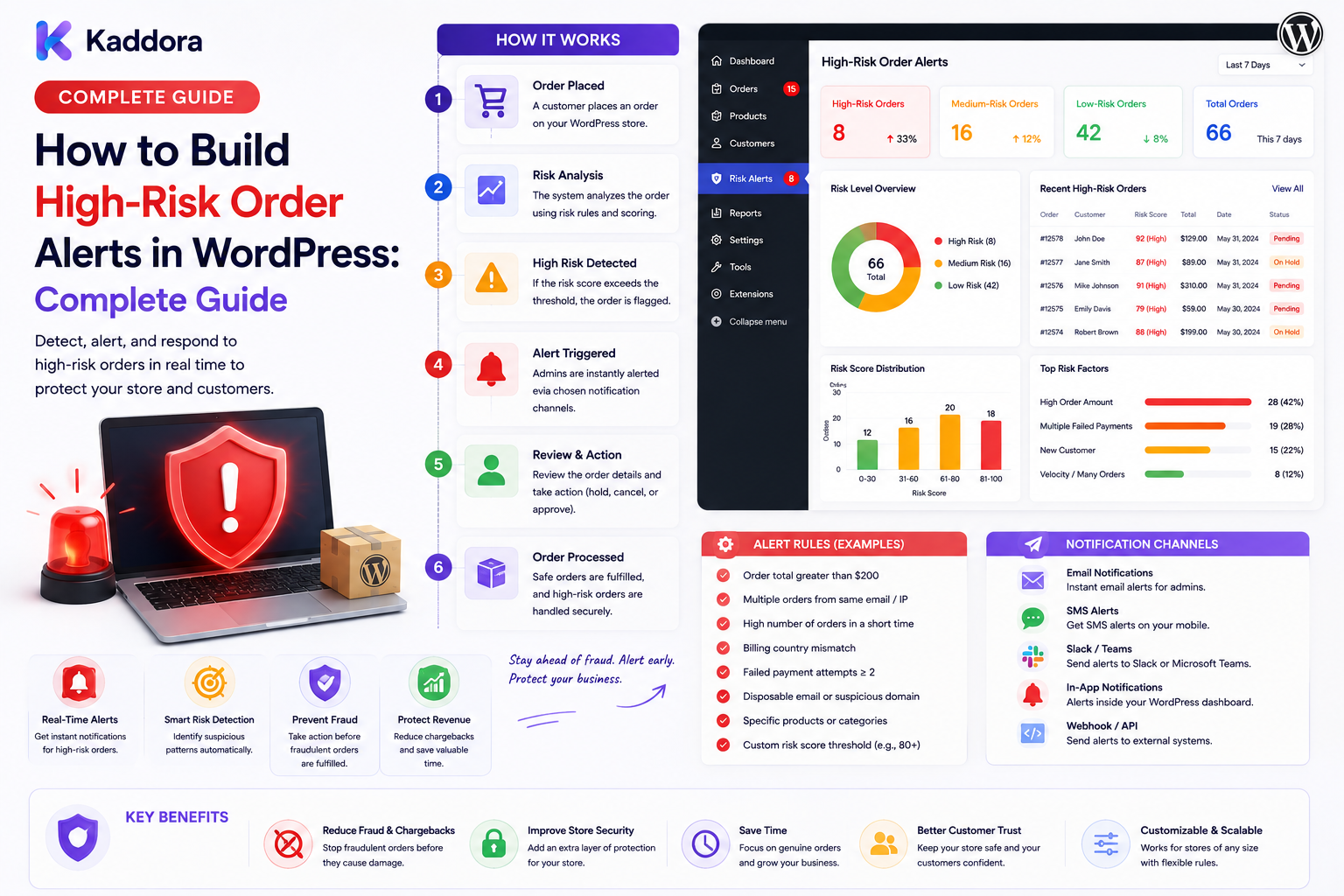
How to Build High-Risk Order Alerts in WordPress: Complete Guide
Introduction
Fraud monitoring and risk scoring are useful only when the business can act on the information they produce.
A high-risk order sitting unnoticed in a database does not help an operations team.
This is why high-risk order alerts are an important part of an eCommerce risk-management system.
When an order reaches a configured risk threshold, the system can notify an authorized team and create a review task.
For example:
Order ↓ Risk Signals ↓ Risk Score ↓ Threshold Reached ↓ High-Risk Alert ↓ Review Queue ↓ Authorized Decision
Alerts can appear in:
WordPress admin
Operations dashboards
Customer-service systems
Internal messaging platforms
Notification centers
The objective is not to alert employees about every unusual order.
The objective is to make important risk conditions visible at the right time.
In this guide, you'll learn how to design and build a reliable high-risk order alert system with WordPress and WooCommerce.
What Are High-Risk Order Alerts?
A high-risk order alert is a notification generated when an order meets one or more business-defined risk conditions.
For example:
Risk Score: 82 Risk Level: High → Create Alert → Create Review Case
The alert itself is not proof of fraudulent activity.
It is a signal that an order may require additional attention.
A well-designed system separates:
Risk Detection
from
Alerting
and
Decision-Making.
Why Are High-Risk Order Alerts Important?
A good alerting system can help businesses:
Detect important exceptions quickly
Prioritize manual review
Reduce delayed responses
Improve operational visibility
Reduce repetitive monitoring
Connect fraud systems with operations
Create a history of important risk events
Without alerts, teams may need to constantly inspect dashboards manually.
Automation lets the system bring important cases to them.
High-Risk Alert vs Risk Score
These concepts are related but different.
Risk Score
Represents the calculated risk level of an order.
High-Risk Alert
Represents a notification or task created because the score or another rule crossed a configured threshold.
For example:
Risk Score: 76 ↓ High Risk ↓ Alert Generated ↓ Manual Review
The score can change without necessarily generating another alert every time.
This prevents notification overload.
Step 1: Define What Counts as High Risk
Start by defining your criteria.
For example:
Risk Score >= 70 → High Risk
Or:
High-value order + Multiple payment attempts → Alert
Possible triggers include:
High risk score
Repeated payment failures
Unusual order velocity
High-value transaction
External provider risk signal
Unusual account behavior
Repeated suspicious activity
The exact rules should be specific to the business.
Step 2: Create Alert Rules
Alert rules determine when a notification should be generated.
Example:
Rule: Risk Score >= 70 Action: Create High-Risk Alert Priority: High
Another:
Rule: External Risk = Critical Action: Create Alert Priority: Critical
Rules should ideally be configurable.
This allows the risk team to refine thresholds without redesigning the entire system.
Step 3: Define Alert Severity
Not every alert has the same urgency.
A useful model is:
Critical High Medium Low
Example:
Critical → Immediate review High → Priority review Medium → Standard review Low → Monitoring
Severity should reflect the action required, not simply how unusual an order looks.
Step 4: Build an Alert Record
Do not rely only on a notification message.
Create a persistent alert record.
Example:
Alert ID: ALT-8921 Order: #10784 Risk Score: 84 Severity: Critical Status: Open Created: 11:25
The alert can store:
Order ID
Customer reference
Risk score
Severity
Trigger
Reason
Status
Assignee
Created time
Resolved time
This allows alerts to become part of the operational workflow.
Step 5: Store Alert Reasons
An alert should explain why it was created.
For example:
Order #10784 Risk Score: 84 Reasons: - 7 payment attempts - Unusual order velocity - High transaction value - External risk signal elevated
Avoid showing only:
HIGH RISK
Without context, the alert has limited operational value.
Step 6: Create an Alert Status Lifecycle
A useful status model is:
Open ↓ Acknowledged ↓ Under Review ↓ Resolved
Additional states may include:
Escalated
Dismissed
False Positive
Monitoring
Waiting for Information
This prevents alerts from becoming an endless list of unresolved notifications.
Step 7: Assign Alerts to Teams
Different alert types may belong to different teams.
For example:
Payment Risk → Finance Fraud Risk → Fraud Team Shipping Risk → Operations Customer Account Risk → Customer Security
Assignment can be:
Manual
Rule-based
Team-based
Role-based
Workload-based
Every alert should have clear ownership when human action is required.
Step 8: Build a High-Risk Alert Dashboard
An operations dashboard can provide a summary such as:
High-Risk Alerts Critical: 5 High: 17 Medium: 34 Open: 42 [View Critical] [View High] [View All]
The dashboard can also show:
Order
Severity
Risk score
Reason
Assignee
Age
Status
Use pagination for large alert volumes.
Step 9: Add Filters
Useful filters include:
Severity
Risk score
Status
Date
Team
Reviewer
Payment method
Order amount
Alert reason
For example:
Severity: Critical Status: Open Team: Fraud
Filtering allows teams to focus on the most important cases.
Step 10: Add Email Alerts
Email remains useful for urgent operational alerts.
Example:
High-Risk Order Detected Order: #10784 Risk Score: 84 Severity: Critical Reasons: Multiple payment attempts Unusual order velocity [Open Review]
Email should contain enough context to explain the event without exposing unnecessary sensitive information.
Step 11: Add Internal Dashboard Notifications
Persistent in-app alerts are useful because they provide history.
For example:
🔴 Order #10784 requires review Risk Score: 84 Severity: Critical [Review Order]
Notifications can link to the appropriate internal review case.
The destination still needs server-side authorization.
Step 12: Add Browser or Push Notifications
For teams that need immediate awareness, browser or application push notifications can be useful.
Example:
Critical: Order #10784 requires review.
Keep push messages concise.
Detailed risk evidence should remain inside the authorized dashboard.
Step 13: Prevent Alert Fatigue
One of the biggest problems with alerting systems is too many notifications.
If every small anomaly creates a message, employees may start ignoring alerts.
Use:
Severity levels
Thresholds
Alert deduplication
Cooldown periods
Grouping
Escalation
Priority routing
For example:
20 Similar Events ↓ 1 Alert Group ↓ Operations Team
This keeps the system actionable.
Step 14: Implement Alert Deduplication
The same underlying event may produce multiple risk evaluations.
Without deduplication:
One Order ↓ Event A ↓ Alert ↓ Retry ↓ Alert
Instead, use a unique alert key.
Example:
Order: #10784 Rule: high_risk Event: evt_839201 Alert: ALT-8921
Before creating another alert, determine whether the same event and condition have already been handled.
Step 15: Use Alert Cooldowns
Sometimes an order remains high risk for a long period.
You may not want a new alert every time the score is recalculated.
A cooldown policy can help:
High-Risk Alert ↓ Cooldown: 30 Minutes ↓ No Duplicate Alert
Cooldowns should be configurable according to severity.
Critical alerts may require different treatment from low-priority alerts.
Step 16: Add Escalation Rules
Unresolved high-risk alerts may require escalation.
For example:
High-Risk Alert ↓ Reviewer ↓ No Action ↓ Timeout ↓ Manager
Escalation can be triggered by:
Severity
Review age
Order value
Business deadline
Reviewer workload
Repeated alerts
The system should record when an alert is escalated and why.
Step 17: Connect Alerts With Review Cases
An alert should usually lead to a structured action.
A useful relationship is:
Risk Evaluation ↓ High-Risk Alert ↓ Review Case ↓ Reviewer ↓ Decision
This prevents alerts from becoming disconnected messages.
The alert brings attention.
The review case manages the work.
Step 18: Connect WooCommerce Events
WooCommerce can act as an important source of order events.
For example:
WooCommerce Order ↓ Risk Evaluation ↓ Threshold ↓ High-Risk Alert
The alert layer should not become the source of truth for order status.
Instead, it should reference authoritative commerce data.
Step 19: Integrate Payment Provider Signals
External payment systems may provide additional risk information.
A typical architecture is:
Payment Provider ↓ API / Webhook ↓ Validation ↓ Risk Signal ↓ Alert Rule ↓ High-Risk Alert
Validate webhook authenticity and payload structure before allowing external events to influence internal workflows.
Step 20: Connect Fraud Monitoring
The previous risk-scoring layer can feed alerts directly.
For example:
Order ↓ Fraud Monitoring ↓ Risk Score: 81 ↓ Policy ↓ High-Risk Alert
The alert should preserve the reasons behind the risk evaluation.
This makes the downstream review much easier.
Step 21: Add REST APIs
An operations dashboard can use REST endpoints such as:
GET /admin/risk-alerts GET /admin/risk-alerts/{id} POST /admin/risk-alerts/{id}/acknowledge POST /admin/risk-alerts/{id}/assign POST /admin/risk-alerts/{id}/resolve POST /admin/risk-alerts/{id}/escalate
Every protected endpoint should enforce:
Authentication
Capability checks
Object-level authorization
Input validation
Rate limiting
Never rely on frontend access controls alone.
Step 22: Add Audit Logging
Record important alert actions.
Example:
11:25 Alert Created 11:26 Assigned to Analyst A 11:31 Acknowledged 11:44 Escalated 12:02 Resolved
Audit records should include:
Actor
Action
Timestamp
Alert
Previous state
New state
Reason
Protect audit information from unauthorized changes.
Step 23: Use Queues for Notifications
Sending every email or notification synchronously can slow down the main application.
Use a queue:
Risk Alert Created ↓ Notification Queue ↓ Worker ↓ Email / Push / Portal
This is especially useful during high-volume sales events.
Step 24: Build Alert Metrics
Useful reporting includes:
Alerts per day
Critical alerts
Average response time
Average resolution time
False-positive rate
Alerts by rule
Alerts by team
Escalation rate
Example:
Alert Metrics Critical: 18 High: 74 Resolved: 68 Escalated: 12 False Positive: 9
Metrics help teams identify noisy rules and operational bottlenecks.
Step 25: Monitor False Positives
An alerting system that produces too many false positives becomes difficult to trust.
Track outcomes:
Alert ↓ Review ↓ Legitimate
or:
Alert ↓ Review ↓ Confirmed Risk
Use these outcomes to improve thresholds and rule design.
AI for High-Risk Order Alerts
AI can assist with alert analysis.
Useful applications include:
Summarizing risk signals
Grouping related alerts
Explaining unusual order patterns
Prioritizing review queues
Drafting analyst notes
For example:
Risk Signals ↓ AI Summary ↓ Reviewer
AI should not invent risk evidence or access data outside the user's authorization.
Critical order decisions should remain governed by explicit business rules and authorized workflows.
Privacy and Security
High-risk alerts may contain sensitive customer and transaction information.
Use:
Least-privilege access
Server-side authorization
Secure APIs
Data minimization
Protected credentials
Audit logging
Appropriate retention
Avoid exposing internal risk scores or investigation notes to customers unless the business intentionally provides such information.
Common High-Risk Alert Mistakes
Alerting on Every Anomaly
Use meaningful thresholds.
No Deduplication
Repeated events can create notification floods.
No Ownership
Every actionable alert should have a responsible team or person.
No Context
Always provide useful reasons for the alert.
Exposing Internal Risk Data
Keep sensitive investigation details restricted.
Synchronous Notifications
Use queues where appropriate.
Ignoring False Positives
Measure outcomes and tune rules.
Trusting External Events
Validate payment and fraud webhooks.
High-Risk Order Alert Checklist
Detection
Risk scoring
Fraud signals
Payment signals
Velocity rules
High-value rules
External provider signals
Alerts
Severity
Alert record
Alert reason
Deduplication
Cooldown
Escalation
Review
Review queue
Assignment
Reviewer permissions
Decision tracking
Resolution
Notifications
Admin dashboard
Push / browser
Notification queue
Security
Authentication
Server-side authorization
Object-level checks
Webhook validation
Data minimization
Audit trail
Analytics
Alert volume
Response time
Resolution time
False positives
Escalations
Rule performance
Recommended High-Risk Alert Architecture
A scalable WordPress and WooCommerce architecture can look like:
WooCommerce │ Order Event ↓ ┌──────────────────┐ │ Risk Engine │ └────────┬─────────┘ ↓ ┌──────────────────┐ │ Policy Layer │ └────────┬─────────┘ ↓ ┌──────────────────┐ │ Alert Generator │ └────────┬─────────┘ ↓ ┌──────────────────┐ │ Alert Record │ └────────┬─────────┘ ↓ ┌──────────────────┐ │ Review Queue │ └────────┬─────────┘ ↓ Reviewer │ ┌────────────┼────────────┐ ↓ ↓ ↓ Resolve Escalate Monitor
External payment, fraud, shipping, ERP, and other systems can provide validated signals to the risk-engine layer.
How to Build High-Risk Order Alerts in WordPress
A practical workflow is:
Step 1
Define what constitutes a high-risk order.
Step 2
Identify the risk signals and data sources.
Step 3
Create configurable alert rules.
Step 4
Define severity levels.
Step 5
Create persistent alert records.
Step 6
Store the reasons behind every alert.
Step 7
Build an alert dashboard and review queue.
Step 8
Add email, portal, or push notifications.
Step 9
Implement deduplication and cooldown policies.
Step 10
Add assignment and escalation.
Step 11
Connect WooCommerce, payment, and fraud-monitoring events.
Step 12
Implement secure APIs, webhooks, and audit logging.
Step 13
Track alert outcomes and false positives.
Step 14
Continuously tune rules based on real operational results.
Performance Considerations
High-volume stores may generate many risk events.
Avoid processing every notification synchronously.
Use:
Queues
Background workers
Indexed alert queries
Pagination
Batched notifications
Efficient risk calculations
Cached summary metrics
For example:
50,000 Orders ↓ Risk Events ↓ Rule Evaluation ↓ Only High-Risk Cases ↓ Alert Queue
This keeps the alerting system focused on actionable cases.
Why Choose ThemeKaddora?
ThemeKaddora develops WordPress themes, plugins, WooCommerce solutions, HTML templates, UI kits, SaaS products, and business-focused digital solutions.
Modern commerce systems can support workflows involving:
WooCommerce
Fraud monitoring
Risk scoring
High-risk alerts
Order review
Customer portals
Notifications
APIs
Webhooks
ERP
CRM
Analytics
Automation
High-risk alerts can therefore become part of a broader eCommerce operations platform that connects transaction intelligence with review, fulfillment, and business automation.
Conclusion
High-risk order alerts create the operational bridge between risk detection and human action.
A strong workflow connects:
Order
↓
Risk Signals
↓
Risk Score
↓
Policy
↓
Alert
↓
Review
↓
Decision
The most effective systems do not simply generate notifications.
They provide useful reasons, appropriate severity, clear ownership, deduplication, escalation, audit history, and secure access to the underlying order information.
For small WooCommerce stores, simple threshold-based alerts may be sufficient.
For larger eCommerce businesses, the alerting architecture can include fraud-provider signals, payment webhooks, risk scoring, review queues, notification workers, escalation rules, analytics, machine-learning signals, and AI-assisted investigation.
The key is to prevent alert fatigue while making important exceptions visible.
The goal is not to notify the business about everything unusual.
The goal is to make the right risks visible to the right people at the right time so they can take the right action.
Frequently Asked Questions
What are high-risk order alerts?
High-risk order alerts are notifications or review tasks generated when an order meets configured risk conditions that require additional attention.
How are high-risk order alerts different from risk scores?
A risk score represents an order's calculated risk, while an alert is generated when a score or another rule requires operational attention.
Can WooCommerce generate high-risk order alerts?
WooCommerce can provide order events that feed a custom risk-monitoring and alerting system.
What can trigger a high-risk order alert?
Triggers can include high risk scores, repeated payment attempts, unusual order velocity, large transactions, external provider signals, or other business-defined conditions.
Should every unusual order create an alert?
No. Alerting every anomaly can create alert fatigue. Use meaningful thresholds, severity levels, deduplication, and business-specific policies.
What information should a high-risk alert contain?
Useful information can include order reference, risk level, score, alert reason, severity, creation time, and a secure link to the authorized review interface.
Should internal fraud information be shown to customers?
Generally, internal risk analysis and investigation details should remain restricted unless the business intentionally exposes a customer-facing explanation.
How can I prevent duplicate high-risk alerts?
Use unique event identifiers, alert keys, deduplication logic, and appropriate cooldown periods.
What is alert fatigue?
Alert fatigue occurs when a team receives too many notifications and begins ignoring them. Good alert design prioritizes actionable events.
Can high-risk alerts be assigned to teams?
Yes. Alerts can be routed to fraud, finance, operations, security, or other teams based on configurable rules.
Can high-risk alerts be escalated?
Yes. Alerts can escalate when they remain unresolved, exceed a review target, or meet other business-defined conditions.
Can payment-provider data trigger alerts?
Yes. Validated payment events and risk signals can feed into an internal alerting system.
Can webhooks be used for high-risk order alerts?
Yes. Payment and fraud-provider webhooks can provide near-real-time events, but their authenticity and payloads should be validated before processing.
Can alerts be connected to a customer review workflow?
Yes. An alert can create or link to a review case where an authorized employee investigates and records a decision.
Can high-risk alerts use REST APIs?
Yes. REST APIs can support administrative dashboards, alert assignment, status updates, resolution, reporting, and integrations when protected with proper authorization.
Should alert notifications be processed asynchronously?
For larger systems, queues and background workers can prevent notification delivery from slowing down the main commerce application.
Can AI help analyze high-risk alerts?
Yes. AI can summarize signals, group related cases, explain patterns, and help prioritize review. It should not invent evidence, bypass permissions, or independently override controlled business decisions.
How should false positives be handled?
Track whether alerts were legitimate, false positives, or confirmed risks. Use the outcomes to improve thresholds and rule quality.
Why is an audit trail important?
An audit trail records when an alert was created, who reviewed it, what actions were taken, and how it was resolved.
Can high-risk alert systems scale?
Yes. Event-driven processing, queues, indexed queries, pagination, background workers, deduplication, and modular integrations allow alerting systems to scale with transaction volume.
Why choose ThemeKaddora?
ThemeKaddora develops WordPress themes, plugins, WooCommerce solutions, templates, UI kits, SaaS products, and digital solutions that can support eCommerce automation, order management, risk monitoring, customer portals, alerts, APIs, integrations, and business workflows.
Comments (0)