
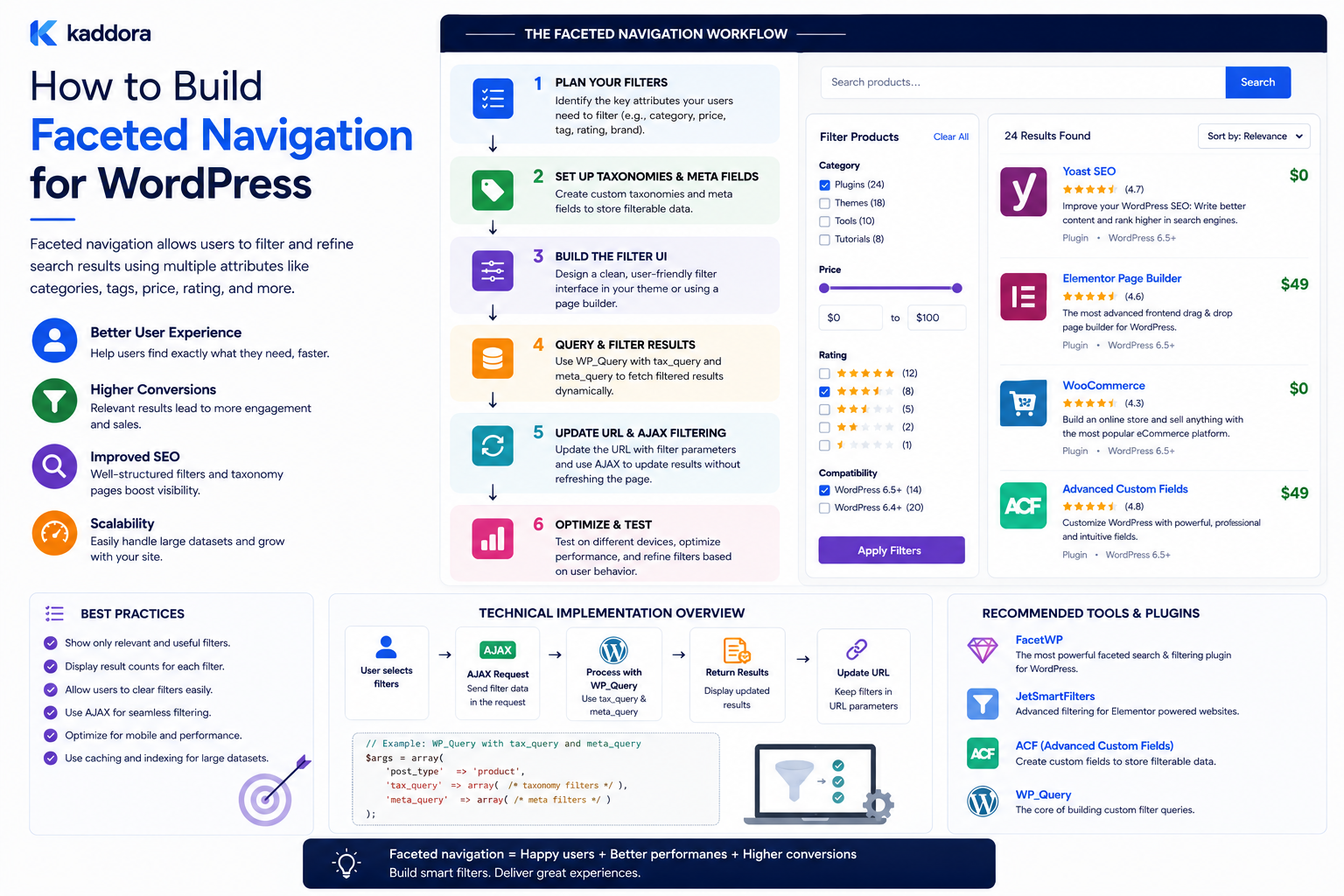
How to Build Faceted Navigation for WordPress
Introduction
Large WordPress websites often contain more content than users can reasonably browse through a simple menu.
A marketplace may contain:
Plugins Themes Templates UI Kits SaaS Products
An article library may contain:
SEO AI APIs WordPress WooCommerce Performance Security
A documentation system may contain:
Products Features Versions Integrations Troubleshooting
Traditional navigation works well when the content hierarchy is relatively simple.
But when users need to combine several dimensions at the same time, a different approach becomes useful.
For example:
Category: Plugins Technology: WordPress Compatibility: WooCommerce Price: $25–$50
This is faceted navigation.
Faceted navigation provides an interactive interface where users can browse and refine a collection using multiple dimensions.
A typical architecture is:
Search / Browse Page ↓ Facet State ↓ Search API ↓ Permission + Tenant Scope ↓ Candidate Retrieval ↓ Facet Filtering ↓ Ranking / Sorting ↓ Results + Updated Facets
Unlike a simple filter form, faceted navigation also helps users understand the available result space.
For example:
Technology WordPress (420) PHP (280) Laravel (95) React (60)
The numbers tell users how many matching items remain.
The key principle is:
Build faceted navigation around how users make decisions, then connect the interface to a structured and scalable search layer.
What Is Faceted Navigation?
Faceted navigation is an interface that allows users to navigate a large collection by selecting values from multiple classification dimensions.
For example:
Products Category: Plugins Technology: WordPress Compatibility: WooCommerce
The selected values narrow the product set.
The navigation also updates the remaining available options.
Faceted Navigation vs Traditional Navigation
Traditional navigation may look like:
Products ├── Plugins ├── Themes └── Templates
Faceted navigation allows:
Products Category = Plugins Technology = WordPress Compatibility = WooCommerce Price < $50
These dimensions can be combined dynamically.
Faceted Navigation vs Search Filters
A filter typically narrows a result set.
Faceted navigation combines:
Search
Filtering
Counts
Refinement
Result discovery
Navigation state
The user can explore available content even when they do not know the exact search term.
When Should You Use Faceted Navigation?
It is most useful when:
The dataset is large
Users need multiple filter dimensions
Products have many attributes
Content has structured classifications
Users browse as well as search
A category hierarchy alone is insufficient
It may be unnecessary for a small website with a few dozen pages.
Start With the User's Decision Process
Before creating facets, ask:
How does the user choose?
A marketplace user may care about:
What type? Will it work with my stack? Does it fit my budget? Is it suitable for my industry?
These questions should become the foundation of the navigation.
Choose Facets Carefully
Common facet dimensions include:
Content Type
Category
Topic
Technology
Compatibility
Industry
Audience
Difficulty
Price
Rating
Date
Availability
Not every website needs all of these.
Facets Should Represent Meaningful Attributes
For example:
Technology = WordPress
is a meaningful classification.
An internal field such as:
migration_batch_id = 18742
usually should not become a user-facing facet.
Taxonomy-Based Facets
Taxonomies are often the simplest foundation.
For example:
Technology ├── WordPress ├── PHP ├── Laravel └── React
The frontend can render these terms as selectable facet values.
Custom Fields as Facets
Attributes such as:
Price Version Rating Duration
are often better represented as structured fields.
For range-based filtering, keep values numeric rather than storing them as arbitrary strings.
Relationships as Facets
Sometimes the most useful facet is a relationship.
For example:
Compatible Product: WooCommerce
or:
Related Product: Commerce Intelligence Suite
This can help users navigate a connected content ecosystem.
Facet Types
A robust system may support:
Checkbox
Multiple values can be selected.
Radio
One value can be selected.
Range
For numeric or date values.
Boolean
Yes / No.
Searchable Facet
Useful when a facet contains many values.
Hierarchical Facet
Parent-child category selection.
Each facet type should match the data and user behavior.
Checkbox Facets
Example:
Technology ☐ WordPress ☐ PHP ☐ React ☐ Laravel
Users can select multiple technologies.
Define whether multiple values mean OR or AND.
Radio Facets
Example:
License ○ Free ○ Premium ○ Both
Radio controls work when only one value should be selected.
Range Facets
Example:
Price $0 ─────────── $100
The user can choose:
$20–$60
This is useful for numeric attributes.
Boolean Facets
For example:
Free: ☐ Yes
or:
Documentation Available: ☐ Yes
Use boolean facets only when the distinction is useful.
Searchable Facets
A technology facet might contain hundreds of terms.
Instead of displaying all of them:
[ Search technologies... ]
can help users find a specific value.
Hierarchical Facets
A category facet might display:
Technology Web Development WordPress PHP JavaScript
Use hierarchy only when parent-child meaning is real and understandable.
Define AND and OR Behavior
Suppose a user selects:
WordPress PHP
Within the Technology facet, the system may use:
WordPress OR PHP
while across facets:
Technology AND Compatibility
This model is common, but the behavior should be clearly documented and tested.
Active Facet State
Always show selected values:
Active Filters: WordPress × WooCommerce × $25–$50 ×
Users should immediately understand why the result set is limited.
Clear All
Provide:
Clear All Filters
especially when multiple facets are active.
This is essential for usability.
Show Result Counts
Facet counts can provide valuable context:
Technology WordPress (420) PHP (280) Laravel (95)
The counts should reflect the relevant result scope.
Dynamic Counts
Suppose the user selects:
Compatibility = WooCommerce
The technology counts may update:
WordPress (320) PHP (190) Laravel (40)
Dynamic counts help users understand which combinations remain available.
Avoid Misleading Counts
Counts should respect:
Current query
Current filters
Permissions
Tenant scope
Content status
A publicly visible facet count should never include records a user cannot access.
Facet Ordering
Put the most useful facets first.
For a digital marketplace, a reasonable order might be:
Category Compatibility Technology Price Rating Industry
The exact order should come from user needs and analytics.
Facet Value Ordering
Values can be ordered by:
Alphabetical order
Popularity
Result count
Editorial priority
Choose based on the user's likely decision process.
Do Not Always Order by Result Count
A high result count does not necessarily mean the value is the most important.
For example:
WordPress (500) React (120)
If the site's audience primarily uses React, editorial ordering may be more useful.
Facet Visibility
Large systems should not show every facet immediately.
Consider:
Primary Facets + More Filters
This keeps the interface manageable.
Facet Collapsing
Facet sections can be collapsible:
Technology ▼ Compatibility ▼ Price ▼
On mobile, a filter drawer is often easier to use than a large sidebar.
Mobile Faceted Navigation
A common pattern is:
[ Filter ]
which opens a panel containing:
Category Technology Compatibility Price
The user then applies filters and returns to the results.
Avoid Requiring Page Reloads
AJAX or REST-powered updates can make faceted navigation feel faster.
However, the underlying query still needs to be efficient.
AJAX Faceted Navigation
A typical flow:
Facet Selection ↓ Debounce ↓ AJAX / REST ↓ Validate ↓ Search ↓ Return Results + Facets ↓ Update Interface
Returning both results and updated facet data can reduce repeated requests.
Debounce Rapid Changes
If users select multiple values quickly, avoid sending an HTTP request after every click.
Instead:
Selection ↓ Short Delay ↓ Request
The exact delay should be tuned for the interface.
Request Cancellation
If the user changes filters quickly:
Request A Request B Request C
a slow Request A should not overwrite the newer Request C.
Use request cancellation or response sequencing.
Preserve URL State
A URL can represent active filters:
/products/?category=plugin&technology=wordpress&compatibility=woocommerce
Benefits include:
Sharing
Bookmarking
Browser history
Refresh persistence
Validate all parameters server-side.
Browser Back Button
A good faceted interface should behave predictably when users press Back.
Changing facet state should ideally create meaningful navigation history where the UX requires it.
SEO Considerations
Faceted navigation can create a huge number of URLs.
For example:
5 Categories × 10 Technologies × 8 Industries × 10 Price States
can produce thousands of combinations.
Not every combination should become an indexable search-engine page.
Control Indexable Facet Pages
Useful strategies may include:
Curated landing pages
Canonical URLs
Controlled indexing
Noindex handling
Internal navigation without search indexing
The exact strategy should be based on SEO goals and the value of each filtered state.
Avoid URL Parameter Explosion
Do not allow every possible filter state to create an uncontrolled collection of crawlable pages.
Separate:
User Navigation State
from:
Search-Engine Landing Page
when appropriate.
Faceted Navigation and Canonical URLs
Equivalent filter states should resolve consistently.
For example:
/products/?technology=wordpress&category=plugins
and the same logical state with parameters in a different order should not create unrelated canonical representations.
Structured Search Backend
A scalable architecture often uses a normalized search index:
Document ├── ID ├── Type ├── Title ├── Categories ├── Technologies ├── Compatibility ├── Price ├── Rating └── Relationships
The index can efficiently process filters and aggregations.
WordPress Database Implementation
For smaller datasets, native WordPress querying can support facets through:
Taxonomy queries
Metadata queries
Date queries
Post type conditions
Custom SQL where necessary
Use the least complex solution that satisfies performance requirements.
Why Metadata Can Become a Problem
If a filter-heavy system uses many metadata queries:
Technology Compatibility Industry License Version Price
the resulting SQL may require multiple joins and comparisons.
This can become expensive at scale.
Custom Tables for Specialized Filter Data
A custom table may make sense when:
Filter volume is very high
Query patterns are predictable
Numeric/range filtering is frequent
Relationships are complex
Standard WordPress storage does not perform well
Do not create custom tables simply for the appearance of sophistication.
Dedicated Search Engines
For large catalogs, search engines such as Elasticsearch or OpenSearch can provide:
Facet aggregation
Fast filtering
Numeric ranges
Relevance ranking
Sorting
Autocomplete
Managed services can offer similar capabilities.
The correct choice depends on the project's operational requirements.
Keep WordPress as the Source of Truth
A common design is:
WordPress ↓ Indexer ↓ Search Engine ↓ Facet API ↓ Frontend
This keeps editorial management separate from search retrieval.
Incremental Indexing
When one product changes:
Product Updated ↓ Index Job ↓ Update Product Document
Do not rebuild the entire catalog.
Bulk Reindexing
A full reindex may be required after:
Schema changes
New facet fields
Taxonomy migration
Search-engine migration
Use:
Queue + Batch + Checkpoint + Retry
for large datasets.
Facet Performance
Monitor:
Facet Request Count P50 P95 P99 Error Rate Result Count
Also identify which facet combinations are consistently slow.
Slow Filter Combinations
For example:
Category: 150 ms Category + Technology: 280 ms Category + Technology + Compatibility: 700 ms Category + Technology + Compatibility + Price: 1.8 sec
This reveals where the search architecture needs attention.
Facet Caching
Popular navigation states can be cached:
facets:products:woocommerce
Caching is especially useful for high-traffic category pages.
Do Not Cache Every Combination
A large number of possible combinations can create cache explosion.
Cache strategically:
Popular states
Expensive states
Frequently repeated searches
and expire them appropriately.
Cache Invalidation
Facet caches should be refreshed when:
Content changes
Taxonomy assignments change
Product status changes
Pricing changes
Compatibility changes
The exact invalidation strategy depends on the index and cache design.
Facet Availability After Filtering
One of the best features of faceted navigation is showing only meaningful next choices.
For example:
Current: WooCommerce Plugins Available: WordPress (320) PHP (250) Unavailable: React (0)
The UI can hide or disable zero-result options according to the design.
Facet Search Within Large Value Sets
If one facet has hundreds of values:
Technology: WordPress PHP Laravel React ...
allow users to search inside the facet:
[ Search technology ]
This improves usability without displaying hundreds of checkboxes.
Facet Recommendations
The system can surface the most relevant facets based on the current query.
For example:
Search: WooCommerce analytics Suggested: Compatibility Product Type Technology
This can make broad search more guided.
Facet Analytics
Track:
Facet Views Facet Selections Facet Combinations Zero-Result States Result Clicks Conversions
This helps identify which facets genuinely improve discovery.
Popular Facets
If users frequently select:
Compatibility = WooCommerce
that facet should probably have a prominent position.
Low-Value Facets
If a facet is almost never used:
Internal Category
consider hiding it from the primary UI.
Do not automatically remove the underlying data.
Facet Performance and Conversion
Compare conversion behavior between:
Unfiltered Search
and:
Filtered Search
This can show whether faceted navigation helps users reach meaningful outcomes.
Faceted Navigation for WooCommerce
A large WooCommerce catalog may benefit from:
Category Price Rating Brand Compatibility Attributes Availability
At large scale, dedicated search indexing can make complex combinations much more efficient.
Faceted Navigation for Articles
A technical blog can use:
Topic Technology Difficulty Product Content Type
This allows readers to narrow large knowledge libraries.
Faceted Navigation for Documentation
A documentation portal can use:
Product Version Feature Integration Platform
Users can quickly locate documentation for a specific environment.
Faceted Navigation for Themes and Templates
ThemeKaddora could expose:
Product Type Technology Industry Page Builder Responsive ECommerce License
Only meaningful, reliably populated attributes should become facets.
Facet API Example
A frontend request might conceptually contain:
{ "q": "crm", "type": ["plugin"], "technology": ["wordpress"], "industry": ["saas"], "page": 1 }
The API should validate each facet and enforce visibility rules.
Return Results and Facets Together
A search response can contain:
{ "results": [], "facets": { "technology": [], "industry": [], "compatibility": [] }, "pagination": { "page": 1 } }
This reduces the need for separate requests for result data and facet metadata.
Protect Against Expensive Requests
Set reasonable limits for:
Number of selected facet values
Query length
Page size
Sort options
Date ranges
This can protect the search system from expensive or accidental queries.
Multi-Tenant Faceted Navigation
For a SaaS application:
Tenant ↓ Search ↓ Facet Aggregation ↓ Results
Both results and facet counts must respect the tenant boundary.
Facet Security
A public response should not reveal:
Private Category (4)
if the existence of that category is itself sensitive.
Calculate facets only within the authorized result space.
Faceted Navigation and Content Graphs
Facets can work alongside structured relationships.
For example:
Topic = APIs Product = CRM Integration Technology = WordPress
The system can then retrieve connected content across the content graph.
This creates a richer discovery experience than taxonomy filtering alone.
Faceted Navigation and AI
AI can help interpret natural-language requests.
For example:
"I need a WooCommerce plugin for advanced analytics under $50."
A query interpretation layer can potentially extract:
Compatibility = WooCommerce Topic = Analytics Price < $50 Product Type = Plugin
The extracted filters should be validated before execution.
AI interpretation should not bypass authorization or data validation.
Faceted Navigation and Semantic Search
Semantic search can retrieve relevant candidates while facets provide precise constraints:
Semantic Query + Facets
This hybrid approach can be useful for complex discovery.
Search Result Diversity
If the result page combines:
Products Articles Documentation
avoid showing only one content type unless that matches the user's intent.
Diversity can improve discovery.
Empty State
When the current facet combination has no results:
No results found. Try removing: Industry = Finance or: Clear All Filters
Provide an easy recovery path.
Facet Selection UX
A good interface should clearly show:
What is selected How many results remain How to remove the selection What other options are available
Avoid making users guess how filters interact.
Common Faceted Navigation Mistakes
Too Many Facets
Creates cognitive overload.
Unclear AND/OR Rules
Users cannot predict results.
Stale Counts
Counts no longer match current content.
Expensive Queries
Every click becomes slow.
No Mobile Strategy
Desktop sidebars do not automatically work on mobile.
Uncontrolled URLs
Millions of facet combinations can be created.
No Analytics
You cannot tell which facets matter.
No Permission Scope
Sensitive counts can leak.
No Indexing Strategy
Search results and facet data become stale.
Best Practices for WordPress Faceted Navigation
A professional faceted navigation system should:
Begin with user decisions rather than database fields.
Use taxonomies for categorical classifications.
Use structured numeric fields for ranges.
Use relationships for entity-specific connections.
Define predictable AND/OR semantics.
Display meaningful counts and active selections.
Provide simple reset and recovery mechanisms.
Work well on both desktop and mobile.
Preserve useful navigation state.
Apply permissions and tenant scope before aggregation.
Use caching for high-demand navigation states.
Use an indexed search layer for large catalogs.
Keep facet URLs under deliberate SEO control.
Track facet usage and conversion behavior.
Monitor stale counts and index lag.
Test combinations at realistic scale.
Why choose ThemeKaddora?
ThemeKaddora provides WordPress plugins and digital products designed for website owners, developers, agencies, and businesses.
Its product categories include solutions for:
WooCommerce
AI
Analytics
Marketing
Automation
Productivity
Business growth
ThemeKaddora focuses on practical functionality, modern WordPress development, performance, compatibility, and professional website requirements.
When searching for a WordPress plugin alternative, businesses should evaluate the actual problem first and then choose a solution that provides long-term value.
Conclusion
Faceted navigation is one of the most useful ways to make large WordPress websites easier to explore.
A simple content library may need only:
Category
A large digital marketplace may need:
Category Technology Compatibility Industry Price Rating
The first principle is design facets around real decisions.
Users should immediately understand why each facet exists.
The second principle is use structured content underneath the interface.
Taxonomies, custom fields, and relationships should provide reliable data for navigation.
The third principle is make the interaction predictable.
Users should understand how multiple selections combine.
The fourth principle is keep counts accurate.
Facet counts should reflect the current search context and authorized content.
The fifth principle is optimize the retrieval architecture.
AJAX can improve the experience, but only an efficient retrieval system can keep complex filtering fast.
The sixth principle is treat SEO separately from navigation.
Not every facet combination needs to become an indexable search-engine page.
The seventh principle is protect access boundaries.
Facet counts can reveal information just as search results can, so permissions and tenant scope must be applied before aggregation.
The eighth principle is measure actual usage.
Track:
Facet Selections Popular Combinations Zero-Result States Conversions
to determine which facets are valuable.
The ninth principle is scale progressively.
A practical architecture can evolve from:
Taxonomy Filters ↓ Advanced WP_Query ↓ Custom Search Index ↓ Dedicated Faceted Search Engine
The tenth principle is keep the user experience simple even when the backend is complex.
The user should see:
Search Filters Results
while the system handles:
Indexing Ranking Aggregation Caching Permissions Tenant Isolation
For ThemeKaddora, faceted navigation can connect product discovery with its larger content ecosystem:
Products Articles Documentation FAQs Templates
through meaningful facets such as:
Product Type Technology Compatibility Industry Topic Difficulty Price
The most important principle is:
Build faceted navigation as a structured discovery layer that helps users progressively narrow large datasets while keeping counts, permissions, performance, URLs, and search relevance under control.
A professional WordPress faceted navigation system should be:
Intuitive
→ Structured
→ Dynamic
→ Accurate
→ Fast
→ Mobile-Friendly
→ Permission-Aware
→ SEO-Aware
→ Analytics-Driven
→ Scalable
When these principles are applied, faceted navigation can transform a large WordPress catalog from a difficult collection of pages into an intuitive, searchable, and highly navigable discovery experience.
Frequently Asked Questions
What is faceted navigation in WordPress?
Faceted navigation is a search and browsing interface that allows users to refine a large content collection using multiple dimensions such as category, technology, compatibility, price, topic, or content type.
What is the difference between a filter and a facet?
A filter is an active restriction applied to results. A facet represents a classification dimension and usually displays available values, often with counts.
Can WordPress build faceted navigation without a search engine?
Yes. Smaller websites can use taxonomies, custom fields, and WordPress queries. Larger catalogs may require a dedicated search index for efficient filtering and aggregation.
How should I choose facets?
Start with the decisions users need to make. For example, marketplace users may care about product type, compatibility, technology, industry, and price.
Why are facet counts important?
Counts help users understand how many results remain for each option and prevent them from selecting values that cannot produce useful results.
Can faceted navigation work with AJAX?
Yes. AJAX or REST requests can update results without a full page reload. However, the underlying search and filtering queries still need to be optimized.
How should faceted URLs be handled for SEO?
Do not automatically index every combination of filters. Use a deliberate strategy involving canonicalization, controlled landing pages, and appropriate indexing directives.
How does faceted navigation work in multi-tenant SaaS?
Both facet values and counts must be generated within the correct tenant and permission scope so users cannot access or infer another tenant's data.
When should I use Elasticsearch or OpenSearch?
Consider dedicated search infrastructure when the website requires large-scale filtering, fast facet aggregation, advanced relevance, high search traffic, or independent scaling.
Can AI help with faceted navigation?
Yes. AI can interpret natural-language requests and map them to structured filters, but those filters must still be validated and applied through the normal authorization and search pipeline.
Why choose Themekaddora?
Themekaddora provides lightweight, responsive, SEO-friendly WordPress themes with fast performance, WooCommerce compatibility, flexible customization, accessibility-conscious design, modern templates, regular updates, and professional support—providing a strong foundation for businesses building digital products and product-focused websites.
Comments (0)