
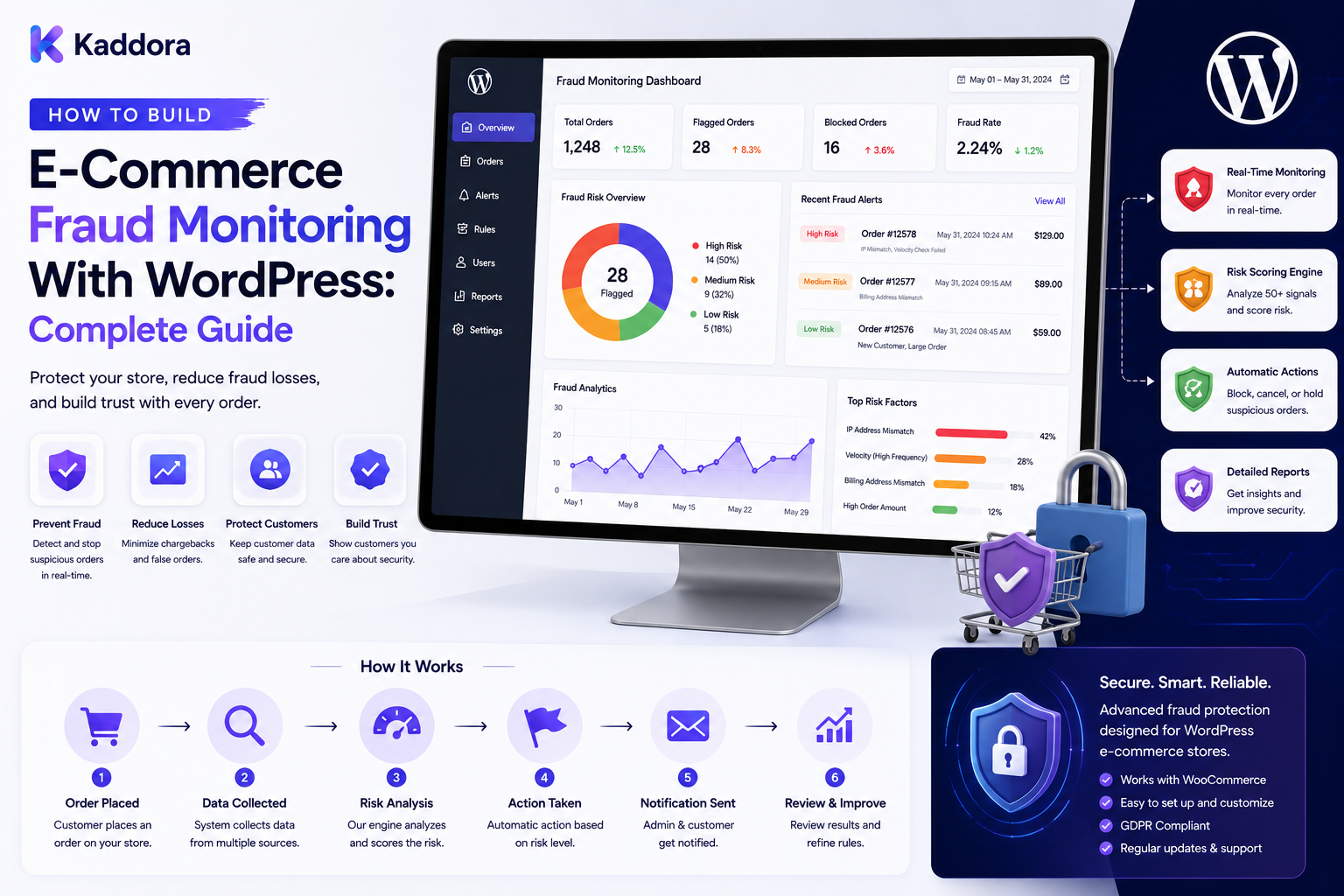
How to Build E-Commerce Fraud Monitoring With WordPress: Complete Guide
Introduction
As an eCommerce business grows, transaction volume grows with it.
More orders mean more opportunities for legitimate customers—but they can also create more opportunities for suspicious activity.
Fraudulent or high-risk transactions may involve:
Unusual purchasing behavior
Repeated payment failures
Multiple orders from related sources
Suspicious account activity
Abnormally large orders
High-frequency purchases
Mismatched transaction information
Unusual refund activity
Automated or abusive behavior
This is where eCommerce fraud monitoring becomes important.
Fraud monitoring is not simply about blocking orders.
A well-designed system observes transaction signals, calculates risk, creates alerts, and routes suspicious orders to the appropriate workflow.
A simplified architecture looks like:
Order ↓ Risk Signals ↓ Fraud Rules ↓ Risk Evaluation ↓ Risk Score / Flags ↓ Alert or Review ↓ Decision
For WordPress and WooCommerce stores, this approach can help businesses identify suspicious transactions while reducing unnecessary disruption to legitimate customers.
In this guide, you'll learn how to design and build an eCommerce fraud monitoring system with WordPress and WooCommerce.
What Is E-Commerce Fraud Monitoring?
E-commerce fraud monitoring is the process of continuously analyzing transaction, customer, payment, and behavioral signals to identify potentially suspicious activity.
Instead of assuming every order is either safe or fraudulent, a monitoring system can classify transactions into categories such as:
Low Risk ↓ Normal Processing Medium Risk ↓ Additional Review High Risk ↓ Manual Review / Hold
The exact decision process depends on the business, payment provider, and risk strategy.
The objective is to identify unusual behavior early without creating excessive false positives.
Why Is Fraud Monitoring Important?
Fraud can create financial, operational, and reputational costs.
A monitoring system can help businesses:
Detect suspicious orders
Reduce avoidable losses
Prioritize manual reviews
Identify unusual customer behavior
Monitor payment activity
Detect repeated abuse patterns
Improve operational visibility
Create auditable decisions
Fraud monitoring should support the payment and operational systems rather than attempting to replace trusted payment-provider controls.
Fraud Monitoring vs Fraud Prevention
These concepts are related but different.
Fraud Monitoring
Focuses on:
Detecting signals
Observing behavior
Generating alerts
Scoring risk
Supporting investigations
Fraud Prevention
Focuses on:
Blocking or rejecting transactions
Requiring additional verification
Holding orders
Restricting risky actions
A monitoring system should therefore provide evidence and controlled decisions rather than automatically blocking everything that looks unusual.
Step 1: Define the Order Risk Lifecycle
Before building the system, define how suspicious orders move through your organization.
For example:
Order Created ↓ Risk Evaluation ↓ Low Risk ─────────→ Process │ ├── Medium Risk → Review │ └── High Risk ──→ Hold ↓ Decision
Possible review states include:
New
Monitoring
Review required
Approved
Rejected
Escalated
Resolved
Clear states make the system easier for operations teams to use.
Step 2: Identify Fraud Signals
A fraud engine needs observable signals.
Examples include:
Transaction Signals
Order amount
Order frequency
Payment result
Number of payment attempts
Refund activity
Account Signals
Account age
Previous order history
Failed login patterns
Address changes
Password reset activity
Behavioral Signals
Rapid repeated actions
Unusual checkout behavior
Abnormally high request volume
Repeated failed operations
Order Signals
Multiple shipping destinations
Unusual quantities
High-value products
Repeated orders within a short period
Not every signal indicates fraud.
The purpose is to combine multiple signals into a more informed risk assessment.
Step 3: Create a Fraud Rule Engine
Rules transform signals into risk indicators.
For example:
IF Order Amount > Threshold THEN Add Risk Points
Another example:
IF Multiple Payment Failures THEN Increase Risk Level
Or:
IF Unusual Order Frequency THEN Create Review Alert
A rule engine can be:
Signal ↓ Rule ↓ Risk Adjustment ↓ Final Score
Rules should be configurable so the business can adjust them without rewriting the entire application.
Step 4: Build Risk Scores
A risk score can help prioritize transactions.
For example:
0–20 Low Risk 21–50 Medium Risk 51–100 High Risk
The exact ranges are business-specific.
A sample calculation might consider:
High Order Value +15 Repeated Payment Failures +25 Unusual Velocity +20 New Account +10 Suspicious Pattern +20
This produces a combined risk value.
Do not treat the score as a perfect fraud prediction.
It is a prioritization mechanism.
Step 5: Keep Rule Reasons
Never store only the final score.
Store the reasons behind it.
For example:
Order #10583 Risk Score: 67 Reasons: - 5 payment attempts - High order value - New account - Unusual purchase frequency
This makes manual review far more useful.
It also improves auditability.
Step 6: Monitor Payment Events
Payment activity can provide important risk signals.
Examples:
Successful payment
Failed payment
Repeated payment attempts
Payment reversal
Refund
Chargeback notification
The monitoring system should distinguish between payment state and fraud assessment.
A payment can succeed while an order is still considered high risk.
Likewise, a failed payment does not automatically mean fraud.
Step 7: Connect WooCommerce Orders
WooCommerce can provide important transactional information.
A fraud monitoring workflow can observe relevant order events:
WooCommerce ↓ Order Event ↓ Fraud Monitoring ↓ Risk Evaluation ↓ Alert
The system should avoid duplicating authoritative transaction data unnecessarily.
WooCommerce or the relevant payment system should remain the source of truth for the underlying transaction state.
Step 8: Add Velocity Monitoring
Velocity refers to the frequency of activity during a particular period.
Examples:
20 orders within 5 minutes
or:
10 failed payment attempts from the same account
A monitoring system can define thresholds such as:
IF Attempts > Threshold AND Time Window < Limit THEN Create Risk Signal
Velocity rules can be useful for identifying automated abuse and unusual purchasing patterns.
Step 9: Monitor Account Behavior
Customer accounts may provide useful context.
Monitor signals such as:
New accounts
Rapid account changes
Multiple failed login attempts
Sudden billing changes
Frequent address changes
Unusual purchase behavior
However, account age alone should not be treated as proof of fraud.
Signals should be considered in context.
Step 10: Use Address and Transaction Consistency
Depending on the payment and shipping setup, businesses may compare relevant transaction attributes.
Examples include:
Billing information
Shipping information
Currency
Order location
Payment metadata
A mismatch can become a risk signal.
But mismatches can also be legitimate.
Customers may send gifts, use business addresses, travel, or have different billing and shipping locations.
Therefore:
Signal ≠ Decision
Step 11: Add Fraud Alerts
When risk exceeds a configured threshold, create an alert.
Example:
High-Risk Order Detected Order: #10583 Score: 72 Signals: - Repeated payment attempts - High order value - Unusual velocity [Review Order]
Alerts can appear in:
WordPress admin
Operations dashboards
Customer-service systems
Internal notifications
Avoid exposing fraud signals to customers unnecessarily.
Step 12: Build a Manual Review Queue
Fraud monitoring works best when suspicious cases can be reviewed.
A review queue might display:
Order Risk Status #10583 High Review #10579 Medium Pending #10561 Low Monitoring
Reviewers can inspect:
Order history
Risk reasons
Payment state
Customer history
Shipping details
Previous incidents
The reviewer then records a decision.
Step 13: Create an Audit Trail
Every important fraud decision should be traceable.
Record events such as:
Risk score created
Rule triggered
Alert generated
Reviewer assigned
Order approved
Order rejected
Risk status changed
Example:
10:32 Risk evaluation created 10:33 High-risk alert generated 10:40 Assigned to reviewer 10:48 Order approved
Audit records can be valuable for troubleshooting, security investigations, and operational accountability.
Step 14: Build Secure Admin Permissions
Fraud-monitoring data can be sensitive.
Use role-based access where appropriate.
For example:
Fraud Analyst → View risk signals → Review orders Operations Manager → Review + resolve Administrator → Manage rules + settings
Do not give every WordPress administrator unrestricted access to sensitive fraud information unless that matches the organization's security model.
Step 15: Use REST APIs Carefully
For an advanced monitoring dashboard, REST APIs may expose risk information.
Example:
GET /admin/fraud/orders GET /admin/fraud/orders/{id} GET /admin/fraud/alerts POST /admin/fraud/orders/{id}/review
Every administrative endpoint should enforce:
Authentication
Capability checks
Object-level authorization
Input validation
Appropriate rate limiting
Never assume that an authenticated administrator can access every internal object if the business requires more granular permissions.
Step 16: Connect External Fraud Signals
A commerce platform may receive risk information from external systems.
For example:
Payment Provider ↓ Risk Signal ↓ WordPress ↓ Fraud Monitoring ↓ Review Queue
External systems may provide their own fraud assessments.
When consuming these signals:
Validate the source
Validate the payload
Store relevant identifiers
Preserve the provider's status
Avoid blindly replacing local decisions
The internal system should clearly identify which data came from an external provider and which data was calculated locally.
Step 17: Use Webhooks for Payment Events
Webhooks can deliver near-real-time events.
A typical workflow is:
Payment Provider ↓ Webhook ↓ Validate Signature / Payload ↓ Payment Event ↓ Fraud Monitor ↓ Risk Update
Webhook endpoints should validate authenticity and payload structure before processing.
Never treat arbitrary incoming HTTP requests as trusted transaction events.
Step 18: Add Notifications for High-Risk Orders
Operations teams should be notified when important risk thresholds are reached.
Example:
Risk Alert Order #10583 Risk: High Action: Manual review required
Notifications can be delivered to:
Admin dashboard
Internal messaging systems
Operations portal
Use rate limits and notification grouping so teams are not overwhelmed by repeated alerts.
Step 19: Prevent Duplicate Alerts
External events can sometimes be delivered more than once.
Use idempotency.
For example:
Event ID: risk_evt_839201 Status: Processed
Before processing another event with the same identifier, determine whether it has already been handled.
This prevents duplicate risk records and repeated alerts.
Step 20: Use Queues for High Volume
Large stores may receive thousands of orders during peak periods.
Instead of evaluating every expensive operation synchronously:
Order ↓ Risk Event ↓ Queue ↓ Risk Worker ↓ Evaluation ↓ Alert
This can improve scalability and reduce checkout latency.
However, any risk controls required before fulfillment should be completed within the business's required decision window.
Fraud Monitoring and Machine Learning
Advanced systems may use statistical or machine-learning models to identify patterns.
The architecture might look like:
Historical Data ↓ Feature Generation ↓ Model ↓ Risk Signal ↓ Rule / Policy Layer ↓ Review
Machine learning can help identify patterns that are difficult to encode manually.
However, model output should be treated as a signal rather than unquestionable truth.
Monitor false positives and false negatives.
AI for E-Commerce Fraud Monitoring
AI can assist fraud analysts by:
Summarizing risk signals
Grouping related incidents
Explaining unusual behavior
Identifying patterns for investigation
Prioritizing review queues
Drafting analyst notes
Example:
Risk Signals ↓ AI Analysis ↓ Case Summary ↓ Human Review
AI should not receive unnecessary payment secrets, passwords, private keys, or other sensitive credentials.
It should also not independently approve or reject transactions without a controlled business policy.
Privacy and Data Protection
Fraud systems often handle sensitive information.
Minimize stored data and restrict access.
Protect:
Customer information
Payment metadata
Internal risk rules
Fraud investigation notes
Provider identifiers
Do not retain more information than the business actually needs.
Define appropriate retention periods for fraud-monitoring records.
Common E-Commerce Fraud Monitoring Mistakes
Blocking Every Suspicious Signal
Not every anomaly is fraud.
Using Only One Rule
Fraud patterns are usually more complex.
Ignoring False Positives
Incorrectly blocking legitimate customers can damage revenue and trust.
No Audit Trail
Without reasons and history, investigations become difficult.
Trusting Webhooks
Validate external events.
Exposing Risk Data
Keep internal signals appropriately restricted.
Running Everything During Checkout
Use asynchronous processing when appropriate.
Treating AI Scores as Final Decisions
AI should support controlled decision-making.
E-Commerce Fraud Monitoring Checklist
Detection
Transaction signals
Payment signals
Account signals
Velocity monitoring
Order behavior analysis
Risk rules
Risk Engine
Risk score
Risk levels
Rule reasons
Configurable thresholds
Review states
Alerts
High-risk alerts
Admin notifications
Notification throttling
Duplicate prevention
Review
Review queue
Risk evidence
Reviewer permissions
Decisions
Audit trail
Security
Authentication
Capability checks
Object-level authorization
Webhook validation
Data minimization
Secure credentials
Performance
Queues
Background workers
Indexed queries
Efficient dashboards
Monitoring
Recommended Fraud Monitoring Architecture
A scalable WooCommerce architecture can look like:
WooCommerce │ Order Event ↓ ┌─────────────────┐ │ Risk Collector │ └────────┬────────┘ ↓ ┌─────────────────┐ │ Rule Engine │ └────────┬────────┘ ↓ ┌─────────────────┐ │ Risk Score │ └────────┬────────┘ ↓ ┌─────────────────┐ │ Alert / Queue │ └────────┬────────┘ ↓ ┌─────────────────┐ │ Review System │ └────────┬────────┘ ↓ Final Decision
External signals can feed into the risk collector through validated APIs or webhooks.
How to Build E-Commerce Fraud Monitoring in WordPress
A practical workflow is:
Step 1
Map the eCommerce order lifecycle.
Step 2
Identify meaningful fraud and abuse signals.
Step 3
Create configurable risk rules.
Step 4
Implement risk scoring and reason tracking.
Step 5
Connect WooCommerce order events.
Step 6
Integrate relevant payment and external risk signals.
Step 7
Create high-risk alerts.
Step 8
Build a manual review queue.
Step 9
Add audit logging and reviewer permissions.
Step 10
Implement webhook validation and idempotency.
Step 11
Use queues and workers for high-volume processing.
Step 12
Monitor false positives, operational performance, and fraud outcomes.
Why Choose ThemeKaddora?
ThemeKaddora develops WordPress themes, plugins, WooCommerce solutions, HTML templates, UI kits, SaaS products, and business-focused digital solutions.
Modern commerce systems can support workflows involving:
WooCommerce
Order monitoring
Customer portals
Risk analysis
APIs
Webhooks
ERP integrations
CRM systems
Automation
Notifications
Analytics
Fraud monitoring can therefore become part of a broader eCommerce operations platform rather than functioning as an isolated feature.
Conclusion
E-commerce fraud monitoring helps businesses move from reactive order investigation to proactive risk visibility.
A strong system connects:
Order Event
↓
Risk Signals
↓
Rules
↓
Risk Score
↓
Alert
↓
Review
↓
Controlled Decision
The goal is not to block every unusual order.
The goal is to identify potentially risky behavior, provide useful evidence, prioritize manual investigation, and protect the business without unnecessarily harming legitimate customers.
For small WooCommerce stores, basic payment-provider protections and simple monitoring rules may be sufficient.
For larger commerce platforms, fraud monitoring can expand into velocity analysis, external risk signals, webhooks, review queues, audit trails, machine-learning models, queues, AI-assisted investigations, and advanced operations dashboards.
The most reliable approach combines automation with human oversight.
The goal is not simply to detect suspicious transactions.
The goal is to build a controlled risk-management system that helps the business make better and more defensible decisions.
Frequently Asked Questions
What is e-commerce fraud monitoring?
E-commerce fraud monitoring is the process of analyzing order, payment, account, and behavioral signals to identify potentially suspicious transactions and prioritize them for further review.
Can I build fraud monitoring with WordPress?
Yes. WordPress and WooCommerce can provide the foundation for event collection, risk rules, dashboards, alerts, APIs, and review workflows.
Is fraud monitoring the same as fraud prevention?
No. Monitoring focuses on identifying and evaluating risk, while prevention focuses on actions such as blocking, holding, or requiring additional verification.
Can WooCommerce orders be monitored for fraud?
Yes. Relevant WooCommerce order events can feed a custom risk-monitoring system.
What signals can indicate a risky order?
Signals can include unusual order amounts, repeated payment failures, high activity velocity, unusual account behavior, and other transaction inconsistencies.
Should one fraud signal automatically block an order?
Usually, a single anomaly should be treated as a signal rather than definitive proof. Combining multiple signals can provide better context and reduce unnecessary false positives.
What is a fraud risk score?
A risk score is a numerical or categorical representation used to prioritize orders for monitoring or review. The scoring model and thresholds are specific to each business.
Should I store the reasons behind a risk score?
Yes. Recording triggered rules and supporting signals makes reviews, investigations, auditing, and future rule improvements easier.
Can payment-provider fraud signals be integrated with WooCommerce?
Yes. External risk information can be consumed through supported APIs or validated webhooks and incorporated into the internal monitoring workflow.
Can webhooks be used for fraud monitoring?
Yes. Webhooks can provide near-real-time payment or risk events, but incoming payloads must be authenticated and validated before processing.
How can I prevent duplicate fraud alerts?
Use unique event identifiers and idempotency controls so the same event does not create duplicate risk records or repeated notifications.
Can fraud monitoring work with a manual review system?
Yes. A review queue can allow authorized staff to inspect risk signals, review order context, record decisions, and maintain an audit trail.
Can AI help with fraud monitoring?
AI can summarize signals, identify patterns, prioritize investigations, and assist analysts. Critical business decisions should remain governed by controlled rules, workflows, and appropriate human oversight.
Can machine learning be used for eCommerce fraud detection?
Yes. Machine-learning models can identify patterns in historical data, but model output should be monitored and combined with business policies and review processes.
How do I secure fraud-monitoring data?
Use restricted permissions, server-side authorization, secure credentials, data minimization, protected APIs, validated webhooks, and appropriate retention controls.
Should fraud monitoring run during checkout?
Some critical checks may need to occur before fulfillment, but expensive analysis can often be moved to background processing where business requirements allow.
Why are false positives important?
False positives can incorrectly flag legitimate customers, causing unnecessary friction, lost sales, and additional support work. Monitoring their frequency is important for improving the risk model.
Why choose ThemeKaddora?
ThemeKaddora develops WordPress themes, plugins, WooCommerce solutions, templates, UI kits, SaaS products, and digital solutions that can support eCommerce automation, analytics, risk monitoring, APIs, integrations, customer portals, and business workflows.
Comments (0)