
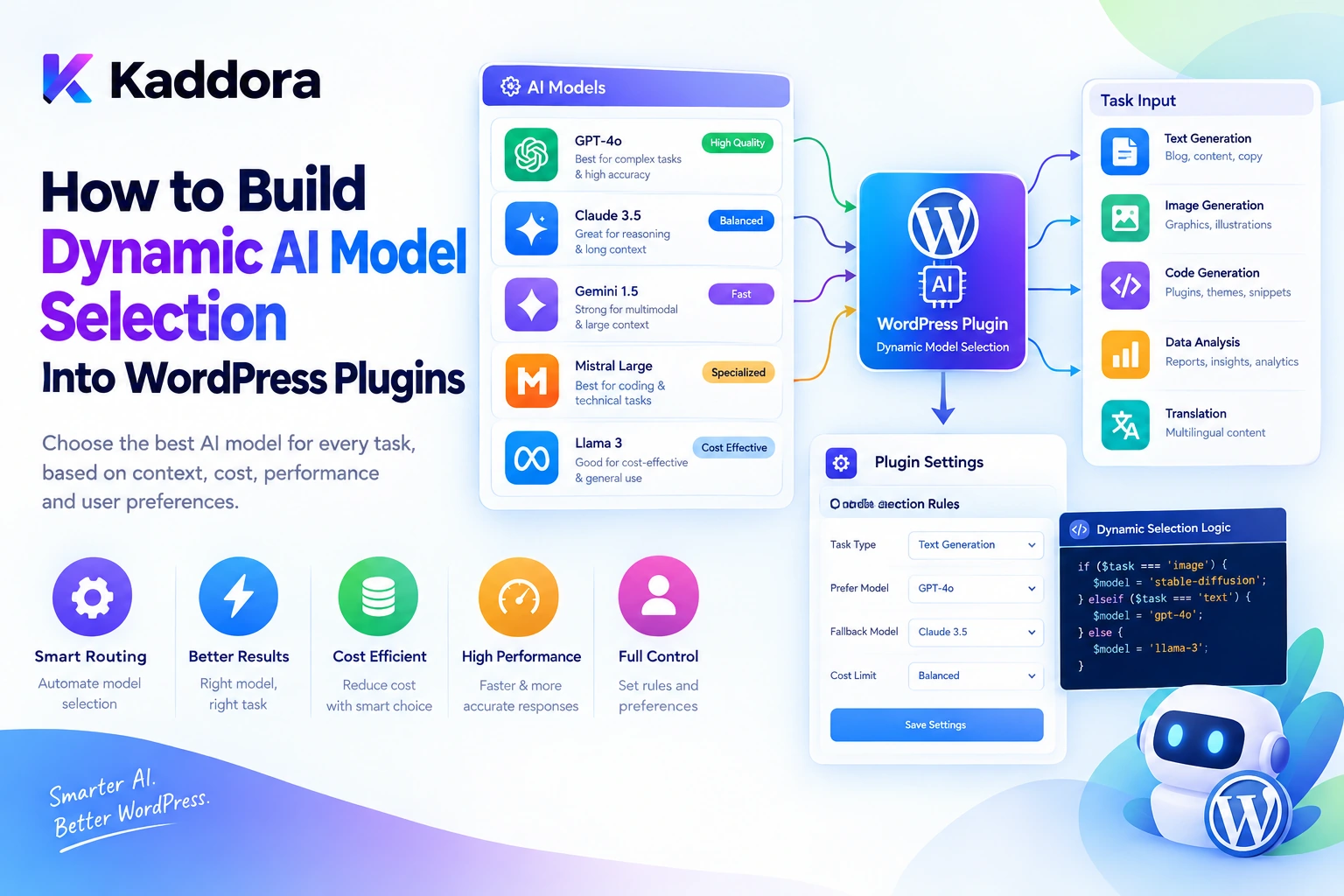
Introduction
AI-powered WordPress plugins increasingly perform different types of tasks, including content generation, SEO analysis, semantic search, image interpretation, customer support, code review, and workflow automation.
However, these tasks do not always require the same AI model.
A simple request to classify a customer message may require a fast, cost-efficient model. An advanced request to review a complex PHP architecture may benefit from a more capable reasoning model. An image-analysis request may require a model that supports image input.
Using one model for every operation can increase costs, introduce unnecessary latency, or produce lower-quality results for specialized tasks.
This is where dynamic AI model selection becomes useful.
Instead of hardcoding one model across an entire plugin, developers can build a routing system that selects an appropriate model according to the task, required capabilities, quality expectations, latency requirements, and usage budget.
A practical architecture looks like this:
WordPress Request ↓ Task Identification ↓ Routing Policy ↓ Capability and Budget Check ↓ Select Model and Provider ↓ Execute AI Request ↓ Validate Response ↓ Return Result
This guide explains how to implement dynamic AI model selection in WordPress plugins, including routing strategies, provider abstraction, PHP architecture, fallbacks, security, performance optimization, and monitoring.
What Is Dynamic AI Model Selection?
Dynamic AI model selection is the process of choosing an AI model at runtime according to the requirements of a particular task.
Instead of always using the same model:
WordPress Plugin ↓ One AI Model ↓ Every Task
the plugin evaluates each request and selects an appropriate configuration.
For example:
Text Classification ↓ Fast Model Product Description ↓ Balanced Model Complex Code Review ↓ Advanced Reasoning Model Image Analysis ↓ Compatible Vision Model
These are capability profiles rather than specific model identifiers. The actual models should be selected from the providers supported by the plugin.
A dynamic routing system may consider:
Task type
Task complexity
Required input modalities
Tool-calling requirements
Expected output format
Context requirements
Quality targets
Response-time limits
Usage budgets
Provider availability
The goal is to select the least expensive and fastest configuration that reliably meets the task's requirements.
Why Do WordPress Plugins Need Dynamic Model Selection?
A plugin may start with a single AI feature and gradually expand into multiple workflows.
For example, a WooCommerce AI plugin might perform:
Classify Product Categories Generate Product Descriptions Analyze Customer Reviews Summarize Sales Reports Answer Inventory Questions
These operations have different requirements.
A simple classification task may not need advanced reasoning. A complex sales analysis may require more extensive context and stronger reasoning capabilities.
Dynamic model selection lets the plugin adapt its execution strategy to the request.
1. Reduce Unnecessary AI Costs
Short, well-defined tasks can often use a cost-efficient model when it meets the required quality standard.
2. Improve Response Time
A fast model may be preferable for an interactive task that does not require extensive reasoning.
3. Match Models to Specialized Tasks
Some tasks require specific capabilities, such as image input, structured output, or tool calling.
4. Support Multiple Providers
A plugin can be designed to use more than one configured provider when its requirements justify that complexity.
5. Improve Workflow Reliability
An explicit routing layer can apply fallback policies and handle incompatible configurations consistently.
These benefits are not automatic. Model selection must be evaluated against actual task performance, latency, and cost.
For current model-selection principles, see the official OpenAI model selection guide and API model catalog.
Understand the Different AI Model Profiles
A practical implementation can begin with a small set of model profiles rather than exposing every available model to every feature.
1. Fast and Cost-Efficient Profile
Suitable for well-defined, repetitive tasks such as:
Text classification
Intent detection
Short summaries
Metadata extraction
Sentiment classification
Basic content formatting
For example:
Input: A customer says the delivery arrived late. Task: Classify the support message. Output: Delivery Issue
If the task can be performed reliably by a smaller model, there may be little value in routing every request to a more expensive configuration.
2. Balanced Profile
Suitable for everyday tasks requiring a combination of quality, speed, and cost efficiency.
Examples include:
Product description generation
Blog rewriting
Customer support drafts
FAQ generation
Standard question answering
Routine content analysis
3. Advanced Reasoning Profile
Suitable for complex tasks that need deeper analysis or multiple constraints.
Examples include:
Technical architecture reviews
Complex code analysis
Multi-step planning
Detailed document comparison
Troubleshooting complicated errors
Evaluating conflicting information
A more capable model does not guarantee a correct answer. Output validation and task-specific evaluation remain important.
4. Specialized Capability Profiles
Some workflows require capabilities that are not interchangeable.
Examples include:
Image Analysis Audio Transcription Structured JSON Output Function Calling Long-Context Analysis Code Generation
The router should verify that the configured model supports the capability required by the task.
A model that performs well on text generation may not be suitable for an image workflow or a particular structured-output requirement.
Design a Task-Based Model Routing Strategy
The first step is to classify the work the plugin performs.
A routing policy can define a preferred profile for each known task.
Task
Starting profile
Main consideration
Text classification
Fast
Latency and accuracy
Metadata extraction
Fast
Structured output reliability
Short summaries
Fast or balanced
Complexity of source content
Product descriptions
Balanced
Writing quality and cost
Blog generation
Balanced or advanced
Length and editorial expectations
Code review
Advanced reasoning
Technical complexity
Workflow planning
Advanced reasoning
Number of steps and constraints
Image analysis
Compatible vision profile
Image-input support
Bulk content enrichment
Fast or balanced
Throughput and budget
These profiles are starting points, not universal rules.
The correct configuration should be selected through testing with representative inputs and measurable quality requirements.
Do not rely only on task labels
Two tasks with the same label can have very different complexity.
For example:
Rewrite a Short Product Description
is simpler than:
Rewrite a Technical Product Manual While Preserving All Specifications
A router can also evaluate deterministic request properties such as:
Input size
Requested output length
Required tools
Input modality
Task criticality
Remaining usage budget
Latency target
Avoid adding a separate AI classification request for every operation when simple rules can make the routing decision.
Build a Centralized Model Registry
Avoid scattering provider names and model identifiers throughout individual plugin classes.
A centralized registry can define available model profiles.
For example:
$model_profiles = array( 'fast' => array( 'provider' => 'primary', 'model_key' => 'kaddora_ai_model_fast', ), 'balanced' => array( 'provider' => 'primary', 'model_key' => 'kaddora_ai_model_balanced', ), 'reasoning' => array( 'provider' => 'primary', 'model_key' => 'kaddora_ai_model_reasoning', ), );
These are illustrative configuration keys rather than actual model IDs.
A profile can also define:
Supported Capabilities Context Requirements Output Format Usage Budget Latency Target Fallback Policy
The router resolves the profile through this registry and verifies that the selected configuration is valid.
The registry should contain only models and providers that the plugin administrator has configured and approved.
Implement a Task-to-Model Router in PHP
A simple routing class can map recognized tasks to model profiles.
final class Kaddora_AI_Model_Router { private const TASK_PROFILES = array( 'classification' => 'fast', 'metadata_extraction' => 'fast', 'short_summary' => 'fast', 'content_generation' => 'balanced', 'content_rewrite' => 'balanced', 'code_review' => 'reasoning', 'complex_planning' => 'reasoning', 'default' => 'balanced', ); public function resolve_profile( string $task ): string { $task = sanitize_key( $task ); return self::TASK_PROFILES[ $task ] ?? self::TASK_PROFILES['default']; } }
This example demonstrates deterministic routing, but a production router also needs to resolve the chosen profile, verify its configuration, and check required capabilities.
For example, an application service might use:
$profile = $router->resolve_profile( 'metadata_extraction' ); // Resolve configured provider and model. // Validate required capabilities. // Execute through the selected provider adapter.
The client should not be allowed to submit an arbitrary model identifier and bypass the routing policy.
For sensitive or expensive operations, perform validation and authorization before executing the AI request.
Add Context-Aware Model Selection
Task-based routing provides a solid foundation. A more advanced implementation can select a profile based on both task type and request requirements.
For example:
Task: Content Generation Input: Short Product Description Profile: Fast or Balanced
Another request might be:
Task: Content Generation Input: Long Technical Article Strict Factual Constraints Profile: Balanced or Advanced
A routing policy can evaluate:
Task Type + Input Size + Required Capabilities + Quality Target + Latency Limit + Usage Budget ↓ Model Profile
Keep this policy explicit and testable.
For example, an image-analysis request should not be sent to a text-only configuration. A structured-output workflow should use a compatible model and API configuration.
Model selection should also be separate from authorization. A task should not become permissible merely because a more capable model is available.
Separate Model Routing From Provider Communication
The routing layer should decide which configured model to use. The provider adapter should handle the actual request.
A provider interface can define a consistent contract:
interface Kaddora_AI_Provider_Interface { public function generate( array $messages, array $options = array() ); }
The architecture then becomes:
WordPress Feature ↓ Model Router ↓ Resolved Profile ↓ Provider Adapter ↓ External AI API ↓ Normalized Result
WordPress provides an HTTP API for making external requests. See the official WordPress HTTP API guide.
An illustrative request can use wp_remote_post():
$response = wp_remote_post( $endpoint, array( 'timeout' => 30, 'headers' => array( 'Content-Type' => 'application/json', 'Authorization' => 'Bearer ' . $api_key, ), 'body' => wp_json_encode( $payload ), ) ); if ( is_wp_error( $response ) ) { // Handle the transport error safely. }
The endpoint, request body, authentication, and response parsing must match the selected provider's current API documentation.
Keep credentials server-side, validate HTTP status codes, and avoid exposing raw provider errors to frontend users.
Implement Safe Model Fallbacks
A selected model may be unavailable, rate-limited, or temporarily unable to process a request.
A fallback policy can help the plugin recover:
Primary Model ↓ Request Failure ↓ Classify Error ↓ Retry Eligible? ├── Yes → Controlled Retry └── No → Check Fallback Policy ↓ Compatible Fallback? ↓ Retry or Fail Safely
Not all failures should trigger a fallback.
Potentially retryable conditions include temporary network errors, timeouts, and certain rate-limit responses, depending on provider guidance.
Invalid input, authorization failures, or unsupported capabilities generally require correction rather than switching models.
A fallback configuration must preserve the required capabilities, data-processing rules, output format, and context requirements.
Use bounded retries to prevent excessive API usage.
Optimize Cost and Latency Together
Dynamic model selection can help control usage, but the cheapest individual request does not always produce the lowest cost per successful task.
Consider:
Profile A Lower Cost Per Request Frequent Failures More Retries Profile B Higher Cost Per Request Higher Success Rate Fewer Retries
Profile B may be more cost-effective overall if it reliably completes the task with fewer attempts.
Monitor:
Average response time
Task success rate
Input and output usage
Retry count
Cost per successful task
Quality evaluation results
The official OpenAI cost optimization guide discusses selecting suitable models, reducing unnecessary requests, and minimizing token usage. The model optimization guide explains the importance of evaluating model outputs and refining performance.
Use these ideas to measure the behavior of your own WordPress plugin rather than selecting models based only on price.
Apply Dynamic Model Selection to WordPress Workflows
Model routing becomes particularly useful when a plugin performs many different types of AI operations.
AI SEO plugins
An SEO plugin may route:
Keyword Classification ↓ Fast Profile Meta Description Draft ↓ Balanced Profile Complex Content Analysis ↓ Advanced Profile
The choice depends on the quality expectations and actual task complexity.
WooCommerce plugins
An ecommerce plugin may use different profiles for product classification, description generation, review analysis, and complex product-recommendation reasoning.
Prices, stock levels, order statuses, and product attributes should come from current WooCommerce data rather than being invented by the model.
AI coding assistants
A coding assistant may route simple code explanations to a faster configuration and complex architectural reviews to a more capable one.
Generated code should still be reviewed, tested, and validated before application.
AI agents and automated workflows
An AI agent can use different profiles for classification, planning, analysis, and content generation.
However, the agent must operate within the plugin's routing policy and approved tool permissions.
Add Routing Policies for Sensitive Tasks
Some requests require stricter controls regardless of complexity.
For example:
Public Content Summary ↓ Standard Routing Policy
But:
Private Customer Data ↓ Privacy and Permission Checks ↓ Approved Provider and Model
The application should determine whether data is permitted to be sent to a particular provider before routing the request.
Do not transmit private customer information to an external service merely because a model can analyze it.
A policy layer can enforce:
Approved providers
Allowed data categories
Redaction requirements
Site and tenant boundaries
Usage limits
Output restrictions
Model routing should complement WordPress authorization and privacy controls, not replace them.
Monitor Model Routing Decisions
A production routing system should make its decisions observable.
For example:
Task: metadata_extraction Selected Profile: fast Provider: primary Status: success Duration: Recorded by Monitoring
Useful metrics include:
Metric
Purpose
Requests per profile
Shows which configurations are used
Success rate
Measures reliability
Average latency
Measures responsiveness
Retry rate
Reveals unstable configurations
Usage per task
Helps control spending
Fallback rate
Identifies provider or model problems
Quality score
Evaluates output suitability
Avoid logging API keys or unnecessary sensitive content.
Use monitoring results to refine the routing map over time. Changes to a model, prompt, or provider should be evaluated on representative tasks before being rolled out broadly.
Common Mistakes When Building Dynamic AI Model Selection
1. Using one model for every task
Different workloads have different requirements.
Better: define task-specific model profiles.
2. Choosing models only by price
A cheaper model may need more retries or produce lower-quality results.
Better: compare cost per successful task and measured quality.
3. Hardcoding model IDs across the plugin
Scattered configuration makes changes difficult to maintain.
Better: centralize model settings in a registry or configuration service.
4. Routing without checking capabilities
A model might not support the required input modality, tool calling, or output format.
Better: validate compatibility before execution.
5. Using uncontrolled fallback logic
Repeated retries and switches can increase latency and cost.
Better: classify failures and define bounded fallback policies.
6. Sending sensitive data without review
An otherwise capable model may not be an approved destination for particular data.
Better: enforce provider and data-processing rules before routing.
7. Ignoring configuration changes
Model updates can affect output quality or API behavior.
Better: track configurations and run regression evaluations.
8. Overengineering the routing layer
Not every WordPress plugin requires multiple providers and complex scoring algorithms.
Better: start with a few clear profiles and expand when measurements justify it.
Best Practices for Dynamic AI Model Selection in WordPress
Define task categories before selecting models.
Maintain a centralized model registry.
Separate routing decisions from provider communication.
Select models according to task complexity and requirements.
Evaluate cost per successful task.
Use bounded retries and compatible fallbacks.
Validate capabilities before making requests.
Keep API credentials server-side.
Enforce privacy and authorization policies.
Validate AI output before using it.
Track latency, usage, failures, and quality.
Reevaluate routing after model or provider changes.
Keep deterministic business rules outside AI reasoning.
Avoid unnecessary routing complexity.
Test routing decisions with representative real-world tasks.
WordPress AI Model Selection Checklist
Architecture
Task categories are defined.
A centralized model registry exists.
Provider communication is separate from business logic.
Required capabilities are documented.
Model configuration can be updated safely.
Reliability
Fallback rules are documented.
Retries are bounded.
Provider errors are handled safely.
Structured responses are validated.
Unsupported model configurations are rejected.
Security
API credentials remain server-side.
Approved provider and data restrictions are enforced.
WordPress permissions remain authoritative.
Sensitive content is minimized or redacted.
Logs exclude secrets and unnecessary private information.
Cost and Performance
Response latency is measured.
Usage and costs can be monitored.
Duplicate requests are controlled.
Routing is evaluated against representative tasks.
Model changes trigger appropriate regression testing.
Why Choose Kaddora?
Building intelligent WordPress plugins requires more than connecting an AI model to an API. Developers need a reliable way to select appropriate models, manage providers, control costs, and keep application behavior maintainable.
Kaddora focuses on practical WordPress development and AI-powered functionality for use cases such as:
AI SEO
WooCommerce intelligence
Content generation
AI coding assistants
Semantic search
Customer support
Multimodal retrieval
AI agent workflows
A well-designed Kaddora implementation can centralize model selection while allowing different plugin features to use configurations appropriate to their workloads.
The objective is not to make every request more complicated. It is to make model selection intentional, measurable, reliable, and cost-aware.
Conclusion
Dynamic AI model selection helps developers choose appropriate models for different WordPress plugin tasks.
Instead of sending every request to one model, a routing layer can consider:
Task Type + Required Capabilities + Quality Requirements + Latency Target + Usage Budget ↓ Routing Policy ↓ Model Selection ↓ Validated Result
A simple plugin may need only two or three configured model profiles. A larger system may require provider abstraction, capability checks, fallback handling, task-specific budgets, monitoring, and quality evaluation.
The most important principle is to select models based on demonstrated task performance rather than assumptions about model size or price.
By centralizing routing, measuring quality and cost, validating outputs, and keeping permissions under application control, WordPress developers can build AI-powered plugins that are more efficient, reliable, and maintainable.
Frequently Asked Questions
What is dynamic AI model selection in WordPress?
Dynamic AI model selection is the process of choosing an appropriate AI model or provider for each plugin task based on factors such as complexity, required capabilities, quality, latency, and cost.
Why do WordPress AI plugins need dynamic model selection?
It allows different plugin features to use suitable AI configurations, helping balance response quality, processing speed, and usage costs.
How should a WordPress plugin choose the right AI model?
Define task categories, identify required capabilities, test candidate models on representative inputs, and choose the least expensive configuration that reliably meets the task's quality requirements.
Can dynamic AI model selection reduce WordPress plugin costs?
It can reduce unnecessary spending by using cost-efficient models for suitable tasks. Actual savings depend on usage, output quality, retries, latency, and provider pricing.
Can WordPress AI model routing support multiple providers?
Yes. A provider abstraction can allow the plugin to route tasks across configured providers while preserving centralized validation, security, and error handling.
How should model fallback work in WordPress AI plugins?
Fallback rules should distinguish temporary errors from permanent failures, use bounded retries, verify capability compatibility, and switch only to approved alternatives.
How can I secure dynamic AI model selection in WordPress?
Keep API credentials server-side, validate requests and outputs, enforce WordPress permissions, restrict approved providers, and apply data-protection rules before sending information to external models.
Why choose ThemeKaddora?
ThemeKaddora provides a marketplace for WordPress plugins, themes, and website templates. Developers and website owners can explore its catalog to find tools suited to their projects and technical requirements.
Comments (0)