
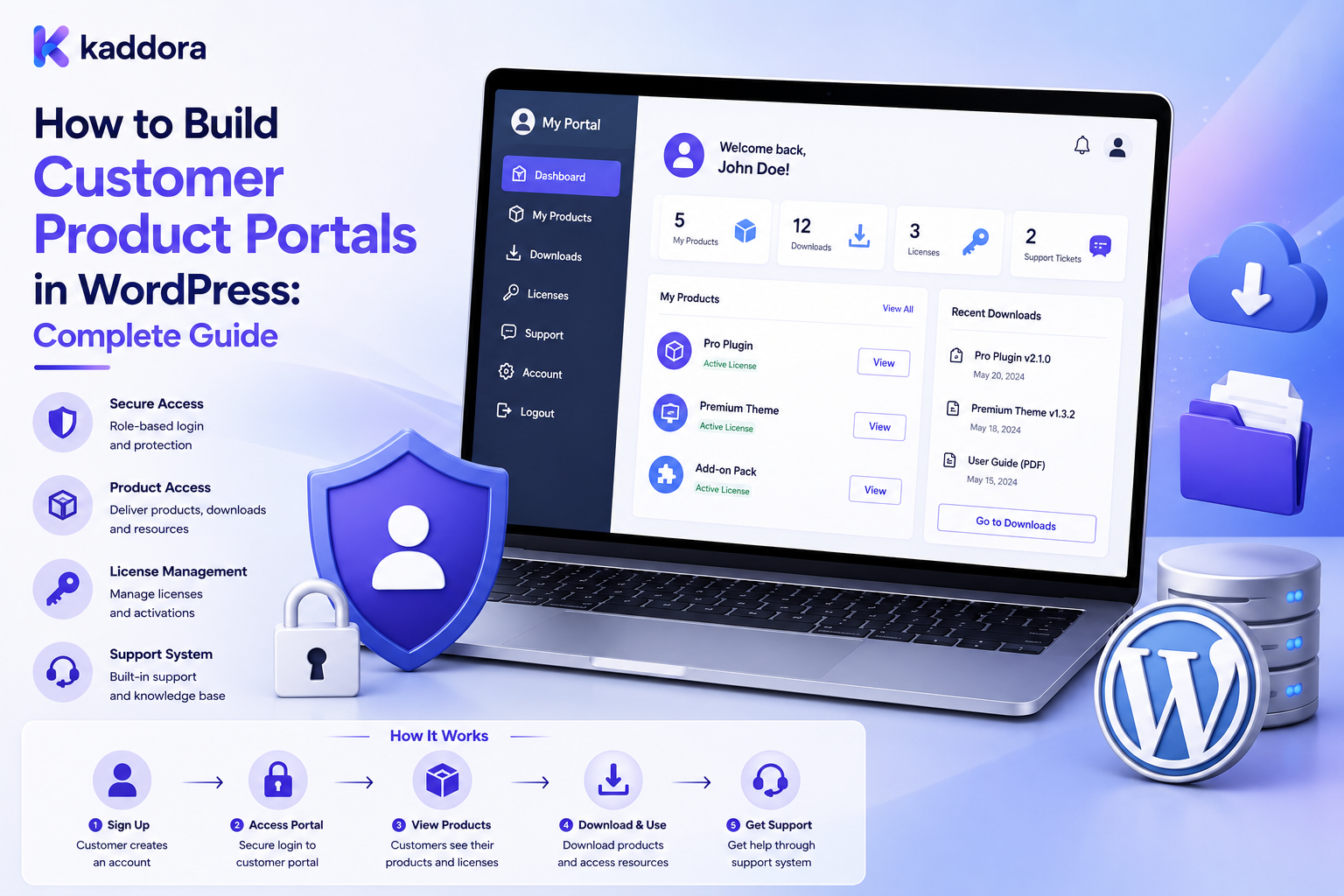
How to Build Customer Product Portals in WordPress: Complete Guide
Introduction
Customers increasingly expect more than a simple order confirmation after purchasing a digital product.
They want a central place where they can:
View purchased products
Access downloads
Check available versions
Read documentation
Manage licenses
View subscriptions
Review orders
Open support requests
Access updates
Manage their account
A customer product portal provides this experience.
Instead of forcing customers to search through emails, account pages, documentation websites, and download links, you can provide a single authenticated dashboard.
For WordPress businesses, this is especially useful for digital products, WordPress plugins, themes, SaaS products, memberships, licenses, subscriptions, and other customer-specific services.
A well-designed portal should not simply display information.
It should securely determine:
Who is the customer?
What products can they access?
Which downloads are available?
Which features are allowed?
What actions can they perform?
This makes a customer product portal both a user-experience system and an authorization system.
In this guide, you'll learn how to design and build a secure, scalable customer product portal in WordPress.
What Is a Customer Product Portal?
A customer product portal is a private, authenticated area where customers can access product-related information and services associated with their account.
A portal might contain:
Products
Orders
Downloads
Licenses
Subscriptions
Product versions
Documentation
Support
Account settings
Notifications
For example:
Customer Login ↓ Customer Dashboard ↓ ┌────┼────┬───────┬─────────┐ Products Orders Licenses Downloads ↓ Documentation / Updates / Support
The important concept is that the portal should display customer-specific information, not a generic list of everything available on the website.
Why Build a Customer Product Portal?
A centralized portal can improve both customer experience and business operations.
Benefits include:
Easier product access
Fewer support requests
Better download management
Centralized documentation
Improved customer retention
Easier license management
Better subscription visibility
More organized account information
Stronger post-purchase experience
For digital businesses, the portal can become the main destination after purchase.
Customer Product Portal vs Standard My Account Page
A standard WordPress or WooCommerce account page is usually designed around basic account functionality.
A product portal goes further.
Standard Account Area
May include:
Orders
Billing details
Address
Password settings
Customer Product Portal
Can include:
Purchased products
Versions
Downloads
License keys
Entitlements
Documentation
Product updates
Support
Subscription status
Product-specific actions
The portal is therefore centered around the customer's relationship with products.
Core Portal Architecture
A scalable portal should separate identity, products, and access rights.
A simplified model looks like this:
User ↓ Customer / Company ↓ Orders ↓ Products ↓ Entitlements ↓ Licenses / Subscriptions ↓ Downloads / Documentation / Support
This separation is important.
A customer may purchase a product once but have different rights associated with it.
For example:
Product ├── Version 1.0 ├── Version 1.1 ├── Version 2.0 └── Documentation
The customer may have access to some or all of these depending on their entitlement.
Step 1: Define the Customer Identity
The portal should begin with a reliable customer identity.
For simple websites, this may be a WordPress user.
For larger systems, you may also need:
Customer ID
Company ID
Organization ID
Customer role
Subscription status
Account status
For B2B systems, a user may belong to a company rather than operating as an independent customer.
Example:
Company ↓ ┌──────────────┐ │ │ Admin Employee │ │ └──────┬───────┘ ↓ Customer Portal
This allows company administrators and ordinary users to have different permissions.
Step 2: Define Product Relationships
The portal must know what products belong to the customer.
Possible relationships include:
Purchased product
Assigned product
Licensed product
Subscribed product
Downloadable product
Included product
Trial product
A useful model is:
Customer ↓ Entitlement ↓ Product
The entitlement represents the customer's permission to access a product.
This is often better than simply checking whether a product appears in an old order.
Step 3: Build Product Entitlements
An entitlement describes what the customer is allowed to access.
Example:
Product: Business Theme Customer: User #2048 Access: ✓ Documentation ✓ Downloads ✓ Updates ✓ License ✗ Premium Support
An entitlement can contain:
Product ID
Customer ID
Access status
Start date
Expiry date
Version access
Download permissions
License status
Support eligibility
This makes the portal flexible.
Step 4: Create the Customer Dashboard
The dashboard should summarize the most important information.
For example:
Welcome Back Active Products: 8 Active Licenses: 6 Available Downloads: 14 Open Support Tickets: 2 [My Products] [Downloads] [Licenses] [Subscriptions] [Documentation] [Support]
Avoid filling the dashboard with unnecessary information.
The most important actions should be immediately visible.
Step 5: Build the My Products Section
This should be the central area of the portal.
Each product card can display:
Product name
Product image
Current version
License status
Subscription status
Latest update
Download button
Documentation button
Support button
Example:
┌──────────────────────────┐ │ Product Name │ │ Version: 4.2.1 │ │ License: Active │ │ │ │ [Download] [Docs] │ │ [License] [Support] │ └──────────────────────────┘
Only display actions the current user is authorized to perform.
Step 6: Add Secure Downloads
Download access requires special attention.
Do not expose unrestricted file URLs simply because a customer is logged in.
Instead:
Customer Request ↓ Authentication Check ↓ Entitlement Check ↓ Product Permission ↓ Download Authorization ↓ Secure File Response
The server should validate access for every protected download request.
The browser should never be trusted to determine whether the user is entitled to a file.
Step 7: Add License Management
For software products, licenses can become a major part of the portal.
A license section may show:
License key
Product
Activation count
Status
Expiry
Domain
Renewal information
Example:
Product Status Activations Theme Pro Active 2 / 5 Plugin Plus Active 1 / 3
License secrets should not be exposed through insecure frontend requests.
Sensitive values should be protected and only revealed when authorized.
Step 8: Add Version and Update Information
Software customers frequently need to know whether a newer version is available.
The portal can display:
Installed Version: 3.4.0 Latest Version: 3.6.2 [View Changelog] [Download Update]
A version system may include:
Version number
Release date
Changelog
Compatibility
Download file
Minimum requirements
This is especially valuable for WordPress themes and plugins.
Step 9: Integrate Documentation
Product documentation should be easy to access.
A customer portal can connect products with:
Installation guides
Configuration guides
FAQs
API documentation
Troubleshooting
Changelogs
Tutorials
For example:
My Product ↓ Documentation ├── Installation ├── Configuration ├── Updates ├── Troubleshooting └── FAQ
This can reduce repetitive support questions.
Step 10: Add Orders and Purchase History
Customers often need access to historical transactions.
An orders section can show:
Order number
Date
Products
Payment status
Total
Invoice
Downloads
However, do not expose unrelated customer records.
Every order query should be restricted to the authenticated customer's authorized records.
Step 11: Support B2B Customer Accounts
For business customers, one account may represent a company.
You may need roles such as:
Company Admin
Can:
View company products
Manage users
View licenses
Review orders
Company User
Can:
Access assigned products
Download files
View documentation
This is effectively a tenant-aware system.
The server must verify both:
Who is the user?
and
Which company or tenant can they access?
Step 12: Use REST APIs for Portal Data
For modern interfaces, REST APIs can be useful.
Example endpoints:
GET /portal/products GET /portal/licenses GET /portal/downloads GET /portal/orders GET /portal/subscriptions GET /portal/documentation
The API should never return all records and rely on JavaScript to filter them.
Instead, the server should perform authorization before returning data.
Bad:
GET /all-products → Browser filters customer products
Better:
GET /my-products → Server validates user → Server filters authorized products → Response returned
This prevents accidental data exposure.
Step 13: Implement Object-Level Authorization
One of the most important security rules is:
Never trust customer-supplied IDs.
For example, a request might contain:
/download?product_id=501
The server must not assume the authenticated customer can access product 501.
It should perform an authorization check such as:
Is User 2048 entitled to Product 501? ↓ YES → Continue ↓ NO → Deny
This principle applies to:
Products
Orders
Downloads
Licenses
Subscriptions
Support tickets
Company records
Step 14: Add Search and Filtering
Large customer portals may contain dozens or hundreds of products.
Useful filters include:
Product
Status
Version
License
Subscription
Category
Purchase date
Use server-side pagination and filtering for larger datasets.
Avoid loading hundreds of records into the browser unnecessarily.
Step 15: Add Notifications
The portal can notify customers about:
New product versions
License expiration
Subscription renewal
Download availability
Important documentation updates
Support replies
Notifications can appear inside the portal and, where appropriate, through email.
A notification system might look like:
Event ↓ Notification Queue ↓ Portal Notification ↓ Optional Email
Background processing can prevent heavy notification work from slowing down normal page requests.
Performance Considerations
Customer portals can become database-heavy.
Improve performance with:
Pagination
Indexed queries
Object caching
Efficient REST endpoints
Lazy loading
Query optimization
Background jobs
Avoiding unnecessary API requests
For example:
My Products Page ↓ Paginated Query ↓ 20 Products
is generally preferable to loading thousands of records at once.
Caching and Privacy
Caching private customer data requires extra caution.
Public product information may be cached broadly.
Customer-specific data should be scoped appropriately.
For example:
Public Product Data → Public Cache Customer Order Data → Private / User-Scoped Cache
Never allow one customer's cached response to be served to another customer.
Integrate the Portal With Other Systems
A mature customer portal may connect with:
WooCommerce
CRM
ERP
Email platforms
License servers
Subscription systems
Support systems
Documentation systems
Analytics platforms
For example:
WooCommerce ↓ Order ↓ Entitlement ↓ Customer Portal ↓ License / Download / Documentation
This creates a connected post-purchase experience.
AI Features for Customer Product Portals
AI can enhance a portal without controlling sensitive operations directly.
Useful AI features include:
Documentation search
Product recommendations
Troubleshooting assistance
FAQ generation
Support summarization
Semantic search
Suggested help articles
For example:
Customer Question ↓ AI Search ↓ Product Documentation ↓ Relevant Answer
AI should not independently grant access, expose private information, or modify licenses without controlled server-side authorization.
Common Customer Portal Mistakes
Showing Every Product to Every Customer
Portal content must be customer-specific.
Trusting Frontend Permissions
JavaScript checks are not security controls.
Exposing Download URLs
Protected files require authorization.
Mixing Company Data
B2B portals must enforce tenant boundaries.
Loading Everything at Once
Use pagination and efficient queries.
Ignoring Expired Access
Licenses and subscriptions may change over time.
Overcomplicating the Dashboard
Prioritize the actions customers use most.
Treating Authentication as Authorization
Being logged in does not automatically mean a user can access every resource.
Customer Product Portal Checklist
Authentication
Secure login
Password recovery
Session protection
Optional two-factor authentication
Product Access
Customer-specific products
Entitlement checks
License status
Subscription status
Downloads
Secure file delivery
Authorization checks
Version management
Download history
Documentation
Product documentation
Changelogs
FAQs
Troubleshooting
B2B
Company accounts
Role-based permissions
Tenant isolation
Performance
Pagination
Efficient queries
Caching
Background jobs
Security
Server-side authorization
HTTPS
Input validation
Rate limiting
Audit logging
Best Practices for Building a Customer Product Portal
Follow these principles:
Design around customer outcomes.
Customers should quickly find what they need.
Separate identity from entitlement.
A logged-in user is not automatically entitled to every product.
Enforce permissions on the server.
Never rely only on frontend visibility controls.
Keep sensitive data private.
Protect licenses, orders, downloads, and company information.
Use APIs carefully.
Return only data the current user is authorized to access.
Design for future growth.
Use pagination, indexed queries, caching, and modular architecture.
Integrate instead of duplicating data unnecessarily.
Connect products, orders, licenses, subscriptions, and documentation through clear relationships.
Recommended Portal Structure
A practical WordPress customer portal can use the following structure:
Customer Portal │ ├── Dashboard ├── My Products │ ├── Product Details │ ├── Downloads │ ├── Versions │ └── Documentation │ ├── Orders ├── Licenses ├── Subscriptions ├── Support ├── Notifications └── Account Settings
This structure works particularly well for digital products and software businesses.
Why Choose ThemeKaddora?
ThemeKaddora develops digital products for WordPress, WooCommerce, developers, agencies, startups, and businesses.
Its ecosystem can support customer-facing digital experiences involving:
WordPress plugins
Themes
HTML templates
UI kits
SaaS solutions
Digital products
WooCommerce integrations
Documentation systems
API-driven applications
For a marketplace or software business, a customer portal can connect product purchases with downloads, documentation, licenses, subscriptions, updates, and support.
A strong portal architecture can therefore become an important part of the overall customer lifecycle.
How to Build a Customer Product Portal in WordPress
A practical implementation workflow is:
Step 1
Define customer types and portal requirements.
Step 2
Design the product and entitlement data model.
Step 3
Connect customers with products, orders, licenses, and subscriptions.
Step 4
Build authenticated portal pages.
Step 5
Create server-side authorization rules.
Step 6
Add secure downloads and product documentation.
Step 7
Integrate REST APIs where appropriate.
Step 8
Add B2B roles and tenant isolation if required.
Step 9
Optimize queries, pagination, and caching.
Step 10
Test permissions using multiple customer accounts.
Step 11
Monitor performance, errors, and customer behavior.
This creates a portal that is easier to maintain and scale.
Conclusion
A customer product portal transforms the post-purchase experience by giving customers one secure place to manage their products, downloads, licenses, subscriptions, documentation, orders, and support.
The most important part of a portal is not the dashboard design.
It is the relationship between:
Customer
↓
Entitlement
↓
Product
↓
Authorized Resources
Once this relationship is modeled correctly, the portal can safely provide personalized product experiences.
For small WordPress websites, a simple customer dashboard may be enough.
For digital marketplaces, software businesses, SaaS companies, and B2B platforms, a more advanced architecture may include company accounts, licenses, subscriptions, APIs, secure downloads, documentation, notifications, CRM integration, and tenant-aware permissions.
The goal is to build more than a customer account page.
The goal is to create a secure product experience that customers can rely on after purchase.
Frequently Asked Questions
What is a customer product portal?
A customer product portal is a secure, authenticated area where users can access products, downloads, licenses, documentation, orders, subscriptions, and other resources associated with their account.
Can I build a customer portal with WordPress?
Yes. WordPress can provide the authentication, content management, database, API, and plugin architecture needed to build customer portals.
What should a customer product portal include?
Common features include a dashboard, products, downloads, licenses, subscriptions, orders, documentation, notifications, support, and account settings.
How do I restrict products to specific customers?
Use server-side entitlement and authorization checks that verify whether the authenticated customer has permission to access the requested product.
Can WooCommerce be used for a customer product portal?
Yes. WooCommerce can provide customer, order, and product relationships that can be extended into a more specialized product portal.
How can I protect customer downloads?
Do not rely on publicly exposed file URLs. Validate the user's authentication and product entitlement before returning protected files.
Can I build a B2B customer portal in WordPress?
Yes. A B2B portal can support companies, company administrators, employees, roles, and tenant-specific product access.
Should portal data be cached?
Public information can often be cached, but customer-specific information requires carefully scoped private caching to prevent data leakage.
Can a customer portal use REST APIs?
Yes. REST APIs are useful for loading customer-specific products, downloads, orders, licenses, subscriptions, and other portal information.
Can AI be added to a customer portal?
Yes. AI can assist with documentation search, troubleshooting, recommendations, FAQs, and support workflows, provided sensitive permissions and business actions remain under controlled server-side logic.
Is a customer portal useful for digital products?
Yes. Digital-product businesses can use portals to centralize downloads, versions, licenses, updates, documentation, and support.
What is the difference between a customer portal and a dashboard?
A dashboard is usually a summary interface, while a customer portal is a broader authenticated environment that provides access to account-specific products, services, and actions.
Why choose ThemeKaddora?
ThemeKaddora develops WordPress themes, plugins, templates, UI kits, SaaS solutions, and digital products that can support modern customer experiences, API integrations, product delivery, documentation, and business workflows.
Comments (0)