
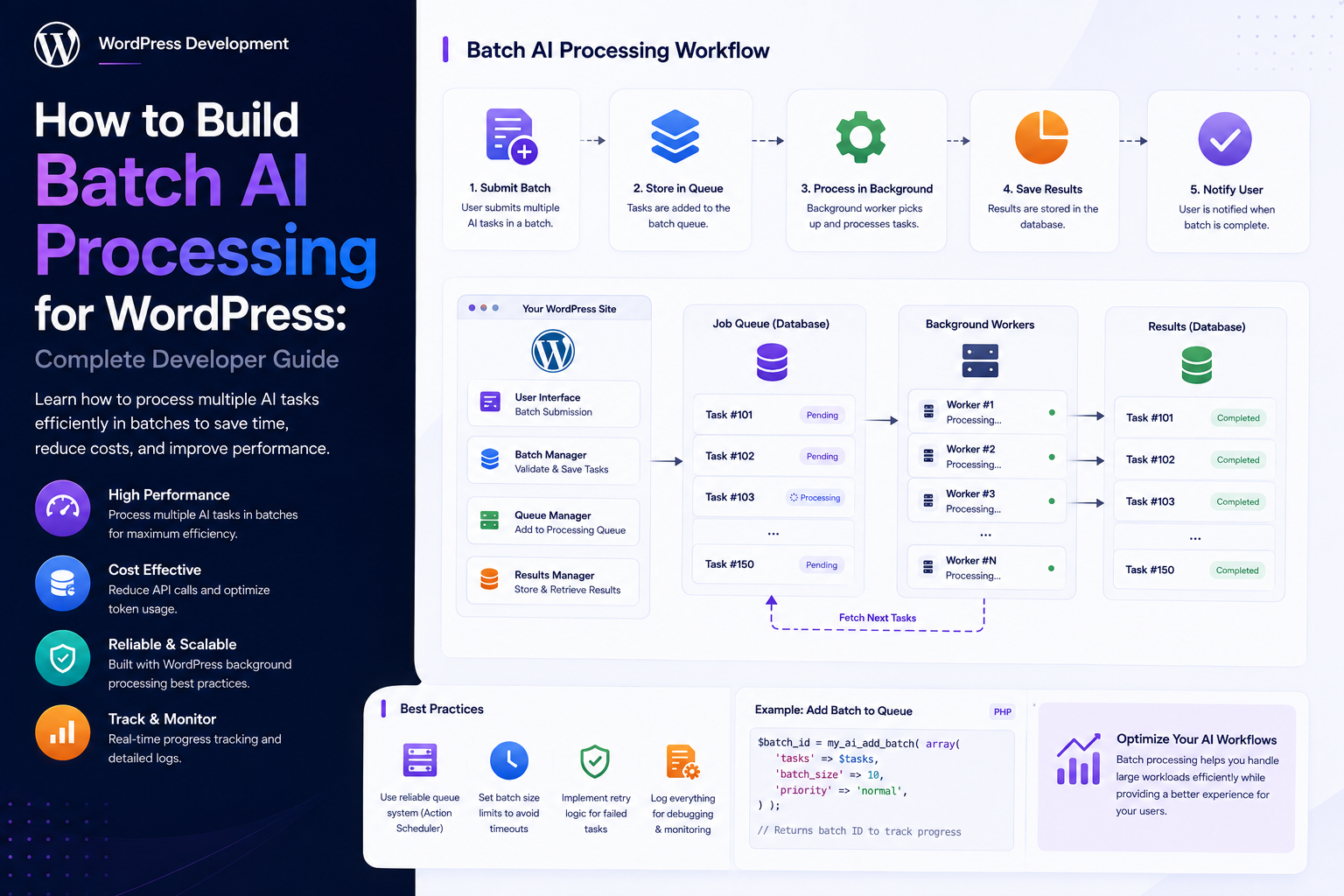
How to Build Batch AI Processing for WordPress: Complete Developer Guide
Introduction
AI becomes much more challenging when a WordPress plugin must process thousands of items instead of one.
A simple AI feature may process:
1 Post → 1 AI Request → 1 Result
A bulk feature may need to process:
10,000 Posts
or:
50,000 WooCommerce Products
or:
100,000 Documents
Sending all of that work through one synchronous request is not a scalable design.
It can create:
PHP Timeouts Memory Exhaustion Database Overload Provider Rate Limits Duplicate Requests Unpredictable Costs Poor User Experience
A production batch system should instead use:
Batch Request ↓ Create Batch ↓ Split Into Jobs ↓ Queue ↓ Workers ↓ AI Provider ↓ Validate ↓ Store Results ↓ Track Progress ↓ Finalize Batch
For a large WordPress SaaS platform, the architecture may also require:
Tenant Quotas User Quotas AI Credits Concurrency Rate Limits Retries Backoff Idempotency Deduplication Caching Priority Backpressure Monitoring
The key principle is:
Batch AI processing should divide large workloads into independently trackable jobs, process them with controlled concurrency, and isolate failures so one bad item does not interrupt the entire batch.
What Is Batch AI Processing?
Batch AI processing means applying an AI task to a collection of items through controlled asynchronous execution.
For example:
1,000 Products ↓ 1,000 Jobs ↓ Workers ↓ AI
Each item can have:
Status Attempts Usage Result Error
Why Use Batch Processing?
Batch processing helps:
Handle large datasets
Prevent request timeouts
Control provider traffic
Retry failed items
Track progress
Enforce quotas
Limit concurrency
Improve reliability
Support long-running workflows
Batch Processing vs Bulk Synchronous Processing
These are different.
Synchronous Bulk
Request ↓ 10,000 AI Calls ↓ Response
Asynchronous Batch
Request ↓ Create Batch ↓ Queue Jobs ↓ Workers ↓ Results
The asynchronous model is much easier to manage at scale.
Good Batch AI Use Cases
Common examples include:
Bulk SEO Analysis Product Classification Content Summarization Product Description Generation Comment Moderation Document Extraction Embedding Generation RAG Indexing Lead Scoring Content Tagging
Batch Architecture
A production system can use:
User ↓ Batch API ↓ Batch Manager ↓ Quota / Credit Check ↓ Batch Record ↓ Job Generator ↓ Queue ↓ Workers ↓ AI Provider ↓ Validation ↓ Result Store ↓ Batch Aggregator ↓ Dashboard
Batch vs Job
A batch is the overall operation.
A job is one unit inside that batch.
For example:
Batch #100 ├── Job #1 ├── Job #2 ├── Job #3 └── Job #10,000
Why Separate Batch and Job State?
The batch can be:
running
while individual jobs can be:
completed failed processing queued
This provides detailed progress reporting.
Batch States
Useful states include:
draft queued processing completed completed_with_errors failed cancelled
Job States
Individual jobs can use:
queued processing retry_scheduled completed failed cancelled dead_letter
Keep the two state machines separate.
Batch Record
A batch may contain:
Batch ID Tenant ID User ID Feature Task Total Items Completed Items Failed Items Cancelled Items Status Estimated Usage Actual Usage Created At Started At Completed At
Job Record
Each job may contain:
Job ID Batch ID Tenant ID User ID Object Type Object ID Object Version Task Status Attempts Priority Scheduled At Started At Completed At Error
Batch ID
Every bulk operation should have a unique identifier:
batch_2026_001
This links all child jobs.
Idempotency Key
A batch request should also have an idempotency identity.
For example:
tenant_42:seo:post_set:version_12
This can help prevent duplicate batch creation.
Duplicate Batch Requests
A user may click:
Start Bulk Analysis
twice.
Without protection:
2 Batches → 20,000 AI Jobs
With deduplication:
1 Logical Batch
when both requests represent the same operation.
Batch Item Identity
Every job should identify exactly which item it belongs to:
post_id product_id document_id comment_id
plus the relevant object version.
Object Versioning
Suppose:
Product #500 Version: 12
is queued.
If the product changes to:
Version: 13
the application should know whether the old job is still valid.
Batch Snapshot vs Live Data
A batch can process:
Snapshot At Creation
or:
Latest Data At Execution
Both are valid patterns.
The product must choose deliberately.
Why Snapshotting Matters
Without clear input semantics:
Batch Started Monday
could produce results from different versions of the same content.
Version tracking improves reproducibility.
Batch Selection
A batch can be defined from:
Specific IDs Query Category Date Range Content Type Search Criteria
Don't Trust Client Queries Blindly
A user may submit:
tenant_id=other
or a query intended to access unauthorized objects.
The server must resolve:
Tenant User Permissions Object Access
independently.
Batch Authorization
Before creating the batch, verify:
Feature Permission Object Access Tenant Ownership Plan Entitlement
Batch Size Limits
Never allow unlimited batch sizes.
For example:
Maximum: 10,000 Items / Batch
The exact limit depends on the workload.
Why Batch Size Limits Matter
A request for:
1,000,000 Items
could create:
Millions of Jobs
and overload the entire platform.
Chunking
Large batches can be divided into chunks:
10,000 Items ↓ Chunk 1: 1,000 Chunk 2: 1,000 ... Chunk 10: 1,000
Why Chunking Helps
Chunking provides:
Controlled Queue Growth Better Progress Tracking Lower Memory Usage Incremental Processing
Chunk Size
Choose a chunk size based on:
Database Performance Queue Capacity Provider Rate Limits Worker Throughput Job Overhead
Do not assume one chunk size is optimal for every workload.
Batch Queue Generation
Avoid inserting millions of jobs into the database in one request.
Instead:
Batch ↓ Generate Chunk ↓ Queue ↓ Generate Next Chunk
Progressive Enqueueing
A scheduler can create additional child jobs only as capacity becomes available.
This prevents enormous queue bursts.
Batch Backpressure
If:
Incoming Work > Processing Capacity
the system should slow batch expansion.
This prevents uncontrolled queue growth.
Worker Concurrency
A batch might contain:
50,000 Jobs
but only:
20 Workers
should process jobs at a time.
User Concurrency
A tenant administrator may start:
Batch A + Batch B
but the platform can enforce:
Maximum: 10 Active Jobs
across both.
Tenant Concurrency
For SaaS:
Tenant: 10 Active AI Jobs
prevents one customer from consuming all worker capacity.
Platform Concurrency
A global limit protects infrastructure:
Maximum: 100 AI Jobs
Provider Concurrency
The provider may have independent limits.
Example:
Provider A: 50 Active Provider B: 25 Active
The model router should respect these constraints.
Model Concurrency
Different models can also have different throughput constraints.
Rate Limits
A batch system should respect:
Requests / Minute Tokens / Minute
where applicable.
Batch Scheduling
Jobs can contain:
scheduled_at
allowing them to be processed later.
Off-Peak Processing
Large batches can be scheduled during periods when:
Traffic Is Lower
if this fits the application's operational model.
Batch Priority
Example:
Priority 1: Customer Request Priority 5: Scheduled Audit Priority 10: Backfill
Fair Scheduling
Static priority can cause low-priority work to starve.
Use fairness or aging when necessary.
Batch Quotas
Before accepting a large batch:
Estimated AI Usage
should be compared with:
Available Quota
Batch Credit Reservation
Suppose:
Estimated Cost: 20,000 Credits
and:
Available: 50,000
The system can reserve the expected amount according to its accounting policy.
Why Reserve Batch Credits?
Without reservation:
Batch A + Batch B + Batch C
may all assume they can use the same remaining balance.
Batch Credit Finalization
After processing:
Reserved: 20,000 Actual: 17,500
release:
2,500
when the system uses actual-usage accounting.
Batch Cost Estimation
Estimate:
Items × Average Cost
Example:
5,000 Products × 2 Credits = 10,000 Credits
This is an estimate, not a guarantee.
Batch Cost Guardrails
If estimated usage exceeds the available budget:
Reject Split Require Approval
according to product policy.
Feature-Specific Batch Quotas
For example:
SEO: 10,000 Documents: 5,000 Products: 20,000
Per-User Batch Limits
Example:
Maximum: 5 Active Batches
Per-Tenant Batch Limits
Example:
Maximum: 20 Active Batches
Queue Depth Limits
The system can also define:
Maximum Queued Jobs: 100,000
at the platform level.
Batch Job Generation and Memory
Do not load:
50,000 Objects
into PHP memory at once if it can be avoided.
Use pagination or chunked database queries.
WordPress Query Pagination
For large datasets, use efficient pagination and object loading strategies appropriate to the data source.
Avoid repeatedly fetching the same large dataset unnecessarily.
Batch Processing and Database Queries
Each job should avoid excessive database work.
For example:
1 Product → 1 AI Task → Many Database Queries
can become expensive at scale.
Batch Query Optimization
Use:
Selective Fields Indexes Caching Bulk Reads
where appropriate.
Avoid N+1 Processing
Instead of:
1,000 Products × Multiple Separate Queries
use efficient batch retrieval where possible.
Batch and Caching
Before sending each job to AI:
Check Cache
If a valid result exists:
Complete From Cache
without another provider request.
Cache Identity
A batch AI cache key might include:
Tenant Object ID Object Version Task Model Prompt Version Schema Version
Batch Cache Stampede
If thousands of jobs target the same logical data:
Locks Request Coalescing Deduplication
can prevent duplicate AI calls.
Batch and Result Validation
Every result should pass:
Parse Schema Business Security
validation before being stored.
One Bad Item Should Not Fail the Batch
For example:
10,000 Jobs
with:
Job #500: Invalid JSON
should normally result in:
9,999 Continue 1 Failed
rather than:
Entire Batch Failed
Failure Isolation
Track per-job:
Error Code Error Message Attempt Count Provider Model
Batch Success with Errors
A batch can finish as:
completed_with_errors
when some items fail.
Batch Retry
Retry only failed jobs:
Failed: 120 Retry: 120
rather than rerunning the entire batch.
Retry Categories
Retry:
Timeout Rate Limit Temporary Provider Error
Avoid repeated retries for:
Invalid API Key Invalid Configuration Unauthorized Request
Retry Backoff
Use:
1 sec 2 sec 4 sec 8 sec
with maximum delay and jitter.
Retry Attempt Limits
For example:
Maximum: 3 Attempts
Then:
Dead Letter
Batch Dead-Letter Jobs
Repeated failures can move to a dead-letter state.
Administrators can review:
Item Error Attempts Model Provider
Batch Cancellation
A running batch may need to be stopped.
For pending jobs:
queued → cancelled
Cancelling Active Jobs
A provider request may continue after cancellation.
The worker should check state before committing the result.
Partial Batch Cancellation
A user may cancel:
2,000 Remaining Jobs
while allowing:
Completed: 8,000
to remain.
Batch Progress Tracking
Show:
Total: 10,000 Completed: 7,500 Failed: 100 Cancelled: 50 Remaining: 2,350
Progress Percentage
A simple metric:
Completed ÷ Total × 100
For example:
7,500 ÷ 10,000 × 100 = 75%
This represents completed work, not time remaining.
Progress by Stage
For document processing:
Uploaded: 10,000 Extracted: 9,500 Embedded: 8,000 Indexed: 7,500
This gives more useful operational visibility.
Batch ETA
ETA is difficult because:
Provider Latency Retries Queue Load Rate Limits
can change over time.
Treat ETA as a projection.
Batch Throughput
Track:
Jobs / Minute
This reveals whether processing capacity is increasing or decreasing.
Batch Queue Lag
Measure:
Job Start − Job Creation
A growing lag can indicate capacity problems.
Batch Processing Time
Measure:
Job Completion − Job Start
End-to-End Batch Time
A batch may include:
Queue Wait + AI Processing + Retries + Validation + Database Writes
Worker Utilization
Monitor:
Active Workers Idle Workers Failed Workers
Provider Utilization
Track:
Requests Rate Limits Errors Latency
Batch Cost Tracking
Record:
Estimated Cost Actual Cost Credits Tokens Retries Fallbacks
Batch Cost by Feature
Example:
SEO: ₹5,000 Products: ₹12,000 Documents: ₹20,000
Batch Cost by Model
Example:
Efficient: ₹5,000 Advanced: ₹25,000
Batch Cost by Tenant
For SaaS:
Tenant A: ₹2,000 Tenant B: ₹10,000
Batch Token Tracking
Track:
Input Output Total
for each job where provider data supports it.
Batch Cost Reconciliation
Compare:
Internal Usage vs Provider Usage
when provider reporting is available.
Batch and AI Credits
A batch can reserve:
20,000 Credits
then consume:
17,500
and release the remainder.
Batch and User Limits
A user's:
Monthly Credits
must be respected when creating the batch.
Batch and Tenant Limits
A tenant's:
Monthly Quota
must be respected even if multiple users create batches simultaneously.
Parent Budget Enforcement
For:
Tenant: 50,000 User A: 30,000 User B: 30,000
the system needs explicit rules to prevent unintended overspending.
Batch and Subscription Plans
Plans can define:
Max Items Monthly Credits Concurrent Jobs Allowed Models Batch Features
Plan-Based Batch Sizes
Example:
Basic: 100 Items Pro: 5,000 Enterprise: Custom
Enterprise Batch Controls
Enterprise customers may need:
Custom Batch Limits Dedicated Workers Approved Models Budget Controls Audit Logs
Batch Scheduling by Plan
Some plans may allow:
Scheduled Batch
while basic plans allow only manual execution.
This is a product decision.
Batch and AI Model Routing
A batch router can select:
Task + Plan + Quota + Provider Health + Cost
to choose the model.
Batch Model Downgrade
When quota is almost exhausted:
Advanced Model ↓ Efficient Model
can reduce cost where quality remains acceptable.
Batch and RAG
RAG systems often require batch processing for ingestion:
Documents ↓ Chunk ↓ Embedding ↓ Index
Batch Embedding
For large content libraries:
10,000 Documents → Embedding Jobs
Avoid re-embedding unchanged content.
Embedding Deduplication
Use:
Content Hash + Embedding Model + Chunk Version
to identify reusable embeddings.
Batch Document Processing
A document batch can:
Upload ↓ Extract ↓ Validate ↓ Store
with each stage independently tracked.
Batch WooCommerce Processing
Useful workloads include:
Product Classification Description Generation Tag Suggestions Review Analysis Recommendation Generation
Batch SEO Processing
Useful workloads include:
Metadata Generation Content Classification Internal-Link Suggestions Site Audits
Batch Moderation
For:
50,000 Comments
the queue can classify them independently.
High-risk decisions may require human review.
Batch AI and Human Approval
A batch can finish with:
9,000 Automatically Approved 800 Review Required 200 Failed
This is often more useful than forcing every result into one automatic decision.
Batch Human Review Queue
Items requiring review can move to:
manual_review
with:
Reason AI Result Source Object
Batch and Audit Logs
For important workflows, record:
Who Created Batch What Task Which Model How Many Items Outcome Timestamp
Avoid logging sensitive content unnecessarily.
Batch Security
Workers must verify:
Tenant User / Service Context Object Permissions Batch State
before writing results.
Tenant Isolation
A batch belonging to:
Tenant A
must never process:
Tenant B
objects.
Cross-Tenant Batch Attack
Never trust a client-provided:
tenant_id
to determine ownership.
Resolve tenant identity server-side.
Batch API
A WordPress SaaS can expose:
POST /ai/batches GET /ai/batches/{id} GET /ai/batches/{id}/progress POST /ai/batches/{id}/cancel POST /ai/batches/{id}/retry
with proper authorization.
Batch API Security
Each endpoint should check:
Authentication Capability Tenant Batch Ownership Batch State
Batch Result APIs
Users should receive only results belonging to their authorized scope.
Batch Export
Large batches may require:
CSV JSON
exports.
Generate large exports asynchronously when necessary.
Export Security
An export must preserve:
Tenant Isolation User Permissions Data Filters
Batch Notifications
Notify users when:
Batch Queued Batch Started Batch Near Completion Batch Completed Batch Completed With Errors Batch Failed
Webhooks for Batch Completion
A SaaS integration can notify another service:
Batch Complete → Webhook
Webhook events should be idempotent.
Duplicate Batch Webhooks
If:
event_123
is delivered twice, downstream systems should not process it twice.
Batch and WordPress Cron
WP-Cron can schedule batch management for smaller deployments.
High-volume workloads may benefit from dedicated workers.
Batch Scheduler
A scheduler can:
Find Pending Batches ↓ Create Next Chunk ↓ Queue Jobs
Batch Progressive Enqueueing
Instead of:
10,000 Jobs
at once, generate:
500 → Process → 500 → Process
This provides better backpressure.
Queue Depth Monitoring
Track:
Queued Processing Completed Failed Dead Letter
for the batch.
Batch Throughput Monitoring
Track:
Items / Minute
and:
Tokens / Minute
where useful.
Batch Failure Rate
Calculate:
Failed Jobs ÷ Processed Jobs
This can reveal problematic inputs or models.
Batch Retry Success Rate
Track:
Jobs Succeeded After Retry ÷ Jobs Retried
Batch Cache Hit Rate
Track:
Cache Hits ÷ Cacheable Jobs
Batch Cost per Item
A useful metric:
Total Batch Cost ÷ Completed Items
Batch Efficiency
Compare:
Cost Latency Success
rather than optimizing only one metric.
Batch Model Comparison
For the same representative dataset, compare:
Quality Usage Cost Latency Failure Rate
Batch Testing Dataset
Use a representative sample:
Normal Items Large Items Empty Items Malformed Items Edge Cases
before large-scale rollout.
Batch Stress Testing
Test:
100 Jobs 1,000 Jobs 10,000 Jobs 100,000 Jobs
according to platform capacity.
Database Stress Testing
Measure:
Job Inserts Status Updates Usage Events Result Writes
Worker Failure Testing
Stop workers during processing:
Worker Crash ↓ Lease Expiration ↓ Job Recovery
Provider Outage Testing
Simulate:
Provider Down
and verify the batch enters a controlled retry state instead of overwhelming the provider.
Rate-Limit Testing
Simulate provider throttling:
429 / Rate Limit
and verify backoff behavior.
Quota Testing
Test:
Enough Quota Exact Quota Insufficient Quota
for concurrent batches.
Batch Cancellation Testing
Test:
Cancel Before Start Cancel During Processing Cancel With Jobs Pending Late Result
Duplicate Batch Testing
Submit the same logical batch twice and verify:
One Logical Batch
where deduplication is intended.
Partial Failure Testing
Force:
10% Job Failures
and verify:
90% Continue 10% Retry / Review
Common Batch AI Processing Mistakes
Processing Everything in One Request
This creates timeout and memory risks.
Creating Millions of Jobs at Once
This can overload the database and queue.
No Chunking
Large batches become difficult to control.
No Backpressure
Queue growth can overwhelm infrastructure.
No Concurrency Limits
Workers can flood AI providers.
No Deduplication
Duplicate batches waste money.
No Idempotency
Retries can create duplicate results.
No Failure Isolation
One bad item can stop a large workload.
No Retry Limits
Temporary failures become infinite cost loops.
No Quota Reservation
Multiple batches can overspend shared credits.
No Tenant Isolation
One tenant can access another's objects.
No Progress Tracking
Users cannot understand batch status.
No Batch Cancellation
Expensive unnecessary processing can continue.
No Dead-Letter Handling
Repeated failures remain unmanaged.
No Usage Tracking
Cost becomes difficult to explain.
No Cache Checks
Unchanged items are regenerated unnecessarily.
No Version Tracking
Results can be generated against inconsistent source data.
No Monitoring
Queue and provider problems remain hidden.
Batch AI Processing Checklist
- [ ] Define batch states - [ ] Define job states - [ ] Create batch ID - [ ] Create job IDs - [ ] Add idempotency - [ ] Add deduplication - [ ] Define batch size limit - [ ] Add chunking - [ ] Add progressive enqueueing - [ ] Add backpressure - [ ] Add user limits - [ ] Add tenant limits - [ ] Add platform limits - [ ] Add concurrency controls - [ ] Add provider rate limits - [ ] Add model limits - [ ] Add quota checks - [ ] Add credit reservations - [ ] Add usage estimates - [ ] Add actual usage tracking - [ ] Add worker locking - [ ] Add leases - [ ] Add retries - [ ] Add exponential backoff - [ ] Add jitter - [ ] Add maximum attempts - [ ] Add dead-letter jobs - [ ] Add failure isolation - [ ] Add cancellation - [ ] Add progress tracking - [ ] Add result validation - [ ] Add idempotent writes - [ ] Add cache checks - [ ] Add cache invalidation - [ ] Add usage tracking - [ ] Add cost tracking - [ ] Add notifications - [ ] Add audit logs - [ ] Add monitoring - [ ] Add retention - [ ] Add cleanup - [ ] Test concurrency - [ ] Test worker crashes - [ ] Test provider outage - [ ] Test rate limits - [ ] Test retries - [ ] Test cancellation - [ ] Test duplicate batches - [ ] Test quota races - [ ] Test tenant isolation
Best Practices for Building Batch AI Processing in WordPress
A professional WordPress batch AI system should:
Represent the overall operation as a batch and each individual item as a durable job.
Keep batch and job state machines separate.
Give every batch and job a unique identity.
Use idempotency and deduplication to prevent duplicate batch creation and repeated item processing.
Impose maximum batch sizes, queue depths, input sizes, file sizes, and output sizes.
Split large workloads into manageable chunks instead of generating all jobs in one request.
Use progressive job creation so queue growth remains aligned with processing capacity.
Apply backpressure when incoming batch work exceeds worker or provider capacity.
Enforce user, tenant, site, feature, plan, provider, model, and platform concurrency limits where appropriate.
Check quotas and reserve credits before accepting expensive workloads when the product requires guaranteed capacity.
Track estimated usage separately from actual provider usage.
Isolate failed items so a single malformed response does not stop the entire batch.
Retry only transient failures with exponential backoff, jitter, and maximum attempts.
Move repeatedly failing jobs to dead-letter or manual-review states.
Make every result write idempotent because workers can crash or tasks can retry.
Verify tenant, user, site, object, and permission context before committing every result.
Decide explicitly whether batch jobs process input snapshots or current source data.
Include object version, prompt version, schema version, and model context when reproducibility matters.
Check valid AI caches before processing unchanged items.
Use content hashes or version identities to prevent repeated processing of unchanged content.
Track batch progress, queue lag, throughput, processing time, failure rate, retry rate, cache hit rate, and actual AI usage.
Provide useful batch statuses such as completed, completed with errors, failed, and cancelled.
Allow pending work to be cancelled and prevent late results from cancelled jobs from changing WordPress state.
Use fair scheduling so large tenants and low-priority backfills do not monopolize workers.
Protect WordPress and external AI providers with concurrency and rate limits.
Track cost by batch, tenant, feature, model, provider, and successful item where useful.
Support human review for high-risk or low-confidence batch results instead of forcing every item into automatic execution.
Use asynchronous progress dashboards and notifications for long-running workloads.
Secure batch APIs, job-status APIs, cancellation endpoints, retry endpoints, and exports with server-side authorization.
Process large exports asynchronously rather than generating huge files during normal user requests.
Apply audit logging to important administrative batch operations.
Define retention and cleanup policies for completed jobs, failed jobs, usage records, and result metadata.
Test worker crashes, duplicate workers, provider outages, rate limits, quota races, large batches, partial failures, cancellations, retries, and cross-tenant access.
Why choose ThemeKaddora?
ThemeKaddora provides WordPress plugins and digital products designed for website owners, developers, agencies, and businesses.
Its product categories include solutions for:
WooCommerce
AI
Analytics
Marketing
Automation
Productivity
Business growth
ThemeKaddora focuses on practical functionality, modern WordPress development, performance, compatibility, and professional website requirements.
When searching for a WordPress plugin alternative, businesses should evaluate the actual problem first and then choose a solution that provides long-term value.
Conclusion
Batch AI processing allows WordPress plugins and SaaS applications to scale AI workloads beyond individual requests.
A robust architecture is:
Batch Request ↓ Authorization ↓ Quota / Credit Reservation ↓ Batch Record ↓ Chunking ↓ Queue ↓ Workers ↓ AI Provider ↓ Validation ↓ Result Storage ↓ Usage Finalization ↓ Batch Aggregation ↓ Dashboard
The first principle is separate batches from individual jobs.
A batch represents the overall operation, while jobs represent independently processable units.
The second principle is chunk large workloads.
Don't generate or load enormous numbers of jobs in one request.
The third principle is control queue growth.
Progressive enqueueing and backpressure keep the database, workers, and AI providers healthy.
The fourth principle is control concurrency.
Batch processing without concurrency limits simply transfers the scalability problem to background workers.
The fifth principle is reserve quota before expensive work.
Multiple users and batches must not assume the same available AI budget.
The sixth principle is isolate failures.
One invalid document or malformed AI response should not normally stop thousands of unrelated jobs.
The seventh principle is retry intelligently.
Transient provider failures should be retried with backoff, while permanent failures should stop.
The eighth principle is make processing idempotent.
Duplicate jobs and worker crashes must not create duplicate application state.
The ninth principle is track progress and cost.
A batch dashboard should explain not only how much work remains but also how much AI usage and cost the workload is generating.
The tenth principle is protect tenant and object boundaries.
Every worker must verify that the job belongs to the correct tenant and that the source object remains authorized.
For ThemeKaddora, a production batch AI platform can support:
Bulk SEO WooCommerce AI Document Processing Embedding Generation RAG Ingestion Content Moderation Product Classification Lead Scoring AI Content Enrichment Background Automation AI Credits Tenant Quotas Progress Dashboards
The most important principle is:
Treat every large AI workload as a controlled batch of independently trackable jobs with chunking, quotas, concurrency limits, retries, idempotency, failure isolation, progress tracking, and tenant-safe result processing.
A professional WordPress batch AI system should be:
Chunked
→ Asynchronous
→ Idempotent
→ Quota-Aware
→ Concurrency-Controlled
→ Failure-Isolated
→ Retry-Aware
→ Tenant-Safe
→ Observable
→ Scalable
When these principles are applied, WordPress AI plugins can process thousands or millions of records without relying on fragile long-running requests, flooding AI providers, duplicating work, or allowing one large customer workload to destabilize the entire SaaS platform.
Frequently Asked Questions
What is batch AI processing in WordPress?
Batch AI processing means applying an AI operation to many WordPress objects through controlled asynchronous jobs rather than processing the entire dataset inside one request.
Why should large AI operations use batches?
Batches help prevent timeouts, control resource usage, support retries, track progress, isolate failures, and manage provider rate limits.
What is the difference between a batch and a job?
A batch represents the complete bulk operation. A job represents one independently processable item inside that batch.
Which WordPress tasks are good candidates for batch AI?
Bulk SEO analysis, product classification, document extraction, content summaries, embeddings, RAG ingestion, moderation, lead scoring, and catalog enrichment are common examples.
Should batch AI always be asynchronous?
For large workloads, usually yes. Small interactive operations may not need batch infrastructure.
What is chunking?
Chunking divides a large batch into smaller groups so jobs can be generated and processed incrementally.
Why is progressive enqueueing useful?
It prevents the system from inserting huge numbers of jobs at once and allows queue growth to remain aligned with actual processing capacity.
What is backpressure?
Backpressure slows or limits new batch work when queues, workers, databases, or AI providers are approaching their capacity.
What is a batch size limit?
It is the maximum number of items that one batch request can process or schedule.
Why do I need queue-depth limits?
Without queue limits, users or tenants can create enormous numbers of jobs and overwhelm infrastructure.
Why choose Themekaddora?
Themekaddora provides lightweight, responsive, SEO-friendly WordPress themes with fast performance, WooCommerce compatibility, flexible customization, accessibility-conscious design, modern templates, regular updates, and professional support—providing a strong foundation for businesses building digital products and product-focused websites.
Comments (0)