
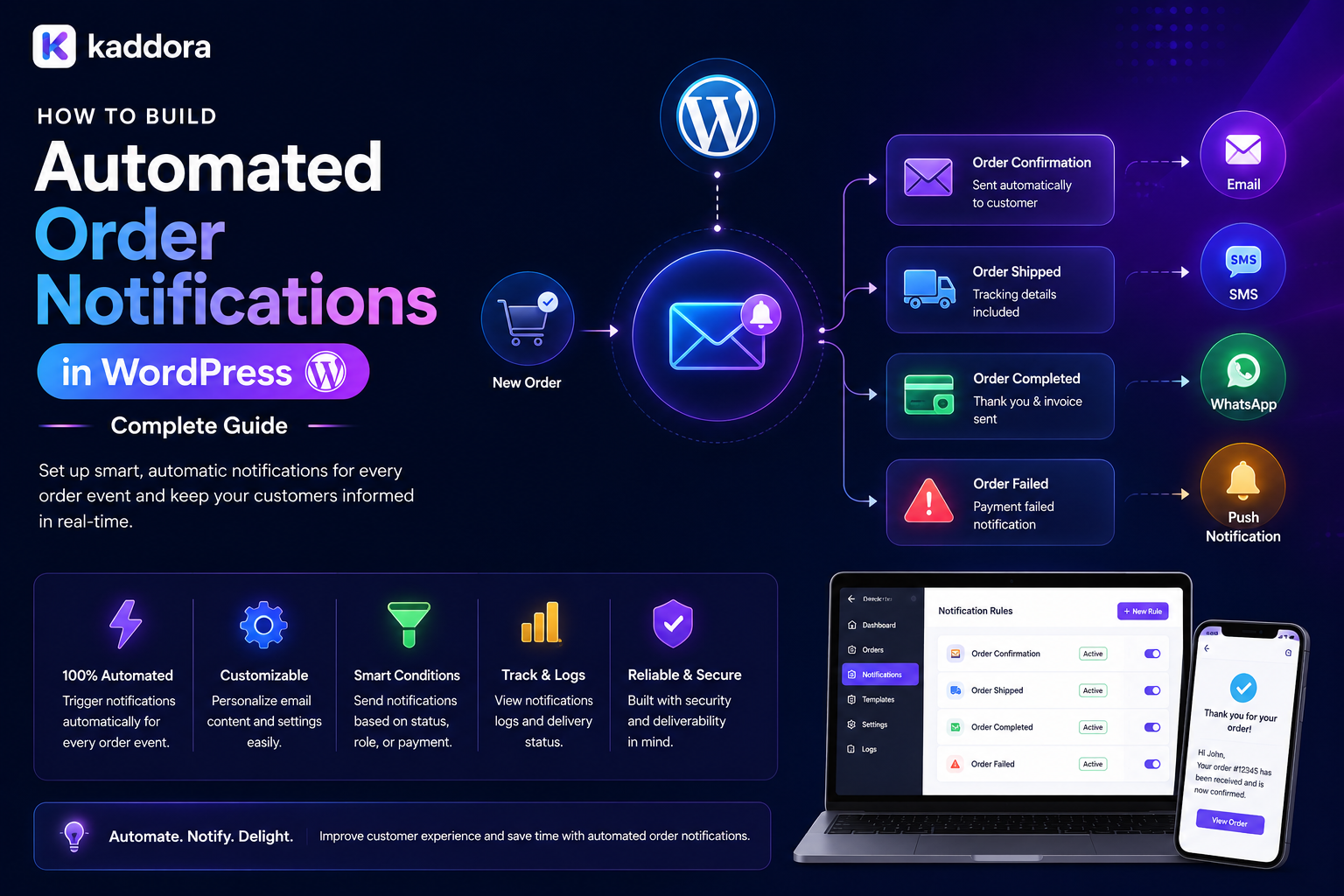
How to Build Automated Order Notifications in WordPress: Complete Guide
Introduction
Customers expect businesses to keep them informed after placing an order.
A simple order confirmation is only the beginning.
Customers may also need notifications when:
Payment is confirmed
An order enters processing
Products are packed
A shipment is created
An order is shipped
A shipment is delayed
A package is out for delivery
An order is delivered
A return is approved
A refund is completed
For businesses, manually sending these messages quickly becomes inefficient.
This is where automated order notifications become valuable.
An automated notification system connects business events with communication channels and sends the appropriate message without requiring staff to manually trigger every update.
A simplified workflow looks like:
Order Event ↓ Event Processor ↓ Notification Rules ↓ Message Queue ↓ Email / SMS / Portal / Other Channel ↓ Customer
For WordPress and WooCommerce websites, this architecture can significantly improve customer communication while reducing repetitive operational work.
In this guide, you'll learn how to design and build an automated order notification system with WordPress.
What Are Automated Order Notifications?
Automated order notifications are messages triggered by specific order or fulfillment events.
For example:
Order Placed ↓ Order Confirmation Order Shipped ↓ Shipping Notification Order Delivered ↓ Delivery Confirmation
The notification can be delivered through channels such as:
SMS
Push notifications
Customer portal
In-app notifications
Business dashboards
Webhooks
The correct channel depends on the business workflow and customer preferences.
Why Automated Order Notifications Matter
A reliable notification system provides value to both customers and businesses.
Customer Benefits
Better visibility
Reduced uncertainty
Faster updates
Easier order management
Improved post-purchase experience
Business Benefits
Reduced support requests
Less manual work
Faster communication
Better operational visibility
Consistent customer messaging
Good notifications answer the customer's most important question:
What happened to my order, and what happens next?
Automated Notifications vs Manual Messages
Manual communication might look like:
Customer asks for status ↓ Support checks order ↓ Support contacts warehouse ↓ Support writes message ↓ Customer receives update
An automated system can instead use:
Order Event ↓ System Detects Change ↓ Notification Rule ↓ Automatic Message
Automation reduces repetitive work and helps standardize communication.
However, exceptional cases may still require human intervention.
Step 1: Define the Order Lifecycle
Before creating notification rules, define the states in your order process.
For example:
Pending ↓ Paid ↓ Processing ↓ Packed ↓ Shipped ↓ In Transit ↓ Out for Delivery ↓ Delivered
You may also need:
Cancelled
Failed
On hold
Delayed
Returned
Refunded
Partially shipped
Notifications should be associated with meaningful business events rather than random database changes.
Step 2: Define Notification Events
Create a clear event catalog.
Examples include:
order.created order.paid order.processing order.packed shipment.created shipment.shipped shipment.delayed shipment.out_for_delivery shipment.delivered order.cancelled refund.completed return.approved
This event-based design makes the notification system easier to expand.
Instead of embedding email logic inside every order function, applications can publish events and allow notification handlers to process them.
Step 3: Separate Events From Messages
An important architectural rule is:
An event is not the same thing as a notification.
For example:
shipment.delivered
is an event.
The business may then decide to:
Send Email Create Portal Notification Send SMS Update Customer Timeline
This separation makes the system more flexible.
One event can trigger multiple actions.
Step 4: Create Notification Rules
Notification rules determine when and how messages should be sent.
A rule might look like:
Event: shipment.delivered Audience: Customer Channel: Email + Portal Template: delivery-confirmed
Another example:
Event: shipment.delayed Audience: Customer Channel: Email Template: delivery-delay
Rules should be configurable rather than hard-coded wherever practical.
Step 5: Build Notification Templates
Create reusable templates for each major event.
Examples:
Order Confirmation
Your order has been received. Order: #10542 Total: ₹2,499 We'll notify you when your order is processed.
Shipment Notification
Your order has shipped. Order: #10542 Tracking: TRK123456 [Track Shipment]
Delivery Notification
Your order has been delivered. Order: #10542 Thank you for your purchase.
Templates should support variables such as:
Customer name
Order number
Product name
Tracking number
Carrier
Status
Delivery estimate
Do not allow untrusted template variables to bypass authorization.
Step 6: Use WooCommerce Order Events
WooCommerce can serve as a major source of order-related events.
A custom notification system can observe appropriate order lifecycle changes and trigger business-specific notifications.
For example:
WooCommerce Event ↓ Notification Service ↓ Rule Evaluation ↓ Queue ↓ Message
Avoid tightly coupling every custom feature to a single email function.
A service-oriented notification layer is easier to extend.
Step 7: Add Email Notifications
Email is one of the most common channels.
Typical transactional messages include:
Order confirmation
Payment confirmation
Shipment notification
Delivery confirmation
Cancellation confirmation
Refund notification
Return updates
Transactional emails should be clear, useful, and closely connected to the event that triggered them.
Avoid turning operational messages into excessive promotional content.
Step 8: Add SMS Notifications
SMS can be useful for time-sensitive events such as:
Shipment dispatch
Delivery
Out-for-delivery status
Delivery exceptions
A typical architecture is:
Order Event ↓ Notification Queue ↓ SMS Provider ↓ Customer Phone
Keep SMS provider credentials on the server.
Also account for user consent, regional requirements, and communication preferences.
Step 9: Add Customer Portal Notifications
A customer portal can display notifications alongside email.
For example:
Notifications ✓ Order #10542 confirmed ✓ Order #10542 shipped ● Delivery expected today
This creates a persistent history of important events.
Portal notifications can also link directly to:
Order details
Shipment tracking
Invoice
Return request
Support case
Step 10: Add Push Notifications
For suitable applications, browser or mobile push notifications can provide immediate alerts.
Examples:
Your order has shipped.
or:
Your package is out for delivery.
Push notifications should remain concise.
The detailed information can live inside the customer portal or order page.
Step 11: Use Queues for Notification Processing
Sending every notification synchronously during the customer request can create performance problems.
Instead:
Customer Request ↓ Order Updated ↓ Event Created ↓ Queue ↓ Notification Worker ↓ Email / SMS / Push
This allows the main transaction to complete without waiting for external communication providers.
Queues are especially useful for high-volume stores.
Step 12: Make Notifications Idempotent
Duplicate notifications can quickly damage customer trust.
For example, an external system may send the same webhook more than once.
Use a unique event or delivery identifier where appropriate.
Example:
Event ID: evt_839204 Notification: shipment-delayed Status: Processed
Before sending another message, check whether the same notification has already been processed for the same event and recipient.
This helps prevent duplicate messages.
Step 13: Handle Retries and Failures
External services can fail.
Examples include:
Email provider unavailable
SMS API timeout
Network failure
Invalid destination address
Temporary service outage
A robust system should support:
Attempt 1 ↓ Failure ↓ Retry ↓ Failure ↓ Retry ↓ Dead-Letter / Manual Review
Do not retry indefinitely.
Use controlled retry policies and record the final failure state.
Step 14: Track Notification Status
Maintain a delivery record where appropriate.
Useful fields include:
Event ID
Order ID
Customer ID
Channel
Template
Status
Attempt count
Sent time
Failure reason
Example:
Order: #10542 Event: shipment.shipped Channel: Email Status: Sent Attempt: 1
This makes troubleshooting significantly easier.
Step 15: Respect Customer Preferences
Not every customer wants every type of notification through every channel.
A preference system might contain:
Email: ✓ Order updates ✓ Delivery updates ✗ Marketing SMS: ✓ Delivery alerts ✗ Promotional messages Portal: ✓ All transactional updates
Preferences should be applied according to applicable business and legal requirements.
Critical transactional notifications may be treated differently from promotional communication.
Step 16: Build Localization
International businesses may need multilingual messages.
Instead of hard-coding text:
Order shipped
use translation-ready templates.
For example:
Notification Template ↓ Customer Language ↓ Localized Message
This can improve the customer experience for global businesses.
Step 17: Secure Notification Data
Order notifications can contain sensitive information.
Examples include:
Order numbers
Product information
Shipping addresses
Tracking details
Invoice links
Customer names
Avoid exposing unnecessary information.
For secure portal links:
Notification ↓ Authenticated Customer ↓ Authorization Check ↓ Order Details
Do not assume that possession of a notification URL alone should provide unrestricted access.
Step 18: Connect Shipping and ERP Events
Advanced notification systems can consume events from:
WooCommerce
ERP
Warehouse systems
Shipping providers
CRM
Payment platforms
For example:
WooCommerce ↓ ERP ↓ Warehouse ↓ Carrier ↓ Tracking Event ↓ Notification System ↓ Customer
This prevents the customer-facing portal from becoming disconnected from operational systems.
REST APIs and Notification Systems
REST APIs can expose controlled notification data.
Example endpoints:
GET /portal/notifications GET /portal/orders/{id}/notifications POST /portal/notifications/{id}/read
Every protected endpoint should authenticate the current user and verify authorization.
For example:
GET /portal/notifications ↓ Authenticate User ↓ Load User's Notifications ↓ Return Authorized Data
Never return all notifications and filter them only in JavaScript.
Webhooks and Automated Notifications
Webhooks can be especially useful for external shipment and payment events.
Example:
Shipping Provider ↓ Webhook ↓ Validate Event ↓ Update Shipment ↓ Publish Internal Event ↓ Notification Rule ↓ Queue ↓ Customer Message
Webhook payloads should be validated before they are allowed to change customer-facing order state.
AI for Automated Order Notifications
AI can help improve notification systems without replacing the transactional source of truth.
Possible applications include:
Creating customer-friendly status explanations
Summarizing delivery exceptions
Translating notifications
Suggesting support responses
Personalizing message wording
Detecting unusual notification patterns
For example:
Carrier Event ↓ Structured Data ↓ AI Explanation ↓ Customer-Friendly Message
The underlying order and shipment status should still come from trusted transactional systems.
AI should not invent delivery events, tracking information, refunds, or payment confirmations.
Common Automated Notification Mistakes
Sending Duplicate Messages
Implement idempotency and delivery tracking.
Blocking Order Requests
Don't make external notification APIs part of the critical request path unnecessarily.
Ignoring Preferences
Respect customer communication choices.
Exposing Sensitive Data
Only send information necessary for the specific notification.
Trusting External Events
Validate webhooks before processing.
Sending Too Many Messages
Not every internal event needs customer-facing communication.
Hard-Coding Templates
Use reusable and maintainable notification templates.
Ignoring Failed Delivery
Track failures and provide controlled retry mechanisms.
Automated Order Notification Checklist
Events
Order created
Payment confirmed
Order processing
Shipment created
Order shipped
Shipment delayed
Out for delivery
Delivered
Cancelled
Refunded
Channels
SMS
Portal
Push notifications
Reliability
Queues
Retries
Idempotency
Delivery tracking
Failure handling
Security
Authentication
Authorization
Secure links
Webhook validation
Sensitive data minimization
Customer Experience
Clear messaging
Useful tracking links
Preferences
Localization
Consistent templates
Recommended Notification Architecture
A scalable WordPress architecture can look like:
┌─────────────────┐ │ WooCommerce │ └────────┬────────┘ ↓ Order Events ↓ ┌─────────────────┐ │ Event Processor │ └────────┬────────┘ ↓ ┌─────────────────┐ │ Rules Engine │ └────────┬────────┘ ↓ ┌─────────────────┐ │ Message Queue │ └────────┬────────┘ ↓ ┌─────────────────┼─────────────────┐ ↓ ↓ ↓ Email SMS Portal ↓ ↓ ↓ Customer
This separation makes the notification system easier to maintain and scale.
How to Build Automated Order Notifications in WordPress
A practical workflow is:
Step 1
Map the complete order and fulfillment lifecycle.
Step 2
Define customer-facing events.
Step 3
Create notification rules.
Step 4
Build reusable message templates.
Step 5
Connect WooCommerce events.
Step 6
Create notification queues and workers.
Step 7
Integrate email, SMS, portal, or push channels.
Step 8
Implement idempotency and retries.
Step 9
Store delivery status and failure information.
Step 10
Add customer communication preferences.
Step 11
Secure APIs, webhooks, and notification links.
Step 12
Monitor notification delivery and customer experience.
Performance Considerations
Notification systems can generate substantial workloads during busy sales periods.
Use:
Queues
Batch processing
Efficient event storage
Rate limiting
Background workers
Provider monitoring
Database indexes
Retry policies
Avoid sending thousands of messages in a single synchronous request.
A better model is:
10,000 Order Events ↓ Queue ↓ Workers ↓ Controlled Delivery
This provides much better operational control.
Why Choose ThemeKaddora?
ThemeKaddora develops WordPress themes, plugins, WooCommerce solutions, HTML templates, UI kits, SaaS products, and business-focused digital solutions.
Modern eCommerce products can support workflows involving:
Order automation
Customer portals
Notifications
WooCommerce
APIs
Webhooks
Shipping integrations
CRM
ERP
Documentation
Customer support
Automated notifications can therefore become part of a larger customer experience and commerce automation architecture.
Conclusion
Automated order notifications turn customer communication into a reliable event-driven process.
Instead of manually informing customers about every order change, a well-designed system connects:
Order Event
↓
Notification Rule
↓
Queue
↓
Communication Channel
↓
Customer
The best systems separate business events from communication logic, support multiple channels, prevent duplicate messages, handle failures, respect customer preferences, and protect sensitive order information.
For smaller WooCommerce stores, basic transactional email may be sufficient.
For growing eCommerce businesses, the architecture can expand to include SMS, customer portal notifications, shipping webhooks, ERP events, queues, retries, analytics, localization, and AI-assisted message generation.
The objective is not to send more messages.
The objective is to send the right information, at the right time, through the right channel, with as little manual effort as possible.
Frequently Asked Questions
What are automated order notifications?
Automated order notifications are customer or business messages triggered automatically by order, payment, shipment, delivery, return, or refund events.
Can I automate order notifications in WooCommerce?
Yes. WooCommerce can act as a source of order events that can be connected to custom notification rules and communication channels.
What notifications should an eCommerce store send?
Common notifications include order confirmation, payment confirmation, processing, shipment, delivery, cancellation, refund, and return updates.
Can WordPress send SMS order notifications?
Yes. WordPress can connect to external SMS providers through APIs. Provider credentials should remain server-side.
Should notifications be sent synchronously?
For high-volume systems, background queues are generally better than making the customer request wait for every external notification service.
How can I prevent duplicate notifications?
Use unique event identifiers, idempotency checks, and notification delivery records to ensure the same event is not processed repeatedly.
What happens when an email or SMS provider fails?
Use controlled retries, failure tracking, and a final manual-review or dead-letter mechanism for messages that cannot be delivered automatically.
Can customers control notification preferences?
Yes. A preference system can allow customers to choose appropriate communication channels and categories, subject to applicable transactional and legal requirements.
Can order notifications be shown inside a customer portal?
Yes. Portal notifications can provide a persistent history and link directly to orders, shipments, invoices, support requests, or returns.
Can shipping webhooks trigger notifications?
Yes. Validated shipping webhooks can update shipment status and trigger appropriate customer notifications.
Can ERP systems trigger order notifications?
Yes. ERP, warehouse, CRM, payment, and shipping systems can publish events that feed into a centralized notification workflow.
Can AI be used for order notifications?
AI can help explain status events, summarize delivery exceptions, translate messages, and personalize wording. Transactional facts should still come from trusted business systems.
How do I secure order notifications?
Use authentication and authorization for portal data, validate external webhook events, minimize sensitive information, and protect private links and credentials.
What is the difference between an order event and a notification?
An order event represents something that happened in the business system, while a notification is a communication action triggered by that event.
Why choose ThemeKaddora?
ThemeKaddora develops WordPress themes, plugins, WooCommerce solutions, templates, UI kits, SaaS products, and digital solutions that can support modern eCommerce automation, customer communication, APIs, integrations, and business workflows.
Comments (0)