
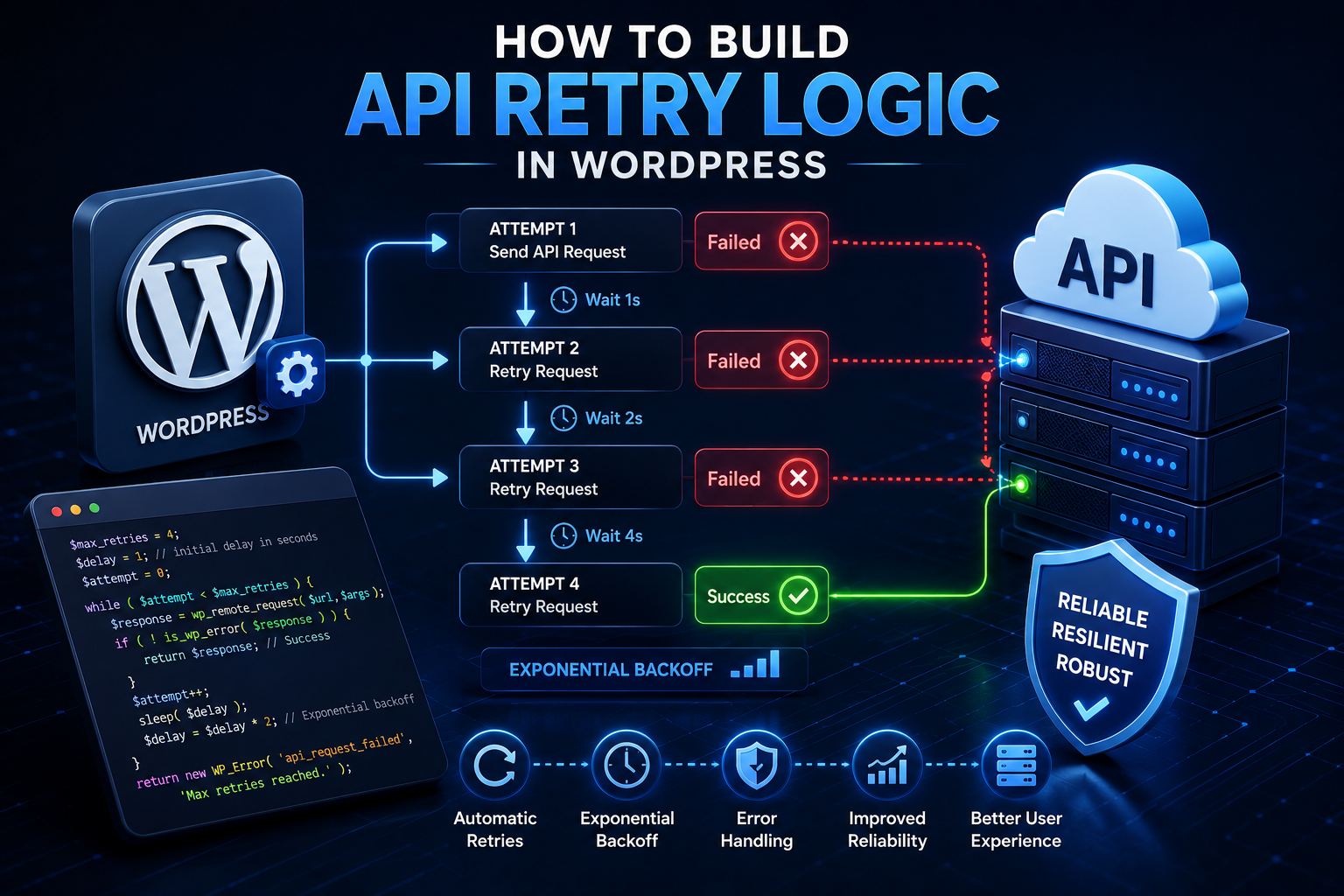
How to Build API Retry Logic in WordPress: Complete Developer Guide
Introduction
External APIs are an important part of modern WordPress development.
A plugin may communicate with:
AI platforms
CRM systems
Payment providers
Shipping services
Analytics platforms
SaaS applications
Email services
Licensing systems
Internal company APIs
The normal workflow looks like:
WordPress ↓ HTTP Request ↓ External API ↓ Response
Sometimes the request succeeds immediately.
Sometimes it fails because the remote service is temporarily unavailable.
For example:
Request ↓ Timeout
or:
Request ↓ 503 Service Unavailable
or:
Request ↓ 429 Too Many Requests
A temporary failure does not always mean the operation should permanently fail.
This is where retry logic becomes useful.
A retry allows the application to attempt an operation again after a failure:
Attempt 1 ↓ Temporary Failure ↓ Wait ↓ Attempt 2 ↓ Success
However, retrying requests blindly can be dangerous.
For example:
POST Create Payment ↓ Timeout ↓ Retry ↓ Duplicate Payment
A retry system therefore needs to answer several questions:
Should this error be retried? How many times? How long should we wait? Is the operation idempotent? Can the provider return Retry-After? What if the first request actually succeeded? What happens after all retries fail?
This is why reliable retry logic involves much more than:
for ( $i = 0; $i < 3; $i++ ) { // Retry. }
A professional implementation should combine:
Error Classification + Retry Limits + Backoff + Idempotency + Timeouts + Rate-Limit Handling + Failure State + Monitoring
In this guide, you'll learn what retry logic is, which WordPress API failures should be retried, which should not, how exponential backoff works, how 429 and 5xx responses should be treated, how timeouts create unknown outcomes, how idempotency protects write operations, how retries should work in Cron and background jobs, how to avoid retry storms, how circuit breakers can improve resilience.
What Is API Retry Logic?
API retry logic is the process of attempting an HTTP operation again after an eligible failure.
A simplified workflow is:
HTTP Request ↓ Success? ┌────┴────┐ Yes No ↓ ↓ Done Retryable? ├── No → Fail └── Yes ↓ Wait ↓ Retry
The important word is:
Retryable
Not every failure should trigger another request.
Why Retry Logic Is Necessary
Internet communication is not perfectly reliable.
A request may fail temporarily because of:
Network interruption
DNS issue
Temporary provider outage
Gateway failure
Rate limiting
Server overload
Timeout
Without retry logic, an otherwise temporary problem can become a permanent application failure.
Retry Logic Is Not "Try Everything Again"
A professional system first classifies the error.
For example:
Timeout → Potentially Retryable 429 → Retryable After Delay 503 → Often Retryable 400 → Usually Not Retryable 401 → Authentication Problem 404 → Resource Problem
The provider's API documentation and the operation's semantics determine the final policy.
Transport Failures
A WordPress HTTP request can return WP_Error.
For example:
$response = wp_remote_get( $url ); if ( is_wp_error( $response ) ) { // Transport failure. }
Possible causes include:
Timeout
DNS resolution failure
Connection failure
TLS problem
Some transport failures may be temporary.
Others require infrastructure correction.
HTTP Failures
A remote API can return an HTTP response such as:
400 401 403 404 429 500 502 503 504
These should be classified separately from WP_Error.
Business-Level Failures
A provider may also return:
{ "success": false, "code": "invalid_customer" }
with a 200 response.
This is generally not a retryable infrastructure failure.
The request itself may be valid but the business input is invalid.
The Retryability Matrix
A useful starting point is:
Failure
Often Retryable?
Typical Action
Timeout
Yes
Backoff and retry when safe
DNS temporary failure
Sometimes
Retry carefully
Connection failure
Sometimes
Retry
400
No
Fix request
401
Usually no
Refresh/fix credentials
403
Usually no
Fix permissions
404
Usually no
Check resource
409
Depends
Resolve conflict
422
Usually no
Fix validation
429
Yes
Respect delay/rate limit
500
Often
Retry with backoff
502
Often
Retry with backoff
503
Often
Retry with backoff
504
Often
Retry carefully
This is a starting point, not a universal rule.
Retry Only When the Operation Is Safe
The request itself matters.
Consider:
GET Product
Retrying is often straightforward.
But:
POST Create Payment
may create a duplicate side effect.
Retryability therefore depends on both:
Error Type + Operation Semantics
What Is Idempotency?
An operation is idempotent when repeating the same logical operation does not create unintended additional effects.
For example:
Set Order Status = Completed
can potentially be repeated safely.
While:
Charge Customer ₹1,000
may not be safe to repeat.
Idempotency Keys
Some APIs support an idempotency key.
For example:
Idempotency-Key: kdr-order-123
The provider can recognize repeated requests as the same logical operation.
Why Idempotency Matters After a Timeout
Consider:
WordPress ↓ Create Order ↓ Provider Creates Order ↓ Connection Lost
WordPress sees:
Timeout
but the external system may already contain the order.
A retry without idempotency can create another order.
Unknown Outcomes
For critical write operations, a timeout may create:
Unknown
instead of:
Failed
The application may need reconciliation.
Reconciliation
A reconciliation job can verify the remote state:
Local Operation → Unknown Check Provider → Existing Transaction Found Local State → Completed
This is especially important for:
Payments
Orders
Subscriptions
Invoices
Retry Count
Retry logic should have a limit.
For example:
Maximum Attempts = 3
A job might therefore move:
Pending ↓ Attempt 1 ↓ Failed ↓ Attempt 2 ↓ Failed ↓ Attempt 3 ↓ Failed ↓ Permanent / Paused
Do not retry forever.
Why Infinite Retries Are Dangerous
Infinite retries can create:
API overload
Higher costs
Rate-limit exhaustion
Database growth
Queue congestion
Worker consumption
Repeated duplicate side effects
An external outage can become a WordPress outage if every failed request keeps retrying.
Exponential Backoff
Instead of retrying immediately:
Retry Retry Retry
use increasing delays.
For example:
Attempt 1 ↓ 1 second ↓ Attempt 2 ↓ 2 seconds ↓ Attempt 3 ↓ 4 seconds
This is called exponential backoff.
Why Backoff Helps
Suppose the API is overloaded:
Provider → 503
If thousands of clients retry immediately, the provider receives another burst of traffic.
Backoff spreads retry attempts over time.
Adding Jitter
Even with exponential backoff, many workers can still retry at exactly the same time.
For example:
Worker A → 4 sec Worker B → 4 sec Worker C → 4 sec Worker D → 4 sec
Jitter adds controlled randomness:
Worker A → 3.7 sec Worker B → 4.2 sec Worker C → 4.8 sec Worker D → 3.9 sec
This can reduce synchronized retry spikes.
Retry-After
A provider may return:
Retry-After: 30
especially with rate limiting.
When the provider supplies retry guidance, the integration should respect it where appropriate.
Handling HTTP 429
A 429 Too Many Requests response usually means the application is exceeding a rate limit.
A good strategy is:
429 ↓ Read Retry-After ↓ Wait ↓ Retry
Do not retry immediately in a tight loop.
Rate Limit Awareness
Retry logic should be aware of:
Requests Per Minute Requests Per Second Account Quota Token Limits Concurrent Requests
Provider limits differ.
Handling HTTP 5xx
Temporary server-side failures such as:
500 502 503 504
may be retryable.
Use:
Limited Attempts + Backoff + Jitter
where appropriate.
Handling 400 Errors
A 400 generally indicates the request is invalid.
For example:
Missing Required Field
Retrying the exact same request will usually fail again.
Fix the request instead.
Handling 401 Errors
A 401 commonly indicates authentication failure.
For OAuth:
401 ↓ Refresh Token ↓ Retry Once
This should be strictly limited.
Avoid Authentication Retry Loops
Do not do:
401 ↓ Refresh ↓ 401 ↓ Refresh ↓ 401 ...
After the allowed refresh attempt fails, mark the authentication problem clearly.
Handling 403 Errors
A 403 can indicate:
Missing permission
Incorrect scope
Restricted endpoint
Account limitation
Retrying unchanged usually does not solve the problem.
Handling 404 Errors
A 404 may indicate:
Wrong endpoint
Missing resource
Deleted object
Incorrect API version
Usually investigate rather than retry.
Handling 409 Conflicts
Some systems use 409 for concurrent or duplicate operations.
A retry may be appropriate only after resolving the conflict.
For example:
Version Conflict ↓ Refresh Resource ↓ Reapply Update
This is different from simply sending the same request again.
Handling 422 Errors
A 422 commonly indicates invalid business data.
For example:
Invalid Address
Fix the input rather than retrying unchanged.
Retry Delays and Total Operation Time
A retry policy should consider the complete time budget.
For example:
Attempt 1 → 10 sec timeout Wait → 2 sec Attempt 2 → 10 sec timeout Wait → 4 sec Attempt 3 → 10 sec timeout
This workflow can occupy significant time.
Do not design retries without considering the total operation budget.
Frontend Retry vs Background Retry
These require different strategies.
Frontend
The visitor is waiting.
Prefer:
Short Timeout + Few Retries + Quick Fallback
Background
A worker can wait longer.
Use:
Queue + Backoff + Multiple Attempts
where appropriate.
Do Not Put Heavy Retry Loops in Page Requests
This is risky:
Visitor ↓ API ↓ Retry ↓ Retry ↓ Retry ↓ Page
The page may become extremely slow.
Use background processing for expensive retries.
WordPress Cron Retry Strategy
Cron can schedule future retries:
Attempt ↓ Temporary Failure ↓ Schedule Next Attempt
rather than sleeping inside the current PHP request.
Do Not Sleep for Long Periods in PHP
Avoid designs such as:
sleep( 60 );
inside a normal WordPress request to implement retry delays.
This keeps the PHP worker occupied.
Instead, reschedule the work.
Queue-Based Retry
A robust architecture is:
Job ↓ Processing ↓ Retryable Failure ↓ Next Attempt At ↓ Queue ↓ Worker
The worker can process it later.
Retry Metadata
A useful job record can contain:
attempt_count last_attempt_at next_attempt_at error_code status
This makes retry behavior observable.
Example Job States
pending processing retry_scheduled completed failed cancelled unknown
A state machine provides better control than a simple Boolean.
Retry and Cron Locking
As discussed in the WordPress Cron architecture, a Cron lock does not guarantee exactly-once business execution.
A retryable job should still use:
Idempotency Job Claims Unique Identifiers
where needed.
Retry and Duplicate Workers
Suppose two workers process:
Job 123
at the same time.
Use an atomic job-claim mechanism:
Pending ↓ Processing
so only one worker claims the job.
Retry and External APIs
A provider may treat repeated requests differently.
For example:
GET
may be safe to retry.
But:
POST
may require idempotency.
The client must understand the operation.
Retry and API Client Design
A reusable API client can expose:
request()
while a policy layer determines:
Retry? How many? How long?
This keeps transport and business rules separated.
Retry Policy Object
A larger application can define:
final class KDR_Retry_Policy { public function should_retry( $error, int $attempt ): bool { // Determine retry eligibility. } public function delay( int $attempt ): int { // Determine backoff delay. } }
The exact implementation depends on application requirements.
Centralize Retry Rules
Avoid:
Feature A → 3 retries Feature B → 10 retries Feature C → infinite Feature D → no timeout
A shared policy reduces inconsistent behavior.
Provider-Specific Retry Rules
Different providers can have different requirements.
For example:
Provider A → Retry 503 Provider B → Retry 502/503/504 Provider C → Specific Retry-After semantics
A provider adapter can customize the policy.
Retry and Cost
Retries are not free.
For paid APIs:
1 Request
can become:
3 Requests
after retry.
For AI APIs, repeated expensive requests can increase operating costs significantly.
AI Retry Strategy
AI requests may fail because of:
Timeout
429
5xx
Temporary network failure
A job can:
Attempt ↓ Retryable Failure ↓ Backoff ↓ Retry
but should use a maximum number of attempts and cost-aware policies.
AI Idempotency
If an AI operation creates persistent business output:
Generate Product Description
store a job ID so a retry does not accidentally create multiple records.
WooCommerce Retry Strategy
Different WooCommerce integrations require different policies.
Shipping
A rate lookup may be retried.
ERP Sync
A failed synchronization can be queued.
Payment
A timeout must not automatically trigger another charge.
Payment Retry Strategy
A payment request should typically use:
Idempotency + Explicit State + Reconciliation
A simplified flow:
Payment Request ↓ Response ├── Success → Complete ├── Declined → Failed └── Timeout → Unknown
Then:
Unknown ↓ Reconcile Provider
Analytics Retry Strategy
Analytics is often well suited for queued retries:
Event ↓ Queue ↓ Batch ↓ API ↓ Failure ↓ Retry
This keeps analytics failures away from visitor-facing requests.
CRM Retry Strategy
CRM sync can use:
Cursor + Batch + Retry + Idempotency
so failed batches can resume.
ERP Retry Strategy
ERP integrations often need strong state tracking:
Pending Processing Synced Retry Failed Unknown
This is more robust than a simple success flag.
SaaS Retry Strategy
For multi-tenant systems, retry jobs should preserve:
tenant_id job_id attempt_count next_attempt_at
so one tenant's retries do not affect another tenant incorrectly.
Tenant Isolation During Retries
A retry must use the same intended tenant context:
Tenant 101 ↓ Retry ↓ Tenant 101
Never derive the tenant from mutable global state.
Retry and Authentication Refresh
Authentication failure may require:
401 ↓ Refresh Access Token ↓ Retry Original Request Once
Only the authenticator should handle token-refresh details.
Retry and Rate Limiting
A robust system can coordinate:
Provider Limit + Local Queue + Retry Backoff
to keep request volume under control.
Global vs Per-Tenant Rate Limits
A SaaS provider may impose:
Global Limit
while your application may also need:
Per-Tenant Limit
Both can matter.
Retry Storms
A retry storm occurs when many failed requests retry simultaneously.
For example:
100 Jobs ↓ Provider 503 ↓ 100 Immediate Retries ↓ Provider Still 503 ↓ More Retries
This can worsen the outage.
Preventing Retry Storms
Use:
Exponential Backoff + Jitter + Queue Limits + Circuit Breaker + Rate Limiting
Circuit Breaker Pattern
A circuit breaker can move through:
Closed ↓ Failure Threshold Reached ↓ Open ↓ Wait ↓ Half-Open Test ↓ Closed
When to Open the Circuit
For example, if a provider returns repeated:
503
within a short interval, the application can temporarily stop creating additional load.
The exact threshold depends on the integration.
Half-Open State
After a cooldown:
Circuit Open ↓ Test Request ↓ Success → Close Circuit Failure → Keep Open
This allows the provider to recover.
Retry and Fallback
If cached data exists:
API Fails ↓ Use Cache
This may be better than retrying immediately in a visitor-facing request.
Retry and Stale Data
For non-critical information:
Fresh Data
might be preferred, but:
Slightly Stale Data
may be better than showing nothing.
The correct choice is business-specific.
Retry and Asynchronous APIs
For long-running providers:
Create Remote Job ↓ Receive Job ID ↓ Poll / Webhook
is often better than retrying the original long request.
Retry and Webhooks
Webhook providers may retry delivery automatically.
Your webhook handler should therefore be idempotent.
Avoid creating your own retry layer that duplicates the provider's retry behavior unnecessarily.
Retry and Webhook Acknowledgment
A webhook endpoint should generally validate and acknowledge valid events quickly while moving heavy work to a queue.
For example:
Webhook ↓ Verify ↓ Store ↓ Queue ↓ Respond
Retry and API Response Validation
Validate every response before deciding:
Success
A malformed response should not be treated as a successful operation simply because the HTTP status was 200.
Retry and JSON Errors
For example:
200 OK ↓ Invalid JSON
This is not normally an HTTP retry case by itself.
Investigate the provider response first.
Retry and Schema Changes
If the API suddenly changes its response schema:
Schema Validation Failure
blindly retrying the same request probably will not help.
This is usually an integration compatibility problem.
Retry and API Version Changes
If the provider changes from:
v1
to:
v2
fix the integration rather than retrying indefinitely.
Retry Observability
Track:
Attempts Retryable Failures Retries Success After Retry Final Failures
This helps determine whether retry logic is actually improving reliability.
Success-After-Retry Metric
A useful metric is:
Success After Retry
If many requests succeed after one retry, the retry policy may be useful.
If almost none succeed, retries may simply be generating additional load.
Retry Exhaustion
When all attempts fail:
Retry 1 ↓ Retry 2 ↓ Retry 3 ↓ Exhausted
The system should move the job to:
Failed
or:
Paused
with enough information for recovery.
Dead-Letter Queues
For larger systems, permanently failed jobs can be moved to a dead-letter queue:
Retry Exhausted ↓ Dead-Letter Queue
Administrators can then inspect and replay them after fixing the underlying problem.
WordPress Implementation Options
Small plugins can use:
WP-Cron
for delayed retries.
Larger systems may use:
Queue Action Scheduler External Worker
depending on the platform and requirements.
Retry Scheduling With WP-Cron
Instead of sleeping:
Failure ↓ Schedule Next Attempt
The next Cron event can process the retry later.
This frees the current PHP worker.
Retry and Action Scheduler
For WooCommerce-related systems, Action Scheduler can be useful for scheduled asynchronous work where it fits the architecture.
Use the scheduling system appropriate to the workload rather than building a large custom queue unnecessarily.
Retry and Database Job State
A persistent job record can contain:
id status attempt_count last_error last_attempt_at next_attempt_at
The worker reads this state before processing.
Atomic Job Claims
A worker should safely claim work:
Pending ↓ Atomically Claim ↓ Processing
This prevents duplicate workers where concurrency matters.
Retry Locking
Do not use:
Cron Lock
as the only protection against duplicate business processing.
Use explicit job identifiers and claims.
Retry Policy Class Example
A simple policy:
final class KDR_Retry_Policy { public function should_retry( string $type, int $attempt ): bool { if ( $attempt >= 3 ) { return false; } return in_array( $type, array( 'timeout', 'rate_limit', 'server_error', ), true ); } public function delay( int $attempt ): int { return min( 60, 2 ** $attempt ); } }
This is only an architectural example.
A production policy should also consider:
Retry-After Jitter Operation Type Provider Idempotency Total Time Budget
Improve Retry Delay With Jitter
Conceptually:
$base_delay = min( 60, 2 ** $attempt ); $jitter = random_int( 0, 5 ); $delay = $base_delay + $jitter;
The actual implementation should use an appropriate randomization strategy and limits.
Do Not Retry Non-Idempotent Operations Blindly
For example:
POST Create Payment
should not automatically use the same retry policy as:
GET Product
The retry policy should understand operation semantics.
Retry Policy by Operation
A practical model:
Read → More Permissive Write With Idempotency → Controlled Retry Payment Write → Strict Retry + Reconciliation Authentication → Refresh Once Validation Error → No Retry
Retry and Rate-Limit Budget
Your own system can maintain request budgets.
For example:
Provider Limit → 100 requests/minute Local Queue → Keep Requests Below Limit
This reduces 429 responses.
Retry and Concurrency Limits
Even if every request is individually valid, too many simultaneous requests may overwhelm the provider.
Use a worker concurrency limit where appropriate:
Max 5 Workers
instead of:
500 Workers
all contacting the same service.
Retry and Circuit Breaker Together
These mechanisms solve different problems:
Retry → Recover from temporary failure Circuit Breaker → Stop pressure during sustained failure
Using both can create a stronger resilience architecture.
Retry and Fallback Together
For optional data:
API Timeout ↓ Retry Background ↓ Serve Cached Data
This can preserve the user experience.
Retry and Monitoring Together
If retry count increases sharply:
Retries ↑
monitor:
Provider Latency 5xx 429 Timeout
This can reveal an external service degradation.
Retry Debugging Workflow
When retries are behaving badly:
1. Which errors are retrying? 2. How many attempts? 3. What is the delay? 4. Is Retry-After respected? 5. Is the operation idempotent? 6. Are multiple workers retrying? 7. Is there a circuit breaker? 8. Is the provider actually recovering?
Common Retry Mistakes
Retrying Every Error
Permanent failures do not become valid by repeating them.
Infinite Retries
Can create system overload.
No Backoff
Creates retry storms.
No Jitter
Can synchronize thousands of retries.
Ignoring Retry-After
Can violate provider rate limits.
Retrying Payments Blindly
Can create duplicate charges.
Retrying Inside Frontend Requests
Makes pages slow.
Sleeping Inside PHP
Consumes PHP workers.
No Job State
Makes recovery difficult.
No Idempotency
Can duplicate side effects.
No Monitoring
You cannot know whether retries help.
Best Practices for WordPress API Retry Logic
A professional WordPress integration should:
Classify failures before retrying.
Check WP_Error and HTTP response codes separately.
Retry only appropriate temporary failures.
Respect Retry-After when applicable.
Use exponential backoff.
Add jitter for distributed workloads.
Keep retry counts bounded.
Define a total operation time budget.
Consider idempotency for every write operation.
Treat uncertain write outcomes as unknown rather than automatically failed.
Use background jobs for expensive retries.
Avoid long sleep() operations inside PHP workers.
Store retry state persistently.
Use atomic job claims when concurrency matters.
Monitor retries, failures, and success-after-retry rates.
Add circuit breakers for repeatedly failing dependencies where justified.
Practical Retry-Aware Request Example
A simplified request loop can look like:
function kdr_retry_request( string $url, array $args = array(), int $max_attempts = 3 ) { for ( $attempt = 1; $attempt <= $max_attempts; $attempt++ ) { $response = wp_remote_request( $url, $args ); if ( is_wp_error( $response ) ) { if ( $attempt === $max_attempts ) { return $response; } $delay = min( 60, 2 ** ( $attempt - 1 ) ); sleep( $delay ); continue; } $status = wp_remote_retrieve_response_code( $response ); if ( $status >= 200 && $status < 300 ) { return $response; } if ( ! in_array( $status, array( 429, 500, 502, 503, 504, ), true ) ) { return $response; } if ( $attempt === $max_attempts ) { return $response; } $delay = min( 60, 2 ** ( $attempt - 1 ) ); sleep( $delay ); } return new WP_Error( 'retry_exhausted', 'The remote request could not be completed.' ); }
This example is intentionally simplified.
Do not use a sleep-based retry loop inside a normal visitor-facing WordPress request for long delays.
For production workloads, schedule future attempts through a queue, Cron, Action Scheduler, or another appropriate background-processing mechanism.
Better Background Retry Architecture
Instead of:
Request ↓ sleep() ↓ Retry
prefer:
Request ↓ Retryable Failure ↓ Save Retry State ↓ Schedule Next Attempt ↓ Return
Then the worker runs later.
Why choose ThemeKaddora?
ThemeKaddora provides WordPress plugins and digital products designed for website owners, developers, agencies, and businesses.
Its product categories include solutions for:
WooCommerce
AI
Analytics
Marketing
Automation
Productivity
Business growth
ThemeKaddora focuses on practical functionality, modern WordPress development, performance, compatibility, and professional website requirements.
When searching for a WordPress plugin alternative, businesses should evaluate the actual problem first and then choose a solution that provides long-term value.
Conclusion
API retry logic is an essential part of reliable WordPress integrations, but it must be designed carefully.
The goal is not:
"Try the request three times."
The real goal is:
Recover from temporary failures without creating duplicate operations, retry storms, unnecessary cost, or poor user experience.
A mature retry architecture begins by classifying failures:
Transport HTTP Business
Then determine whether the failure is retryable.
For example:
Timeout → Potentially Retry 429 → Retry After Delay 503 → Potentially Retry 400 → Fix Request 401 → Refresh Authentication 422 → Fix Data
The operation itself matters just as much.
A safe read:
GET Product
may be easy to retry.
A payment:
POST Charge
requires idempotency and reconciliation.
A timeout may create:
Unknown Outcome
rather than a definite failure.
For large or expensive operations, retries should usually happen asynchronously:
Job ↓ Attempt ↓ Retryable Failure ↓ Backoff ↓ Queue ↓ Next Attempt
rather than keeping a PHP request alive with:
sleep()
This is particularly important for:
AI generation
Analytics batches
CRM synchronization
ERP synchronization
WooCommerce integrations
SaaS operations
A strong retry system should also combine:
Exponential Backoff + Jitter + Retry Limits + Rate-Limit Handling + Idempotency + Job State + Monitoring
For sustained provider failures, a circuit breaker can stop the application from continuously adding pressure.
For optional data, cached results or graceful fallbacks can protect the user experience.
For ThemeKaddora products, a reusable architecture is:
Business Service ↓ Job / Queue ↓ API Client ↓ Retry Policy ↓ WordPress HTTP API ↓ External Provider
The retry policy should remain separate from business logic whenever practical.
The API client handles communication.
The retry policy determines whether another attempt is appropriate.
The job system schedules that attempt.
The business service decides what the result means.
This separation makes the system easier to test and maintain.
The most important principle is:
Retry only when there is a realistic chance of recovery, and make every retry-aware workflow safe against duplicate side effects, prolonged failures, and resource exhaustion.
A professional WordPress retry architecture should be:
Selective
→ Bounded
→ Backoff-Aware
→ Idempotent
→ Rate-Limit-Aware
→ Observable
→ Asynchronous When Needed
→ Failure-Resilient
When these principles are followed, WordPress plugins can recover from temporary API failures without turning external outages into application-wide performance or data-integrity problems.
Frequently Asked Questions
What is API retry logic?
API retry logic is a controlled process for attempting a failed remote request again when the failure may be temporary and the operation is safe to repeat.
Should WordPress retry every failed API request?
No. Retry only appropriate temporary failures such as some timeouts, 429 responses, and certain 5xx responses.
What is exponential backoff?
Exponential backoff increases the delay between retry attempts, reducing pressure on an unhealthy or rate-limited external service.
What is jitter?
Jitter adds controlled randomness to retry delays so many workers do not retry at exactly the same time.
Should 400 errors be retried?
Usually not. A 400 generally indicates that the request itself needs correction.
Should 401 errors be retried?
Usually only after resolving authentication, such as refreshing an expired OAuth access token, and the retry should be tightly limited.
Should 429 responses be retried?
Often yes, but after respecting provider rate-limit guidance such as Retry-After.
Should 500-series responses be retried?
Some 5xx responses can be temporary and retryable, but the operation must be safe to repeat and the provider's documentation should be considered.
Can a timeout mean that the API operation actually succeeded?
Yes. The remote server may complete a write operation even if the response is lost. This can create an unknown outcome.
How do I prevent duplicate operations during retries?
Use idempotency keys where supported, stable operation identifiers, database constraints, atomic job claims, and reconciliation workflows.
Why choose Themekaddora?
Themekaddora provides lightweight, responsive, SEO-friendly WordPress themes with fast performance, WooCommerce compatibility, flexible customization, accessibility-conscious design, modern templates, regular updates, and professional support—providing a strong foundation for businesses building digital products and product-focused websites.
Comments (0)