
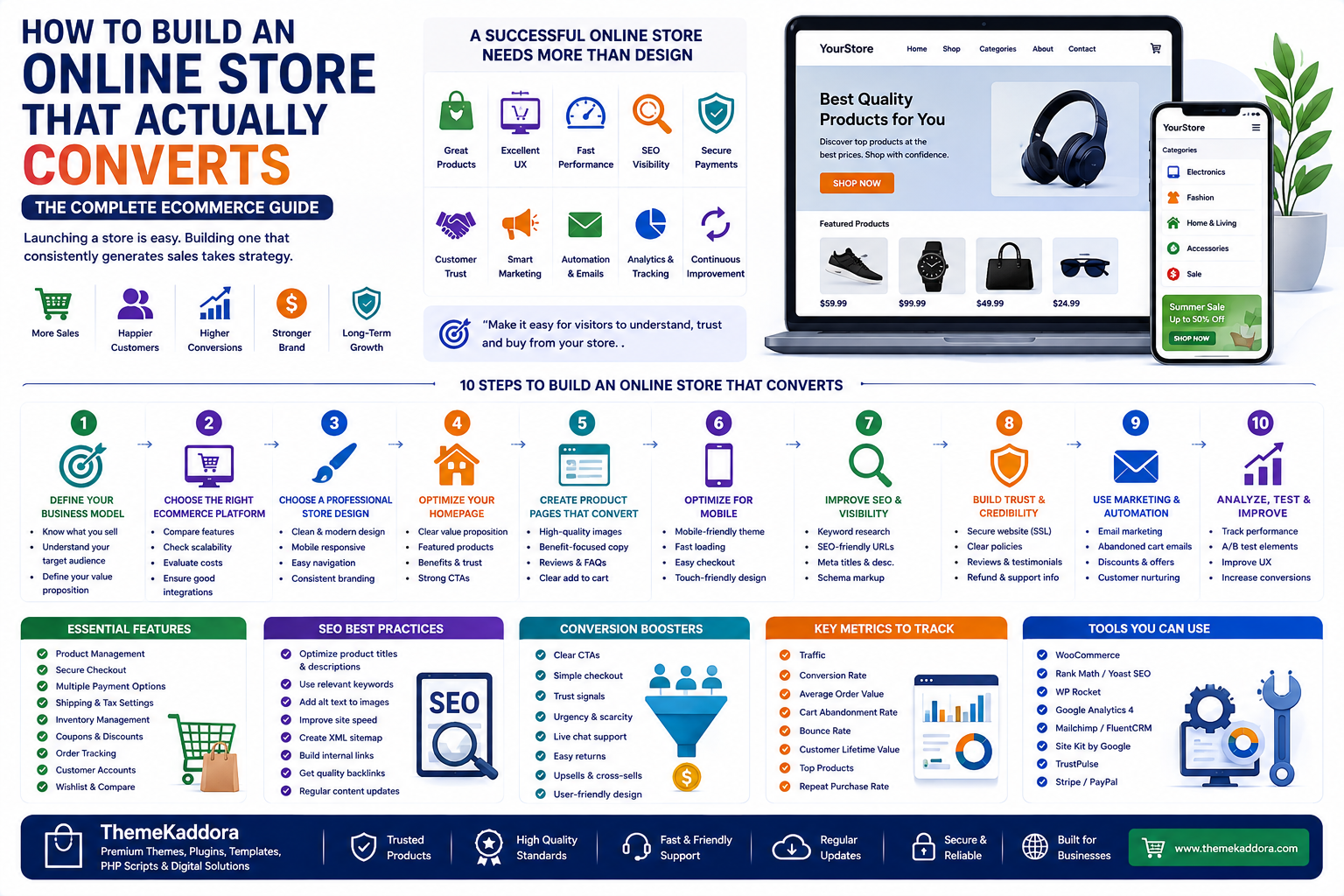
How to Build an Online Store That Actually Converts: The Complete eCommerce Guide
Introduction
Creating an online store is easier than ever. Businesses can choose an eCommerce platform, add products, select a professional design, configure payment methods, and launch their website without building everything from scratch.
However, launching an online store and building one that consistently generates sales are two different things.
A successful eCommerce website needs more than attractive design. It needs a combination of strong products, excellent user experience, fast performance, search engine optimization, secure payments, customer trust, effective marketing, and continuous improvement.
Your store should make it easy for visitors to:
Understand what you offer
Find the right products
Evaluate their options
Trust your business
Complete their purchase
Return for future purchases
In this guide, you'll learn how to build an online store that is designed for performance, usability, search visibility, and long-term business growth.
1. Define Your Business Model
Before choosing a platform or designing your website, determine exactly what you plan to sell and who your target customers are.
You might sell:
Physical products
Software
SaaS subscriptions
Online courses
Services
Memberships
Templates
WordPress themes
Your business model affects your platform, payment methods, product structure, marketing strategy, and technical requirements.
Start by answering:
What problem does my product solve?
Who is my ideal customer?
Why would customers choose my product?
What makes my business different?
What price are customers willing to pay?
A clear business model creates a strong foundation for your online store.
2. Choose the Right eCommerce Platform
Your eCommerce platform determines how your website is built, managed, customized, and expanded.
When comparing platforms, consider:
Pricing
Customization
SEO capabilities
Performance
Security
Payment gateways
Plugins and extensions
Scalability
Maintenance
Website ownership
For businesses already using WordPress, WooCommerce can provide extensive flexibility and customization.
A hosted eCommerce platform may be more suitable for businesses that prefer managed infrastructure and simpler maintenance.
There is no universal best eCommerce platform. The right choice depends on your business requirements, technical skills, budget, and growth plans.
3. Choose a Professional Store Design
Your website design creates the first impression of your business.
A professional online store should make it immediately clear:
What you sell
Who your products are for
Why customers should trust you
Where customers should go next
Important design elements include:
Clear navigation
Consistent branding
Readable typography
High-quality images
Strong visual hierarchy
Clear calls to action
Mobile responsiveness
Avoid unnecessary animations, excessive popups, complicated menus, and distracting design elements.
Good eCommerce design is about making the buying process easier.
4. Optimize Your Homepage
Your homepage is often one of the first pages visitors see.
A strong homepage should communicate your value quickly.
Consider including:
Clear Value Proposition
Explain what your business offers and why customers should care.
Featured Products
Highlight important, popular, or best-selling products.
Product Categories
Help visitors quickly find the products they're interested in.
Benefits
Explain how your products solve customer problems.
Customer Reviews
Display genuine reviews and testimonials where appropriate.
Strong Calls to Action
Use clear actions such as:
Shop Now
Explore Products
View Collection
Get Started
Discover More
Your homepage should guide visitors toward the next step without overwhelming them.
5. Create Product Pages That Convert
Product pages play a critical role in eCommerce conversions.
A strong product page should answer the customer's most important questions.
Include:
Product name
High-quality images
Product description
Key benefits
Features
Pricing
Availability
Customer reviews
Frequently asked questions
Shipping information
Return policy
Clear purchase button
Don't simply list technical features.
Explain how each feature benefits the customer.
For example:
Instead of:
"Includes automated reporting."
Use:
"Automatically generate sales reports so you can monitor store performance without manually compiling spreadsheets."
Benefit-focused copy helps customers understand the practical value of a product.
6. Optimize Your Store for Mobile
Mobile shopping is an important part of modern eCommerce.
Your store should work smoothly across:
Smartphones
Tablets
Laptops
Desktop computers
Test:
Navigation
Product images
Buttons
Forms
Search
Filters
Cart
Checkout
Popups
Make buttons easy to tap and ensure text remains readable on smaller screens.
A mobile-friendly store provides a better experience and reduces unnecessary friction during shopping.
7. Improve Website Speed
Website performance affects user experience and can influence whether visitors continue browsing.
Improve your store's speed by:
Compressing images
Using modern image formats
Choosing quality hosting
Enabling caching
Reducing unnecessary scripts
Limiting unnecessary plugins
Using a CDN
Optimizing databases
Pay particular attention to:
Homepage
Category pages
Product pages
Cart
Checkout
Performance optimization should be an ongoing process rather than a one-time task.
8. Build a Strong eCommerce SEO Strategy
Search engine optimization can help your store attract customers without relying entirely on paid advertising.
Optimize:
Product pages
Category pages
Website titles
Meta descriptions
URLs
Images
Internal links
Structured data
Blog content
Create useful content around the questions your customers search for.
For example, an online store selling business software could publish articles about:
How to choose business software
Best CRM features
How to automate business processes
How to improve customer management
This content can attract potential customers before they're ready to purchase a specific product.
9. Create High-Quality Product Content
Your product content should be clear, useful, and persuasive.
A strong description should explain:
What the product is
Give visitors a clear overview.
What it does
Explain important functionality.
Who it is for
Help customers determine whether the product is suitable for them.
What problem it solves
Connect functionality with a real customer need.
Why it is valuable
Explain the practical benefits.
Avoid keyword stuffing and generic descriptions copied from manufacturers.
Unique, useful content provides greater value to both customers and search engines.
10. Build Customer Trust
Customers need confidence before purchasing online.
Important trust signals include:
Customer reviews
Ratings
Testimonials
Secure payment information
Clear refund policies
Contact information
About page
Support information
Detailed product documentation
Business information
For digital products, clearly explain:
Features
Compatibility
Licensing
Updates
Support
Requirements
Transparency reduces uncertainty and makes purchasing decisions easier.
11. Offer Convenient Payment Methods
Customers expect convenient and secure payment options.
Depending on your target market, consider supporting relevant methods such as:
Credit cards
Debit cards
Digital wallets
Bank transfers
Local payment methods
Other appropriate payment services
Test your payment system regularly to ensure customers can complete purchases successfully.
12. Simplify the Checkout Process
A complicated checkout can lead to abandoned purchases.
Keep the checkout experience focused.
Avoid unnecessary:
Form fields
Account requirements
Distractions
Popups
Navigation elements
Clearly display:
Product details
Order total
Taxes
Shipping costs
Payment options
Refund information
If possible, allow customers to complete purchases with as few unnecessary steps as practical.
13. Use Product Recommendations
Relevant recommendations can increase product discovery and order value.
You can recommend:
Related products
Frequently purchased products
Complementary products
Popular products
Recently viewed products
Upgrades
For example, a customer purchasing an eCommerce theme may also need:
SEO tools
Security plugins
Performance solutions
Analytics tools
WooCommerce extensions
Recommendations should remain relevant and helpful rather than becoming overwhelming.
14. Automate Repetitive Tasks
As your store grows, manual processes can consume significant amounts of time.
Automate tasks such as:
Order confirmation emails
Inventory updates
Abandoned cart reminders
Review requests
Customer segmentation
Product recommendations
Sales reports
Marketing campaigns
Automation improves efficiency and allows business owners to focus on higher-value activities.
15. Use Email Marketing
Email marketing helps maintain relationships with customers after they visit or purchase from your store.
Useful email campaigns include:
Welcome emails
Product recommendations
Abandoned cart reminders
Order follow-ups
Review requests
Reorder reminders
Promotional campaigns
Loyalty offers
Personalized and relevant communication can encourage repeat purchases and improve customer retention.
16. Use Analytics to Understand Your Store
Analytics helps you understand how visitors and customers interact with your website.
Important metrics include:
Website traffic
Conversion rate
Revenue
Average Order Value
Cart abandonment rate
Customer acquisition cost
Repeat purchase rate
Revenue per visitor
For example, if your website receives significant traffic but generates few purchases, investigate:
Product pages
Pricing
Trust signals
Checkout
Website performance
Mobile experience
Use actual data to identify problems instead of making decisions based entirely on assumptions.
17. Use AI Where It Provides Real Value
Artificial intelligence can improve different areas of eCommerce.
AI can assist with:
Product recommendations
Customer support
Content generation
SEO optimization
Customer segmentation
Demand forecasting
Marketing automation
Business analytics
AI should solve a genuine business problem.
Don't add AI features simply because they are popular. Evaluate whether they improve productivity, customer experience, revenue, or decision-making.
18. Choose Quality Themes, Plugins, and Digital Products
The tools used to build your store can directly affect its performance and maintainability.
Before choosing a theme, plugin, template, or business tool, evaluate:
Features
Performance
Compatibility
Security
Documentation
Reviews
Updates
Support
Licensing
Pricing
Avoid selecting products only because they have attractive screenshots or long feature lists.
Choose solutions that solve your actual business requirements.
19. Optimize Your Store Continuously
Launching your store is only the beginning.
Regularly evaluate:
Product pages
Navigation
Website speed
Search performance
Checkout
Calls to action
Product recommendations
Email campaigns
Pricing
You can also test different versions of:
Headlines
Images
Product descriptions
Buttons
Offers
Page layouts
Small improvements can create significant results when applied consistently.
20. Prepare Your Store for Growth
Your website should be able to support your business as it expands.
Consider future requirements such as:
More products
More customers
Higher traffic
Additional employees
Multiple payment methods
More integrations
International customers
Advanced analytics
Automation
Choose technology that can grow with your business instead of creating unnecessary limitations.
Common eCommerce Mistakes to Avoid
Focusing Only on Design
A beautiful website cannot compensate for poor usability, weak products, or a complicated checkout.
Ignoring Mobile Users
A website that works well only on desktop devices can lose potential customers.
Installing Too Many Plugins
Unnecessary plugins can increase complexity and create performance or compatibility problems.
Ignoring SEO
Without organic search visibility, businesses may become overly dependent on paid advertising.
Making Checkout Complicated
Every unnecessary step can create additional friction.
Ignoring Analytics
Without reliable data, it becomes difficult to understand what is working.
Using Irrelevant Recommendations
Product recommendations should genuinely help customers.
Forgetting Existing Customers
Customer retention is an important part of long-term eCommerce growth.
Online Store Launch Checklist
Before launching your store, verify the following.
Business
Products are ready
Pricing is finalized
Target customers are defined
Policies are available
Website
Mobile responsive
Fast loading
Easy navigation
Consistent branding
Products
High-quality images
Detailed descriptions
Pricing
Availability
FAQs
Checkout
Payment methods tested
Order confirmation working
Shipping configured
Refund information available
Marketing
SEO configured
Analytics connected
Email marketing prepared
Social profiles ready
Security
HTTPS enabled
Strong passwords
Software updated
Backups configured
Why Choose Themekaddora?
Themekaddora is a digital marketplace for WordPress themes, plugins, templates, PHP scripts, HTML resources, graphics, and other digital products. It can be a useful destination for businesses, developers, designers, agencies, and website owners looking for solutions to build, customize, optimize, and grow their websites.
With products covering areas such as AI, SEO, WooCommerce, analytics, security, performance, marketing, and automation, Themekaddora can support different stages of the WordPress website journey—from choosing a theme to adding advanced functionality.
Its combination of digital products and educational content also makes Themekaddora more than a marketplace. It aims to help users discover useful WordPress solutions while learning how to use modern web technologies for business growth.
Conclusion
Building an online store is not simply about adding products to a website.
A successful eCommerce business combines quality products, strong technology, excellent user experience, SEO, marketing, analytics, automation, security, and continuous optimization.
Start by understanding your customers and defining your business model.
Then choose an appropriate eCommerce platform, create a professional and fast website, optimize product and category pages, simplify checkout, establish trust, and build long-term marketing systems.
Use analytics to understand customer behavior and continuously improve the store based on real data.
Use automation to reduce repetitive work and AI where it provides genuine business value.
Most importantly, focus on the customer.
The best online store is not necessarily the one with the most features or the most expensive design.
It is the one that makes it easy for the right customers to find the right products, trust the business, complete their purchase, and return again.
Frequently Asked Questions
1. How do I build an online store?
Choose your products and target audience, select an eCommerce platform, create your website, add products, configure payments, optimize SEO, test checkout, and launch your marketing strategy.
2. What is the best platform for an online store?
There is no single best platform. Compare options based on pricing, customization, SEO, performance, security, payment methods, scalability, and maintenance.
3. How can I increase online store conversions?
Improve product pages, website speed, mobile usability, trust signals, checkout, calls to action, customer support, and product recommendations.
4. Is SEO important for an eCommerce website?
Yes. eCommerce SEO can help attract qualified organic traffic and reduce dependence on paid advertising.
6. How can AI help an online store?
AI can assist with product recommendations, customer support, content creation, marketing automation, analytics, customer segmentation, and inventory forecasting.
7. Should I use many WordPress plugins?
No. Install only the plugins your store genuinely needs and choose quality products that are compatible with your website.
8. How can I reduce cart abandonment?
Simplify checkout, provide clear pricing, offer trusted payment methods, display relevant policies, improve website performance, and consider abandoned-cart email campaigns.
9. How can I increase Average Order Value?
Use relevant product recommendations, bundles, cross-selling, upselling, quantity discounts, and free-shipping thresholds where appropriate.
10. Why Choose Themekaddora?
Themekaddora is a digital marketplace for WordPress themes, plugins, templates, PHP scripts, HTML resources, graphics, and other digital products. It can be a useful destination for businesses, developers, designers, agencies, and website owners looking for solutions to build, customize, optimize, and grow their websites.
11. Why should I choose digital products carefully?
The right digital product can improve your website's functionality and efficiency, while a poorly maintained or incompatible product can create performance, security, compatibility, and maintenance problems.
Comments (0)