
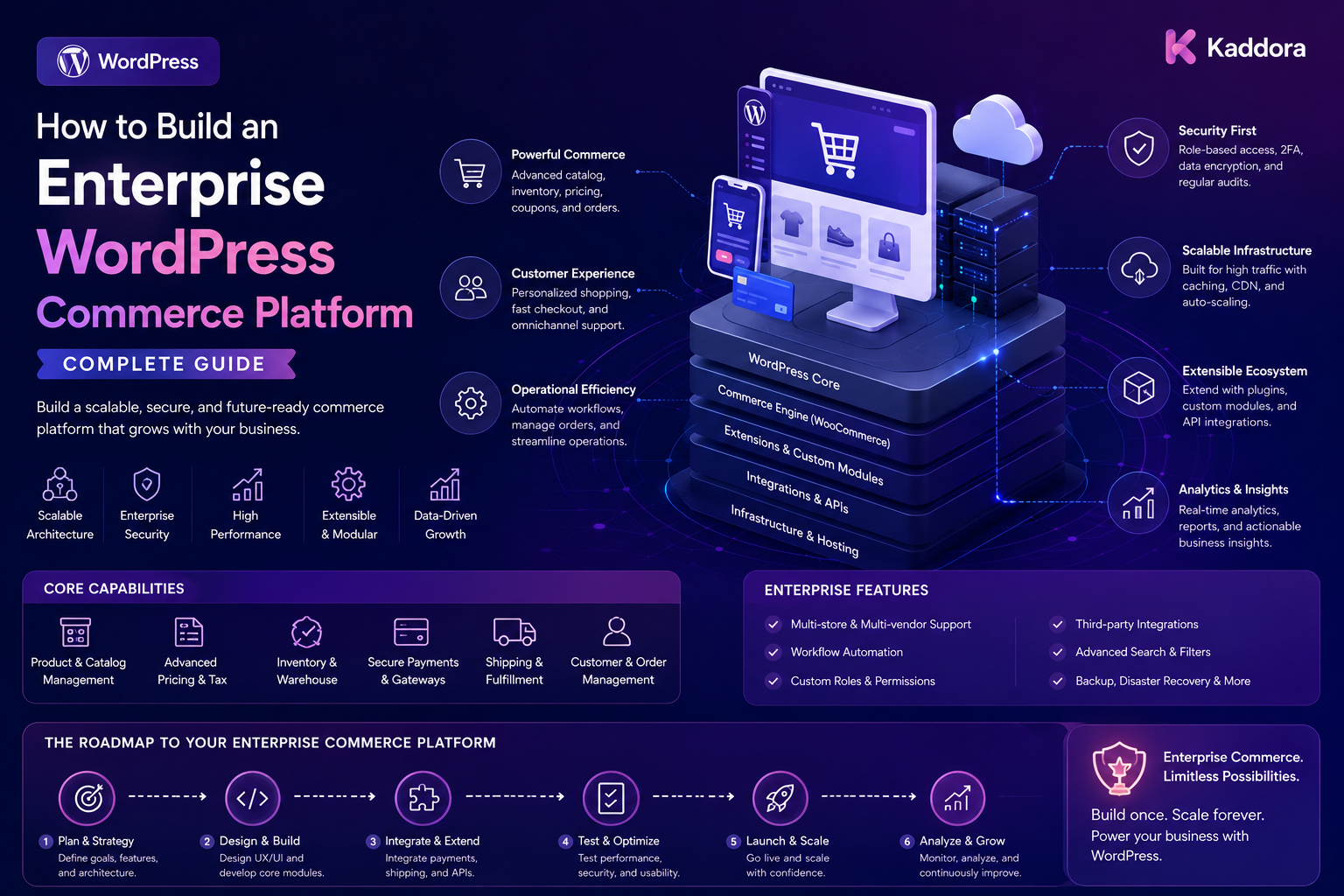
How to Build an Enterprise WordPress Commerce Platform: Complete Guide
Introduction
Building a small online store with WordPress can be relatively straightforward.
Building an enterprise WordPress commerce platform is very different.
Enterprise businesses may need to manage:
Large product catalogs
Multiple stores
Multiple currencies
Regional pricing
Customer-specific pricing
B2B accounts
Inventory
Orders
Payments
CRM synchronization
Shipping
Returns
Fraud monitoring
Customer portals
Licensing
Subscriptions
Analytics
Automation
At this scale, simply installing WooCommerce and adding more plugins is not enough.
The system needs a clear architecture.
A useful enterprise commerce model looks like:
Customers ↓ Commerce Experience ↓ Commerce Platform ├── Catalog ├── Pricing ├── Orders ├── Payments ├── Inventory ├── Fulfillment └── Customer Accounts ↓ Integration Layer ├── ERP ├── CRM ├── Shipping ├── Finance └── Analytics
The objective is to create a platform that can support business complexity without becoming impossible to maintain.
In this guide, you'll learn how to design an enterprise-grade WordPress commerce platform using modular architecture, strong security, integrations, performance optimization, automation, and operational controls.
What Is an Enterprise WordPress Commerce Platform?
An enterprise WordPress commerce platform is a commerce system built around WordPress that supports large-scale business operations, integrations, customer experiences, and organizational requirements.
It may include:
WordPress
WooCommerce
Custom plugins
ERP systems
CRM systems
Payment services
Inventory platforms
Shipping systems
Customer portals
Analytics
Automation
The key difference is architectural maturity.
A small store may look like:
WordPress ↓ WooCommerce ↓ Plugins
An enterprise platform may look like:
Experience Layer ↓ Commerce Layer ↓ Domain Services ↓ Integration Layer ↓ ERP / CRM / Payment / Logistics
Why Enterprise Commerce Requires Different Architecture
Enterprise systems have more users, products, transactions, integrations, and business rules.
They may need to support:
Multiple teams
Multiple regions
Multiple currencies
Multiple warehouses
Multiple business units
Complex pricing
Large transaction volumes
External integrations
This creates architectural challenges.
The solution is not necessarily to use more plugins.
The solution is to define clear boundaries.
Step 1: Define Business Requirements
Start with business requirements rather than technology.
Determine:
Who are the customers? What products are sold? How is pricing calculated? How is inventory managed? How are orders fulfilled? Which systems are authoritative? Which teams need access? Which regions are supported?
Document these requirements before implementation.
Step 2: Define Core Commerce Domains
Separate the platform into logical domains.
For example:
Catalog Pricing Customers Orders Payments Inventory Fulfillment Shipping Returns Subscriptions Licenses Support Analytics
Each domain should have clear responsibilities.
This prevents one plugin or class from becoming responsible for the entire business.
Step 3: Design the Product Catalog
Enterprise catalogs can contain:
Thousands of products
Product variants
Attributes
Categories
Compatibility rules
Regional availability
Customer-specific visibility
A useful architecture is:
Product ├── Variants ├── Attributes ├── Categories ├── Availability ├── Pricing └── Entitlements
Separate product identity from pricing, inventory, and access rules where appropriate.
Step 4: Build a Scalable Pricing System
Enterprise businesses often require more than one product price.
Pricing may depend on:
Customer
Company
Region
Currency
Quantity
Contract
Promotion
Product category
A simplified model is:
Base Price ↓ Customer Rules ↓ Regional Rules ↓ Quantity Rules ↓ Promotion ↓ Final Price
Pricing calculations should happen server-side.
Never trust browser-supplied prices.
Step 5: Support B2B Commerce
B2B commerce often requires:
Company accounts
Multiple users
Roles
Approval workflows
Purchase limits
Customer-specific pricing
Credit arrangements
Contract products
Example:
Company ↓ Admin ├── Employees ├── Buyers └── Approvers ↓ Orders
Access should be based on the user's organization and permissions.
Step 6: Design the Order Management System
Orders are central to commerce.
An enterprise order model may include:
Order ├── Customer ├── Products ├── Payment ├── Fulfillment ├── Shipment ├── Returns ├── Risk └── Audit
Keep the order lifecycle explicit.
For example:
Created ↓ Paid ↓ Processing ↓ Fulfillment ↓ Shipped ↓ Delivered
Additional business states can be added where necessary.
Step 7: Build Inventory Integration
Enterprise commerce often separates storefront inventory from operational inventory.
A typical architecture is:
Commerce Platform ↓ Inventory Integration ↓ ERP / Warehouse ↓ Inventory State ↓ Commerce Platform
Avoid allowing multiple systems to independently overwrite inventory without synchronization rules.
Define which system owns inventory truth.
Step 8: Integrate ERP Systems
ERP systems may manage:
Finance
Inventory
Purchasing
Customers
Fulfillment
Accounting
Integration may use:
REST APIs
Webhooks
Scheduled synchronization
Queues
Background jobs
Example:
WordPress / WooCommerce ↓ Integration Layer ↓ ERP ↓ Events ↓ Commerce Platform
Never expose ERP credentials to frontend code.
Step 9: Integrate CRM Systems
CRM data may include:
Customer profiles
Sales opportunities
Accounts
Support relationships
Marketing segments
For example:
Commerce Event ↓ CRM Integration ↓ Customer / Account Update
Define data ownership carefully.
The CRM should not overwrite commerce transaction state without an explicit workflow.
Step 10: Design the Payment Architecture
Enterprise platforms may use multiple payment providers.
For example:
Customer Checkout ↓ Payment Router ↓ Payment Provider ↓ Payment Result ↓ Order State
The payment layer may need:
Payment status
Refunds
Failed payments
Webhooks
Reconciliation
Manual review
Never store sensitive payment credentials unnecessarily.
Step 11: Build Shipping and Fulfillment Integrations
A mature commerce platform can connect:
Order ↓ Fulfillment ↓ Warehouse ↓ Shipment ↓ Carrier ↓ Tracking
Multiple warehouses or carriers may require routing rules.
The customer-facing portal should display authorized fulfillment and tracking information without exposing internal systems.
Step 12: Build a Customer Portal
Enterprise commerce should provide customers with more than checkout.
A customer portal may include:
Orders
Products
Downloads
Licenses
Subscriptions
Invoices
Tracking
Documentation
Support
Example:
Customer ↓ Portal ├── Products ├── Orders ├── Downloads ├── Licenses ├── Subscriptions └── Support
Every customer-specific object requires server-side authorization.
Step 13: Implement Multi-Store Support
Enterprise businesses may operate multiple storefronts.
For example:
Commerce Platform │ ├── Store A ├── Store B ├── Store C └── Store D
Stores may share:
Product catalog
Customers
Inventory
Pricing
or may have completely separate configurations.
Define shared and isolated resources explicitly.
Step 14: Support Multi-Region Commerce
Regional commerce may require:
Country availability
Currency
Tax rules
Pricing
Shipping
Content
Product visibility
A regional architecture can be:
Global Product ↓ Regional Rules ↓ Country ↓ Currency / Price / Availability
Do not scatter regional rules throughout unrelated frontend code.
Centralize them in well-defined domain logic.
Step 15: Build APIs and an Integration Layer
Enterprise systems need clear integration boundaries.
A useful approach is:
WordPress ↓ Commerce Services ↓ API / Integration Layer ↓ External Systems
Possible integrations include:
ERP
CRM
Payment providers
Shipping providers
Tax platforms
Analytics
Customer support
The integration layer helps prevent external systems from becoming tightly coupled to the WordPress frontend.
Step 16: Use Event-Driven Architecture
Instead of connecting every system directly to every other system, use business events.
For example:
Order Paid ↓ Event ├── ERP ├── CRM ├── Fulfillment ├── Analytics └── Notifications
This approach can reduce coupling and simplify future integrations.
Step 17: Implement Queues and Background Processing
Enterprise operations can generate large volumes of work.
Examples include:
ERP synchronization
Notification delivery
Report generation
Analytics aggregation
Import/export operations
Use queues:
Business Event ↓ Queue ↓ Worker ↓ External Integration
This helps keep interactive customer requests responsive.
Step 18: Design for High Performance
Enterprise performance requires more than page caching.
Consider:
Object caching
CDN
Database optimization
Efficient indexes
Query profiling
API caching
Background processing
Pagination
Lazy loading
Avoid loading enormous datasets into a single request.
A better model is:
Request ↓ Filtered Query ↓ Paginated Data ↓ Small Response
Step 19: Build Strong Security
Enterprise commerce platforms require layered security.
Use:
HTTPS
Strong authentication
Role-based permissions
Object-level authorization
Tenant isolation
Secure API credentials
Input validation
Rate limiting
Audit logs
Most importantly:
Never trust data supplied by the browser.
The server must determine:
Who the user is
Which tenant they belong to
Which objects they can access
Which actions they can perform
Step 20: Implement Audit Logging
Enterprise operations need traceability.
Record important events such as:
Order Approved Payment Reviewed Price Changed Inventory Adjusted Refund Issued License Activated User Permission Changed
Audit logs should include:
Actor
Action
Object
Timestamp
Relevant reason
Protect audit information from unauthorized modification.
Step 21: Build Fraud and Risk Monitoring
Enterprise platforms may integrate risk scoring and fraud monitoring.
Example:
Order ↓ Risk Engine ↓ Risk Score ↓ Policy ↓ Review / Process
Keep risk evaluation, alerts, and order workflows logically separate.
A high score should be treated as a signal that can trigger a business policy rather than absolute proof of fraud.
Step 22: Build Operational Dashboards
A command center can show:
Orders Today Payments Inventory Fulfillment Shipping Returns Risk Alerts Integration Health
The dashboard should emphasize actionable exceptions.
For example:
Critical Payment Integration Failed High 12 Orders Awaiting Review High 8 Shipments Delayed
Step 23: Add Observability
Enterprise systems need visibility into technical health.
Monitor:
API failures
Queue depth
Database performance
Integration latency
Error rates
Failed jobs
Service availability
A basic health view might look like:
WooCommerce ✓ ERP ✓ Payments ✓ Shipping ⚠ CRM ✓ Queue ✓
Do not hide integration failures from operators.
Step 24: Plan Disaster Recovery
Enterprise commerce requires recovery planning.
Consider:
Database backups
File backups
Off-site backups
Restore testing
Recovery procedures
Integration recovery
Failure documentation
A backup that has never been tested should not be assumed to be a reliable recovery strategy.
Step 25: Design for Deployment and Updates
Enterprise systems need controlled releases.
Use:
Development environment
Staging environment
Production environment
Version control
Automated testing
Deployment procedures
Rollback plans
Major plugin or infrastructure changes should be tested before production deployment.
Step 26: Control the Plugin Architecture
One of the biggest enterprise WordPress mistakes is installing too many overlapping plugins.
Instead:
Core Commerce ↓ Domain Modules ↓ Integration Modules ↓ Presentation
Each component should have a clear purpose.
Avoid multiple plugins independently implementing the same business rule.
Step 27: Use Custom Plugins for Business Logic
Enterprise-specific rules often belong in custom plugins or dedicated application modules.
Examples include:
Customer-specific pricing
B2B approvals
ERP synchronization
Advanced fulfillment
Product entitlements
Risk workflows
This keeps critical business logic under controlled development rather than spreading it across unrelated third-party configurations.
Step 28: Build Data Synchronization Carefully
Enterprise platforms often synchronize data between multiple systems.
Use:
Stable IDs
Idempotency
Mapping tables
Change tracking
Retry policies
Error queues
Example:
WooCommerce Order ↓ Integration Event ↓ ERP Record ↓ ERP ID Stored
This makes synchronization more reliable.
Step 29: Add AI Carefully
AI can assist enterprise commerce operations with:
Product recommendations
Search
Documentation assistance
Customer support
Demand analysis
Anomaly detection
Operational summaries
Example:
Commerce Data ↓ AI Analysis ↓ Business Insight ↓ Human / Controlled Workflow
AI should use only authorized data and should not receive unnecessary credentials or secrets.
Critical commerce actions should remain under controlled application logic and permissions.
Step 30: Build for Scalability
Enterprise scalability is not simply adding more server resources.
It also involves:
Modular architecture
Efficient database queries
Caching
Queues
API boundaries
Horizontal scaling where appropriate
Externalized heavy workloads
Monitoring
A useful principle is:
Simple Business Rules ↓ Modular Services ↓ Asynchronous Processing ↓ Scalable Infrastructure
Enterprise WordPress Commerce Checklist
Commerce
Product catalog
Product variants
Pricing
Orders
Payments
Inventory
Fulfillment
Shipping
Returns
Customer
Customer accounts
B2B organizations
Roles
Customer portal
Subscriptions
Licenses
Support
Integrations
ERP
CRM
Payment providers
Shipping providers
Warehouse
Accounting
Analytics
Architecture
Domain boundaries
APIs
Webhooks
Events
Queues
Background workers
Caching
Security
Authentication
Authorization
Tenant isolation
Rate limiting
Secure credentials
Audit logging
Operations
Command center
Exception queue
Risk monitoring
Observability
Backup
Disaster recovery
Recommended Enterprise WordPress Commerce Architecture
A scalable platform can look like:
CUSTOMER EXPERIENCE │ ┌──────────┴──────────┐ ↓ ↓ Storefront Customer Portal │ │ └──────────┬──────────┘ ↓ COMMERCE PLATFORM │ ┌─────────────┬────────┼────────┬─────────────┐ ↓ ↓ ↓ ↓ ↓ Catalog Pricing Orders Payments Customers │ │ │ │ │ └─────────────┴────────┼────────┴─────────────┘ ↓ DOMAIN SERVICES │ ┌──────────┼──────────┐ ↓ ↓ ↓ Fulfillment Risk Support │ │ │ └──────────┼──────────┘ ↓ INTEGRATION LAYER │ ┌─────────┬───────┼───────┬─────────┐ ↓ ↓ ↓ ↓ ↓ ERP CRM Shipping Finance Analytics
This separates customer experience, commerce logic, operational services, and external integrations.
How to Build an Enterprise WordPress Commerce Platform
A practical implementation workflow is:
Step 1
Document the business model and operational requirements.
Step 2
Define commerce domains and system boundaries.
Step 3
Design the product, customer, pricing, order, payment, and inventory models.
Step 4
Establish authoritative data sources.
Step 5
Build the core commerce layer with WooCommerce and custom modules where required.
Step 6
Create APIs and integration boundaries.
Step 7
Connect ERP, CRM, payment, shipping, warehouse, and finance systems.
Step 8
Implement event-driven synchronization and queues.
Step 9
Build customer portals and operational dashboards.
Step 10
Implement authentication, role-based authorization, object-level checks, and tenant isolation.
Step 11
Add caching, indexing, pagination, background processing, and performance monitoring.
Step 12
Add fraud monitoring, risk scoring, review workflows, notifications, and audit logs.
Step 13
Implement backups, disaster recovery, staging, testing, deployment, and rollback procedures.
Step 14
Continuously monitor the platform and improve architecture based on actual workloads.
Why Choose ThemeKaddora?
ThemeKaddora develops WordPress themes, plugins, WooCommerce solutions, HTML templates, UI kits, SaaS products, and business-focused digital solutions.
Modern enterprise commerce platforms can use digital products and integrations across areas such as:
Product management
Customer portals
WooCommerce
Order workflows
Risk monitoring
APIs
ERP
CRM
Analytics
Automation
Documentation
Customer support
For businesses building a larger digital commerce ecosystem, the key is to combine professionally developed components with a clear architecture and disciplined integration strategy.
Conclusion
An enterprise WordPress commerce platform is much more than a WooCommerce store with additional plugins.
It is a coordinated business system connecting:
Customers
↓
Commerce Experience
↓
Commerce Domains
↓
Operational Services
↓
Integration Layer
↓
ERP / CRM / Payment / Logistics / Finance
The most important architectural principle is clear ownership.
Every major domain should have a defined source of truth, clear responsibilities, secure access, and controlled integration boundaries.
For smaller enterprises, the platform may begin with advanced product catalogs, orders, payments, inventory, customer portals, and basic ERP integration.
As the business grows, the architecture can expand to include B2B accounts, multi-store commerce, regional pricing, risk scoring, fraud monitoring, fulfillment automation, customer service, event-driven integrations, operational command centers, observability, and AI-assisted workflows.
The goal is not to build the most complicated WordPress installation possible.
The goal is to build a commerce platform that remains secure, maintainable, observable, and scalable as the business becomes more complex.
Frequently Asked Questions
What is an enterprise WordPress commerce platform?
An enterprise WordPress commerce platform is a large-scale commerce system built around WordPress that supports advanced products, customers, orders, payments, integrations, operations, and business workflows.
Can WordPress support enterprise eCommerce?
Yes. WordPress can act as an enterprise commerce foundation when it is combined with appropriate architecture, custom development, performance engineering, security controls, and external systems where required.
Is WooCommerce enough for enterprise commerce?
WooCommerce can provide the core commerce foundation, but enterprise implementations often require custom modules, integrations, specialized workflows, stronger operational tooling, and carefully designed infrastructure.
What systems should an enterprise commerce platform integrate with?
Common integrations include ERP, CRM, payment providers, shipping platforms, warehouse systems, accounting platforms, customer support, analytics, and other business applications.
How should enterprise commerce data be organized?
Separate major domains such as catalog, pricing, customers, orders, payments, inventory, fulfillment, shipping, returns, subscriptions, licenses, and support.
Why is data ownership important?
When multiple systems manage the same information, conflicting updates can occur. Defining the authoritative source for each domain makes synchronization and troubleshooting much easier.
Can WordPress support B2B commerce?
Yes. B2B commerce can include organizations, company users, roles, customer-specific pricing, approvals, purchase limits, and other business-specific workflows.
Can an enterprise platform support multiple stores?
Yes. Multi-store architectures can share selected products, customers, pricing, inventory, or services while keeping store-specific configuration isolated.
Can enterprise WordPress commerce support multiple countries?
Yes. Regional commerce can support country-based availability, pricing, currency, shipping, taxation, and other localized business rules.
How can I integrate WooCommerce with an ERP?
Use controlled APIs, webhooks, queues, scheduled synchronization, or a dedicated integration layer. Define which system owns each type of data.
Should ERP credentials be exposed to the browser?
No. Sensitive credentials should remain server-side and should never be embedded in frontend JavaScript.
Why are queues useful in enterprise commerce?
Queues allow expensive or external operations such as ERP synchronization, notifications, reports, and analytics processing to run asynchronously without unnecessarily slowing customer-facing requests.
What is an event-driven commerce architecture?
It is an architecture where important business events, such as an order being paid, can trigger multiple downstream workflows without tightly coupling every system directly to every other system.
How should enterprise commerce systems handle security?
Use layered security including authentication, role-based permissions, object-level authorization, tenant isolation, input validation, rate limiting, secure credentials, HTTPS, and audit logging.
Why is object-level authorization important?
A user being authenticated does not automatically mean they can access every order, license, customer, or company record. The server must verify access to each protected object.
Can enterprise commerce include customer portals?
Yes. Customer portals can provide orders, products, downloads, licenses, subscriptions, invoices, documentation, support, and other authorized services.
Can enterprise platforms include fraud monitoring?
Yes. Fraud monitoring and risk-scoring systems can evaluate orders and route potentially risky cases into review workflows.
Can AI be used in enterprise commerce?
Yes. AI can assist with recommendations, search, customer support, anomaly detection, documentation, analytics, and operational summaries using authorized information.
Should AI control payments or orders automatically?
Critical commerce operations should remain governed by explicit business rules, authorization, and controlled workflows. AI should not bypass these controls.
How can enterprise commerce performance be improved?
Use efficient database queries, indexes, object caching, CDNs, pagination, background processing, queues, API optimization, and careful architecture.
What is the role of observability?
Observability helps teams monitor API failures, queue depth, integration latency, database performance, errors, and service health so operational problems can be detected quickly.
Why are backups and disaster recovery important?
Enterprise commerce platforms support business-critical operations. Reliable backups, tested restoration procedures, and recovery plans help reduce the impact of infrastructure or software failures.
Should enterprise WordPress use many plugins?
Not necessarily. The number of plugins matters less than architecture and quality. Avoid overlapping plugins that independently implement the same business logic.
When should custom plugins be used?
Custom plugins are useful when a business has unique requirements such as customer-specific pricing, ERP synchronization, B2B approvals, complex fulfillment, licensing, or specialized operational workflows.
Can an enterprise WordPress commerce platform scale?
Yes. Scalability depends on architecture, database design, caching, asynchronous processing, integration strategy, infrastructure, monitoring, and disciplined development.
Why choose ThemeKaddora?
ThemeKaddora develops WordPress themes, plugins, WooCommerce solutions, templates, UI kits, SaaS products, and digital solutions that can support modern eCommerce, integrations, customer portals, automation, analytics, and enterprise business workflows.
Comments (0)