
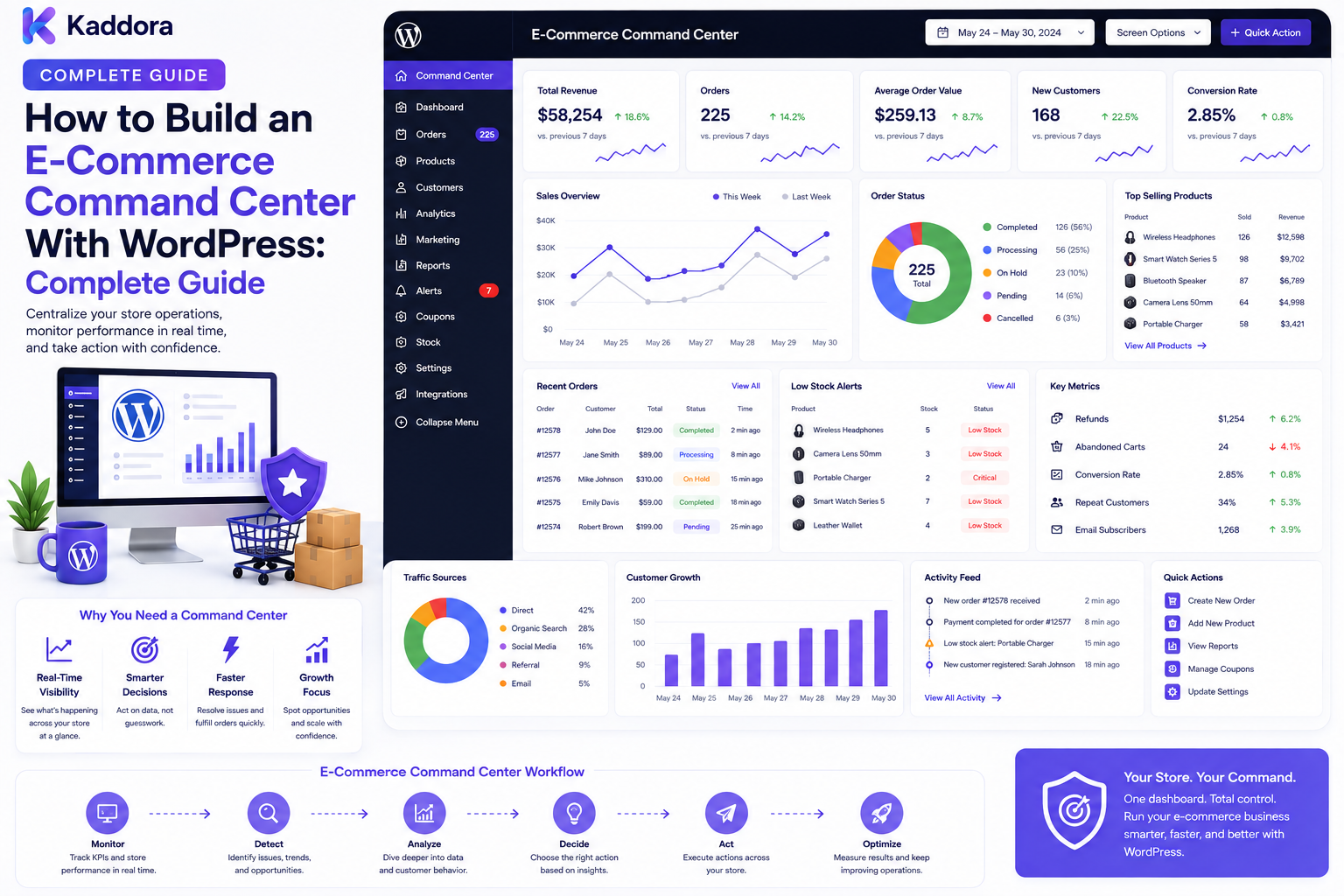
How to Build an E-Commerce Command Center With WordPress: Complete Guide
Introduction
Managing a growing eCommerce business often means working across multiple systems.
One platform handles orders.
Another manages payments.
A warehouse system manages fulfillment.
A shipping provider manages delivery.
A CRM stores customer information.
An ERP may manage finance and inventory.
Fraud-monitoring tools may generate risk alerts.
Customer support may operate in another system.
When this information remains disconnected, teams spend valuable time switching between dashboards and searching for answers.
This is where an eCommerce command center becomes useful.
An eCommerce command center provides a centralized operational interface where teams can monitor important commerce activity, investigate exceptions, coordinate workflows, and take authorized actions.
A simplified architecture looks like:
Commerce Systems ↓ Integration Layer ↓ Operations Intelligence ↓ Command Center ↓ Team Actions
The command center should not attempt to replace every underlying system.
Instead, it should become the operational layer that brings critical information and actions together.
For WordPress and WooCommerce businesses, this can create a powerful foundation for managing complex commerce operations.
In this guide, you'll learn how to design and build an eCommerce command center with WordPress.
What Is an E-Commerce Command Center?
An eCommerce command center is a centralized operational platform that provides visibility into multiple areas of an online business.
It may bring together:
Orders
Payments
Inventory
Fulfillment
Shipping
Returns
Refunds
Fraud alerts
Customer issues
Integration failures
Operational tasks
A typical structure looks like:
Command Center │ ┌────────────────┼─────────────────┐ ↓ ↓ ↓ Orders Payments Inventory ↓ ↓ ↓ Fulfillment Risk Shipping ↓ ↓ ↓ Returns Support Exceptions
The goal is centralized visibility and controlled action.
Why Build an E-Commerce Command Center?
A command center can help businesses:
Reduce tool switching
Improve operational visibility
Detect exceptions faster
Coordinate teams
Prioritize urgent tasks
Monitor business health
Centralize alerts
Speed up operational decisions
Instead of asking:
"Which system contains this information?"
the team can ask:
"What needs attention right now?"
That shift is one of the most important benefits of a command-center architecture.
Command Center vs Standard Dashboard
A traditional dashboard often focuses on metrics.
For example:
Revenue
Orders
Conversion rate
Average order value
A command center goes further.
It combines:
Visibility + Exceptions + Actions + Ownership
For example:
Orders Today: 1,920 Needs Fulfillment: 84 Payment Exceptions: 12 Delayed Shipments: 9 High-Risk Orders: 7 [Review] [Resolve] [Assign]
This makes the interface operational rather than purely informational.
Step 1: Define the Operational Mission
Before developing the command center, decide what it should help the team accomplish.
Ask:
What is happening? What is delayed? What is broken? What requires approval? What requires investigation? Who should act?
This prevents the command center from becoming a giant collection of unrelated widgets.
Step 2: Identify the Systems You Need to Connect
A command center may connect with:
WooCommerce
Payment providers
ERP
CRM
Inventory systems
Shipping platforms
Warehouse systems
Fraud systems
Customer support
Analytics
Email platforms
A broader architecture may look like:
WooCommerce ───────┐ Payments ──────────┤ ERP ───────────────┤ Inventory ─────────┤ Shipping ──────────┤ CRM ───────────────┤ Support ───────────┤ Risk ──────────────┘ ↓ Integration Layer ↓ Command Center
Define the authoritative source for each data category.
Step 3: Create an Operations Data Model
Don't simply copy every external database into WordPress.
Instead, define the operational information the command center actually needs.
For example:
Order ├── Status ├── Payment ├── Fulfillment ├── Shipment ├── Risk └── Exceptions
The command center can store operational references and derived information while the underlying systems remain authoritative for their own records.
Step 4: Build the Command Center Home
The home screen should answer the most important operational questions quickly.
Example:
E-Commerce Command Center Orders Today 1,920 Processing 142 Fulfillment Pending 84 Shipment Delays 9 Payment Exceptions 12 High-Risk Orders 7 Returns Pending 18 Integration Errors 3
Important exceptions should be visually prominent.
Step 5: Create an Exception-First Interface
A command center should prioritize things that need attention.
For example:
Critical Payment Provider Failure High 7 High-Risk Orders High 9 Delayed Shipments Medium 18 Pending Returns
This is more useful operationally than showing only revenue charts.
Step 6: Add Order Operations
The order module can provide:
New orders
Processing orders
Orders awaiting fulfillment
Orders on hold
Cancelled orders
Orders requiring review
Example:
Order #10872 Payment: Paid Fulfillment: Pending Risk: Low Shipment: Not Created
The interface should provide authorized actions such as opening the order, assigning the case, or viewing related fulfillment information.
Step 7: Add Payment Monitoring
Finance teams may need visibility into:
Payment success
Payment failures
Pending payments
Refunds
Reconciliation exceptions
Manual review cases
Example:
Payments Successful: 1,845 Pending: 21 Failed: 12 Refund Pending: 5 Review Required: 8
Sensitive payment credentials should never be exposed.
Use appropriate transaction references and operational states.
Step 8: Add Inventory Monitoring
Inventory issues can directly affect fulfillment.
The command center can highlight:
Low-stock products
Out-of-stock items
Inventory mismatches
Sync failures
Backorders
Reserved quantities
Example:
Inventory Low Stock: 32 Out of Stock: 11 Sync Errors: 4 Backordered: 7
Clicking an exception should lead to an appropriate operational workflow.
Step 9: Add Fulfillment Monitoring
Track orders through operational stages:
Processing ↓ Picking ↓ Packed ↓ Ready to Ship ↓ Shipped
The command center can surface bottlenecks such as:
84 Orders Awaiting Fulfillment
This helps warehouse and operations teams prioritize workloads.
Step 10: Add Shipping Visibility
The shipping module can show:
Shipments in transit
Out for delivery
Delayed shipments
Delivery exceptions
Delivered orders
Example:
Shipping In Transit: 326 Out for Delivery: 42 Delayed: 9 Delivered Today: 287
External carrier information should be translated into useful business states.
Step 11: Add Returns and Refunds
Returns can create significant operational work.
Monitor:
Return Requests: 27 Approved: 19 In Transit: 11 Received: 8 Refund Pending: 6
Each item should link to the appropriate return or refund workflow.
Step 12: Integrate Risk and Fraud Monitoring
The command center can incorporate:
Risk scores
High-risk alerts
Review queues
Fraud investigations
Suspicious activity
Example:
Risk Center Critical: 2 High: 7 Review Pending: 9 Escalated: 3
The command center should present authorized risk information rather than becoming the primary fraud engine.
Step 13: Create a Unified Task Queue
One of the strongest features of a command center is a common operations queue.
For example:
Operations Queue [HIGH] Review payment exception [HIGH] Investigate delayed shipment [HIGH] Review high-risk order [MED] Process return [MED] Resolve inventory mismatch
Each task can have:
Priority
Owner
Status
Due time
Related object
Reason
Step 14: Add Team Assignment
Different issues should be routed to the appropriate team.
For example:
Payment Issue → Finance Inventory Issue → Warehouse Shipping Delay → Operations Risk Alert → Risk Team Customer Issue → Support
Assignment can be based on:
Team
Role
Workload
Business rules
Region
Store
Product category
Step 15: Add Role-Based Views
Different users need different command-center experiences.
Executive
Business overview
Critical exceptions
Performance trends
Operations
Orders
Fulfillment
Shipping
Exceptions
Finance
Payments
Refunds
Reconciliation
Warehouse
Inventory
Picking
Packing
Fulfillment
Risk
Alerts
Risk scoring
Reviews
The same backend can serve different views while enforcing role-based permissions.
Step 16: Implement Strong Authorization
The command center may expose highly sensitive operational information.
Use:
Authentication
Role-based permissions
Capability checks
Object-level authorization
Tenant isolation
For example:
User Requests Order #10872 ↓ Authenticate ↓ Check Permission ↓ Check Tenant / Ownership ↓ Return Authorized Data
Never assume that an internal user automatically has access to every object.
Step 17: Create Action-Oriented Widgets
Each important widget should have an operational purpose.
For example:
Delayed Shipments: 9 ↓ View Delays ↓ Assign Shipment ↓ Contact Customer
A command center should minimize the distance between detection and action.
Step 18: Add Real-Time Updates
Some information becomes stale quickly.
Possible approaches include:
REST APIs
Webhooks
Polling
Server-sent events
WebSockets
For example:
Carrier Event ↓ Webhook ↓ Event Processor ↓ Operations State ↓ Command Center Update
Not every widget needs real-time updates.
Use the appropriate frequency for each data type.
Step 19: Build Event-Driven Integrations
A command center becomes much more powerful when systems publish business events.
Example:
WooCommerce ↓ Order Event ↓ Operations Event Bus ↓ Command Center
Other systems can feed events such as:
payment.failed shipment.delayed inventory.sync_failed return.created risk.alerted
An event-driven design can reduce tight coupling between integrations.
Step 20: Use Queues and Background Workers
Expensive tasks should not block interactive requests.
Examples include:
External synchronization
Large report generation
Risk analysis
Notification delivery
Data aggregation
Architecture:
Business Event ↓ Queue ↓ Worker ↓ Processing ↓ Command Center State
This improves scalability and resilience.
Step 21: Add Search and Filtering
Operations teams often need to find one specific object quickly.
Useful filters include:
Order ID
Customer
Product
Status
Team
Priority
Risk level
Payment state
Shipping state
Date
For large datasets, use server-side search and pagination.
Step 22: Add Command-Center Notifications
Important exceptions can generate alerts.
Examples:
Payment provider outage
High-risk order
Inventory synchronization failure
Shipment delay spike
ERP integration failure
Use:
Dashboard alerts
Internal notifications
Push notifications where appropriate
Avoid notifying every user about every event.
Route notifications according to ownership and severity.
Step 23: Add Audit Logs
Command centers often provide actions that modify business state.
Record important actions such as:
11:20 Order Assigned 11:24 Payment Reviewed 11:29 Fulfillment Released 11:32 Shipment Escalated
Audit logs help answer:
Who changed this?
What changed?
When did it change?
Why was it changed?
Step 24: Add Operational Analytics
Useful metrics include:
Orders processed
Average fulfillment time
Payment exceptions
Shipment delays
Review backlog
Return processing time
Integration failures
Example:
Operational Performance Orders Processed: 1,836 Average Fulfillment: 4.2 hrs Payment Exceptions: 12 Shipment Delays: 9 Open Tasks: 74
Metrics should help the team identify trends and bottlenecks.
Step 25: Add SLA and Escalation Monitoring
Critical tasks may require deadlines.
Example:
High-Risk Review Created: 10:30 Target: 11:00 Status: 10 min remaining
The system can escalate overdue tasks to managers or supervisors.
Keep internal deadlines distinct from customer promises unless the business can reliably meet customer-facing commitments.
Step 26: Connect ERP and CRM
A mature command center can connect operational and customer systems.
Example:
WooCommerce ↓ ERP ↓ Warehouse ↓ Shipping ↓ CRM ↓ Command Center
The architecture should clearly define data ownership.
For example:
Commerce system → orders
Payment provider → transaction status
ERP → financial or operational records
Warehouse → fulfillment
Carrier → shipment events
CRM → customer relationship data
Step 27: Build Multi-Store or Multi-Tenant Support
Enterprise commerce systems may manage multiple stores or business units.
For example:
Command Center │ ├── Store A │ ├── Orders │ └── Inventory │ ├── Store B │ ├── Orders │ └── Inventory │ └── Store C ├── Orders └── Inventory
Users should only access stores, tenants, and operational records they are authorized to manage.
Step 28: Add AI-Assisted Operations
AI can support command-center users with:
Daily operational summaries
Exception clustering
Search across documentation
Anomaly explanations
Task prioritization
Support summaries
Suggested next actions
Example:
Operational Data ↓ AI Analysis ↓ Summary "9 shipments are delayed. 4 are waiting for carrier updates. 2 require customer support action."
AI should work from authorized data and should not invent operational facts.
Critical actions should remain governed by explicit workflows and permissions.
Step 29: Add Operational Health Monitoring
The command center should monitor the systems it depends on.
For example:
System Health WooCommerce ✓ Payments ✓ ERP ✓ Shipping ⚠ CRM ✓ Inventory Sync ✕
This helps distinguish a business problem from an integration problem.
Step 30: Design for Failure
A command center should continue providing useful information when one integration fails.
For example:
Shipping API Down ↓ Mark Integration Degraded ↓ Retain Last Known State ↓ Create Exception ↓ Notify Operations
Don't silently display stale information as if it were current.
Clearly indicate data freshness and integration health.
Performance Considerations
A command center can become expensive if every widget runs complex database queries independently.
Use:
Aggregated queries
Appropriate indexes
Pagination
Caching
Background calculations
Lazy loading
Efficient API design
A better architecture is:
Operational Events ↓ Aggregated State ↓ Dashboard Summary ↓ Detail on Demand
This reduces unnecessary work.
Common E-Commerce Command Center Mistakes
Building a Giant Dashboard
More widgets do not necessarily create more operational value.
No Clear Ownership
Every actionable exception should have a responsible team.
Mixing Authoritative Data Sources
Define ownership for every major data type.
No Data Freshness Indicators
Users need to know when information was last updated.
Weak Permissions
Internal dashboards may contain sensitive business data.
Real-Time Everything
Use real-time updates only where operationally necessary.
No Failure Handling
Integration outages should become visible operational events.
No Audit Trail
Important actions should remain traceable.
Letting AI Make Uncontrolled Changes
AI should assist within controlled workflows and permissions.
E-Commerce Command Center Checklist
Core Modules
Orders
Payments
Inventory
Fulfillment
Shipping
Returns
Refunds
Risk
Risk scores
Fraud alerts
Review queue
Escalation
Operations
Exception center
Task queue
Assignment
Priorities
SLA tracking
Integrations
WooCommerce
ERP
CRM
Payment providers
Shipping providers
Warehouse systems
Technical
REST APIs
Webhooks
Event processing
Queues
Background workers
Caching
Security
Authentication
Role-based permissions
Object-level authorization
Tenant isolation
Audit logs
Reliability
Error monitoring
Integration health
Retry handling
Data freshness
Failure states
Recommended E-Commerce Command Center Architecture
A scalable design can look like:
COMMERCE SYSTEMS │ ┌─────────────┬─────────┼─────────┬─────────────┐ ↓ ↓ ↓ ↓ ↓ WooCommerce Payments ERP Shipping CRM │ │ │ │ │ └─────────────┴─────────┼─────────┴─────────────┘ ↓ ┌───────────────────┐ │ Integration Layer │ └─────────┬─────────┘ ↓ ┌───────────────────┐ │ Event / Ops Layer │ └─────────┬─────────┘ ↓ ┌───────────────────┐ │ Rules & Exceptions│ └─────────┬─────────┘ ↓ ┌───────────────────┐ │ Command Center │ └─────────┬─────────┘ ↓ Team Actions
This architecture keeps integration logic, operational state, and presentation concerns separated.
How to Build an E-Commerce Command Center in WordPress
A practical implementation workflow is:
Step 1
Define the business operations the command center must control or monitor.
Step 2
Identify all required commerce, payment, ERP, shipping, inventory, CRM, and risk systems.
Step 3
Define the authoritative source for each data type.
Step 4
Create an operational data model.
Step 5
Build the command-center overview.
Step 6
Add order, payment, inventory, fulfillment, shipping, returns, and risk modules.
Step 7
Create a centralized exception and task queue.
Step 8
Add priorities, assignment, SLAs, and escalation.
Step 9
Implement roles, capabilities, object-level authorization, and tenant isolation.
Step 10
Build REST APIs and webhook integrations.
Step 11
Add queues, background processing, caching, and optimized queries.
Step 12
Add audit logs, notifications, analytics, and system-health monitoring.
Step 13
Test integration failures, stale data, duplicate events, unauthorized access, and high-volume workloads.
Why Choose ThemeKaddora?
ThemeKaddora develops WordPress themes, plugins, WooCommerce solutions, HTML templates, UI kits, SaaS products, and business-focused digital solutions.
Modern commerce products can support workflows involving:
WooCommerce
Order management
Customer portals
Risk scoring
Fraud monitoring
Payment workflows
Inventory
Shipping
ERP
CRM
Notifications
APIs
Webhooks
Analytics
Automation
An eCommerce command center can bring these capabilities together into a centralized operational experience for growing digital businesses.
Conclusion
An eCommerce command center transforms fragmented operational information into one coordinated environment.
Instead of forcing teams to move between separate order, payment, inventory, shipping, risk, ERP, CRM, and support systems, the command center provides a unified operational view.
The strongest architecture connects:
Commerce Systems
↓
Integration Layer
↓
Operational Events
↓
Rules and Exceptions
↓
Command Center
↓
Team Actions
The key is not to duplicate every system.
The key is to provide the right information, from the right source, at the right time, with the right permissions.
For smaller stores, a command center may begin with orders, payments, inventory, shipping, and returns.
For larger businesses, it can grow into a sophisticated platform with ERP synchronization, fraud monitoring, risk scoring, customer portals, event-driven integrations, review workflows, queues, SLAs, audit trails, health monitoring, and AI-assisted operations.
A successful command center should answer one central question:
What needs attention right now?
And then make the next action clear.
The goal is not simply to monitor the business.
The goal is to help the business operate from a single, secure, intelligent control layer.
Frequently Asked Questions
What is an eCommerce command center?
An eCommerce command center is a centralized operational interface that brings together important information about orders, payments, inventory, fulfillment, shipping, returns, risk, exceptions, and business workflows.
Can I build an eCommerce command center with WordPress?
Yes. WordPress and WooCommerce can provide the foundation for an operational command center using custom plugins, APIs, integrations, queues, dashboards, and permissions.
What is the difference between a command center and a dashboard?
A dashboard primarily displays information and metrics, while a command center combines visibility with exceptions, assignments, workflows, priorities, and operational actions.
What should an eCommerce command center include?
Common modules include orders, payments, inventory, fulfillment, shipping, returns, refunds, risk alerts, exceptions, tasks, notifications, and system health.
Can WooCommerce be the foundation?
Yes. WooCommerce can provide core order and commerce information while external systems contribute payment, ERP, warehouse, shipping, CRM, and risk information.
Can a command center connect to an ERP?
Yes. ERP systems can provide financial, inventory, fulfillment, or other operational information through APIs or event-based integrations.
Can shipping providers be integrated?
Yes. Shipping systems can provide tracking, delivery, delay, and exception events to the command center.
Can fraud monitoring be included?
Yes. Fraud-monitoring systems and risk engines can feed authorized alerts and review information into the command center.
Can an eCommerce command center handle multiple stores?
Yes. A multi-store architecture can separate operational information by store, organization, or tenant while enforcing server-side access controls.
How should command-center permissions work?
Use authentication, role-based permissions, capability checks, object-level authorization, and tenant isolation where required.
Can the command center use REST APIs?
Yes. REST APIs can provide operational summaries, order data, exception queues, assignments, dashboards, and administrative actions.
Can webhooks update the command center?
Yes. Validated webhooks can deliver payment, shipping, inventory, ERP, CRM, and other business events.
Should the command center use real-time updates?
Only where the operational requirement justifies it. Some data may need real-time updates, while other metrics can use scheduled refreshes or caching.
How can I improve command-center performance?
Use efficient queries, indexes, pagination, caching, background aggregation, event-driven processing, and lazy-loaded details.
What is an exception center?
An exception center is a centralized queue for problems or tasks requiring attention, such as payment failures, shipment delays, inventory mismatches, and high-risk orders.
Why is data freshness important?
Operational decisions can become incorrect when information is stale. The command center should clearly track data timestamps and integration health.
Can AI help operate an eCommerce command center?
AI can summarize operational conditions, explain anomalies, prioritize tasks, search documentation, and assist teams using authorized data.
Should AI automatically change orders?
Critical business changes should remain governed by explicit policies and authorization. AI should not independently bypass these controls.
Why are audit logs important?
Audit logs provide a record of who changed operational data, what was changed, when it happened, and why, which improves accountability and troubleshooting.
Can an eCommerce command center scale for enterprise businesses?
Yes. Event-driven integrations, queues, background workers, indexed data access, caching, tenant isolation, modular architecture, and monitoring can support larger commerce environments.
Why choose ThemeKaddora?
ThemeKaddora develops WordPress themes, plugins, WooCommerce solutions, templates, UI kits, SaaS products, and digital solutions that can support eCommerce operations, dashboards, integrations, automation, customer portals, risk monitoring, and business workflows.
Comments (0)