
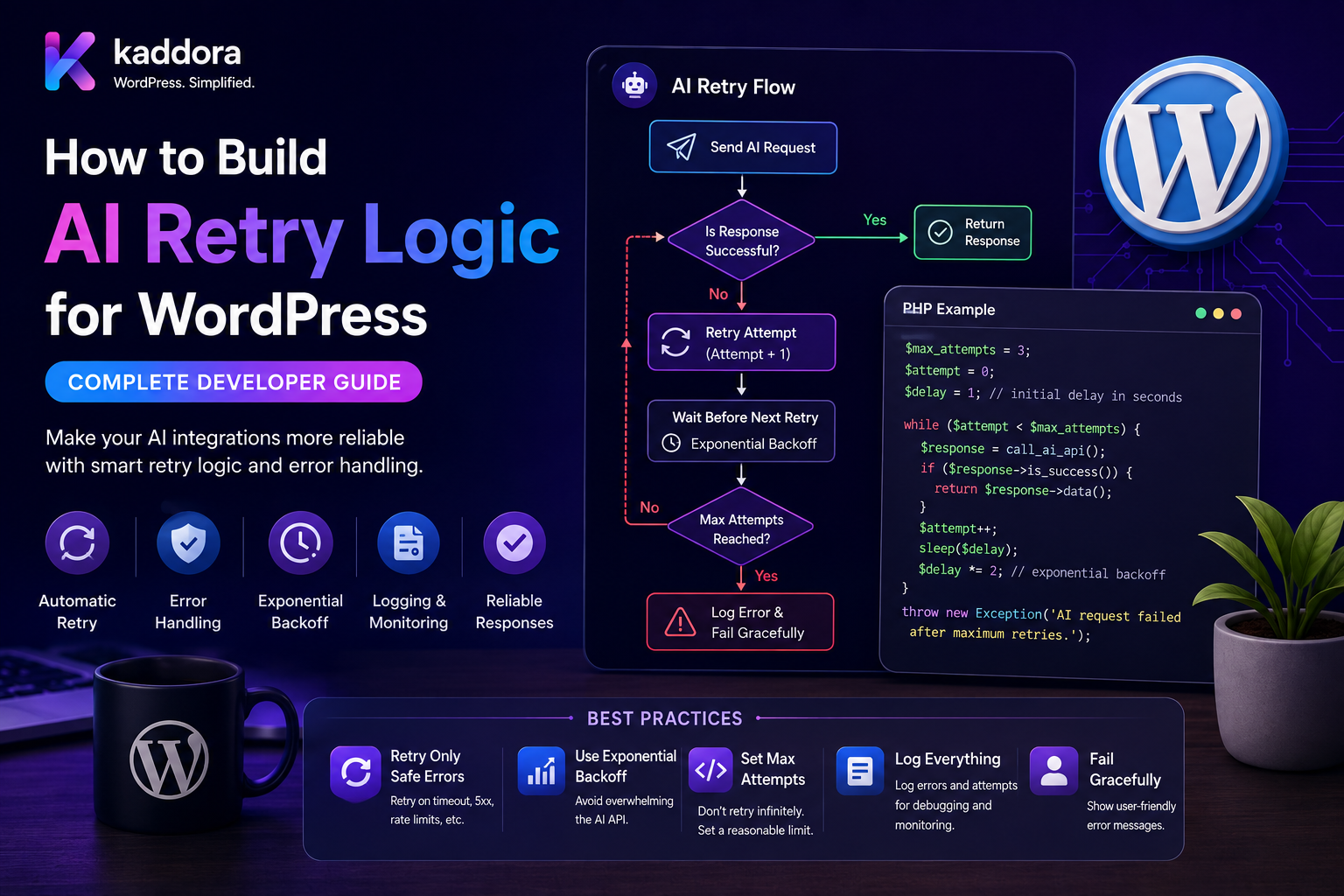
How to Build AI Retry Logic for WordPress: Complete Developer Guide
Introduction
AI APIs are external services.
That means a WordPress AI plugin must be prepared for temporary failures.
An AI request may fail because of:
Timeout Rate Limit Temporary Provider Error Network Failure Service Unavailable Connection Reset
A production plugin should not immediately assume that every failure is permanent.
At the same time, blindly retrying every error is dangerous.
For example:
Invalid API Key Unsupported Model Permission Error Invalid Request
will normally not be fixed by sending the same request again.
A good retry system therefore follows:
AI Request ↓ Error ↓ Classify Error ↓ Retryable? ├── No → Fail └── Yes ↓ Backoff ↓ Retry ↓ Success? ├── Yes → Complete └── No → Retry / Fallback / Review
For high-volume WordPress AI systems, retry logic should also work with:
Queues Background Workers Idempotency Rate Limits Usage Tracking Fallback Models Dead-Letter Jobs Monitoring
The key principle is:
Retry only failures that are plausibly temporary, use controlled backoff and attempt limits, and make every retry safe through idempotent application design.
What Is AI Retry Logic?
AI retry logic is the mechanism that determines what a WordPress plugin should do when an AI API request fails.
A basic strategy is:
Request ↓ Failure ↓ Wait ↓ Retry
A production system adds:
Error Classification Attempt Limits Backoff Jitter Fallbacks Idempotency Logging Dead-Letter Handling
Why Retry Logic Matters
Without retry handling:
Temporary API Error ↓ AI Feature Fails
A single provider timeout could break a user workflow.
With controlled retries:
Temporary Error ↓ Retry ↓ Success
the plugin can recover automatically.
Not Every Error Should Be Retried
This is the most important part of retry design.
A useful classification is:
Retryable
Timeout Rate Limit Temporary Network Error Transient Server Error Service Unavailable
Usually Not Retryable
Invalid API Key Invalid Request Unsupported Model Permission Failure Malformed Configuration
Needs Application Handling
Invalid AI Output Schema Failure Business Validation Failure
These may require a retry or fallback depending on the task.
Transport Errors
Transport failures occur before a usable AI response is received.
Examples include:
DNS Failure Connection Timeout Read Timeout Connection Reset
These are often candidates for limited retries.
HTTP Status-Based Retry Logic
An AI provider may use different HTTP status codes.
Conceptually:
4xx → Usually Client / Configuration Problem 5xx → Often Temporary Server Problem
Rate-limit responses can require special handling based on the provider's documented behavior.
Do not create retry rules from status codes alone; inspect provider documentation and response headers where available.
Rate Limits
An AI API may tell the application to slow down.
The plugin should recognize rate-limit responses and avoid immediately sending another request.
Prefer:
Rate Limit ↓ Wait ↓ Retry
over:
Rate Limit ↓ Retry Immediately ↓ Rate Limit ↓ Retry Immediately
Retry-After
Some providers return a Retry-After value.
When provided and trusted, this should influence the retry delay.
Conceptually:
Provider: Retry After 8 Seconds Worker: Wait 8 Seconds
Exponential Backoff
A common strategy is:
Attempt 1: 1 second Attempt 2: 2 seconds Attempt 3: 4 seconds Attempt 4: 8 seconds
The exact values should be chosen for the application.
Why Exponential Backoff?
Without backoff, many WordPress workers can repeatedly hit a failing provider.
This creates:
More Requests + More Failures + More Load
Backoff reduces pressure.
Jitter
If many workers retry at exactly the same time:
Worker A: 8 sec Worker B: 8 sec Worker C: 8 sec
they may all hit the provider simultaneously.
Jitter adds small randomness to spread requests.
For example:
Base Delay: 8 sec Actual: 7.4 sec 8.3 sec 9.0 sec
Maximum Retry Attempts
Never retry forever.
For example:
Attempt 1 Attempt 2 Attempt 3 → Fail / Fallback
The appropriate number depends on:
Task Importance Latency Cost Provider Limits Queue Type
Retry Budget
A retry budget can cap:
Retries Per Job Retries Per Tenant Retries Per Minute
This protects the system from runaway failures.
AI Retry and Cost
Retries consume AI resources.
For example:
1 Original Request + 2 Retries = 3 Provider Requests
Track retry-related usage when calculating AI cost.
Retry Cost Monitoring
Track:
Request Count Retry Count Fallback Count Failed Count Estimated Cost
A high retry rate can indicate a provider, model, prompt, or infrastructure problem.
Timeout Handling
A WordPress plugin should define:
Connection Timeout Read Timeout Total Operation Timeout
Never allow external AI requests to block indefinitely.
Timeout vs Retry
A timeout is often retryable when:
The request may have failed transiently.
But there is an important complication:
A timeout does not always mean the provider did not process the request.
This is especially important for operations with side effects.
Idempotency After Timeout
Suppose:
Create Resource ↓ Provider Processes Request ↓ Network Times Out
The WordPress plugin cannot know whether the operation succeeded.
If it blindly retries, it may create a duplicate.
Use provider-supported idempotency mechanisms where available, or application-level idempotency when designing the operation.
Idempotency Keys
A request can have a stable identifier:
job_123 + action_generate
If the same action is retried:
job_123 + action_generate
the system can recognize it as the same logical operation.
AI Generation vs Side Effects
Pure generation:
Prompt → Text
is easier to retry.
Tool-calling workflows can have side effects:
AI ↓ Create Order
These require much stronger idempotency controls.
Safe Retry Design
A safe pattern is:
Create Job ↓ Assign Idempotency Key ↓ Call Provider ↓ Store Result
On retry:
Same Job + Same Logical Action
should not create duplicate side effects.
Retry State Machine
A job can use:
Pending ↓ Processing ↓ Retry Scheduled ↓ Processing ↓ Succeeded
or:
Failed ↓ Dead Letter
Retry Metadata
Store:
Attempt Count Last Error Next Retry At First Attempt At Last Attempt At
This makes operational debugging easier.
Retry Queue
A scalable architecture is:
AI Task ↓ Queue ↓ Worker ↓ AI API ↓ Failure ↓ Retry Queue
This keeps retry scheduling outside the user-facing request.
Do Not Retry Inside the Browser
Avoid:
Browser ↓ AI Request ↓ Failure ↓ Retry ↓ Retry
This can create poor UX and duplicate requests.
Use a server-side retry system.
WordPress Admin UX
For interactive AI features:
Generating...
If the initial request fails, the UI can show:
Processing in background...
for retryable tasks.
Background AI Retry
A user can start:
Analyze 500 Posts
and the system can create:
500 Jobs
Workers retry individual failures without restarting the entire batch.
Batch Retry Isolation
Suppose:
Jobs: 1,000 Failed: 12
Retry:
Only the 12 failed jobs
rather than all 1,000.
This saves time and money.
Retry With a Different Model
Sometimes repeated failure is model-specific.
For example:
Model A ↓ Repeated Schema Failure ↓ Model B
The fallback must support:
Same Task Same Required Capabilities Compatible Output Contract
Retry vs Fallback
These are different strategies.
Retry
Same model + Same task
Fallback
Alternative model/provider
Use fallback when repeating the same request is unlikely to help.
Model Fallback Policy
A policy can define:
Model A: 3 Attempts Then: Model B: 1 Attempt Then: Manual Review
The number of attempts should be based on real workload behavior.
Fallback Cost
A fallback may be more expensive.
Track:
Primary Cost + Fallback Cost
before deciding that fallback is always better.
Prompt Adjustment Retry
A malformed response may be caused by output formatting.
A controlled retry can modify the request:
Original ↓ Explicit JSON Reminder ↓ Retry
Do not make arbitrary prompt changes that alter the task semantics.
Output Validation Retry
For structured AI:
AI ↓ Schema Validation ↓ Failure ↓ Retry ↓ Validate
Keep validation deterministic.
Retry on Hallucination
Hallucination is not automatically a reason to retry.
If the model repeatedly produces unsupported information, consider:
Better Context Better Retrieval Different Model Human Review
rather than simply sending the same prompt repeatedly.
Retry and RAG
A RAG workflow may fail because retrieval was poor.
Instead of:
Retry Generation
consider:
Improve Retrieval ↓ Generate Again
The retry strategy should understand which pipeline stage failed.
Stage-Aware Retry
For:
Ingestion → Retrieval → Generation → Validation
each stage may have different retry behavior.
Retry by Failure Category
Example:
Ingestion Failure → Retry Ingestion Provider Timeout → Retry Provider Schema Failure → Limited Generation Retry Authorization Failure → Fail Immediately
This is better than one generic retry loop.
Retry and WordPress Database Errors
If the AI request succeeded but saving the result failed:
AI: Success Database: Failure
do not necessarily call the AI model again.
Retry the database operation when safe.
This avoids unnecessary AI costs.
Separate AI Retry From Application Retry
A mature workflow distinguishes:
AI Provider Retry
from:
Database Retry Queue Retry Webhook Retry
Each subsystem should have its own failure policy.
Transaction Boundaries
For example:
AI Request ↓ Validated Result ↓ Database Transaction ↓ Commit
If the database transaction fails:
Retry Database
rather than regenerating AI content unnecessarily.
Retry and Webhooks
An AI provider or integration may send duplicate webhooks.
Use:
Event ID + Idempotency
to avoid duplicate processing.
Webhook Retry vs API Retry
These are different.
API Retry
Your plugin retries an outbound request.
Webhook Retry
Another service retries a request to your plugin.
The receiver should be idempotent in both cases.
Dead-Letter Queue
After repeated failures:
Retry 1 Retry 2 Retry 3 → Dead Letter
A dead-letter job can be reviewed manually.
Dead-Letter Information
Store:
Job ID Task Order / Post / Product ID Attempts Last Error Model Provider Created At
This allows support teams to investigate.
Manual Retry
Administrators may need:
Retry Job
after fixing:
API Credentials Provider Configuration Model Settings Prompt Quota
Manual Retry Permissions
Only authorized users should be able to retry sensitive AI jobs.
Use:
Capability Checks Tenant Checks Job Ownership
Retry API Security
A custom endpoint such as:
POST /ai/jobs/123/retry
must verify:
Authentication Authorization Tenant Job State
Never trust a client-provided tenant ID.
Retry Job Ownership
A customer should not retry:
Another Tenant's Job
by changing:
job_id
This is an IDOR risk.
Retry Rate Limits
Limit manual retry requests:
Retries Per User Retries Per Minute
to prevent abuse.
AI Retry and Usage Quotas
A customer with:
100 AI Credits
should not accidentally consume:
300 Credits
because a faulty retry loop keeps executing.
Usage accounting must be retry-aware.
Credit Reservation
For some systems:
Reserve Credits ↓ Execute ↓ Finalize Usage
can help avoid race conditions.
The implementation should clearly define how failed/retried requests affect credit accounting.
Retry and Concurrent Workers
Two workers can accidentally retry the same job.
For example:
Worker A: Attempt 2 Worker B: Attempt 2
Use locking, leases, unique job states, or idempotency to prevent duplicate execution.
Job Lease
A worker can acquire:
Job Lock
for a limited duration.
If the worker dies:
Lease Expires ↓ Job Can Retry
Retry Scheduling
Store:
next_retry_at
and have workers process only jobs whose retry time has arrived.
Exponential Backoff Example
A conceptual formula is:
Delay = Base × 2^(attempt - 1)
with an upper maximum.
Add jitter so large worker fleets do not synchronize.
Maximum Backoff
Do not allow:
Delay: 3 Days
for an interactive feature unless the product explicitly supports long-running tasks.
Choose appropriate limits by task type.
Retry Classes
A useful design can define:
Interactive Background Batch Critical
with different retry policies.
Interactive Retry Policy
For:
Generate Meta Description
you may prefer:
Fast Retry Low Attempts Quick Failure
because the user is waiting.
Background Retry Policy
For:
Analyze 10,000 Posts
you can use:
More Attempts Longer Backoff Dead-Letter Handling
Critical AI Workflow
For:
Document Extraction
a workflow may require:
Multiple Validation Attempts Fallback Human Review
depending on risk.
Retry and Human Review
A safe final state is:
Automatic Retry ↓ Fallback ↓ Failure ↓ Human Review
This prevents infinite automation.
Retry Monitoring
Track:
Retry Rate Success After Retry Failure After Retry Average Attempts Fallback Rate Dead-Letter Rate
Retry Effectiveness
A useful metric:
Successful Retry Jobs ÷ Retry Attempted Jobs
For example:
900 ÷ 1,000 = 90%
A low success-after-retry rate may indicate poor retry policy.
Provider-Specific Retry Rates
Compare:
Provider A: 2% Retry Provider B: 8% Retry
This helps identify infrastructure problems.
Model-Specific Retry Rates
For example:
Model A: 1.5% Model B: 6%
High schema-failure rates can suggest a model is not suitable for the task.
AI Retry and Cost Dashboard
A dashboard can show:
Requests: 50,000 Retries: 2,500 Fallbacks: 400 Dead Letters: 75 Estimated Retry Cost: ₹X
Prompt Version and Retry Logs
When a retry succeeds, record:
Prompt Version Model Attempt
This can reveal whether a newer prompt improves reliability.
Retry and Model Migration
When changing models:
Model A ↓ Model B
compare:
Initial Failure Rate Retry Rate Fallback Rate Task Success Cost
Retry and Caching
If a validated AI result already exists:
Cached Result
do not make another AI request unnecessarily.
Retries should check whether another worker has already completed the same logical task.
Retry Deduplication
Before retrying:
Check: Result Already Exists? Job Already Succeeded? Another Worker Running?
This prevents duplicate generation.
Retry and Scheduled Jobs
WordPress scheduled tasks can identify:
next_retry_at <= now
and process eligible jobs.
For large systems, a dedicated queue can provide better control.
Retry and External Service Outages
If the AI provider experiences a broad outage:
100,000 Jobs
immediately retrying every job may create a recovery storm.
Use:
Global Backoff Queue Throttling Provider Health Checks
where appropriate.
Circuit Breaker
A circuit breaker can temporarily stop outbound calls after repeated failures:
Healthy ↓ Failures ↓ Open ↓ Stop Requests ↓ Test Provider ↓ Closed
This can protect both your plugin and the provider.
Circuit Breaker and WordPress
For large SaaS deployments, a shared provider-health state can prevent thousands of tenants from repeatedly calling an unhealthy provider.
The implementation should avoid allowing one tenant's failures to incorrectly disable another tenant's independent provider.
Provider Health
Track:
Success Rate Error Rate Latency Rate Limits
to inform routing decisions.
Retry With Provider Fallback
A multi-provider system can use:
Provider A ↓ Repeated Temporary Failure ↓ Provider B
when policy permits.
Provider Fallback Security
Ensure tenant/provider credentials remain correctly isolated.
Never fall back from:
Tenant A
to:
Tenant B Credentials
or another tenant's configuration.
Retry Policy Configuration
A WordPress admin screen can expose:
Max Attempts Base Delay Maximum Delay Retry on Rate Limit Retry on Timeout Fallback Enabled
Sensitive settings should require administrative permissions.
Don't Let Administrators Disable All Safety
Some safeguards should remain enforced:
Maximum Retry Limit Maximum Backoff Authentication Idempotency
Do not provide settings that allow completely uncontrolled retries.
Retry Testing
Test:
Success Timeout Rate Limit 5xx Network Error Invalid API Key Invalid Request Schema Failure Business Validation Failure
Retry Timing Testing
Verify:
Attempt 1 → Correct Delay Attempt 2 → Longer Delay Attempt 3 → Maximum Delay
and ensure jitter behaves within expected bounds.
Duplicate Worker Testing
Start:
Worker A + Worker B
against the same job and verify only one logical attempt proceeds.
Retry Idempotency Testing
Submit:
Same Job + Same Event + Same Action
multiple times.
Confirm only one final application result is committed.
Credit Usage Testing
Test:
Original Request + Retry + Fallback
and verify usage accounting is correct.
Dead-Letter Testing
Force repeated failures:
Attempt 1 Attempt 2 Attempt 3
and confirm the job reaches:
Dead Letter
instead of retrying forever.
Recovery Testing
Fix the underlying problem and test:
Dead Letter ↓ Manual Retry ↓ Success
Upgrade Testing
After a plugin update verify:
Queued Jobs Retry State Attempt Counts Idempotency Keys Scheduled Retries
remain valid.
Uninstall Strategy
Before uninstalling an AI plugin, define what happens to:
Pending Jobs Retry Jobs Dead Letters Usage Records Logs Cache
Do not accidentally leave background processes running against deleted plugin tables.
Common AI Retry Logic Mistakes
Retrying Every Error
Permanent errors waste money and time.
No Backoff
Retries can overload the provider.
No Jitter
Large worker fleets may retry simultaneously.
Unlimited Retries
Jobs can become infinite cost loops.
Retrying Inside the Browser
Creates poor UX and duplicate requests.
No Idempotency
Timeouts can create duplicate side effects.
Retrying After Database Failure by Calling AI Again
This can unnecessarily generate the same content multiple times.
No Dead-Letter State
Repeated failures become difficult to manage.
No Usage Controls
Retry loops can consume excessive credits.
No Tenant Isolation
Retrying jobs can cross customer boundaries.
No Monitoring
High retry rates can remain invisible.
No Model Fallback
A model-specific failure can disable the feature unnecessarily.
No Circuit Breaker
Large outages can create retry storms.
AI Retry Logic Checklist
- [ ] Define retryable errors - [ ] Define permanent errors - [ ] Handle rate limits - [ ] Handle Retry-After - [ ] Add connection timeout - [ ] Add read timeout - [ ] Add exponential backoff - [ ] Add jitter - [ ] Set maximum attempts - [ ] Set maximum delay - [ ] Add retry budget - [ ] Add idempotency - [ ] Add job locks / leases - [ ] Add queues - [ ] Add fallback models - [ ] Add provider fallback - [ ] Add dead-letter handling - [ ] Add manual retry - [ ] Add usage controls - [ ] Add cost tracking - [ ] Add audit logs - [ ] Add monitoring - [ ] Add circuit breaker where appropriate - [ ] Separate AI retry from DB retry - [ ] Separate provider failure from validation failure - [ ] Test duplicate workers - [ ] Test timeout - [ ] Test rate limit - [ ] Test 5xx - [ ] Test schema failure - [ ] Test permanent errors - [ ] Test recovery
Best Practices for Building AI Retry Logic in WordPress
A professional WordPress AI retry system should:
Classify failures before deciding whether to retry.
Retry only transient provider, transport, or infrastructure failures.
Respect provider-specific rate-limit responses and documented retry guidance.
Use exponential backoff with jitter to prevent retry storms.
Set maximum attempts and maximum delay for every job class.
Use different policies for interactive, background, batch, and critical AI workflows.
Give timeout errors careful treatment because a timed-out request may have been processed remotely.
Use idempotency keys for operations where duplicate processing could create side effects.
Deduplicate retries when another worker has already completed the same logical job.
Keep retry logic server-side rather than repeatedly retrying from browser JavaScript.
Separate AI-provider retries from database, queue, webhook, and other application retries.
Do not regenerate AI content merely because a subsequent database write failed.
Retry structured-output failures only when another attempt has a reasonable chance of succeeding.
Use fallback models or providers when repeated failures indicate a model/provider-specific problem.
Verify that fallback models support the same task, output contract, and required capabilities.
Track attempt counts, errors, delays, provider, model, prompt version, and final result.
Move repeatedly failing jobs to a dead-letter state rather than retrying indefinitely.
Provide secure administrative retry controls with capability, ownership, and tenant checks.
Protect AI credit and usage accounting from retry races and duplicate workers.
Use queue-level locking or leases so multiple workers cannot process the same job simultaneously.
Consider circuit breakers or provider-health controls for high-volume SaaS workloads.
Keep tenant credentials and provider configurations isolated during fallback and retries.
Monitor retry rate, success-after-retry, fallback rate, dead-letter rate, latency, and retry cost.
Build recovery workflows that allow failed jobs to be safely retried after configuration or provider issues are resolved.
Test timeouts, rate limits, 5xx errors, malformed output, schema failures, duplicate workers, dead letters, usage accounting, provider outages, and multi-tenant isolation.
Why choose ThemeKaddora?
ThemeKaddora provides WordPress plugins and digital products designed for website owners, developers, agencies, and businesses.
Its product categories include solutions for:
WooCommerce
AI
Analytics
Marketing
Automation
Productivity
Business growth
ThemeKaddora focuses on practical functionality, modern WordPress development, performance, compatibility, and professional website requirements.
When searching for a WordPress plugin alternative, businesses should evaluate the actual problem first and then choose a solution that provides long-term value.
Conclusion
AI retry logic is a reliability mechanism, not simply a loop around an API request.
A robust architecture is:
AI Task ↓ Request ↓ Success? ├── Yes → Validate → Save └── No ↓ Classify Error ↓ Retryable? ├── No → Fail └── Yes ↓ Backoff ↓ Retry ↓ Repeated Failure? ├── No → Continue └── Yes ↓ Fallback ↓ Dead Letter / Review
The first principle is classify before retrying.
A timeout and an invalid API key are not the same problem.
The second principle is use backoff.
Immediate retries can multiply traffic during an outage.
The third principle is add jitter.
Large worker fleets should not retry at the same instant.
The fourth principle is limit attempts.
Every retry has a cost and should have a defined boundary.
The fifth principle is make retries idempotent.
A timeout does not prove that the remote system failed to process the request.
The sixth principle is separate failure domains.
AI, database, queue, webhook, and external-integration retries should have independent policies.
The seventh principle is use queues for expensive workflows.
Background jobs make retries observable and prevent long AI operations from blocking user requests.
The eighth principle is use fallbacks carefully.
A different model or provider can help when the primary path is unavailable, but the fallback must support the required contract.
The ninth principle is protect usage and tenant boundaries.
A retry loop should never accidentally consume unlimited credits or execute another customer's job.
The tenth principle is monitor retry effectiveness.
The important question is not simply "How many retries happened?" but:
How many failed tasks were successfully recovered, at what cost, and under what failure conditions?
For ThemeKaddora, a production AI retry framework can support:
Transient Error Recovery Rate-Limit Handling Exponential Backoff Jitter Fallback Models Multi-Provider Routing AI Queues Idempotency Dead-Letter Jobs AI Credits Cost Monitoring Circuit Breakers Human Review Multi-Tenant AI
The most important principle is:
Retry temporary failures in a controlled, idempotent, observable way, while allowing permanent failures to stop immediately and repeated failures to move into fallback or human-review workflows.
A professional WordPress AI retry architecture should be:
Error-Aware
→ Backoff-Based
→ Idempotent
→ Queue-Driven
→ Cost-Controlled
→ Fallback-Ready
→ Tenant-Safe
→ Observable
→ Failure-Tolerant
→ Maintainable
When these principles are applied, WordPress AI plugins can survive temporary provider outages, rate limits, network failures, and background-processing errors without turning retries into duplicate operations, runaway AI costs, or invisible production failures.
Frequently Asked Questions
What is AI retry logic in WordPress?
AI retry logic is the system that decides when and how a WordPress plugin should repeat a failed AI API request.
Should every AI API error be retried?
No. Temporary failures such as timeouts and rate limits may be retryable, while invalid credentials, unsupported models, and malformed requests usually require correction instead.
What is exponential backoff?
Exponential backoff increases the delay between retry attempts, reducing pressure on an unavailable or rate-limited service.
Why should retries use jitter?
Jitter adds small randomness to retry delays so many workers do not send requests simultaneously.
How many times should an AI request be retried?
There is no universal number. The limit should depend on task importance, latency requirements, cost, provider behavior, and whether the task runs interactively or in the background.
What is idempotency?
Idempotency ensures repeating the same logical operation does not create unintended duplicate effects.
Why is idempotency important for AI retries?
A request can time out after the provider has already processed it. Retrying without idempotency can therefore duplicate operations in tool-calling or side-effect workflows.
Should AI retries happen in browser JavaScript?
Usually no. Server-side queues and workers provide better control, logging, backoff, and deduplication.
What should happen after maximum retries?
The job can move to a failed or dead-letter state, use a compatible fallback model/provider, or be routed to human review depending on the task.
Can I retry a schema-validation failure?
Sometimes. A limited retry can be useful for structured-output failures, but repeated failures may indicate that the selected model, prompt, or schema needs revision.
Should I retry when saving an AI result to the database fails?
Retry the database operation where safe rather than generating the same AI result again.
Why choose Themekaddora?
Themekaddora provides lightweight, responsive, SEO-friendly WordPress themes with fast performance, WooCommerce compatibility, flexible customization, accessibility-conscious design, modern templates, regular updates, and professional support—providing a strong foundation for businesses building digital products and product-focused websites.
Comments (0)