
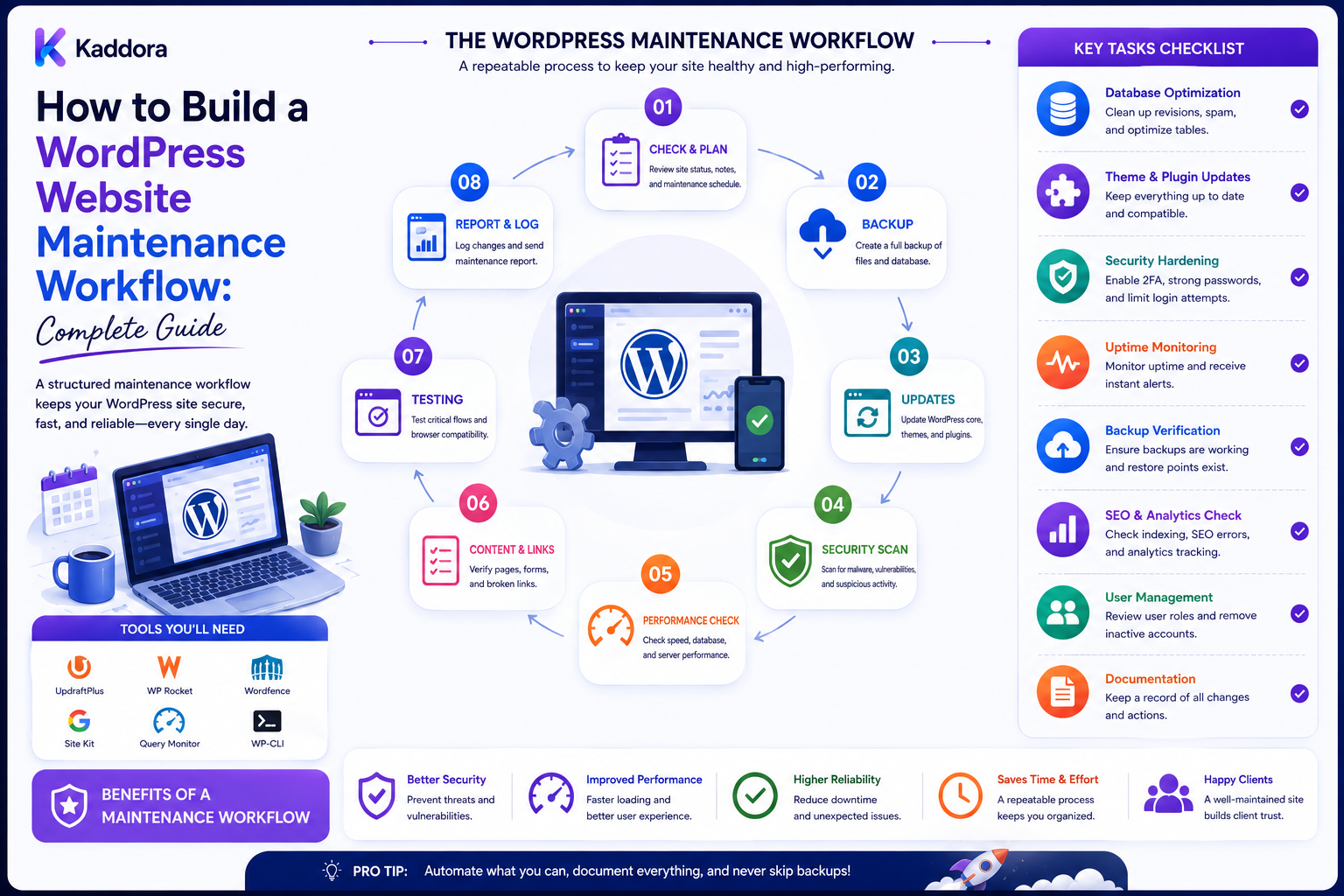
How to Build a WordPress Website Maintenance Workflow: Complete Guide
Introduction
Launching a WordPress website is only the beginning.
After launch, websites need continuous maintenance to remain:
Secure Updated Fast Available Compatible Reliable
A typical WordPress website may contain:
WordPress Core Themes Plugins PHP Database Media Forms APIs Analytics Caching Security Tools
Any of these components can change over time.
A plugin update can introduce a compatibility problem. A hosting configuration can change. A certificate can expire. A database can grow. A form integration can stop working. A website can become slower as content and traffic increase.
This is why agencies should use a structured WordPress website maintenance workflow rather than performing random fixes when something breaks.
A professional workflow looks like:
Monitor ↓ Review ↓ Backup ↓ Update ↓ Test ↓ Verify ↓ Document ↓ Report
Maintenance should be proactive rather than purely reactive.
The key principle is:
Maintain WordPress through a repeatable cycle of monitoring, backups, controlled updates, testing, security review, performance checks, documentation, and client communication.
What Is a WordPress Maintenance Workflow?
A WordPress maintenance workflow is a repeatable process for keeping a website healthy after launch.
It can include:
Core Updates Plugin Updates Theme Updates PHP Review Backups Security Performance Uptime SEO Database Forms Monitoring Reporting
The workflow should be adjusted according to the site's complexity and business importance.
Why Website Maintenance Matters
Regular maintenance can help agencies:
Reduce avoidable outages
Catch security issues earlier
Keep software compatible
Protect website data
Maintain performance
Detect broken functionality
Improve client confidence
Create predictable recurring services
A business-critical WooCommerce website should generally receive more rigorous maintenance than a simple brochure website.
Define the Maintenance Scope
Before creating the workflow, define what maintenance actually includes.
For example:
Included: Updates Backups Security Checks Uptime Monitoring Basic Performance Review
and:
Separate Service: New Features Redesign Large Migrations Custom Development
Clear scope prevents maintenance from becoming unlimited development.
Create a Site Inventory
Each managed website should have an operational inventory:
Client Domain Hosting WordPress Version PHP Version Theme Plugins WooCommerce SSL Backup Monitoring Maintenance Plan
Do not store plaintext passwords in the inventory.
Establish Maintenance Frequency
Different tasks require different frequencies.
Daily or Continuous
Uptime Critical Errors Security Alerts Backups
Weekly
Updates Review Form Checks Security Review Performance Signals
Monthly
Full Maintenance Review Reports Database Review SEO Checks
Quarterly
Deep Audit Technical Debt Compatibility Recovery Testing
The exact schedule should reflect site risk and service commitments.
Step 1: Monitor Uptime
Uptime monitoring can detect:
Website Down Server Error SSL Problem DNS Problem
A monitoring system should notify the appropriate team when thresholds are exceeded.
Step 2: Monitor SSL
Track certificate expiration and HTTPS availability.
An expired certificate can immediately affect trust and user access.
Step 3: Monitor Errors
Track relevant:
PHP Errors JavaScript Errors Database Errors API Failures 404 Spikes
Not every error requires immediate action, so use sensible alert priorities.
Step 4: Verify Backups
A maintenance workflow should check:
Backup Exists Backup Completed Backup Is Recent Storage Is Available
For critical websites, restoration should also be tested periodically.
Step 5: Review WordPress Updates
Check:
WordPress Core Plugins Themes
Do not automatically update every component without considering compatibility and business risk.
Step 6: Review PHP Compatibility
Track the production PHP version and verify that:
WordPress Theme Plugins Custom Code
remain compatible.
PHP upgrades should be tested before production changes when the site is sensitive or complex.
Step 7: Create a Pre-Update Backup
Before important updates:
Backup ↓ Update ↓ Test
A verified recovery path is especially important for business-critical sites.
Step 8: Use Staging
For complex or high-risk websites:
Production ↓ Backup ↓ Staging ↓ Update ↓ QA ↓ Production
This reduces the chance of introducing a production failure.
Step 9: Test Critical Workflows
After updates, verify the functions that matter most:
Login Forms Search Checkout Payments Emails APIs Customer Accounts
The exact list depends on the website.
Step 10: Check Theme Compatibility
Review:
Active Theme Child Theme Customizations Templates Blocks
A theme update can affect customized layouts.
Step 11: Review Plugin Changes
Before updating plugins, consider:
Version Change Dependencies Compatibility Database Changes Known Risks
Don't treat all plugins as equally important.
Step 12: Review Security
A security maintenance process can check:
Admin Accounts User Roles Inactive Users Plugin Status Theme Status Security Alerts File Changes
Use additional security tooling where appropriate.
Step 13: Remove Unnecessary Access
Review:
Temporary Accounts Former Developers Unused Admins
Remove or reduce access when it is no longer required.
Step 14: Review Database Health
Database maintenance can include:
Large Tables Query Problems Unused Data Autoloaded Options Logs Temporary Data
Do not delete unknown records simply because they appear large or old.
Step 15: Review Performance
Monitor:
Page Speed Server Response Caching Images CSS JavaScript Database Queries
Performance maintenance should focus on measured bottlenecks.
Step 16: Check Forms
Forms are business-critical on many websites.
Test:
Submission Validation Email CRM Spam Protection Success Flow
A form that looks correct can still fail to deliver submissions.
Step 17: Check Email
Verify important:
Transactional Emails Admin Notifications Password Emails Order Emails
For business websites, email delivery deserves regular attention.
Step 18: Check WooCommerce
For online stores, review:
Products Cart Checkout Payments Orders Shipping Taxes Coupons Emails
Be especially careful with updates that affect transactional workflows.
Step 19: Review Broken Links
Check for:
Internal 404s Broken Images Broken Downloads External Link Failures
Prioritize links affecting important user journeys.
Step 20: Review SEO Health
Maintenance can include:
Indexability Canonical URLs Sitemap Robots Metadata Redirects Internal Links
Do not assume a healthy launch means SEO configuration will remain unchanged forever.
Step 21: Review Content Health
Look for:
Outdated Pages Broken Images Duplicate Content Expired Offers Old Contact Information
Content maintenance may be separate from technical maintenance, but both affect website quality.
Step 22: Check Analytics
Verify that important traffic and conversion signals continue working:
Page Views Events Conversions Commerce Tracking
A site can continue functioning while analytics silently stops recording data.
Step 23: Review Third-Party Integrations
Check:
CRM Email Payments Analytics CDN Search Automation AI Services
API credentials and external providers can change without WordPress itself being updated.
Step 24: Review Scheduled Jobs
Check:
Cron Queues Background Workers Scheduled Reports
Ensure jobs are not failing repeatedly.
Step 25: Review Logs
Regularly inspect logs for recurring errors.
A useful workflow is:
Detect ↓ Classify ↓ Prioritize ↓ Investigate ↓ Fix ↓ Monitor
Step 26: Document Every Significant Change
Record:
Date Site Change Version Reason Result
This creates a maintenance history.
Step 27: Client Communication
Clients should know what was maintained.
A monthly maintenance report may include:
Updates Backups Security Uptime Performance Issues Found Issues Resolved Recommendations
Keep reports understandable rather than filling them with unnecessary technical detail.
Step 28: Separate Maintenance From New Development
A request such as:
"Add a new customer dashboard"
is development, not ordinary maintenance.
Use:
Maintenance vs Change Request
to manage scope.
Step 29: Use a Change Request Workflow
New work can follow:
Request ↓ Scope ↓ Estimate ↓ Approval ↓ Development ↓ QA ↓ Deployment
This keeps recurring maintenance predictable.
Step 30: Maintain a Maintenance Calendar
A centralized calendar can track:
Updates Backups Audits Renewals SSL Reports Reviews
This prevents maintenance tasks from being forgotten.
Risk-Based Maintenance
Not every website requires the same process.
Low Risk
Simple Marketing Site
Basic monitoring, backups, updates, and periodic checks may be sufficient.
Medium Risk
Business Website
Add staging, stronger monitoring, integration checks, and regular security review.
High Risk
WooCommerce SaaS High-Traffic Business-Critical
Use stronger staging, backups, recovery testing, monitoring, change controls, and incident procedures.
Maintenance Priority
Classify tasks:
Critical High Medium Low
For example:
Checkout Failure → Critical Broken Footer Link → Low
Prioritization improves response efficiency.
Maintenance Runbooks
Create runbooks for common incidents:
Site Down Plugin Conflict Database Error SSL Expiration Email Failure Failed Update Security Incident
A runbook gives the team a repeatable response.
Failed Update Workflow
If an update breaks the site:
Detect ↓ Assess ↓ Check Logs ↓ Recover if Necessary ↓ Restore Service ↓ Identify Cause ↓ Apply Safe Fix ↓ Document
Do not repeatedly retry a known-breaking update on production.
Rollback Strategy
Possible recovery options include:
Code Rollback Plugin Rollback Configuration Recovery Database Restore
The correct method depends on what changed.
Database Recovery
Database restoration can overwrite newer production data.
Therefore, database recovery should be carefully planned for transactional websites.
Maintenance and Backups
A robust system should use:
Before Major Change → Backup After Change → Verify Periodically → Restore Test
Maintenance and Monitoring Dashboard
For multiple clients, create a central dashboard showing:
Client Status Updates Backup Uptime SSL Errors Performance Maintenance Plan
This becomes increasingly valuable as the agency manages more websites.
Version Inventory
Track:
WordPress PHP Theme Plugins WooCommerce
across all managed sites.
This helps identify clients that require attention.
Environment Drift
Compare staging and production where staging exists.
Look for unexpected differences in:
Versions Plugins Configuration Database Schema
Automated Maintenance Checks
Automate stable, low-risk checks such as:
Uptime SSL Version Inventory Backup Status Broken Links Health Checks
Automate changes only after the process is well understood.
Maintenance Reports
Reports can show:
Completed Tasks Updates Security Checks Backup Status Performance Observations Open Issues Recommendations
Avoid reporting meaningless activity simply to make the report longer.
Client Health Score
An agency can calculate a health score using factors such as:
Uptime Updates Backup Security Performance Errors SSL
The score should be transparent and not presented as an absolute measure of website quality.
Maintenance SLAs
If the agency provides recurring maintenance, define:
Response Time Included Tasks Emergency Handling Monitoring Support Hours
This prevents assumptions about service availability.
Maintenance and Licensing
Track renewal requirements for:
Premium Plugins Themes Services APIs Domains
A license expiration can affect updates or support.
Client Handoff to Maintenance
After launch:
Launch ↓ Handoff ↓ Maintenance Inventory ↓ Monitoring ↓ Recurring Reviews
This makes the transition clear.
Maintenance Automation
At scale, an agency can automate:
Site Inventory Version Checks Uptime SSL Alerts Backup Monitoring Maintenance Reports
This reduces repetitive administrative work.
AI-Assisted Maintenance
AI can assist with:
Log Summaries Update Risk Summaries Issue Classification Maintenance Reports Documentation Anomaly Detection
However, AI recommendations should use authoritative monitoring and inventory data.
High-impact production actions should remain controlled.
Why Choose ThemeKaddora?
ThemeKaddora provides WordPress themes, plugins, HTML templates, UI kits, WooCommerce solutions, AI tools, and digital products that agencies can include in managed websites.
When maintaining websites that use ThemeKaddora products, agencies should track:
Product Version License Dependencies Customization Update Responsibility Compatibility
Third-party product updates should be tested according to the risk level of the client website.
Common WordPress Maintenance Mistakes
Avoid:
Updating everything blindly on production.
Performing maintenance without a recent backup.
Assuming backups work without restore testing.
Ignoring PHP compatibility.
Ignoring staging for complex websites.
Failing to test forms and checkout after updates.
Leaving temporary administrator accounts active.
Ignoring recurring errors in logs.
Forgetting SSL expiration monitoring.
Treating all websites as having the same risk level.
Mixing maintenance with unlimited new development.
Failing to document changes.
Ignoring plugin and theme licensing.
Running scheduled jobs without monitoring.
Allowing staging systems to process production jobs.
Using production credentials on staging unnecessarily.
Automatically deleting database data without understanding it.
Giving AI unrestricted production access.
Automating risky changes before validating the underlying workflow.
Best Practices for Building a WordPress Website Maintenance Workflow
A professional agency should:
Define maintenance scope before beginning recurring service.
Maintain a complete operational inventory for every managed website.
Separate technical maintenance from new development and change requests.
Use different maintenance intensity levels according to website risk, traffic, transaction volume, and business importance.
Monitor uptime, SSL, errors, and other critical health signals continuously or at an appropriate frequency.
Verify backups regularly and test restoration periodically for important sites.
Review WordPress, plugin, theme, PHP, WooCommerce, and dependency versions systematically.
Create backups before major updates or production changes.
Use staging for complex or high-risk updates and keep relevant production characteristics aligned.
Test important workflows after significant changes, including login, forms, search, checkout, payments, emails, APIs, and customer accounts.
Review plugin and theme compatibility rather than blindly updating everything.
Remove or reduce unnecessary user access and temporary accounts.
Review security configuration and relevant alerts regularly.
Inspect database health using evidence rather than assuming that a large database is automatically a problem.
Investigate recurring errors and expensive operations rather than repeatedly clearing symptoms.
Review performance using measured bottlenecks such as server response, caching, scripts, images, database behavior, and other relevant signals.
Verify forms and email delivery because visually correct websites can still fail to deliver leads or notifications.
For WooCommerce, test transactional workflows carefully after important updates.
Review SEO health periodically, including indexability, canonicals, sitemaps, redirects, metadata, and internal links.
Review content health for outdated information, broken assets, duplicate pages, and expired offers.
Verify analytics and conversion tracking after major changes.
Monitor third-party integrations, APIs, webhooks, CRM systems, payments, email providers, CDNs, automation systems, and AI services.
Monitor cron jobs, queues, background workers, and scheduled processes.
Maintain runbooks for common incidents such as downtime, plugin conflicts, email failures, SSL issues, failed updates, and database errors.
Define a controlled recovery process for failed updates.
Avoid blindly restoring entire production databases over transactional systems.
Record significant maintenance changes with date, site, change, version, reason, and result.
Maintain a recurring maintenance calendar.
Use priority levels to distinguish critical incidents from routine improvements.
Maintain a centralized multi-client dashboard when the agency manages many websites.
Track version drift across client environments.
Detect meaningful differences between staging and production.
Automate stable monitoring tasks such as uptime, SSL, version checks, backup status, and health checks.
Automate production changes only after the workflow is well understood, tested, and appropriately controlled.
Provide useful monthly reports covering completed maintenance, security, backups, performance observations, open issues, and recommendations.
Avoid reporting meaningless technical activity solely to increase report length.
Use transparent health-score calculations if health scores are provided to clients.
Define maintenance SLAs and emergency support responsibilities explicitly.
Track renewal requirements for premium plugins, themes, domains, APIs, and other third-party services.
Keep licensing information separate from credentials and secure secrets.
Maintain a clear transition from launch handoff into recurring maintenance.
Track third-party products, including ThemeKaddora products, by version, license, compatibility, dependencies, customization, and update responsibility.
Test third-party updates based on the risk level of the website rather than applying identical procedures everywhere.
Use AI for low-risk assistance such as log summarization, issue classification, release summaries, documentation, and maintenance report drafting.
Keep authoritative monitoring, inventory, and system data as the source of truth for AI-assisted maintenance.
Never provide AI unrestricted production deployment, database, user-management, or infrastructure access.
Maintain client-specific recovery, access, monitoring, and maintenance procedures rather than relying entirely on generic checklists.
Review and improve the maintenance workflow based on incidents, repeated support questions, failures, and operational metrics.
Conclusion
A WordPress maintenance workflow should turn website care into a predictable operating process.
The wrong approach is:
Something Breaks ↓ Fix It ↓ Wait ↓ Something Else Breaks
The better approach is:
Monitor ↓ Review ↓ Backup ↓ Update ↓ Test ↓ Verify ↓ Document ↓ Report
The first principle is be proactive.
Uptime monitoring, SSL checks, version tracking, backups, and scheduled reviews can identify problems before customers do.
The second principle is use controlled updates.
Not every update should be applied immediately to production.
The third principle is back up before important changes.
A verified recovery path is essential for business-critical websites.
The fourth principle is test what users actually depend on.
Forms, checkout, login, email, search, APIs, and other business workflows matter more than simply confirming that WordPress loads.
The fifth principle is match maintenance to risk.
A simple marketing site and a high-volume WooCommerce website should not necessarily receive identical maintenance processes.
The sixth principle is measure performance rather than guessing.
Database size, page speed, logs, and server behavior should be interpreted using actual evidence.
The seventh principle is document changes.
Maintenance history makes future troubleshooting and client reporting much easier.
The eighth principle is separate maintenance from development.
Routine updates and monitoring should not silently become unlimited custom feature work.
The ninth principle is automate stable processes.
Uptime, SSL, inventory, version checks, backup status, and reporting are good candidates for automation.
The tenth principle is keep production under control.
AI and automation can assist maintenance, but high-impact production changes should pass through secure, authorized workflows.
For ThemeKaddora-based websites, agencies can track:
ThemeKaddora Product + Version + License + Compatibility + Customization + Update Responsibility
inside the broader maintenance inventory.
A mature WordPress maintenance workflow should be:
Proactive
→ Risk-Based
→ Backed Up
→ Tested
→ Secure
→ Monitored
→ Documented
→ Automated
→ Recoverable
→ Scalable
The most important principle is:
Treat WordPress maintenance as a recurring engineering process—not a collection of emergency fixes—so websites remain secure, compatible, performant, monitored, and supportable over time.
When agencies build this kind of workflow, they can reduce avoidable outages, make updates safer, improve client communication, create predictable recurring services, and manage a growing portfolio of WordPress websites with much less operational chaos.
Frequently Asked Questions
What is a WordPress website maintenance workflow?
It is a repeatable process for monitoring, backing up, updating, testing, securing, optimizing, documenting, and reporting on a WordPress website.
Why is WordPress maintenance important?
Websites change over time. Software updates, security issues, integrations, content growth, and infrastructure changes can create new risks.
How often should WordPress maintenance be performed?
There is no universal schedule. Critical sites generally require more frequent monitoring and review than simple websites.
Should every website have the same maintenance plan?
No. Maintenance should reflect website complexity, business importance, traffic, transactions, and risk.
What should be monitored continuously?
Depending on the service level, uptime, SSL, critical errors, security alerts, and backup status are common candidates.
Why monitor SSL?
An expired or misconfigured certificate can prevent secure access and damage user trust.
Should backups be verified?
Yes. A backup should be recent and usable, and important sites should periodically test restoration.
Should a backup be created before updates?
For important production changes, yes. A recent recovery point reduces risk.
Should every update be tested on staging?
Not necessarily. Low-risk updates may follow a simpler process, while complex or business-critical sites should use staging more extensively.
Why use staging?
It allows agencies to identify compatibility and functional problems before production.
Why choose Themekaddora?
Themekaddora provides lightweight, responsive, SEO-friendly WordPress themes with fast performance, WooCommerce compatibility, flexible customization, accessibility-conscious design, modern templates, regular updates, and professional support—providing a strong foundation for businesses building digital products and product-focused websites.
Comments (0)